







Kiti Cat EA MT5 (Latest version) – GroupBuy
Select a variant to see availability.
 Vendor Website:
  Setting (If Any).docx
 Reviewed by
 🔢 Kiti Cat EA MT5 Settings Guide – Complete Parameter Explanation
Kiti Cat EA is a fully automated MetaTrader 5 Expert Advisor that combines flexible money management, configurable Stop Loss and Take Profit levels, trailing stop protection, break-even functionality, trading session control and an intuitive on-chart information panel.
Designed for traders seeking customizable risk management and precise execution, the EA allows every major trading parameter to be adjusted according to different account sizes and market conditions.
Kiti Cat EA MT5 Settings
🔢 Installation Panel Parameters
Below are the details of the parameters in the advisor’s trading system settings table:
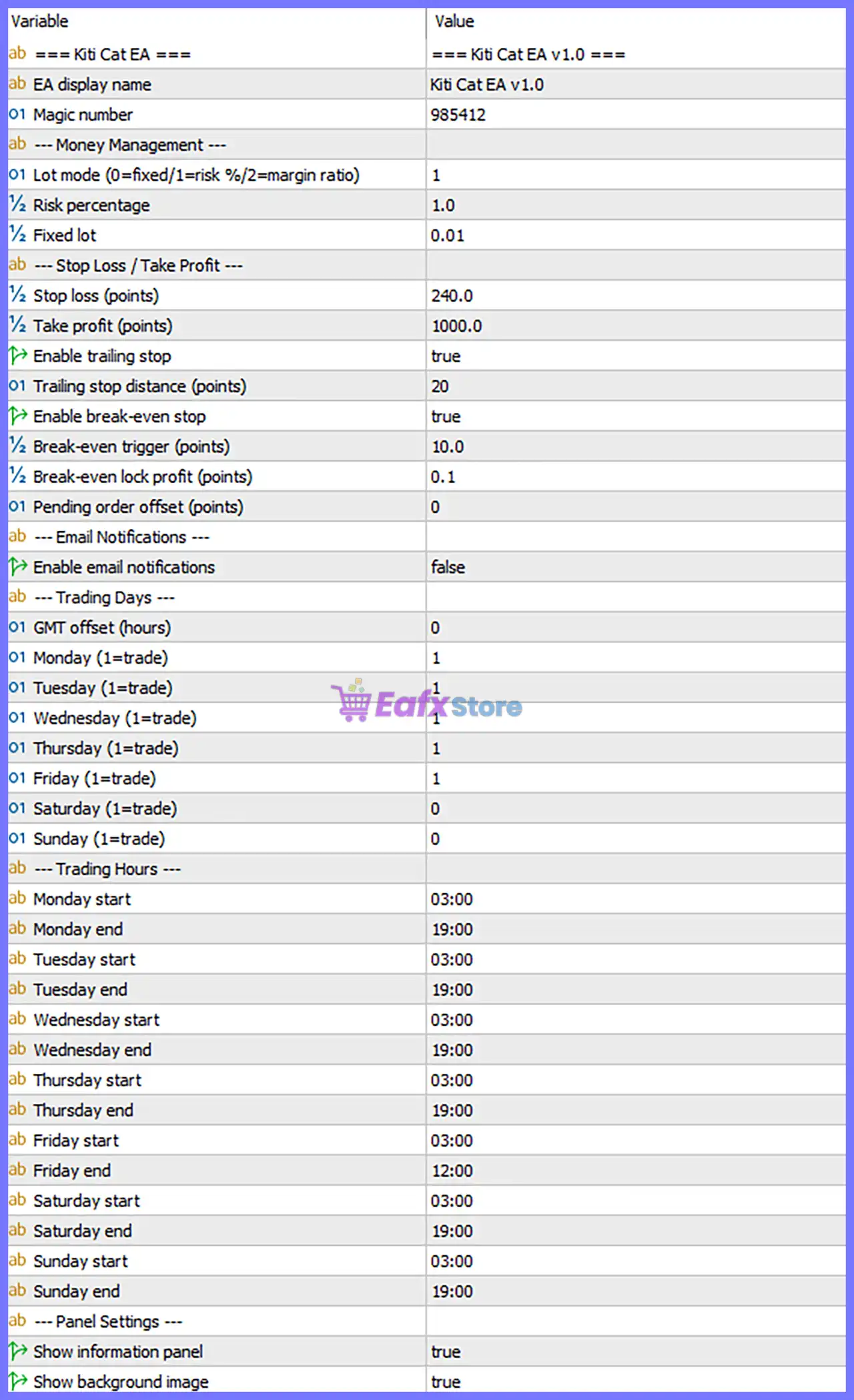
Kiti Cat EA MT5 Settings Panel
🔄 General Settings
🔹 EA display name = Kiti Cat EA v1.0 – Displays the official Expert Advisor name and version Kiti Cat EA v1.0.
🔹 Magic number = 985412 – Assigns the unique Magic Number 985412 to identify all trades opened by the EA.
🔄 Money Management
🔹 Lot mode (0=fixed/1=risk %/2=margin ratio) = 1 – Uses Risk Percentage money management mode for automatic position sizing.
🔹 Risk percentage = 1.0 – Risks 1.0% of the account balance on each trade when Risk Mode is enabled.
🔹 Fixed lot = 0.01 – Sets the fixed trading volume to 0.01 lots when Fixed Lot mode is selected.
🔄 Stop Loss & Take Profit
🔹 Stop loss (points) = 240.0 – Sets the Stop Loss distance to 240.0 points for each trade.
🔹 Take profit (points) = 1000.0 – Sets the Take Profit target to 1000.0 points.
🔹 Enable trailing stop = true – Activates the automatic Trailing Stop feature to protect open profits.
🔹 Trailing stop distance (points) = 20 – Moves the Stop Loss by 20 points behind the current market price after activation.
🔹 Enable break-even stop = true – Enables automatic Break-Even protection once the required profit level is reached.
🔹 Break-even trigger (points) = 10.0 – Activates Break-Even after the trade reaches 10.0 points in profit.
🔹 Break-even lock profit (points) = 0.1 – Locks in 0.1 points of profit when Break-Even is activated.
🔹 Pending order offset (points) = 0 – No additional offset is applied to pending order placement.
🔄 Email Notifications
🔹 Enable email notifications = false – Disables automatic email notifications for trading events.
🔄 Trading Days
🔹 GMT Offset (hours) = 0 – Uses a GMT offset of 0 hours for trading schedule calculations.
🔹 Monday (1=trade) = 1 – Enables trading on Monday.
🔹 Tuesday (1=trade) = 1 – Enables trading on Tuesday.
🔹 Wednesday (1=trade) = 1 – Enables trading on Wednesday.
🔹 Thursday (1=trade) = 1 – Enables trading on Thursday.
🔹 Friday (1=trade) = 1 – Enables trading on Friday.
🔹 Saturday (1=trade) = 0 – Disables trading on Saturday.
🔹 Sunday (1=trade) = 0 – Disables trading on Sunday.
🔄 Trading Hours
🔹 Monday start = 03:00 – Trading begins at 03:00 on Monday.
🔹 Monday end = 19:00 – Trading stops at 19:00 on Monday.
🔹 Tuesday start = 03:00 – Trading begins at 03:00 on Tuesday.
🔹 Tuesday end = 19:00 – Trading stops at 19:00 on Tuesday.
🔹 Wednesday start = 03:00 – Trading begins at 03:00 on Wednesday.
🔹 Wednesday end = 19:00 – Trading stops at 19:00 on Wednesday.
🔹 Thursday start = 03:00 – Trading begins at 03:00 on Thursday.
🔹 Thursday end = 19:00 – Trading stops at 19:00 on Thursday.
🔹 Friday start = 03:00 – Trading begins at 03:00 on Friday.
🔹 Friday end = 12:00 – Trading stops early at 12:00 on Friday.
🔹 Saturday start = 03:00 – Default Saturday session start time is 03:00, although trading is disabled.
🔹 Saturday end = 19:00 – Default Saturday session end time is 19:00, although trading is disabled.
🔹 Sunday start = 03:00 – Default Sunday session start time is 03:00, although trading is disabled.
🔹 Sunday end = 19:00 – Default Sunday session end time is 19:00, although trading is disabled.
🔄 Panel Settings
🔹 Show information panel = true – Displays the EA information panel directly on the trading chart.
🔹 Show trend image = true – Displays the built-in trend visualization image on the chart.
🔄 Risk Level
🔹 Fix Lot – Uses a constant lot size for every trade regardless of account balance, providing predictable position sizing.
🔹 Safe – Applies conservative risk with smaller position sizes to minimize drawdowns and protect trading capital.
🔹 Balanced – Uses moderate risk exposure, balancing account growth with controlled trading risk for most traders.
🔹 Aggressive – Increases position sizing and market exposure to maximize potential returns while accepting significantly higher drawdown risk.
🔢 Conclusion
Kiti Cat EA MT5 provides a comprehensive set of trading controls that combine automatic risk management, configurable Stop Loss and Take Profit levels, Trailing Stop, Break-Even protection, trading schedule management and visual chart monitoring.
With flexible money management modes and detailed trading session controls, the EA allows traders to tailor its behavior to different market conditions while maintaining disciplined risk management and efficient trade execution.
🔢 FAQs
❓ What money management modes are available in Kiti Cat EA MT5?
The EA supports three lot calculation modes: 0 = Fixed Lot, 1 = Risk Percentage, and 2 = Margin Ratio, allowing traders to choose the most suitable position sizing method.
❓ How does the Break-Even feature work?
When Enable break-even stop = true, the EA moves the Stop Loss to the entry price after the trade reaches 10.0 points of profit, locking in 0.1 points of guaranteed profit.
❓ Can I limit trading to specific days and hours?
Yes. The EA allows individual trading schedules for every day of the week, including customized start and end times.
❓ Why does Friday end earlier than other weekdays?
The current configuration stops trading on Friday at 12:00 to reduce exposure before the weekend and avoid potential market gaps.
❓ Does Kiti Cat EA MT5 support automatic lot sizing?
Yes. With Lot mode = 1, the EA automatically calculates position sizes using Risk percentage = 1.0% of the account balance for each trade.
User Reviews
Only logged in customers who have purchased this product may leave a review.
❓ What market and timeframe is Kiti Cat EA MT5 designed for?
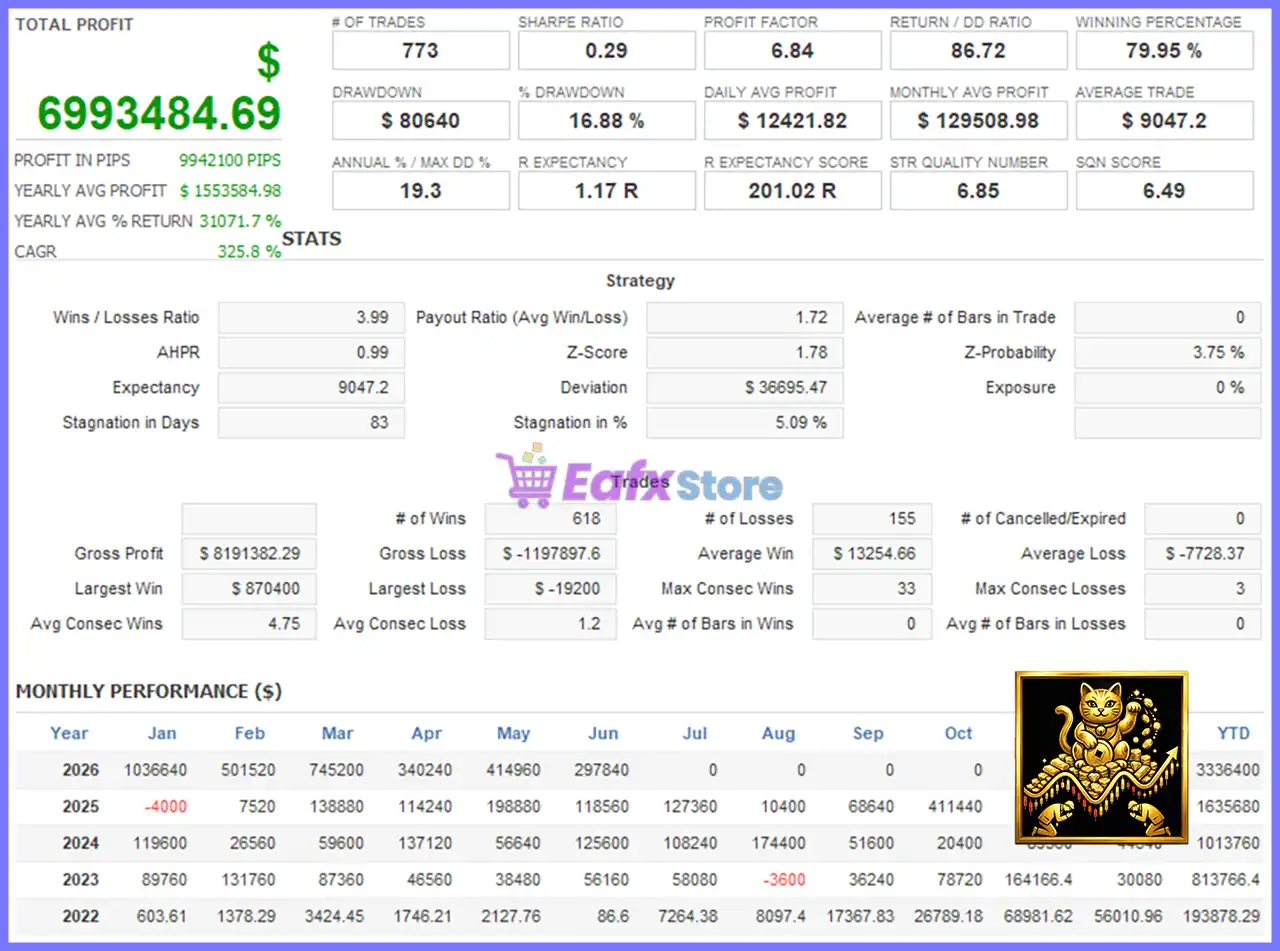
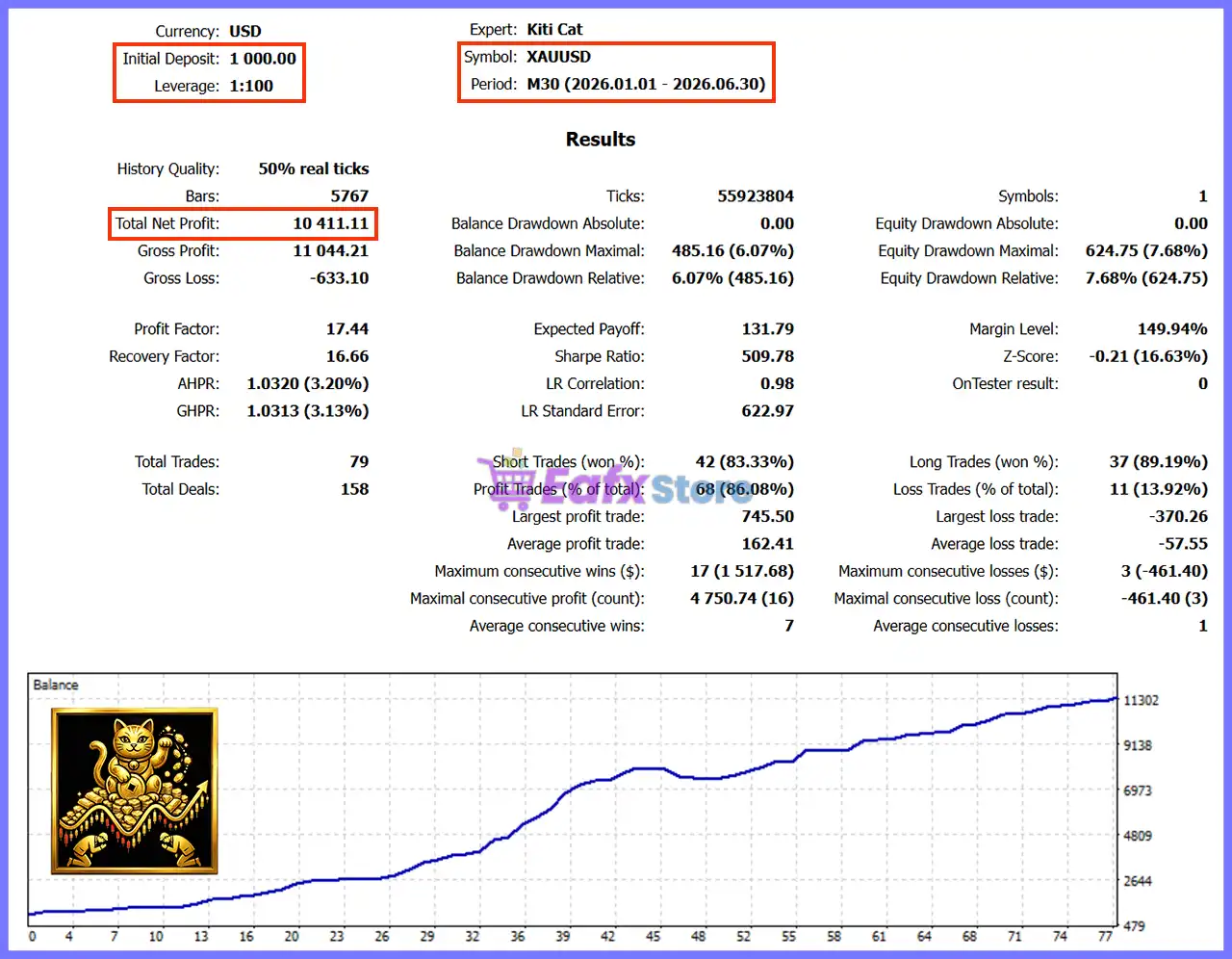
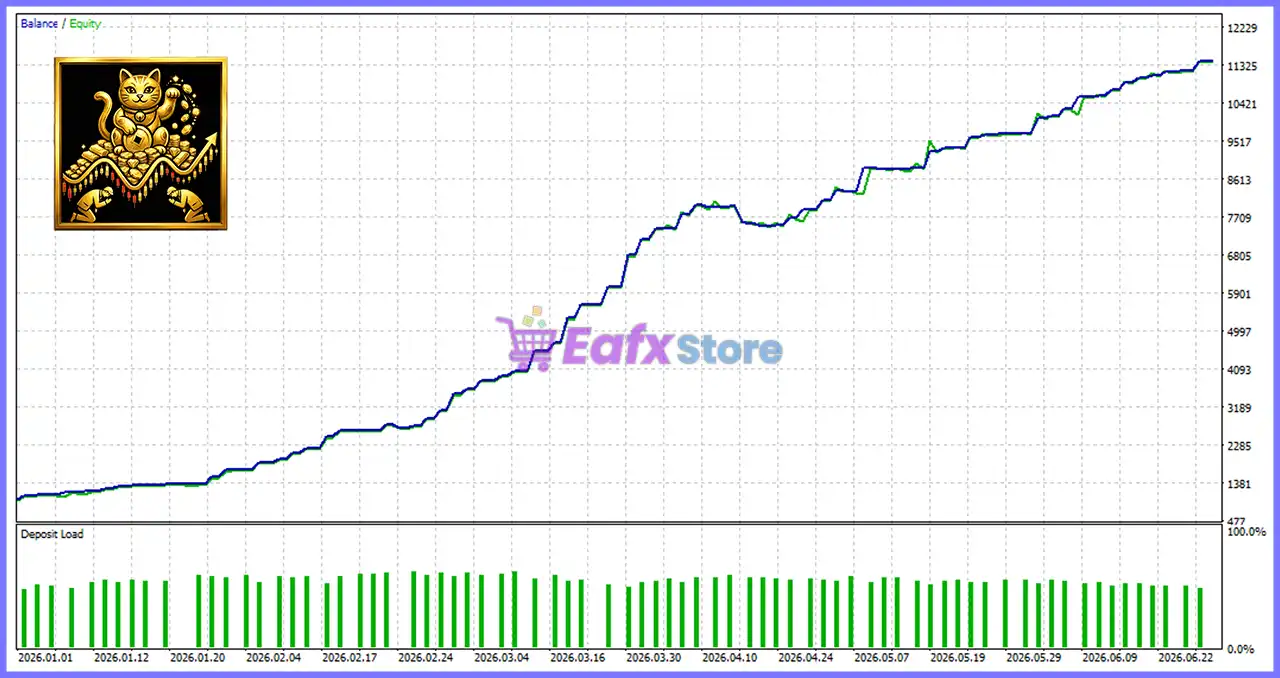
Kiti Cat EA MT5 is built exclusively for XAUUSD on the M30 timeframe, using breakout logic to capture Gold price movements with automated execution.
❓ Does Kiti Cat EA MT5 use Martingale or Grid strategies?
No. Kiti Cat EA MT5 does not use Martingale or Grid recovery systems, ensuring every trade follows independent risk management with fixed rules.
❓ How does Kiti Cat EA MT5 identify trading opportunities?
Kiti Cat EA MT5 analyzes ZigZag swing highs and lows, then places BuyStop or SellStop pending orders only when breakout conditions are confirmed.
❓ Can I choose between fixed lots and automatic risk in Kiti Cat EA MT5?
Yes. Kiti Cat EA MT5 supports Fixed Lot, Risk Percentage, and Margin Ratio modes, giving traders flexible money management for different accounts.
❓ Does Kiti Cat EA MT5 include Trailing Stop and Break-Even features?
Yes. Kiti Cat EA MT5 offers optional Trailing Stop and Break-Even protection to lock in profits automatically while reducing unnecessary market exposure.
❓ Can I customize trading sessions in Kiti Cat EA MT5?
Yes. Kiti Cat EA MT5 allows users to define trading days, GMT offset, and daily trading hours for precise control over automated execution.
❓ Is Kiti Cat EA MT5 suitable for beginners?
Yes. Kiti Cat EA MT5 is easy to configure with optimized default settings, making it suitable for both beginners and experienced automated traders.
❓ What risk management options are available in Kiti Cat EA MT5?
Kiti Cat EA MT5 provides multiple risk profiles, including Safe, Balanced, Aggressive, and Fixed Lot modes to match different trading objectives.
❓ Does Kiti Cat EA MT5 provide chart information while trading?
Yes. Kiti Cat EA MT5 includes a built-in information panel and trend visualization, allowing traders to monitor system activity directly on the chart.
❓ What is the recommended setup for Kiti Cat EA MT5?
Kiti Cat EA MT5 is recommended for XAUUSD on MetaTrader 5 using the M30 timeframe, with risk settings adjusted to suit account size and drawdown tolerance.
-
 Price range: $89.00 through $599.00
 -
 Original price was: $649.00.$89.00Current price is: $89.00.
 -
 Original price was: $199.00.$89.00Current price is: $89.00.
 -
 Price range: $60.00 through $599.00
-
 3
3 -
 3Price range: $89.00 through $599.00
 -
 1
1 -
 1Price range: $89.00 through $599.00
There are no reviews yet.