

🔢 Nine Engine EA MT5 Settings Guide – Complete Parameter Explanation
Nine Engine EA MT5 is a professional automated Gold trading Expert Advisor designed specifically for XAUUSD. It combines intelligent money management, customizable risk controls, economic news filtering, trading session management, and a built-in trading dashboard.
Optimized for MetaTrader 5, the EA provides flexible execution settings while allowing traders to customize risk exposure and trading schedules for different market conditions.

🔢 Installation Panel Parameters
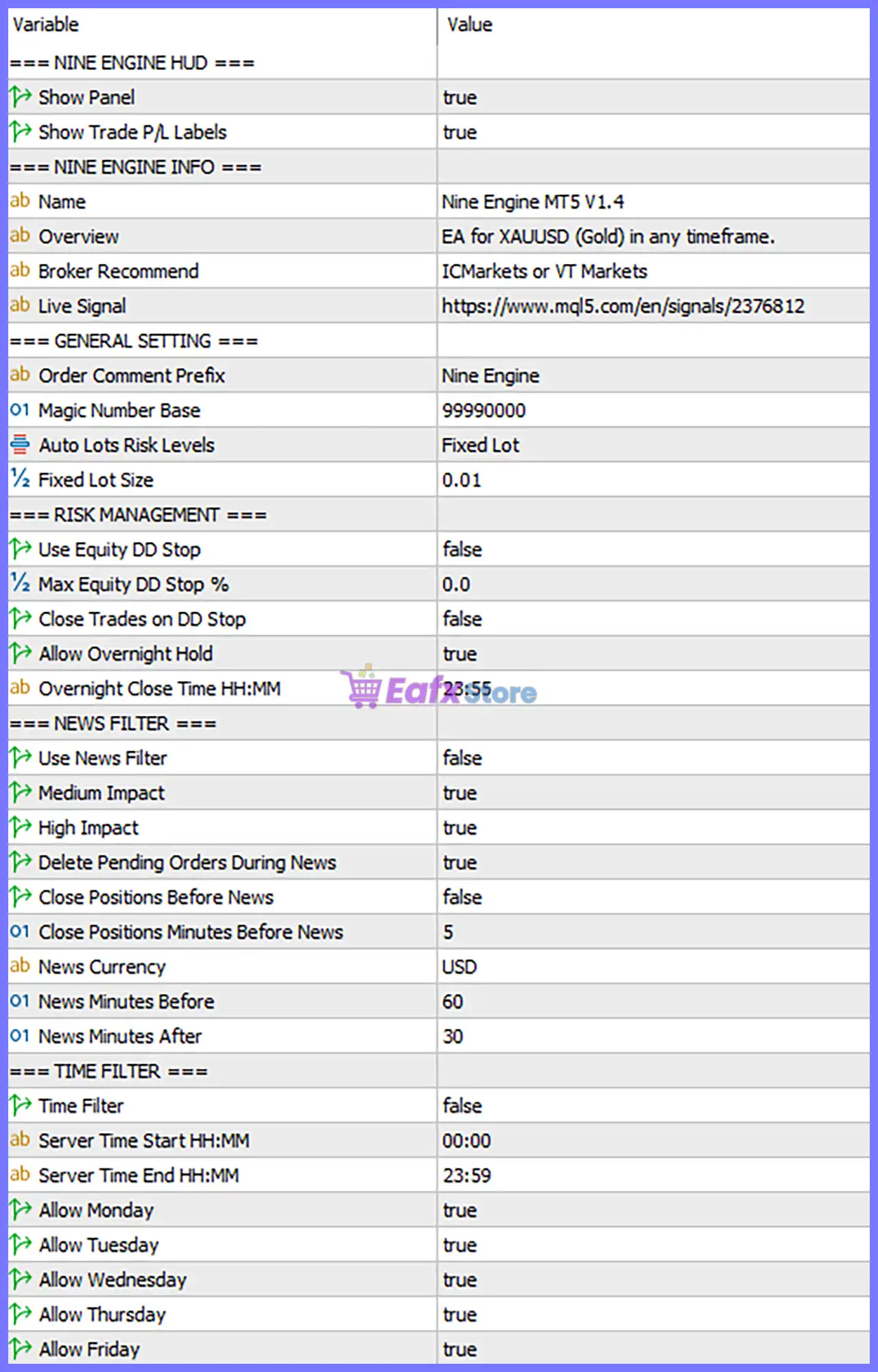
Below are the details of the parameters in the advisor’s trading system settings table:
🔄 Nine Engine HUD
🔹 Show Panel = true – Displays the on-chart information panel with the EA's trading statistics and status.
🔹 Show Trade P/L Labels = true – Displays floating Profit/Loss labels directly on the chart for open trades.
🔄 Nine Engine Information
🔹 Overview = EA for XAUUSD (Gold) in any timeframe. – Indicates that the EA is optimized for XAUUSD (Gold) and can be attached to any chart timeframe.
🔹 Broker Recommend = ICMarkets or VT Markets – Recommends using ICMarkets or VT Markets for optimal execution.
🔄 General Settings
🔹 Order Comment Prefix = Nine Engine – Adds the custom trade comment prefix "Nine Engine" to every order.
🔹 Magic Number Base = 99990000 – Assigns the base Magic Number 99990000 to identify all trades opened by the EA.
🔹 Auto Lots Risk Levels = Fixed Lot – Uses the Fixed Lot money management mode.
🔹 Fixed Lot Size = 0.01 – Opens each new trade with a fixed volume of 0.01 lots.
🔄 Risk Management
🔹 Use Equity DD Stop = false – Disables automatic equity drawdown protection.
🔹 Max Equity DD Stop % = 0.0 – No maximum equity drawdown limit is configured because the feature is disabled.
🔹 Close Trades on DD Stop = false – The EA will not automatically close positions when a drawdown limit is reached.
🔹 Allow Overnight Hold = true – Allows positions to remain open overnight.
🔹 Overnight Close Time HH:MM = 23:55 – Sets 23:55 as the overnight closing time when the overnight close function is used.
🔄 News Filter
🔹 Use News Filter = false – Disables the built-in economic news filter.
🔹 Medium Impact = true – Medium-impact news events are included when the News Filter is enabled.
🔹 High Impact = true – High-impact news events are included when the News Filter is enabled.
🔹 Delete Pending Orders During News = true – Automatically removes pending orders during filtered news events.
🔹 Close Positions Before News = false – Open positions remain active before scheduled news releases.
🔹 Close Positions Minutes Before News = 5 – If enabled, positions would close 5 minutes before the news event.
🔹 News Currency = USD – Monitors USD economic events.
🔹 News Minutes Before = 60 – Blocks trading 60 minutes before monitored news.
🔹 News Minutes After = 30 – Resumes trading 30 minutes after monitored news.
🔄 Time Filter
🔹 Time Filter = false – Trading time restrictions are disabled.
🔹 Server Time Start HH:MM = 00:00 – Defines 00:00 as the optional trading session start time.
🔹 Server Time End HH:MM = 23:59 – Defines 23:59 as the optional trading session end time.
🔹 Allow Monday = true – Enables trading on Monday.
🔹 Allow Tuesday = true – Enables trading on Tuesday.
🔹 Allow Wednesday = true – Enables trading on Wednesday.
🔹 Allow Thursday = true – Enables trading on Thursday.
🔹 Allow Friday = true – Enables trading on Friday.
🔄 Risk Level
🔹 Fix Lot – Uses a constant lot size for every trade regardless of account balance, making position sizing predictable and suitable for traders who prefer manual control.
🔹 Safe – Uses conservative position sizing with lower exposure to help preserve account equity during volatile market conditions.
🔹 Balanced – Applies moderate risk to balance steady account growth with controlled drawdowns, making it suitable for most traders.
🔹 Aggressive – Increases trading exposure by using larger position sizes to maximize potential returns, while also increasing drawdown risk. This mode is recommended for experienced traders.
🔢 Conclusion
Nine Engine EA MT5 is a powerful automated Gold trading solution that combines intelligent trade execution, flexible money management, comprehensive news controls, and customizable trading schedules into one professional Expert Advisor.
With support for fixed-lot trading, optional drawdown protection, integrated chart visualization, and configurable news and time filters, the EA provides traders with a reliable framework for automated XAUUSD trading. Proper configuration of each parameter helps improve execution quality, maintain disciplined risk management, and optimize long-term trading performance.
🔢 FAQs
❓ What market is Nine Engine EA MT5 designed for?
Nine Engine EA MT5 is specifically optimized for XAUUSD (Gold) and can be attached to any timeframe chart.
❓ What money management method is currently configured?
The default configuration uses Auto Lots Risk Levels = Fixed Lot with a Fixed Lot Size = 0.01 lots.
❓ Does the EA automatically stop trading during news events?
The current setup has Use News Filter = false, so the news filter is disabled. If enabled, the EA can monitor USD medium- and high-impact news, delete pending orders, and suspend trading before and after major announcements.
❓ Can Nine Engine EA MT5 hold positions overnight?
Yes. With Allow Overnight Hold = true, the EA can keep positions open overnight. The optional overnight closing time is set to 23:55.
❓ Can I restrict trading to specific days or trading hours?
Yes. Although the Time Filter is currently disabled, you can enable it and configure the Server Time Start/End along with the allowed trading days to control when the EA is permitted to trade.



