



Perceptrader AI MT5 v2.43 with SetFiles (Unlimited)

Subscriptions for Special Plan
- 30 EA package is more economical!
- Special package with 99%
- Download 1 EA/Day

Subscriptions for Premium Membership
- Download Unlimited in 1 Year
- Get 100% Discount
- Get free access to all

Subscriptions for Gold Membership
- 1 Year Membership
- Get 100% Discount
- Access EA+Indicator+Course
Frequently bought together 🎁
Add these products to enhance your purchase



 Vendor Website:
  Perceptrader AI MT5 v2.43.ex5
 Reviewed by
 🔢 Perceptrader AI MT5 Robot Settings Guide
Perceptrader AI MT5 Robot is an advanced AI-powered multi-currency Expert Advisor designed to combine machine learning, intelligent grid management, news protection, portfolio diversification, and sophisticated money management into a single automated trading system.
The EA provides flexible risk controls, neural network filtering, dynamic trade management, and extensive portfolio settings, making it suitable for traders seeking a highly customizable MT5 trading solution.
🔢 Perceptrader AI MT5 Robot Settings Explained
🔄 MM & Risk Settings
🔹 Check for Instances of the EA = true – Verifies whether another instance of the EA is already running before opening trades.
🔹 Allow Opening a new Initial Trade? = true – Allows the EA to create new initial trading positions.
🔹 Allow Manual Trading Buttons = false – Disables manual trading buttons on the chart.
🔹 Lot-sizing Method = Low Risk Set (0.25% load) – Uses the predefined Low Risk profile with 0.25% account load.
🔹 Fixed Lot = 0.01 – Uses a fixed trading volume of 0.01 lots when applicable.
🔹 Dynamic Lot (Balance/Equity based) = 10000.0 – Calculates lot size automatically using a 10,000.0 balance/equity reference.
🔹 Deposit Load % = 0.25 – Uses 0.25% account exposure for position sizing.
🔹 Fixed Initial Deposit? (Tester only) = false – Does not use a fixed deposit during strategy testing.
🔹 Tester Withdrawal (Tester only) = 0.0 – No periodic withdrawals are simulated during testing.
🔹 Withdrawal Amount (Tester only) = 1000.0 – Simulated withdrawal amount is 1000.0 if withdrawals are enabled.
🔹 Rounding Method = Round half up – Rounds calculated lot sizes using the “Round half up” method.
🔹 Max Lot per Order = 100.0 – Limits each individual order to 100.0 lots.
🔹 Auto Split? = true – Automatically splits oversized positions into multiple smaller orders.
🔹 Maximum Spread, in pips = 5.0 – Stops opening trades if spread exceeds 5.0 pips.
🔹 Maximum Slippage for a non-ECN acc, in pips = 5.0 – Allows a maximum execution slippage of 5.0 pips.
🔹 Portfolio Mode = false – Portfolio trading mode is disabled.
🔹 Initial Delay for Portfolio Mode, ms = 4000 – Uses a 4000 ms startup delay when portfolio mode is enabled.
🔹 Consider WAKA Orders (Portfolio only) = true – Includes WAKA orders in portfolio calculations.
🔹 Consider GP Orders (Portfolio only) = false – Excludes GP orders from portfolio mode.
🔹 Consider NCP Orders (Portfolio only) = false – Excludes NCP orders from portfolio mode.
🔹 Maximum Symbols at a time = 2 – Trades a maximum of 2 symbols simultaneously.
🔹 Only One Symbol if Grid reaches this Level [0-disabled] = 0 – No symbol restriction based on grid level.
🔹 Disable Trades on the Same Side of a Currency = false – Allows multiple positions in the same currency direction.
🔹 Allow Hedging? = false – Hedging is disabled.
🔹 Allow Trading on Holidays? = false – Prevents trading during holidays.
🔹 Allow to Buy/Sell = Buy and Sell – Enables both Buy and Sell trading directions.
🔹 Minimum Free Margin % [0-disabled] = 0.0 – No minimum free margin restriction.
🔹 Max Open Lots (Filter) = 100000.0 – Allows total exposure up to 100000.0 lots.
🔹 Max Open Lots Adjusted For… = Disabled – Automatic lot adjustment is disabled.
🔹 Max Floating Drawdown % = 100.0 – Floating drawdown limit is set to 100.0%.
🔹 Max Floating Drawdown % for each Symbol = 100.0,100.0,100.0,100.0 – Applies 100.0% floating drawdown limit to each listed symbol.
🔹 Max Floating Drawdown in Money [0-disabled] = 0.0 – No monetary floating drawdown limit.
🔹 Max Daily Drawdown Limit % FTMO Rules = 100.0 – Daily FTMO drawdown limit is 100.0%.
🔹 Max Daily Drawdown Limit in Money FTMO Rules [0-disabled] = 0.0 – Monetary FTMO daily drawdown limit disabled.
🔹 Max Daily Drawdown Reset Hour FTMO Rules (Broker time) = 0 – Resets FTMO daily drawdown at broker hour 0.
🔹 Max Daily Drawdown Type FTMO = Equity – Uses Equity-based drawdown calculations.
🔹 Max Drawdown Action = Close trades & stop trading for 24h – Closes all trades and pauses trading for 24 hours when drawdown is exceeded.
🔹 Do Nothing if During Rollover = false – Drawdown protection remains active during rollover.
🔹 Max Drawdown Calculation = This strategy – Drawdown is calculated only for this EA strategy.
🔹 Handle Max Drawdown Events on Every Tick = false – Drawdown is not evaluated on every incoming tick.
🔹 Check Margin for all Grid Levels = true – Verifies available margin before creating additional grid positions.
🔹 Check Bars for Errors = true – Performs bar consistency checks before trading.
🔄 Time Settings
🔹 Hour to Start Trading = 0 – Trading begins at 00:00.
🔹 Minutes to Start Trading = 0 – Trading starts at minute 00.
🔹 Hour to Stop Trading = 23 – Trading stops at 23:00.
🔹 Minutes to Stop Trading = 59 – Trading ends at 23:59.
🔹 Hour to Close & Stop Trading on Friday [0-disabled] = 0 – Friday forced closing is disabled.
🔹 Trade on Monday = true – Monday trading is enabled.
🔹 Trade on Tuesday = true – Tuesday trading is enabled.
🔹 Trade on Wednesday = true – Wednesday trading is enabled.
🔹 Trade on Thursday = true – Thursday trading is enabled.
🔹 Trade on Friday = true – Friday trading is enabled.
🔹 Rollover Start Hour = 23 – Rollover protection starts at 23:00.
🔹 Rollover Start Minutes = 45 – Rollover starts at 23:45.
🔹 Rollover End Hour = 0 – Rollover ends at 00:00.
🔹 Rollover End Minutes = 15 – Rollover ends at 00:15.
🔹 Send Orders During Rollover = true – Allows orders during rollover.
🔹 Remove TakeProfit During Rollover = false – Take Profit remains active.
🔹 Remove StopLoss During Rollover = false – Stop Loss remains active.
🔄 News Filter Settings
🔹 News Filter Enabled = true – Enables the advanced economic news filter.
🔹 News Filter Action = Prohibit opening of the initial trade – Blocks new initial positions during news events.
🔹 Disable Trading on Bank Holidays = false – Bank holiday restriction disabled.
🔹 Disable Built-in News Filter Settings = false – Built-in news filter remains active.
🔹 Custom Events = USD – Filters important USD economic events.
🔹 Medium Impact News = false – Ignores medium-impact news.
🔹 Low Impact News = false – Ignores low-impact news.
🔹 Speaks = false – Audio announcements are disabled.
🔹 Wait Minutes Before Event = 15 – Stops opening trades 15 minutes before news.
🔹 Wait Minutes After Event = 15 – Resumes trading 15 minutes after news.
🔹 Increase Take Profit, in pips [0-disabled] = 0.0 – No TP increase during news.
🔹 Show News List = true – Displays the economic calendar.
🔹 News List Refresh Rate = Every 3 hours – Updates the news feed every 3 hours.
🔄 Stock Market Crash Filter
🔹 Stock Market Crash Filter Enabled = false – Crash protection is disabled.
🔹 Stock Market Symbol = US500,SPX500 – Uses US500 and SPX500 as market references.
🔹 Filter Period = 48 – Uses a 48-period crash filter.
🔹 Max Historical Volatility (HV), in % = 40.0 – Maximum HV threshold is 40.0%.
🔹 Block Trading for the Entire Day = false – Does not stop trading for the whole day after detection.
🔄 Additional Settings
🔹 Trade Comment = Perceptrader – Custom trade comment attached to all positions.
🔹 UID (0…9) = 0 – User identification number is 0.
🔹 Basic Magic Number = 26484 – Uses 26484 as the EA Magic Number.
🔹 Show Panel = true – Displays the trading panel.
🔹 Show Stats = true – Displays trading statistics.
🔹 Font Size (1…8) = 6 – Uses font size 6.
🔹 Debug Mode = false – Debug logging is disabled.
🔄 Backtest Settings
🔹 Disable Automatic GMT Detection = false – GMT is detected automatically.
🔹 GMT Test/Manual = 2 – Uses GMT offset 2 for testing.
🔹 DST Test/Manual = US – Uses the US daylight saving time profile.
🔄 Strategy Settings
🔹 Symbols separated by comma = NZDUSD,USDCAD,AUDNZD,AUDCAD,NZDCAD,GBPCHF – Trades these six currency pairs.
🔹 Custom Symbol Multipliers = (empty) – Uses default symbol multipliers.
🔹 Percentage Pips Mode = false – Standard pip calculations are used.
🔹 Trading Setup = Unique trades – Prevents duplicate trades.
🔹 Trading Frequency [1…10max] = 6 – Trading frequency level is 6.
🔹 Daily ATR Period = 5 – Uses a 5-period Daily ATR.
🔹 Volatility Filter = 0.0 – Volatility filter disabled.
🔹 Reverse Strategy = false – Reverse trading logic disabled.
🔹 Open Opposite Trade = false – Opposite positions are not opened.
🔄 Forecast Settings
🔹 Use ChatGPT Forecast = false – ChatGPT forecasting is disabled.
🔹 Use Gemini Forecast = false – Gemini forecasting is disabled.
🔄 Machine Learning Settings
🔹 Enable Neural Network Filter = true – Activates AI neural-network trade filtering.
🔹 Min Probability of Profit % = 90 – Requires a minimum 90% estimated probability before trading.
🔄 Take Profit Settings
🔹 TakeProfit for Initial Trade = 9.9 pips – Initial TP is 9.9 pips.
🔹 Weighted TakeProfit = true – Uses weighted TP calculations.
🔹 TakeProfit for Grid = 0.0 pips – Grid TP uses automatic calculation.
🔹 TakeProfit #1 after this Level = 0 – Disabled.
🔹 TakeProfit #1 after X bars = 0 – Disabled.
🔹 TakeProfit #1 = 0.0 – Disabled.
🔹 TakeProfit #2 after this Level = 0 – Disabled.
🔹 TakeProfit #2 after X bars = 0 – Disabled.
🔹 TakeProfit #2 = 0.0 – Disabled.
🔹 TakeProfit #3 after this Level = 0 – Disabled.
🔹 TakeProfit #3 after X bars = 0 – Disabled.
🔹 TakeProfit #3 = 0.0 – Disabled.
🔹 Hide TakeProfit = false – TP remains visible.
🔹 Do not adjust TP unless new grid level opened = false – TP may be adjusted dynamically.
🔹 Cover Swaps = true – Swap costs are considered in profit calculations.
🔄 Stop Loss Settings
🔹 StopLoss for Grid = 0.0 pips – Uses dynamic Stop Loss.
🔹 Hide StopLoss = false – Stop Loss remains visible.
🔹 Trailing SL Size = 0.0 pips – Trailing Stop disabled.
🔹 Trailing SL Start = 10.0 pips – Trailing begins after 10.0 pips if enabled.
🔹 Randomize TP Levels = false – TP randomization disabled.
🔹 Max Random Delay before sending Orders = 0.0 sec – No execution delay.
🔹 Allow sending SL along with an order = false – Stop Loss is not submitted together with the order.
🔄 Grid Settings
🔹 Trade Distance = 25 – Grid spacing is 25 pips.
🔹 Pause Between Grid Trades = 0 min – No delay between grid trades.
🔹 Smart Distance = true – Uses adaptive grid spacing.
🔹 Maximum Trades = 9 – Allows a maximum of 9 positions.
🔹 Custom Multipliers = 1,2,4,8,14,24,41,69 – Applies these custom lot multipliers.
🔹 Calculate Levels from Initial Trade = true – Grid levels are calculated from the first position.
🔹 Grid Level to Start = 1 – Grid begins at level 1.
🔹 Keep Original Profit Level & Lot Size = false – Profit targets and lot sizes adjust dynamically.
🔹 Force Basket Closure once Initial Order is Closed = false – Basket remains active after the initial order closes.
🔹 Send Push Notifications after this Level = 0 – Push notifications disabled.
🔢 Risk Level
🔹 Fix Lot – Uses a constant trading volume regardless of account balance for predictable exposure.
🔹 Safe – Applies conservative lot sizing and lower portfolio exposure to minimize drawdowns.
🔹 Balanced – Offers a balance between capital preservation and account growth, suitable for most traders.
🔹 Aggressive – Increases position sizing and risk exposure for higher return potential, accompanied by larger drawdown risk.
🔢 Conclusion
Perceptrader AI MT5 Robot is a feature-rich automated trading solution that combines AI-based filtering, neural network analysis, advanced grid management, portfolio diversification, dynamic money management and sophisticated risk controls.
With configurable news protection, flexible trading sessions, intelligent Take Profit logic, and comprehensive drawdown management, it provides experienced MT5 traders with extensive customization for automated multi-currency trading.
🔢 FAQs
❓ What markets can Perceptrader AI MT5 Robot trade?
It supports multiple Forex currency pairs, including NZDUSD, USDCAD, AUDNZD, AUDCAD, NZDCAD, and GBPCHF.
❓ Does Perceptrader AI MT5 Robot use artificial intelligence?
Yes. It includes a Neural Network Filter that evaluates trade quality using a configurable minimum probability threshold.
❓ Can I enable or disable the news filter?
Yes. The built-in Advanced News Filter can be fully configured or disabled according to your trading preferences.
❓ Does the EA support dynamic money management?
Yes. It supports both fixed lot sizing and dynamic lot calculation based on balance or equity.
❓ Can I customize the grid strategy?
Yes. You can adjust grid distance, maximum trades, custom multipliers, smart distance calculations, Take Profit behavior, and numerous other grid parameters to suit your preferred trading style.
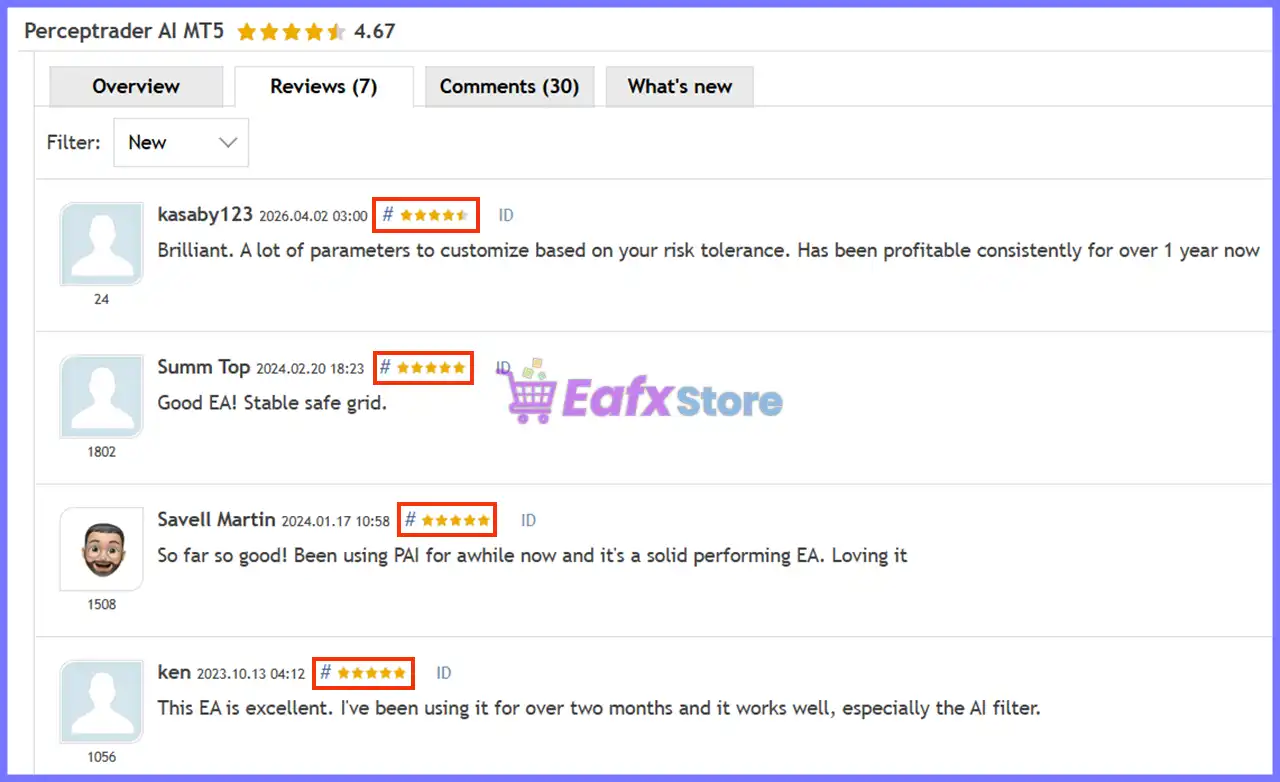
User Reviews
Only logged in customers who have purchased this product may leave a review.
❓ What markets can Perceptrader AI Robot trade?
Perceptrader AI Robot supports NZDUSD, USDCAD, AUDNZD, AUDCAD, NZDCAD, and GBPCHF, allowing multi-symbol trading from a single MT5 chart.
❓ How does Perceptrader AI Robot use Artificial Intelligence?
Perceptrader AI Robot combines Deep Learning, neural networks, and optional AI forecasts to filter low-probability trades and improve entry quality.
❓ Can Perceptrader AI Robot trade multiple currency pairs simultaneously?
Yes. Perceptrader AI Robot manages multiple supported symbols from one M5 chart, simplifying portfolio trading while reducing chart management.
❓ Does Perceptrader AI Robot include an advanced News Filter?
Yes. Perceptrader AI Robot features customizable economic news and stock market crash filters to help avoid trading during high-risk events.
❓ What lot sizing methods are available in Perceptrader AI Robot?
Perceptrader AI Robot supports Fixed Lots, Dynamic Lots, Deposit Load, and automatic risk presets, giving traders flexible money management options.
❓ How does Perceptrader AI Robot control trading risk?
Perceptrader AI Robot includes floating drawdown protection, margin monitoring, FTMO daily loss limits, and configurable maximum exposure controls.
❓ Can Perceptrader AI Robot work with ChatGPT or Gemini forecasts?
Yes. Perceptrader AI Robot can optionally use ChatGPT and Google Gemini forecasts as additional filters before accepting new trading signals.
❓ Is a VPS recommended for Perceptrader AI Robot?
Yes. Perceptrader AI Robot is designed to run continuously on a VPS, helping maintain stable execution and uninterrupted automated trading.
❓ What account type is recommended for Perceptrader AI Robot?
Perceptrader AI Robot is designed for MT5 hedging accounts and performs best with a reliable ECN broker offering stable execution conditions.
❓ Does Perceptrader AI Robot provide real-time trading information?
Yes. Perceptrader AI Robot includes a live statistics panel, self-diagnostic system, and neural network forecast display for real-time monitoring.
🔥 Get This EA for FREE with Our Membership! 🚀🚀
Unlock access to this EA, premium Indicators, and exclusive trading tools completely FREE with any of our Membership Plans! Thousands of traders already benefit from our VIP library—join them and level up your trading instantly. Choose Your Membership:
- SPECIAL – 1 Month Membership
- GOLD – 1 Year Membership
- PREMIUM – 1 Year Membership
-
 Original price was: $2,800.00.$89.00Current price is: $89.00.
 -
 Price range: $89.00 through $599.00
 -
 Price range: $89.00 through $599.00
 -
 Price range: $89.00 through $599.00
-
 10Original price was: $499.00.$69.00Current price is: $69.00.
 -
 1Original price was: $11,000.00.$89.00Current price is: $89.00.
 -
 3Original price was: $999.00.$69.00Current price is: $69.00.
 -
 3Original price was: $999.00.$69.00Current price is: $69.00.
There are no reviews yet.