






Smart Universal Expert Adviser MT5 (Latest version)

Subscriptions for Special Plan
- 30 EA package is more economical!
- Special package with 99%
- Download 1 EA/Day

Subscriptions for Premium Membership
- Download Unlimited in 1 Year
- Get 100% Discount
- Get free access to all

Subscriptions for Gold Membership
- 1 Year Membership
- Get 100% Discount
- Access EA+Indicator+Course
Frequently bought together 🎁
Add these products to enhance your purchase


Quick Verdict
Smart Universal Expert Adviser MT5 is one of the most flexible automation solutions available for MetaTrader 5. Instead of forcing traders into a fixed strategy, it transforms custom indicator signals into fully automated trading while offering advanced risk management, grid, recovery, and trade management features suitable for almost any trading style.
Best For
✅ Traders using custom indicators.
✅ Forex, Gold, and Indices traders.
✅ Strategy developers.
✅ Semi-automated traders.
✅ MT5 users seeking a highly customizable automation engine.
Overall Rating
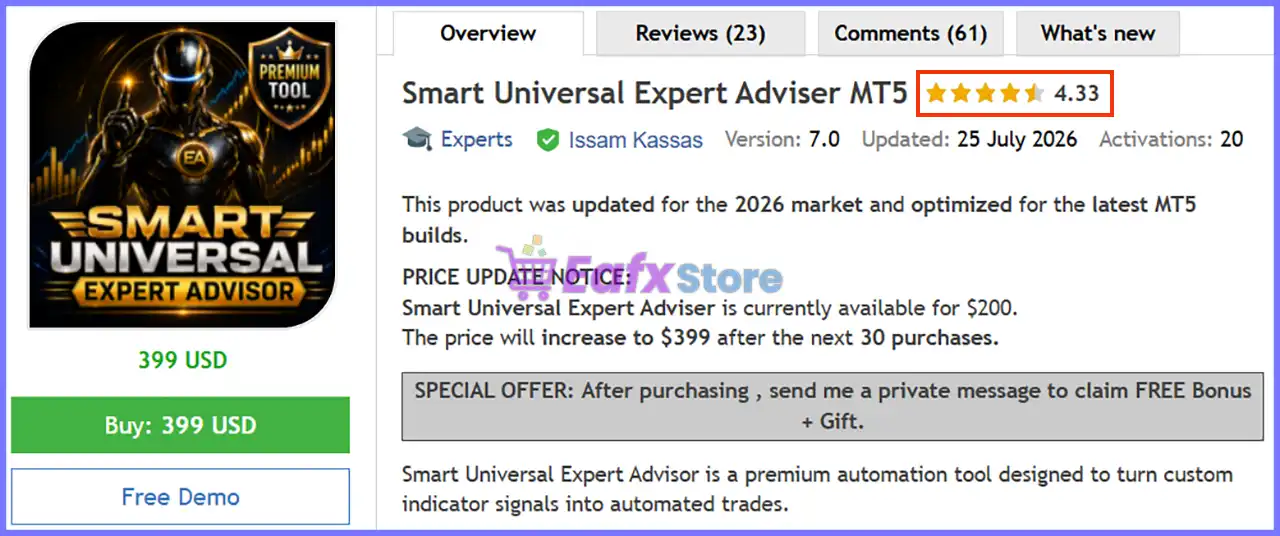
9.7/10 ⭐⭐⭐⭐⭐
What is Smart Universal Expert Adviser MT5?
Smart Universal Expert Adviser MT5 is a professional MetaTrader 5 automation framework designed to convert virtually any indicator with Buy/Sell buffers into a fully automated trading system.
Unlike conventional Expert Advisor (EA) that rely on a single proprietary strategy, Smart Universal EA serves as a complete trading engine. Traders can integrate their preferred indicators, configure advanced execution rules, customize money management, and optimize every aspect of trade management without writing a single line of code.
 Vendor Website: View here
Delivery time 24h-48h after payment.
Refund if not delivered.
You will receive the current version without any limitations (ID+Time).
Smart Universal Expert Adviser MT5 Review
How Does Smart Universal Expert Adviser MT5 Work?
Connect Any Compatible Indicator
The EA reads Buy and Sell buffers from compatible custom indicators and converts those signals into automated trade execution.
Multiple Trading Modes
Users can choose between Signal Trading, Martin Recovery, Pure Grid, Directional Grid, or hybrid strategies depending on their trading objectives.
Advanced Position Management
Every trade can be managed using Stop Loss, Take Profit, Breakeven, ATR Trailing Stop, Point Trailing Stop and Opposite Signal logic.
Flexible Automation
Instead of forcing traders into predefined rules, Smart Universal EA lets users customize filters, risk settings, trading sessions, news restrictions and money management.
Complete Backtesting Support
Strategies can be optimized inside the MT5 Strategy Tester, allowing traders to evaluate indicators and trading systems before using them on live accounts.
Key Features of Smart Universal Expert Adviser MT5
Universal Indicator Integration
Works with custom indicators that provide Buy and Sell buffers.
Built-in Trend Breakout Catcher
Includes a non-repainting breakout indicator ready for immediate automation.
Multiple Trading Strategies
Supports Signal Trading, Martin Recovery, Pure Grid, and Directional Grid strategies.
Professional Risk Management
Includes drawdown protection, breakeven, ATR trailing, spread filters, slippage control and margin protection.
Highly Configurable
Offers hundreds of adjustable parameters suitable for beginners and advanced traders alike.
Advanced Dashboard
Provides a customizable on-chart control panel with hotkeys, live spread monitoring and multiple display modes.
Historical Trading Results Performance
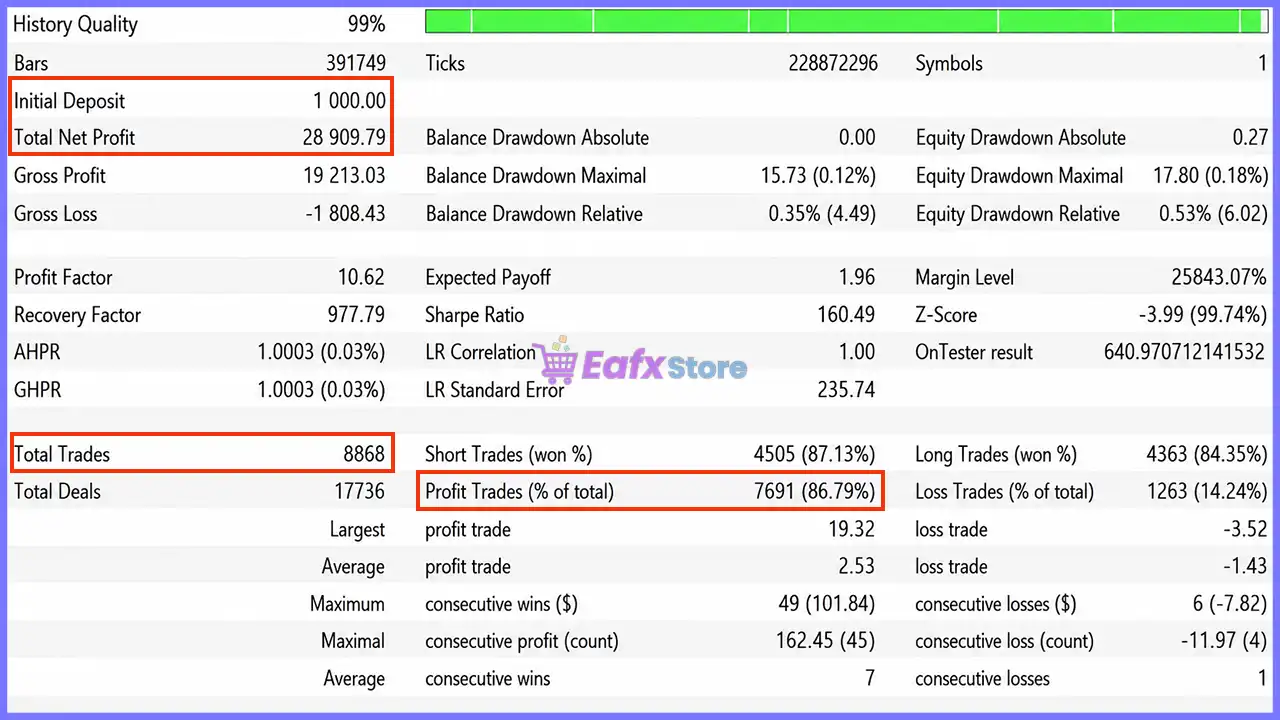
Smart Universal Expert Adviser MT5 Backtest Results
| Metric | Backtest Result |
|---|---|
| Initial Deposit | $1,000 |
| Total Net Profit | $28,909.79 |
| Profit Factor | 10.62 |
| Recovery Factor | 977.79 |
| Total Trades | 8,868 |
| Winning Trades | 86.79% |
| Balance Drawdown | 0.35% |
| Equity Drawdown | 0.53% |
Performance Analysis
The historical backtest demonstrates exceptionally strong trading consistency. Starting from a $1,000 initial balance, the EA generated $28,909.79 in net profit while maintaining an extremely low 0.53% equity drawdown.
A Profit Factor of 10.62 and 86.79% winning trades indicate efficient signal execution and effective trade management. While these historical results are impressive, actual performance will always depend on the quality of the connected indicator, market conditions, and chosen risk settings.
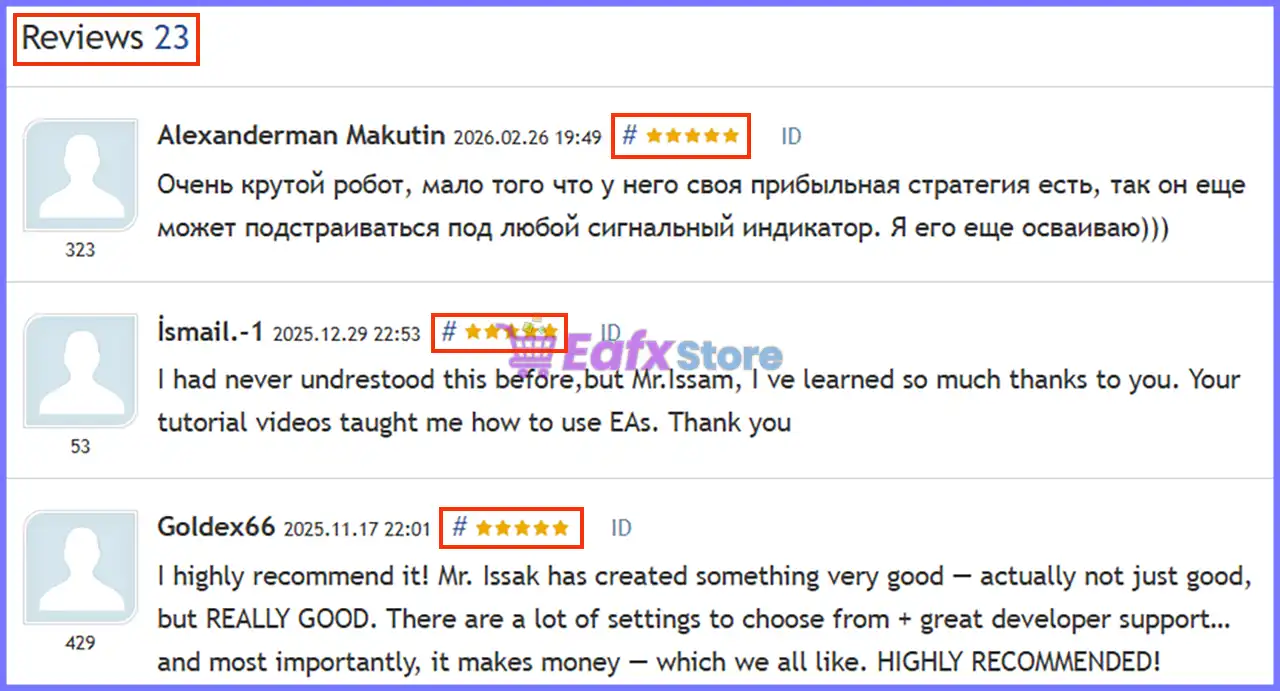
What Real Users Are Saying (User Reviews)
⭐⭐⭐⭐⭐ Jason Attia Guindi (2024.02.22)
“Described Smart Universal EA as one of the best Expert Advisors available, praising its automation capabilities,”
⭐⭐⭐⭐⭐ Ade Nike (2024.03.01)
“Highlighted excellent customer service, helpful educational resources, and stated that it was one of the best EA purchases made from the developer.”
⭐⭐⭐⭐⭐ Jsharma (2024.03.21)
“Recommended the EA for traders without programming knowledge and praised the seller for being responsive and supportive.”
⭐⭐⭐⭐⭐ Wb1345 (2024.04.05)
“Commended the developer’s exceptional customer support, explaining that issues were resolved quickly and professionally.”
⭐⭐⭐⭐⭐ Gosiapach (2024.06.04)
“Appreciated the ability to automate trading strategies without coding while also praising the included Trend Catcher indicator.”
User reviews of Smart Universal Expert Adviser MT5
Why Smart Universal Expert Adviser MT5 Stands Out
Complete Trading Automation Engine
Transforms virtually any compatible indicator into a fully automated trading system.
Multiple Built-in Strategies
Supports signal trading, recovery systems, grid trading and breakout strategies within a single EA.
Exceptional Flexibility
Works across Forex, Gold, Indices, and many other MT5 markets.
Powerful Dashboard
Offers one of the most comprehensive management panels available for MetaTrader 5.
Risk Management Features
Flexible Money Management
Supports both Fixed Lot sizing and Risk Percentage position sizing for different trading styles.
Comprehensive Trade Protection
Includes Stop Loss, Take Profit, Breakeven, ATR Trailing Stop, and Point Trailing Stop to manage open positions efficiently.
Drawdown Protection
Monitors account drawdown and can automatically close all trades once the predefined maximum loss threshold is reached.
Account Safety Controls
Provides free margin monitoring, maximum lot limits, total open lot restrictions, spread filters, slippage control and daily trade limits.
Smart Trading Filters
Allows traders to configure news filters, trading sessions, day-of-week restrictions, and minimum time between trades for improved execution quality.
Recommended Trading Conditions
For the best performance, the developer recommends:
| Features | Type |
|---|---|
| Trading platform | MetaTrader 5 (MT5) |
| Time frames | Any |
| Currency pairs | Forex, Gold, Indices |
| Minimum / Recommended deposit | $500 |
| Minimum / Recommended leverage | Any |
| Account type | ECN / Low Spread |
| Additional services | Unlock and Decompile |
| Recommended brokers | Exness Broker, Icmarkets Broker |
| Recommended VPS | MyfxVPS.com (Blue VPS, Golden VPS). Lowest Latency, 2 week Free Trial, 100% Free for 12-18 Months. |
Product Download Package?
The download package of the product suite includes:
 Experts: Smart Universal Expert Adviser MT5.ex5
 Reviewed by David Easton
Weaknesses and Risk Warnings
🔹 Trading performance depends entirely on the quality of the connected indicator.
🔹 Recovery and Grid strategies should be configured carefully due to increased exposure.
🔹 Poor risk management can significantly impact account performance.
🔹 Users should optimize settings before live deployment.
🔹 Historical backtests cannot guarantee future trading results.
Who Should Use Smart Universal Expert Adviser MT5?
Smart Universal Expert Adviser MT5 is ideal for:
🔹 Traders with profitable custom indicators.
🔹 Manual traders seeking automation.
🔹 Strategy developers.
🔹 Semi-automated traders.
🔹 Professional MT5 users.
🔹 Traders who want full control over execution and risk management.
🔹 Anyone looking to automate trading without coding.
Final Verdict
Smart Universal Expert Adviser MT5 is far more than a conventional Expert Advisor—it is a complete automation framework that bridges the gap between trading indicators and fully automated execution. With support for custom indicators, multiple trading strategies, advanced money management, comprehensive account protection, and extensive customization, it provides traders with exceptional flexibility to build personalized automated systems.
Whether you are automating a simple signal-based strategy or developing a sophisticated recovery or grid approach, Smart Universal Expert Adviser MT5 delivers the professional tools needed to automate, optimize, and manage trading efficiently while maintaining full control over risk and execution.
Smart Universal Expert Adviser MT5 Settings Guide
Smart Universal Expert Adviser MT5 is a flexible multi-strategy Expert Advisor that supports indicator-based trading, manual signal execution, trend breakout detection, martingale recovery, grid trading, ATR trailing and comprehensive risk management.
With advanced dashboard controls, customizable technical filters, money management options, account protection features, and trading session filters, Smart Universal Expert Adviser MT5 allows traders to build highly customized automated trading strategies suitable for various market conditions.
Smart Universal Expert Adviser MT5 Settings Explained
Signal Source
🔹 Signal source = Trend Breakout Catcher – Uses the Trend Breakout Catcher algorithm as the primary signal generator.
🔹 Trade only on new candle = true – Opens trades only after a new candle has formed.
🔹 Trade only on new signal = true – Executes trades only when a fresh trading signal is detected.
🔹 Signal timeframe = current – Uses the current chart timeframe for signal generation.
Custom Indicator Signal Settings
🔹 Custom indicator file name = MarketSmartTrend Trading System MT5 – Uses the SmartTrend Trading System MT5 custom indicator.
🔹 Show custom indicator on chart = true – Displays the custom indicator on the chart.
🔹 Buy signal buffer = 8 – Reads BUY signals from indicator buffer 8.
🔹 Sell signal buffer = 9 – Reads SELL signals from indicator buffer 9.
🔹 Signal bar shift = 1 – Uses data from 1 completed candle.
🔹 Buy SL buffer (-1 = off) = -1 – Disables custom Stop Loss buffer for BUY trades.
🔹 Sell SL buffer (-1 = off) = -1 – Disables custom Stop Loss buffer for SELL trades.
🔹 Buy TP buffer (-1 = off) = -1 – Disables custom Take Profit buffer for BUY trades.
🔹 Sell TP buffer (-1 = off) = -1 – Disables custom Take Profit buffer for SELL trades.
🔹 SL/TP bar shift = 1 – Reads Stop Loss and Take Profit values from 1 completed bar.
Trading Strategy
🔹 Trading strategy = Martin Recovery – Uses the Martin Recovery strategy for trade management.
🔹 Allowed trade direction = Buy and Sell – Allows both BUY and SELL positions.
🔹 Allow buy and sell together = true – Enables simultaneous BUY and SELL trades.
Signal Strategy (Manual / SL-TP)
🔹 Use stop loss = true – Enables Stop Loss protection.
🔹 Stop loss in points = 300 – Sets the Stop Loss distance to 300 points.
🔹 Use take profit = true – Enables Take Profit.
🔹 Take profit multiplier = 2.0 – Calculates TP using a 2.0× multiplier.
🔹 Close on opposite signal = false – Ignores opposite trading signals for open positions.
🔹 Use breakeven = true – Enables automatic Break-even protection.
🔹 Breakeven start multiplier = 1.0 – Activates Break-even after reaching 1.0× target.
🔹 Use ATR trailing stop = false – ATR trailing is disabled.
🔹 ATR trailing multiplier = 1.0 – ATR multiplier is 1.0.
🔹 Use point trailing stop = false – Standard point trailing is disabled.
🔹 Point trailing start = 1000 – Trailing begins after 1000 points if enabled.
🔹 Point trailing distance = 500 – Trailing distance is 500 points.
🔹 Point trailing step = 100 – Stop Loss moves every 100 points.
Martin Recovery Strategy
🔹 Recovery lot multiplier = 1.5 – Increases recovery lot sizes by 1.5×.
🔹 Recovery risk mode = Aggressive risk – Uses aggressive recovery logic.
🔹 Recovery step in points = 300 – Opens recovery positions every 300 points.
🔹 Use dynamic recovery step = true – Dynamically adjusts recovery spacing.
🔹 Start dynamic step after trades = 4 – Dynamic spacing starts after 4 trades.
🔹 Dynamic step multiplier = 1.2 – Multiplies spacing by 1.2×.
🔹 Recovery basket TP in points = 300 – Basket closes with 300 points profit.
🔹 Use drawdown recovery = true – Enables recovery based on account drawdown.
🔹 Start recovery after trades = 3 – Recovery starts after 3 positions.
🔹 Drawdown recovery mode = Floating drawdown percent – Uses floating equity drawdown.
🔹 Drawdown offset in points = 1 – Recovery offset is 1 point.
🔹 Drawdown offset percent = 3.0 – Uses a 3.0% drawdown threshold.
🔹 Maximum recovery orders = 10 – Limits recovery trades to 10 positions.
News Filter
🔹 Use news filter = false – Economic news filter is disabled.
🔹 Block if news data is missing = false – Trading continues if news data is unavailable.
🔹 Broker GMT offset = 2 – Broker operates at GMT+2.
🔹 Stop before news minutes = 60 – Stops trading 60 minutes before news.
🔹 Resume after news minutes = 60 – Resumes trading 60 minutes after news.
🔹 News calendar URL = https://www.forexfactory.com/calendar – Uses Forex Factory as the news source.
Technical Settings
🔹 EA magic number = 2166 – Uses 2166 as the Magic Number.
🔹 Trade comment = Smart Universal EA – Adds Smart Universal EA as the trade comment.
🔹 Enable debug logs = false – Debug logging is disabled.
🔹 Show chart comment = false – Chart comments are hidden.
SUEA Panel / Dashboard
🔹 Show panel on chart = true – Displays the trading dashboard.
🔹 Panel mode (0 Compact, 1 Standard, 2 Full) = 2 – Uses Full Mode.
🔹 Panel X position = 10 – Horizontal position is 10 pixels.
🔹 Panel Y position = 10 – Vertical position is 10 pixels.
🔹 Panel chart corner = Left upper chart corner – Anchors the panel to the upper-left corner.
🔹 Restore saved panel layout = true – Loads the previous panel layout automatically.
🔹 Auto-scale panel = true – Automatically scales the dashboard.
🔹 Manual panel scale = 1.0 – Manual scaling factor is 1.0.
🔹 Keep panel inside chart = true – Prevents the dashboard from leaving chart boundaries.
🔹 Panel width = 260 – Dashboard width is 260 pixels.
🔹 Panel font size = 9 – Uses font size 9.
🔹 Use bold panel text = true – Displays bold panel text.
🔹 Panel bold font = Segoe UI Semibold – Uses Segoe UI Semibold.
🔹 Minimum panel width = 230 – Minimum dashboard width.
🔹 Maximum panel width = 360 – Maximum dashboard width.
🔹 Allow panel dragging = true – Allows repositioning via drag-and-drop.
🔹 Show collapse button = true – Displays the collapse button.
🔹 Show close button = true – Displays the close button.
🔹 Show spread status = true – Displays live spread information.
SUEA Panel Hotkeys
🔹 Enable panel hotkeys = true – Activates keyboard shortcuts.
🔹 Collapse / expand hotkey = C – Press C to collapse or expand the dashboard.
🔹 Panel mode hotkey = Q – Press Q to switch dashboard modes.
Trend Breakout Catcher Settings
🔹 Trend smoothing = 1 – Uses smoothing level 1.
🔹 Trend amplitude = 2 – Uses trend amplitude value 2.
ATR Trailing Settings
🔹 ATR period = 14 – Calculates ATR using 14 periods.
🔹 ATR multiplier = 3.0 – Uses a 3.0× ATR multiplier.
Grid Strategy
🔹 Grid mode = Pure Grid – Uses the Pure Grid strategy.
🔹 Grid step in points = 300 – Places grid orders every 300 points.
🔹 Grid levels per side = 15 – Allows 15 grid levels per direction.
🔹 Grid lot mode = Fixed lot per level – Uses fixed lots for every grid order.
🔹 Grid lot multiplier = 1.5 – Multiplies grid lots by 1.5×.
🔹 Grid TP mode = Profit in account currency – Uses account currency profit targets.
🔹 Grid TP in account currency = 10.0 – Basket TP equals 10.0 account currency units.
🔹 Grid TP in points = 100 – Alternative Take Profit is 100 points.
🔹 Maximum active grid orders = 99 – Allows 99 active grid trades.
🔹 Maximum Pure Grid cycles = 99 – Supports 99 complete grid cycles.
🔹 Maximum grid drawdown percent = 0.0 – No drawdown restriction is applied.
🔹 Pending order expiry minutes = 60 – Pending orders expire after 60 minutes.
Risk & Money Management
🔹 Lot calculation method = Fixed lot – Uses fixed position sizing.
🔹 Fixed lot size = 0.01 – Opens trades using 0.01 lots.
🔹 Risk percent per trade = 1.0 – Risk equals 1.0% per trade.
🔹 Use free margin filter = false – Free margin filter is disabled.
🔹 Required free margin = 1000.0 – Suggested minimum free margin is 1000.0.
🔹 Limit maximum lot per trade = false – Maximum lot restriction is disabled.
🔹 Maximum lot per trade = 5.0 – Maximum allowed lot is 5.0.
🔹 Limit total open lots = false – Total lot limitation is disabled.
🔹 Maximum total open lots = 50.0 – Total exposure limit is 50.0 lots.
Account Protection
🔹 Use drawdown protection = true – Enables drawdown monitoring.
🔹 Maximum drawdown percent = 51.0 – Trading protection activates at 51.0% drawdown.
🔹 Close trades at max drawdown = true – Automatically closes trades at the drawdown limit.
🔹 Maximum spread (-1 = off) = 999 – Spread limit is effectively disabled.
🔹 Maximum allowed slippage = 999 – Slippage protection is effectively disabled.
🔹 Trade frequency limit (-1 = off) = 999 – No frequency restriction.
🔹 Daily trade limit (-1 = off) = 999 – No daily trade limit.
Trading Time
🔹 Use trading hours = false – Trading time filter is disabled.
🔹 Trading start hour = 0 – Trading starts at 00:00.
🔹 Trading start minute = 0 – Trading starts at minute 00.
🔹 Trading stop hour = 23 – Trading stops at 23:00.
🔹 Trading stop minute = 59 – Trading ends at 23:59.
🔹 Trade on Monday = true – Monday trading is enabled.
🔹 Trade on Tuesday = true – Tuesday trading is enabled.
🔹 Trade on Wednesday = true – Wednesday trading is enabled.
🔹 Trade on Thursday = true – Thursday trading is enabled.
🔹 Trade on Friday = true – Friday trading is enabled.
🔹 Use minimum time between trades = false – No waiting period between trades.
🔹 Minimum time between trades = 5 – Minimum interval is 5 minutes if enabled.
Conclusion
Smart Universal Expert Adviser MT5 is a highly configurable multi-strategy Expert Advisor that combines Trend Breakout detection, custom indicator signals, Martin Recovery, Pure Grid trading, ATR-based management, advanced money management, and comprehensive account protection. Its extensive configuration options allow traders to tailor trading behavior, recovery mechanisms, dashboard functionality, and risk controls to suit both conservative and aggressive trading styles while maintaining full flexibility across various market environments.
FAQs
❓ What trading strategy does Smart Universal Expert Adviser MT5 use?
It supports multiple approaches, including Trend Breakout Catcher, Martin Recovery, Pure Grid trading, and custom indicator-based strategies.
❓ Can I use my own custom indicator with Smart Universal Expert Adviser MT5?
Yes. The EA allows you to specify a custom MT5 indicator and configure its signal buffers for automated trading.
❓ Does Smart Universal Expert Adviser MT5 include money management features?
Yes. It supports fixed lot sizing, percentage risk management, grid lot scaling, recovery multipliers, and multiple account protection options.
❓ Can the EA filter economic news?
Yes. It includes a configurable news filter with broker GMT offset, stop/resume timing, and Forex Factory calendar integration, although it is disabled by default.
❓ Is Smart Universal Expert Adviser MT5 suitable for advanced users?
Yes. Its modular architecture, extensive dashboard controls, recovery engine, grid management, and advanced customization options make it suitable for experienced MT5 traders seeking full control over automated trading.
User Reviews
Only logged in customers who have purchased this product may leave a review.
❓ What is Smart Universal Expert Adviser MT5 designed for?
Smart Universal Expert Adviser MT5 automates Buy and Sell signals from custom indicators, allowing traders to build flexible trading systems without coding.
❓ Can Smart Universal Expert Adviser MT5 work with custom indicators?
Yes. Smart Universal Expert Adviser MT5 supports custom indicators with Buy and Sell buffers, making it easy to automate your own trading strategy.
❓ Does Smart Universal Expert Adviser MT5 include built-in trading signals?
Yes. Smart Universal Expert Adviser MT5 includes the non-repainting Trend Breakout Catcher indicator, which can generate trading signals directly.
❓ What trading modes are available in Smart Universal Expert Adviser MT5?
Smart Universal Expert Adviser MT5 supports signal-based trading, recovery trading, and grid trading, giving traders multiple automation options.
❓ What risk management features does Smart Universal Expert Adviser MT5 offer?
Smart Universal Expert Adviser MT5 includes drawdown protection, trailing stop, breakeven, spread filters, news filters, and flexible lot sizing controls.
❓ Can I use Smart Universal Expert Adviser MT5 on different markets?
Yes. Smart Universal Expert Adviser MT5 works with Forex, Gold, indices, and other liquid MT5 markets, depending on your connected indicator.
❓ Does Smart Universal Expert Adviser MT5 support backtesting?
Yes. Smart Universal Expert Adviser MT5 supports backtesting and optimization, helping traders evaluate indicator-based strategies before live trading.
❓ Which account type is recommended for Smart Universal Expert Adviser MT5?
Smart Universal Expert Adviser MT5 performs best on ECN or low-spread accounts, providing faster execution and lower trading costs.
❓ Who should use Smart Universal Expert Adviser MT5?
Smart Universal Expert Adviser MT5 is ideal for traders who already have reliable indicators and want to automate execution without developing a custom EA.
❓ Can Smart Universal Expert Adviser MT5 guarantee profitable trading?
No. Smart Universal Expert Adviser MT5 is an automation engine, and overall performance depends on your indicator quality, settings, market conditions, and risk management.
-
 Original price was: $4,999.00.$249.00Current price is: $249.00.
 -
 Original price was: $4,500.00.$249.00Current price is: $249.00.
 -
 Original price was: $4,999.00.$249.00Current price is: $249.00.
 -
 Original price was: $28,000.00.$249.00Current price is: $249.00.
-
 0Original price was: $1,299.00.$249.00Current price is: $249.00.
 -
 3Original price was: $199.00.$159.00Current price is: $159.00.
 -
 0Original price was: $199.00.$179.00Current price is: $179.00.
 -
 1Original price was: $699.00.$249.00Current price is: $249.00.
There are no reviews yet.