




Black Thunder EA MT5 + SetFiles (Latest version) – GroupBuy
Select a variant to see availability.
Quick Verdict
Black Thunder EA MT5 is a fully automated breakout scalping Expert Advisor (EA) built exclusively for XAUUSD. Unlike many Gold robots, it completely avoids martingale, grid, averaging and recovery strategies. With pending-order execution, fixed Stop Loss, intelligent trailing stop management, multiple trading modes, and advanced risk protection, it offers traders a disciplined and highly configurable solution focused on consistent long-term performance.
Best For
✅ Gold (XAUUSD) scalpers
✅ Conservative traders
✅ Breakout trading enthusiasts
✅ Prop firm traders
✅ Traders seeking low drawdown automation
Overall Rating
9.7/10 ⭐⭐⭐⭐⭐
What is Black Thunder EA MT5?
Black Thunder EA MT5 is a professional MetaTrader 5 Expert Advisor designed specifically for automated Gold (XAUUSD) breakout scalping. Instead of chasing every market movement, the EA patiently waits for predefined breakout conditions before placing Buy Stop or Sell Stop pending orders.
Unlike many commercial Gold EAs, Black Thunder does not use Grid, Martingale, Averaging or Recovery systems. Every position is protected by a predefined Stop Loss and managed with an intelligent Trailing Stop that locks in profits as the market moves favorably.
 Vendor Website: View here
This is GroupBuy ==> How to Join
How Does Black Thunder EA MT5 Work?
Breakout Pending Order Strategy
Rather than entering at market price, Black Thunder places Buy Stop and Sell Stop pending orders only when strict breakout conditions are satisfied.
Fully Automated Trade Management
Every position is automatically managed using predefined Stop Loss levels and an adaptive trailing stop that protects accumulated profits.
Multi-Mode Trading Profiles
Users can select between Safe Mode, Conservative Mode, Aggressive Mode, Custom Mode, or dedicated News Mode depending on account objectives.
Economic Calendar Integration
The EA integrates directly with the MT5 Economic Calendar, allowing intelligent trading around major events such as CPI, NFP, and FOMC announcements.
Broker Compatibility
Automatic time synchronization, spread normalization, and support for both 2-digit and 3-digit Gold pricing ensure compatibility with most ECN brokers.
Key Features of Black Thunder EA MT5
Pure Breakout Scalping Strategy
Executes trades only when high-quality breakout opportunities appear.
No Grid or Martingale
Maintains disciplined risk without using recovery systems or position averaging.
Multiple Trading Modes
Includes Safe, Conservative, Aggressive, Custom and dedicated News trading profiles.
Intelligent News Trading
Can automatically trade or avoid major economic releases using the built-in MT5 Economic Calendar.
Flexible Money Management
Supports both Fixed Lot and Auto Lot sizing with customizable scaling parameters.
Advanced Broker Diagnostics
Monitors slippage, execution speed, Stop Loss accuracy, and broker execution quality in real time.
Intelligent Risk Protection
Provides configurable daily loss limits, consecutive loss protection and temporary trading pauses.
Optimized for XAUUSD
Designed specifically for Gold trading on the M1 timeframe using low-spread ECN execution.
Historical Trading Results Performance
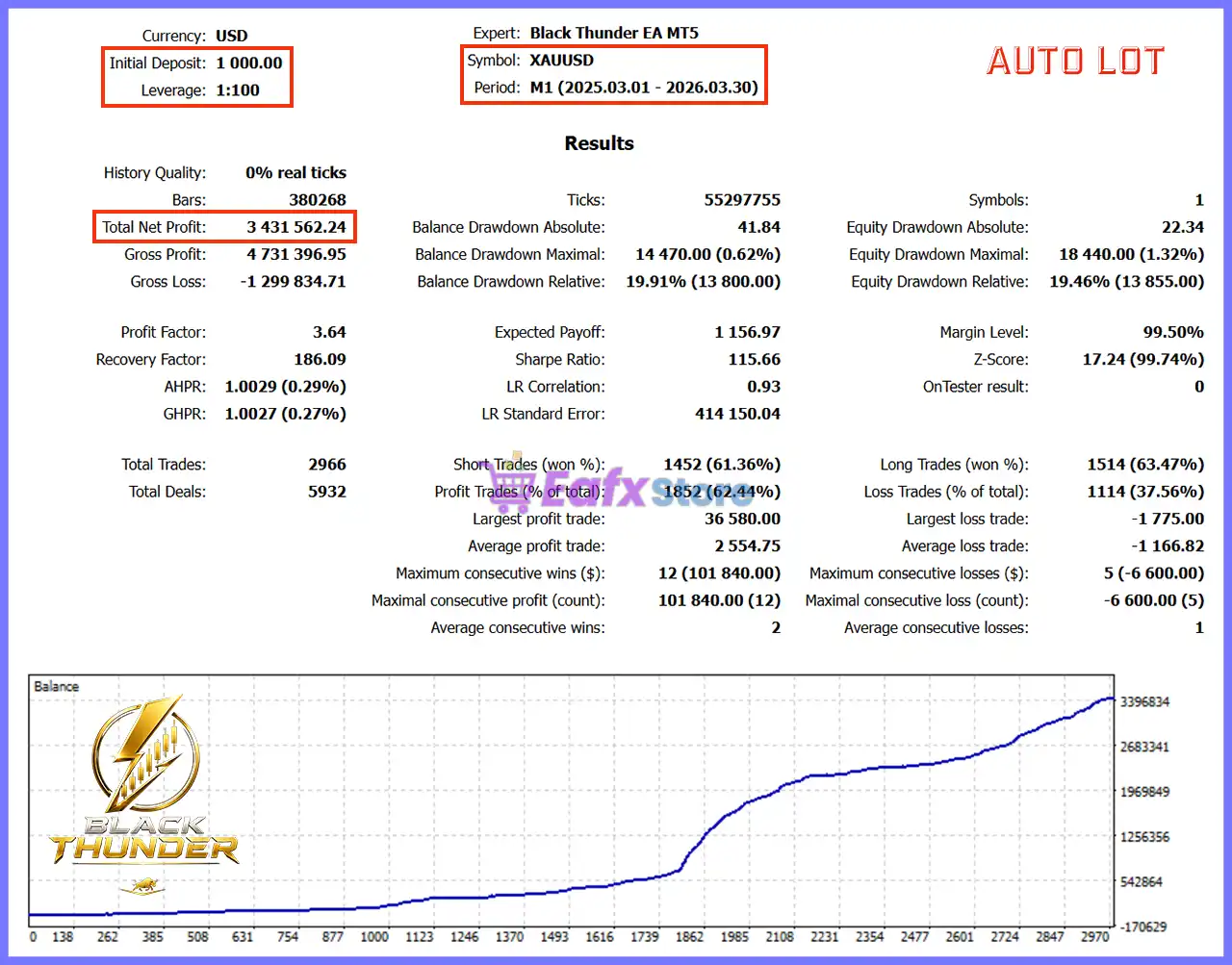
Backtest 1 (2025–2026)
Black Thunder EA MT5 Backtest
| Metric | Result |
|---|---|
| Initial Deposit | $1,000 |
| Total Net Profit | $3,431,562.24 |
| Profit Factor | 3.64 |
| Total Trades | 2,966 |
| Winning Trades | 62.44% |
| Equity Drawdown | 1.32% |
| Recovery Factor | 186.09 |
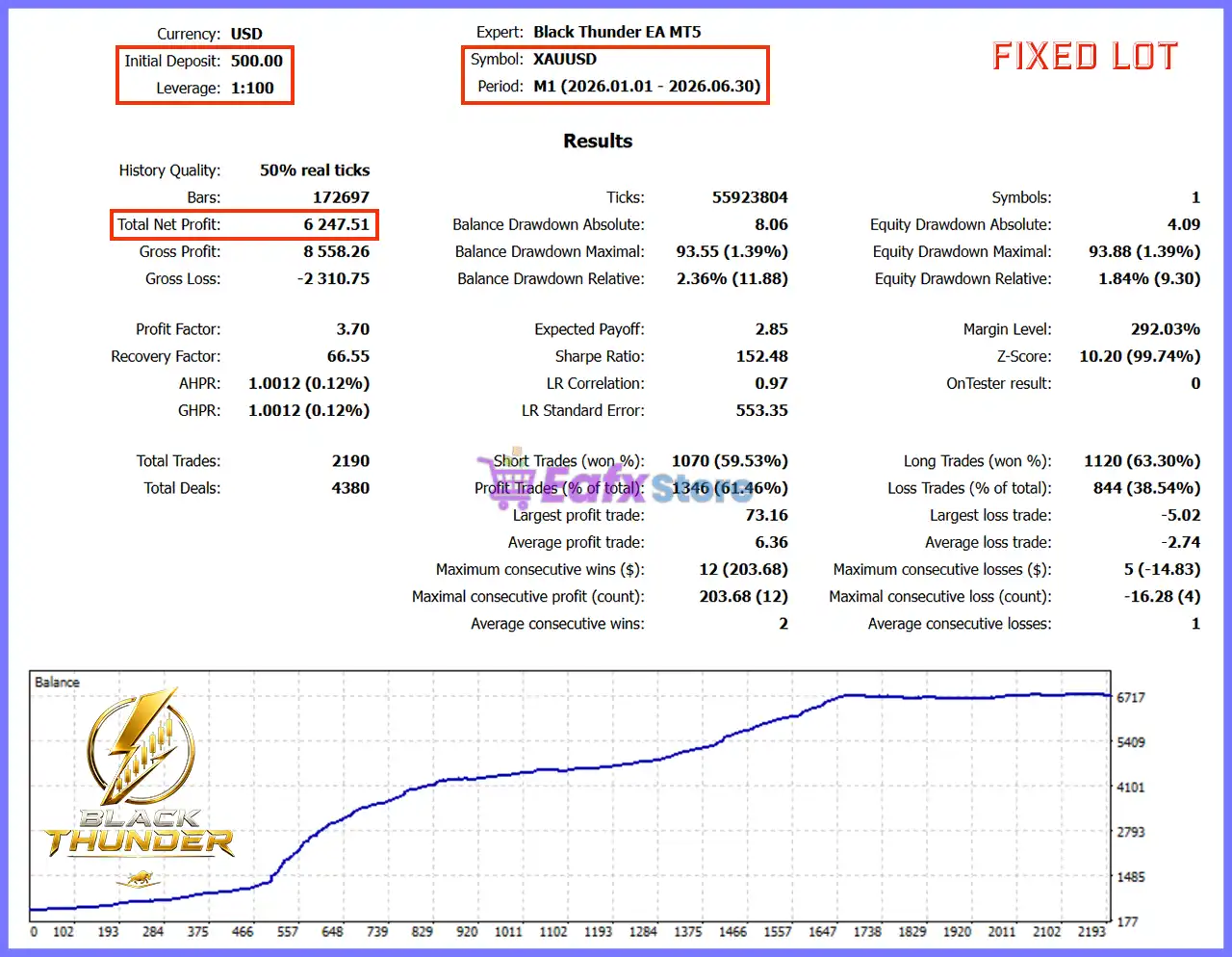
Backtest 2 (2026)
Black Thunder EA MT5 Backtest Results
| Metric | Result |
|---|---|
| Initial Deposit | $500 |
| Total Net Profit | $6,247.51 |
| Profit Factor | 3.70 |
| Total Trades | 2,190 |
| Winning Trades | 61.46% |
| Equity Drawdown | 1.84% |
| Recovery Factor | 66.55 |
Performance Analysis
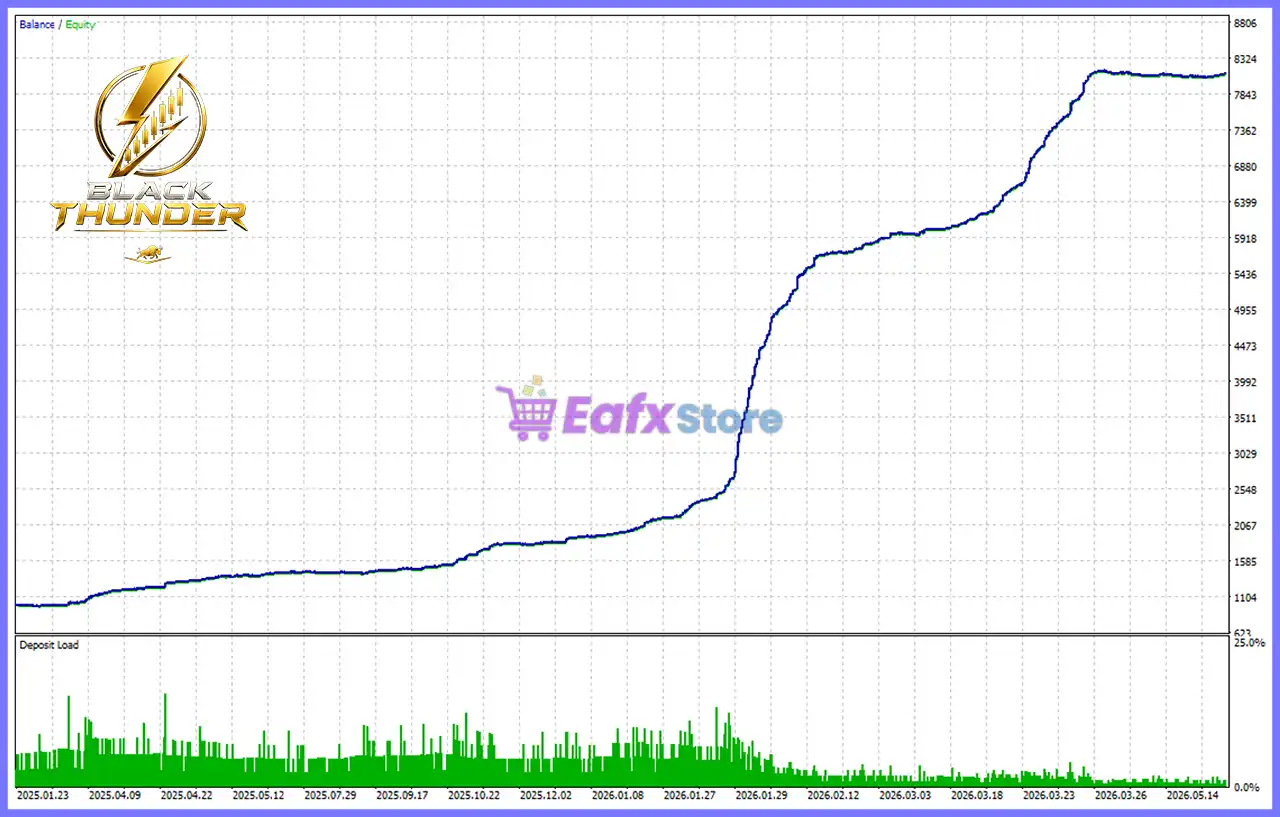
The historical backtests highlight Black Thunder EA MT5’s disciplined trading methodology.
Across both testing periods, the EA maintained exceptionally low equity drawdown below 2%, while generating substantial net profits with Profit Factors above 3.0.
Thousands of executed trades demonstrate the robustness of the breakout strategy, and the steadily rising equity curves suggest consistent performance rather than isolated profit spikes.
These results make the EA particularly attractive for traders seeking sustainable Gold scalping with controlled risk exposure.
Why Black Thunder EA MT5 Stands Out
True Breakout Trading
Unlike many Gold EAs that rely on averaging or recovery systems, Black Thunder trades only confirmed breakout opportunities.
Extremely Low Drawdown
Historical testing demonstrates outstanding capital preservation with equity drawdown remaining below 2%.
Multiple Trading Profiles
The ability to switch instantly between Safe, Conservative, Aggressive, Custom and News modes provides exceptional flexibility.
Integrated Economic Calendar
The built-in News Mode automatically synchronizes with the MT5 Economic Calendar to handle high-impact events intelligently.
Professional Broker Monitoring
Advanced diagnostic tools continuously monitor execution quality, slippage, latency and broker performance.
Risk Management Features
No Martingale or Grid
Every trade is independent, eliminating the compounding risks associated with averaging or recovery systems.
Fixed Stop Loss Protection
Each position is opened with a predefined Stop Loss, ensuring every trade has a clearly defined maximum risk.
Intelligent Trailing Stop
The EA dynamically adjusts Stop Loss levels as trades move into profit, helping secure gains while allowing profitable positions to continue running.
Daily Loss Controls
Supports configurable daily loss limits, consecutive loss monitoring, and automatic trading pauses for enhanced capital protection.
Flexible Position Sizing
Choose between Fixed Lot and Auto Lot modes, with scalable lot increments based on account balance and customizable maximum lot limits.
Broker Protection Tools
Built-in spread monitoring, slippage alerts, execution diagnostics, and broker quality analysis help maintain reliable order execution.
Recommended Trading Conditions
| Features | Type |
|---|---|
| Trading platform | MetaTrader 5 (MT5) |
| Time frames | M1 (1 minute chart) |
| Currency pairs | XAUUSD (Gold) |
| Minimum / Recommended deposit | $100+ |
| Minimum / Recommended leverage | 1:100+ |
| Account type | Hedging (ECN / RAW Spread) |
| Additional services | Unlock and Decompile |
| Recommended brokers | Exness Broker, Icmarkets Broker |
| Recommended VPS | MyfxVPS.com (Blue VPS, Golden VPS). Lowest Latency, 2 week Free Trial, 100% Free for 12-18 Months. |
Product Download Package?
The download package of the product suite includes:
Experts
 Setting (If Any).docx
Installation Guide.docx
SetFiles
BLACK_THUNDER_for_XAUUSD.set
BLACK_THUNDER_for_XAUUSD_Default.set
BLACK_THUNDER_for_XAUUSD_AutoLot.set
 Reviewed by David Easton
Weaknesses and Risk Warnings
🔹 Optimized exclusively for XAUUSD and may not perform similarly on other instruments.
🔹 Breakout systems can experience temporary periods of reduced activity during low-volatility markets.
🔹 Performance depends heavily on fast execution and low spreads.
🔹 News Mode is available only on live or demo accounts because the MT5 Strategy Tester does not support the Economic Calendar.
🔹 Proper money management remains essential despite the EA’s low historical drawdown.
Who Should Use Black Thunder EA MT5?
Black Thunder EA MT5 is ideal for:
🔹 Professional Gold scalpers.
🔹 Traders who avoid Grid and Martingale strategies.
🔹 Conservative investors seeking low drawdown.
🔹 Prop firm traders.
🔹 MT5 users looking for disciplined breakout automation.
🔹 Traders using ECN brokers and VPS hosting.
🔹 Investors prioritizing capital preservation alongside steady growth.
Final Verdict
Black Thunder EA MT5 is a professionally engineered Gold breakout Expert Advisor that emphasizes precision, disciplined execution and robust capital protection. By eliminating Grid, Martingale, Averaging, and Recovery techniques, it offers a cleaner and more sustainable trading approach than many competing Gold robots.
Its multiple trading profiles, integrated Economic Calendar support, advanced diagnostic tools, intelligent trailing stop system, and consistently low historical drawdown make it a compelling solution for traders seeking dependable XAUUSD automation. For those looking for a configurable, risk-conscious, and performance-focused Gold Expert Advisor, Black Thunder EA MT5 stands out as an excellent choice for MetaTrader 5.
Black Thunder EA MT5 Settings Guide
Black Thunder EA MT5 is a professional automated Expert Advisor for MetaTrader 5 that offers multiple trading modes, advanced money management, intelligent risk protection, economic news handling, broker compatibility settings and extensive diagnostic tools.
With support for Conservative, Aggressive, Safe, Custom, and News trading modes, the EA allows traders to customize trading behavior while maintaining strict control over execution quality, position sizing, and account protection.
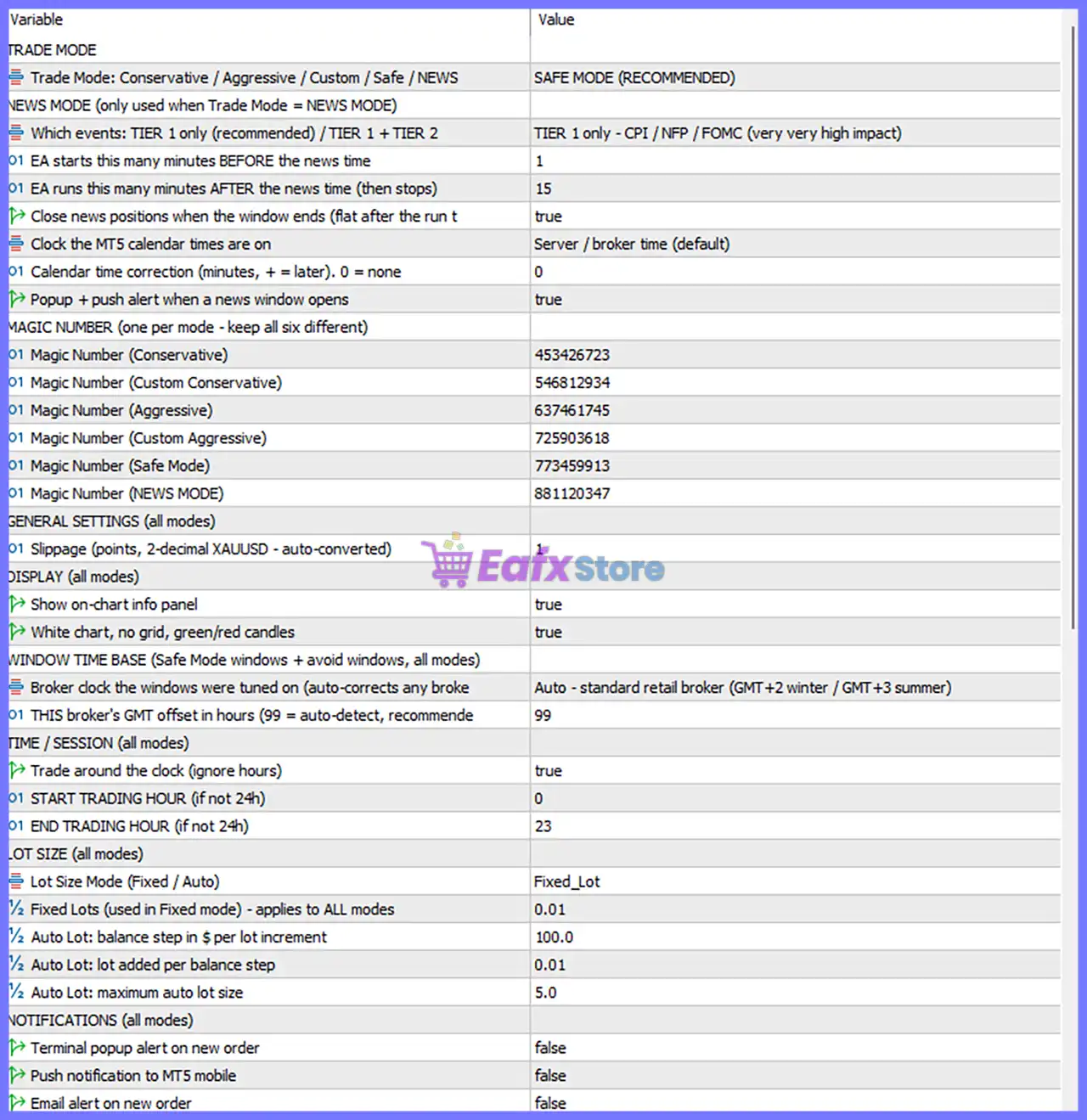
Black Thunder EA MT5 Settings Panel
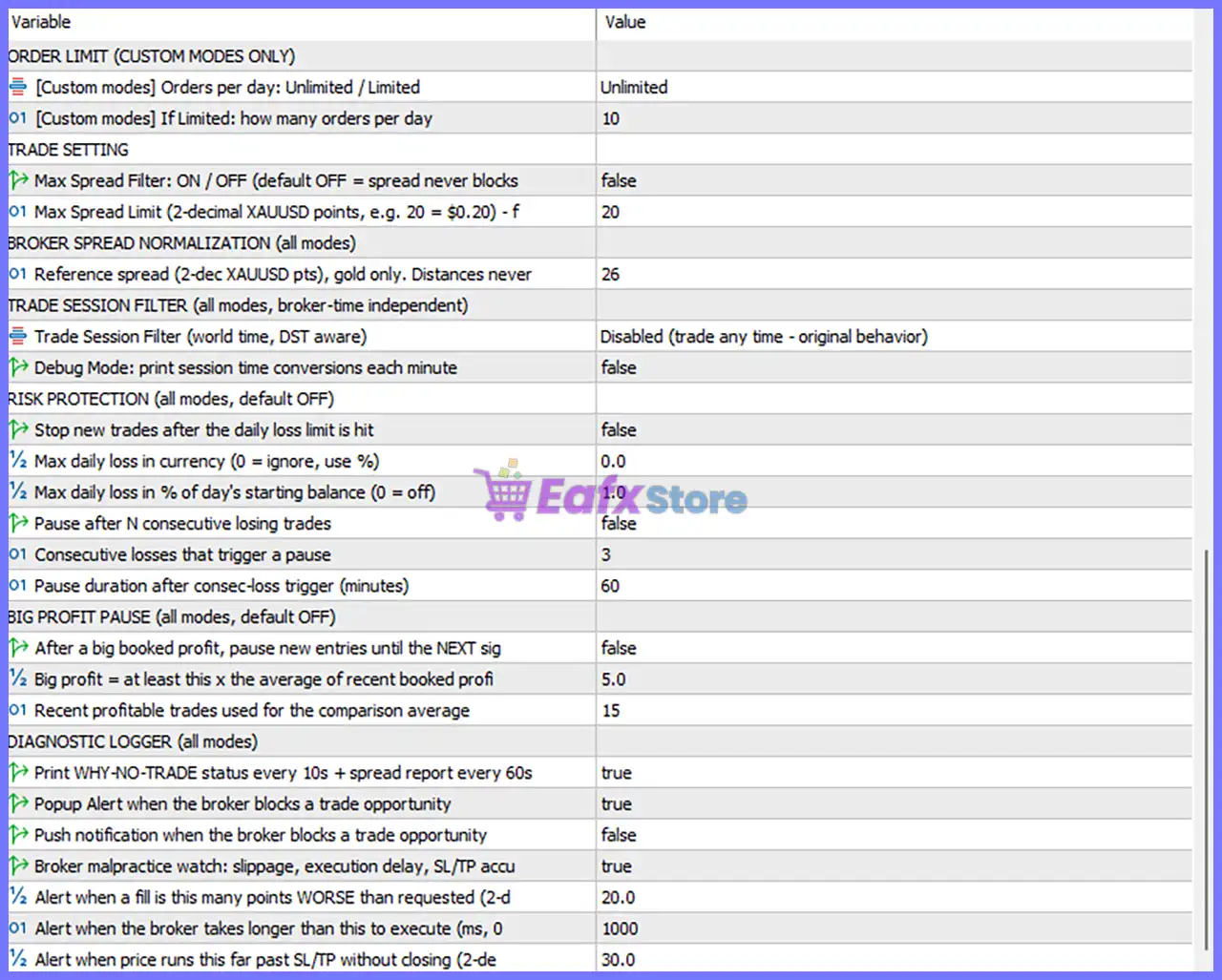
Black Thunder EA MT5 Setting Panel
Black Thunder EA MT5 Settings Explained
Trade Mode
🔹 Trade Mode: Conservative / Aggressive / Custom / Safe / NEWS = SAFE MODE (RECOMMENDED) – Selects SAFE MODE as the active trading profile for balanced and conservative execution.
News Mode (Only Used When Trade Mode = NEWS MODE)
🔹 Which events: TIER 1 only (recommended) / TIER 1 + TIER 2 = TIER 1 only – CPI / NFP / FOMC (very very high impact) – Trades only around the highest-impact economic events including CPI, NFP, and FOMC.
🔹 EA starts this many minutes BEFORE the news time = 1 – Starts preparing for trading 1 minute before the scheduled news release.
🔹 EA runs this many minutes AFTER the news time (then stops) = 15 – Continues trading for 15 minutes after the news event.
🔹 Close news positions when the window ends (flat after the run) = true – Automatically closes all news trades after the trading window finishes.
🔹 Clock the MT5 calendar times are on = Server / broker time (default) – Uses broker server time for economic calendar synchronization.
🔹 Calendar time correction (minutes, + = later), 0 = none = 0 – Applies 0 minutes of calendar time adjustment.
🔹 Popup + push alert when a news window opens = true – Displays alerts when the configured news trading window begins.
Magic Number (One Per Mode – Keep All Six Different)
🔹 Magic Number (Conservative) = 453426723 – Unique trade identifier for Conservative mode.
🔹 Magic Number (Custom Conservative) = 546812934 – Unique Magic Number for Custom Conservative mode.
🔹 Magic Number (Aggressive) = 637461745 – Unique identifier for Aggressive trading.
🔹 Magic Number (Custom Aggressive) = 725903618 – Dedicated Magic Number for Custom Aggressive mode.
🔹 Magic Number (Safe Mode) = 773459913 – Trade identifier used while operating in Safe Mode.
🔹 Magic Number (NEWS MODE) = 881120347 – Dedicated Magic Number for News trading mode.
General Settings
🔹 Slippage (points, 2-decimal XAUUSD – auto-converted) = 1 – Maximum permitted execution slippage is 1 point.
Display Settings
🔹 Show on-chart info panel = true – Displays the EA information panel on the chart.
🔹 White chart, no grid, green/red candles = true – Automatically formats the chart using a white background without grid lines.
Window Time Base (Safe Mode Windows + Avoid Windows)
🔹 Broker clock the windows were tuned on = Auto – standard retail broker (GMT+2 winter / GMT+3 summer) – Automatically adjusts trading windows for common retail broker server times.
🔹 THIS broker’s GMT offset in hours (99 = auto-detect) = 99 – Uses automatic GMT offset detection.
Time / Session Settings
🔹 Trade around the clock (ignore hours) = true – Enables 24-hour trading regardless of session settings.
🔹 START TRADING HOUR (if not 24h) = 0 – Trading begins at 00:00 if hourly restrictions are enabled.
🔹 END TRADING HOUR (if not 24h) = 23 – Trading ends at 23:00 if hourly restrictions are enabled.
Lot Size Settings
🔹 Lot Size Mode (Fixed / Auto) = Fixed_Lot – Uses a fixed trading volume.
🔹 Fixed Lots (used in Fixed mode) = 0.01 – Opens trades with a fixed volume of 0.01 lots.
🔹 Auto Lot: balance step in $ per lot increment = 100.0 – Increases lot size for every $100.0 balance increase when Auto Lot mode is used.
🔹 Auto Lot: lot added per balance step = 0.01 – Adds 0.01 lots for each balance increment.
🔹 Auto Lot: maximum auto lot size = 5.0 – Limits automatic position size to 5.0 lots.
Notification Settings
🔹 Terminal popup alert on new order = false – Disables MT5 popup notifications for new trades.
🔹 Push notification to MT5 mobile = false – Disables mobile push notifications.
🔹 Email alert on new order = false – Disables email notifications for executed trades.
Order Limit (Custom Modes Only)
🔹 Order limit modes per day: Unlimited / Limited = Unlimited – Allows unlimited daily trades in Custom mode.
🔹 If Limited: how many orders per day = 10 – Maximum of 10 trades per day when Limited mode is selected.
Trade Settings
🔹 Max Spread Filter: ON / OFF = false – Disables spread filtering.
🔹 Max Spread Limit (2-decimal XAUUSD points) = 20 – Maximum permitted spread is 20 points if enabled.
Broker Spread Normalization
🔹 Reference spread (2-dec XAUUSD pts), gold only = 26 – Uses 26 points as the reference spread for Gold trading calculations.
Trade Session Filter
🔹 Trade Session Filter (world time, DST aware) = Disabled (trade any time – original behavior) – Session restrictions are disabled.
🔹 Debug Mode: print session time conversions each minute = false – Disables session conversion debugging.
Risk Protection
🔹 Stop new trades after the daily loss limit is hit = false – Continues trading even after reaching the daily loss threshold.
🔹 Max daily loss in currency (0 = ignore) = 0.0 – Currency-based daily loss protection is disabled.
🔹 Max daily loss in % of day’s starting balance (0 = off) = 1.0 – Defines a 1.0% daily loss threshold when enabled.
🔹 Pause after N consecutive losing trades = false – Does not pause after consecutive losses.
🔹 Consecutive losses that trigger a pause = 3 – Trading pauses after 3 losses if enabled.
🔹 Pause duration after consecutive-loss trigger (minutes) = 60 – Pause duration is 60 minutes.
Big Profit Pause
🔹 After a big booked profit, pause new entries until the NEXT signal = false – Continues trading immediately after profitable trades.
🔹 Big profit = at least this × the average of recent booked profit = 5.0 – Defines a big profit as 5.0× the recent average.
🔹 Recent profitable trades used for the comparison average = 15 – Uses the last 15 profitable trades to calculate the average.
Diagnostic Logger
🔹 Print WHY-NO-TRADE status every 10s + spread report every 60s = true – Continuously logs why trades are not opened.
🔹 Popup Alert when the broker blocks a trade opportunity = true – Displays an alert when order execution is blocked.
🔹 Push notification when the broker blocks a trade opportunity = false – Does not send push notifications for blocked trades.
🔹 Broker malpractice watch: slippage, execution delay, SL/TP accuracy = true – Monitors broker execution quality.
🔹 Alert when a fill is this many points WORSE than requested = 20.0 – Alerts when slippage exceeds 20.0 points.
🔹 Alert when the broker takes longer than this to execute (ms, 0 = off) = 1000 – Alerts if execution exceeds 1000 milliseconds.
🔹 Alert when price runs this far past SL/TP without closing (2-decimal) = 30.0 – Warns when price exceeds SL/TP by 30.0 points without execution.
Conclusion
Black Thunder EA MT5 is a highly configurable Expert Advisor built for traders who require advanced control over execution, news trading, money management, and broker monitoring. With multiple trading profiles, dedicated Magic Numbers, automatic time synchronization, intelligent diagnostics, configurable risk protection, and flexible lot sizing, the EA provides a professional-grade environment suitable for both conservative and aggressive trading styles.
FAQs
❓ What trading mode is recommended in Black Thunder EA MT5?
The default and recommended configuration is SAFE MODE, which balances profitability with conservative risk management.
❓ Does Black Thunder EA MT5 support news trading?
Yes. The EA includes a dedicated NEWS MODE that can trade around major economic events such as CPI, NFP and FOMC.
❓ Can I use automatic lot sizing?
Yes. Besides Fixed Lot mode, the EA supports Auto Lot sizing based on account balance growth with configurable balance steps and lot increments.
❓ Does Black Thunder EA MT5 include risk protection?
Yes. It offers daily loss controls, consecutive-loss pause options, spread monitoring, broker execution diagnostics, and execution quality alerts.
❓ Why does Black Thunder EA MT5 use different Magic Numbers?
Each trading mode uses its own unique Magic Number to keep trades organized, prevent conflicts, and allow multiple strategies to run simultaneously on the same trading account.
User Reviews
Only logged in customers who have purchased this product may leave a review.
❓ What market is Black Thunder EA MT5 designed to trade?
Black Thunder EA MT5 is developed exclusively for XAUUSD, using a breakout scalping strategy that places pending orders when predefined conditions are met.
❓ Does Black Thunder EA MT5 use Grid or Martingale strategies?
No. Black Thunder EA MT5 does not use Grid, Martingale, averaging, or recovery methods, relying instead on disciplined breakout trading.
❓ How does Black Thunder EA MT5 enter trades?
Black Thunder EA MT5 places Buy Stop and Sell Stop pending orders after confirming breakout conditions, aiming to capture strong Gold price movements.
❓ How does Black Thunder EA MT5 manage trading risk?
Black Thunder EA MT5 opens every trade with a fixed Stop Loss and uses a trailing stop to protect profits as the market moves in your favor.
❓ Does Black Thunder EA MT5 include a spread filter?
Yes. Black Thunder EA MT5 checks the current spread before placing new orders and avoids trading when spreads exceed the configured limit.
❓ What are the recommended settings for Black Thunder EA MT5?
Black Thunder EA MT5 is recommended for XAUUSD on the M1 timeframe with a hedging account, ECN broker, VPS, and at least 1:100 leverage.
❓ What is the minimum deposit for Black Thunder EA MT5?
Black Thunder EA MT5 recommends a minimum initial deposit of $500, while higher balances can provide greater flexibility for risk management.
❓ Does Black Thunder EA MT5 support news filtering?
Yes. Black Thunder EA MT5 can use the MetaTrader 5 Economic Calendar to adjust trading behavior around scheduled high-impact news events.
❓ Can Black Thunder EA MT5 work with different Gold price formats?
Yes. Black Thunder EA MT5 is compatible with brokers that quote XAUUSD using either two-digit or three-digit Gold pricing formats.
-
 Price range: $89.00 through $599.00
 -
 Price range: $89.00 through $599.00
 -
 Price range: $89.00 through $599.00
 -
 Price range: $80.00 through $599.00
-
 4
4 -
 3
3 -
 7Original price was: $1,199.00.$229.00Current price is: $229.00.
 -
 3Price range: $89.00 through $599.00
There are no reviews yet.