



Quantum Athena X EA MQ5 v2.2 + SetFiles (Source Code)

Subscriptions for Special Plan
- 30 EA package is more economical!
- Special package with 99%
- Download 1 EA/Day

Subscriptions for Premium Membership
- Download Unlimited in 1 Year
- Get 100% Discount
- Get free access to all

Subscriptions for Gold Membership
- 1 Year Membership
- Get 100% Discount
- Access EA+Indicator+Course
Frequently bought together 🎁
Add these products to enhance your purchase



Quick Verdict
Quantum Athena X EA is a flexible GOLD trading system built around six refined strategies, combining an optimized Plug & Play setup with Custom Mode. It emphasizes selective entries, disciplined execution and controlled market participation while giving traders greater control over which strategies are active.
Best For
✅ XAUUSD traders seeking a professional MT5 EA.
✅ Traders who prefer selective trend-following strategies.
✅ Users wanting customizable strategy selection.
✅ Traders looking for Plug & Play automation.
✅ Experienced users who want greater trading control.
✅ Traders comfortable with higher gold-market volatility.
Overall Rating
9.3/10 ⭐⭐⭐⭐⭐
| Rating Category | Score |
|---|---|
| Strategy Design | 9.0/10 |
| Customization | 9.2/10 |
| Live Performance | 9.8/10 |
| Historical Results | 9.0/10 |
| Risk & Trade Control | 9.2/10 |
| Ease of Use | 9.0/10 |
| Overall Average | 9.3/10 |
What is Quantum Athena X EA?
Quantum Athena X EA is an automated MetaTrader 5 Expert Advisor (EA) designed primarily for XAUUSD (Gold).
The system is presented as an evolution of the original Quantum Athena, retaining the same streamlined core engine and six selected trading strategies, while introducing Custom Mode. This allows traders to decide which individual strategies should be enabled or disabled.
The central philosophy is selective trading rather than forcing the EA to remain active constantly. The system is designed specifically around GOLD/XAUUSD, with recommended low-spread execution conditions and a hedging account environment.
⭐ Vendor Website: View here
About the Developer
Quantum Athena X was developed by Bogdan Ion Puscasu, and the live trading signals provided identify him as the author.
Among the available options, Quantum Athena X stands out as one of the Expert Advisors (EAs) with the most impressive trading results.
Other products associated with the developer include:
The developer’s published Quantum portfolio demonstrates a strong focus on automated GOLD and other financial-market strategies, with different systems targeting different trading styles and instruments.
What is Quantum Athena X’s Trading Strategy?
Six Refined Trading Strategies
Quantum Athena X uses six built-in strategies that have been individually refined for current GOLD market conditions.
Rather than exposing users to unnecessary complexity, the system packages these strategies inside a streamlined automated engine.
Custom Mode
The major upgrade is Custom Mode.
Users can selectively enable or disable individual strategies, allowing them to create a personalized combination instead of being restricted to one fixed strategy configuration.
Selective Market Participation
Quantum Athena X is not designed to trade simply because the market is open.
The supplied description emphasizes a selective approach:
🔹 Analyze market conditions continuously.
🔹 Wait for qualifying setups.
🔹 Execute when predefined conditions are satisfied.
🔹 Avoid unnecessary overtrading.
🔹 Remain inactive when conditions are not considered attractive.
This approach can be particularly useful for traders who prefer fewer, more selective opportunities rather than constant market activity.
Plug & Play Configuration
For users who do not want to manually optimize multiple strategies, the original optimized configuration remains available.
This provides a straightforward setup:
Attach EA → select risk → use optimized configuration → allow the EA to trade.
Trend-Following Grid Component
The product description specifically describes an elite trend-following grid system that builds positions according to structured market momentum rather than random price movement.
This is an important characteristic to understand because grid-based trading can increase exposure during extended market movements. Appropriate risk management is therefore essential.
Key Features of Quantum Athena X EA
Custom Strategy Mode
Traders can independently enable or disable the six built-in strategies, providing significantly more control over the EA’s trading behavior.
Six Refined GOLD Strategies
The system combines six carefully selected strategies that have been refined and optimized around current XAUUSD market behavior.
Optimized Plug & Play Setup
Users who prefer simplicity can use the prepared default configuration without manually constructing their own strategy combination.
Selective Trading Logic
Quantum Athena X does not attempt to trade continuously. It waits for market conditions that satisfy its internal criteria before participating.
Trend-Following Grid System
The EA can build positions in the direction of structured market momentum, providing a trend-oriented approach rather than random grid expansion.
Continuous Market Analysis
The system is designed for ongoing GOLD market monitoring, allowing it to identify opportunities without requiring manual chart observation.
Streamlined Automated Execution
The EA combines strategy selection, market analysis and trade execution into one automated framework designed to minimize unnecessary complexity for the user.
Verified Live Signal Performance
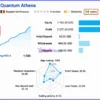
The Quantum Athena X achieved impressive profit performance when trading with XAUUSD (Gold). Trading results on real account for 54 weeks of trading.
Quantum Athena X EA Live Signal
| Metric | Result |
|---|---|
| Growth Since 2025 | 1,580% |
| Tracking Period | 54 weeks |
| Profit | $2,037.24 |
| Initial Deposit | $50.00 |
| Profit Trades | 76.5% |
| Maximum Drawdown | 36.8% |
The displayed signal shows 1,580% total growth, with an overall upward performance curve across the tracking period.
The signal also shows 76.5% profitable trades and a 36.8% maximum drawdown.
The combination of very high historical growth and relatively substantial drawdown is important: the results demonstrate strong upside potential in the displayed period, but also show that the strategy can experience meaningful equity fluctuations.
Historical Trading Results Performance
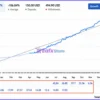
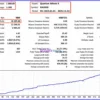
Quantum Athena X has achieved impressive profitability over 12 months of backtesting. The system demonstrates exceptional capability in mastering the market and maximizing profits.
Quantum Athena X EA Backtests
| Metric | Results |
|---|---|
| Initial Deposit | $1,000 |
| Symbol | XAUUSD |
| Timeframe | H1 |
| Total Net Profit | $10,285.08 |
| Profit Factor | 4.47 |
| Recovery Factor | 5.65 |
| Sharpe Ratio | 164.34 |
| Profit Trades | 80.36% |
| Total Trades | 667 |
| Balance Drawdown Maximal | 5.71% |
The historical test produced $10,285.08 net profit from a $1,000 initial deposit in the supplied report.
The test recorded 667 trades, of which 536 were profitable, representing 80.36% of total trades.
The report also shows a 4.47 profit factor, 5.65 recovery factor, and 164.34 Sharpe ratio.
However, the most important risk figure is the 23.55% maximum equity drawdown, demonstrating that the strategy can experience significant temporary equity declines.
Why Quantum Athena X EA Stands Out
Customization Without Rebuilding the EA
Many automated systems give users a fixed configuration. Quantum Athena X takes a different approach by allowing individual strategies to be activated or disabled.
This creates a useful middle ground between:
🔹 Fully automated Plug & Play trading.
🔹 Advanced strategy customization.
Strong Focus on GOLD
Quantum Athena X is not marketed as a generic multi-market EA.
Its development is specifically focused on GOLD/XAUUSD, allowing the strategy architecture to be optimized around one highly liquid but volatile instrument.
Selective Execution
The system emphasizes patience rather than constant trading.
This can help avoid unnecessary entries during periods where the strategy does not identify suitable conditions.
Established Quantum Strategy Lineage
Quantum Athena X builds upon the original Quantum Athena X architecture rather than starting from an unrelated strategy concept.
The MQL5 listing describes it as the next generation of the Quantum Athena X system.
Risk Management Features
Configurable Risk Level
The user can select an appropriate risk level rather than being forced into one universal position-sizing approach.
Controlled Trading Frequency
The EA deliberately avoids excessive market participation, waiting for conditions that satisfy its trading logic.
Strategy Selection
Custom Mode allows users to disable strategies they do not want active, giving greater control over overall market exposure.
Trend-Based Position Building
The grid component is described as trend-following and structured around market momentum rather than indiscriminate averaging.
Broker and Execution Requirements
The recommended environment emphasizes ECN, RAW or low-spread brokers, helping reduce execution costs that can affect automated GOLD trading.
Recommended Trading Conditions
For the best performance, the developer recommends:
| Features | Type |
|---|---|
| Trading platform | MetaTrader 5 (MT5) |
| Time frames | Any |
| Currency pairs | XAUUSD (Gold) |
| Minimum / Recommended deposit | $500+ |
| Minimum / Recommended leverage | 1:100+ |
| Account type | Hedging (ECN, RAW or low-spread) |
| Additional services | Unlock and Decompile |
| Recommended brokers | Exness Broker, Icmarkets Broker |
| Recommended VPS | MyfxVPS.com (Blue VPS, Golden VPS). Lowest Latency, 2 week Free Trial, 100% Free for 12-18 Months. |
Product Download Package?
The download package of the product suite includes:
MQ5 (Source Code)
✅ Quantum Athena X.ex5
✅ Quantum Athena X.mq5
SetFiles
✅ QAX_Auto_Balance.set
✅ QAX_Risk_Reserved.set
✅ QAX_Fixed Lot_Low Risk.set
✅ Quantum Athena X_Very Low Risk.set
✅ Quantum Athena X_Low Risk.set
✅ Quantum Athena X_Medium Risk.set
✅ Quantum Athena X_High Risk.set
➡️ Reviewed by David Easton
Weaknesses and Risk Warnings
Significant Drawdown Is Possible
The supplied live signal shows 36.8% maximum drawdown, while the historical MT5 report shows 23.55% maximum equity drawdown.
Traders must be comfortable with substantial temporary equity fluctuations.
Grid Exposure Requires Careful Risk Control
The system includes a trend-following grid component.
Even though the grid is described as structured around momentum, multiple positions can increase exposure when market conditions move against the strategy.
GOLD Is Highly Volatile
XAUUSD can experience rapid price movements during economic announcements, geopolitical events and changes in market sentiment.
Leverage Can Amplify Losses
The recommended leverage of up to 1:500 can improve capital efficiency but can also magnify exposure when position sizing is too aggressive.
Broker Conditions Matter
Spread, execution speed, slippage, liquidity and contract specifications can affect automated trading results.
Backtest and Live Results Can Differ
The historical report provides useful evidence about past behavior, but it cannot guarantee identical future performance.
Real-market execution may produce materially different results.
Who Should Use Quantum Athena X EA?
Quantum Athena X may be suitable for traders who
🔹 Primarily trade XAUUSD.
🔹 Want a professional MT5 automation solution.
🔹 Prefer selective rather than constant trading.
🔹 Want a Plug & Play configuration.
🔹 Want the option to customize individual strategies.
🔹 Understand trend-following and grid-based exposure.
🔹 Have sufficient capital to tolerate drawdowns.
🔹 Can provide a stable VPS environment.
🔹 Prefer low-spread or ECN/RAW execution.
It is less suitable for traders who expect
🔹 Guaranteed monthly profits.
🔹 Very low drawdown.
🔹 Constantly increasing equity without fluctuations.
🔹 A completely risk-free automated strategy.
🔹 Aggressive leverage without understanding position exposure.
Final Verdict
Quantum Athena X EA is positioned as a more flexible evolution of Quantum Athena, combining six refined GOLD strategies with the major addition of Custom Mode. Its strongest advantage is the ability to choose between a professionally prepared Plug & Play configuration and a more personalized strategy combination.
For traders who want a customizable GOLD MT5 EA with an established strategy framework, selective execution and Plug & Play convenience, Quantum Athena X is a strong candidate.
🔢 Quantum Athena X EA – Complete Settings & Configuration Guide
Quantum Athena X EA is an automated trading system designed for XAUUSD (Gold), with a configuration framework focused on automated position sizing, trading-direction control, drawdown management, execution parameters, visual chart presentation, trading-day filters, and emergency basket protection.
According to the supplied settings panel, the EA uses XAUUSD, supports automated balance-based lot calculation, can trade in both directions, includes an FOMC trading restriction, and provides configurable visual and safety controls. The settings below reproduce all parameters and numerical values visible in the provided image.
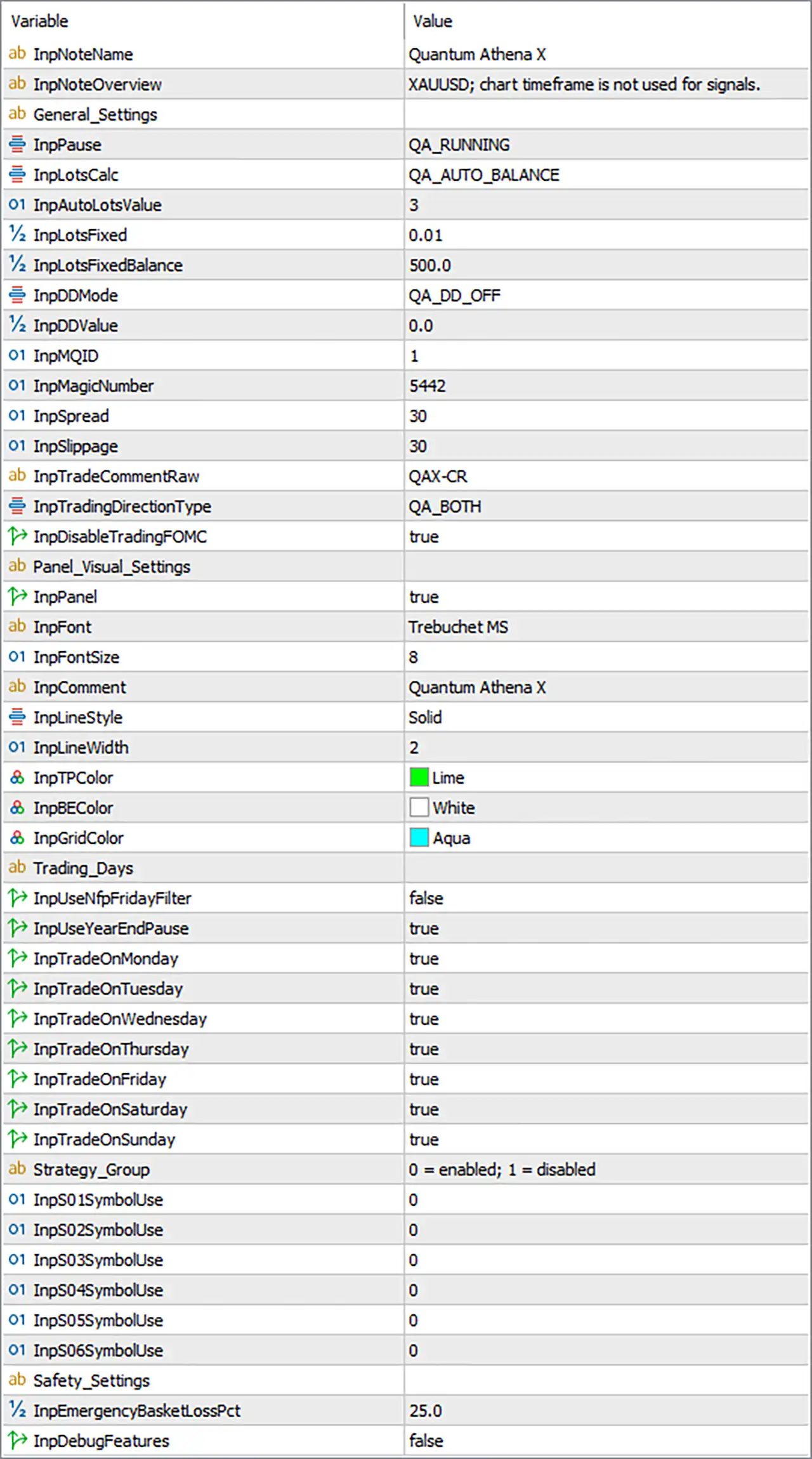
Quantum Athena X EA Settings Panel
🔄 General Settings
🔹 InpNoteName = Quantum Athena X — Defines the EA’s displayed identification/name as Quantum Athena X.
🔹 InpNoteOverview = XAUUSD; chart timeframe is not used for signals. — Indicates that the EA is designed for XAUUSD and that the chart timeframe is not used for generating trading signals.
🔹 General_Settings — Section heading for the EA’s main operational configuration.
🔹 InpPause = QA_RUNNING — Sets the EA operating state to QA_RUNNING, indicating that the configured state is running.
🔹 InpLotsCalc = QA_AUTO_BALANCE — Selects QA_AUTO_BALANCE as the lot-calculation method, meaning position sizing is based on the EA’s automatic balance-based mechanism.
🔹 InpAutoLotsValue = 3 — Sets the automatic lot-sizing parameter to 3; its exact calculation effect depends on the EA’s internal implementation.
🔹 InpLotsFixed = 0.01 — Defines a fixed lot size of 0.01 for configurations or modes that use fixed-lot sizing.
🔹 InpLotsFixedBalance = 500.0 — Sets the balance reference to 500.0 for the fixed-lot configuration.
🔹 InpDDMode = QA_DD_OFF — Selects QA_DD_OFF, disabling the EA’s drawdown-control mode.
🔹 InpDDValue = 0.0 — Sets the drawdown-control value to 0.0, consistent with the drawdown function being disabled.
🔹 InpMQID = 1 — Sets the MQ identifier parameter to 1.
🔹 InpMagicNumber = 5442 — Assigns 5442 as the EA’s Magic Number for identifying and managing its trades.
🔹 InpSpread = 30 — Sets the configured spread threshold to 30.
🔹 InpSlippage = 30 — Sets the maximum configured slippage tolerance to 30.
🔹 InpTradeCommentRaw = QAX-CR — Sets the raw trade comment to QAX-CR, which can be attached to EA-generated orders.
🔹 InpTradingDirectionType = QA_BOTH — Enables QA_BOTH, allowing the EA to operate in both Buy and Sell directions.
🔹 InpDisableTradingFOMC = true — Enables the FOMC trading restriction, meaning trading is disabled around FOMC events according to the EA’s internal event logic.
🔄 Panel & Visual Settings
🔹 Panel_Visual_Settings — Section containing the on-chart display configuration.
🔹 InpPanel = true — Enables the EA information panel on the chart.
🔹 InpFont = Trebuchet MS — Sets Trebuchet MS as the panel font.
🔹 InpFontSize = 8 — Sets the panel font size to 8.
🔹 InpComment = Quantum Athena X — Sets the displayed EA comment/label to Quantum Athena X.
🔹 InpLineStyle = Solid — Uses a Solid line style for the EA’s visual elements.
🔹 InpLineWidth = 2 — Sets the visual line width to 2.
🔹 InpTPColor = Lime — Sets the Take Profit visual color to Lime.
🔹 InpBEColor = White — Sets the Break-Even visual color to White.
🔹 InpGridColor = Aqua — Sets the grid visual color to Aqua.
🔄 Trading Days
🔹 Trading_Days — Section controlling which days of the week the EA is permitted to trade.
🔹 InpUseNfpFridayFilter = false — Disables the dedicated NFP Friday filter.
🔹 InpUseYearEndPause = true — Enables the year-end trading pause.
🔹 InpTradeOnMonday = true — Trading is enabled on Monday.
🔹 InpTradeOnTuesday = true — Trading is enabled on Tuesday.
🔹 InpTradeOnWednesday = true — Trading is enabled on Wednesday.
🔹 InpTradeOnThursday = true — Trading is enabled on Thursday.
🔹 InpTradeOnFriday = true — Trading is enabled on Friday.
🔹 InpTradeOnSaturday = true — Trading is enabled on Saturday.
🔹 InpTradeOnSunday = true — Trading is enabled on Sunday.
Note: Although all seven day switches are set to true, actual trading availability may still depend on the broker’s market hours, symbol availability, and other EA restrictions.
🔄 Strategy Group
🔹 Strategy_Group = 0 = enabled; 1 = disabled — Defines the interpretation of the strategy-group controls: 0 = enabled and 1 = disabled.
🔹 InpS01SymbolUse = 0 — Strategy/Symbol group 01 is set to 0, corresponding to enabled under the displayed rule.
🔹 InpS02SymbolUse = 0 — Strategy/Symbol group 02 is set to 0, corresponding to enabled.
🔹 InpS03SymbolUse = 0 — Strategy/Symbol group 03 is set to 0, corresponding to enabled.
🔹 InpS04SymbolUse = 0 — Strategy/Symbol group 04 is set to 0, corresponding to enabled.
🔹 InpS05SymbolUse = 0 — Strategy/Symbol group 05 is set to 0, corresponding to enabled.
🔹 InpS06SymbolUse = 0 — Strategy/Symbol group 06 is set to 0, corresponding to enabled.
🔄 Safety Settings
🔹 Safety_Settings — Section dedicated to emergency risk protection.
🔹 InpEmergencyBasketLossPct = 25.0 — Sets the emergency basket-loss threshold to 25.0%; this parameter is intended to provide an account-level/basket-level emergency protection mechanism according to the EA’s internal logic.
🔹 InpDebugFeatures = false — Disables debug features, keeping diagnostic functionality turned off during normal operation.
🔄 Quantum Athena X EA – Full Settings Summary
General Configuration
🔹 InpNoteName = Quantum Athena X — EA identification name.
🔹 InpNoteOverview = XAUUSD; chart timeframe is not used for signals. — XAUUSD-focused system with chart timeframe-independent signals.
🔹 InpPause = QA_RUNNING — EA running state.
🔹 InpLotsCalc = QA_AUTO_BALANCE — Automatic balance-based lot calculation.
🔹 InpAutoLotsValue = 3 — Automatic lot-sizing parameter.
🔹 InpLotsFixed = 0.01 — Fixed lot size.
🔹 InpLotsFixedBalance = 500.0 — Fixed-lot balance reference.
🔹 InpDDMode = QA_DD_OFF — Drawdown protection disabled.
🔹 InpDDValue = 0.0 — Drawdown value set to 0.0.
🔹 InpMQID = 1 — MQ identifier.
🔹 InpMagicNumber = 5442 — EA trade identifier.
🔹 InpSpread = 30 — Spread setting.
🔹 InpSlippage = 30 — Slippage setting.
🔹 InpTradeCommentRaw = QAX-CR — Trade comment.
🔹 InpTradingDirectionType = QA_BOTH — Buy and Sell trading enabled.
🔹 InpDisableTradingFOMC = true — FOMC trading restriction enabled.
Visual Configuration
🔹 InpPanel = true — Information panel enabled.
🔹 InpFont = Trebuchet MS — Panel font.
🔹 InpFontSize = 8 — Font size.
🔹 InpComment = Quantum Athena X — Panel comment/name.
🔹 InpLineStyle = Solid — Solid visual lines.
🔹 InpLineWidth = 2 — Line width.
🔹 InpTPColor = Lime — Take Profit color.
🔹 InpBEColor = White — Break-Even color.
🔹 InpGridColor = Aqua — Grid color.
Trading Schedule
🔹 InpUseNfpFridayFilter = false — NFP Friday filter disabled.
🔹 InpUseYearEndPause = true — Year-end pause enabled.
🔹 InpTradeOnMonday = true — Monday trading enabled.
🔹 InpTradeOnTuesday = true — Tuesday trading enabled.
🔹 InpTradeOnWednesday = true — Wednesday trading enabled.
🔹 InpTradeOnThursday = true — Thursday trading enabled.
🔹 InpTradeOnFriday = true — Friday trading enabled.
🔹 InpTradeOnSaturday = true — Saturday trading enabled.
🔹 InpTradeOnSunday = true — Sunday trading enabled.
Strategy Controls
🔹 InpS01SymbolUse = 0 — Strategy group 01 enabled.
🔹 InpS02SymbolUse = 0 — Strategy group 02 enabled.
🔹 InpS03SymbolUse = 0 — Strategy group 03 enabled.
🔹 InpS04SymbolUse = 0 — Strategy group 04 enabled.
🔹 InpS05SymbolUse = 0 — Strategy group 05 enabled.
🔹 InpS06SymbolUse = 0 — Strategy group 06 enabled.
Safety
🔹 InpEmergencyBasketLossPct = 25.0 — Emergency basket-loss threshold.
🔹 InpDebugFeatures = false — Debug features disabled.
🔢 Overview
Quantum Athena X EA MT5 settings are designed for automated XAUUSD trading, with configurable automatic lot sizing, fixed lot sizing, spread control, slippage control, Buy/Sell direction management, FOMC protection, trading-day filters, strategy-group activation, chart visualization, and emergency basket-loss protection.
The supplied configuration uses QA_AUTO_BALANCE for lot calculation, with InpAutoLotsValue = 3, while the alternative fixed-lot parameters are InpLotsFixed = 0.01 and InpLotsFixedBalance = 500.0. Drawdown protection is currently set to QA_DD_OFF with InpDDValue = 0.0.
For execution, the EA uses InpSpread = 30, InpSlippage = 30, InpMagicNumber = 5442, and InpTradeCommentRaw = QAX-CR. Trading direction is set to QA_BOTH, allowing both Buy and Sell operations.
The visual system is enabled with InpPanel = true, Trebuchet MS, font size 8, line width 2, and Lime, White, and Aqua visual colors. The configuration also enables all seven displayed trading-day switches while activating the year-end pause and disabling the dedicated NFP Friday filter.
🔢 Conclusion
Quantum Athena X EA provides a broad configuration structure covering the key components of an automated XAUUSD trading system. Its settings allow users to control position sizing, execution limits, trading direction, event restrictions, visual presentation, trading days, strategy groups, and emergency protection.
The current configuration is particularly notable for QA_AUTO_BALANCE lot calculation, QA_BOTH trading direction, Magic Number 5442, Spread 30, Slippage 30, and a 25.0% emergency basket-loss setting. The six strategy-symbol controls are all set to 0, which the panel explicitly defines as enabled.
These values describe the configuration shown in the supplied settings image. They should not automatically be considered optimal for every account or broker. Backtesting, forward testing, and careful risk evaluation are recommended before using an automated trading system with real funds.
User Reviews
Only logged in customers who have purchased this product may leave a review.
❓ How many strategies are included in Quantum Athena X EA?
Quantum Athena X EA includes six independently refined strategies, each optimized for current GOLD market conditions and available through the system's strategy selection.
❓ Can I choose which strategies Quantum Athena X EA uses?
Yes. Quantum Athena X EA features Custom Mode, allowing traders to enable or disable individual strategies and create a personalized trading combination.
❓ Does Quantum Athena X EA have a Plug & Play setup?
Yes. Quantum Athena X EA includes a fully optimized default configuration for traders who prefer a prepared setup without creating their own strategy combination.
❓ What trading approach does Quantum Athena X EA use?
Quantum Athena X EA uses an elite trend-following grid approach that builds positions according to structured market momentum rather than random price movement.
❓ Does Quantum Athena X EA trade constantly?
No. Quantum Athena X EA is designed for controlled participation, waiting for strict market conditions and higher-quality opportunities instead of forcing frequent trades.
❓ What market is Quantum Athena X EA designed for?
Quantum Athena X EA is designed specifically for GOLD, with its strategies refined around current Gold market behavior and its required trading environment.
❓ What account type is recommended for Quantum Athena X EA?
Quantum Athena X EA is recommended for Hedging accounts and ECN, RAW, or low-spread brokers, with stable execution conditions for automated trading.
❓ Is a VPS required for Quantum Athena X EA?
Yes. A VPS is mandatory according to the provided requirements, supporting continuous automated operation and stable market monitoring throughout the trading period.
🔥 Get This EA for FREE with Our Membership! 🚀🚀
Unlock access to this EA, premium Indicators, and exclusive trading tools completely FREE with any of our Membership Plans! Thousands of traders already benefit from our VIP library—join them and level up your trading instantly. Choose Your Membership:
- SPECIAL – 1 Month Membership
- GOLD – 1 Year Membership
- PREMIUM – 1 Year Membership
-
 Original price was: $549.99.$249.00Current price is: $249.00.
-
 Original price was: $739.79.$599.00Current price is: $599.00.
-
 Original price was: $999.00.$599.00Current price is: $599.00.
-
 Original price was: $500.00.$249.00Current price is: $249.00.
-
 1Original price was: $2,500.00.$299.00Current price is: $299.00.
-
 1Original price was: $2,500.00.$199.00Current price is: $199.00.
-
 2Original price was: $3,999.00.$199.00Current price is: $199.00.
-
 1Original price was: $799.00.$129.00Current price is: $129.00.
There are no reviews yet.