


🔢 Quantum Valkyrie Robot Settings Guide – Complete Parameter Explanation
Quantum Valkyrie Robot is a professional automated Gold trading Expert Advisor optimized for XAUUSD on the M15 timeframe. It combines intelligent automatic lot sizing, adaptive ATR-based stop loss management, dynamic risk control, optimized execution filters and flexible trading-day scheduling.
With customizable money management and built-in protection against high-volatility periods such as NFP and holiday trading, Quantum Valkyrie Robot provides traders with a reliable and disciplined solution for automated Gold trading.
🔢 Installation Panel Parameters
Below are the details of the parameters in the advisor’s trading system settings table:
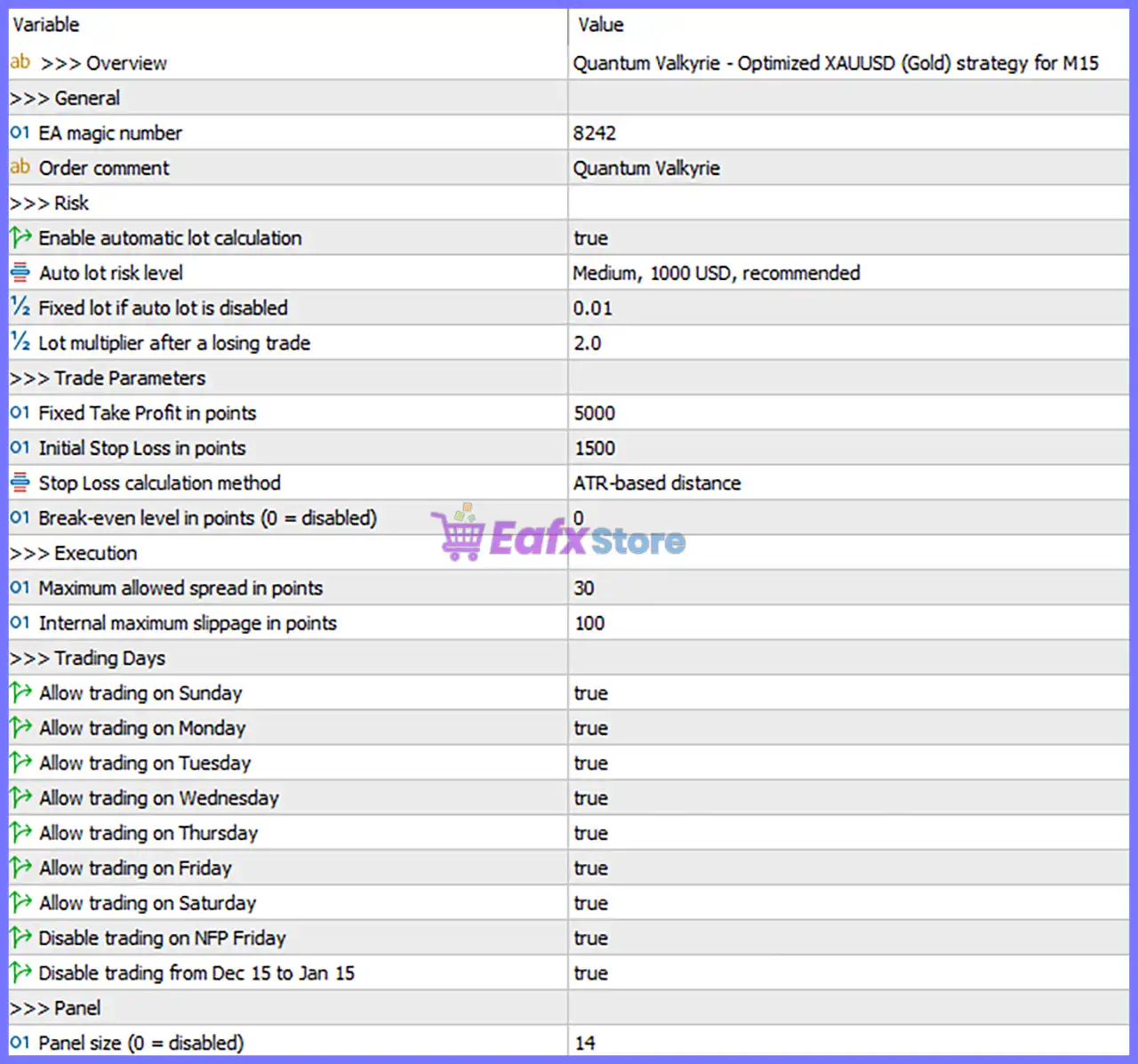
🔶 Overview
🔹 Overview = Quantum Valkyrie - Optimized XAUUSD (Gold) strategy for M15 – Indicates that the EA is optimized for trading XAUUSD (Gold) on the M15 timeframe.
🔶 General
🔹 EA Magic Number = 8242 – Unique identifier assigned to all trades opened by Quantum Valkyrie Robot, allowing independent trade management.
🔹 Order Comment = Quantum Valkyrie – Adds the custom comment "Quantum Valkyrie" to every trade for easy identification.
🔶 Risk Management
🔹 Enable Automatic Lot Calculation = true – Enables automatic lot size calculation based on the selected risk profile.
🔹 Auto Lot Risk Level = Medium, 1000 USD, recommended – Uses the Medium risk profile with a recommended minimum account balance of 1000 USD.
🔹 Fixed Lot if Auto Lot is Disabled = 0.01 – Uses a fixed trading volume of 0.01 lots when automatic lot calculation is turned off.
🔹 Lot Multiplier After a Losing Trade = 2.0 – Multiplies the lot size by 2.0 after a losing trade according to the EA's recovery logic.
🔶 Trade Parameters
🔹 Fixed Take Profit in Points = 5000 – Sets the Take Profit target to 5000 points for each position.
🔹 Initial Stop Loss in Points = 1500 – Sets the initial Stop Loss distance to 1500 points.
🔹 Stop Loss Calculation Method = ATR-based distance – Calculates the Stop Loss dynamically using the Average True Range (ATR).
🔹 Break-even Level in Points (0 = Disabled) = 0 – Break-even protection is disabled because the value is 0.
🔶 Execution
🔹 Maximum Allowed Spread in Points = 30 – The EA opens new trades only when the current spread is 30 points or lower.
🔹 Internal Maximum Slippage in Points = 100 – Allows a maximum execution slippage of 100 points before rejecting an order.
🔶 Trading Days
🔹 Allow Trading on Sunday = true – Trading is enabled on Sunday.
🔹 Allow Trading on Monday = true – Trading is enabled on Monday.
🔹 Allow Trading on Tuesday = true – Trading is enabled on Tuesday.
🔹 Allow Trading on Wednesday = true – Trading is enabled on Wednesday.
🔹 Allow Trading on Thursday = true – Trading is enabled on Thursday.
🔹 Allow Trading on Friday = true – Trading is enabled on Friday.
🔹 Allow Trading on Saturday = true – Trading is enabled on Saturday.
🔹 Disable Trading on NFP Friday = true – Prevents the EA from opening new trades during Non-Farm Payroll (NFP) Fridays to reduce exposure to extreme market volatility.
🔹 Disable Trading from Dec 15 to Jan 15 = true – Suspends trading between December 15 and January 15 to avoid the lower liquidity and irregular market conditions typically seen during the holiday season.
🔶 Panel Settings
🔹 Panel Size (0 = Disabled) = 14 – Displays the on-chart information panel using size 14; setting 0 would disable the panel completely.
🔢 Conclusion
Quantum Valkyrie Robot provides a streamlined yet powerful configuration designed specifically for automated XAUUSD M15 trading. Its intelligent money management, ATR-based stop loss calculation, automatic lot sizing, spread protection, and built-in trading schedule filters help traders maintain disciplined execution while adapting to changing market conditions.
By understanding and properly configuring these parameters, traders can optimize the EA's performance and align it with their preferred level of risk and account size.
🔢 FAQs
❓ What market is Quantum Valkyrie Robot optimized for?
Quantum Valkyrie Robot is optimized for XAUUSD (Gold) on the M15 timeframe, providing settings specifically tuned for this market.
❓ Should I use Auto Lot or Fixed Lot?
The recommended option is Enable Automatic Lot Calculation = true, which uses the Medium risk profile designed for an account balance of approximately 1000 USD. If disabled, the EA trades with the configured 0.01 lot size.
❓ Why is the Break-even feature disabled?
The parameter Break-even Level in Points = 0 disables automatic break-even protection. Traders can increase this value to activate automatic Stop Loss adjustment after a predefined profit.
❓ What is the purpose of disabling trading during NFP and holidays?
The EA avoids opening trades during NFP Fridays and the period from December 15 to January 15 to reduce exposure to unusually high volatility, low liquidity, and unpredictable price movements.
❓ What does the Lot Multiplier After a Losing Trade do?
The Lot Multiplier = 2.0 increases the next trade's position size after a losing trade according to the EA's built-in recovery strategy. Traders should use this feature carefully, as larger lot sizes also increase potential risk.



