


Sigma Trend Protocol STP EA MT5 (Latest version) - Unlimited

Subscriptions for Special Plan
- 30 EA package is more economical!
- Special package with 99%
- Download 1 EA/Day

Subscriptions for Premium Membership
- Download Unlimited in 1 Year
- Get 100% Discount
- Get free access to all

Subscriptions for Gold Membership
- 1 Year Membership
- Get 100% Discount
- Access EA+Indicator+Course
Frequently bought together 🎁
Add these products to enhance your purchase




Quick Overview
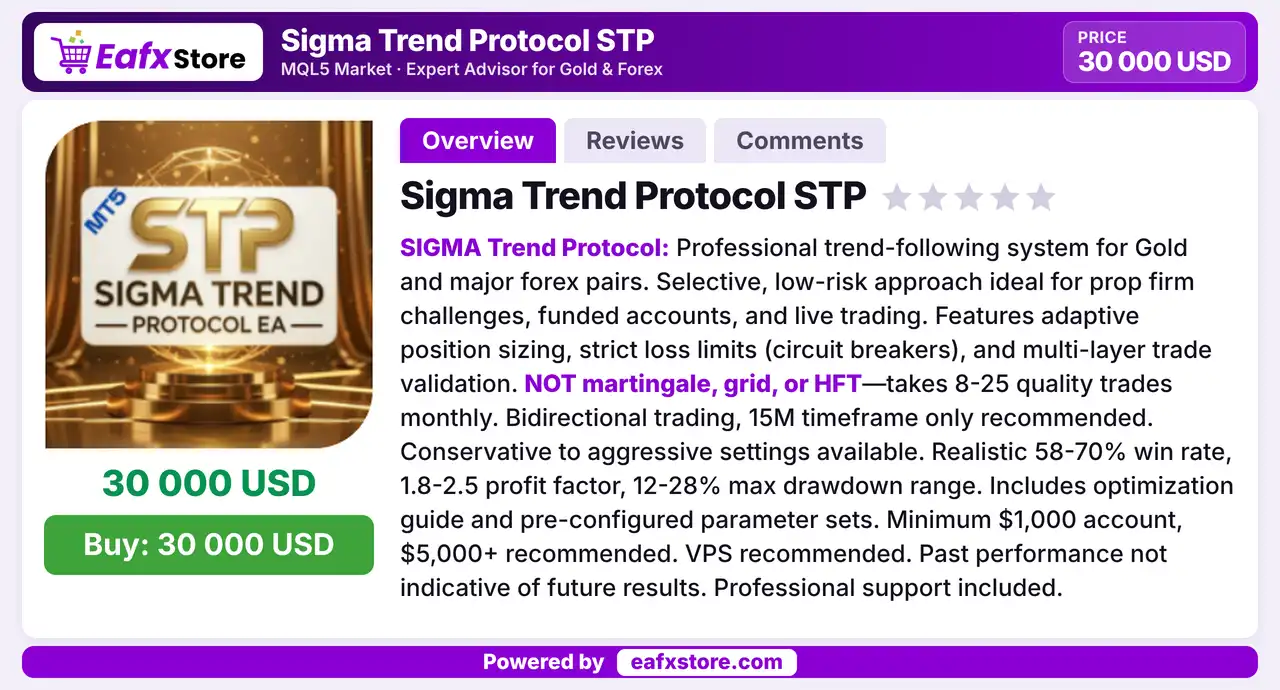
Sigma Trend Protocol STP EA is a trend following robot for gold and major forex pairs that trades both directions and takes only a few setups each month. Each trade passes several validation layers, position size adapts to the account and circuit breakers cap losses. It is described as not martingale, grid or high frequency, and it targets prop firm accounts.
Best For:
✅ Gold traders who want a selective robot.
✅ Prop firm and funded account users.
✅ Traders who value circuit breaker limits.
✅ Users who accept a low trade count.
✅ Traders who want conservative presets.
What is Sigma Trend Protocol STP EA?
Sigma Trend Protocol STP EA is an Expert Advisor (EA) for MetaTrader 5. It is a trend following system for gold and major forex pairs.
It is built for a selective, low risk style and is aimed at prop firm challenges, funded accounts and live trading.
 Vendor Website: View here
Delivery time 24h-48h after payment.
Refund if not delivered.
You will receive the current version without any limitations (ID+Time).
Sigma Trend Protocol STP EA MT5 Review
How Does Sigma Trend Protocol STP EA Work?
Trend Following
The EA trades with the prevailing trend and opens both buy and sell positions, depending on the direction of the market.
Layered Validation
Each setup passes several checks before a trade is placed, so only quality setups are taken.
Adaptive Sizing
Position size adapts to account conditions, which helps to keep the risk of each trade consistent.
Circuit Breakers
Strict loss limits stop trading when losses reach a set level, which protects the account from a long losing run.
Trading Strategy
Follow the Trend
The EA looks for the prevailing direction on gold and major pairs and opens buy or sell positions that agree with it.
Validate Each Setup
A trade is placed only after several layers of market checks agree, which removes many weak signals before an order is sent.
Wait for Quality Setups
The system is described as taking only a small number of trades each month, so it spends most of its time out of the market.
Adapt the Position Size
Volume is adjusted with account conditions, which aims to keep the risk of each trade steady as the balance changes.
Pause After Losses
Strict loss limits work as circuit breakers, so trading stops once losses reach a set level and cannot continue after a bad run.
Historical Trading Results Performance
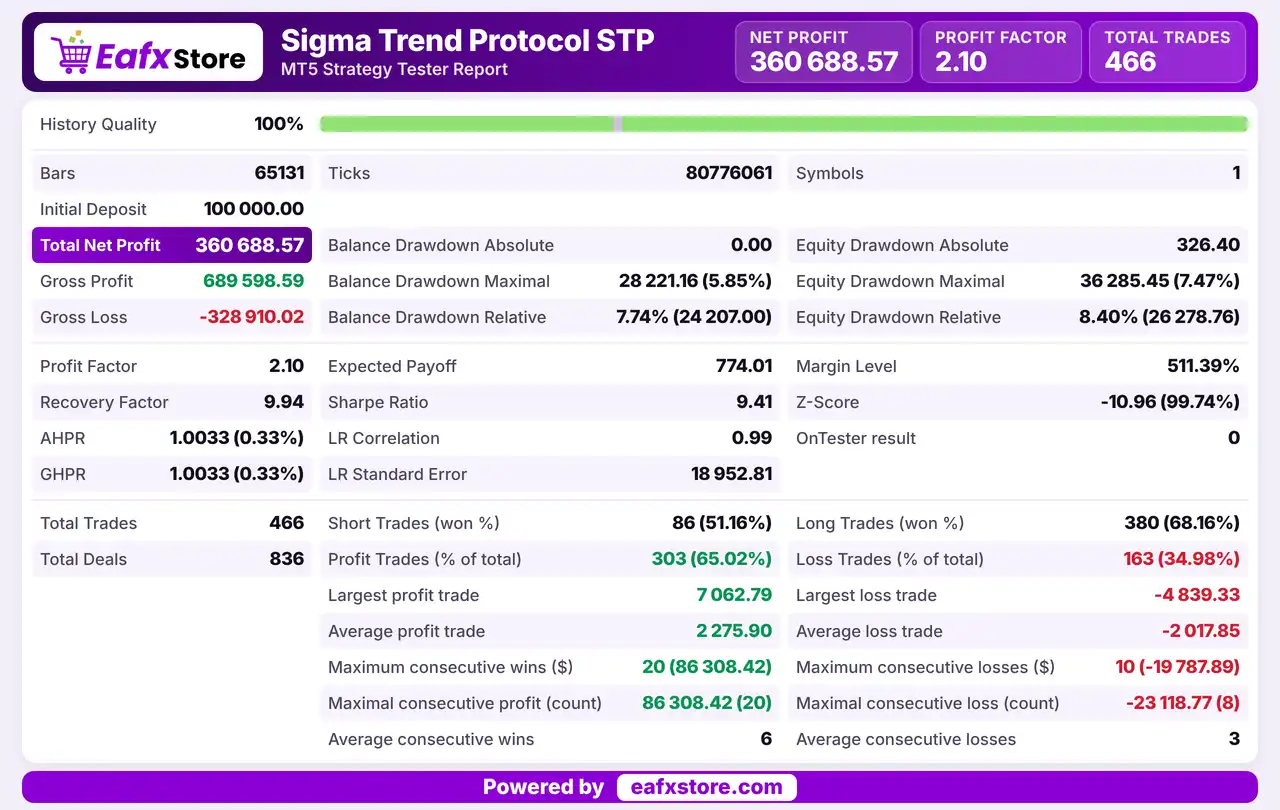
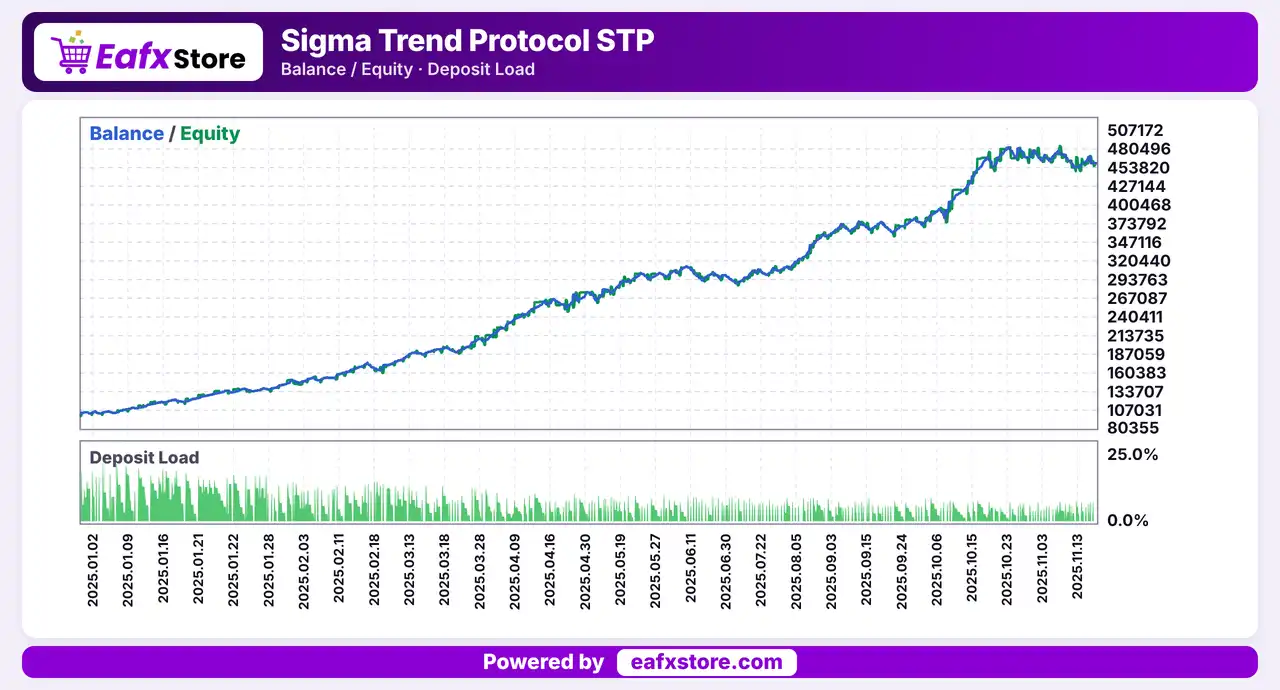
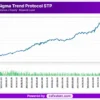
This EA was backtested on XAUUSD (Gold). The test duration is not shown in the report. The strategy generated a net profit of $360,688.57 from an initial deposit of $100,000.
Sigma Trend Protocol STP EA MT5 Backtest Results
Sigma Trend Protocol STP EA Backtest Results
| Parameter | Results |
|---|---|
| Trading Symbol | XAUUSD |
| Testing Period | 11 months |
| Initial Deposit | $100,000 |
| Total Net Profit | $360,688.57 |
| Profit Factor | 2.10 |
| Total Trades | 466 |
Key Features of Sigma Trend Protocol STP EA
Trend Following Logic
The EA is built around following the main trend, with buy and sell trades in both directions on the same instrument at any time.
Layered Trade Validation
Several checks must agree before an order is sent, which is meant to raise the quality of entries and to cut weak signals early.
Adaptive Position Sizing
Trade volume follows the state of the account instead of a single fixed lot, which keeps the exposure in proportion to the balance over time.
Circuit Breaker Loss Limits
Strict loss limits halt trading when losses reach a chosen level, which fits the daily and total drawdown rules used by most prop firms.
Gold Focus with Forex Support
The system is optimized for XAUUSD and is said to work on major forex pairs too, without changing the core logic of the system.
Conservative to Aggressive Settings
Risk can be set from a careful level to a bolder one, so the same EA can suit different accounts and different trading goals.
Optimization Guide and Presets
A guide and ready parameter sets are described as part of the package, which gives the first setup a clear and simple starting point.
Risk Management
Stated Numbers Are Only Expectations
The win rate, profit factor and drawdown ranges are goals and not test results, so real results can be quite different.
Loss Limits Act After the Loss
A circuit breaker works once losses have happened, and a gap can pass a stop-loss and cause a larger loss than planned.
Aggressive Settings Raise Drawdown
Bolder presets use larger risk, so a short run of losses can cause a deep drop in the balance.
Few Trades Make Results Uneven
With a low trade count one or two losses can change a whole month, and a take-profit is never guaranteed on any trade.
What Sets It Apart
Loss Limits Built in
Strict circuit breakers are part of the system, which answers the drawdown rules found in prop firm challenges.
Low Trade Count by Design
Few quality trades make the EA easy to follow and less exposed to spread costs than a busy scalper.
No Grid or Martingale
The product is described as avoiding both methods, which removes the usual chain of averaging down trades.
Ready to Start
Presets and an optimization guide give a trader a clear base to begin from instead of a blank list of inputs.
Who Should Use Sigma Trend Protocol STP EA?
Prop Firm Candidates
People working on challenges or funded accounts who need loss limits and a robot that trades only a few times a month.
Patient Gold Traders
Users who accept a low trade count and want a rule based trend system instead of constant activity.
Cautious Risk Takers
Traders who prefer capital protection and will start with a conservative preset and test it carefully first.
Not for Traders Who
Want daily trades, scalping, grid or martingale methods, or expect a guaranteed profit from an EA.
Recommended Trading Conditions
For the best performance, the developer recommends:
| Features | Type |
|---|---|
| Trading platform | MetaTrader 5 (MT5) |
| Time frames | Any |
| Currency pairs | Gold and Major forex pairs |
| Minimum / Recommended deposit | $1,000+ |
| Minimum / Recommended leverage | Any |
| Account type | ECN, STP or Standard |
| Additional services | Unlock and Decompile |
| Recommended brokers | Exness Broker, Icmarkets Broker |
| Recommended VPS | MyfxVPS.com (Blue VPS, Golden VPS). Lowest Latency, 2 week Free Trial, 100% Free for 12-18 Months. |
Product Download Package?
The download package of the product suite includes:
 Experts: Sigma Trend Protocol STP.ex5
 Reviewed by David Easton
Final Verdict
Sigma Trend Protocol STP EA is a selective trend following robot for gold and major forex pairs, with layered trade validation, adaptive position sizing and circuit breaker loss limits. It suits patient traders and prop firm candidates who accept a low number of trades and clear loss limits. The timeframe details conflict, the stated statistics are expectations and not test results, so a demo trial with a conservative preset and a close look at the loss limits should come before any live trading.
🔢 Sigma Trend Protocol STP EA MT5: Complete Settings Guide and Input Parameters Explained
Sigma Trend Protocol STP EA is an automated trading Expert Advisor configured around trend identification, market-regime detection, multi-timeframe confirmation, and structured entry and exit management. Its inputs combine linear regression, ATR, Donchian Channels, ADX, Exponential Moving Averages (EMAs), Keltner Channels, and MACD to help evaluate market direction, volatility, and potential entry conditions.
The EA also includes configurable risk limits, adaptive position sizing, session filters, spread controls, news-event filtering, and trailing-stop management. The following guide explains all visible settings from both supplied input panels, preserving their original names and numerical values.
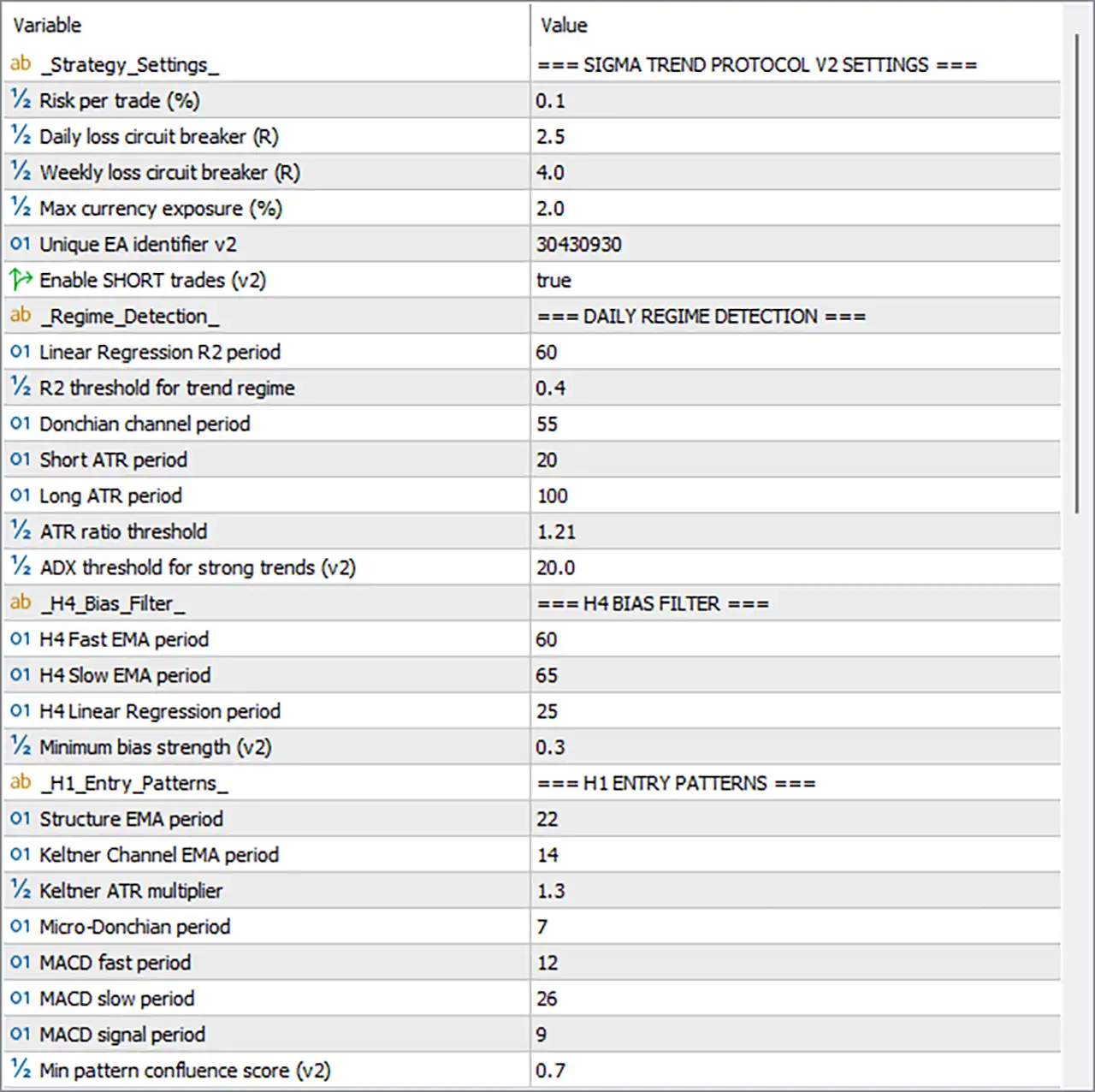
Sigma Trend Protocol STP EA MT5 Settings Panel
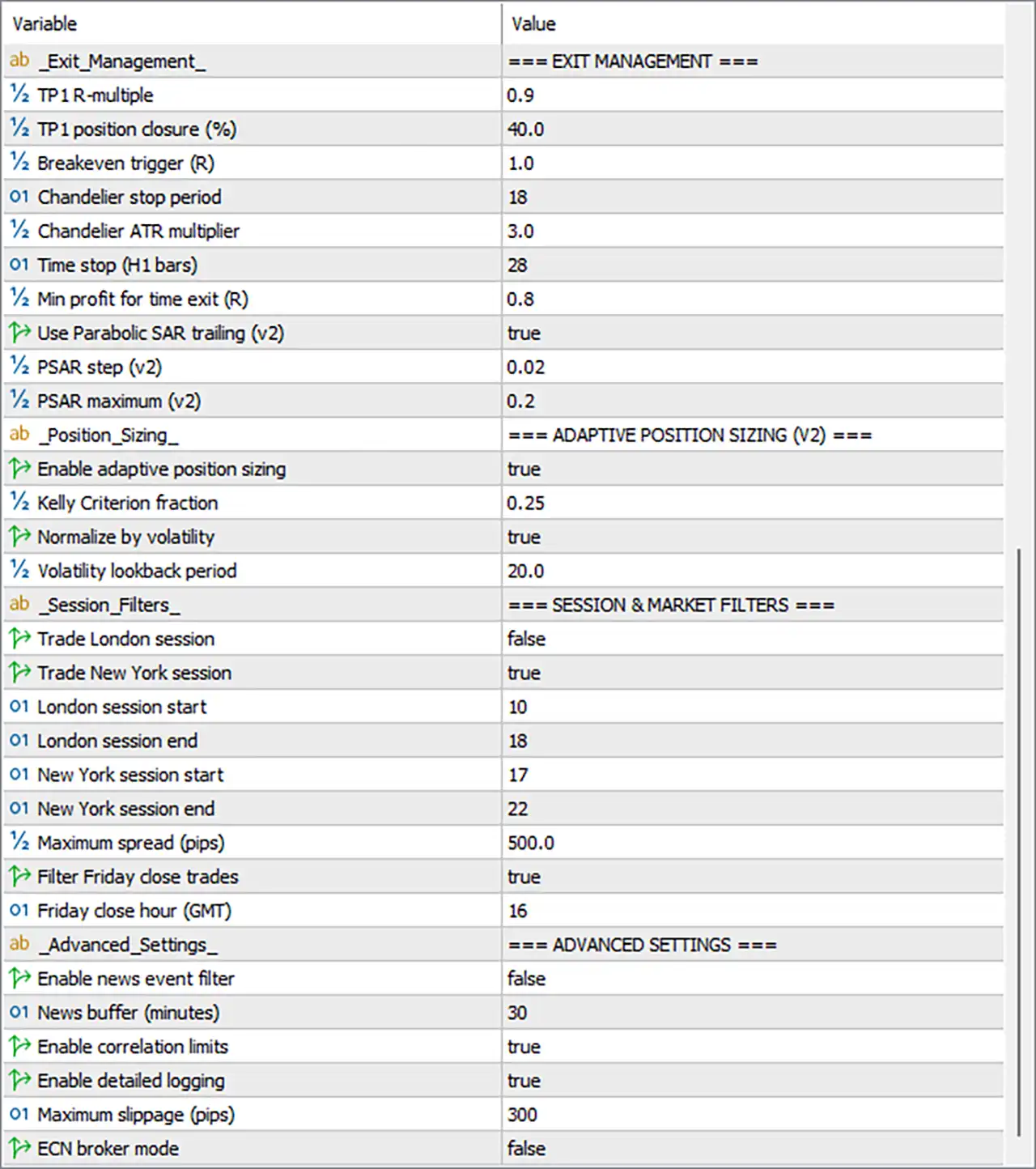
Sigma Trend Protocol STP EA Settings Panel
⚙️ Strategy Settings — Sigma Trend Protocol V2
🔹 Strategy_Settings = Sigma Trend Protocol V2 Settings: Section heading identifying the main strategy and risk-control parameters.
🔹 Risk per trade (%) = 0.1: Sets the configured risk per trade to 0.1%. If the EA uses this value as a percentage of account equity or balance, it represents a relatively conservative nominal risk setting, although the actual position size depends on the EA’s calculation method.
🔹 Daily loss circuit breaker (R) = 2.5: Sets the daily loss threshold to 2.5R, where R typically represents the predefined risk associated with one trade. If implemented as a daily loss limit, the EA may stop opening trades after reaching this threshold.
🔹 Weekly loss circuit breaker (R) = 4.0: Sets the weekly loss threshold to 4.0R. This parameter can be used to limit further trading after cumulative losses reach the configured multiple of the defined trade risk.
🔹 Max currency exposure (%) = 2.0: Sets the maximum currency exposure parameter to 2.0%. The precise exposure calculation depends on the EA’s implementation, including whether exposure is measured by open risk, currency concentration, or another internal metric.
🔹 Unique EA identifier v2 = 30430930: Assigns the unique EA identifier 30430930 to the V2 strategy instance, helping distinguish its managed trades from those associated with other EAs or configurations.
🔹 Enable SHORT trades (v2) = true: Enables short-selling signals for the V2 strategy, allowing the EA to consider sell trades when its entry rules and applicable filters are satisfied.
⚙️ Daily Regime Detection
🔹 Regime_Detection = Daily Regime Detection: Section heading for the parameters used to classify market conditions.
🔹 Linear Regression R2 period = 60: Sets the linear regression analysis period to 60 bars. The resulting R-squared measure can help assess how closely price movement follows a linear trend over the selected period.
🔹 R2 threshold for trend regime = 0.4: Sets the trend-regime R-squared threshold to 0.4. If the EA compares its calculated R-squared value against this threshold, the result helps determine whether the market qualifies as sufficiently trend-oriented.
🔹 Donchian channel period = 55: Sets the Donchian Channel calculation period to 55 bars. This channel tracks the highest high and lowest low across the selected window and can help identify breakouts or price-range boundaries.
🔹 Short ATR period = 20: Sets the short-term Average True Range (ATR) calculation period to 20 bars, providing a measure of recent market volatility.
🔹 Long ATR period = 100: Sets the long-term ATR period to 100 bars, providing a broader volatility reference for comparison with the short-term ATR.
🔹 ATR ratio threshold = 1.21: Sets the ATR ratio threshold to 1.21. When the EA compares short-term and long-term volatility, this value can help identify volatility expansion or contraction according to its programmed rules.
🔹 ADX threshold for strong trends (v2) = 20.0: Sets the Average Directional Index (ADX) threshold to 20.0. The EA can use this value to assess trend strength; the exact entry or regime decision depends on its implementation.
⚙️ H4 Bias Filter
🔹 H4_Bias_Filter = H4 Bias Filter: Section heading for the higher-timeframe directional filter based on the four-hour chart.
🔹 H4 Fast EMA period = 60: Sets the fast Exponential Moving Average period to 60 on the H4 bias-filter calculation, helping assess the broader price direction.
🔹 H4 Slow EMA period = 65: Sets the slow Exponential Moving Average period to 65. Comparing the fast EMA of 60 with the slow EMA of 65 may help identify directional bias, depending on the EA’s logic.
🔹 H4 Linear Regression period = 25: Sets the higher-timeframe linear regression period to 25 bars, providing another measure of the direction or structure of H4 price movement.
🔹 Minimum bias strength (v2) = 0.3: Sets the minimum higher-timeframe bias-strength threshold to 0.3. The EA may use this value to reject weak or unclear directional conditions before considering entries.
⚙️ H1 Entry Patterns
🔹 H1_Entry_Patterns = H1 Entry Patterns: Section heading for entry-condition parameters associated with the one-hour timeframe.
🔹 Structure EMA period = 22: Sets the EMA period used for the entry-structure calculation to 22 bars, helping assess price direction or structure on the H1 timeframe.
🔹 Keltner Channel EMA period = 14: Sets the EMA period used in the Keltner Channel calculation to 14 bars. This EMA generally provides the channel’s central reference line.
🔹 Keltner ATR multiplier = 1.3: Sets the Keltner Channel ATR multiplier to 1.3, controlling the channel’s width relative to measured volatility.
🔹 Micro-Donchian period = 7: Sets the Micro-Donchian Channel period to 7 bars. This short lookback can help identify local breakouts or short-term price boundaries.
🔹 MACD fast period = 12: Sets the fast MACD moving-average period to 12 bars, controlling the faster component of the MACD calculation.
🔹 MACD slow period = 26: Sets the slow MACD moving-average period to 26 bars, defining the slower component used to calculate the difference between the fast and slow averages.
🔹 MACD signal period = 9: Sets the MACD signal-line period to 9 bars, smoothing the MACD value to help assess momentum changes and potential signal-line crossovers.
🔹 Min pattern confluence score (v2) = 0.7: Sets the minimum pattern-confluence score to 0.7. The EA may require entry conditions to achieve this score before accepting a setup; the exact scoring scale depends on the strategy’s internal logic.
⚙️ Exit Management
🔹 Exit_Management = Exit Management: Section heading for take-profit, breakeven, trailing, and time-based exit controls.
🔹 TP1 R-multiple = 0.9: Sets the first take-profit target at 0.9R, where R generally represents the initial trade risk. If applied directly, TP1 is targeted at 0.9 times the initial risk distance.
🔹 TP1 position closure (%) = 40.0: Configures the first take-profit action to close 40.0% of the position when TP1 is reached, subject to the EA’s order-management implementation.
🔹 Breakeven trigger (R) = 1.0: Sets the breakeven activation threshold to 1.0R. When the trade reaches the configured profit multiple, the EA may move the stop-loss to the entry price or to a calculated breakeven level.
🔹 Chandelier stop period = 18: Sets the Chandelier Exit lookback period to 18 bars. This method commonly uses recent highs or lows together with ATR to calculate a volatility-adjusted trailing stop.
🔹 Chandelier ATR multiplier = 3.0: Sets the Chandelier Exit ATR multiplier to 3.0, controlling the distance between the relevant price extreme and the calculated stop level.
🔹 Time stop (H1 bars) = 28: Sets the time-based exit threshold to 28 H1 bars. If the EA closes positions after this limit, it corresponds to approximately 28 hours of H1 bar time, excluding market closures and gaps.
🔹 Min profit for time exit (R) = 0.8: Sets the minimum profit threshold for the time-based exit to 0.8R. This may determine whether a trade qualifies for a time-related exit, depending on the programmed conditions.
🔹 Use Parabolic SAR trailing (v2) = true: Enables Parabolic SAR-based trailing-stop management for the V2 strategy.
🔹 PSAR step (v2) = 0.02: Sets the Parabolic SAR acceleration step to 0.02, controlling how the indicator’s trailing reference responds to price movement.
🔹 PSAR maximum (v2) = 0.2: Sets the maximum Parabolic SAR acceleration factor to 0.2, limiting how far the acceleration step can increase under the standard PSAR calculation.
⚙️ Adaptive Position Sizing (V2)
🔹 Position_Sizing = Adaptive Position Sizing (V2): Section heading for dynamic position-volume management.
🔹 Enable adaptive position sizing = true: Enables adaptive position sizing, allowing the EA to adjust trading volume according to its configured sizing logic rather than relying exclusively on a constant lot size.
🔹 Kelly Criterion fraction = 0.25: Sets the Kelly fraction to 0.25, or one-quarter of the full Kelly calculation if implemented conventionally. Fractional Kelly sizing is commonly used to reduce exposure compared with full Kelly sizing, but the outcome depends on the EA’s underlying probability and payoff estimates.
🔹 Normalize by volatility = true: Enables volatility normalization for position sizing. The EA can adjust volume according to measured volatility, subject to its internal calculation method.
🔹 Volatility lookback period = 20.0: Sets the volatility lookback period to 20.0. This value is likely used to determine the historical window for volatility estimation; confirm whether the EA expects an integer period or accepts a decimal input.
⚙️ Session and Market Filters
🔹 Session_Filters = Session & Market Filters: Section heading for time-based trading restrictions and market-condition filters.
🔹 Trade London session = false: Disables trading during the London session through this option.
🔹 Trade New York session = true: Enables trading during the New York session, subject to the configured session times and any additional filters.
🔹 London session start = 10: Sets the London session start parameter to hour 10, according to the EA’s configured time reference.
🔹 London session end = 18: Sets the London session end parameter to hour 18.
🔹 New York session start = 17: Sets the New York session start parameter to hour 17.
🔹 New York session end = 22: Sets the New York session end parameter to hour 22.
🔹 Maximum spread (pips) = 500.0: Sets the maximum spread threshold to 500.0 pips. This is a large value under conventional pip definitions, so verify how the EA converts pips for the traded instrument and whether the intended setting is actually points or another unit.
🔹 Filter Friday close trades = true: Enables the Friday closing filter, allowing the EA to apply its configured Friday-related trade restrictions or closure rules.
🔹 Friday close hour (GMT) = 16: Sets the Friday closing hour to 16 GMT, corresponding to 16:00 GMT if the EA interprets this parameter as a 24-hour clock value.
⚙️ Advanced Settings
🔹 Advanced_Settings = Advanced Settings: Section heading for news protection, correlation control, logging, and execution-related settings.
🔹 Enable news event filter = false: Disables the news-event filter. The News buffer (minutes) value remains configured but may not be applied while this switch is off.
🔹 News buffer (minutes) = 30: Sets the news-event buffer to 30 minutes. If the news filter is enabled, this value may define the period around relevant events during which trading is restricted; confirm whether the buffer applies before events, after events, or both.
🔹 Enable correlation limits = true: Enables correlation-limit controls, which may restrict exposure to highly correlated instruments or signals according to the EA’s internal rules.
🔹 Enable detailed logging = true: Enables detailed logging to help record the EA’s activity, decisions, or diagnostic information. This can assist with testing and troubleshooting.
🔹 Maximum slippage (pips) = 300: Sets the maximum slippage parameter to 300 pips. This is unusually high under conventional pip definitions, so verify the unit conversion and intended threshold before using it in live trading.
🔹 ECN broker mode = false: Disables ECN broker mode. If the EA supports different execution procedures for ECN brokers, the alternative execution mode will be used under this configuration.
🔢 Conclusion
Sigma Trend Protocol STP EA MT5 combines multi-timeframe trend analysis, volatility-based regime detection, structured entry patterns, and configurable trade management. Its displayed settings use 0.1% risk per trade, a daily loss circuit breaker of 2.5R, a weekly loss circuit breaker of 4.0R, and a maximum currency exposure parameter of 2.0%. Short trades are enabled, adaptive position sizing is active, and volatility normalization is enabled.
The exit configuration includes a TP1 target of 0.9R, partial closure of 40.0%, a breakeven trigger of 1.0R, a Chandelier stop period of 18, and Parabolic SAR trailing with a step of 0.02 and maximum of 0.2. New York session trading is enabled, London session trading is disabled, and correlation limits and detailed logging are enabled.
Several settings deserve careful review before live use, particularly Maximum spread (pips) = 500.0, Maximum slippage (pips) = 300, the session-hour reference, and the precise definitions of the risk circuit breakers and currency exposure. The EA’s risk calculations should be validated through backtesting and demo trading before capital is committed.
User Reviews
Only logged in customers who have purchased this product may leave a review.
❓ What is Sigma Trend Protocol STP EA?
A trend following Expert Advisor for gold and major forex pairs that trades selectively and uses adaptive sizing and circuit breaker loss limits.
❓ Is Sigma Trend Protocol STP EA a martingale or grid EA?
It is described as not martingale, not grid and not high frequency. A demo test helps confirm this before real money is used.
❓ Which markets suit Sigma Trend Protocol STP EA?
Gold is the main market, and major forex pairs are also described as supported.
❓ Which timeframe does Sigma Trend Protocol STP EA use?
The product text names two different timeframes, so the correct one should be confirmed before the EA is used.
❓ How often does Sigma Trend Protocol STP EA trade?
Rarely. It is described as taking only a small number of quality trades each month.
❓ What are circuit breakers in Sigma Trend Protocol STP EA?
Strict loss limits that stop trading when losses reach a set level, which helps protect the account.
❓ Is Sigma Trend Protocol STP EA suitable for prop firm accounts?
It is designed with prop firm challenges in mind, but the limits must still match the rules of the firm.
❓ Which account types work with Sigma Trend Protocol STP EA?
ECN, STP and standard accounts are described as compatible.
-
 Original price was: $30,000.00.$599.00Current price is: $599.00.
 -
 Original price was: $3,750.00.$599.00Current price is: $599.00.
 -
 Original price was: $30,000.00.$599.00Current price is: $599.00.
 -
 Original price was: $999.00.$89.00Current price is: $89.00.
-
 0Original price was: $500.00.$199.00Current price is: $199.00.
 -
 1Original price was: $1,299.00.$249.00Current price is: $249.00.
 -
 1Original price was: $790.00.$249.00Current price is: $249.00.
 -
 0Original price was: $1,599.99.$599.00Current price is: $599.00.
There are no reviews yet.