







HkRecoil MT4 (Latest version) - Unlimited

Subscriptions for Special Plan
- 30 EA package is more economical!
- Special package with 99%
- Download 1 EA/Day

Subscriptions for Premium Membership
- Download Unlimited in 1 Year
- Get 100% Discount
- Get free access to all

Subscriptions for Gold Membership
- 1 Year Membership
- Get 100% Discount
- Access EA+Indicator+Course
Frequently bought together 🎁
Add these products to enhance your purchase




Quick Overview
HkRecoil MT4 is a fully automatic Expert Advisor (EA) for MetaTrader 4 recommended for XAUUSD on the 15 minute chart. It is described as using its own price action algorithms, and its settings combine moving average and RSI conditions with a trailing stop and grid trading.
Best For:
✅ Gold traders who use the M15 chart.
✅ Traders who want a fully automatic EA.
✅ Users who accept grid based trading.
✅ Traders who like trailing stop exits.
✅ Users who test small and larger accounts.
What is HkRecoil MT4?
HkRecoil MT4 is a fully automated Expert Advisor (EA) designed for the MetaTrader 4 trading platform. Optimized for XAUUSD (Gold) trading on the M15 timeframe, this trading robot combines Moving Average and RSI indicators to identify potential trading opportunities.
The EA integrates trailing stop functionality and grid trading to manage open positions and trading execution. It also provides flexible lot size options suitable for both small and larger trading accounts, offering traders greater control over their trading strategy and risk management.
⭐ Vendor Website: View here
⭐ Delivery time 24h-48h after payment.
⭐ Refund if not delivered.
⭐ You will receive the current version without any limitations (ID+Time).
HkRecoil MT4 Review
HkRecoil MT4 Trading Strategy
Trade Gold on the M15 Chart
The product recommends XAUUSD on the 15 minute chart and describes the EA as trend friendly and rule based.
Confirm Entries with Indicators
The settings use two moving average blocks and two RSI blocks with overbought and oversold levels to set the direction.
Track Open Transactions
The product mentions its own transaction tracking algorithm, which is meant to follow and manage the positions that the EA opens.
Trail Profit with a Stop
A trailing stop with start, distance and step values moves the stop behind price once a trade is in profit.
Build Positions with a Grid
Grid levels and gradation settings can add positions at set spacing, with changing volume across the levels.
Key Features of HkRecoil MT4
Fully Automatic Trading
The EA runs without manual input after setup, using its own algorithms to find entries and to manage the positions it opens on the chart.
Price Action and Indicator Logic
The product speaks of price action algorithms, while the inputs show moving average and RSI blocks, so both ideas shape the entries.
Trailing Stop Management
Start, stop and step inputs control when the trailing stop begins and how closely it follows price, which helps protect open profit.
Grid Trading Controls
Two grid blocks set the spacing, the level gradation, the volume gradation and the stop loss and take profit gradation of extra positions.
Account Size Settings
The product lists separate lot values for a small account and for a larger account, which makes the first setup easier for new users.
Separate Grid Lot
The grid lot is its own input, so extra positions can use a different size from the first trade, which gives finer control of exposure.
Historical Trading Results Performance
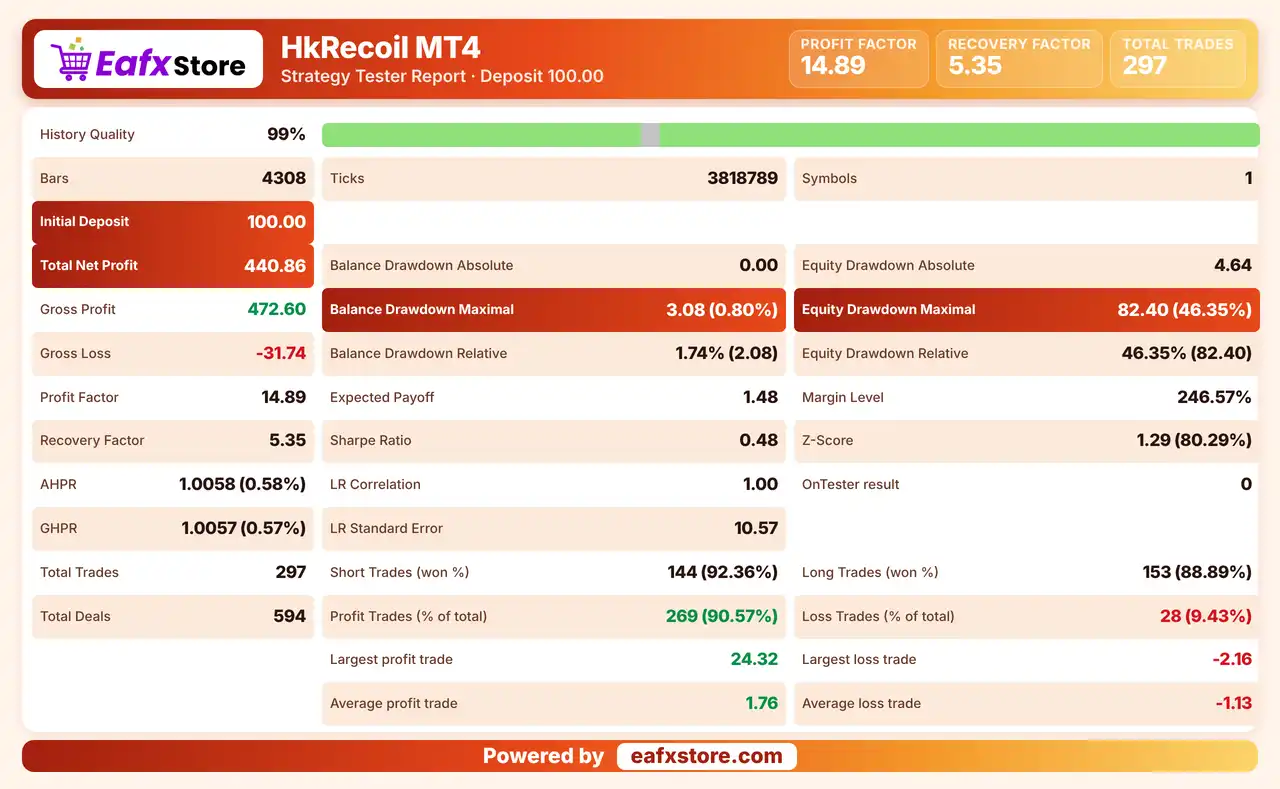
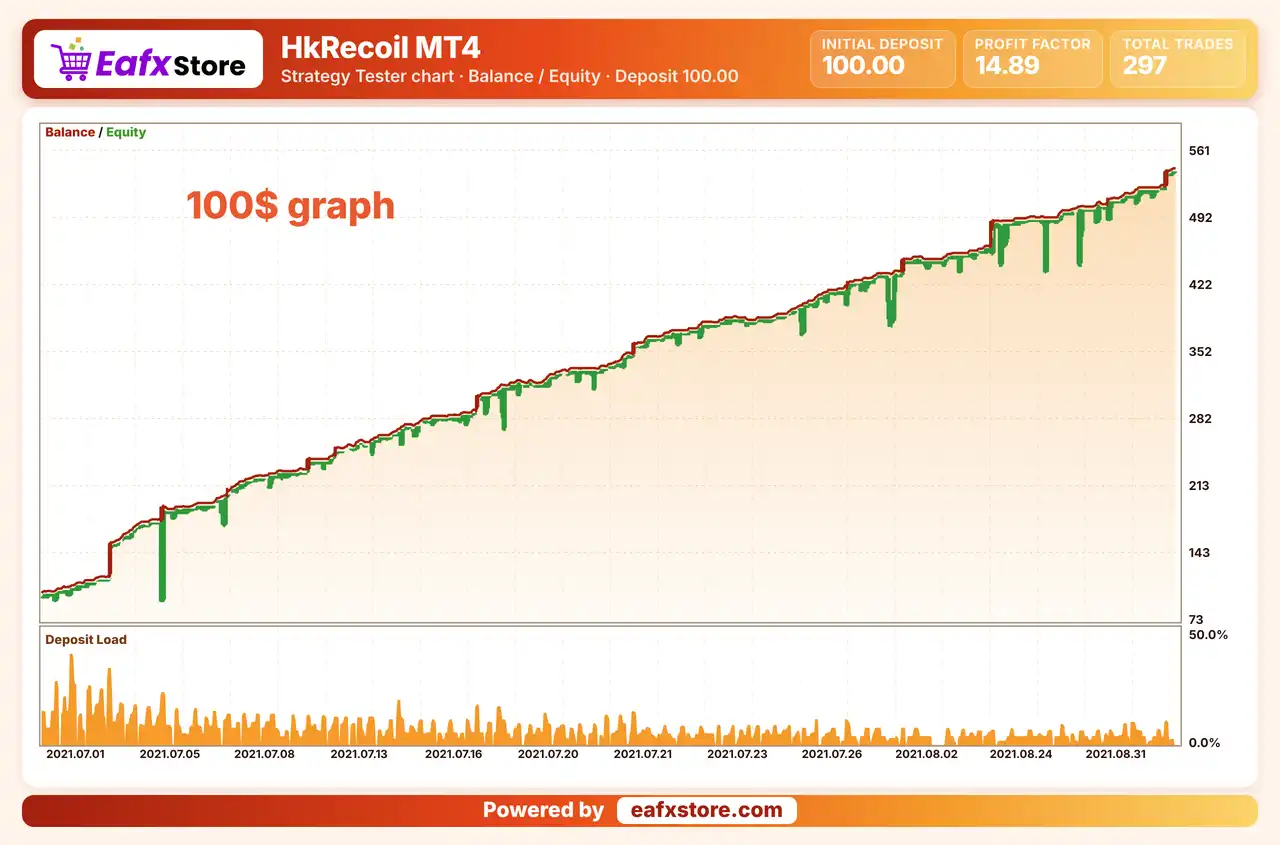
$100 Backtest Results
HkRecoil MT4 EA Backtest Results
| Parameter | Results |
|---|---|
| Initial Deposit | $100 |
| Total Net Profit | $440.86 |
| Profit Factor | 14.89 |
| Total Trades | 297 |
| History Quality | 99% |
| Maximum Balance Drawdown | 0.80% |
| Recovery Factor | 5.35 |
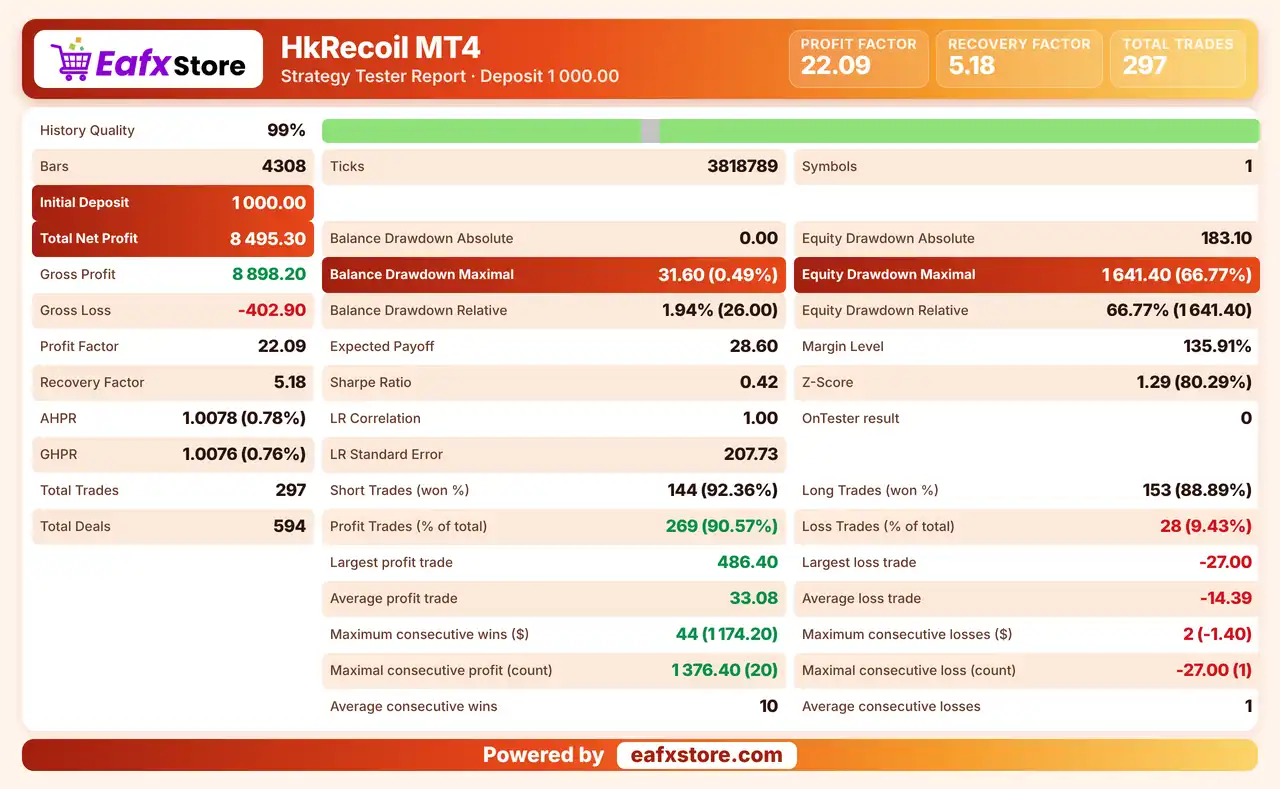
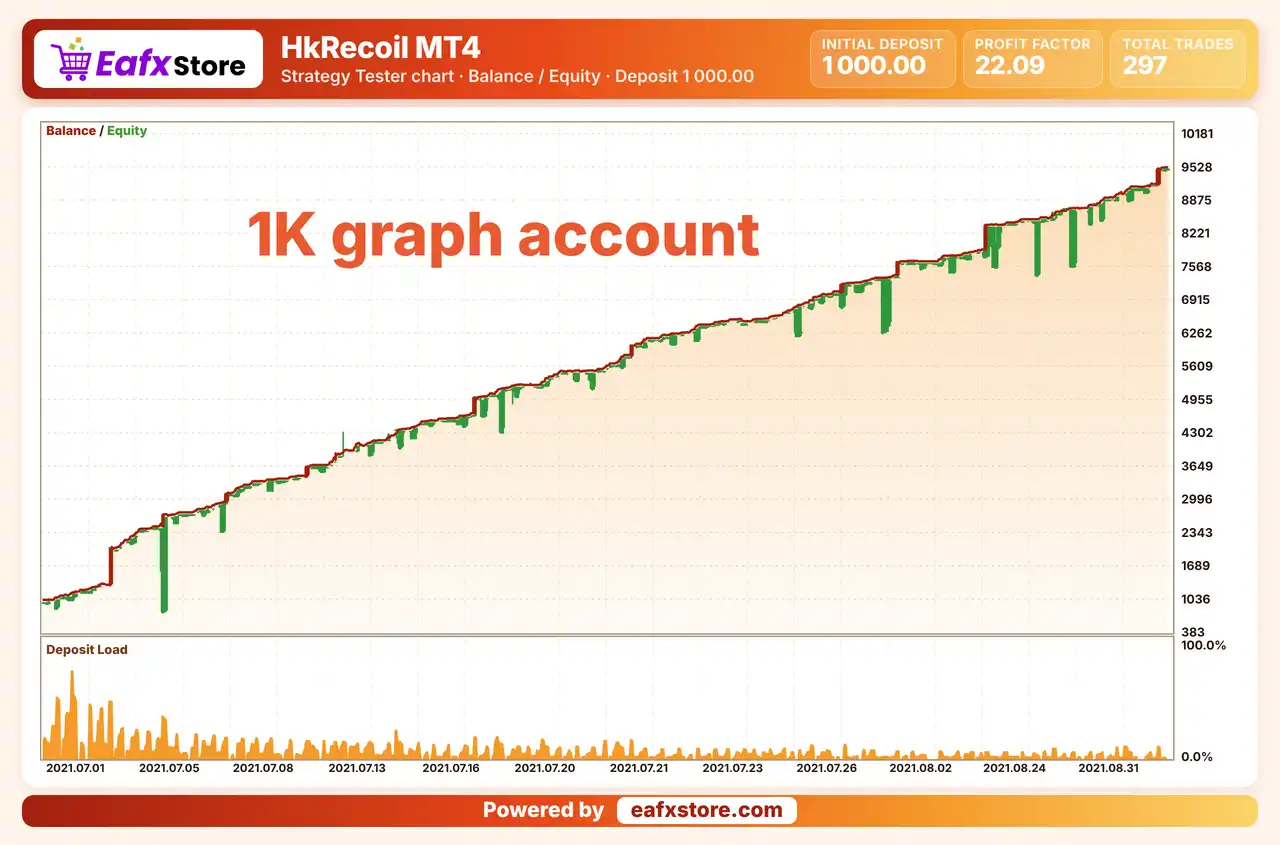
$1,000 Backtest Results
HkRecoil MT4 Backtest Results
| Parameter | Results |
|---|---|
| Initial Deposit | $1,000 |
| Total Net Profit | $8,495.30 |
| Profit Factor | 22.09 |
| Total Trades | 297 |
| History Quality | 99% |
| Winning Trades | 90.57% |
| Maximum Balance Drawdown | 1.94% |
Risk Management
Grid Positions Add Up
Each extra grid position adds to the open exposure, so a strong trend against the trade can create a large floating loss.
Volume Progression Is Risky
Growing lot sizes across the grid can turn a small loss into a big one, so the volume values need a careful test.
Check the Stop Loss Setting
The listed defaults leave the fixed stop-loss at zero, so the protection of each trade should be confirmed.
Exits May Close Early
The trailing stop can end a trade before a planned take-profit is reached, which can cut gains on strong moves.
News Can Still Hit Hard
The product says no news filter is needed, but gold can jump on major events, so open grids carry extra risk then.
What Sets It Apart
Gold and M15 Focus
The recommendation is narrow, one instrument and one timeframe, so the setup is simple to follow and to test.
Transaction Tracking
The product describes a unique tracking algorithm for transactions, which is meant to manage open positions as a group.
Grid with Trailing Exits
Extra positions come from a grid, while the trailing stop works to lock profit on moving trades.
Account Based Presets
The lot values for small and larger accounts are given in the product text, so no guesswork is needed at the start.
Strengths and Limitations
Strengths
🔹 Hands off operation: the EA is fully automatic, so a trader does not need to place or close trades by hand during normal use.
🔹 Clear setup guide: the product gives direct values for trailing, grid levels and lot size, which shortens the first configuration.
🔹 Indicator based filters: moving average and RSI blocks give the entries a visible logic that can be checked on the chart.
🔹 Flexible grid options: spacing and volume progression can be adjusted, so the grid can be fitted to the trader plan and the account.
Limitations
🔹 Grid raises exposure: extra positions with growing volume can enlarge the total risk fast when price moves against the first trade.
🔹 Fixed exits left open: the listed defaults keep the fixed stop loss and take profit at zero, so protection depends on the trailing and grid logic.
🔹 Claims without proof: the product says no news filter is needed and calls the tracking unique, but no published report supports these words.
🔹 Unclear strategy detail: the text mentions price action, yet the inputs show indicators and a grid, so the exact logic is not fully explained.
Recommended Trading Conditions
Recommended settings and parameters to pay attention to from developers and experts:
| Features | Type |
|---|---|
| Trading platform | MetaTrader 4 (MT4) |
| Time frames | M15 |
| Currency pairs | XAUUSD |
| Minimum / Recommended deposit | $100+ |
| Minimum / Recommended leverage | 1:100+ |
| Account type | Any |
| Additional services | Unlock and Decompile |
| Recommended brokers | Exness Broker, Icmarkets Broker |
| Recommended VPS | MyfxVPS.com (Blue VPS, Golden VPS). Lowest Latency, 2 week Free Trial, 100% Free for 12-18 Months. |
Product Download Package?
The download package of the product suite includes:
✅ Experts: HkRecoil MT4.ex4
Final Verdict
HkRecoil MT4 is a fully automatic robot for gold on the 15 minute chart that pairs moving average and RSI conditions with a trailing stop and a grid with volume progression. The product gives lot values for small and larger accounts and says no news filter is needed, but no report supports its claims, the fixed stop loss is left at zero and the exact strategy is only loosely described. Grid exposure makes a careful demo test and a modest lot size the sensible first steps.
🔢 HkRecoil MT4 Settings Guide: Complete Inputs and Parameters Explained
HkRecoil MT4 is an automated trading Expert Advisor designed for the MetaTrader 4 platform. Its configuration combines moving average indicators, RSI-based trading conditions, trailing-stop management, and grid trading functionality.
The EA provides adjustable lot sizing, grid volume settings, indicator periods, RSI reference levels, and separate grid-management configurations. These parameters allow traders to customize entry conditions, manage open positions, and control how additional grid orders are handled.
This guide explains all the settings displayed in the HkRecoil MT4 input panel, preserving the original parameter names and exact default values.
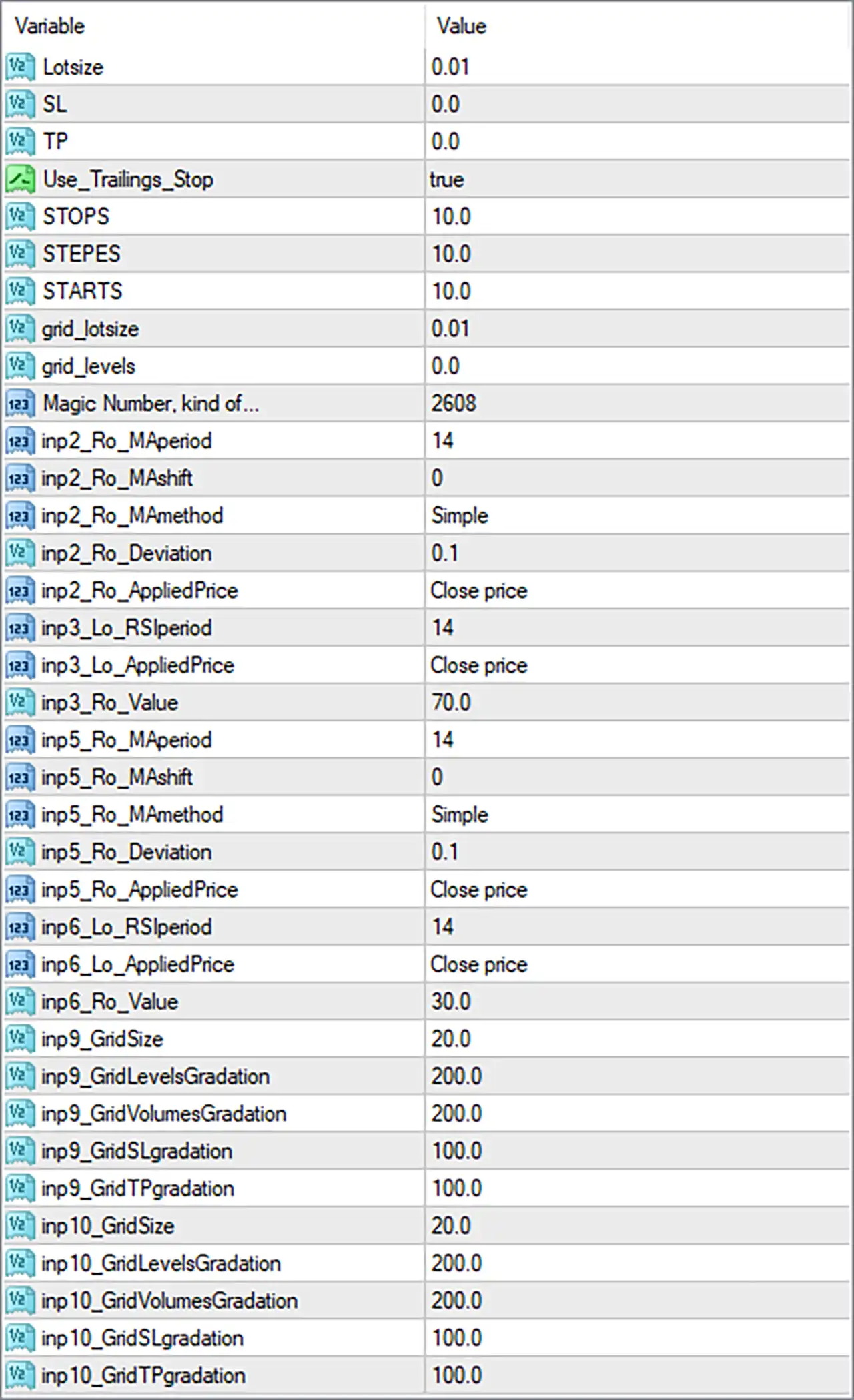
HkRecoil MT4 Settings Panel
⚙️ Basic Trading and Risk Management Settings
🔹 Lotsize = 0.01: Sets the initial trading volume to 0.01 lots. This determines the default position size used when HkRecoil MT4 opens a new trade under its standard lot-sizing configuration.
🔹 SL = 0.0: Sets the fixed stop-loss parameter to 0.0. This indicates that no fixed stop-loss distance is configured through this input, although other stop-management mechanisms may be available.
🔹 TP = 0.0: Sets the fixed take-profit parameter to 0.0. This indicates that no fixed take-profit distance is configured through this input, although other exit-management mechanisms may still be used.
🔹 Use_Trailings_Stop = true: Enables the trailing-stop feature, allowing HkRecoil MT4 to adjust stop-loss levels as trades move into profit according to its programmed trailing rules.
🔹 STOPS = 10.0: Sets the trailing-stop distance parameter to 10.0. This value determines the configured stop distance used by the trailing mechanism, subject to the EA’s internal calculation and unit conventions.
🔹 STEPES = 10.0: Sets the trailing-stop step parameter to 10.0. It defines the configured price movement or increment required before the EA updates the trailing-stop level.
🔹 STARTS = 10.0: Sets the trailing-stop activation threshold to 10.0. This determines the configured profit or price-movement level at which trailing-stop management may begin.
🔹 grid_lotsize = 0.01: Sets the grid trading volume to 0.01 lots. This parameter determines the configured lot size for additional grid positions when the grid mechanism is active.
🔹 grid_levels = 0.0: Sets the main grid-level parameter to 0.0. Depending on the EA’s internal logic, this may disable the main grid-level configuration or represent a default grid setting.
🔹 Magic Number, kind of… = 2608: Assigns the magic number 2608 to trades managed by HkRecoil MT4, helping distinguish its orders from manually opened positions and trades belonging to other Expert Advisors.
⚙️ Moving Average Settings – First Indicator
🔹 inp2_Ro_MAperiod = 14: Sets the moving average period to 14, determining the number of price observations used in the first moving average calculation.
🔹 inp2_Ro_MAshift = 0: Sets the moving average shift to 0, keeping the indicator aligned with its standard chart position without additional displacement.
🔹 inp2_Ro_MAmethod = Simple: Selects the Simple Moving Average (SMA) calculation method, giving equal weighting to the price observations within the selected 14-period calculation.
🔹 inp2_Ro_Deviation = 0.1: Sets the indicator deviation parameter to 0.1. This value may control a deviation-based calculation or tolerance associated with the indicator, depending on the EA’s implementation.
🔹 inp2_Ro_AppliedPrice = Close price: Uses the closing price as the applied price for the moving average calculation, ensuring that the indicator references candle closing-price data.
⚙️ RSI Settings – Second Indicator
🔹 inp3_Lo_RSIperiod = 14: Sets the Relative Strength Index (RSI) calculation period to 14, determining the number of price periods used to measure market momentum.
🔹 inp3_Lo_AppliedPrice = Close price: Uses candle closing prices as the applied price for the RSI calculation, allowing the indicator to evaluate momentum based on closing-price movements.
🔹 inp3_Ro_Value = 70.0: Sets the RSI reference level to 70.0, which is commonly associated with the overbought threshold and may help identify potentially overextended upward price movements.
⚙️ Moving Average Settings – Third Indicator
🔹 inp5_Ro_MAperiod = 14: Sets the third indicator’s moving average period to 14, defining the number of price observations included in its calculation.
🔹 inp5_Ro_MAshift = 0: Sets the moving average shift to 0, ensuring that the third indicator remains aligned with its standard chart position.
🔹 inp5_Ro_MAmethod = Simple: Selects the Simple Moving Average (SMA) method for the third indicator, calculating the average price over 14 periods with equal weighting.
🔹 inp5_Ro_Deviation = 0.1: Sets the third indicator’s deviation parameter to 0.1. This may be used as a tolerance or deviation factor within the EA’s indicator calculations.
🔹 inp5_Ro_AppliedPrice = Close price: Selects the closing price as the applied price for the third indicator, ensuring that its calculation references candle closing-price data.
⚙️ RSI Settings – Fourth Indicator
🔹 inp6_Lo_RSIperiod = 14: Sets the fourth indicator’s RSI period to 14, determining the number of price periods used to calculate the Relative Strength Index.
🔹 inp6_Lo_AppliedPrice = Close price: Uses the closing price as the applied price for the fourth RSI calculation, allowing the indicator to evaluate market momentum based on closing-price data.
🔹 inp6_Ro_Value = 30.0: Sets the RSI reference level to 30.0, commonly associated with the oversold threshold and used to identify potentially overextended downward price movements.
⚙️ Grid Trading Settings – Grid Configuration 9
🔹 inp9_GindSize = 20.0: Sets the grid-size parameter for configuration 9 to 20.0. This may determine the spacing or distance between successive grid entries, depending on the EA’s internal grid calculation.
🔹 inp9_GindLevelsGradation = 200.0: Sets the grid-level gradation parameter to 200.0, controlling the configured progression or adjustment of spacing between successive grid levels.
🔹 inp9_GindVolumesGradation = 200.0: Sets the grid-volume gradation parameter to 200.0, defining the configured progression of trading volume across additional grid positions.
🔹 inp9_GindSLgradation = 100.0: Sets the grid stop-loss gradation parameter to 100.0, providing an adjustment factor for stop-loss management across positions within this grid configuration.
🔹 inp9_GindTPgradation = 100.0: Sets the grid take-profit gradation parameter to 100.0, providing an adjustment factor for take-profit management across positions within this grid configuration.
⚙️ Grid Trading Settings – Grid Configuration 10
🔹 inp10_GindSize = 20.0: Sets the grid-size parameter for configuration 10 to 20.0, defining the configured spacing or distance used by this grid-management component.
🔹 inp10_GindLevelsGradation = 200.0: Sets the grid-level gradation parameter to 200.0, controlling how the spacing between successive grid levels may progress within this configuration.
🔹 inp10_GindVolumesGradation = 200.0: Sets the grid-volume gradation parameter to 200.0, determining the configured volume progression for additional grid positions.
🔹 inp10_GindSLgradation = 100.0: Sets the grid stop-loss gradation parameter to 100.0, defining the configured adjustment factor for stop-loss management across grid positions.
🔹 inp10_GindTPgradation = 100.0: Sets the grid take-profit gradation parameter to 100.0, defining the configured adjustment factor for take-profit management across grid positions.
⚙️ Important Configuration Considerations
🔹 Review the Initial Lot Size: Lotsize = 0.01 and grid_lotsize = 0.01 establish the configured initial and grid trading volumes. Check whether the EA uses these values independently or applies additional volume calculations when opening subsequent positions.
🔹 Understand Trailing-Stop Management: With Use_Trailings_Stop = true, STOPS = 10.0, STEPES = 10.0, and STARTS = 10.0, the EA is configured to use trailing-stop management. Verify the units and activation conditions before live trading.
🔹 Check the Fixed Exit Settings: SL = 0.0 and TP = 0.0 indicate that fixed stop-loss and take-profit distances are not configured through these inputs. Make sure the EA’s trailing-stop and grid-management mechanisms provide appropriate position-exit controls.
🔹 Review Moving Average Confirmation: The two moving average configurations both use MAperiod = 14, MAshift = 0, MAmethod = Simple, Deviation = 0.1, and AppliedPrice = Close price. These settings establish consistent calculation parameters for the configured moving average indicators.
🔹 Understand RSI Reference Levels: The RSI configurations use a period of 14, with reference levels of 70.0 and 30.0. These are commonly associated with overbought and oversold conditions, respectively, but the EA’s actual entry rules depend on its programmed logic.
🔹 Evaluate Grid Volume Progression: Both grid configurations use GindVolumesGradation = 200.0. Verify whether this represents a 200% progression, a multiplier, or another internal scaling factor because aggressive volume increases can significantly raise account exposure.
🔹 Check Grid-Level Configuration: The main grid_levels parameter is 0.0, while the two additional grid configurations use GindSize = 20.0. Confirm how the EA activates and coordinates these grid components before running it on a live account.
🔢 Conclusion
HkRecoil MT4 provides configurable trading controls combining moving average indicators, RSI-based conditions, trailing-stop management, and grid trading functionality. Its displayed configuration uses an initial lot size of 0.01, a grid lot size of 0.01, and an enabled trailing-stop feature with STOPS = 10.0, STEPES = 10.0, and STARTS = 10.0.
The indicator settings include two 14-period Simple Moving Average configurations and two 14-period RSI configurations, with reference levels of 70.0 and 30.0. In addition, grid configurations 9 and 10 use a grid size of 20.0, grid-level and volume gradation values of 200.0, and stop-loss and take-profit gradation values of 100.0.
Before deploying HkRecoil MT4 on a live account, traders should carefully evaluate the grid-volume progression, verify the trailing-stop calculation units, and understand how the EA manages positions when fixed SL and TP values are set to 0.0. Backtesting and demo testing are recommended to assess its trading behavior and potential risk exposure.
User Reviews
Only logged in customers who have purchased this product may leave a review.
❓ What is HkRecoil MT4?
A fully automatic Expert Advisor for MetaTrader 4 that combines moving average and RSI conditions with a trailing stop and grid trading.
❓ Which symbol does HkRecoil MT4 recommend?
XAUUSD / GOLD
❓ Which timeframe does HkRecoil MT4 use?
The 15 minute chart is recommended.
❓ Is HkRecoil MT4 fully automatic?
Yes. The product describes it as a fully automatic Expert Advisor.
❓ Does HkRecoil MT4 use a grid?
Yes. It has grid settings that can open extra positions with changing spacing and volume.
❓ Is HkRecoil MT4 a martingale EA?
The product does not say so, but the grid includes volume progression, so a demo test is wise before real money is used.
❓ Does HkRecoil MT4 use a stop loss?
It has a trailing stop, while the listed defaults leave the fixed stop loss and take profit at zero.
❓ Does HkRecoil MT4 need a news filter?
The product says it does not, but major news can still move gold quickly, so caution is advised.
❓ What deposit does HkRecoil MT4 recommend?
The recommended minimum deposit is 100 USD, with higher leverage advised.
❓ Does HkRecoil MT4 need a hosted server?
The product advises a low ping hosted server for gold trading.
-
 Original price was: $2,100.00.$249.00Current price is: $249.00.
 -
 Original price was: $700.00.$249.00Current price is: $249.00.
 -
 Original price was: $1,500.00.$249.00Current price is: $249.00.
 -
 Original price was: $1,467.00.$249.00Current price is: $249.00.
-
 0Original price was: $1,299.00.$249.00Current price is: $249.00.
 -
 0Original price was: $199.00.$179.00Current price is: $179.00.
 -
 0Original price was: $500.00.$199.00Current price is: $199.00.
 -
 1Original price was: $699.00.$249.00Current price is: $249.00.
There are no reviews yet.