





Forex Stability EA MT4 (Latest version) - Unlimited

Subscriptions for Special Plan
- 30 EA package is more economical!
- Special package with 99%
- Download 1 EA/Day

Subscriptions for Premium Membership
- Download Unlimited in 1 Year
- Get 100% Discount
- Get free access to all

Subscriptions for Gold Membership
- 1 Year Membership
- Get 100% Discount
- Access EA+Indicator+Course
Frequently bought together 🎁
Add these products to enhance your purchase




Quick Overview
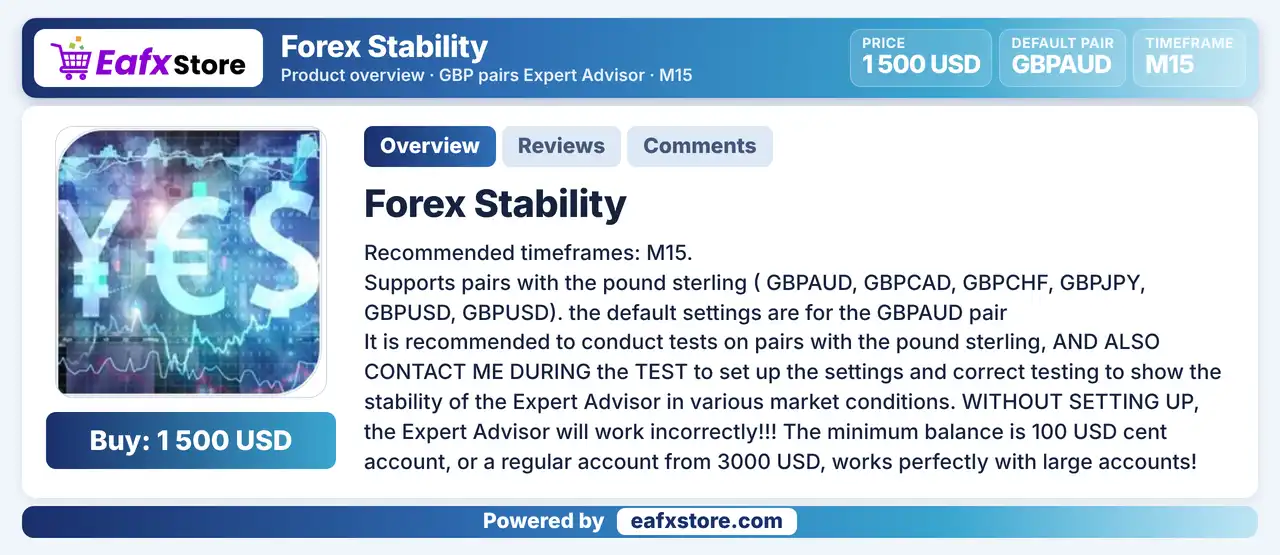
Forex Stability EA is an RSI based Expert Advisor (EA) for MetaTrader 4 made for pairs with the British pound on the M15 chart. It reads RSI from the hourly chart, spaces its trades by a minimum distance, raises the lot with a multiplier and closes positions at a take profit. The default settings are prepared for GBPAUD, and the setup needs careful testing.
Best For:
✅ Traders who focus on pound pairs,
✅ Users who like RSI based entries,
✅ Traders who accept lot multiplier systems,
✅ Users who test cent accounts first,
✅ Traders who run the M15 chart,
What is Forex Stability EA MT4?
Forex Stability EA is an automated trading Expert Advisor (EA) designed for the MetaTrader 4 (MT4) platform. Using the Relative Strength Index (RSI) indicator to identify potential trading opportunities, this Forex trading robot is specifically developed for British pound currency pairs, with a primary focus on the GBPAUD pair and the M15 timeframe.
 Vendor Website: View here
Delivery time 24h-48h after payment.
Refund if not delivered.
You will receive the current version without any limitations (ID+Time).
Forex Stability EA MT4 Review
Forex Stability EA MT4 Trading Strategy
Read RSI on the Hourly Chart
The EA takes RSI values from the H1 chart, with an oversold level for buys and an overbought level for sells.
Space Trades by a Minimum Distance
A minimum step controls how far apart successive entries must be, so positions are not stacked too closely.
Raise the Lot with a Multiplier
A lot multiplier increases the size of later positions, which makes the system an averaging style approach.
Close at a Fixed Take Profit
A take profit value sets the profit target that closes the trades, so exits depend on reaching that planned distance.
Focus on Pound Pairs
The EA is made for pairs with the British pound and the default values are tuned for GBPAUD on the M15 chart.
Key Features of Forex Stability EA MT4
RSI Based Signals
Entries rely on an RSI with its own timeframe, period, buy level and sell level, which keeps the signal logic simple and easy to check.
Pound Pair Support
The product lists several pairs with the British pound, so the same EA can be tested on a group of related and active markets.
Minimum Trade Distance
A minimum step setting keeps successive entries apart, which controls how closely the EA can build positions in one direction.
Lot Multiplier
A lot multiplier raises the volume of later positions, which can speed up recovery but also grows the exposure after several entries.
Take Profit Management
A fixed take profit value sets the profit target, so the EA closes trades once the planned distance is reached by price.
Historical Trading Results Performance
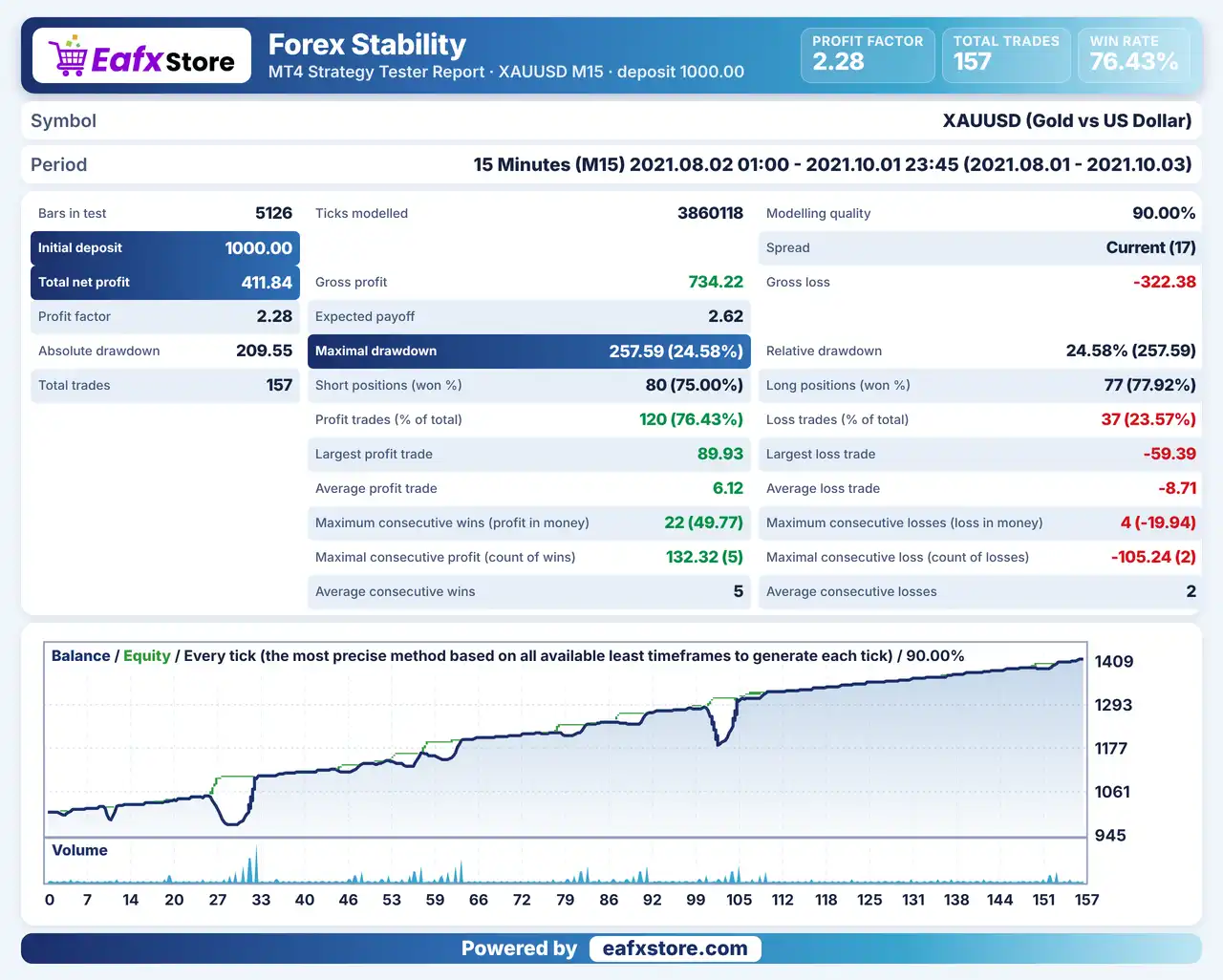
Forex Stability EA was backtested on XAUUSD (Gold) using the M15 timeframe from August 2 to October 1, 2021, covering approximately two months of historical data with 157 trades.
Forex Stability EA MT4 Backtest Results
| Parameter | Results |
|---|---|
| Initial Deposit | $1,000 |
| Total Net Profit | $411.84 |
| Profit Factor | 2.28 |
| Total Trades | 157 |
| History Quality | 90% |
| Winning Trades | 76.43% |
| Maximum Drawdown | 24.58% |
Risk Management
The Lot Multiplier Raises Risk
Each later position is larger, so a trend against the trade can create a big floating loss in a short time.
There Is No Stop Loss Input
Without a fixed stop-loss, a long adverse move can keep growing the loss, so the account size matters.
The Target Is the Only Exit
Trades close at a take-profit distance, and price may stay away from it for a long time.
Wrong Setup Breaks the Logic
The product warns about incorrect operation without setup, so every input should be reviewed before live use.
What Sets It Apart
Pound Pair Focus
The EA is built around a group of pairs with the British pound, instead of a broad list of unrelated markets.
Hourly RSI on a Faster Chart
The signal is read from the hourly RSI while the EA runs on M15, which mixes two views of the market.
Short Input List
Only a handful of inputs control the whole system, which makes the EA quick to learn and to test.
Cent Account Option
The product allows a cent account for small balances, which lowers the cost of a first live test.
Strengths and Limitations
Strengths
🔹 Simple logic: an RSI signal, a trade spacing rule and a take profit are easy to understand and to check on a chart.
🔹 Few settings to manage: the short list of inputs reduces the chance of setup mistakes and also shortens the whole testing process.
🔹 Account flexibility: the product states that it can work on a small cent account as well as on a large regular account.
🔹 Default pair ready: the default values are prepared for GBPAUD, so a first test can start without changing many of the other inputs.
Limitations
🔹 Multiplier raises exposure: progressive lot sizes can grow total risk quickly when price keeps moving against the open positions.
🔹 No stop loss input: the listed settings include no stop loss, so a long adverse move can leave positions open with a growing loss.
🔹 Setup is critical: the product warns that the EA works incorrectly without proper setup, which makes careful testing very important.
🔹 Claims without a report: the name suggests stability, but no published report in the source proves this under different market conditions.
Recommended Trading Conditions
Recommended settings and parameters to pay attention to from developers and experts:
| Features | Type |
|---|---|
| Trading platform | MetaTrader 4 (MT4) |
| Time frames | M15 |
| Currency pairs | GBPAUD, GBPCAD, GBPCHF, GBPJPY, GBPUSD, GBPUSD |
| Minimum / Recommended deposit | 100 USD cent |
| Minimum / Recommended leverage | Any |
| Account type | Any |
| Additional services | Unlock and Decompile |
| Recommended brokers | Exness Broker, Icmarkets Broker |
| Recommended VPS | MyfxVPS.com (Blue VPS, Golden VPS). Lowest Latency, 2 week Free Trial, 100% Free for 12-18 Months. |
Product Download Package?
The download package of the product suite includes:
 Experts: Forex Stability.ex4
 Reviewed by David Easton
Final Verdict
Forex Stability EA is a simple RSI based robot for pairs with the British pound on the M15 chart, with a minimum trade spacing, a lot multiplier and a fixed take profit. Its short settings list is easy to learn, but the multiplier grows later positions, no stop loss input is listed and nothing in the source proves the stability its name suggests. A cent account, a very small starting lot and a long demo test are the sensible way to try it before any real trading begins at all.
🔢 Forex Stability EA MT4 Settings Guide: Complete Inputs and Parameters Explained
Forex Stability EA MT4 is an automated trading Expert Advisor designed for the MetaTrader 4 platform. Its configuration focuses on RSI-based trading signals, adjustable position sizing, trade spacing, and take-profit management.
The EA allows traders to configure the RSI timeframe, calculation period, overbought and oversold levels, minimum trading distance, initial lot size, and lot multiplier. These parameters provide flexibility when adjusting the trading strategy, position management, and execution settings according to different market conditions.
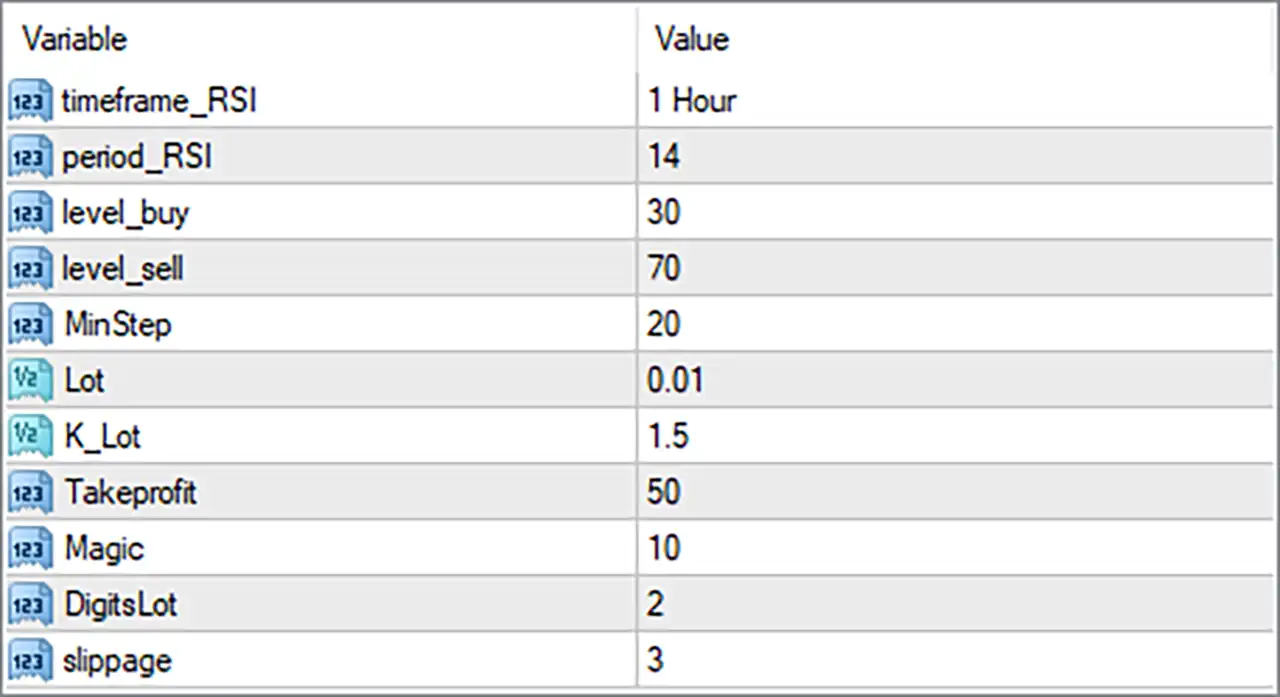
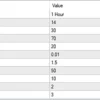
Forex Stability EA MT4 Settings Panel
⚙️ RSI Indicator Settings
🔹 timeframe_RSI = 1 Hour: Sets the RSI indicator timeframe to 1 Hour (H1). This means the EA uses RSI data from the hourly chart to evaluate market momentum and identify potential trading opportunities.
🔹 period_RSI = 14: Sets the RSI calculation period to 14. The Relative Strength Index measures the strength and speed of recent price movements using the selected 14-period calculation.
🔹 level_buy = 30: Sets the RSI buy reference level to 30. This is commonly considered the oversold threshold, helping identify potential buying opportunities when the RSI indicates that the market may be experiencing downward pressure.
🔹 level_sell = 70: Sets the RSI sell reference level to 70. This is commonly considered the overbought threshold, helping identify potential selling opportunities when the RSI indicates that the market may be experiencing upward pressure.
⚙️ Trading Distance and Lot Management Settings
🔹 MinStep = 20: Sets the minimum trading step to 20. This parameter may determine the minimum price distance between successive entries or trading operations, helping control the spacing of positions according to the EA’s internal strategy.
🔹 Lot = 0.01: Sets the initial trading volume to 0.01 lots. This defines the configured starting position size when Forex Stability EA MT4 opens a new trade.
🔹 K_Lot = 1.5: Sets the lot multiplier to 1.5. If the EA uses progressive position sizing, subsequent lot sizes may increase by a factor of 1.5 relative to the previous position, depending on its internal calculation rules.
⚙️ Take Profit and Trade Identification Settings
🔹 Takeprofit = 50: Sets the configured take-profit value to 50. This determines the intended profit-taking distance or target used by the EA. Verify whether the value represents pips, points, or another internal unit before live trading.
🔹 Magic = 10: Assigns the magic number 10 to trades managed by Forex Stability EA MT4. This identifier helps distinguish the EA’s orders from manually opened positions and trades managed by other Expert Advisors.
⚙️ Lot Precision and Execution Settings
🔹 DigitsLot = 2: Sets the lot-size precision to 2 decimal places. This controls the configured decimal precision used when handling trading volumes, subject to the broker’s minimum lot size and volume-step requirements.
🔹 slippage = 3: Sets the permitted slippage parameter to 3. This defines the configured tolerance between the requested trade price and the actual execution price, depending on the EA’s order-execution logic and broker conditions.
⚙️ Important Configuration Considerations
🔹 RSI Timeframe and Period: The EA uses timeframe_RSI = 1 Hour and period_RSI = 14. This combination evaluates hourly market momentum using a standard 14-period RSI calculation, even if the EA is attached to a different chart timeframe.
🔹 Buy and Sell Thresholds: The configured level_buy = 30 and level_sell = 70 establish conventional RSI oversold and overbought reference levels. Confirm how the EA interprets RSI crossings and whether it requires additional entry conditions.
🔹 Lot Multiplier and Risk Exposure: Lot = 0.01 and K_Lot = 1.5 provide the starting volume and configured multiplier. If the EA progressively increases position sizes, total exposure can grow significantly after multiple entries.
🔹 Minimum Trading Distance: MinStep = 20 should be checked against the EA’s distance calculation and the broker’s quote precision. This helps determine how closely successive positions can be opened.
🔹 Take-Profit Configuration: Takeprofit = 50 establishes the configured profit target. Verify its unit and whether the EA applies this target to individual positions or another level of trade management.
🔹 Order Execution: slippage = 3 and DigitsLot = 2 should be checked against your broker’s execution conditions, minimum volume, and permitted lot-size increments.
🔢 Conclusion
Forex Stability EA MT4 provides a straightforward configuration system centered on RSI-based trading signals, position sizing, trading distance, and take-profit management.
The displayed settings use an H1 RSI timeframe with a 14-period calculation, a buy level of 30, and a sell level of 70. Position sizing starts at 0.01 lots with a K_Lot multiplier of 1.5, while MinStep = 20 and Takeprofit = 50 define additional trading and profit-management parameters.
Before running Forex Stability EA MT4 on a live account, traders should carefully evaluate the lot multiplier, verify the units used by MinStep and Takeprofit, and test the RSI entry conditions under different market conditions. Backtesting and demo trading are recommended to understand the EA’s behavior and manage potential trading risks.
User Reviews
Only logged in customers who have purchased this product may leave a review.
❓ What is Forex Stability EA MT4?
An RSI based Expert Advisor for MetaTrader 4 made for pairs with the British pound.
❓ Which pairs does Forex Stability EA MT4 support?
Pairs with the pound, such as GBPAUD, GBPCAD, GBPCHF, GBPJPY and GBPUSD, with GBPAUD as the default.
❓ Which timeframe does Forex Stability EA MT4 use?
M15 is recommended, and the RSI is read from the hourly chart.
❓ How does Forex Stability EA MT4 find entries?
It uses an RSI with an oversold level for buys and an overbought level for sells.
❓ Does Forex Stability EA MT4 use a lot multiplier?
Yes. A multiplier raises the lot of later positions, which increases the exposure.
❓ Is Forex Stability EA MT4 a martingale EA?
It uses a lot multiplier, which is an averaging approach, so it should be treated as a high risk system and tested first.
❓ Does Forex Stability EA MT4 use a stop loss?
The listed settings include no stop loss. Exits depend on a fixed take profit.
❓ What account does Forex Stability EA MT4 recommend?
A cent account for small balances or a regular account for larger balances, with high leverage.
❓ What leverage does Forex Stability EA MT4 recommend?
A leverage of 1 to 500 or higher.
❓ Does Forex Stability EA MT4 need setup?
Yes. The product warns that the EA works incorrectly without proper setup and testing.
-
 Original price was: $1,100.00.$249.00Current price is: $249.00.
 -
 Original price was: $1,299.00.$249.00Current price is: $249.00.
 -
 Original price was: $7,000.00.$249.00Current price is: $249.00.
 -
 Original price was: $2,100.00.$249.00Current price is: $249.00.
-
 0Original price was: $2,288.00.$249.00Current price is: $249.00.
 -
 0Original price was: $430.00.$249.00Current price is: $249.00.
 -
 2Original price was: $990.00.$599.00Current price is: $599.00.
 -
 6Original price was: $1,000.00.$599.00Current price is: $599.00.
There are no reviews yet.