




Universe EA MT4 (Latest version) - Unlimited

Subscriptions for Special Plan
- 30 EA package is more economical!
- Special package with 99%
- Download 1 EA/Day

Subscriptions for Premium Membership
- Download Unlimited in 1 Year
- Get 100% Discount
- Get free access to all

Subscriptions for Gold Membership
- 1 Year Membership
- Get 100% Discount
- Access EA+Indicator+Course
Frequently bought together 🎁
Add these products to enhance your purchase

Quick Overview
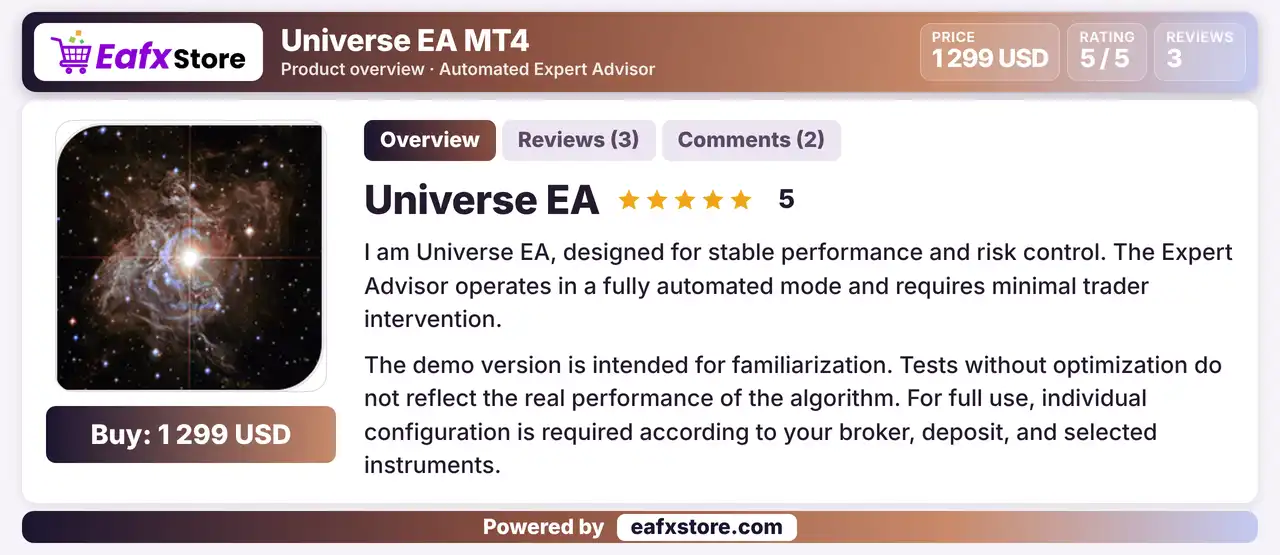
Universe EA is a fully automated Expert Advisor (EA) for MetaTrader 4 that runs on the M15 chart and combines indicators and filters to find trading opportunities. It is described as using adaptive stop losses and capital protection. Each pair must be optimized and run on its own, because the product states that no universal set files exist.
Best For:
✅ Traders who optimize each pair themselves.
✅ Users who run one pair per chart.
✅ Traders who prefer a fully automated EA.
✅ Users with an ECN low spread account.
✅ Traders who plan a yearly re-optimization.
What is Universe EA?
Universe EA MT4 is a fully automated Expert Advisor (EA) designed for the MetaTrader 4 trading platform. Operating on the M15 timeframe, this trading robot combines multiple technical indicators and filtering mechanisms to identify trading opportunities and execute trades automatically.
Universe EA features adaptive Stop Loss management and capital protection mechanisms to help manage trading risks under changing market conditions. It is designed to trade one currency pair per chart, with individual optimization recommended for each trading instrument to achieve settings tailored to its market characteristics.
⭐ Vendor Website: View here
⭐ Delivery time 24h-48h after payment.
⭐ Refund if not delivered.
⭐ You will receive the current version without any limitations (ID+Time).
Universe EA MT4 Review
Trading Strategy
Analyze with Indicators and Filters
The EA combines several indicators and filters to identify trading opportunities according to predefined rules.
Generate Signals by Rule
When the conditions of the rules are met, the EA opens trades by itself, with little need for trader input.
Apply Adaptive Stop Losses
The product describes stop losses that adapt to market conditions, along with capital protection scenarios.
Run One Pair Per Chart
The EA is launched separately for each currency pair in single currency mode, and pairs are never mixed on one chart.
Optimize Every Pair
The product states that each pair must be optimized on the broker quotes and checked again at least once a year.
Key Features of Universe EA MT4
Fully Automated Operation
The EA analyzes the market, opens trades and manages them by itself, so the trader can leave the daily work to the robot.
Indicator and Filter Combination
A mix of indicators and filters is used to find trading opportunities, which is meant to reduce signals in unfavorable conditions.
Adaptive Risk Controls
The product describes adaptive stop losses and capital protection scenarios, which aim to keep the risk of each trade within set limits.
Single Currency Mode
Each pair runs on its own chart with its own settings, which allows separate optimization and separate control of every pair.
Quick Start Parameters
Built in parameters allow a test right after installation, though the product says results need individual optimization for real use.
Historical Trading Results Performance
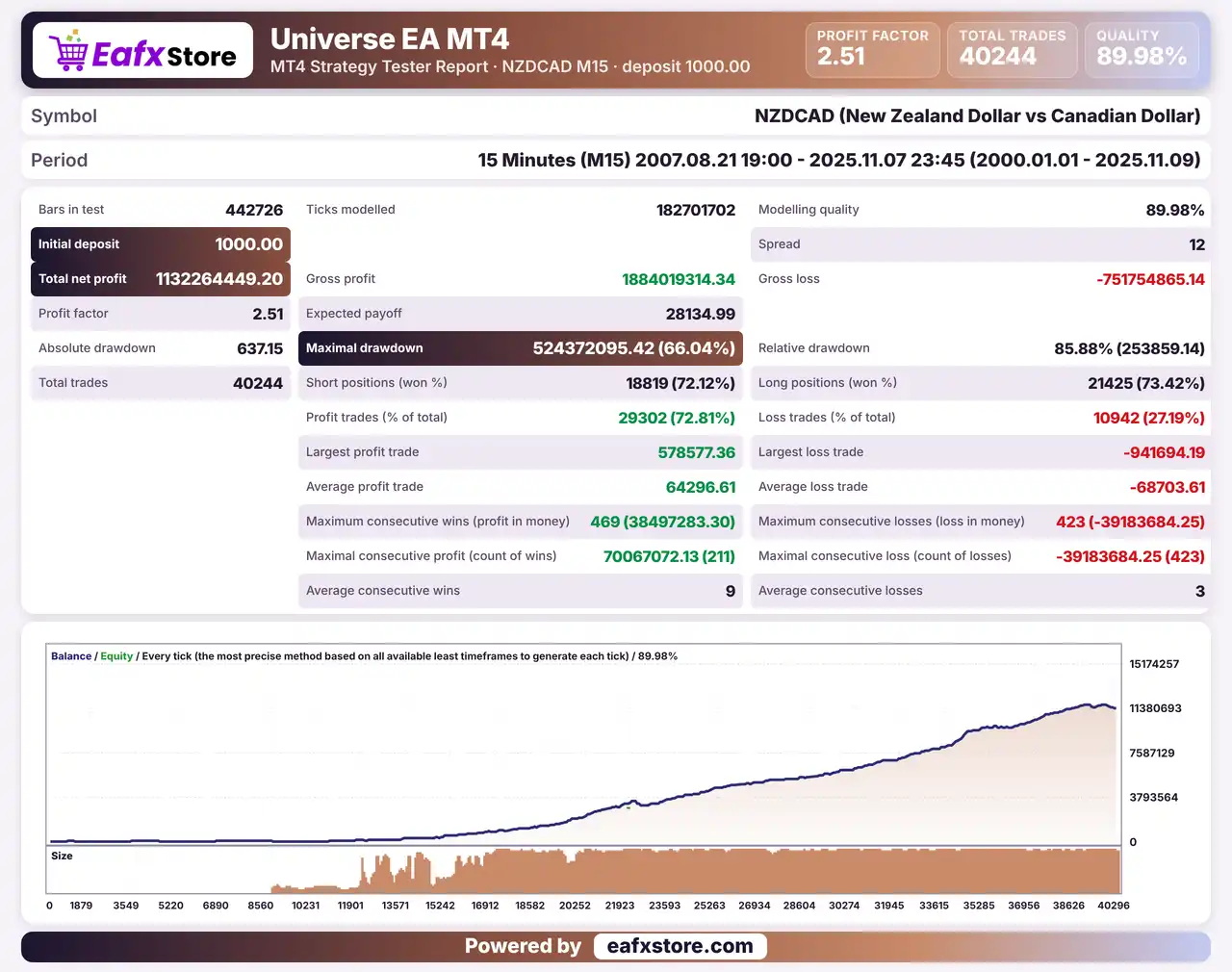
Universe EA was backtested on NZDCAD using the M15 timeframe from August 21, 2007, to November 7, 2025, covering over 18 years of historical data and generating 40,244 trades.
Universe EA MT4 Backtest Results
| Parameter | Backtest Results |
|---|---|
| Initial Deposit | $1,000 |
| Total Net Profit | $1,132,264,449.20 |
| Profit Factor | 2.51 |
| Total Trades | 40,244 |
| Modeling Quality | 89.98% |
| Winning Trades | 72.81% |
| Maximum Drawdown | 66.04% |
Risk Management
Poor Optimization Hurts
Settings that fit past data only can fail in live trading, so every pair should be tested on fresh data too.
Stop Losses Can Slip
Gaps and fast moves can pass the stop-loss level, so the real loss can be larger than planned.
Targets Are Not Guaranteed
A trade may turn before it reaches its take-profit level, so profit is never certain.
More Pairs Means More Exposure
Running several pairs at once raises the total risk on the account, especially when pairs move together.
Strengths and Limitations
Strengths
🔹 Hands off trading: the EA is fully automated, so the trader mainly watches the account instead of placing trades by hand.
🔹 Honest setup message: the product states clearly that optimization is needed and that demo tests do not reflect the real performance.
🔹 Separate pair control: single currency mode keeps each pair independent, which makes testing and troubleshooting easier.
🔹 Wide broker choice: the product names the account type it needs, so any broker with consistently low spreads may suit the EA.
Limitations
🔹 Optimization is the trader job: the product says the work is done by the buyer, so results depend on skill and on the parameters chosen.
🔹 No ready set files: with no universal settings, a new user must run tests and optimization before the EA can be used on a live account.
🔹 Strategy details are thin: the text mentions indicators and filters without naming them, so the exact entry logic cannot be judged.
🔹 No results published: the source includes no backtest or live report, so no returns or drawdown figures can be quoted.
Recommended Trading Conditions
Recommended settings and parameters to pay attention to from developers and experts:
| Features | Type |
|---|---|
| Trading platform | MetaTrader 4 (MT4) |
| Time frames | M15 |
| Currency pairs | NZDCAD, AUDCAD, AUDUSD, USDCAD |
| Minimum / Recommended deposit | $1,000+ |
| Minimum / Recommended leverage | 1:100+ |
| Account type | ECN, RAW |
| Additional services | Unlock and Decompile |
| Recommended brokers | Exness Broker, Icmarkets Broker |
| Recommended VPS | MyfxVPS.com (Blue VPS, Golden VPS). Lowest Latency, 2 week Free Trial, 100% Free for 12-18 Months. |
Product Download Package?
The download package of the product suite includes:
✅ Experts: Universe EA.ex4
Final Verdict
Universe EA MT4 is a fully automated M15 robot that combines indicators and filters and describes adaptive stop losses and capital protection. Its strongest point is honesty about setup: every pair must be optimized on the broker quotes, run alone and reviewed each year. That also means no ready settings, thin strategy detail and no published results, so its value rests on the trader work. Careful optimization, fresh data tests and a demo trial are the sensible steps before any live trading.
🔢 Universe EA MT4 Settings Guide: Complete Inputs and Parameters Explained
Universe EA MT4 is an automated trading Expert Advisor designed for the MetaTrader 4 platform. Its configuration features an advanced trading framework combining timeframe selection, institutional time management, spread filtering, trade execution controls, adaptive risk management, signal precision calibration, and market condition analysis.
The EA includes configurable trading sessions, entry direction, capital allocation, dynamic AI-based risk logic, market volatility adjustment, and signal visualization. It also provides an on-chart information panel and customizable interface colors to help traders monitor its operating conditions.
This comprehensive guide explains all the parameters displayed in the Universe EA settings panel, preserving their original names and exact default values.
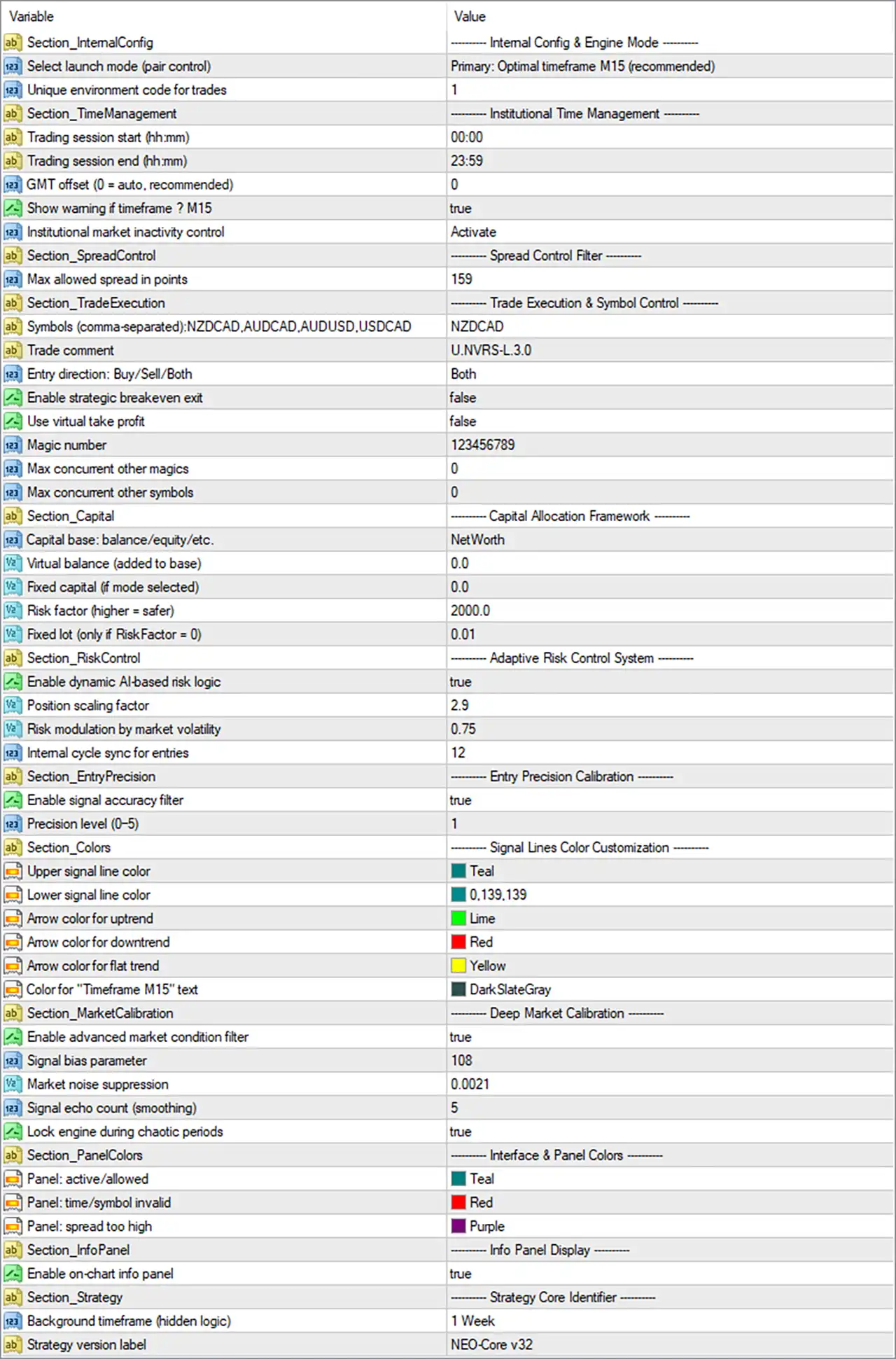
Universe EA MT4 Settings Panel
⚙️ Internal Configuration and Engine Mode
🔹 Select launch mode (pair control) = Primary: Optimal timeframe M15 (recommended): Selects the primary operating mode with M15 (15-minute) as the recommended timeframe, defining the EA’s preferred chart timeframe and operating configuration.
🔹 Unique environment code for trades = 1: Assigns environment code 1 to the EA’s trading operations, potentially helping distinguish its trading environment and manage trade identification internally.
⚙️ Institutional Time Management Settings
🔹 Trading session start (hhmm) = 00:00: Sets the beginning of the permitted trading session to 00:00, allowing the EA to start operating at midnight according to its configured time reference.
🔹 Trading session end (hhmm) = 23:59: Sets the end of the permitted trading session to 23:59, providing an almost full-day trading window.
🔹 GMT offset (0 = auto, recommended) = 0: Sets the GMT offset to 0, selecting automatic time-offset handling according to the parameter’s description and recommended configuration.
🔹 Show warning if timeframe ≠ M15 = true: Enables timeframe warnings when the chart timeframe differs from M15, helping traders identify when the EA is running on a timeframe other than its recommended operating timeframe.
🔹 Institutional market inactivity control = Activate: Activates the institutional market inactivity control, allowing the EA to manage or restrict trading during periods identified as inactive according to its internal market analysis.
⚙️ Spread Control Filter
🔹 Max allowed spread in points = 159: Sets the maximum permitted spread to 159 points. The EA can use this threshold to filter trading opportunities and avoid entering positions when the spread exceeds the configured limit.
⚙️ Trade Execution and Symbol Control
🔹 Symbols (comma-separated),AUDCAD,AUDUSD,USDCAD = NZDCAD: Defines the available symbol list as NZDCAD, AUDCAD, AUDUSD, and USDCAD, with NZDCAD selected as the current symbol value displayed in the settings.
🔹 Trade comment = U.3.0: Sets the trade comment to U.3.0, providing a descriptive identifier that may appear in the comments associated with orders opened by the EA.
🔹 Entry direction: Buy/Sell/Both = Both: Allows the EA to consider both buy and sell trading opportunities rather than restricting its entries to a single market direction.
🔹 Enable strategic breakeven exit = false: Disables the strategic breakeven exit function, meaning this specific breakeven-based exit mechanism is not activated through the current configuration.
🔹 Use virtual take profit = false: Disables virtual take-profit management, indicating that the EA is not configured to use this specific virtual TP mechanism.
🔹 Magic number = 123456789: Assigns the magic number 123456789 to the EA’s trades, allowing MetaTrader 4 to distinguish its orders from manually opened positions and trades managed by other Expert Advisors.
🔹 Max concurrent other magics = 0: Sets the maximum number of concurrent trades associated with other magic numbers to 0, potentially preventing the EA from operating alongside positions identified by different magic numbers, depending on its internal filtering logic.
🔹 Max concurrent other symbols = 0: Sets the maximum number of concurrent trades on other symbols to 0, potentially restricting simultaneous trading activity across additional instruments.
⚙️ Capital Allocation Framework
🔹 Capital base: balance/equity/etc. = NetWorth: Selects NetWorth as the capital reference for the EA’s capital allocation calculations, determining the financial base used by its internal risk-management framework.
🔹 Virtual balance (added to base) = 0.0: Sets the additional virtual balance to 0.0, meaning no extra virtual capital is added to the selected capital base through this parameter.
🔹 Fixed capital (if mode selected) = 0.0: Sets the fixed capital reference to 0.0. This parameter is intended for configurations using a fixed-capital mode, rather than the currently selected NetWorth reference.
🔹 Risk factor (higher = safer) = 2000.0: Sets the risk factor to 2000.0. According to the parameter description, higher values correspond to a more conservative risk configuration within the EA’s internal capital and position-sizing calculations.
🔹 Fixed lot (only if RiskFactor = 0) = 0.01: Sets the fixed lot size to 0.01, which is intended for use when RiskFactor is set to 0.0. With the current Risk factor of 2000.0, this fixed-lot parameter may not be the active position-sizing method.
⚙️ Adaptive Risk Control System
🔹 Enable dynamic AI-based risk logic = true: Enables the dynamic AI-based risk-management feature, allowing the EA to adjust its risk calculations according to its programmed analysis of market conditions.
🔹 Position scaling factor = 2.9: Sets the position scaling factor to 2.9, controlling an internal scaling parameter used in the EA’s position-sizing calculations and adaptive risk framework.
🔹 Risk modulation by market volatility = 0.75: Sets the market-volatility risk modulation parameter to 0.75, allowing the EA’s risk-management system to adjust its calculations according to detected market volatility.
🔹 Internal cycle sync for entries = 12: Sets the internal entry synchronization cycle to 12, defining a configurable cycle parameter used by the EA to coordinate or synchronize its trading-entry calculations.
⚙️ Entry Precision Calibration
🔹 Enable signal accuracy filter = true: Enables the signal accuracy filter, allowing the EA to apply additional signal-quality checks before accepting potential trading opportunities.
🔹 Precision level (0-5) = 1: Sets the signal precision level to 1 on a scale from 0 to 5, configuring the sensitivity or strictness of the EA’s entry precision filtering according to its internal logic.
⚙️ Signal Lines Color Customization
🔹 Upper signal line color = Teal: Sets the upper signal line color to Teal, making the upper indicator or signal reference visually distinguishable on the trading chart.
🔹 Lower signal line color = 0,139,139: Sets the lower signal line color using RGB values 0,139,139, corresponding to a DarkCyan shade for visual identification of the lower signal reference.
🔹 Arrow color for uptrend = Lime: Sets the uptrend signal arrow color to Lime, allowing bullish signals to be visually distinguished from other market conditions.
🔹 Arrow color for downtrend = Red: Sets the downtrend signal arrow color to Red, making bearish trading signals easier to identify on the chart.
🔹 Arrow color for flat trend = Yellow: Sets the sideways or flat-market signal arrow color to Yellow, visually distinguishing neutral market conditions from bullish and bearish trends.
🔹 Color for “Timeframe M15” text = DarkSlateGray: Sets the color of the “Timeframe M15” chart text to DarkSlateGray, customizing the appearance of the timeframe information displayed by the EA.
⚙️ Deep Market Calibration
🔹 Enable advanced market condition filter = true: Enables the advanced market condition filter, allowing the EA to evaluate additional market characteristics before accepting trading signals.
🔹 Signal bias parameter = 108: Sets the signal bias parameter to 108, configuring an internal value used by the EA’s signal calibration or directional analysis.
🔹 Market noise suppression = 0.0021: Sets the market noise suppression parameter to 0.0021, controlling an internal filtering value intended to reduce the influence of insignificant market fluctuations on signal calculations.
🔹 Signal echo count (smoothing) = 5: Sets the signal echo or smoothing count to 5, defining the number of smoothing iterations or signal references used by the EA’s internal signal-processing mechanism.
🔹 Lock engine during chaotic periods = true: Enables the engine lock during chaotic market periods, allowing the EA to suspend or restrict its trading engine when its internal market analysis identifies unstable conditions.
⚙️ Interface and Panel Color Settings
🔹 Panel: active/allowed = Teal: Sets the panel status color to Teal when the EA is operating under permitted or active conditions, making the status easier to recognize.
🔹 Panel: time/symbol invalid = Red: Sets the panel warning color to Red when the configured trading time or symbol is invalid, helping traders identify configuration-related restrictions.
🔹 Panel: spread too high = Purple: Sets the panel warning color to Purple when the detected spread exceeds the permitted threshold, providing a visual indication of unfavorable spread conditions.
⚙️ Information Panel Display
🔹 Enable on-chart info panel = true: Enables the on-chart information panel, allowing Universe EA MT4 to display supported trading information, operating status, and relevant configuration details directly on the MetaTrader 4 chart.
⚙️ Strategy Core Identifier
🔹 Background timeframe (hidden logic) = 1 Week: Sets the background timeframe to 1 Week (W1), defining the higher-timeframe reference used by the EA’s hidden strategy logic or background market calculations.
🔹 Strategy version label = NEO-Core v32: Identifies the strategy core version as NEO-Core v32, providing a reference label for the EA’s internal strategy configuration.
⚙️ Important Configuration Considerations
🔹 Recommended Operating Timeframe: The launch mode specifies M15 as the recommended timeframe. Keep the chart timeframe aligned with this recommendation and retain Show warning if timeframe ≠ M15 = true to receive configuration warnings.
🔹 Trading Session and GMT Configuration: Trading is configured from 00:00 to 23:59, with GMT offset = 0 for automatic handling. Confirm the broker’s server-time settings and how the EA interprets its trading-session schedule.
🔹 Spread Protection: Max allowed spread in points = 159 establishes the spread threshold. Check the typical spread of the selected trading instrument, particularly during news releases and periods of reduced liquidity.
🔹 Symbol Selection: The displayed symbol list contains NZDCAD, AUDCAD, AUDUSD, and USDCAD, while NZDCAD is the selected value. Confirm that the intended trading instrument matches the broker’s symbol naming conventions.
🔹 Capital and Risk Management: The EA uses Capital base = NetWorth and Risk factor = 2000.0, with dynamic AI-based risk logic enabled. Understand how Position scaling factor = 2.9 and Risk modulation by market volatility = 0.75 affect actual position sizing before live deployment.
🔹 Entry Signal Quality: The signal accuracy filter and advanced market condition filter are both enabled. Precision level = 1, Signal bias parameter = 108, and Market noise suppression = 0.0021 determine additional internal calibration settings.
🔹 Market Protection: Lock engine during chaotic periods = true activates the configured engine-lock feature, helping the EA avoid trading during conditions identified as unstable by its internal logic.
🔹 Trade Management: Enable strategic breakeven exit = false and Use virtual take profit = false mean these two specific mechanisms are disabled. Review the EA’s other exit-management rules to understand how open positions are closed.
🔹 Concurrent Trading Restrictions: Max concurrent other magics = 0 and Max concurrent other symbols = 0 may impose strict restrictions on simultaneous trading activity. Confirm their exact behavior before running multiple EAs or trading several instruments on the same account.
🔢 Conclusion
Universe EA MT4 offers an extensive configuration framework combining institutional time management, spread protection, symbol control, adaptive risk management, entry precision filtering, and advanced market calibration.
Its default configuration recommends the M15 timeframe, supports both buy and sell directions, and uses NZDCAD as the selected trading symbol. The capital framework is based on NetWorth, with Risk factor = 2000.0 and dynamic AI-based risk logic enabled.
Additional features include a maximum spread of 159 points, a signal precision filter, volatility-based risk modulation, and an engine lock during chaotic market conditions. The EA also provides customizable signal colors and an enabled on-chart information panel.
Before using Universe EA MT4 on a live account, traders should carefully review the capital allocation framework, position scaling factor, trading-session configuration, spread threshold, and concurrent trading restrictions. Backtesting and demo testing are recommended to understand how these advanced parameters affect trade execution and overall account exposure.
User Reviews
Only logged in customers who have purchased this product may leave a review.
❓ What is Universe EA MT4?
A fully automated Expert Advisor for MetaTrader 4 that uses indicators and filters on the M15 chart.
❓ Which timeframe does Universe EA MT4 use?
M15
❓ Which pairs does Universe EA MT4 use?
NZDCAD is the main example, with AUDCAD, AUDUSD and USDCAD as further examples.
❓ Does Universe EA MT4 need optimization?
Yes. The product states that each pair must be optimized individually and checked at least once a year.
❓ Does Universe EA MT4 include set files?
No. The product says universal set files are not provided because broker conditions differ.
❓ What is single currency mode in Universe EA MT4?
Each pair is run separately on its own chart, never mixed with other pairs on one chart.
❓ Does Universe EA MT4 use a stop loss?
The product describes adaptive stop losses and capital protection scenarios.
❓ Is Universe EA MT4 a grid or martingale EA?
The product information does not mention grid or martingale logic, but it also does not explain the strategy in detail.
❓ What account does Universe EA MT4 need?
An ECN, raw spread or similar account with consistently low spreads, and high leverage.
-
 Original price was: $999.00.$249.00Current price is: $249.00.
 -
 Original price was: $1,200.00.$249.00Current price is: $249.00.
 -
 Original price was: $2,620.00.$249.00Current price is: $249.00.
 -
 Original price was: $1,000.00.$249.00Current price is: $249.00.
-
 4Original price was: $499.00.$249.00Current price is: $249.00.
 -
 0Original price was: $2,288.00.$249.00Current price is: $249.00.
 -
 0Original price was: $290.00.$179.00Current price is: $179.00.
 -
 1Original price was: $500.00.$249.00Current price is: $249.00.
There are no reviews yet.