


🔢 Trippy EA MT4 Settings Guide: Complete Inputs and Parameters Explained
Trippy EA MT4 is an automated trading Expert Advisor designed for the MetaTrader 4 platform. Its configuration combines Martingale-based trade management, moving average indicators, adjustable order spacing, and automatic lot-size multiplication.
The EA allows traders to configure the initial trading volume, lot multiplier, maximum number of open trades, and profit target for each trading cycle. It also includes Fast and Slow Moving Average settings to support its trading logic and a Magic Number to identify its positions.
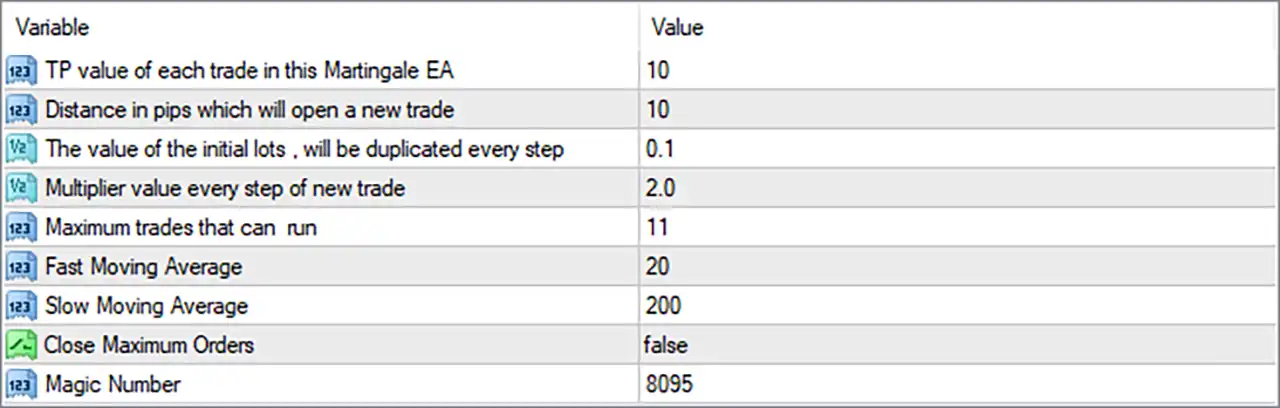
This guide explains all 9 parameters displayed in the Trippy EA settings panel, preserving their original names and exact default values.
⚙️ Martingale Strategy and Trade Management
🔹 TP value of each trade in this Martingale EA = 10: Sets the take-profit target for each trade in the Martingale strategy to 10. This parameter defines the configured profit target for individual positions, rather than necessarily representing a combined basket profit target.
🔹 Distance in pips which will open a new trade = 10: Sets the distance between trades to 10 pips. When the market moves against an existing position by the configured distance, the EA can open another trade according to its Martingale logic.
🔹 The value of the initial lots, will be duplicated every step = 0.1: Sets the initial trading volume to 0.1 lots. This is the starting lot size used by the EA before applying the configured multiplier to subsequent trades.
🔹 Multiplier value every step of new trade = 2.0: Sets the Martingale lot multiplier to 2.0, meaning the lot size of each subsequent trade can be multiplied by 2.0 compared with the previous trade, according to the EA's position-sizing logic.
🔹 Maximum trades that can run = 11: Limits the number of trades that can run within the configured strategy to a maximum of 11, helping restrict the number of positions opened during a Martingale trading cycle.
⚙️ Moving Average Settings
🔹 Fast Moving Average = 20: Sets the fast moving average period to 20, allowing the EA to evaluate shorter-term price movements and use the resulting trend information in its trading calculations.
🔹 Slow Moving Average = 200: Sets the slow moving average period to 200, providing a longer-term market trend reference that can help the EA assess the broader market direction.
⚙️ Order Management and Identification
🔹 Close Maximum Orders = false: Disables the Close Maximum Orders option. When set to false, the EA does not activate this particular automatic order-closing function when the maximum trade limit is reached; the exact behavior depends on its internal programming.
🔹 Magic Number = 8095: Assigns the unique Magic Number 8095 to trades managed by Trippy EA MT4, allowing the platform and EA to distinguish its positions from manually opened trades and orders managed by other Expert Advisors.
⚙️ Important Configuration Considerations
🔹 Initial Trading Volume: The initial lot size is 0.1 lots, which provides the starting position volume for the Martingale sequence.
🔹 Martingale Multiplier: The multiplier of 2.0 can increase position sizes significantly as additional trades are opened, potentially increasing account exposure during prolonged adverse market movements.
🔹 Maximum Trade Limit: Maximum trades that can run = 11 restricts the configured number of trades, but traders should understand how the EA handles the limit when no basket exit has occurred.
🔹 Trade Spacing: Distance in pips which will open a new trade = 10 configures relatively close spacing between additional positions, potentially resulting in frequent entries during volatile market conditions.
🔹 Moving Average Confirmation: Fast Moving Average = 20 and Slow Moving Average = 200 provide short-term and long-term trend references for the EA's trading logic.
🔹 Profit Target: TP value of each trade in this Martingale EA = 10 establishes the individual trade profit target. Verify whether the EA also uses additional basket-closing conditions.
🔹 Risk Management: The supplied settings do not show a separate maximum drawdown percentage, equity protection limit, or daily loss limit. Traders should therefore evaluate the potential exposure created by the 2.0 Martingale multiplier and 11-trade maximum.
🔢 Conclusion
Trippy EA MT4 uses a Martingale-based trading configuration combined with moving average parameters and adjustable trade-management settings.
Its default configuration starts with 0.1 lots, uses a 2.0 lot multiplier, opens additional trades at a distance of 10 pips, and allows a maximum of 11 trades. The individual take-profit setting is 10, while the moving average periods are configured to 20 and 200.
Although the EA provides configurable trade limits, the Martingale multiplier can substantially increase total exposure when the market moves against open positions. Traders should carefully assess the potential drawdown and test different configurations before deploying Trippy EA MT4 on a live trading account.


