
Introduction to Boom Expert MT4
Boom Expert MT4 is an automated trading Expert Advisor (EA) designed for the MetaTrader 4 platform. Its configuration combines percentage-based money management, recovery aggression controls, maximum lot restrictions, EMA-based entry signals, and customizable trade execution settings.
The EA uses three EMA parameters to configure its entry strategy: Fast EMA, Slow EMA, and Signal EMA. It also provides adjustable Take Profit and Stop Loss levels, allowing traders to define their preferred trade exit distances. Additionally, the recovery and lot management parameters offer flexibility in controlling position sizing and trading exposure.
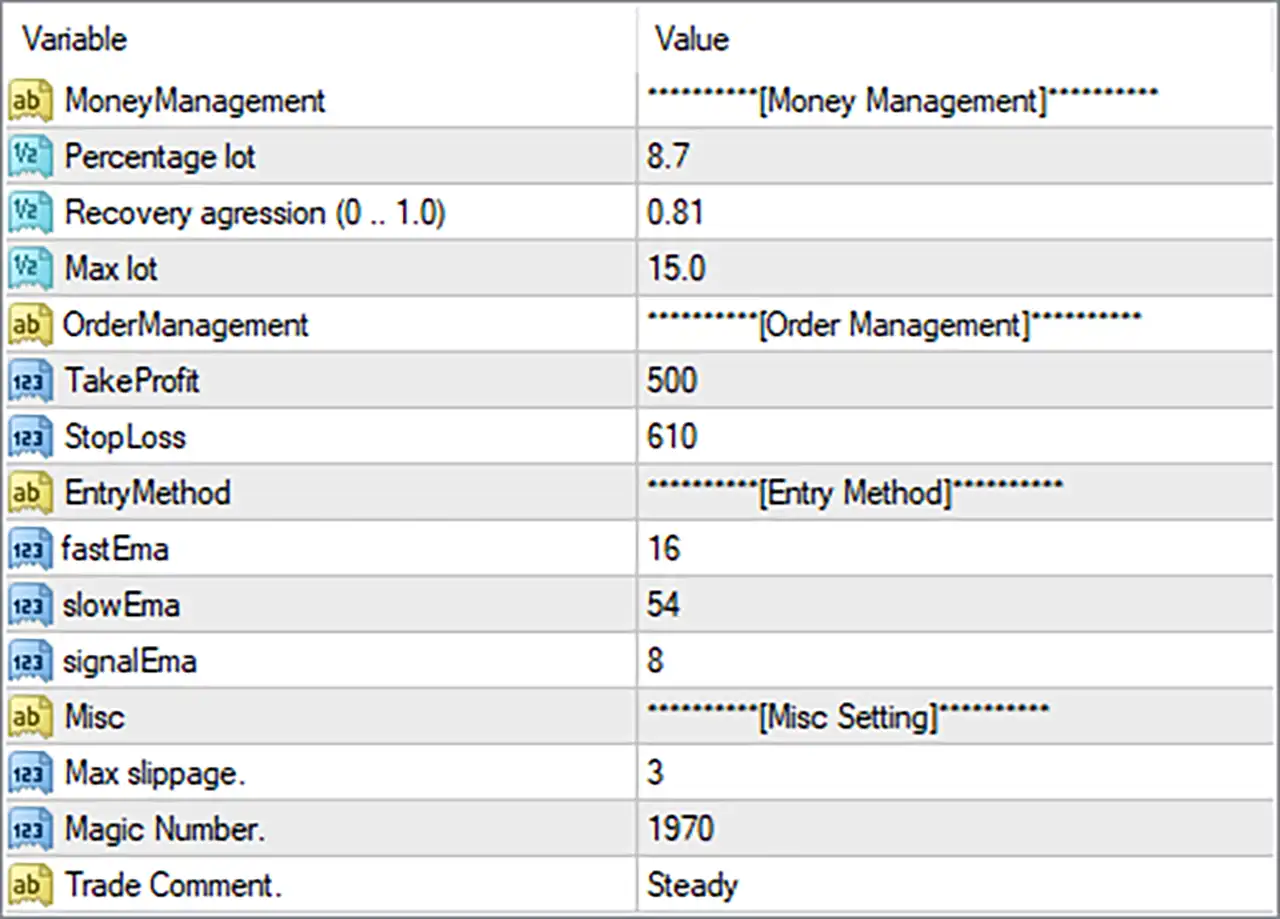
Money Management Settings
This section controls position sizing, recovery behavior, and maximum trading volume.
🔹 MoneyManagement = Money Management – An informational section heading introducing the EA’s position sizing and money management configuration.
🔹 Percentage lot = 8.7 – Sets the percentage-based lot sizing parameter to 8.7. This value is used by the EA’s internal money management system to determine trading volume according to its programmed calculation. The exact interpretation of this percentage should be verified through the EA’s documentation.
🔹 Recovery aggression (0 … 1.0) = 0.81 – Sets the recovery aggression level to 0.81 on a scale from 0 to 1.0. This parameter controls the intensity of the EA’s recovery mechanism, with higher values generally representing more aggressive recovery behavior according to its internal logic.
🔹 Max lot = 15.0 – Sets the maximum permitted trading volume to 15.0 lots. This parameter establishes an upper lot-size limit to help prevent the EA from exceeding the configured position volume.
Order Management Settings
This section defines the Take Profit and Stop Loss levels used to manage trade exits.
🔹 OrderManagement = Order Management – An informational section heading introducing the order management configuration.
🔹 TakeProfit = 500 – Sets the Take Profit distance to 500 points. When a trade reaches its configured profit target, the EA can close the position automatically to secure the intended profit.
🔹 StopLoss = 610 – Sets the Stop Loss distance to 610 points. This parameter defines the maximum configured price movement against an individual position before the EA’s stop-loss protection is triggered.
Entry Method – EMA Trading Strategy
This section contains the moving average parameters used by Boom Expert MT4 to configure its entry signal calculations.
🔹 EntryMethod = Entry Method – An informational section heading introducing the EA’s entry strategy configuration.
🔹 fastEma = 16 – Sets the Fast Exponential Moving Average period to 16. This shorter EMA is designed to respond more quickly to recent price movements and can help identify short-term market direction or potential entry opportunities.
🔹 slowEma = 54 – Sets the Slow Exponential Moving Average period to 54. This longer EMA provides a broader market trend reference and can be used alongside the Fast EMA to evaluate the prevailing market direction.
🔹 signalEma = 8 – Sets the Signal EMA period to 8. This parameter defines the additional EMA calculation used by the EA’s signal-generation logic to refine trading entries based on its programmed strategy.
Miscellaneous Settings
This section contains additional execution parameters and trade identification settings.
🔹 Misc = Misc Setting – An informational section heading introducing the miscellaneous configuration options.
🔹 Max slippage. = 3 – Sets the maximum permitted slippage to 3 points. This parameter controls the acceptable difference between the requested order price and the actual execution price, helping manage order execution conditions.
🔹 Magic Number. = 1970 – Assigns the Magic Number 1970 to trades opened by Boom Expert MT4. This unique identifier helps distinguish the EA’s positions from manual trades and orders opened by other Expert Advisors.
🔹 Trade Comment. = Steady – Sets the custom trade comment to Steady. This label is attached to applicable orders, making it easier to identify Boom Expert MT4 trades in the MT4 Terminal and trading history.
Conclusion
Boom Expert MT4 offers a combination of EMA-based entry configuration, percentage-based money management, recovery controls, and automated trade exit settings.
The supplied configuration uses a Fast EMA of 16, Slow EMA of 54, and Signal EMA of 8, providing three moving average periods for the EA’s entry signal calculations.
Its money management settings include a percentage lot value of 8.7, recovery aggression of 0.81, and maximum lot size of 15.0. For trade management, Take Profit is configured at 500 points, while Stop Loss is set to 610 points.
The EA also uses a maximum slippage of 3 points, Magic Number 1970, and the trade comment Steady.
Traders should pay particular attention to the recovery aggression and maximum lot settings, as aggressive recovery behavior and large position sizes can increase account exposure. It is advisable to test Boom Expert MT4 on a demo account and evaluate its drawdown characteristics before using it with real capital.