








Project Evolution Breakout Scalper MT5 (Latest version) – GroupBuy
Select a variant to see availability.
Quick Verdict
Project Evolution Breakout Scalper MT5 is a feature-rich breakout EA with strong historical testing, multi-currency support, risk-based position sizing and protective trade management. Its results are impressive, although the available evidence does not establish a verified Live Signal or Myfxbook track record.
Best For
✅ Forex Breakout Traders: Designed for automated breakout-based trading.
✅ EURUSD & USDJPY Traders: Optimized for two major currency pairs.
✅ Multi-Timeframe Users: Supports several higher-timeframe configurations.
✅ Risk-Focused Traders: Includes Risk MM, Stop Loss, Breakeven and Trailing Stop controls.
✅ Automated Trading Users: Suitable for traders seeking hands-free execution.
Overall Rating
⭐⭐⭐⭐⭐ 8.9/10
| Category | Rating |
|---|---|
| Trading Strategy | 9.0/10 |
| Risk Management | 9.1/10 |
| Configuration Flexibility | 9.2/10 |
| Historical Performance | 9.4/10 |
| Execution Features | 9.0/10 |
| Verified Live Performance | 7.5/10 |
| Overall Rating | 8.9/10 |
What is Project Evolution Breakout Scalper MT5?
Project Evolution Breakout Scalper MT5 is an automated Forex Expert Advisor (EA) developed around a breakout trading strategy enhanced with advanced algorithms and Neural Network technology.
The EA is designed to analyze market conditions and identify potentially favorable entry opportunities using multiple smart filters. According to the supplied product description, the system is designed to adapt to different economic environments rather than relying on a simple fixed-entry approach.
 Vendor Website: View here
This is GroupBuy ==> How to Join
How Does Project Evolution Breakout Scalper MT5 Work?
Breakout Market Detection
The EA focuses on identifying potential breakout opportunities and searching for moments when price behavior may offer a favorable trading setup.
Advanced Algorithmic Analysis
The system uses advanced algorithms to analyze market conditions and determine potential entry opportunities instead of relying on simple manual rules.
Neural Network Technology
The product description states that Neural Network technology is incorporated into the EA’s development to improve market analysis and entry selection.
Smart Market Filters
Multiple filters are used to evaluate market conditions and help the EA adapt its trading decisions across different economic environments.
Protective Stop Loss
The EA uses a protective Stop Loss mechanism designed to limit the potential impact of adverse price movements.
Automated Position Management
Once a trading opportunity is identified, the EA can automatically manage the position according to its configured Take Profit, Stop Loss, Breakeven and Trailing Stop parameters.
Key Features of Project Evolution Breakout Scalper MT5
Breakout Trading Strategy
Designed to identify potential breakout opportunities across supported Forex markets.
Neural Network Technology
Uses advanced technology as part of its market-analysis and entry-selection framework.
Multiple Smart Filters
Helps the EA evaluate changing market conditions before executing trades.
No Martingale Strategy
The EA does not rely on Martingale-based recovery trading.
No Grid Strategy
The system avoids traditional Grid trading structures.
Risk-Based Money Management
Risk MM can dynamically calculate position sizing according to account balance.
Protective Stop Loss
Provides predefined downside protection for automated positions.
Breakeven Management
Can move trade protection after the configured breakeven condition is reached.
Trailing Stop
Automatically follows favorable price movement according to the configured trailing parameters.
Spread Protection
Includes individual and general maximum-spread controls.
Risk Protection Module
Provides additional rules for managing and closing positions under specific risk conditions.
Verified Live Signal Performance
Project Evolution Breakout Scalper MT5 Live Signal
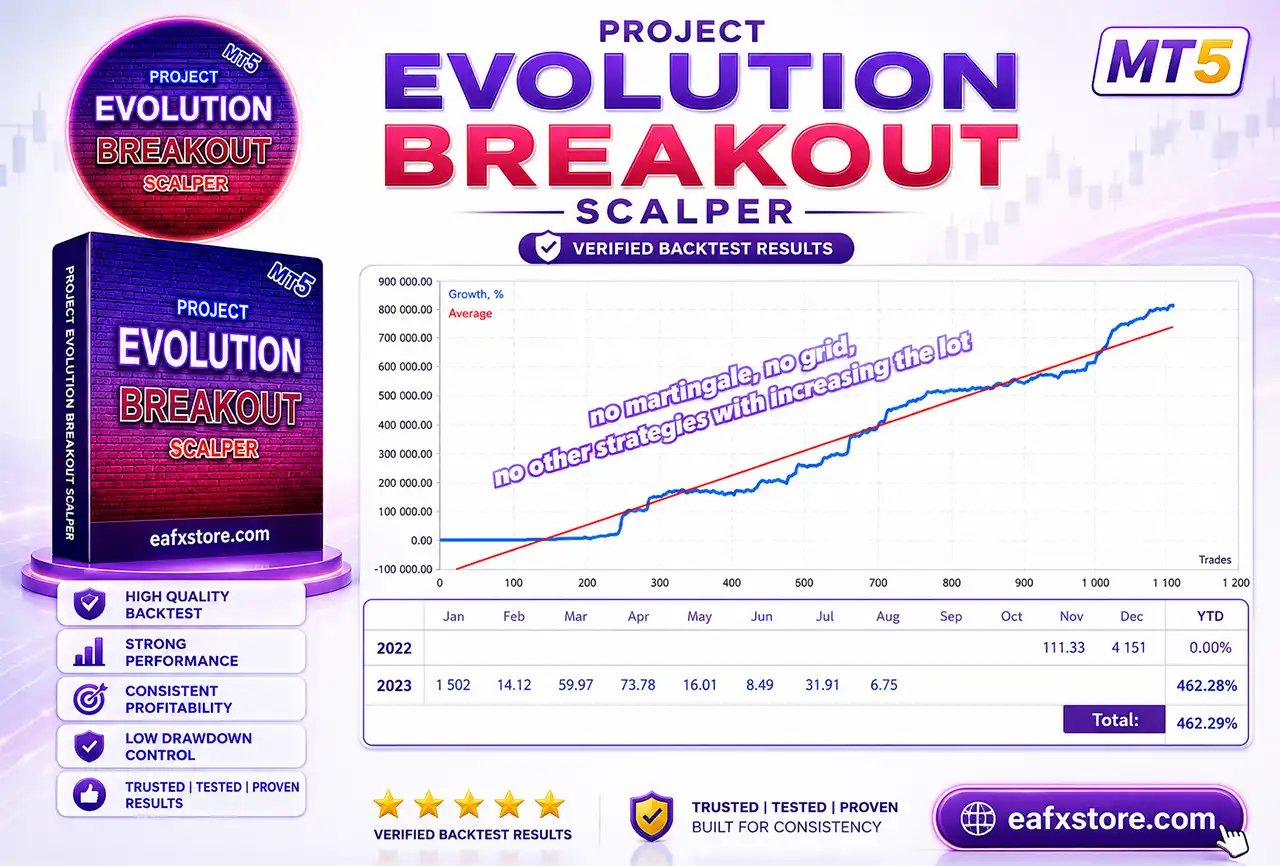
The provided growth report shows an overall growth of 462.29%, with a year-to-date (YTD) growth of 462.28%.
While this is useful performance information, the absence of sufficient verification details to directly link the report to a continuously verified live trading account means it cannot be considered equivalent to a verified live trading signal.
Historical Trading Results Performance
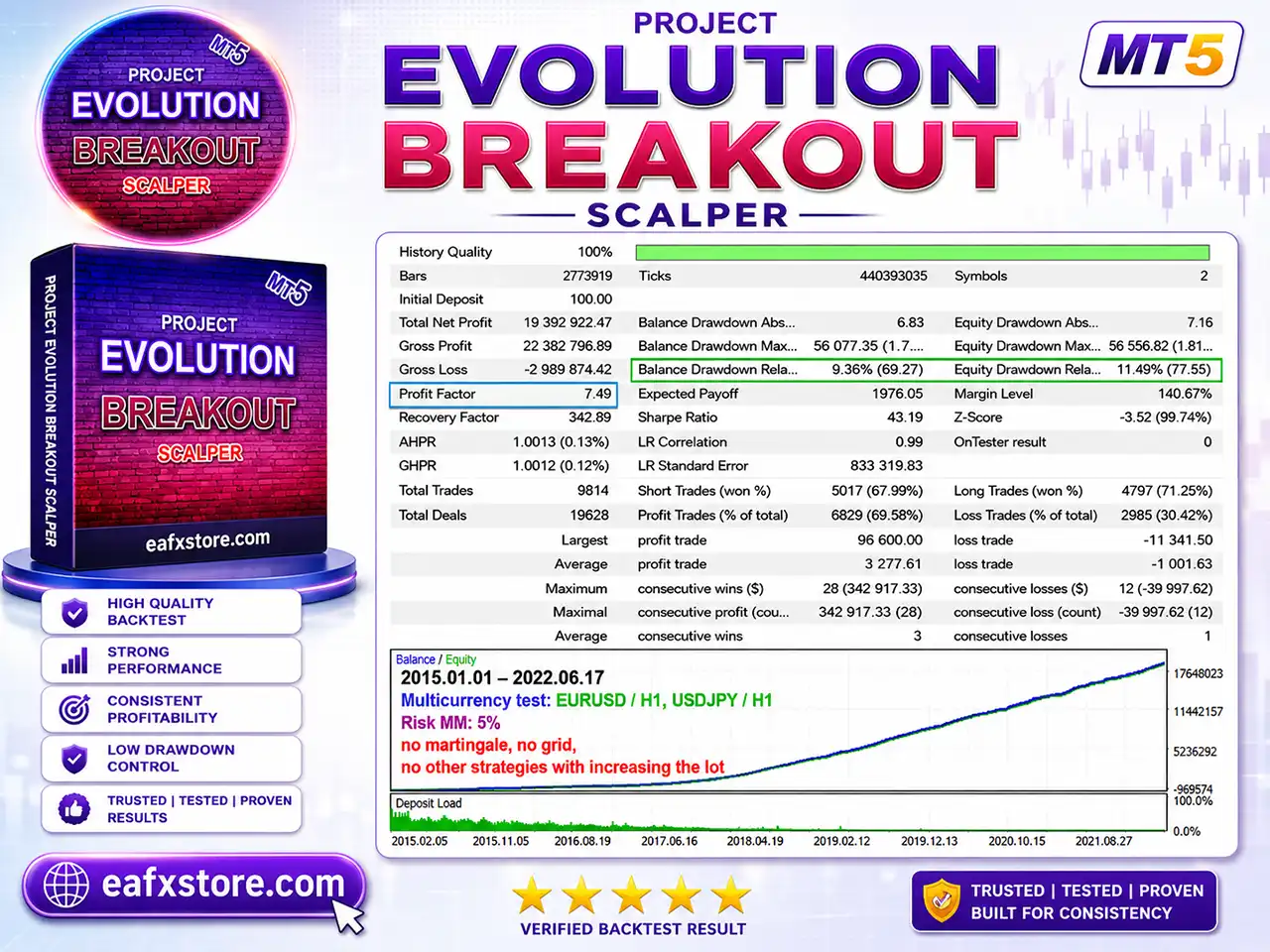
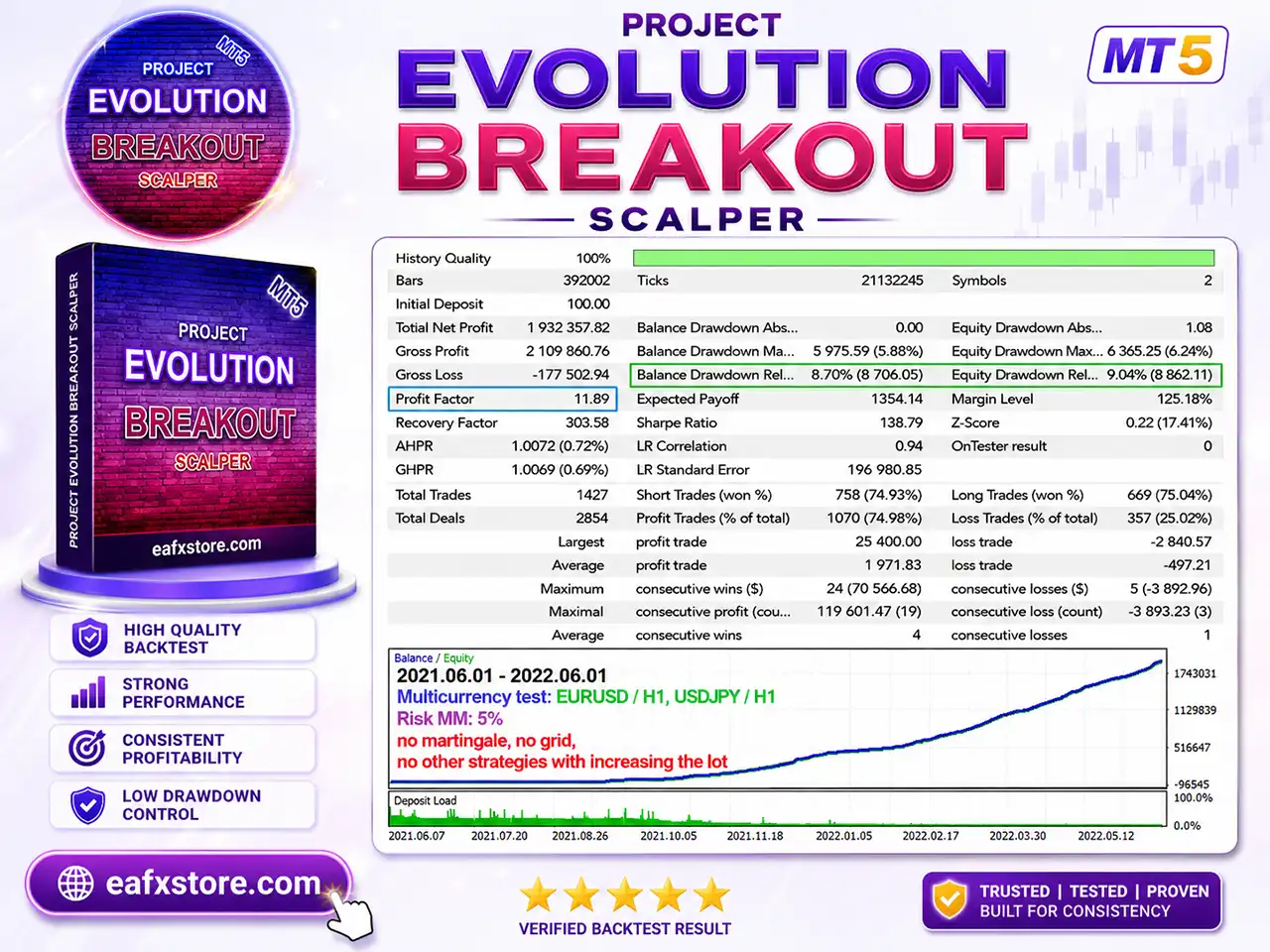
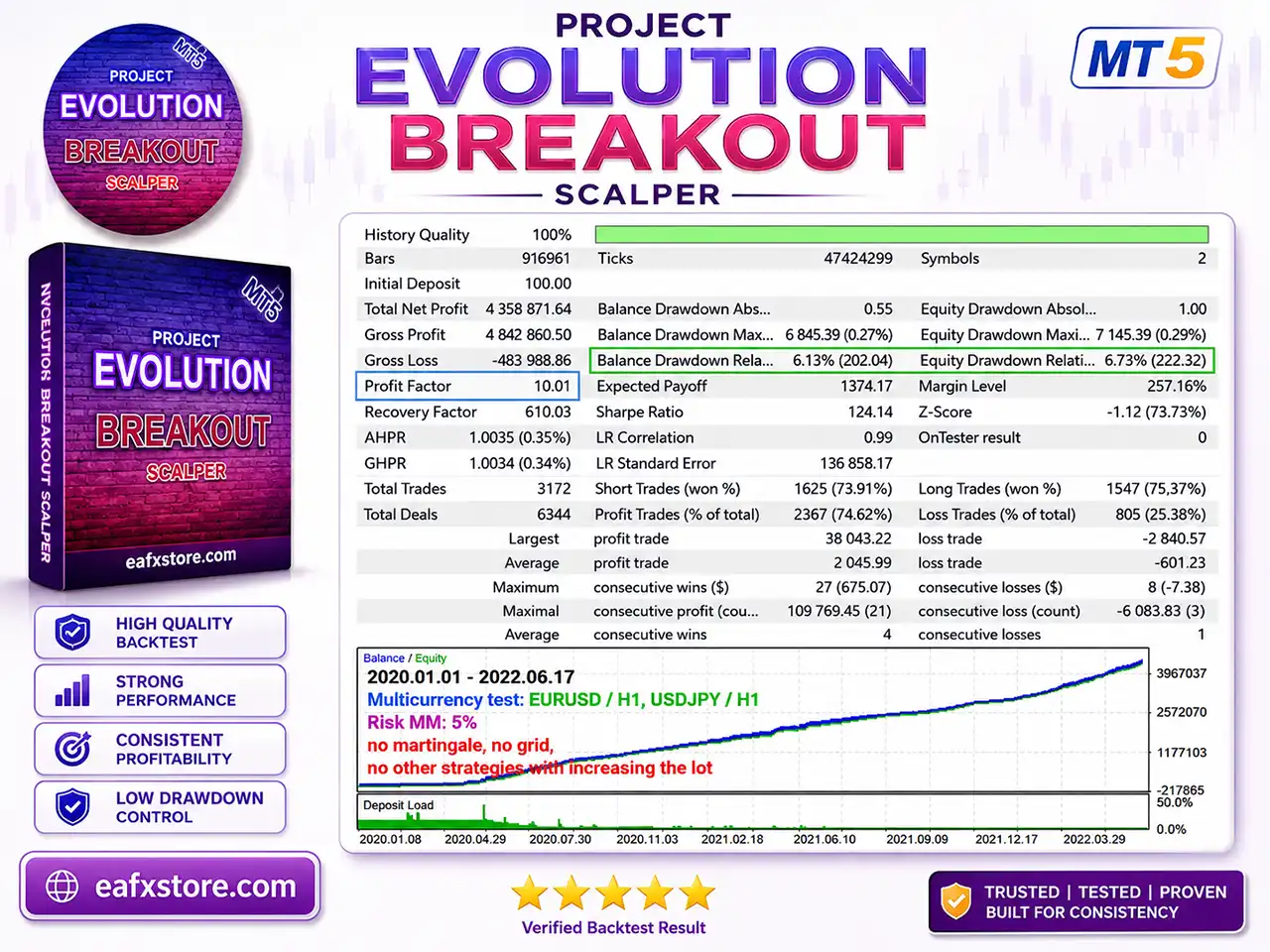
The supplied Strategy Tester reports show several historical test configurations using EURUSD / H1 and USDJPY / H1, with Risk MM set to 5% and explicit statements that the systems use no Martingale, no Grid and no other strategies with increasing the lot.
Historical Test 1
Project Evolution Breakout Scalper MT5 Backtest
| Metric | Result |
|---|---|
| Test Period | 2020.01.01–2022.06.17 |
| Initial Deposit | 100.00 |
| Total Net Profit | 4,358,871.64 |
| Gross Profit | 4,842,860.50 |
| Gross Loss | -483,988.86 |
| Profit Factor | 10.01 |
| Total Trades | 3,172 |
| Profit Trades | 2,367 (74.62%) |
| Equity Drawdown Relative | 6.73% |
| Sharpe Ratio | 124.14 |
This test reports a very high 10.01 Profit Factor with 74.62% profitable trades and approximately 6.73% relative equity drawdown.
Historical Test 2
Project Evolution Breakout Scalper MT5 Backtests
| Metric | Result |
|---|---|
| Test Period | 2015.01.01–2022.06.17 |
| Initial Deposit | 100.00 |
| Total Net Profit | 19,392,922.47 |
| Gross Profit | 22,382,796.89 |
| Gross Loss | -2,989,874.42 |
| Profit Factor | 7.49 |
| Total Trades | 9,814 |
| Profit Trades | 6,829 (69.58%) |
| Equity Drawdown Relative | 11.49% |
| Sharpe Ratio | 43.19 |
This longer historical test produced 19,392,922.47 in reported net profit from a 100.00 starting balance, with a 7.49 Profit Factor and 11.49% relative equity drawdown.
Historical Test 3
Project Evolution Breakout Scalper MT5 Backtest Results
| Metric | Result |
|---|---|
| Test Period | 2021.06.01–2022.06.01 |
| Initial Deposit | 100.00 |
| Total Net Profit | 1,932,357.82 |
| Gross Profit | 2,109,860.76 |
| Gross Loss | -177,502.94 |
| Profit Factor | 11.89 |
| Total Trades | 1,427 |
| Profit Trades | 1,070 (74.98%) |
| Equity Drawdown Relative | 9.04% |
| Sharpe Ratio | 138.79 |
The third test reports the highest Profit Factor of 11.89, with approximately 74.98% profitable trades and 9.04% relative equity drawdown.
Historical Results Summary
Historical results demonstrate strong profitability alongside relatively well-controlled drawdowns relative to the returns achieved.
However, one should exercise caution when evaluating exceptionally high compounded growth figures derived from very small initial capital, as these can be heavily influenced by assumptions regarding capital management and position-sizing mechanisms.
Why Project Evolution Breakout Scalper MT5 Stands Out
Strong Historical Test Results
The supplied reports show high Profit Factor values ranging from 7.49 to 11.89, accompanied by substantial historical profitability.
No Martingale or Grid
The EA’s stated strategy avoids Martingale and Grid structures, which can introduce substantial accumulated exposure during prolonged adverse market movements.
Risk-Based Money Management
Risk MM allows position sizing to respond to account balance rather than simply using an unrestricted fixed progression.
Multi-Currency Architecture
EURUSD and USDJPY can be managed from one chart, providing a convenient multi-market approach.
Advanced Trade Protection
Stop Loss, Breakeven, Trailing Stop and Risk Protection functions provide several layers of automated trade management.
Risk Management Features
Risk MM
Enables risk-based position sizing linked to account balance.
Protective Stop Loss
The EA uses a defined Stop Loss rather than relying solely on recovery mechanisms.
Breakeven Protection
Can protect trades after favorable movement.
Trailing Stop
Helps lock in gains while allowing profitable positions to continue developing.
Risk Protection Module
Provides additional position-management and closing logic.
Spread Protection
Controls trading when spreads exceed configured limits.
Trading-Time Restrictions
Allows trading to be limited to predefined market hours.
Friday Protection
A separate Friday cutoff can reduce exposure toward the end of the trading week.
No Martingale/Grid
The strategy explicitly avoids traditional lot-increasing recovery structures.
Recommended Trading Conditions
For the best performance, the following setup is recommended:
| Features | Type |
|---|---|
| Trading platform | MetaTrader 5 (MT5) |
| Time frames | H1, H2, H3, H4, H6 |
| Currency pairs | EURUSD, USDJPY |
| Minimum / Recommended deposit | $100+ |
| Minimum / Recommended leverage | 1:100+ |
| Account type | Hedging |
| Product type | Original version |
| Additional services | Unlock and Decompile |
| Recommended brokers | Exness Broker, Icmarkets Broker |
| Recommended VPS | MyfxVPS.com (Blue VPS, Golden VPS). Lowest Latency, 2 week Free Trial, 100% Free for 12-18 Months. |
Product Download Package?
The download package of the product suite includes:
 Setting (If Any).docx
Installation Guide.docx
 Reviewed by David Easton
Weaknesses and Risk Warnings
No Independently Verified Live Signal
The available information does not establish a verified Live Signal specifically for this EA.
High Historical Growth
Extremely high backtest returns should be evaluated carefully because historical compounding may not translate directly to live trading.
15.0% Risk Setting
The supplied Risk MM configuration uses a 15.0% risk parameter, which can be aggressive depending on how the EA calculates position size.
Broker Execution Matters
Spreads, slippage, latency and execution quality can materially affect breakout strategies.
Backtest Dependency
Strategy Tester results cannot guarantee future profitability under different market conditions.
Small Starting Balance Risk
Although the stated minimum balance is $50, traders should consider using substantially more capital if the selected risk configuration creates meaningful exposure.
Multiple Symbols
Trading multiple currency pairs simultaneously can increase aggregate account exposure.
Who Should Use Project Evolution Breakout Scalper MT5?
Breakout Strategy Traders
The EA is suitable for traders who prefer automated breakout-based market analysis rather than manual discretionary entries.
EURUSD and USDJPY Traders
Users focused on these two major Forex pairs can take advantage of the EA’s dedicated symbol controls.
Experienced Algorithmic Traders
Because the EA provides extensive configuration options, it is particularly suitable for users who understand risk management, spread, execution and position sizing.
Traders Avoiding Martingale and Grid
Users looking for a system that explicitly avoids traditional Martingale and Grid recovery structures may find the strategy appealing.
Traders Seeking Multi-Timeframe Automation
The ability to operate across H1, H2, H3, H4 and H6 provides flexibility for traders with different trading horizons.
Final Verdict
Project Evolution Breakout Scalper MT5 is a sophisticated automated breakout Expert Advisor that combines Neural Network technology, advanced algorithms, smart filters, Risk MM, protective Stop Loss, Breakeven, Trailing Stop, Risk Protection, spread controls and multi-currency execution.
With suitable broker execution, adequate capital, careful risk settings and proper forward testing, Project Evolution Breakout Scalper MT5 can be an attractive option for traders seeking a structured automated breakout solution for EURUSD and USDJPY.
🔢 Project Evolution Breakout Scalper MT5 Settings Guide
Project Evolution Breakout Scalper MT5 is a configurable breakout-oriented Expert Advisor designed with extensive controls for risk management, trading sessions, multi-symbol execution, multi-timeframe operation, spread protection, trailing stops, break-even management and automated position sizing.
The supplied settings reveal a highly customizable configuration that can be adapted for EURUSD, USDJPY, and other supported symbols, with separate controls for execution, volatility, news conditions and risk.
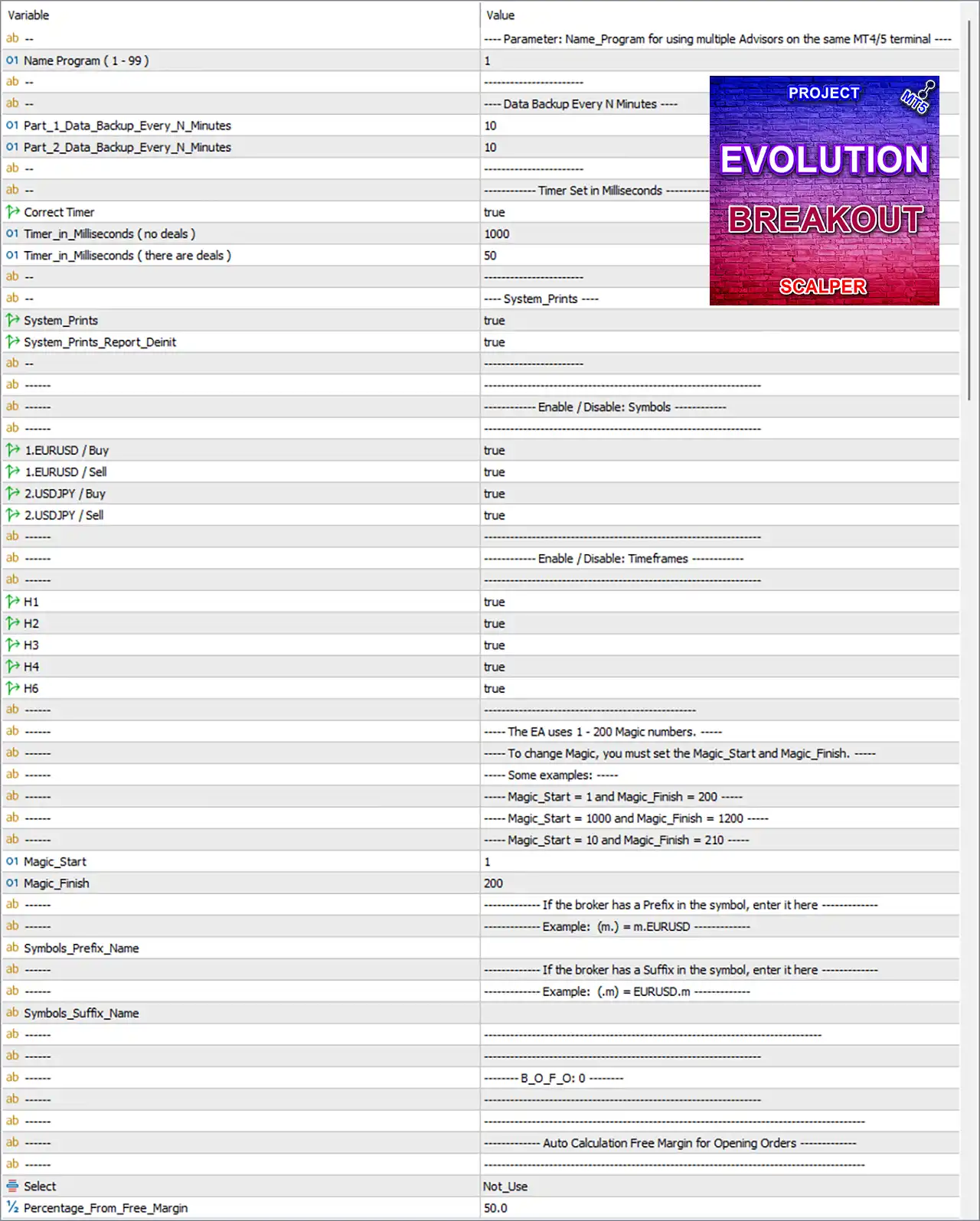
Project Evolution Breakout Scalper MT5 Settings Panel
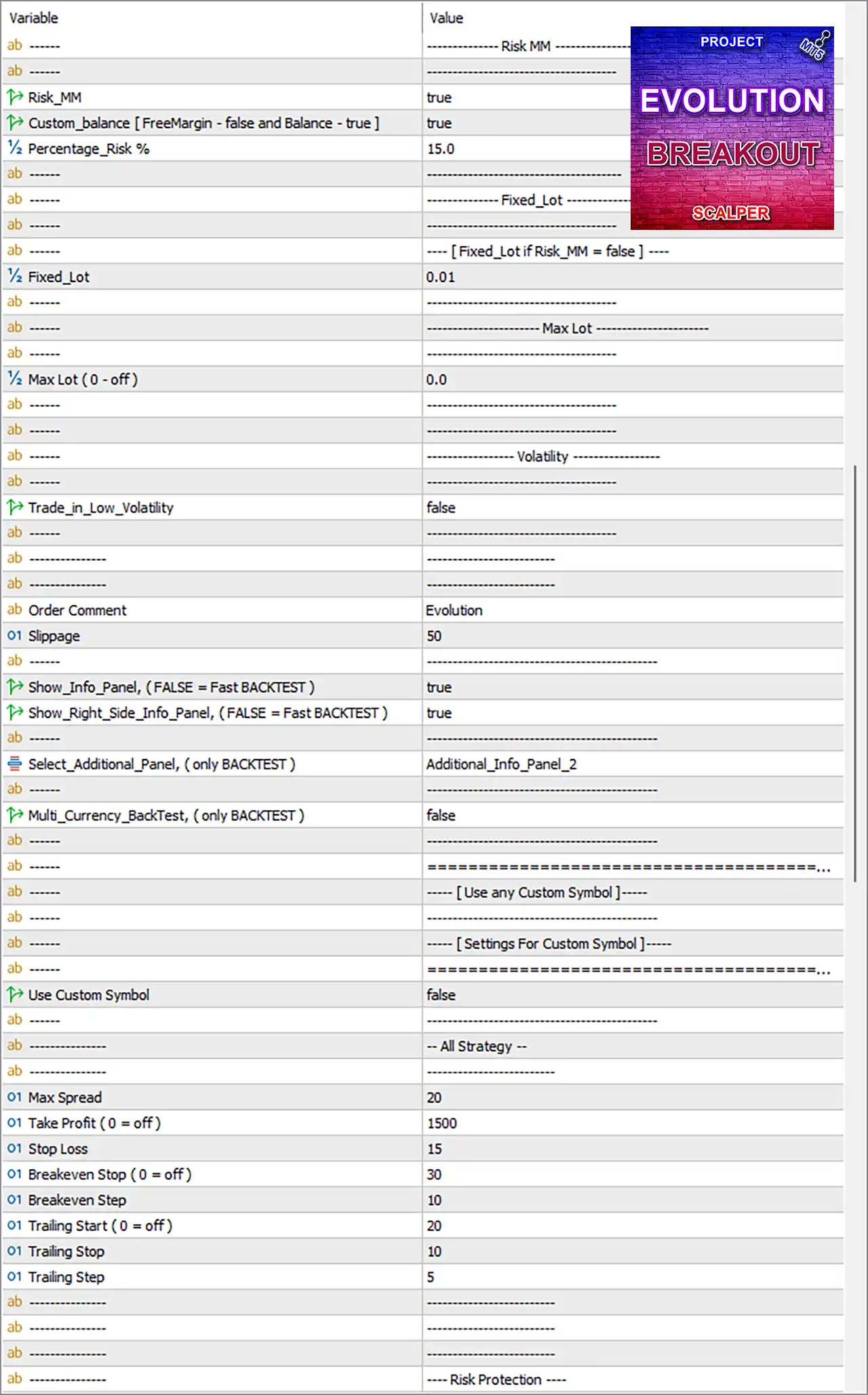
Project Evolution Breakout Scalper MT5 Setting Panel
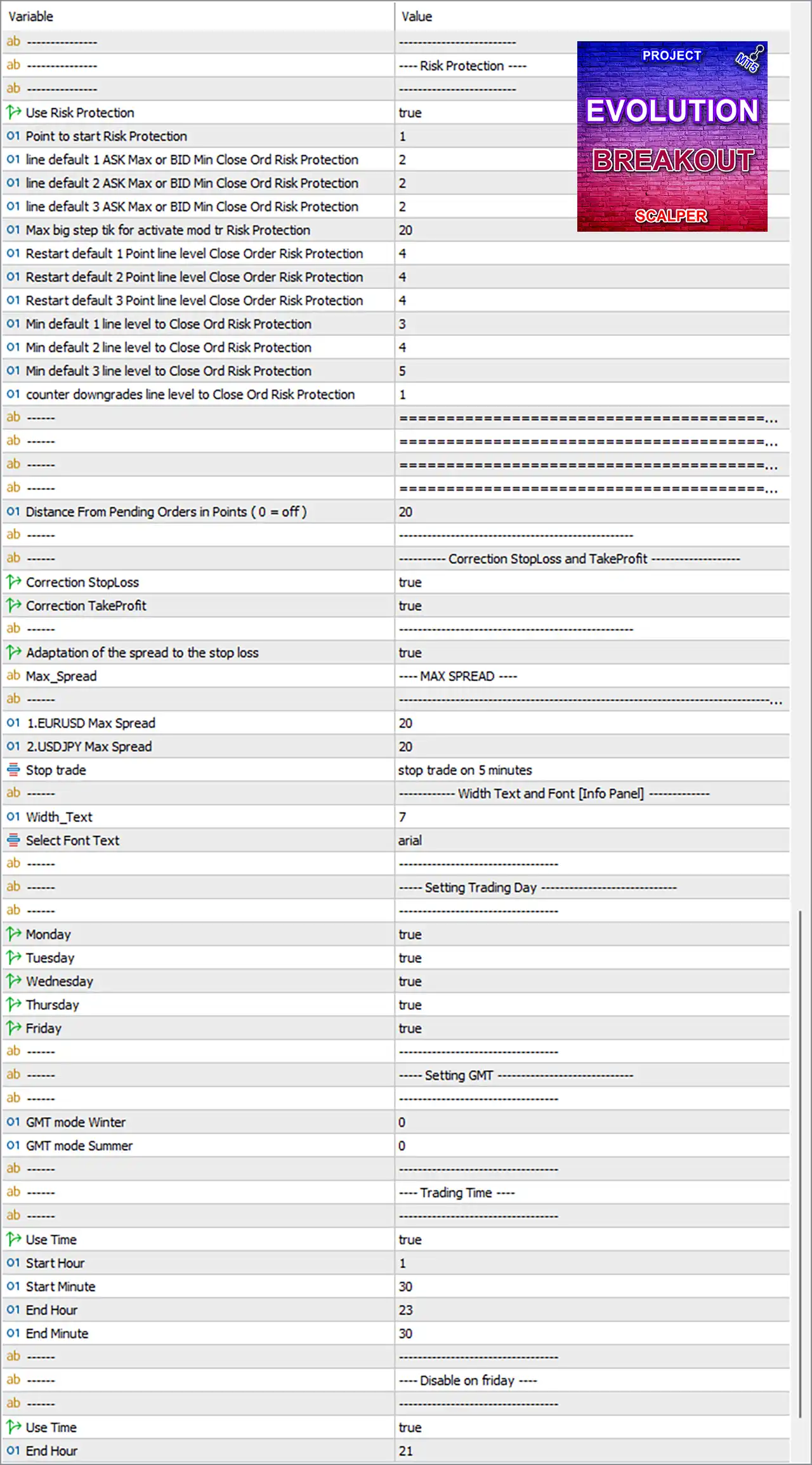
Project Evolution Breakout Scalper MT5 EA Settings Panel
🔶 Risk Protection Settings
🔹 Use Risk Protection: true — Enables the EA’s Risk Protection module.
🔹 Point to start Risk Protection: 1 — Defines the starting point at which Risk Protection becomes active.
🔹 line default 1 ASK Max or BID Min Close Ord Risk Protection: 2 — Sets the first default ASK/BID level used for closing orders under Risk Protection.
🔹 line default 2 ASK Max or BID Min Close Ord Risk Protection: 2 — Sets the second default ASK/BID closing-protection level to 2.
🔹 line default 3 ASK Max or BID Min Close Ord Risk Protection: 2 — Sets the third default ASK/BID closing-protection level to 2.
🔹 Max big step tik for activate mod tr Risk Protection: 20 — Sets the maximum large tick step used to activate the Risk Protection modification.
🔹 Restart default 1 Point line level Close Order Risk Protection: 4 — Defines the restart level for the first default Risk Protection line at 4.
🔹 Restart default 2 Point line level Close Order Risk Protection: 4 — Defines the restart level for the second default Risk Protection line at 4.
🔹 Restart default 3 Point line level Close Order Risk Protection: 4 — Defines the restart level for the third default Risk Protection line at 4.
🔹 Min default 1 line level to Close Ord Risk Protection: 3 — Sets the minimum level for the first Risk Protection closing line to 3.
🔹 Min default 2 line level to Close Ord Risk Protection: 4 — Sets the minimum level for the second Risk Protection closing line to 4.
🔹 Min default 3 line level to Close Ord Risk Protection: 5 — Sets the minimum level for the third Risk Protection closing line to 5.
🔹 counter downgrades line level to Close Ord Risk Protection: 1 — Controls the number of level downgrades for Risk Protection closing logic.
🔹 Distance From Pending Orders in Points (0 = off): 20 — Keeps a 20-point distance from pending orders when the protection distance is active.
🔶 Correction Stop Loss and Take Profit
🔹 Distance From Pending Orders in Points (0 = off): 20 — Uses 20 points as the configured pending-order distance threshold.
🔹 Correction StopLoss: true — Enables automatic Stop Loss correction.
🔹 Correction TakeProfit: true — Enables automatic Take Profit correction.
🔹 Adaptation of the spread to the stop loss: true — Adjusts Stop Loss calculations according to the current spread.
🔶 Spread Protection
🔹 1.EURUSD Max Spread: 20 — Sets the maximum permitted EURUSD spread to 20 points.
🔹 2.USDJPY Max Spread: 20 — Sets the maximum permitted USDJPY spread to 20 points.
🔹 Stop trade: stop trade on 5 minutes — Configures the displayed trade-stopping behavior as stop trade on 5 minutes.
🔶 Information Panel
🔹 Width_Text: 7 — Sets the information-panel text width parameter to 7.
🔹 Select Font Text: arial — Uses Arial as the information-panel font.
🔶 Trading Days
🔹 Monday: true — Enables trading on Monday.
🔹 Tuesday: true — Enables trading on Tuesday.
🔹 Wednesday: true — Enables trading on Wednesday.
🔹 Thursday: true — Enables trading on Thursday.
🔹 Friday: true — Enables trading on Friday.
🔶 GMT Settings
🔹 GMT mode Winter: 0 — Sets the Winter GMT offset parameter to 0.
🔹 GMT mode Summer: 0 — Sets the Summer GMT offset parameter to 0.
🔶 Trading Time
🔹 Use Time: true — Enables the configured trading-time schedule.
🔹 Start Hour: 1 — Sets the trading start hour to 1.
🔹 Start Minute: 30 — Sets the trading start minute to 30.
🔹 End Hour: 23 — Sets the trading end hour to 23.
🔹 End Minute: 30 — Sets the trading end minute to 30.
🔹 Trading Window: 01:30–23:30 — Based on the supplied hour and minute settings, the main trading window runs from 01:30 to 23:30.
🔶 Friday Trading Restriction
🔹 Use Time: true — Enables the separate Friday trading-time restriction.
🔹 End Hour: 21 — Sets the Friday trading cutoff hour to 21.
The supplied screenshot ends at
End Hour: 21, so no separate Friday end-minute value is visible and none has been inferred.
🔶 Multi-Advisor Program Settings
🔹 Name_Program (1–99): 1 — Identifies the EA program instance as program number 1, allowing multiple advisors to operate on the same MT4/5 terminal.
🔶 Data Backup
🔹 Part_1_Data_Backup_Every_N_Minutes: 10 — Configures Part 1 data backup to occur every 10 minutes.
🔹 Part_2_Data_Backup_Every_N_Minutes: 10 — Configures Part 2 data backup to occur every 10 minutes.
🔶 Timer Settings
🔹 Correct Timer: true — Enables the corrected timer mechanism.
🔹 Timer_in_Milliseconds (no deals): 1000 — Sets the timer interval to 1000 milliseconds when there are no active deals.
🔹 Timer_in_Milliseconds (there are deals): 50 — Sets the timer interval to 50 milliseconds when trades/deals are active.
🔶 System Prints
🔹 System_Prints: true — Enables system print/log messages.
🔹 System_Prints_Report_Deinit: true — Enables reporting through the deinitialization/system report mechanism.
🔶 Symbol Enable/Disable Settings
🔹 1.EURUSD / Buy: true — Enables EURUSD Buy trading.
🔹 1.EURUSD / Sell: true — Enables EURUSD Sell trading.
🔹 2.USDJPY / Buy: true — Enables USDJPY Buy trading.
🔹 2.USDJPY / Sell: true — Enables USDJPY Sell trading.
🔶 Timeframe Enable/Disable Settings
🔹 H1: true — Enables the H1 timeframe.
🔹 H2: true — Enables the H2 timeframe.
🔹 H3: true — Enables the H3 timeframe.
🔹 H4: true — Enables the H4 timeframe.
🔹 H6: true — Enables the H6 timeframe.
🔶 Magic Number Range
🔹 Magic_Start: 1 — Sets the beginning of the EA Magic Number range to 1.
🔹 Magic_Finish: 200 — Sets the end of the EA Magic Number range to 200.
🔹 Magic Number Range: 1–200 — The EA is configured to use Magic Numbers from 1 through 200.
🔶 Symbol Prefix and Suffix
🔹 Symbols_Prefix_Name: blank — No broker-specific symbol prefix is configured.
🔹 Symbols_Suffix_Name: blank — No broker-specific symbol suffix is configured.
🔶 Free-Margin Opening Order Calculation
🔹 Select: Not_Use — The automatic free-margin calculation option is currently set to Not_Use.
🔹 Percentage_From_Free_Margin: 50.0 — Defines 50.0% as the configured percentage of free margin for the automatic opening-order calculation.
🔶 Risk Money Management
🔹 Risk_MM: true — Enables risk-based money management.
🔹 Custom_balance [freeMargin = false and balance = true]: true — Enables the custom-balance calculation mode using the balance rather than free margin.
🔹 Percentage_Risk %: 15.0 — Sets the risk-management percentage parameter to 15.0%.
🔶 Fixed Lot
🔹 Fixed_Lot: 0.01 — Sets the fixed trading lot size to 0.01 lots when fixed-lot mode is used.
🔶 Maximum Lot
🔹 Max Lot (0 = off): 0.0 — Sets the maximum lot limit to 0.0, which the parameter description indicates means the limit is off.
🔶 Volatility
🔹 Trade_in_Low_Volatility: false — Disables trading specifically during low-volatility market conditions.
🔶 Trade Execution
🔹 Order Comment: Evolution — Assigns Evolution as the order comment used to identify EA trades.
🔹 Slippage: 50 — Sets the maximum configured slippage parameter to 50 points.
🔶 Information Panels
🔹 Show_Info_Panel, (FALSE = Fast BACKTEST): true — Displays the main information panel and does not use the fast-backtest display mode.
🔹 Show_Right_Side_Info_Panel, (FALSE = Fast BACKTEST): true — Displays the right-side information panel.
🔹 Select_Additional_Panel, (only BACKTEST): Additional_Info_Panel_2 — Selects Additional_Info_Panel_2 for the backtest information panel.
🔹 Multi_Currency_BackTest, (only BACKTEST): false — Disables multi-currency backtesting.
🔶 Custom Symbol
🔹 Use Custom Symbol: false — Disables the use of a custom trading symbol.
🔶 All Strategy Settings
🔹 Max Spread: 20 — Sets the overall maximum spread parameter to 20 points.
🔹 Take Profit (0 = off): 1500 — Sets the Take Profit level to 1500 points.
🔹 Stop Loss: 15 — Sets the Stop Loss parameter to 15 points.
🔹 Breakeven Stop (0 = off): 30 — Sets the breakeven activation/stop parameter to 30 points.
🔹 Breakeven Step: 10 — Sets the breakeven step to 10 points.
🔹 Trailing Start (0 = off): 20 — Activates the trailing-stop process from 20 points of configured movement/profit.
🔹 Trailing Stop: 10 — Sets the trailing-stop distance to 10 points.
🔹 Trailing Step: 5 — Sets the trailing adjustment step to 5 points.
🔢 Conclusion
Project Evolution Breakout Scalper MT5 provides a broad configuration framework for automated breakout trading, combining risk-based money management, fixed-lot controls, multi-symbol trading, multi-timeframe execution, spread protection, Risk Protection, break-even management and trailing stops.
The supplied configuration enables EURUSD and USDJPY, with Buy and Sell operations active across H1, H2, H3, H4, and H6. Risk-based money management is enabled with a configured 15.0% risk parameter, while the fixed lot is 0.01 and the maximum lot limit is disabled with 0.0.
For execution control, the configuration uses 20 maximum spread, 50 slippage, 1500 Take Profit, 15 Stop Loss, 30 Breakeven Stop, 10 Breakeven Step, 20 Trailing Start, 10 Trailing Stop, and 5 Trailing Step. Traders should carefully validate these values through backtesting and forward testing because actual risk depends on the EA’s internal calculation logic, symbol specifications, broker execution, and account conditions.
🔢 FAQs
❓ Which trading symbols are enabled in Project Evolution Breakout Scalper MT5?
EURUSD and USDJPY are enabled for both Buy and Sell trading.
❓ Which timeframes are enabled?
The EA has H1, H2, H3, H4, and H6 enabled.
❓ What is the configured risk percentage?
The Risk_MM system is enabled and Percentage_Risk % = 15.0.
❓ What are the main Stop Loss and Take Profit settings?
The global settings show Stop Loss = 15 and Take Profit = 1500.
❓ Does the EA use trailing and breakeven protection?
Yes. Breakeven is configured at 30 points with a 10-point step, while trailing starts at 20 points, uses a 10-point distance, and has a 5-point step.
User Reviews
Only logged in customers who have purchased this product may leave a review.
❓ What trading strategy does Project Evolution Breakout Scalper MT5 use?
Project Evolution Breakout Scalper MT5 uses a breakout scalping strategy enhanced by Neural Network technology, advanced algorithms, and multiple smart filters for market analysis.
❓ Does Project Evolution Breakout Scalper MT5 use Martingale or Grid?
No. Project Evolution Breakout Scalper MT5 does not use Martingale, Grid, or other strategies that increase lot sizes after trades.
❓ Which currency pairs are recommended for Project Evolution Breakout Scalper MT5?
Project Evolution Breakout Scalper MT5 is recommended for EURUSD and USDJPY, with supported timeframes ranging from H1 to H6.
❓ What timeframes does Project Evolution Breakout Scalper MT5 support?
Project Evolution Breakout Scalper MT5 is recommended on H1, H2, H3, H4, and H6 for both EURUSD and USDJPY trading.
❓ Does Project Evolution Breakout Scalper MT5 use Stop Loss protection?
Yes. Project Evolution Breakout Scalper MT5 sets a protective Stop Loss to help control significant drawdowns and provide predefined trade protection.
❓ What is the minimum recommended balance for Project Evolution Breakout Scalper MT5?
The minimum recommended balance for Project Evolution Breakout Scalper MT5 is $50 when using the recommended currency pairs and timeframes.
❓ What leverage is recommended for Project Evolution Breakout Scalper MT5?
Project Evolution Breakout Scalper MT5 recommends leverage of 1:100 or higher, together with a broker offering low spreads and high-quality execution.
❓ Can Project Evolution Breakout Scalper MT5 trade multiple currencies from one chart?
Yes. Project Evolution Breakout Scalper MT5 can manage multiple supported currencies from a single chart, with currencies enabled or disabled through settings.
❓ What account type is required for Project Evolution Breakout Scalper MT5?
Project Evolution Breakout Scalper MT5 is specified for hedging accounts only. Users running multiple EAs should also assign different Magic Numbers.
-
 Price range: $89.00 through $3,500.00
 -
 Original price was: $4,998.00.$89.00Current price is: $89.00.
 -
 Original price was: $999.00.$89.00Current price is: $89.00.
 -
 Original price was: $249.00.$89.00Current price is: $89.00.
-
 0
0 -
 5Price range: $89.00 through $599.00
 -
 0Price range: $89.00 through $599.00
 -
 2
2
There are no reviews yet.