

Introduction to BollSto EA MT4
BollSto EA is an automated trading Expert Advisor (EA) for MetaTrader 4 that combines Bollinger Bands and Stochastic indicator parameters to configure its trading strategy. The EA provides flexible money management options, adjustable lot sizing, multi-position trading, and configurable risk management.

BollSto EA MT4 includes several trading controls, such as initial trade Take Profit, position-based profit targets, trade distance, and progressive lot multipliers. It also offers configurable Stop Loss protection, trade-count-based closing conditions, slippage control, and timeframe selection.
With its Moderate Risk setting, adjustable position multipliers, and 15-minute default timeframe, BollSto EA provides traders with configurable tools for automated trading and position management.
Below is a complete explanation of all settings and their default values based on the supplied BollSto EA Inputs.
Lot Size and Risk Settings
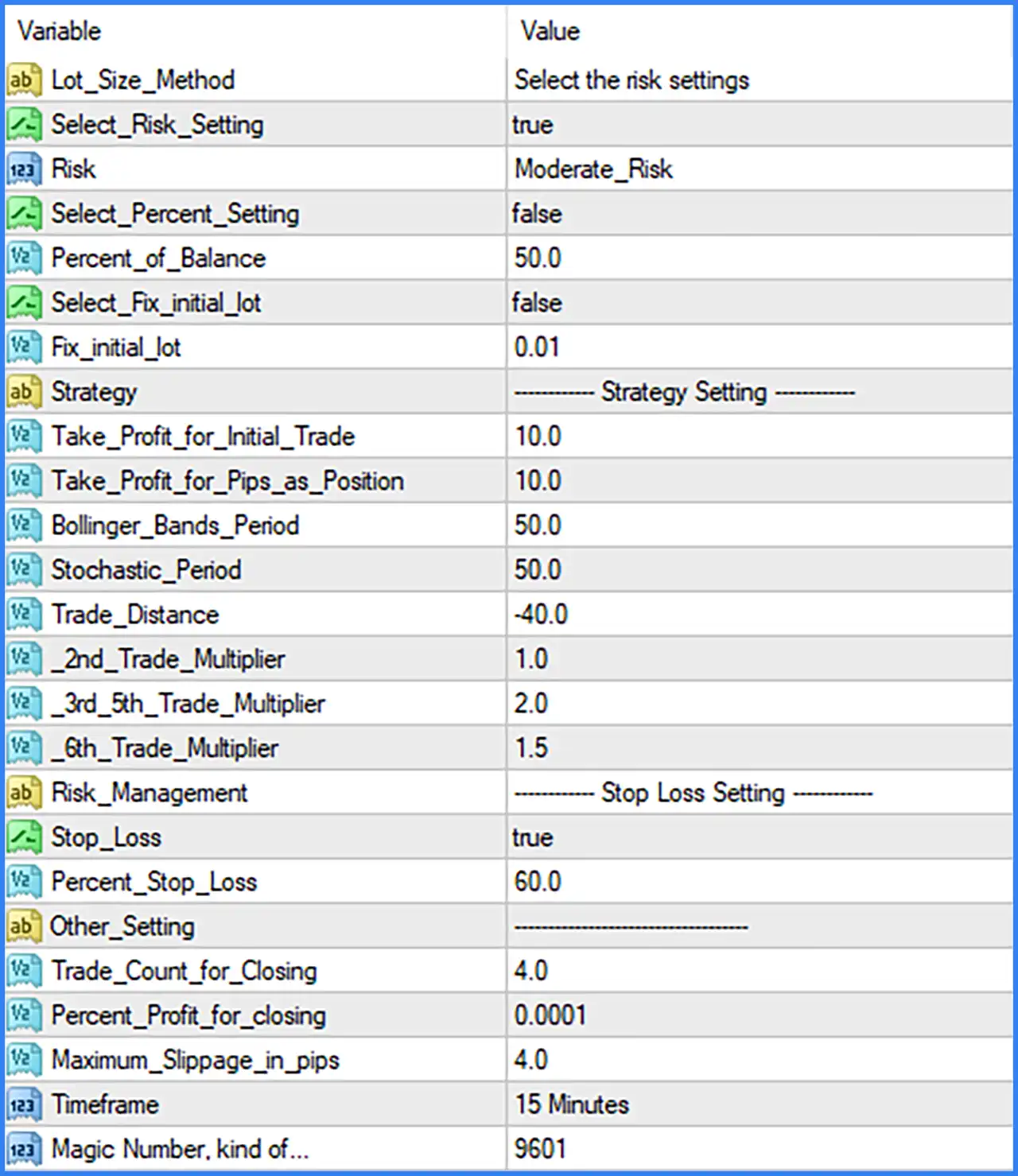
This section controls the lot-sizing method and risk configuration used by BollSto EA MT4.
🔹 Lot_Size_Method = Select the risk settings – Section heading for the EA's lot-sizing and risk configuration options.
🔹 Select_Risk_Setting = true – Enables the predefined risk-setting option, allowing the EA to use the selected risk profile.
🔹 Risk = Moderate_Risk – Selects the Moderate Risk profile, configuring the EA to operate using its predefined moderate-risk settings.
🔹 Select_Percent_Setting = false – Disables the percentage-based balance setting, meaning this lot-sizing option is not selected in the current configuration.
🔹 Percent_of_Balance = 50.0 – Sets the balance percentage parameter to 50.0, which can be used by the EA's percentage-based lot-sizing calculation when that option is activated.
🔹 Select_Fix_initial_lot = false – Disables the fixed initial lot selection, allowing the EA to follow the currently enabled risk-setting configuration instead.
🔹 Fix_initial_lot = 0.01 – Defines the fixed initial trading volume as 0.01 lots when the fixed initial lot option is enabled.
Trading Strategy Settings
This section configures the Bollinger Bands and Stochastic parameters, initial trade profit targets, trade distance, and lot multipliers.
🔹 Strategy = Strategy Setting – Section heading for the EA's main trading strategy parameters.
🔹 Take_Profit_for_Initial_Trade = 10.0 – Sets the Take Profit target for the initial trade to 10.0, defining the profit objective for the first position.
🔹 Take_Profit_for_Pips_as_Position = 10.0 – Sets the position-based Take Profit parameter to 10.0 pips, defining the configured profit target for position management.
🔹 Bollinger_Bands_Period = 50.0 – Sets the Bollinger Bands calculation period to 50, determining the number of price candles used to calculate the indicator.
🔹 Stochastic_Period = 50.0 – Sets the Stochastic indicator period to 50, controlling the calculation period used for market momentum analysis.
🔹 Trade_Distance = -40.0 – Sets the trade-distance parameter to -40.0, defining the configured distance value used by the EA when managing subsequent trading entries.
🔹 _2nd_Trade_Multiplier = 1.0 – Sets the lot multiplier for the second trade to 1.0, maintaining the same multiplication factor as the reference lot size.
🔹 _3rd_5th_Trade_Multiplier = 2.0 – Sets the lot multiplier for the third through fifth trades to 2.0, allowing the EA to apply twice the reference lot size for these positions.
🔹 _6th_Trade_Multiplier = 1.5 – Sets the lot multiplier for the sixth trade to 1.5, defining the trading volume multiplication factor for the sixth position.
Risk Management and Stop Loss Settings
This section controls the EA's Stop Loss functionality and percentage-based loss protection.
🔹 Risk_Management = Stop Loss Setting – Section heading for the EA's Stop Loss and risk protection parameters.
🔹 Stop_Loss = true – Enables the Stop Loss function, allowing the EA to apply its configured loss-protection mechanism.
🔹 Percent_Stop_Loss = 60.0 – Sets the percentage Stop Loss parameter to 60.0, defining the configured loss threshold used by the EA's percentage-based risk management logic.
Other Trading Settings
This section contains additional parameters for position closing, profit management, execution conditions, and trading timeframe.
🔹 Other_Setting = Other Settings – Section heading for additional trading and position management parameters.
🔹 Trade_Count_for_Closing = 4.0 – Sets the trade-count parameter to 4.0, defining the configured number of trades associated with the EA's closing conditions.
🔹 Percent_Profit_for_closing = 0.0001 – Sets the profit percentage parameter for closing positions to 0.0001, controlling the configured profit-based closing condition.
🔹 Maximum_Slippage_in_pips = 4.0 – Sets the maximum permitted slippage to 4.0 pips, helping control the difference between the requested execution price and the actual execution price.
🔹 Timeframe = 15 Minutes – Sets the EA's configured trading timeframe to 15 minutes (M15), providing the timeframe reference for its trading strategy.
🔹 Magic Number, kind of... = 9601 – Assigns Magic Number 9601 to the EA, allowing MetaTrader 4 to identify and distinguish its trades from positions opened by other Expert Advisors or manual trading.
Conclusion
BollSto EA MT4 offers a configurable automated trading system with Bollinger Bands and Stochastic indicator settings, flexible risk management, and multi-position trading capabilities.
Its default configuration selects the Moderate Risk profile, uses a Bollinger Bands period of 50.0 and a Stochastic period of 50.0, and sets the trading timeframe to M15. The EA also provides progressive trade multipliers of 1.0, 2.0, and 1.5 for different position stages.
For additional trade protection, Stop Loss is enabled with a Percent Stop Loss value of 60.0, while the maximum permitted slippage is set to 4.0 pips.
Before using BollSto EA on a live trading account, traders should carefully review the risk profile, percentage-based Stop Loss, trade multipliers, and position-closing parameters. Backtesting and demo testing are recommended to evaluate its trading behavior, drawdown exposure, and suitability for different account sizes and market conditions.