


🔢 Polaris Edge EA MT5 Settings Explained – Complete Parameter Guide
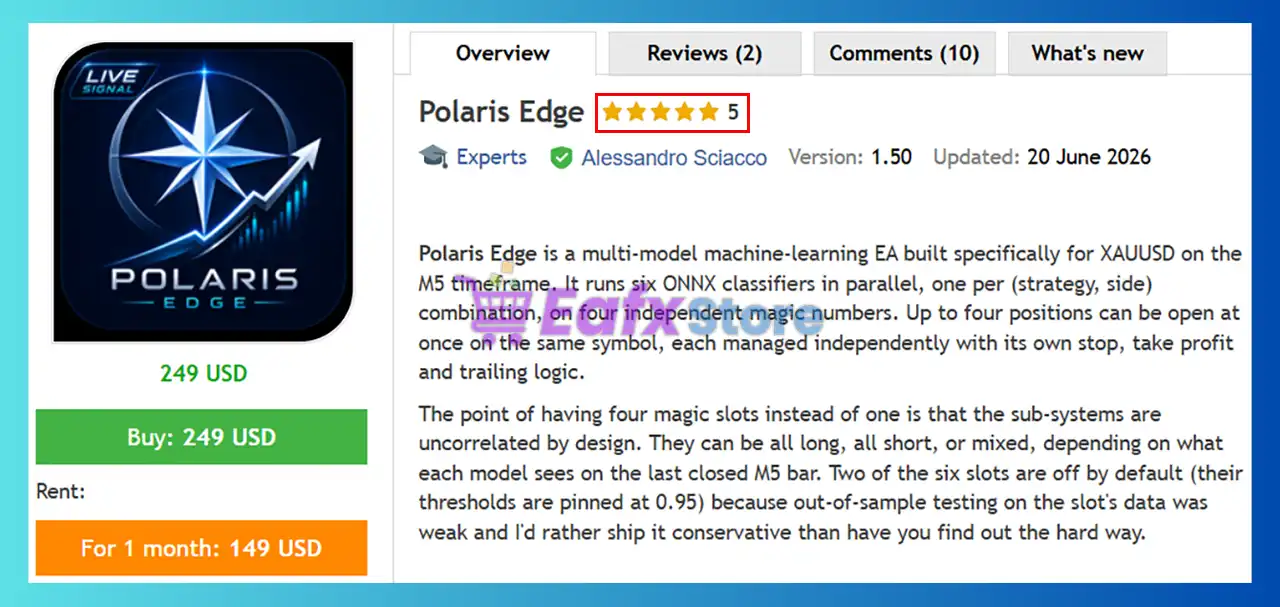
Polaris Edge EA is an advanced MetaTrader 5 Expert Advisor that combines intelligent position sizing, ATR-based trailing stops, machine learning probability filters and comprehensive execution controls.
Designed with built-in risk management and multi-slot trade identification, the EA provides traders with flexible configuration options for optimizing performance while maintaining disciplined capital protection.
🔢 Polaris Edge EA MT5 Settings
Below are the details of the parameters in the advisor’s trading system settings table:
🔶 Position Sizing & Risk
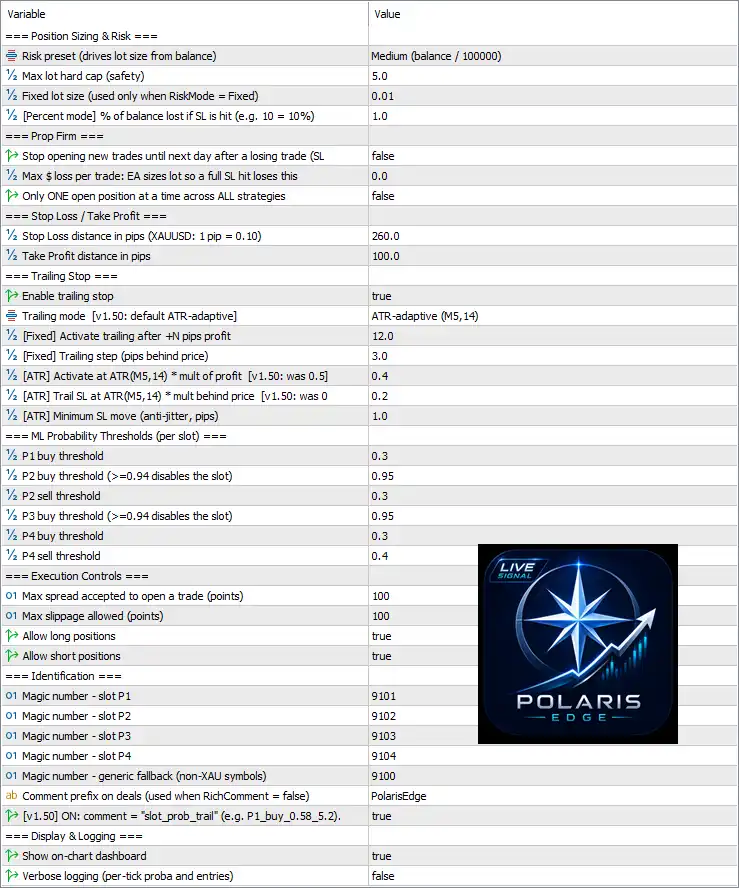
🔹 Risk preset (drives lot size from balance) = Medium (balance / 100000) – Uses the Medium risk profile, automatically calculating lot size based on an account balance divided by 100000.
🔹 Max lot hard cap (safety) = 5.0 – Limits the maximum position size to 5.0 lots regardless of the calculated lot size.
🔹 Fixed lot size (used only when RiskMode = Fixed) = 0.01 – Uses a fixed trading volume of 0.01 lots when Fixed Risk Mode is selected.
🔹 [Percentage mode] % of balance lost if SL is hit (e.g. 10 = 10%) = 1.0 – Risks 1.0% of the account balance if a Stop Loss is triggered.
🔶 Prop Firm Settings
🔹 Stop opening new trades until next day after a losing trade (SL) = false – Continues trading immediately after a losing trade instead of waiting until the next trading day.
🔹 Max % loss per trade: EA sizes lot so a full SL hit loses this = 0.0 – Disables the maximum percentage loss per trade restriction.
🔹 Only ONE open position at a time across ALL strategies = false – Allows multiple strategies or positions to run simultaneously.
🔶 Stop Loss & Take Profit
🔹 Stop Loss distance in pips (XAUUSD: 1 pip = 0.10) = 260.0 – Sets the Stop Loss distance to 260.0 pips.
🔹 Take Profit distance in pips = 100.0 – Sets the Take Profit target to 100.0 pips.
🔶 Trailing Stop
🔹 Enable trailing stop = true – Activates the trailing stop management system.
🔹 Trailing mode [v1.50: default ATR-adaptive] = ATR-adaptive (M5,14) – Uses an ATR-adaptive trailing stop based on the M5 timeframe with an ATR period of 14.
🔹 [Fixed] Activate trailing after +N pips profit = 12.0 – Starts the fixed trailing stop after 12.0 pips of profit.
🔹 [Fixed] Trailing step (pips behind price) = 3.0 – Moves the trailing stop in 3.0-pip increments.
🔹 [ATR] Activate at ATR(M5,14) × mult of profit = 0.4 – Activates ATR trailing when profit reaches 0.4 × ATR(M5,14).
🔹 [ATR] Trail SL at ATR(M5,14) × mult behind price = 0.2 – Places the trailing Stop Loss 0.2 × ATR behind the current price.
🔹 [ATR] Minimum SL move (anti-jitter, pips) = 1.0 – Requires at least 1.0 pip movement before updating the trailing Stop Loss.
🔶 ML Probability Thresholds (Per Slot)
🔹 P1 buy threshold = 0.3 – Minimum buy probability required for Slot P1.
🔹 P2 buy threshold (> = 0.94 disables the slot) = 0.95 – Buy threshold for Slot P2. A value above 0.94 effectively disables the slot.
🔹 P2 sell threshold = 0.3 – Minimum sell probability required for Slot P2.
🔹 P3 buy threshold (> = 0.94 disables the slot) = 0.95 – Buy threshold for Slot P3. A value above 0.94 disables the slot.
🔹 P4 buy threshold = 0.3 – Minimum buy probability required for Slot P4.
🔹 P4 sell threshold = 0.4 – Minimum sell probability required for Slot P4.
🔶 Execution Controls
🔹 Max spread accepted to open a trade (points) = 100 – Prevents opening trades when the spread exceeds 100 points.
🔹 Max slippage allowed (points) = 100 – Allows a maximum slippage of 100 points during order execution.
🔹 Allow long positions = true – Enables Buy trades.
🔹 Allow short positions = true – Enables Sell trades.
🔶 Identification
🔹 Magic number - slot P1 = 9101 – Assigns Magic Number 9101 to Slot P1.
🔹 Magic number - slot P2 = 9102 – Assigns Magic Number 9102 to Slot P2.
🔹 Magic number - slot P3 = 9103 – Assigns Magic Number 9103 to Slot P3.
🔹 Magic number - slot P4 = 9104 – Assigns Magic Number 9104 to Slot P4.
🔹 Magic number - general fallback (non-XAU symbols) = 9100 – Uses Magic Number 9100 for non-XAUUSD symbols.
🔹 Comment prefix on deals (used when RichComment = false) = PolarisEdge – Adds "PolarisEdge" as the prefix for trade comments.
🔹 [v1.50] ON: comment = "slot_prob_trail" (e.g. P1_buy_0.58_5.2.) = true – Enables detailed trade comments containing slot, probability, and trailing information.
🔶 Display & Logging
🔹 Show on-chart dashboard = true – Displays the Polaris Edge dashboard on the trading chart.
🔹 Verbose logging (per-tick proba and entries) = false – Disables detailed per-tick probability and entry logs.
🔢 Conclusion
Polaris Edge EA MT5 is a sophisticated trading system that combines adaptive risk management, ATR-based trailing technology, machine learning probability filters and robust execution controls into a single Expert Advisor.
With configurable money management, intelligent trailing stops, multiple strategy slots, and advanced trade identification, the EA offers traders extensive flexibility while maintaining strong capital protection and disciplined automated execution.
🔢 FAQs
❓ What risk management methods does Polaris Edge EA MT5 support?
The EA supports automatic balance-based lot sizing, fixed lot mode, maximum lot protection, and percentage-based risk management.
❓ Does Polaris Edge EA MT5 use a trailing stop?
Yes. It includes both fixed trailing stops and an ATR-adaptive trailing stop that automatically adjusts to market volatility.
❓ What are the ML Probability Thresholds used for?
They define the minimum confidence level required for each machine learning strategy slot before opening Buy or Sell trades.
❓ Can Polaris Edge EA MT5 trade both Buy and Sell positions?
Yes. The EA independently supports long (Buy) and short (Sell) trading, and both are enabled in this preset.
❓ Does Polaris Edge EA MT5 support multiple Magic Numbers?
Yes. The EA assigns separate Magic Numbers (9101–9104) to individual strategy slots, plus a fallback Magic Number (9100) for non-XAUUSD symbols.



