




Power Kick EA MT5 (Latest version) - Unlimited

Subscriptions for Special Plan
- 30 EA package is more economical!
- Special package with 99%
- Download 1 EA/Day

Subscriptions for Premium Membership
- Download Unlimited in 1 Year
- Get 100% Discount
- Get free access to all

Subscriptions for Gold Membership
- 1 Year Membership
- Get 100% Discount
- Access EA+Indicator+Course
Frequently bought together 🎁
Add these products to enhance your purchase



Quick Verdict
Power Kick EA MT5 is a sophisticated trend-following EA for traders seeking automated market participation with controlled position accumulation. Its backtest shows a 3.85 Profit Factor and 88.10% profitable trades, while the live signal is still very new. The strategy offers strong potential but requires disciplined risk management.
Best For
✅ Forex and Gold traders seeking automated trend-following.
✅ Traders who prefer controlled position accumulation rather than a single-entry system.
✅ Users who want ATR-based TP/SL and volatility-adjusted trade spacing.
✅ Traders who value integrated news and spread filters.
✅ Experienced users who understand combined exposure and drawdown.
Overall Rating
8.5/10 ⭐⭐⭐⭐⭐
| Category | Rating |
|---|---|
| Trading Strategy | 9.0/10 |
| Position Management | 8.8/10 |
| Risk Controls | 8.2/10 |
| Backtest Performance | 9.0/10 |
| Live Performance Evidence | 7.0/10 |
| Configuration Flexibility | 9.1/10 |
| Overall Rating | 8.5/10 |
What is Power Kick EA MT5?
Power Kick EA MT5 is a fully automated Expert Advisor (EA) designed to identify directional market movements and participate in developing trends.
Rather than depending on a single perfect entry, the system can use an advanced position accumulation technique. Multiple controlled entries can be added as a trend develops, with the accumulated position managed as one coordinated trading idea.
 Vendor Website: View here
Delivery time 24h-48h after payment.
Refund if not delivered.
You will receive the current version without any limitations (ID+Time).
How Does Power Kick EA MT5 Work?
Identifies Market Trends
Power Kick EA MT5 analyzes market conditions to detect clear directional movements and identify suitable trend-following opportunities.
Opens the Initial Trade
When the required trading conditions are satisfied, the EA opens a position with predefined Stop Loss (SL) and Take Profit (TP) protection.
Builds the Position Gradually
Instead of relying on a single perfect entry, the EA can add controlled positions as the trend develops.
Adapts Entries to Market Volatility
The EA uses volatility analysis to adjust the spacing between additional entries according to changing market conditions.
Manages the Combined Position
When multiple entries are active, the EA manages them as one coordinated trading idea using its ATR-based profit and loss management.
Filters Unfavorable Conditions
Power Kick can use economic-news protection and spread filtering to avoid opening new trades when market conditions become less favorable.
Controls Trading Frequency and Exposure
The EA regulates the timing and number of additional entries to help prevent excessive position accumulation and maintain a more structured trading process.
Key Features of Power Kick EA
Smart Trend-Following Strategy
Identifies directional market movements and focuses on trading opportunities that align with the prevailing trend.
Controlled Position Accumulation
Can build a position through multiple planned entries instead of relying on a single market entry.
Coordinated Trade Management
Manages accumulated positions as one complete trading idea with predefined profit and protection logic.
ATR-Based Position Management
Uses market volatility to determine profit targets, basket protection and suitable spacing between entries.
Economic News Filter
Monitors important economic events and can temporarily restrict new trades during high-impact news periods.
Spread Protection
Helps prevent new positions from being opened when market spreads become too wide for the configured trading conditions.
Balance-Based Position Sizing
Supports a balance-based lot calculation model designed to adjust position size according to account capital.
On-Chart Control & Monitoring
Provides an information dashboard and action buttons directly on the chart for convenient monitoring and manual control.
Verified Live Signal Performance
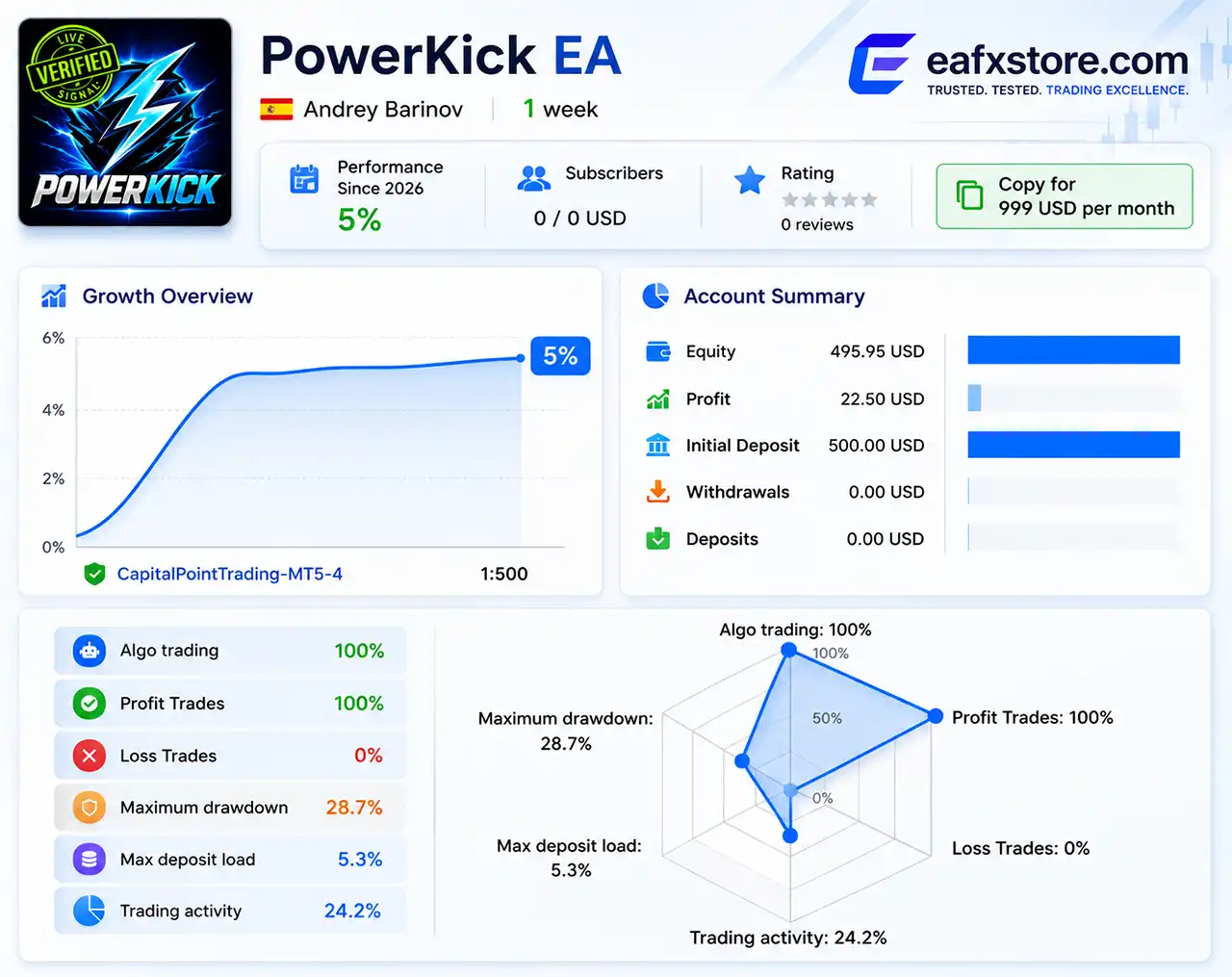
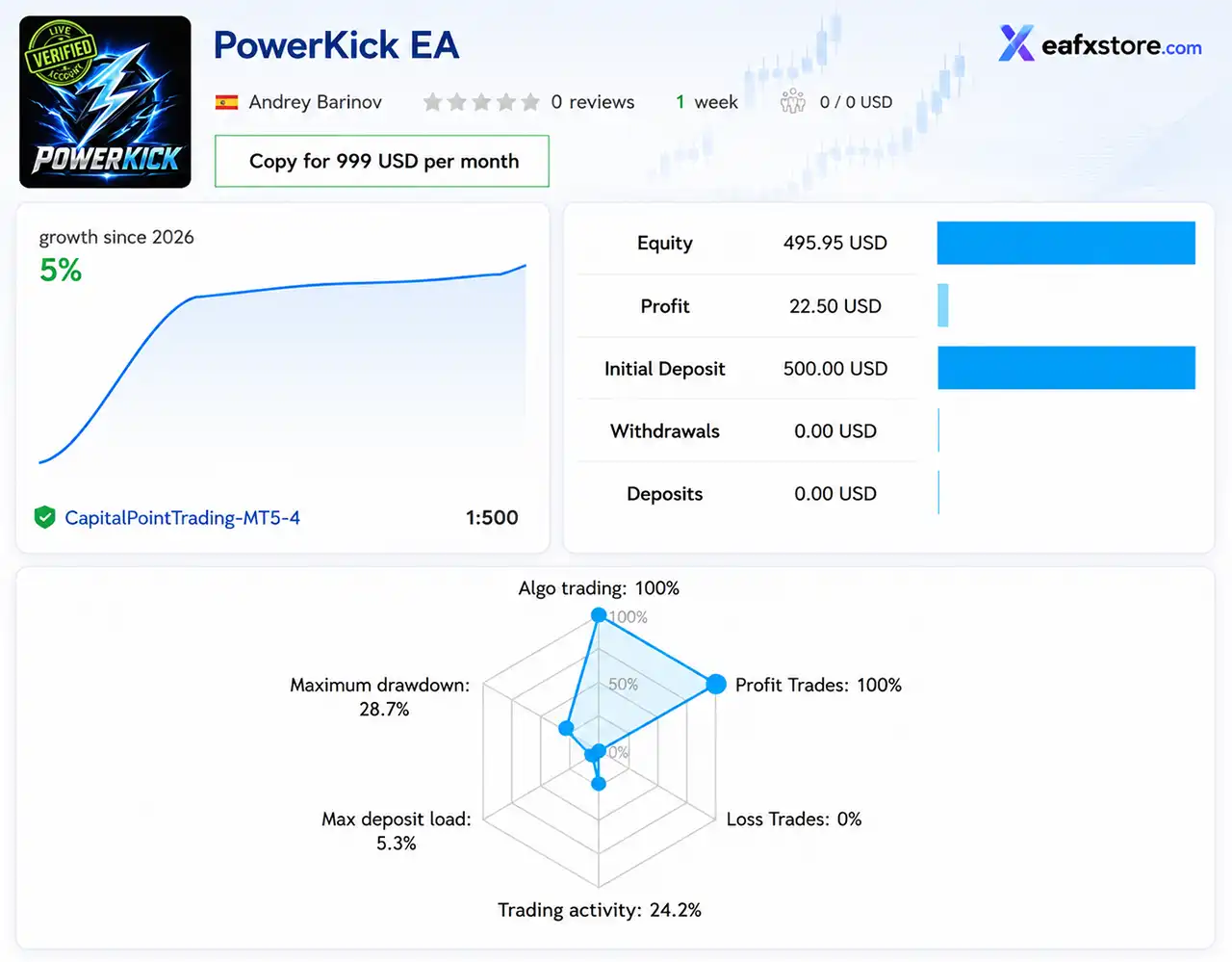
The supplied live signal for Power Kick EA currently shows a very early performance record.
The account has a $500 initial deposit and reports $22.50 profit, while the displayed equity is $495.95.
Power Kick EA Live Signal Results
| Live Signal Metric | Reported Result |
|---|---|
| Signal | Power Kick EA |
| Track Record | 1 week |
| Growth | 5% |
| Initial Deposit | $500 |
| Profit | $22.50 |
| Equity | $495.95 |
| Leverage | 1:500 |
| Profit Trades | 100% |
| Loss Trades | 0% |
| Maximum Drawdown | 28.7% |
The live signal also shows 24.2% trading activity and a 5.3% maximum deposit load.
Live Signal Assessment
The 5% growth after one week is encouraging, and the displayed signal currently shows 100% profitable trades.
However, the record is only one week old. This is far too short to judge long-term robustness.
The displayed 28.7% maximum drawdown is also important. It indicates that users should not evaluate the signal based on its 5% growth alone.
Historical Trading Results Performance
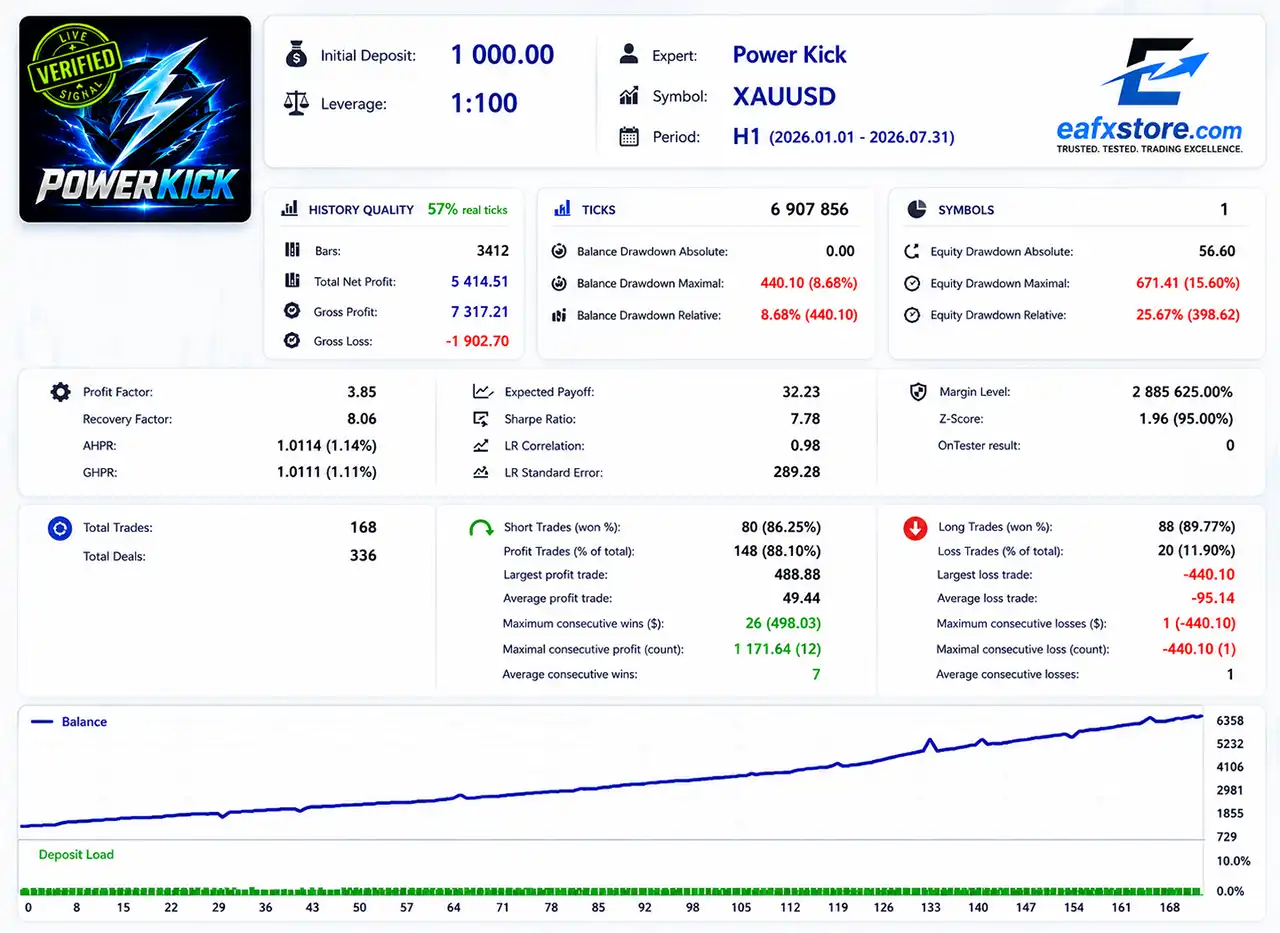
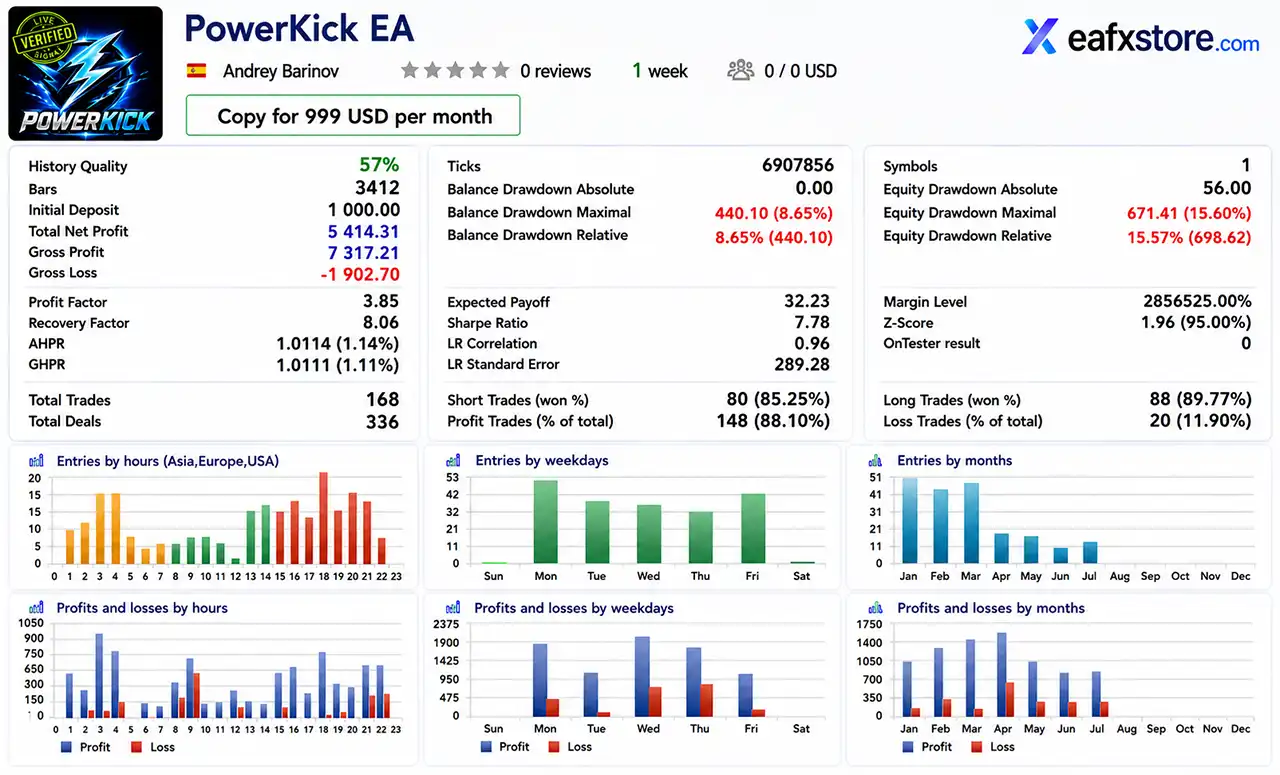
The supplied Strategy Tester report covers XAUUSD from 2026.01.01 to 2026.07.31, using an initial deposit of $1,000 and 1:100 leverage.
Power Kick EA Backtest Results
| Backtest Metric | Result |
|---|---|
| Symbol | XAUUSD |
| Period | 2026.01.01–2026.07.31 |
| Initial Deposit | $1,000.00 |
| History Quality | 57% real ticks |
| Total Net Profit | $5,414.51 |
| Profit Factor | 3.85 |
| Recovery Factor | 8.06 |
| Sharpe Ratio | 7.78 |
| Total Trades | 168 |
| Profit Trades | 88.10% |
The backtest produced $5,414.51 net profit from a $1,000 initial deposit.
The balance curve shown in the supplied report demonstrates a generally upward trajectory, with several periods of stronger acceleration.
Drawdown Analysis
🔹 Balance Drawdown Maximum: 8.68% / $440.10
🔹 Balance Drawdown Relative: 8.68%
🔹 Equity Drawdown Maximum: 15.60% / $671.41
🔹 Equity Drawdown Relative: 25.67% / $398.62
The 25.67% maximum equity drawdown deserves particular attention.
Although the Profit Factor of 3.85 is strong, traders should evaluate the strategy based on both profitability and potential floating drawdown.
Trade Statistics
The test recorded 168 trades and 336 deals.
Long positions achieved an 89.77% win rate, while short positions achieved an 86.25% win rate.
The combined profitable-trade percentage was 88.10%, with 20 losing trades.
The largest profitable trade was $488.88, while the largest loss was -$440.10.
Why Power Kick EA MT5 Stands Out
Mature Development Experience
The developer states that Power Kick is backed by more than 14 years of professional MQL development and 1,000+ completed freelance projects.
More Than a Single-Entry Strategy
Power Kick’s position accumulation model gives it the ability to participate progressively as a trend develops.
Volatility-Aware Position Spacing
The 0.7–3.0 volatility multiplier range allows position spacing to adapt to different market conditions.
Multiple Layers of Trade Protection
The EA combines:
🔹 ATR-based Stop Loss.
🔹 ATR-based Take Profit.
🔹 Spread filtering.
🔹 News filtering.
🔹 Position limits.
🔹 Minimum trade intervals.
🔹 Maximum floating-loss control.
Transparent On-Chart Information
The built-in dashboard provides information directly on the trading chart, while action buttons offer additional interaction.
Multi-Market Capability
Although Forex and Gold are the primary focus, the EA can also be used with supported indexes, metals and cryptocurrencies depending on broker conditions.
Risk Management Features
Predefined Stop Loss & Take Profit
Each trading position is protected with predefined exit levels to help control potential losses.
ATR-Based Basket Protection
Uses market volatility to calculate protective levels for the combined position when multiple entries are active.
Controlled Position Accumulation
Additional entries are managed systematically instead of using unlimited position expansion or uncontrolled averaging.
Balance-Based Lot Sizing
Position size can be calculated according to account balance, helping maintain a structured relationship between capital and trade volume.
Maximum Trade Control
Limits the number of accumulated positions, preventing the EA from opening an unlimited number of entries in the same trading idea.
Volatility-Based Entry Spacing
Adjusts the distance between additional entries according to current market volatility, helping avoid overly concentrated positions.
News & Spread Protection
Filters high-impact economic events and unfavorable spread conditions to reduce unnecessary exposure during potentially unstable market periods.
Recommended Trading Conditions
For the best performance, the following setup is recommended:
| Parameter | Recommended Setting |
|---|---|
| Primary Markets | Forex & Gold |
| Preferred Symbols | XAUUSD, EURUSD, GBPUSD, EURJPY |
| Account Type | Hedging |
| Netting Account | Not supported |
| Recommended Leverage | 1:500 |
| Alternative Leverage | 1:100 |
| Broker Type | Reputable low-spread broker |
| VPS | Recommended |
| News Filter | Enabled |
| Spread Filter | Enabled |
Product Download Package?
The download package of the product suite includes:
✅ Experts: Power Kick EA.ex5
 Reviewed by David Easton
Weaknesses and Risk Warnings
Position Accumulation Risk
Multiple entries can increase total exposure, especially when the market moves strongly against the trading direction.
Potential Drawdown
The EA can experience periods of floating drawdown before market conditions recover or positions are closed.
Floating Loss Protection Is Disabled
The supplied configuration has the maximum floating-loss protection turned off, so users should review this setting carefully.
Live Performance Can Vary
Trading results may differ depending on broker spreads, execution speed, liquidity, market volatility and account conditions.
No Guaranteed Profits
Power Kick can generate losing trades, and historical or live results should never be considered a guarantee of future performance.
Who Should Use Power Kick EA MT5?
Experienced Automated Traders
Power Kick is particularly appropriate for traders who understand position sizing, floating drawdown and accumulated exposure.
Forex and Gold Traders
Users looking for automated trading on XAUUSD, EURUSD, GBPUSD or EURJPY may find the strategy particularly relevant.
Trend-Following Traders
The EA is designed around directional market movements and therefore suits traders who prefer trend-following concepts.
Traders Comfortable With Position Accumulation
Users should understand that multiple entries can form one larger combined position.
Traders Wanting News Protection
The integrated economic-news filter is useful for traders who prefer to restrict new entries around high-impact events.
Final Verdict
Power Kick EA MT5 is a sophisticated automated trading system built around trend following, smart position accumulation and volatility-adaptive trade management.
Its strongest advantage is the combination of a mature development background with a comprehensive execution framework. The EA offers ATR-based Take Profit and Basket Stop Loss, up to 10 accumulated trades, volatility-based spacing, news filtering, spread protection, balance-based lot sizing, terminal monitoring and an on-chart dashboard.
From a product perspective, Power Kick EA is best suited to traders who understand the difference between profitability and risk, and who are comfortable with controlled position accumulation rather than simple one-entry trading.
🔢 Power Kick EA MT5 Settings Guide
Power Kick EA is a configurable automated trading system designed with a broad set of controls for trade direction, ATR-based profit and loss management, position accumulation, volatility-based spacing, economic-news filtering, spread protection, and on-chart controls. Its settings allow traders to define how positions are opened, accumulated, protected, and managed under different market conditions.
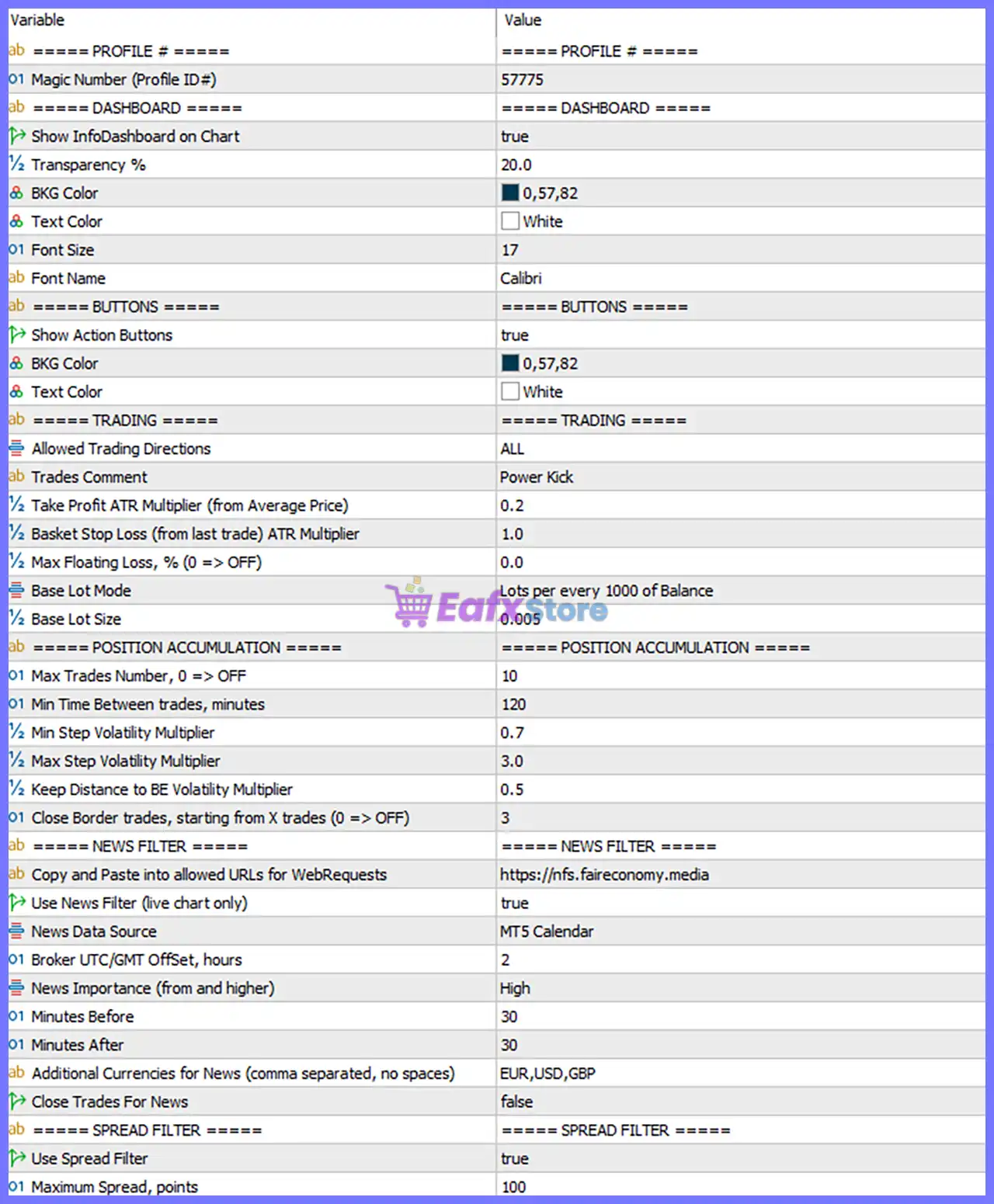
Power Kick EA MT5 Settings Panel
🔄 Profile & Dashboard Settings
🔹 Magic Number (Profile ID#): 57775 — Defines the unique profile/trade identifier used by the EA to distinguish its positions from other Expert Advisors.
🔹 Show InfoDashboard on Chart: true — Displays the Power Kick information dashboard directly on the trading chart.
🔹 Transparency %: 20.0 — Sets the dashboard transparency level to 20.0%, controlling how transparent the dashboard background appears.
🔹 BKG Color: 0,57,82 — Sets the dashboard background color using RGB values 0,57,82.
🔹 Text Color: White — Sets the dashboard text color to White.
🔹 Font Size: 17 — Sets the dashboard font size to 17.
🔹 Font Name: Calibri — Uses Calibri as the dashboard font.
🔄 Action Buttons
🔹 Show Action Buttons: true — Enables the EA’s on-chart action buttons.
🔹 BKG Color: 0,57,82 — Sets the action-button background color to RGB 0,57,82.
🔹 Text Color: White — Sets the action-button text color to White.
🔄 Trading Settings
🔹 Allowed Trading Directions: ALL — Allows the EA to operate in all available trading directions, including Buy and Sell.
🔹 Trades Comment: Power Kick — Assigns Power Kick as the comment associated with EA-generated trades.
🔹 Take Profit ATR Multiplier (from Average Price): 0.2 — Sets the Take Profit calculation at an ATR-based multiplier of 0.2 from the average position price.
🔹 Basket Stop Loss (from last trade) ATR Multiplier: 1.0 — Sets the basket Stop Loss reference using an ATR multiplier of 1.0 from the last trade.
🔹 Max Floating Loss, % (0 => OFF): 0.0 — Sets the maximum floating-loss percentage to 0.0, which means this protection is OFF.
🔹 Base Lot Mode: Lots per every 1000 of Balance — Calculates the base position size according to the account balance, using lots per every 1000 balance units.
🔹 Base Lot Size: 0.005 — Sets the base lot calculation value to 0.005 lots.
🔄 Position Accumulation Settings
🔹 Max Trades Number, 0 => OFF: 10 — Allows a maximum of 10 trades to be accumulated; 0 would disable the limit.
🔹 Min Time Between trades, minutes: 120 — Requires at least 120 minutes between trades.
🔹 Min Step Volatility Multiplier: 0.7 — Sets the minimum position-spacing volatility multiplier to 0.7.
🔹 Max Step Volatility Multiplier: 3.0 — Sets the maximum position-spacing volatility multiplier to 3.0.
🔹 Keep Distance to BE Volatility Multiplier: 0.5 — Uses a 0.5 volatility multiplier when maintaining distance to the Break-Even level.
🔹 Close Border trades, starting from X trades (0 => OFF): 3 — Enables border-trade closing behavior starting from the 3rd trade; 0 would disable this function.
🔄 News Filter Settings
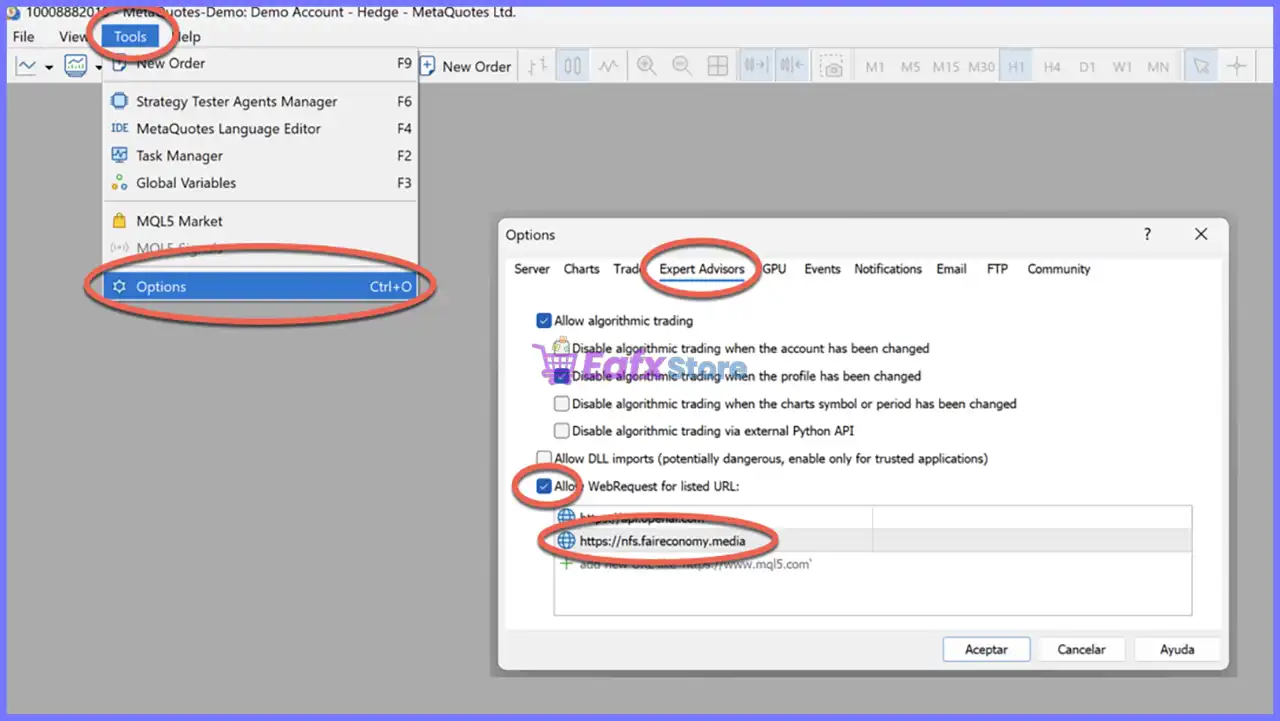
🔹 Copy and Paste into allowed URLs for WebRequests: https://nfs.faireconomy.media — Specifies the external news-data URL configured for WebRequest access. News data URL
🔹 Use News Filter (live chart only): true — Enables the economic-news filter when the EA is operating on a live chart.
🔹 News Data Source: MT5 Calendar — Uses the built-in MT5 Calendar as the configured news-data source.
🔹 Broker UTC/GMT Offset, hours: 2 — Sets the broker’s UTC/GMT offset to +2 hours.
🔹 News Importance (from and higher): High — The EA filters High-impact news and higher-priority events.
🔹 Minutes Before: 30 — Starts the news protection window 30 minutes before the relevant event.
🔹 Minutes After: 30 — Continues the news protection window for 30 minutes after the event.
🔹 Additional Currencies for News (comma separated, no spaces): EUR,USD,GBP — Adds EUR, USD, and GBP to the currencies monitored for economic-news events.
🔹 Close Trades For News: false — Does not automatically close existing positions when a filtered news event occurs.
🔄 Spread Filter Settings
🔹 Use Spread Filter: true — Enables spread protection to prevent trading when market spread conditions exceed the configured threshold.
🔹 Maximum Spread, points: 100 — Sets the maximum permitted spread to 100 points.
🔢 Configuration Summary
🔹 Power Kick Profile ID: 57775 — Unique profile identifier for the EA.
🔹 Dashboard: true — The information dashboard is enabled.
🔹 Dashboard Transparency: 20.0% — Configured transparency level.
🔹 Dashboard Background: 0,57,82 — RGB background setting.
🔹 Dashboard Font: Calibri, size 17 — Configured visual presentation.
🔹 Trading Direction: ALL — All available trading directions are permitted.
🔹 Trade Comment: Power Kick — Identifier attached to generated trades.
🔹 ATR Take Profit Multiplier: 0.2 — Uses 0.2 ATR from average price for the configured TP calculation.
🔹 ATR Basket Stop Loss Multiplier: 1.0 — Uses 1.0 ATR from the last trade for the basket SL calculation.
🔹 Maximum Floating Loss: 0.0 — Floating-loss protection is disabled because 0 => OFF.
🔹 Base Lot Mode: Lots per every 1000 of Balance — Position sizing is linked to account balance.
🔹 Base Lot Size: 0.005 — Base lot parameter is 0.005.
🔹 Maximum Trades: 10 — Position accumulation can reach 10 trades.
🔹 Minimum Trade Interval: 120 minutes — At least 120 minutes between trades.
🔹 Volatility Range: 0.7–3.0 — Minimum and maximum step volatility multipliers.
🔹 BE Distance Multiplier: 0.5 — Break-Even distance uses a 0.5 volatility multiplier.
🔹 News Protection: true — News filtering is enabled for live-chart trading.
🔹 News Importance: High — High-impact events are filtered.
🔹 News Protection Window: 30 minutes before + 30 minutes after — Trading protection surrounds relevant news events.
🔹 News Currencies: EUR,USD,GBP — These three currencies are additionally monitored.
🔹 Close Trades for News: false — Existing trades remain open during filtered news events.
🔹 Maximum Spread: 100 points — Trading is restricted when spread exceeds 100 points.
🔢 Conclusion
Power Kick EA MT5 provides a detailed framework for automated position management, combining ATR-based basket management, balance-based lot sizing, position accumulation, volatility-adjusted spacing, economic-news protection, and spread filtering.
The supplied configuration is relatively structured: it allows up to 10 accumulated trades, requires 120 minutes between trades, uses volatility multipliers from 0.7 to 3.0, and applies a 0.2 ATR Take Profit multiplier alongside a 1.0 ATR basket Stop Loss multiplier.
The news filter is also active, monitoring High-impact events with a 30-minute protection window before and after news, while monitoring EUR, USD, and GBP. Meanwhile, the spread filter is enabled with a maximum threshold of 100 points.
Before using these settings on a live account, traders should verify the broker’s UTC/GMT offset, point value, spread conventions, ATR behavior, and position-sizing rules, because these factors can materially affect how the numerical parameters behave in real trading.
🔢 FAQs
❓ What is the Magic Number of Power Kick EA MT5?
The configured Magic Number (Profile ID#) is 57775.
❓ How many trades can Power Kick EA MT5 accumulate?
The Max Trades Number is set to 10, allowing up to 10 trades under the configured accumulation rules.
❓ Does Power Kick EA MT5 use a news filter?
Yes. Use News Filter = true, with High importance events filtered and a protection period of 30 minutes before and 30 minutes after news.
❓ What currencies are monitored by the news filter?
The configured additional currencies are EUR, USD and GBP.
❓ What is the maximum allowed spread?
The spread filter is enabled with Maximum Spread = 100 points. Trades may therefore be restricted when the spread exceeds the configured threshold.
User Reviews
Only logged in customers who have purchased this product may leave a review.
❓ What trading strategy does Power Kick EA MT5 use?
Power Kick EA MT5 uses a professional trend-following approach with smart position accumulation, allowing multiple controlled entries as a trend develops.
❓ How does the position accumulation system work?
Power Kick EA MT5 can build a total position through multiple controlled entries, then manage the accumulated trades together as one coordinated trading idea.
❓ Does Power Kick EA MT5 use Stop Loss and Take Profit?
Yes. Power Kick EA MT5 applies predefined Stop Loss and Take Profit levels when each trade is opened, providing structured risk and profit management.
❓ Which markets can Power Kick EA MT5 trade?
Power Kick EA MT5 is optimized primarily for Forex and also supports Metals, Indexes, and Crypto, depending on the broker and symbol specifications.
❓ Which currency pairs are recommended for Power Kick EA MT5?
Power Kick EA MT5 primarily focuses on XAUUSD, EURUSD, GBPUSD, and EURJPY, although traders can test other suitable Forex pairs.
❓ Does Power Kick EA MT5 work on Netting accounts?
No. Power Kick EA MT5 is designed specifically for Hedging accounts and does not work on Netting accounts.
❓ What leverage is recommended for Power Kick EA MT5?
Power Kick EA MT5 recommends 1:500 leverage, while the system can also operate with 1:100 depending on the trading setup and broker conditions.
❓ Does Power Kick EA MT5 require a specific broker?
No. Power Kick EA MT5 is not highly broker-dependent, but reputable brokers with lower spreads can generally provide more favorable trading conditions.
❓ How many trades can Power Kick EA MT5 generate each week?
Under typical market conditions, Power Kick EA MT5 may generate approximately 10–30 trades per week for each pair, depending on activity and configuration.
-
 Original price was: $30,000.00.$599.00Current price is: $599.00.
 -
 Original price was: $3,750.00.$599.00Current price is: $599.00.
 -
 Original price was: $30,000.00.$599.00Current price is: $599.00.
 -
 Original price was: $999.00.$89.00Current price is: $89.00.
-
 4Original price was: $499.00.$249.00Current price is: $249.00.
 -
 6Original price was: $1,000.00.$599.00Current price is: $599.00.
 -
 6Original price was: $2,580.00.$249.00Current price is: $249.00.
 -
 2Original price was: $699.00.$249.00Current price is: $249.00.
There are no reviews yet.