

🔢 Vexora Nox MT5 – Complete Settings & Parameters Guide
Vexora Nox MT5 is an advanced MetaTrader 5 Expert Advisor designed to automate breakout trading with flexible money management, profit targeting, stop-loss controls and trailing stop capabilities.
The EA supports both fixed and automatic lot sizing, allowing traders to adapt risk exposure according to account size and trading objectives.
🔢 Vexora Nox MT5 Settings Explained
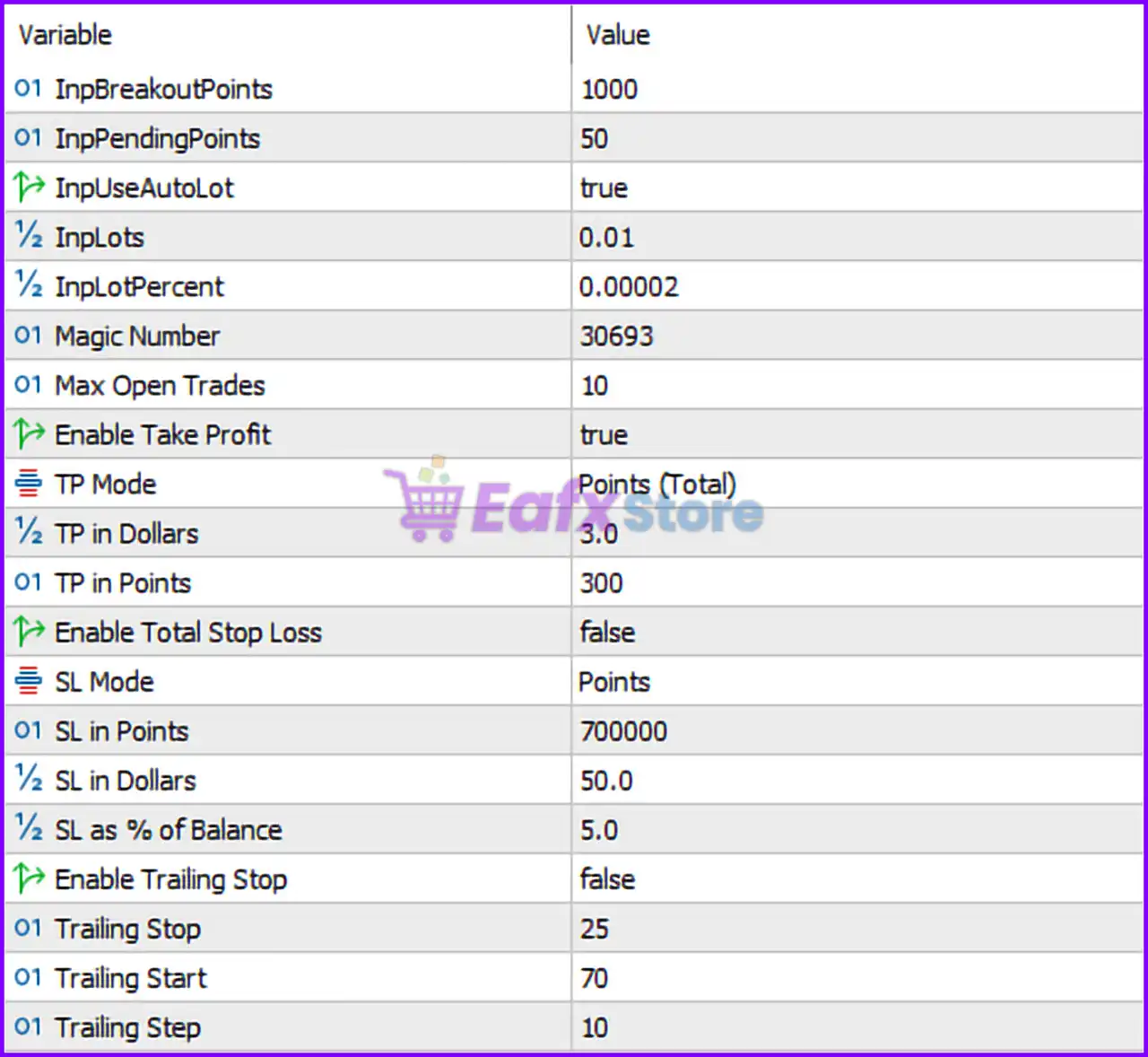
Below are the details of the parameters in the advisor’s trading system settings table:
🔶 Breakout Trading Settings
🔹 InpBreakoutPoints = 1000 — Defines the breakout distance of 1000 points that price must move before the EA triggers a breakout entry signal.
🔹 InpPendingPoints = 50 — Sets pending orders 50 points away from the breakout level to improve entry precision.
🔶 Money Management Settings
🔹 InpUseAutoLot = true — Enables automatic lot size calculation based on account balance and risk parameters.
🔹 InpLots = 0.01 — Specifies the default fixed lot size of 0.01 lots when Auto Lot is disabled.
🔹 InpLotPercent = 0.00002 — Determines the percentage-based lot sizing factor used by the Auto Lot system.
🔶 Trade Identification Settings
🔹 Magic Number = 30693 — Unique identifier used by the EA to distinguish and manage its own trades independently from other EAs.
🔹 Max Open Trades = 10 — Allows a maximum of 10 simultaneously open trades managed by the EA.
🔶 Take Profit Settings
🔹 Enable Take Profit = true — Activates the Take Profit functionality for automatic profit closure.
🔹 TP Mode = Points (Total) — Uses total points-based profit calculation for Take Profit management.
🔹 TP in Dollars = 3.0 — Profit target set to $3.0 when dollar-based Take Profit mode is utilized.
🔹 TP in Points = 300 — Profit target set to 300 points when points-based Take Profit mode is active.
🔶 Stop Loss Settings
🔹 Enable Total Stop Loss = false — Disables the overall account-level stop loss protection feature.
🔹 SL Mode = Points — Stop Loss calculations are based on point values.
🔹 SL in Points = 700000 — Individual trade Stop Loss distance set to 700000 points.
🔹 SL in Dollars = 50.0 — Dollar-based Stop Loss threshold configured at $50.0.
🔹 SL as % of Balance = 5.0 — Risk limit set to 5.0% of account balance when percentage-based stop loss management is used.
🔶 Trailing Stop Settings
🔹 Enable Trailing Stop = false — Disables dynamic trailing stop management.
🔹 Trailing Stop = 25 — Trailing Stop distance configured at 25 points behind current market price.
🔹 Trailing Start = 70 — Trailing Stop activates after a trade reaches 70 points of profit.
🔹 Trailing Step = 10 — Stop Loss is adjusted every 10 points once trailing is active.
🔢 Conclusion
Vexora Nox MT5 provides traders with a structured breakout trading framework combined with flexible risk management tools. Its configurable breakout distance, pending order placement, Auto Lot functionality, Take Profit controls, and trailing stop settings make it suitable for traders seeking an automated MT5 solution with adaptable money management. Proper optimization of the 1000-point breakout level, 300-point Take Profit, and risk-based lot sizing can help tailor the EA to different market conditions and account sizes.
🔢 FAQs
❓ What is the default breakout distance in Vexora Nox MT5?
The EA uses InpBreakoutPoints = 1000, meaning a breakout must occur over 1000 points before a trade signal is generated.
❓ Does Vexora Nox MT5 support automatic lot sizing?
Yes, InpUseAutoLot = true enables automatic lot calculation based on account settings.
❓ How many trades can Vexora Nox MT5 open at the same time?
The EA allows up to 10 open trades through the Max Open Trades = 10 setting.
❓ What is the default Take Profit target?
The default profit target is 300 points with TP Mode = Points (Total) and an optional dollar target of $3.0.
❓ Is the trailing stop enabled by default?
No, Enable Trailing Stop = false, meaning trailing protection must be manually enabled if desired.