



🔢 Sharkyra Gold EA MT5 – Complete Settings & Parameters Guide
Sharkyra Gold EA is an automated trading system designed for MetaTrader 5 that focuses on disciplined risk management, spread control, trailing stop protection, automatic lot sizing and high-impact news filtering. The EA is optimized to manage Gold trading positions efficiently while helping traders control risk during volatile market conditions.

🔢 Sharkyra Gold EA MT5 Settings Explained
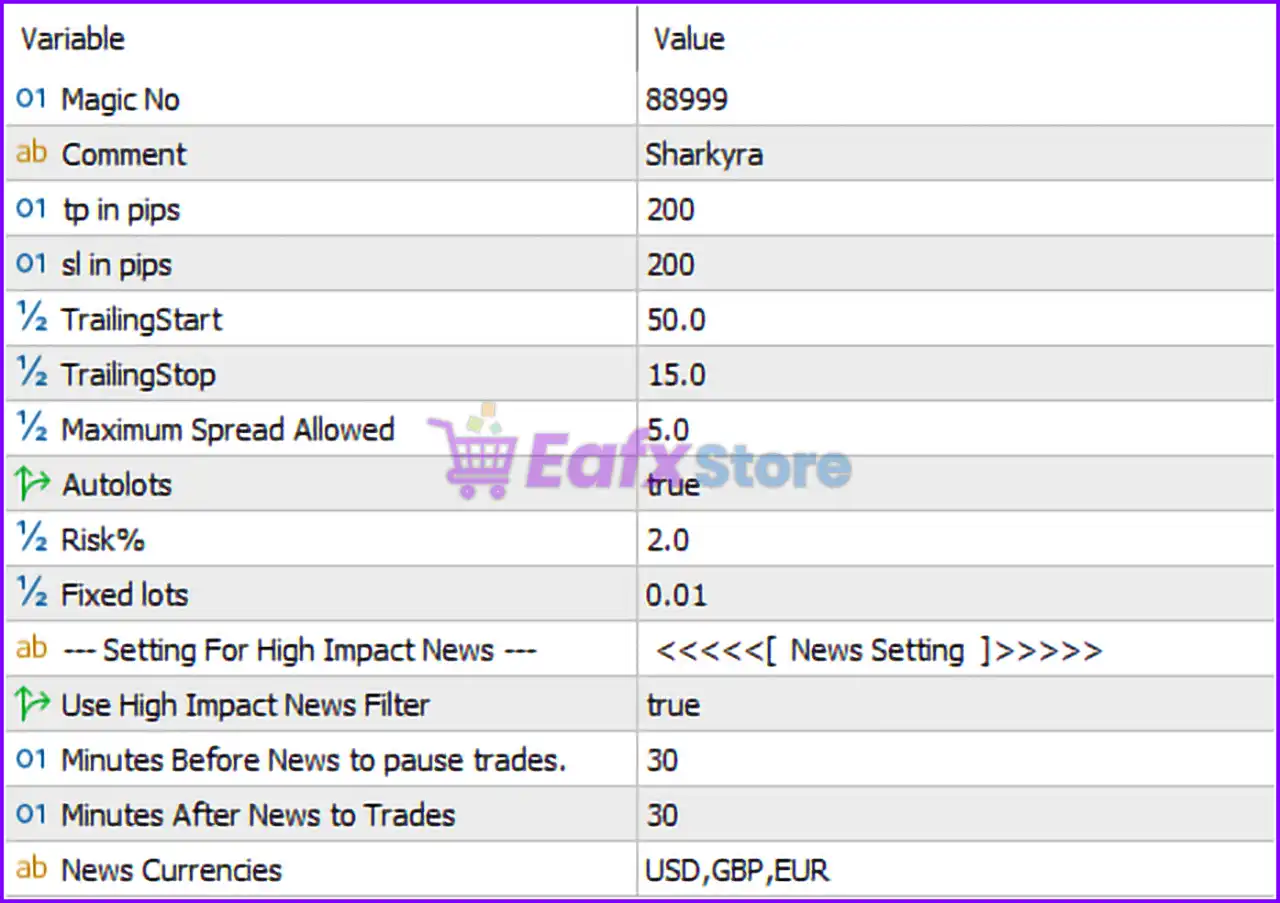
Below are the details of the parameters in the advisor’s trading system settings table:
🔶 General Trading Settings
🔹 Magic No = 88999 — Unique Magic Number used by the EA to identify and manage its own trades without interfering with other Expert Advisors.
🔹 Comment = Sharkyra — Custom trade comment attached to all positions opened by the EA for easier tracking and identification.
🔹 tp in pips = 200 — Sets the Take Profit target at 200 pips from the trade entry price.
🔹 sl in pips = 200 — Sets the Stop Loss distance at 200 pips to limit potential losses.
🔹 TrailingStart = 50.0 — Activates the trailing stop mechanism once the trade reaches 50.0 pips of profit.
🔹 TrailingStop = 15.0 — Maintains a trailing stop distance of 15.0 pips behind the current market price after trailing has started.
🔹 Maximum Spread Allowed = 5.0 — Prevents the EA from opening trades when the spread exceeds 5.0 points/pips, helping avoid costly entries during unfavorable market conditions.
🔶 Money Management Settings
🔹 Autolots = true — Enables automatic lot size calculation based on account balance and risk parameters.
🔹 Risk% = 2.0 — Risks 2.0% of account capital per trade when AutoLots is enabled.
🔹 Fixed lots = 0.01 — Uses a fixed lot size of 0.01 lots when automatic lot sizing is disabled.
🔶 High Impact News Filter Settings
🔹 Use High Impact News Filter = true — Enables protection against major economic news events that can cause extreme market volatility.
🔹 Minutes Before News to pause trades = 30 — Stops opening new trades 30 minutes before a scheduled high-impact news release.
🔹 Minutes After News to Trades = 30 — Resumes trading 30 minutes after the high-impact news event has passed.
🔹 News Currencies = USD,GBP,EUR — Monitors high-impact economic events related to the USD, GBP, and EUR currencies.
🔢 Conclusion
Sharkyra Gold EA combines automated risk management, intelligent trade protection, and economic news filtering into a streamlined trading solution. With a default 200-pip Take Profit, 200-pip Stop Loss, 2.0% risk-based AutoLots, and a built-in high-impact news filter, the EA aims to provide a balanced approach to Gold trading while minimizing exposure during volatile market events.
🔢 FAQs
❓ What is the default Magic Number used by Sharkyra Gold EA MT5?
The EA uses Magic No = 88999 to identify and manage its own trades.
❓ What is the default Take Profit setting?
The default Take Profit is set to 200 pips.
❓ How much risk does the EA use with AutoLots enabled?
The EA is configured to risk 2.0% of account balance per trade.
❓ When does the trailing stop activate?
The trailing stop begins once a position reaches 50.0 pips profit and trails by 15.0 pips.
❓ Which currencies are monitored by the news filter?
The built-in news filter tracks high-impact events related to USD, GBP, and EUR currencies.



