
Gold Injection Ultra EA MT5
Gold Injection Ultra EAGold Injection Ultra EA MT5 Live SignalGold Injection Ultra EA MT5 Backtest ResultsGold Injection Ultra EA Backtest ResultsGold Injection Ultra EA Backtests Results
MT5XAUUSD (Gold) · AnyUpdated 16 Oct 2026

Gold Injection Ultra EA MT5 (Latest version) - Unlimited

Gold Injection Ultra EA MT5 is an EA for automated XAUUSD trading on MetaTrader 5. It uses a protected grid approach with basket stop loss, take profit and trailing profit, drawdown protection, a spread filter and an economic news filter.

Buy now — $599Add to cart
Download link right after paymentUnlimited accounts, no licence lockInstall guide includedFree updates to new versions
Pay with USDT · BTC · ETHBinance Pay
Not sure it fits your broker or account?Ask on Telegram
Check before you buy

Will it work for me?

Trading platform
MetaTrader 5 (MT5)
Time frames
Any
Currency pairs
XAUUSD (Gold)
Minimum / Recommended deposit
$100+
Minimum / Recommended leverage
1:500+
Account type
Hedging, Raw or ECN account
Additional services
Unlock and Decompile
Recommended brokers
Exness Broker, Icmarkets Broker
Recommended VPS
MyfxVPS.com (Blue VPS, Golden VPS). Lowest Latency, 2 week Free Trial, 100% Free for 12-18 Months.
What you get

In the download

FILEGold Injection Ultra EA MT5
Optimize Settings

Recommended settings for Gold Injection Ultra EA MT5

🔢 Gold Injection Ultra EA MT5 Settings Guide: Complete Inputs and Risk Management Explained

Gold Injection Ultra EA MT5 is an automated trading system designed specifically for Gold (XAUUSD) on MetaTrader 5. It uses a structured grid-trading approach with configurable lot sizing, basket-level stop-loss and take-profit management, trailing-profit controls, drawdown protection, spread filtering, trading schedules, and economic news protection.

These features allow traders to customize how the EA opens positions, manages a group of trades, and responds to changing market conditions.

This guide explains every visible input in the supplied configuration, preserving the original parameter names, numerical values, and enabled or disabled states.
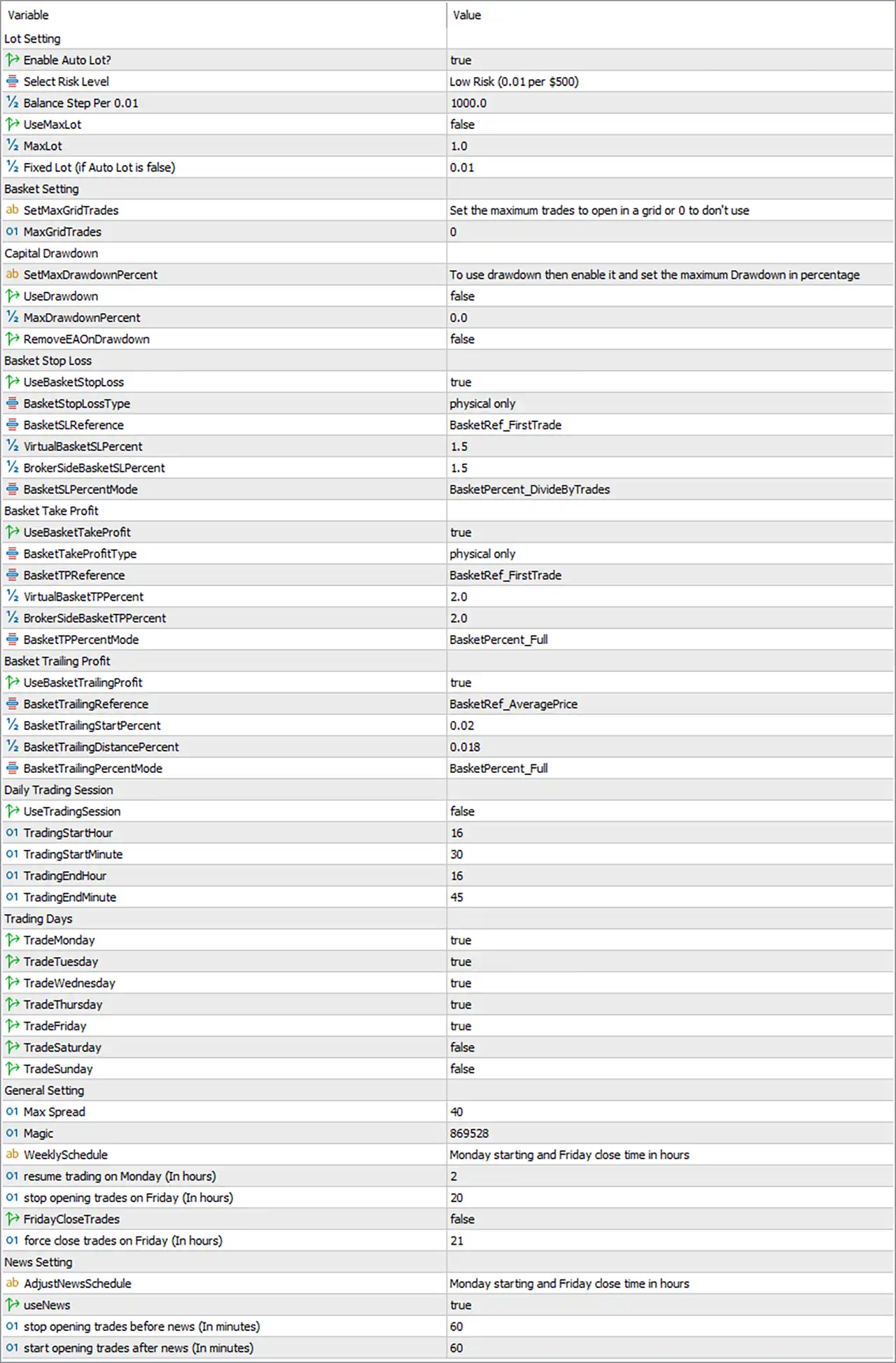
Gold Injection Ultra EA MT5 Settings Panel

⚙️ Lot Setting — Position Sizing

🔹 Enable Auto Lot? = true — Enables automatic lot sizing. The EA calculates position volume according to its configured risk level and balance-based lot-sizing rules instead of relying exclusively on a manually fixed lot.

🔹 Select Risk Level = Low Risk (0.01 per $500) — Selects the Low Risk profile, which specifies a lot-sizing reference of 0.01 lots per $500 of account balance. Actual volume may also depend on the EA's calculation rules, broker minimum-lot requirements, and available margin.

🔹 Balance Step Per 0.01 = 1000.0 — Sets the balance step to 1000.0. This parameter is associated with balance-based lot scaling, but its exact relationship to the selected Low Risk profile should be verified because the displayed profile specifies 0.01 lots per $500.

🔹 UseMaxLot = false — Disables the maximum-lot restriction controlled by the UseMaxLot option. The EA will not apply the separate maximum-lot cap through this switch while it remains false.

🔹 MaxLot = 1.0 — Sets the maximum lot parameter to 1.0. This value serves as the configured cap if maximum-lot protection is enabled; with UseMaxLot = false, the cap is not activated through that option.

🔹 Fixed lot (if Auto Lot is false) = 0.01 — Sets the fixed position size to 0.01 lots when automatic lot sizing is disabled. Since Enable Auto Lot? = true, this is the alternative volume setting rather than the selected sizing mode.

⚙️ Basket Setting — Grid Trade Limits

🔹 SetMaxGridTrades = Set the maximum trades to open in a grid or 0 to don't use — Describes the MaxGridTrades input, which limits the number of trades allowed in a grid. Setting the corresponding numerical parameter to 0 disables this grid-trade limit according to the displayed description.

🔹 MaxGridTrades = 0 — Sets the maximum grid-trade limit to 0, meaning this particular maximum-trade restriction is not used according to the input description. This does not necessarily mean the EA will open zero trades; other entry rules and safety controls may still apply.

⚙️ Capital Drawdown Protection

🔹 SetMaxDrawdownPercent = To use drawdown then enable it and set the maximum Drawdown in percentage — Provides instructions for configuring the maximum drawdown limit. The description indicates that drawdown protection must be enabled and a percentage threshold configured for this mechanism to operate.

🔹 UseDrawdown = false — Disables the drawdown protection feature controlled by this switch. The EA will not apply this specific maximum-drawdown restriction while the setting remains false.

🔹 MaxDrawdownPercent = 0.0 — Sets the maximum drawdown percentage to 0.0. No positive drawdown threshold is configured, and the feature is also disabled by UseDrawdown = false.

🔹 RemoveEAOnDrawdown = false — Disables automatic EA removal when the configured drawdown condition is reached. Since UseDrawdown is also false, the drawdown-triggered behavior should not be assumed to be active in this configuration.

⚙️ Basket Stop Loss

🔹 UseBasketStopLoss = true — Enables basket stop-loss management. The EA can use this feature to manage risk for a group of positions as a basket rather than relying exclusively on individual trade stop-loss levels.

🔹 BasketStopLossType = physical only — Selects physical basket stop-loss management. This indicates that the selected mode uses a broker-side stop-loss mechanism rather than relying solely on a virtual stop monitored by the EA.

🔹 BasketSLReference = BasketRef_FirstTrade — Sets the basket stop-loss reference to the first trade. The basket's stop-loss calculation is anchored to the first position according to the EA's internal rules.

🔹 VirtualBasketSLPercent = 1.5 — Sets the virtual basket stop-loss percentage to 1.5. This configures the percentage threshold for virtual basket protection, although the selected physical-only mode means this virtual setting may not control the active stop-loss method.

🔹 BrokerSideBasketSLPercent = 1.5 — Sets the broker-side basket stop-loss percentage to 1.5. This is the configured percentage for the physical basket stop-loss mechanism, with the exact reference value and calculation determined by the EA's implementation.

🔹 BasketSLPercentMode = BasketPercent_DivideByTrades — Selects the BasketPercent_DivideByTrades calculation mode for basket stop-loss management. This indicates that the configured basket percentage is handled in relation to the number of trades, according to the EA's calculation logic.

⚙️ Basket Take Profit

🔹 UseBasketTakeProfit = true — Enables basket take-profit management. The EA can use this feature to close or manage the group of positions when the configured basket profit objective is reached.

🔹 BasketTakeProfitType = physical only — Selects physical basket take-profit management. The selected mode indicates that take-profit handling uses broker-side order levels rather than relying solely on virtual monitoring by the EA.

🔹 BasketTPReference = BasketRef_FirstTrade — Sets the basket take-profit reference to the first trade. The basket's take-profit calculation uses the first position as its reference according to the EA's internal rules.

🔹 VirtualBasketTPPercent = 2.0 — Sets the virtual basket take-profit percentage to 2.0. This value configures the virtual basket profit threshold, but it may not control active take-profit behavior while the selected mode is physical only.

🔹 BrokerSideBasketTPPercent = 2.0 — Sets the broker-side basket take-profit percentage to 2.0. This is the configured percentage for physical basket take-profit management; the exact monetary or price target depends on the EA's calculation and reference settings.

🔹 BasketTPPercentMode = BasketPercent_Full — Selects the BasketPercent_Full calculation mode for basket take-profit management. The configured basket percentage is applied using the EA's full-basket calculation method rather than the divide-by-trades mode.

⚙️ Basket Trailing Profit

🔹 UseBasketTrailingProfit = true — Enables basket trailing-profit management. This feature is intended to track the profit of the basket and adjust its protective exit behavior as the basket moves into favorable territory.

🔹 BasketTrailingReference = BasketRef_AveragePrice — Sets the trailing-profit reference to the basket's average price. The EA uses its calculated average basket price as the reference for trailing-profit management.

🔹 BasketTrailingStartPercent = 0.02 — Sets the basket trailing activation parameter to 0.02. This value determines the configured activation threshold according to the EA's percentage-based trailing logic; the exact interpretation should be confirmed in the program's implementation.

🔹 BasketTrailingDistancePercent = 0.018 — Sets the basket trailing-distance parameter to 0.018. This defines the configured trailing distance as a percentage-related value, with its exact calculation and reference determined by the EA's internal logic.

🔹 BasketTrailingPercentMode = BasketPercent_Full — Selects the BasketPercent_Full calculation mode for basket trailing-profit management. This configures the trailing logic to use the EA's full-basket percentage calculation rather than dividing the percentage by the number of trades.

⚙️ Daily Trading Session

🔹 UseTradingSession = false — Disables the daily trading-session filter. The start and end times below remain configured, but this session filter is not active through this switch.

🔹 TradingStartHour = 16 — Sets the configured trading-session start hour to 16, or 16:00. The time is relevant when the daily trading-session filter is enabled and is interpreted according to the EA's time reference.

🔹 TradingStartMinute = 30 — Sets the configured trading-session start minute to 30. Together with TradingStartHour = 16, the session start is 16:30.

🔹 TradingEndHour = 16 — Sets the configured trading-session end hour to 16, or 16:00.

🔹 TradingEndMinute = 45 — Sets the configured trading-session end minute to 45. Together with TradingEndHour = 16, the session end is 16:45, giving a configured window of 15 minutes when the session filter is active.

⚙️ Trading Days

🔹 TradeMonday = true — Enables trading on Monday, subject to the EA's other active controls and broker conditions.

🔹 TradeTuesday = true — Enables trading on Tuesday, subject to the EA's other active controls and broker conditions.

🔹 TradeWednesday = true — Enables trading on Wednesday, subject to the EA's other active controls and broker conditions.

🔹 TradeThursday = true — Enables trading on Thursday, subject to the EA's other active controls and broker conditions.

🔹 TradeFriday = true — Enables trading on Friday, subject to the EA's other active controls and broker conditions.

🔹 TradeSaturday = false — Disables trading on Saturday through the weekday-selection control.

🔹 TradeSunday = false — Disables trading on Sunday through the weekday-selection control.

⚙️ General Settings

🔹 Max Spread = 40 — Sets the maximum permitted spread threshold to 40. The EA can use this filter to prevent new trades when the spread exceeds the configured limit. The effective price distance represented by 40 depends on the broker's XAUUSD quote precision and the EA's spread calculation.

🔹 Magic = 869528 — Assigns the magic number 869528 to the EA's trades. This identifier helps distinguish its positions from those opened by other automated systems or manually, depending on the EA's order-management logic.

🔹 WeeklySchedule = Monday starting and Friday close time in hours — Describes the weekly schedule configuration, which controls the Monday trading restart and Friday trading cutoff using hour-based settings. The actual schedule is determined by the numerical parameters below.

🔹 resume trading on Monday (In hours) = 2 — Sets the Monday trading-resumption hour to 2, or 02:00, according to the EA's configured time reference. This determines the configured time for resuming trading at the start of the week.

🔹 stop opening trades on Friday (In hours) = 20 — Sets the Friday cutoff for opening new trades to 20, or 20:00. The EA is configured to stop initiating new trades at this hour, subject to the behavior of its weekly schedule logic.

🔹 FridayCloseTrades = false — Disables the option to close trades automatically on Friday through this setting. Open positions may therefore remain active beyond the Friday cutoff unless another stop-loss, take-profit, or protection mechanism closes them.

🔹 force close trades on Friday (In hours) = 21 — Sets the configured Friday force-close hour to 21, or 21:00. However, FridayCloseTrades = false disables the associated Friday closing feature, so this hour should not be treated as an active guaranteed closing time unless the EA's implementation specifies otherwise.

⚙️ News Settings

🔹 AdjustNewsSchedule = Monday starting and Friday close time in hours — Describes the schedule adjustment associated with the news-filter section. The label indicates that the news schedule is related to the Monday start and Friday closing-hour configuration.

🔹 useNews = true — Enables the economic news filter. The EA is configured to apply its news-related trading restrictions around qualifying events, subject to calendar availability and the program's filtering rules.

🔹 stop opening trades before news (In minutes) = 60 — Sets the pre-news trading restriction to 60 minutes. When the news filter is active, the EA is configured to stop opening new trades during the hour before a qualifying event.

🔹 start opening trades after news (In minutes) = 60 — Sets the post-news restriction to 60 minutes. When the news filter is active, the EA is configured to resume opening trades only after the specified 60-minute period following a qualifying event, subject to other trading conditions.

🔢 Conclusion

The supplied Gold Injection Ultra EA MT5 configuration enables automatic lot sizing with the Low Risk (0.01 per $500) profile. Basket stop-loss, basket take-profit, and basket trailing-profit management are all enabled. The basket stop-loss and take-profit types are both set to physical only, with references based on the first trade; basket trailing uses the average basket price.

The grid-trade limit is set to 0, the separate drawdown protection feature is disabled, and the maximum-lot restriction is also disabled. The daily trading-session filter is off, although its configured window is 16:30–16:45. Monday through Friday trading is enabled, while Saturday and Sunday trading are disabled. The maximum spread is 40, the magic number is 869528, and the news filter is enabled with 60 minutes before and 60 minutes after qualifying announcements.

Before using these settings on a live account, verify the relationship between the Low Risk profile and Balance Step Per 0.01 = 1000.0, the intended meaning of the basket percentage settings, and the behavior of the physical-only basket controls. Since grid systems can accumulate exposure during sustained price movements, a disabled drawdown guard and an unused maximum-grid-trade limit deserve particular attention. Backtesting and demo forward testing are recommended; no configuration guarantees profits or prevents significant losses.

Full review

Quick Overview

Gold Injection Ultra EA MT5 is an Expert Advisor (EA) for automated XAUUSD trading on MetaTrader 5. It uses a structured grid approach with entry conditions, controlled grid expansion and basket level profit management. Basket stop loss, take profit and trailing profit, drawdown protection, a spread filter and a news filter support it.

Best For:

✅ Gold traders who want a managed grid EA on MT5.

✅ Users who prefer basket level profit control.

✅ Traders who want drawdown and spread protection.

✅ Users who need an economic news filter.

✅ Traders who want fixed or automatic lot sizing.

What Is Gold Injection Ultra EA MT5?

Gold Injection Ultra EA MT5 is an Expert Advisor (EA) designed for XAUUSD (Gold) trading on MetaTrader 5. It is built around a structured, protected grid approach that combines entry conditions with controlled grid management.

Each trading cycle is managed as a complete basket, with basket level profit management and several layers of risk protection, instead of treating every position on its own.

⭐ Vendor Website: View here

⭐ Join Our Channel Telegram

⭐ Delivery time 24h-48h after payment.

⭐ Refund if not delivered.

⭐ You will receive the current version without any limitations (ID+Time).

How Does Gold Injection Ultra EA MT5 Work?

Entry Conditions and Grid Logic

The EA decides when to trade from its configured market conditions.

Its grid logic then decides when extra positions are allowed, within a maximum trade limit, and it is not meant to add trades whenever price moves against a position.

Basket Management

A basket stop loss, a basket take profit and a basket trailing profit manage the full cycle together, along with grid profit management.

Money Management

Fixed lots, automatic lots or a balance based calculation set the exposure of the cycle, and a maximum lot protection limits the size of any single position.

Filters and Schedule

A maximum spread filter, an economic news filter, a trading schedule and Friday controls can stop new activity when conditions become costly or risky.

Gold Injection Ultra EA MT5 Trading Strategy

🔹 Enter on set conditions: the EA opens a trade cycle only when its configured market conditions are met, and it does not simply add positions whenever price moves away.

🔹 Expand the grid with limits: additional positions are allowed only by the grid logic and the maximum trade setting, which keeps each cycle more structured than open ended averaging.

🔹 Manage the basket as one: positions of a cycle are handled together, with a basket stop loss, take profit and trailing profit instead of separate exits for every order.

🔹 Size the exposure: fixed lots, automatic lots or a balance based calculation set the exposure of the cycle, and a maximum lot protection caps single position size.

🔹 Pause when conditions worsen: the spread filter, the economic news filter, the trading schedule and drawdown protection can stop new activity in costly or risky moments.

Historical Trading Results Performance

✅ The backtest report shows 682 trades across one unspecified trading symbol, generating a net profit of $3,579.75. The report does not specify the trading pair or test dates, so the exact duration cannot be confirmed.

Gold Injection Ultra EA Backtests Results
Parameter Result
Initial Deposit $1,000
Total Net Profit $3,579.75
Profit Factor 3.53
Total Trades 682
Winning Trades 89.74%
Maximum Equity Drawdown 6.44%
Recovery Factor 13.73

✅ The backtest evaluates one trading symbol over the 2020–2026 period using Every Tick based on Real Ticks. The test reports a net profit of $19,506,531.35, with a maximum equity drawdown of 17.09%.

Gold Injection Ultra EA MT5 Backtest Results

Gold Injection Ultra EA MT5 Backtest Results


Parameter Result
Test Period 2020–2026
Initial Deposit $10,000
Total Net Profit $19,506,531.35
Profit Factor 2.42
Total Trades 3,613
Winning Trades 88.43%
Maximum Equity Drawdown 17.09%

Key Features of Gold Injection Ultra EA MT5

Protected Grid Strategy

The grid expands under set conditions and a maximum trade limit, which aims for a structured trading cycle and not for uncontrolled position accumulation on Gold.

Intelligent Entry Conditions

Trade entries follow the configured market conditions, so the EA does not open a new cycle at random and does not add positions without a rule behind each step.

Basket Level Management

The whole trading cycle is managed as one basket with a basket stop loss, a basket take profit and a basket trailing profit, plus grid profit management.

Flexible Lot Sizing

Traders can use a fixed lot, an automatic lot or a balance based calculation, and a maximum lot protection limits the size of any single position.

Drawdown Protection

Drawdown protection and a maximum grid trade limit help control exposure when the market moves against the cycle for a long time.

Maximum Spread Filter

When the spread goes above the configured limit, the EA can block new trading until conditions improve, which matters during volatile moments and thin liquidity.

Economic News Filter

The news filter helps control trading around important economic events, and traders can set it according to their own preferred trading approach.

Schedule and Friday Controls

A configurable trading schedule and Friday trading controls let traders choose when the EA is active and avoid periods that do not suit their plan.

Gold Symbol Compatibility

The EA supports different Gold pricing formats and symbol names across brokers, and it is built for modern MT5 hedging accounts.

How to Get the Most from Gold Injection Ultra EA MT5

🔹 Use a suitable account: a hedging account with low spreads, such as RAW or ECN, is recommended, together with leverage of 1:500 or higher for the grid to have room.

🔹 Run it on a VPS: the author recommends a VPS, because a grid cycle needs the terminal to stay online and connected while trades and baskets are open.

🔹 Match the lot size to the balance: the right account balance depends on the lot size, the risk settings, broker conditions and Gold volatility, so lots should be chosen with care.

🔹 Set the grid limits first: decide the maximum number of positions, the basket stop loss and the drawdown protection before going live, since these set the worst case for a cycle.

🔹 Test with the broker data: spreads, commissions, contract specifications and Gold pricing differ between brokers, so a test on the data of the chosen broker is advised.

🔹 Check the news and schedule filters: review the news filter, the trading schedule and the Friday controls against the personal plan and the broker server time.

🔹 Plan the risk first: the risk management guide helps with choosing a lot size and a loss limit that suit the account.

Risk Management

Grid Exposure

A grid adds positions as the market moves, so open volume can grow during strong or prolonged moves in Gold, and large floating losses are possible.

A guide to stop-loss placement explains how stops protect an account.

Basket Exits and Drawdown Limits

The basket stop loss, the trade limit and the drawdown protection define the worst case of a cycle, so they should be set before live use.

A guide to take-profit methods shows how targets relate to risk.

Broker Differences and Testing

Spreads, commissions, contract specifications, execution speed and Gold pricing differ between brokers.

A test on a demo account and on the data of the chosen broker is advised before real funds are used.

What Sets It Apart

🔹 Basket level exits: the stop loss, take profit and trailing profit apply to the whole cycle, which ties the exit to how the full group of trades develops.

🔹 Rule based grid expansion: the author states that extra positions follow configured conditions and a trade limit instead of being added every time price moves.

🔹 Several protection layers: drawdown protection, a maximum trade limit, a spread filter and a news filter work together inside one EA.

🔹 Broad Gold compatibility: automatic handling of different Gold pricing formats and symbol names helps the EA run on many brokers without manual setup.

Strengths and Limitations

Strengths

🔹 Structured grid cycle: entry conditions and a maximum trade limit give each cycle clearer boundaries than a basic grid system.

🔹 Basket control: one basket stop loss, take profit and trailing profit keep the exit logic of the full cycle in a single place.

🔹 Layered protection: drawdown, spread, news and schedule controls cover several different kinds of risk inside one EA instead of relying on a single safeguard.

🔹 Flexible sizing: fixed, automatic and balance based lot options fit different account sizes and risk preferences.

Limitations

🔹 Grid risk remains: grid trading can produce significant losses during strong or prolonged moves, and no setting removes that risk completely.

🔹 Exposure can grow: each added position raises open volume, so the total risk depends on lot size, the trade limit and the drawdown setting chosen.

🔹 Account needs are high: the author recommends a low spread hedging account, high leverage and a VPS, which adds cost and setup work.

🔹 No published performance: the product information includes no backtest or live report, so no returns or drawdown figures can be quoted here.

Who Should Use Gold Injection Ultra EA MT5?

🔹 Gold traders on MT5: those who want an automated grid system for XAUUSD with basket level management and protection layers.

🔹 Risk-aware users: traders who understand grid exposure and will set a trade limit, a basket stop loss and drawdown protection before live use.

🔹 Well equipped traders: users who have a hedging low spread account and a VPS, and who test on their own broker data first.

🔹 Not for traders who: cannot accept grid drawdown risk, want a multi-symbol EA or expect guaranteed profit from any automated system.

Recommended Trading Conditions

Recommended settings and parameters to pay attention to from developers and experts:

FeaturesType
Trading platformMetaTrader 5 (MT5)
Time framesAny
Currency pairsXAUUSD (Gold)
Minimum / Recommended deposit$100+
Minimum / Recommended leverage1:500+
Account typeHedging, Raw or ECN account
Additional servicesUnlock and Decompile
Recommended brokersExness Broker, Icmarkets Broker
Recommended VPSMyfxVPS.com (Blue VPS, Golden VPS). Lowest Latency, 2 week Free Trial, 100% Free for 12-18 Months.

Product Download Package?

The download package of the product suite includes:

✅ Experts: Gold Injection Ultra EA MT5.ex5

➡️ Reviewed by David Easton

Final Verdict

Gold Injection Ultra EA MT5 is a Gold grid EA that adds entry conditions, a trade limit, basket level exits and several protection layers to the usual grid approach.

Grid exposure remains the main risk, and no results are published here. A demo trial, a careful trade limit and drawdown setting, and a sensible lot size are the right way to start.

Questions about Gold Injection Ultra EA MT5 (Latest version) - Unlimited

❓ What is Gold Injection Ultra EA MT5?

An Expert Advisor for MetaTrader 5, designed for automated XAUUSD trading with a protected grid approach and basket level profit management.

❓ Which symbol does Gold Injection Ultra EA MT5 trade?

XAUUSD (Gold) on MetaTrader 5, and it supports different Gold symbol names and pricing formats used by brokers.

❓ Does Gold Injection Ultra EA MT5 use a grid?

Yes. It uses a structured grid with entry conditions and a maximum trade limit, and grid trading can cause significant losses in strong or prolonged moves.

❓ What is basket management in Gold Injection Ultra EA MT5?

The positions of one cycle are managed together, with a basket stop loss, a basket take profit and a basket trailing profit.

❓ What lot sizing does Gold Injection Ultra EA MT5 offer?

Fixed lot, automatic lot and balance based calculation, plus a maximum lot protection.

❓ Which protections does Gold Injection Ultra EA MT5 include?

Drawdown protection, a maximum grid trade limit, a maximum spread filter, an economic news filter, a trading schedule and Friday controls.

❓ Which account suits Gold Injection Ultra EA MT5?

A hedging account with low spreads, such as RAW or ECN, with leverage of 1:500 or higher recommended.

❓ Which timeframe does Gold Injection Ultra EA MT5 use?

The product information lists any timeframe, and the EA is attached to an XAUUSD or Gold chart.

❓ Should Gold Injection Ultra EA MT5 be tested first?

Yes. Test it on a demo account and on the historical data of the chosen broker before using real funds.

❓ Does Gold Injection Ultra EA MT5 guarantee profits?

No. It does not guarantee profits or remove trading risk, and past results do not guarantee future results.

Other products traders compare

$599
Instant download
Buy now