🔢 Diversified Multi Strategy Portfolio EA MT5: Complete Settings Guide
Diversified Multi Strategy Portfolio EA is a multi-symbol automated trading system designed to combine several trading strategies within one MetaTrader 5 Expert Advisor. Its configurable modules cover Forex breakout trading, Gold breakout trading, index breakout strategies, index tracking, and a Thursday reversal strategy.
The EA also provides adjustable risk inputs, weekday trading controls, broker GMT configuration, custom symbol names, and individual Magic Numbers for each strategy. These options allow traders to select which modules are active and adapt the portfolio to their broker’s trading environment.
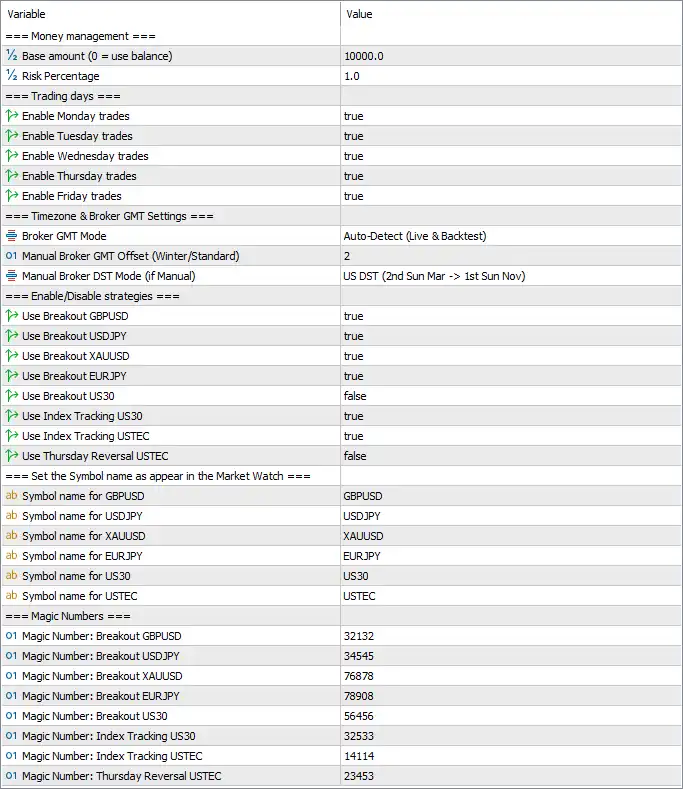
This guide explains every visible input parameter, including the original values and the purpose of each setting.
⚙️ Money Management
🔹 Base amount (0 = use balance) = 10000.0 — Sets the reference account amount used by the EA’s money-management calculations. The current value is 10,000.0; setting this parameter to 0 instructs the EA to use the account balance instead. Confirm the account currency and lot-sizing logic before changing it.
🔹 Risk Percentage = 1.0 — Sets the risk percentage used by the EA when calculating trade exposure or position size. The configured value is 1.0, generally representing 1% if the EA interprets this input as a percentage. The actual monetary risk may differ depending on how the EA calculates lots and manages each strategy.
⚙️ Trading Days
🔹 Enable Monday trades = true — Allows the EA to open trades on Monday. This is useful for enabling the portfolio at the beginning of the trading week, subject to the relevant strategy signals and broker trading hours.
🔹 Enable Tuesday trades = true — Enables trading on Tuesday across the applicable strategy modules. When set to true, the EA can consider valid signals on this day.
🔹 Enable Wednesday trades = true — Allows the EA to trade on Wednesday. This keeps the middle day of the trading week available for strategies whose entry conditions are satisfied.
🔹 Enable Thursday trades = true — Enables Thursday trading, including eligible breakout strategies and any other active module. The separate Thursday Reversal USTEC strategy still depends on its own activation setting.
🔹 Enable Friday trades = true — Allows the EA to trade on Friday. This does not necessarily mean positions are closed automatically before the weekend; the behavior depends on the EA’s trading logic and any additional restrictions.
⚙️ Timezone and Broker GMT Settings
🔹 Broker GMT Mode = Auto-Detect (Live & Backtest) — Configures the EA to detect the broker’s GMT offset automatically in live trading and backtesting. Correct time handling is important because broker server time may differ from GMT and can affect time-dependent strategy rules.
🔹 Manual Broker GMT Offset (Winter/Standard) = 2 — Sets the manual broker GMT offset to 2 hours for winter or standard time. This value is typically relevant when manual time configuration is used; automatic mode is currently selected.
🔹 Manual Broker DST Mode (if Manual) = US DST (2nd Sun Mar -> 1st Sun Nov) — Specifies the daylight-saving-time calendar for manual broker-time configuration. The selected US DST schedule runs from the second Sunday in March to the first Sunday in November. Its relevance depends on whether the EA uses manual GMT mode and how it applies the selected calendar.
⚙️ Enable or Disable Strategies
🔹 Use Breakout GBPUSD = true — Enables the GBPUSD breakout strategy. When active, this module can look for trading opportunities based on its programmed breakout conditions on the configured GBPUSD symbol.
🔹 Use Breakout USDJPY = true — Enables the USDJPY breakout module, allowing it to seek qualifying breakout entries on USDJPY independently of the other strategy switches.
🔹 Use Breakout XAUUSD = true — Activates the Gold breakout strategy on XAUUSD. Gold can behave differently from Forex pairs, so its trading exposure should be evaluated separately when reviewing the portfolio’s overall risk.
🔹 Use Breakout EURJPY = true — Enables the EURJPY breakout strategy. The EA can consider entries from this module when its internal breakout rules and market conditions are satisfied.
🔹 Use Breakout US30 = false — Disables the US30 breakout strategy. With this setting, the EA should not initiate trades through this particular breakout module unless the parameter is changed or the EA implements other overriding logic.
🔹 Use Index Tracking US30 = true — Enables the US30 index-tracking strategy. This is a separate module from the US30 breakout strategy, so index tracking can remain active while US30 breakout trading is disabled.
🔹 Use Index Tracking USTEC = true — Enables the USTEC index-tracking module. It allows the EA to consider its programmed index-tracking signals for USTEC, subject to the symbol name and broker’s instrument availability.
🔹 Use Thursday Reversal USTEC = false — Disables the Thursday Reversal strategy for USTEC. The EA will not use this dedicated module while the setting remains false, even though USTEC index tracking is enabled.
⚙️ Symbol Names in Market Watch
These inputs specify the instrument names the EA uses to identify each market. They should match the broker’s exact symbol names, including any suffixes or prefixes.
🔹 Symbol name for GBPUSD = GBPUSD — Sets the symbol used by the GBPUSD strategy to GBPUSD. If the broker uses a name such as GBPUSD.a or GBPUSDm, this field may need to be updated to match the Market Watch symbol.
🔹 Symbol name for USDJPY = USDJPY — Sets the USDJPY instrument name to USDJPY. The symbol must correspond to the broker’s actual ticker for the strategy to access the intended market.
🔹 Symbol name for XAUUSD = XAUUSD — Sets the Gold instrument name to XAUUSD. Check the broker’s Market Watch because some brokers use alternative Gold tickers or suffixes.
🔹 Symbol name for EURJPY = EURJPY — Sets the instrument name for the EURJPY strategy to EURJPY. This should match the exact symbol available on the trading account.
🔹 Symbol name for US30 = US30 — Sets the index symbol used by the US30 modules to US30. Confirm whether the broker labels the Dow Jones index as US30, DJ30, or another name before trading.
🔹 Symbol name for USTEC = USTEC — Sets the instrument name used by the USTEC strategies to USTEC. Brokers may use alternatives such as NAS100 or USTEC.cash, so the configured value should match the broker’s symbol naming.
⚙️ Magic Numbers
Magic Numbers are identifiers that allow an Expert Advisor to distinguish trades associated with different strategy modules. The values below are configured separately for each module and should generally remain unique within the relevant trading environment.
🔹 Magic Number: Breakout GBPUSD = 32132 — Assigns the identifier 32132 to trades managed by the GBPUSD breakout strategy. Keeping this number distinct helps the EA identify the positions belonging to this module.
🔹 Magic Number: Breakout USDJPY = 34545 — Assigns 34545 to the USDJPY breakout module. This identifier helps separate its trades from those generated by the other strategies.
🔹 Magic Number: Breakout XAUUSD = 76878 — Assigns 76878 to the XAUUSD breakout strategy. A dedicated identifier is useful for distinguishing Gold breakout positions from other trades in the portfolio.
🔹 Magic Number: Breakout EURJPY = 78908 — Assigns 78908 to the EURJPY breakout module. This helps the EA identify positions opened by this specific strategy.
🔹 Magic Number: Breakout US30 = 56456 — Assigns 56456 to the US30 breakout module. Although that module is currently disabled, the identifier remains configured for use if the strategy is activated later.
🔹 Magic Number: Index Tracking US30 = 32533 — Assigns 32533 to the US30 index-tracking module. This is different from the US30 breakout Magic Number, allowing the two strategy types to be distinguished.
🔹 Magic Number: Index Tracking USTEC = 14114 — Assigns 14114 to the USTEC index-tracking strategy. It provides a separate identifier for trades associated with this module.
🔹 Magic Number: Thursday Reversal USTEC = 23453 — Assigns 23453 to the Thursday Reversal USTEC module. The identifier is configured even though this strategy is currently disabled.
🔢 Conclusion
The current configuration of Diversified Multi Strategy Portfolio EA MT5 uses a reference money-management amount of 10000.0 and a risk percentage of 1.0. All five weekday trading switches are enabled. The broker GMT mode is set to automatic detection, while the manual GMT offset is 2 and the manual DST selection follows the US schedule.
Among the eight strategy modules, GBPUSD, USDJPY, XAUUSD, EURJPY, US30 index tracking, and USTEC index tracking are enabled. US30 breakout and Thursday Reversal USTEC are disabled. The symbol fields use the standard names GBPUSD, USDJPY, XAUUSD, EURJPY, US30, and USTEC, and each module has its own configured Magic Number.
Before using this configuration on a live account, verify that every symbol matches the broker’s Market Watch, confirm how the EA calculates risk and position sizes, and test the combined portfolio on a demo account. Because multiple modules may trade different instruments simultaneously, a risk setting for an individual trade should not automatically be treated as the maximum possible risk for the entire portfolio.