





GQL Pending Breakout Gold Expert MT5 (Latest version)

Subscriptions for Special Plan
- 30 EA package is more economical!
- Special package with 99%
- Download 1 EA/Day

Subscriptions for Premium Membership
- Download Unlimited in 1 Year
- Get 100% Discount
- Get free access to all

Subscriptions for Gold Membership
- 1 Year Membership
- Get 100% Discount
- Access EA+Indicator+Course
Frequently bought together 🎁
Add these products to enhance your purchase




Quick Overview
GQL Pending Breakout Gold Expert is an automated Expert Advisor (EA) for MetaTrader 5 that looks for breakout opportunities in Gold. It waits for price consolidation near important market areas, then uses pending orders to enter a valid breakout. Built-in stop loss and take profit, session filtering and spread filtering support it.
Best for:
✅ Gold traders who want a rule based breakout EA.
✅ Users who prefer pending order entries on MT5.
✅ Traders who want session and spread filtering.
✅ Users who like built-in stop loss and take profit.
What is GQL Pending Breakout Gold Expert MT5?
GQL Pending Breakout Gold Expert MT5 is an Expert Advisor (EA) for MetaTrader 5, designed to identify and execute breakout opportunities in the gold market.
It is built around a pending order breakout concept and combines market structure recognition, risk control, session filtering and execution management.
⭐ Vendor Website: View here
⭐ Delivery time 24h-48h after payment.
⭐ Refund if not delivered.
⭐ You will receive the current version without any limitations (ID+Time).
GQL Pending Breakout Gold Expert Review
How Does GQL Pending Breakout Gold Expert MT5 Work?
Consolidation and Breakout
The EA waits for price consolidation around important market areas and then looks for a valid breakout.
Pending Order Entry
Pending orders capture the breakout movement, and entries are executed automatically when the predefined conditions are met.
Risk and Filters
Stop loss and take profit are managed with fixed lot or risk based sizing. Session filtering, a maximum spread filter and basic execution protection avoid unsuitable conditions.
Black Box Approach
The workflow aims to be clear, stable and testable, while the proprietary internal logic is not disclosed.
GQL Pending Breakout Gold Expert MT5 Trading Strategy
🔹 Wait for consolidation: the EA watches for price to consolidate around important market areas, and it does not trade at random or open positions for the sake of activity.
🔹 Look for a valid breakout: the system recognizes market structure and waits for a valid breakout before it prepares an entry, which keeps trading selective and rule based.
🔹 Place pending orders: entries use pending orders placed around the breakout area, so the trade is triggered only if price actually moves through the chosen level.
🔹 Protect each trade: a stop loss and take profit are managed as part of every trade, with fixed lot or risk based sizing chosen by the trader to match the account.
🔹 Avoid unsuitable conditions: session filtering, a maximum spread filter and basic execution protection stop entries when market conditions do not suit the strategy.
Historical Trading Results Performance
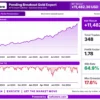
GQL Pending Breakout Gold Expert MT5 was backtested on XAUUSD (Gold) from January 2023 to December 2024, achieving a net profit of $11,482.36, with a 64.9% win rate and 17.6% maximum drawdown.
GQL Pending Breakout Gold Expert MT5 Backtest Results
| Parameter | Result |
|---|---|
| Trading Symbol | XAUUSD (Gold) |
| Test Period | Jan 2023 – Dec 2024 |
| Net Profit | $11,482.36 |
| Profit Factor | 1.78 |
| Total Trades | 348 |
| Win Rate | 64.9% |
| Maximum Drawdown | 17.6% |
Key Features of GQL Pending Breakout Gold Expert MT5
Breakout Detection
The EA identifies breakout opportunities in the gold market through market structure recognition, and it acts only when its predefined conditions are met.
Pending Order Entries
Entries are made with pending orders, which lets the EA capture breakout movement automatically instead of entering at the market before the move is confirmed.
Stop Loss and Take Profit Management
Built-in stop loss and take profit management is part of the execution workflow, so each trade is handled with defined exit levels from the start.
Flexible Position Sizing
Traders can use a fixed lot or risk based sizing, which makes it easier to match trade size to the account balance and personal risk tolerance.
Session Filtering
A trading session filter keeps the EA from opening trades outside the chosen hours, which helps avoid periods that do not suit a breakout approach.
Spread Filter and Execution Protection
A maximum spread filter and basic execution protection reduce the chance of entering when costs are high or execution conditions are poor.
How to Get the Most from GQL Pending Breakout Gold Expert MT5
🔹 Follow the default chart setup: the author states that best results need the default timeframe slots running together, and that one chart or one timeframe is not enough.
🔹 Keep the signal timeframe on chart: the author advises attaching the EA to each chart and leaving the signal timeframe on its chart setting for the default slots to work.
🔹 Use a suitable account: a hedging account is required, with a recommended deposit above the minimum and leverage well above the minimum for several charts running together.
🔹 Run it on a VPS: the author calls a VPS necessary for uninterrupted operation, because pending orders only work while the terminal stays online and connected.
🔹 Test before going live: run the Strategy Tester and a demo account first, and use a live account only after the settings and their effects are fully understood.
🔹 Keep sizing sensible: the author warns against excessive position sizing, so choose a fixed lot or risk based size that suits the account and the loss that can be accepted.
🔹 Plan the risk first: the risk management guide helps with choosing a lot size and a loss limit that suit the account.
GQL Pending Breakout Gold Expert MT5 Risk Management
🔹 No grid and no martingale: the author states that the EA uses neither method, so a losing trade is not averaged down or followed by a larger lot. This claim should still be checked in the Strategy Tester.
🔹 Stop loss must stay active: stop loss and take profit are configurable, and an EA run with a stop loss that is switched off or set far too wide loses its main protection. A guide to stop-loss placement explains why.
🔹 Pending order slippage: breakout orders often trigger during fast moves, so slippage, gaps and widened spreads around news or market openings can fill a trade at a worse price than planned.
🔹 Several charts add up: the default setup runs the EA on several charts, and their trades can point in the same direction at once, so the combined exposure is larger than any single chart suggests.
🔹 Black box needs testing: the logic is not disclosed, so demo trading and Strategy Tester runs on the chosen broker are the only way to judge behavior. A guide to take-profit methods shows how targets relate to risk.
What Sets It Apart
🔹 Pending order breakout concept: the EA waits for price to move through a level before entering, instead of guessing the direction ahead of the move.
🔹 Selective by design: the author states that it is not built for random overtrading and trades only when specific market conditions are met.
🔹 Clear stance on risk methods: the author states there is no martingale and no grid, and that each trade uses a stop loss and take profit.
🔹 Gold and Bitcoin coverage: the default setup covers XAUUSD and BTCUSD, so one product can serve both a Gold and a Bitcoin breakout approach.
Strengths and Limitations
Strengths
🔹 Rule based breakout logic: entries follow predefined conditions around consolidation and breakout, which keeps the approach disciplined.
🔹 Defined exits: stop loss and take profit management is built in, so trades do not depend on manual closing or on the trader watching the screen.
🔹 Execution filters: session, spread and basic execution protection help avoid unsuitable entry conditions such as wide spreads or quiet hours.
🔹 Testable workflow: Strategy Tester compatibility lets traders check behavior on their own broker data before live use.
Limitations
🔹 Black box logic: the internal rules are not disclosed, so users cannot check why a trade was opened and can only judge the EA by testing.
🔹 False breakouts happen: price can break a level and then reverse, and a pending order can then trigger a trade that ends at its stop loss.
🔹 Setup is demanding: the default setup uses several charts, a hedging account, high leverage and a VPS, which adds cost and complexity.
🔹 No published performance: the product information includes no backtest or live report, so no returns or drawdown figures can be quoted here.
Who Should Use GQL Pending Breakout Gold Expert MT5?
🔹 Gold traders on MT5: those who want a rule based breakout EA that uses pending orders and trades only under defined conditions.
🔹 Disciplined users: traders who value session and spread filtering and who will test on demo before using real funds.
🔹 Well equipped traders: people with a hedging account, enough leverage and a VPS, who can run several charts at the same time.
🔹 Not for traders who: want a fully disclosed strategy, a published track record or any guarantee of profit from an automated system.
Recommended Trading Conditions
For the best performance, the developer recommends:
| Features | Type |
|---|---|
| Trading platform | MetaTrader 5 (MT5) |
| Time frames | Any |
| Currency pairs | XAUUSD (Gold) and BTCUSD |
| Minimum / Recommended deposit | $500+ |
| Minimum / Recommended leverage | 1:500+ |
| Account type | Hedging, ECN, RAW, Low spread accounts |
| Additional services | Unlock and Decompile |
| Recommended brokers | Exness Broker, Icmarkets Broker |
| Recommended VPS | MyfxVPS.com (Blue VPS, Golden VPS). Lowest Latency, 2 week Free Trial, 100% Free for 12-18 Months. |
Product Download Package?
The download package of the product suite includes:
✅ Experts: GQL Pending Breakout Gold Expert.ex5
Final Verdict
GQL Pending Breakout Gold Expert MT5 is a rule based breakout EA that uses pending orders, built-in stop loss and take profit, and session and spread filters.
Its logic is undisclosed and no results are published here. A Strategy Tester run, a demo trial and a sensible lot size are the right way to start.
🔢 GQL Pending Breakout Gold Expert MT5: Complete Settings Guide
GQL Pending Breakout Gold Expert is an automated trading system configured for pending-order breakout trading, with settings for signal timeframe selection, ATR-based stop management, volatility filtering, higher-timeframe trend confirmation, and risk control. Its inputs include a 15-minute signal timeframe, configurable pending-order lifetime, trailing protection, optional breakeven management, and H1/H4 trend alignment. Additional settings control lot sizing, maximum spread, slippage, and trading-session hours.
This guide explains every visible input parameter, including all numerical values, Boolean switches, timeframes, and version-related labels. Some parameter descriptions contain implementation-specific abbreviations; where their precise behavior cannot be confirmed from the input name alone, the explanation identifies the likely purpose without assuming undocumented logic.
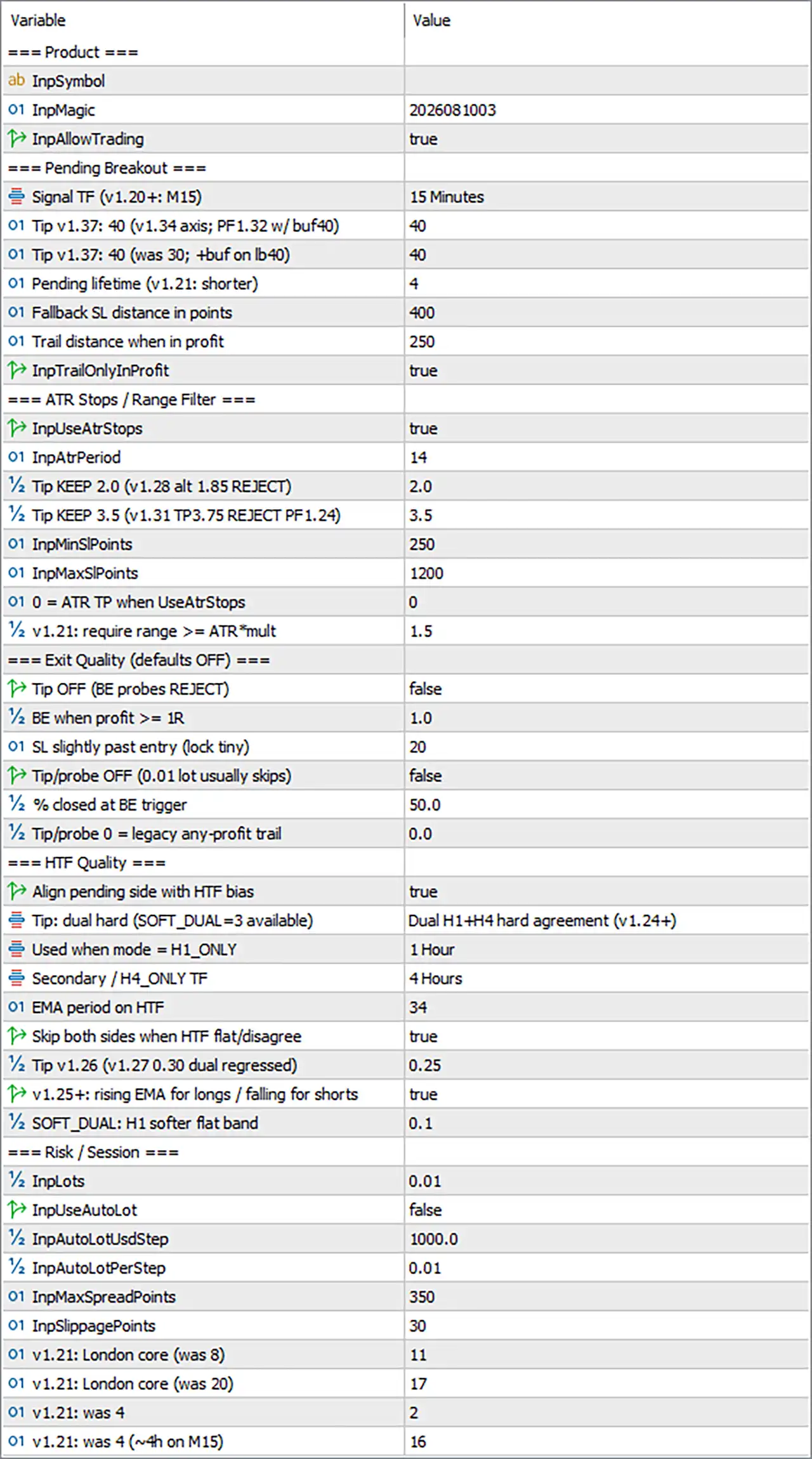
GQL Pending Breakout Gold Expert MT5 Settings Panel
⚙️ Product Settings
🔹 InpSymbol = blank — Specifies the trading symbol used by the EA. The value is blank in the displayed configuration, which may indicate that the EA automatically uses the chart symbol. Confirm the EA’s symbol-selection logic before attaching it to a chart other than the intended Gold instrument.
🔹 InpMagic = 2026081003 — Sets the Magic Number to 2026081003. This identifier helps the EA distinguish its trades and pending orders from those belonging to other Expert Advisors or manual trading, depending on the order-management implementation.
🔹 InpAllowTrading = true — Enables the EA’s trading functionality. When set to true, the EA can evaluate its trading conditions and place orders, subject to the other enabled filters, market conditions, and broker restrictions.
⚙️ Pending Breakout Settings
🔹 Signal TF (v1.20+: M15) = 15 Minutes — Sets the signal timeframe to M15, meaning 15-minute candles are used for the relevant breakout analysis. This timeframe provides a relatively short-term view of price movement and may generate more frequent opportunities than higher timeframes.
🔹 Tip v1.37: 40 (v1.34 axis; PF1.32 w/ buf40) = 40 — Sets the parameter associated with the version 1.37 tip to 40. The label references an axis adjustment in v1.34 and a PF value of 1.32 with buffer 40. These appear to be development or optimization notes; the precise effect of this input requires the EA’s internal implementation.
🔹 Tip v1.37: 40 (was 30; +buf on lb40) = 40 — Sets another version 1.37 parameter to 40, replacing the previous value of 30 according to the label. The note also mentions adding a buffer on lb40, suggesting a relationship with a lookback or breakout buffer, but its exact calculation cannot be established from the input label alone.
🔹 Pending lifetime (v1.21: shorter) = 4 — Sets the pending-order lifetime parameter to 4. This likely controls how long a pending breakout order remains valid before expiration or cancellation. The unit—such as bars, candles, or another time measure—is not specified in the label and should be confirmed through testing.
🔹 Fallback SL distance in points = 400 — Sets the fallback stop-loss distance to 400 points. This value may be used when the primary stop-loss calculation cannot provide a valid level or when a fallback rule is triggered. The actual price distance depends on the symbol’s point size and broker quotation format.
🔹 Trail distance when in profit = 250 — Sets the trailing distance to 250 points when the trade is profitable. This defines the intended distance between price and the trailing stop under the EA’s trailing logic, helping protect gains while allowing room for further movement.
🔹 InpTrailOnlyInProfit = true — Restricts trailing-stop activity to profitable trades if the EA implements this switch according to its label. This setting is intended to prevent the trailing mechanism from moving the stop before the position has reached a favorable state.
⚙️ ATR Stops and Range Filter
🔹 InpUseAtrStops = true — Enables the ATR-based stop-management feature. When active, the EA can use Average True Range calculations to determine or adjust stop distances according to market volatility, subject to its programmed rules.
🔹 InpAtrPeriod = 14 — Sets the ATR calculation period to 14 bars. ATR measures recent price volatility over the selected period and can help the EA adapt stop distances or evaluate whether market movement is sufficient for its strategy.
🔹 Tip KEEP 2.0 (v1.28 alt 1.85 REJECT) = 2.0 — Sets the parameter associated with the KEEP 2.0 configuration to 2.0. The label notes that an alternative value of 1.85 was rejected in version 1.28. This appears to be a strategy-specific tuning parameter, and its exact calculation should not be assumed to be a standard ATR multiplier without verifying the EA logic.
🔹 Tip KEEP 3.5 (v1.31 TP3.75 REJECT PF1.24) = 3.5 — Sets the parameter associated with KEEP 3.5 to 3.5. The label references a rejected take-profit value of 3.75 and a PF value of 1.24. These are configuration notes rather than guaranteed performance outcomes; the precise function of the parameter depends on the EA’s code.
🔹 InpMinSLPoints = 250 — Sets the minimum stop-loss distance to 250 points. This can prevent the EA from placing a stop too close to the entry price, provided the minimum-distance rule is enforced by its stop calculation.
🔹 InpMaxSLPoints = 1200 — Sets the maximum stop-loss distance to 1200 points. This can constrain the stop distance in volatile conditions and may help limit excessively wide stops. The EA’s response when the calculated stop exceeds this maximum depends on its implementation.
🔹 0 = ATR TP when UseAtrStops = 0 — Sets the ATR take-profit-related parameter to 0. The label indicates that 0 has a special meaning for ATR-based take-profit behavior when ATR stops are enabled. It may represent an automatic ATR-based take-profit mode, but this interpretation should be verified because the label does not fully specify the calculation.
🔹 v1.21: require range >= ATR*mult = 1.5 — Sets the range filter multiplier to 1.5. The label indicates that the measured range must be at least the ATR multiplied by this value. If implemented as described, a range below 1.5 × ATR may be rejected, filtering out market conditions with insufficient movement relative to volatility.
⚙️ Exit Quality Settings (Defaults OFF)
🔹 Tip OFF (BE probes REJECT) = false — Sets the Tip OFF switch to false. The label references breakeven probes being rejected, but the exact feature controlled by this parameter is unclear. Since the value is false, any behavior associated with activating this switch should not be assumed to be enabled.
🔹 BE when profit >= 1R = 1.0 — Sets the breakeven trigger threshold to 1.0R. In standard risk terminology, 1R represents a profit equal to the initial risk defined by the stop-loss distance. If the EA uses this convention, breakeven management can be triggered once the position reaches a profit equivalent to its initial risk.
🔹 SL slightly past entry (lock tiny) = 20 — Sets the stop-loss offset beyond the entry price to 20 points for the associated small-profit-lock feature. This may allow the EA to lock in a small gross profit after a qualifying trigger, although fees and execution costs can affect the net outcome.
🔹 Tip/probe OFF (0.01 lot usually skips) = false — Sets the tip/probe-related switch to false. The label notes that a 0.01-lot position usually skips the associated behavior, but it does not establish the exact mechanism. The value should be retained unless the intended behavior has been confirmed through testing.
🔹 % closed at BE trigger = 50.0 — Sets the percentage of the position to close at the breakeven trigger to 50.0%. If partial closure is supported and this setting is active, the EA may close half of the position when the relevant breakeven condition is reached, leaving the remainder open for further management.
🔹 Tip/probe 0 = legacy any-profit trail = 0.0 — Sets the tip/probe-related parameter to 0.0. The label associates zero with a legacy trailing rule that may operate at any profit level. Because this appears to be a compatibility or strategy-specific input, its exact effect should be verified before changing it.
⚙️ Higher-Timeframe Quality Settings
🔹 Align pending side with HTF bias = true — Enables alignment between the pending-order direction and the higher-timeframe trend bias. If implemented as described, the EA can restrict buy-side pending orders to bullish conditions and sell-side pending orders to bearish conditions, reducing trades that conflict with the selected trend filter.
🔹 Tip: dual hard (SOFT_DUAL = 3 available) = Dual H1+H4 hard agreement (v1.24+) — Selects the Dual H1+H4 hard agreement (v1.24+) mode. This indicates that both H1 and H4 trend assessments must agree before a trade qualifies under the dual-timeframe filter. The exact handling of neutral or conflicting readings depends on the EA’s code.
🔹 Used when mode = H1_ONLY = 1 Hour — Sets the timeframe to 1 Hour for the H1-only mode. This value applies when that mode is selected; the current trend mode is the dual H1+H4 agreement setting, so this input may not determine the active filter by itself.
🔹 Secondary / H4_ONLY TF = 4 Hours — Sets the secondary higher timeframe to 4 Hours (H4). This is the higher timeframe used for the secondary trend check or H4-only mode, depending on how the selected trend mode is implemented.
🔹 EMA period on HTF = 34 — Sets the higher-timeframe EMA period to 34 bars. The EMA can act as a reference for determining trend direction and filtering pending breakout orders according to the relationship between price and the moving average.
🔹 Skip both sides when HTF flat/disagree = true — Enables a filter that skips both buy and sell sides when the higher-timeframe trend is flat or the relevant timeframes disagree. This can prevent new pending orders from being placed during unclear trend conditions, depending on the EA’s trend-classification rules.
🔹 Tip v1.26 (v1.27 0.30 dual regressed) = 0.25 — Sets a strategy-specific parameter to 0.25. The label references a version 1.26 setting and a regression note involving 0.30 in version 1.27 dual mode. Its exact meaning cannot be determined from the label alone, so it should be treated as an implementation-specific threshold rather than a confirmed standard indicator setting.
🔹 v1.25+: rising EMA for longs / falling for shorts = true — Enables a directional EMA-slope filter. When implemented according to the label, long setups require a rising EMA, while short setups require a falling EMA. This can help align breakout orders with the direction of the higher-timeframe trend.
🔹 SOFT_DUAL: H1 softer flat band = 0.1 — Sets the H1 flat-band threshold for the soft dual-timeframe mode to 0.1. This appears to define a tolerance around the H1 trend measure within which the market may be classified as flat. The unit and exact calculation are specific to the EA and cannot be confirmed from the label alone.
⚙️ Risk and Trading Session Settings
🔹 InpLots = 0.01 — Sets the base trading volume to 0.01 lots. Since automatic lot sizing is disabled, this is the configured lot size the EA is likely to use for new orders, subject to broker minimum volume and any additional internal restrictions.
🔹 InpUseAutoLot = false — Disables automatic lot sizing. With this setting, the EA is expected to use the manually configured InpLots = 0.01 rather than calculating the lot size from account equity or another automatic sizing rule.
🔹 InpAutoLotUsdStep = 1000.0 — Sets the account-value step for automatic lot sizing to 1000.0 USD or account-currency units, depending on the EA’s implementation. This setting is generally relevant only when automatic lot sizing is enabled, which it currently is not.
🔹 InpAutoLotPerStep = 0.01 — Sets the lot increment per automatic sizing step to 0.01 lots. This defines the volume associated with each InpAutoLotUsdStep increment if the EA calculates position size using a step-based method. It is not expected to control current position size while automatic lot sizing remains disabled.
🔹 InpMaxSpreadPoints = 350 — Sets the maximum permitted spread to 350 points. If the EA enforces this filter, new orders may be blocked when the spread exceeds the configured threshold. The actual price difference represented by 350 points depends on the broker’s symbol specification.
🔹 InpSlippagePoints = 30 — Sets the permitted execution slippage parameter to 30 points. This value is used by the EA’s order-execution logic where supported by the broker and platform. It cannot guarantee a particular execution price during fast markets or liquidity gaps.
🔹 v1.21: London core (was 8) = 11 — Sets a London-session-related parameter to 11, replacing the earlier value of 8 according to the label. This appears to define a session-hour boundary or related London trading window setting, but the exact meaning depends on the EA’s session logic and the time zone used.
🔹 v1.21: London core (was 20) = 17 — Sets another London-session-related parameter to 17, replacing the earlier value of 20. The input likely defines a second session boundary, such as an ending hour, but the label does not explicitly specify whether the value represents the start or end of the trading window.
🔹 v1.21: was 4 = 2 — Sets a version-specific parameter to 2, replacing the earlier value of 4 according to the label. The parameter’s precise purpose is not identified, so its effect should be confirmed from the EA’s behavior or technical description rather than assumed.
🔹 v1.21: was 4 (~4h on M15) = 16 — Sets a version-specific parameter to 16, replacing the earlier value of 4. The note ~4h on M15 suggests a relationship with approximately four hours when measured in 15-minute candles, because 16 × 15 minutes = 240 minutes. The exact behavior controlled by this parameter remains implementation-specific.
🔢 Conclusion
The displayed configuration of GQL Pending Breakout Gold Expert MT5 enables trading with Magic Number 2026081003 and an M15 signal timeframe. Pending breakout orders use a lifetime parameter of 4, a fallback stop distance of 400 points, and a trailing distance of 250 points when profitable. ATR-based stops and the range filter are enabled, with ATR period 14, minimum stop-loss distance 250 points, maximum stop-loss distance 1200 points, and a range multiplier of 1.5.
The higher-timeframe filter is configured for hard agreement between H1 and H4, using EMA period 34. Pending-order direction is aligned with the higher-timeframe bias, and trading is skipped when the higher-timeframe condition is flat or disagrees. The configured base lot is 0.01, while automatic lot sizing is disabled. The maximum spread is 350 points and the slippage parameter is 30 points.
Several inputs contain version notes, abbreviations, or specialized labels whose exact formulas cannot be established from their names alone. Before using the EA on a live account, verify those parameters through controlled backtesting and demo trading. Pay particular attention to pending-order expiration, ATR take-profit behavior when its value is 0, partial closure at the breakeven trigger, the units used by session parameters, and the relationship between the selected H1+H4 mode and its auxiliary settings.
User Reviews
Only logged in customers who have purchased this product may leave a review.
❓ What is GQL Pending Breakout Gold Expert MT5?
An automated Expert Advisor for MetaTrader 5 that identifies breakout opportunities in the gold market and enters them with pending orders.
❓ Which symbols does GQL Pending Breakout Gold Expert MT5 trade?
XAUUSD (Gold) is the main symbol, and BTCUSD is also listed as supported.
❓ How does GQL Pending Breakout Gold Expert MT5 enter trades?
It waits for price consolidation around important market areas, looks for a valid breakout and places pending orders to capture the movement.
❓ Does GQL Pending Breakout Gold Expert MT5 use grid or martingale?
The author states that it uses no martingale and no grid, and that the EA is not designed for random overtrading.
❓ Does GQL Pending Breakout Gold Expert MT5 use a stop loss?
Yes. Stop loss and take profit management is built in, and the trader can set fixed lot or risk based sizing.
❓ What filters does GQL Pending Breakout Gold Expert MT5 include?
Trading session filtering, a maximum spread filter and basic execution protection.
❓ How should GQL Pending Breakout Gold Expert MT5 be set up?
The author states that best results need the default timeframe slots attached together on separate charts, with the signal timeframe left on its chart setting.
❓ Which account suits GQL Pending Breakout Gold Expert MT5?
A hedging account with a deposit of USD 500 at minimum, USD 1000 or more recommended, leverage of 1:500 at minimum and 1:1000 recommended, and a VPS.
❓ Does GQL Pending Breakout Gold Expert MT5 disclose its strategy?
No. It follows a black box approach, and the proprietary algorithms, weighting and model structure are not disclosed.
❓ Can GQL Pending Breakout Gold Expert MT5 be tested before live use?
Yes. It is compatible with the Strategy Tester and can be used on a demo account, which the author recommends before any live use.
❓ Can broker conditions change the results of GQL Pending Breakout Gold Expert MT5?
Yes. Broker quotes, spreads, slippage and execution conditions can all affect real results.
❓ Does GQL Pending Breakout Gold Expert MT5 guarantee profits?
No. It is a trading tool, and past performance does not guarantee future results.
-
 Original price was: $8,000.00.$249.00Current price is: $249.00.
-
 Original price was: $7,000.00.$249.00Current price is: $249.00.
-
 Original price was: $8,000.00.$249.00Current price is: $249.00.
-
 Original price was: $25,000.00.$249.00Current price is: $249.00.
-
 0Original price was: $1,299.00.$249.00Current price is: $249.00.
-
 0Original price was: $290.00.$179.00Current price is: $179.00.
-
 1Original price was: $500.00.$249.00Current price is: $249.00.
-
 0Original price was: $430.00.$249.00Current price is: $249.00.
There are no reviews yet.