


🔢 BulletProof BTC EA MT5 Settings Guide: Complete Inputs and Risk Management Explained
BulletProof BTC EA is an automated Bitcoin trading system designed around session breakout trading on BTC/USD. It focuses on identifying price movements beyond a defined trading range and includes configurable risk profiles, position sizing, trailing-stop management, and chart-based range visualization.
The EA is presented as a system without martingale, grid trading, or loss-averaging strategies, with stop-loss and take-profit protection designed for its trades. The supplied configuration uses Risk Profile 2 – Low, with customizable session parameters and money-management settings.
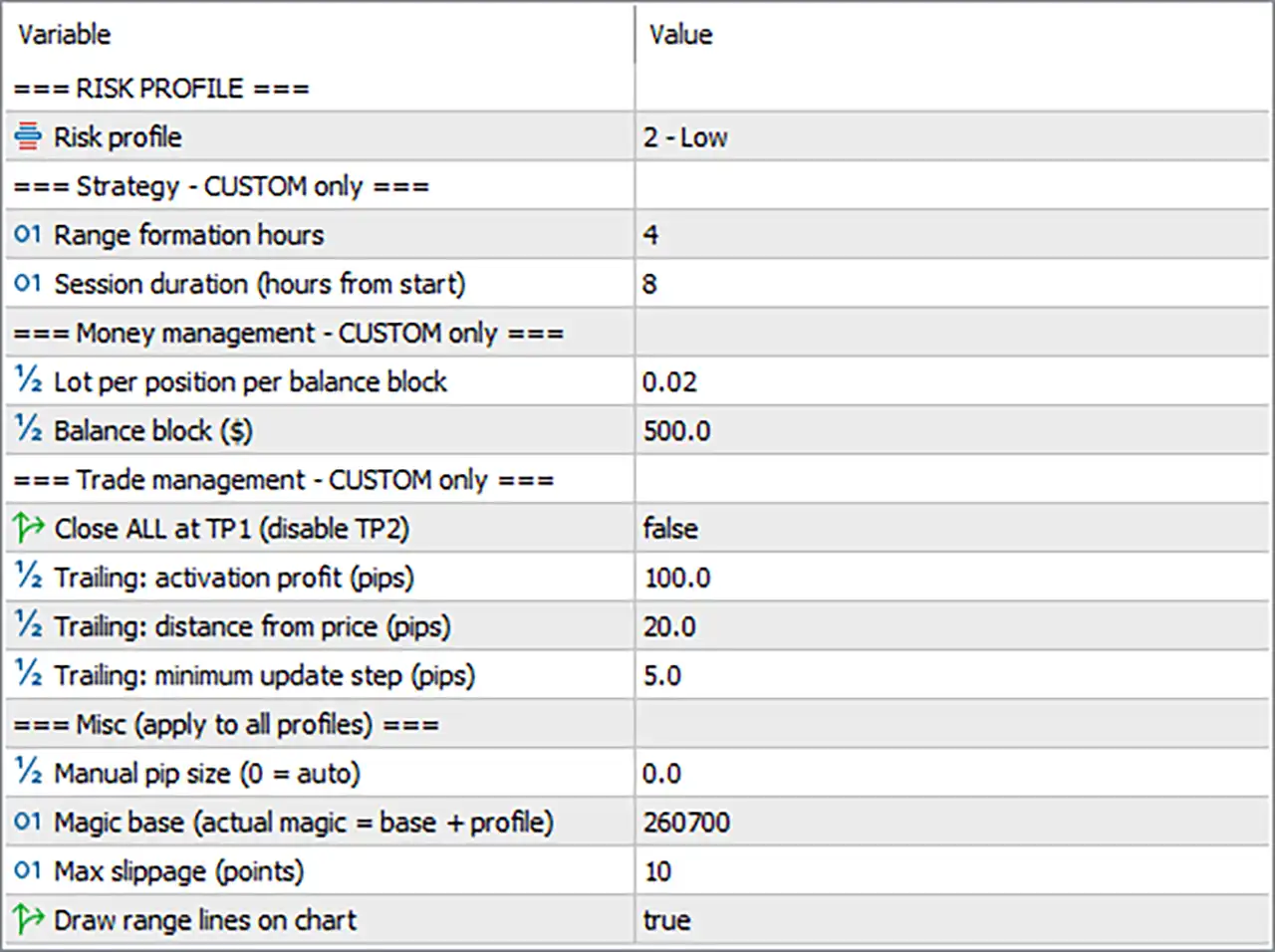
The following breakdown explains every visible input and its configured value, including the parameters marked as applicable to the Custom profile and those that apply to all risk profiles.
⚙️ Risk Profile
🔹 Risk profile = 2 - Low — Selects Risk Profile 2, labeled Low. This profile determines the EA's predefined risk and trading behavior. The precise settings controlled by this profile depend on the EA's internal configuration, and the Custom-only inputs below may not affect the active profile.
⚙️ Strategy Settings — Custom Only
🔹 Range formation hours = 4 — Sets the range formation period to 4 hours. The EA uses this configured period to establish the price range that serves as the reference for identifying potential session breakout opportunities.
🔹 Session duration (hours from start) = 8 — Sets the trading session duration to 8 hours from its configured start. This determines the length of the session used by the strategy when the Custom profile is active.
⚙️ Money Management — Custom Only
🔹 Lot per position per balance block = 0.02 — Sets the position volume to 0.02 lots per balance block. When Custom money management is active, this value determines the lot allocation associated with each configured balance block.
🔹 Balance block ($) = 500.0 — Sets the balance block size to $500.0. This value works with the lot-per-balance-block setting to determine position sizing under Custom money management. The actual volume calculation depends on the EA's internal rules and account balance.
⚙️ Trade Management — Custom Only
🔹 Close ALL at TP1 (disable TP2) = false — Disables the option to close all positions at Take Profit 1 and disable Take Profit 2. With this setting false, the EA does not activate this specific all-position closing behavior through the parameter; the handling of TP1 and TP2 follows its normal programmed logic.
🔹 Trailing: activation profit (pips) = 100.0 — Sets the trailing-stop activation threshold to 100.0 pips. When Custom trade management is active, the trailing mechanism is configured to begin after the required favorable movement or profit condition is reached.
🔹 Trailing: distance from price (pips) = 20.0 — Sets the trailing distance to 20.0 pips. Once trailing is active, this value defines the intended distance between the current market price and the managed stop level.
🔹 Trailing: minimum update step (pips) = 5.0 — Sets the minimum trailing-stop update step to 5.0 pips. This controls the minimum favorable price movement required before the EA updates the trailing stop, according to its internal management logic.
⚙️ Miscellaneous Settings — Apply to All Profiles
🔹 Manual pip size (0 = auto) = 0.0 — Sets the manual pip-size override to 0.0, which selects automatic pip-size detection. The EA determines the applicable pip size from its programmed logic rather than using a manually specified value.
🔹 Magic base (actual magic = base + profile) = 260700 — Sets the base magic number to 260700. The actual magic number is calculated using the base value plus the selected profile identifier, as described by the parameter label. This helps distinguish trades associated with different risk profiles.
🔹 Max slippage (points) = 10 — Sets the maximum slippage parameter to 10 points. This defines the configured tolerance for execution-price differences when orders are placed or processed, subject to the EA's implementation and broker execution conditions.
🔹 Draw range lines on chart = true — Enables the display of range lines on the chart. This visual feature helps traders see the price boundaries used by the breakout strategy and monitor how the market interacts with the established range.
🔢 Conclusion
The supplied BulletProof BTC EA MT5 configuration uses Risk Profile 2 – Low and includes a 4-hour range formation period and an 8-hour session duration in the Custom strategy settings. Custom money management is configured at 0.02 lots per $500.0 balance block, while Custom trailing-stop management uses a 100.0-pip activation threshold, a 20.0-pip trailing distance, and a 5.0-pip minimum update step.
The option to close all positions at TP1 and disable TP2 is set to false. Automatic pip-size detection is enabled through Manual pip size = 0.0, the magic-number base is 260700, maximum slippage is 10 points, and range lines are displayed on the chart.
An important distinction is that several inputs are explicitly labeled Custom only. Because Risk Profile 2 – Low is selected, those Custom settings may not control the active strategy unless the EA is switched to its Custom profile. Confirm the profile behavior and test the settings on a demo account before live deployment. Bitcoin can experience sharp price swings, and neither a low-risk profile nor automated stop management guarantees a particular outcome.


