






Breakouter X6 Portfolio EA MT5 (Latest version) - Unlimited

Subscriptions for Special Plan
- 30 EA package is more economical!
- Special package with 99%
- Download 1 EA/Day

Subscriptions for Premium Membership
- Download Unlimited in 1 Year
- Get 100% Discount
- Get free access to all

Subscriptions for Gold Membership
- 1 Year Membership
- Get 100% Discount
- Access EA+Indicator+Course
Frequently bought together 🎁
Add these products to enhance your purchase



Quick Overview
Breakouter X6 Portfolio EA turns one chart into a small breakout desk. A single instance watches six markets, finds the swing highs and lows that matter on each of them and prepares pending orders to catch a break of that structure.
Best For:
✅ Experienced portfolio traders who are comfortable with several markets, margin and simultaneous orders.
✅ Breakout strategy users who want a rules-based swing breakout system.
✅ Traders who want gold, silver and index exposure managed from one chart.
✅ Users who hold an MT5 hedging account and can supply enough free margin.
What Is Breakouter X6 Portfolio MT5?
Breakouter X6 Portfolio is a MetaTrader 5 Expert Advisor (EA) built around swing structure. It identifies local swing highs and lows, then prepares pending orders so that it can take part when price breaks through a relevant level.
The “X6” in the name refers to the six markets that it coordinates. Running six separate robots on six charts means six sets of inputs and no shared view of the account. Here everything runs from one instance, with one dashboard and one set of controls.
The product requires an MT5 hedging account. Netting accounts are not supported. Because many pending orders and positions can exist at the same time, margin and total exposure matter a great deal.
⭐ Vendor Website: View here
⭐ Delivery time 24h-48h after payment.
⭐ Refund if not delivered.
⭐ You will receive the current version without any limitations (ID+Time).
Breakouter X6 Portfolio EA MT5 Review
How Does Breakouter X6 Portfolio MT5 Work?
Swing Based Entries
The EA identifies local swing highs and lows on each enabled market. It then prepares pending orders to participate if price breaks through a relevant structure.
Six Market Portfolio
XAUUSD, USTEC, XAUCHF, XAUJPY, XAGUSD and XAGEUR can each be enabled or disabled, so the portfolio can be narrowed to the markets a broker offers or a trader prefers.
Automated Exits
Once an order activates, Stop Loss (SL), Take Profit (TP), Breakeven and Trailing functions manage the position.
Broker Symbol Mapping
Inputs allow broker specific prefixes, suffixes and alternative symbol names, so the EA can find the right instruments on different servers.
Breakouter X6 Portfolio MT5 Trading Strategy
🔹 Read the structure: swing highs and lows mark the levels where a break has meaning.
🔹 Place pending orders: orders wait around those levels, so entry happens only when price actually breaks through.
🔹 Spread the exposure: six different markets are traded together, instead of relying on one instrument.
🔹 Manage the exit: Stop Loss, Take Profit, breakeven and trailing handle each position after activation.
🔹 Check before acting: spread, trading sessions, margin, stop distance, freeze level, tick size and volume limits are verified before order operations.
Historical Trading Results Performance
✅ Breakouter X6 Portfolio EA was tested across 6 markets from January 2, 2025, to August 20, 2026. The backtest recorded a net profit of 14,104.91, a 75.28% win rate, and a maximum equity drawdown of 19.17%.
Breakouter X6 Portfolio EA Backtest Results
| Parameter | Result |
|---|---|
| Initial Deposit | $4,000 |
| Total Net Profit | $14,104.91 |
| Total Trades | 4,793 |
| Profit Factor | 1.91 |
| Win Rate | 75.28% |
✅ Breakouter X6 Portfolio EA MT5 was tested across 6 markets from January 2, 2025, to August 20, 2026, using 1% risk per trade. The test recorded a net profit of 64,477.93 and a 75.26% win rate.
Breakouter X6 Portfolio EA MT5 Backtest Results
| Parameter | Result |
|---|---|
| Initial Deposit | $4,000 |
| Total Net Profit | $64,477.93 |
| Total Trades | 4,793 |
| Profit Factor | 1.93 |
| Win Rate | 75.26% |
Key Features of Breakouter X6 Portfolio MT5
One Chart, Six Markets
A single instance coordinates the whole portfolio. The product recommends starting from an XAUUSD M5 chart while the EA manages the enabled markets internally.
Flexible Position Sizing
Two modes are available: the minimum broker lot, or a percentage risk per new trade. The percentage applies to each order and not to the portfolio as a whole.
Execution Safeguards
Spread, trading sessions, margin, stop distance, freeze level, tick size and volume limits are checked before orders are sent or modified.
Live Dashboard
The interface shows equity, free margin, open positions, pending orders, portfolio results and the status of each market.
Broker Symbol Mapping
Prefixes, suffixes and alternative symbol names can be assigned, which helps on brokers with unusual naming.
No External Dependencies
The product description states that DLLs, WebRequest, external indicators and additional files are not required.
How to Get the Most from Breakouter X6 Portfolio MT5
A portfolio EA rewards careful preparation. These habits matter most.
🔹 Open a hedging account: netting accounts are not supported.
🔹 Start with the minimum lot: it is the gentler sizing mode, and percentage risk can come later once behavior on the broker is understood.
🔹 Plan for free margin: concurrent pending orders and positions may need substantial margin, particularly when leverage is lower than the reference test.
🔹 Enable markets step by step: since each market can be switched on or off, the portfolio can be built up gradually.
🔹 Map symbols carefully: check prefixes, suffixes and alternative names so that every enabled market resolves to the right instrument.
🔹 Mind scheduled news: the EA has no external economic calendar or fixed news filter, so releases can affect execution.
🔹 Study risk first: the risk management guide helps with deciding how much to risk on each order.
Risk Management
Aggregate Risk
Several simultaneous positions can create much more total exposure than the risk percentage for one new order suggests.
This is the central risk of the product, and it is why the minimum lot mode is a sensible place to begin.
Drawdown
The published simulations show that drawdown can be significant, especially with percentage based sizing.
Exact figures are in the results section below. A guide to stop-loss placement explains how stop distance shapes risk.
Margin and Leverage
The reference test used 1:500 leverage. Lower leverage may call for more capital or for fewer enabled markets.
False Breakouts
Price can break a swing level and then reverse, which produces losing streaks and temporary drawdown. A guide to take-profit methods shows how exit targets relate to risk.
What Sets It Apart
🔹 Portfolio scope: six markets are coordinated from one instance, so separate robots on separate charts are not needed.
🔹 Honest risk framing: the product details separate per-order risk from total portfolio exposure and discuss margin requirements openly.
🔹 Practical tooling: symbol mapping, a dashboard and pre-trade checks address the real work of running a multi-market EA.
Strengths and Limitations
Strengths
🔹 Six markets managed from one chart, each switchable on its own.
🔹 Complete exit handling with Stop Loss, Take Profit, breakeven and trailing.
🔹 Published test figures for two sizing modes, with the caveats stated.
Limitations
🔹 Capital needs: concurrent pending orders and positions may require substantial free margin, especially at lower leverage.
🔹 Meaningful drawdown: simulations show it can be significant, particularly with percentage sizing.
🔹 Hedging account only: netting accounts cannot be used.
🔹 No news filter: scheduled releases can affect execution.
🔹 No guarantees: simulated results do not predict future performance.
Who Should Use Breakouter X6 Portfolio MT5?
🔹 Experienced portfolio traders: users who are comfortable with multiple markets, margin and simultaneous orders.
🔹 Breakout strategy users: traders who want a rules-based, multi-market swing breakout system.
🔹 Well-capitalized accounts: those who can supply the free margin that a six-market portfolio may need.
🔹 Not for traders who: want a small-account, single-position EA, use a netting account or expect guaranteed returns.
Recommended Trading Conditions
Recommended settings and parameters to pay attention to from developers and experts:
| Features | Type |
|---|---|
| Trading platform | MetaTrader 5 (MT5) |
| Time frames | M5 |
| Currency pairs | XAUUSD, USTEC, XAUCHF, XAUJPY, XAGUSD and XAGEUR |
| Minimum / Recommended deposit | $200+ |
| Minimum / Recommended leverage | 1:30+ |
| Account type | Any |
| Additional services | Unlock and Decompile |
| Recommended brokers | Exness Broker, Icmarkets Broker |
| Recommended VPS | MyfxVPS.com (Blue VPS, Golden VPS). Lowest Latency, 2 week Free Trial, 100% Free for 12-18 Months. |
Product Download Package?
The download package of the product suite includes:
✅ Experts: Breakouter X6 Portfolio.ex5
➡️ Reviewed by David Easton
Final Verdict
Breakouter X6 Portfolio MT5 is a serious tool for traders who think in portfolios. It combines swing based breakout entries, six markets, full exit management and a useful dashboard in one instance, and it is open about the fact that total exposure is not capped by the per-order risk setting.
Suitability depends on market conditions, configuration, broker execution, available margin and risk tolerance. Historical simulations and feature descriptions should not replace reproducible testing and verified live evidence. For experienced traders who hold a hedging account and can manage aggregate risk, it is worth a careful look.
🔢 Breakouter X6 Portfolio EA MT5 Settings Guide: Complete Inputs Explained
Breakouter X6 Portfolio EA is a multi-market breakout trading system designed to manage six instruments from a single MetaTrader 5 chart. The portfolio includes Gold, silver, and other selected markets, using swing highs and swing lows to identify potential breakout opportunities and coordinate pending orders, stop-losses, take-profits, and trailing management. Its inputs allow traders to select markets, map broker-specific symbol names, configure position sizing, set a spread threshold, and control weekend and daily closing behavior.
The following guide explains every visible parameter and its configured value, including all six portfolio instruments, risk-management options, trading-time controls, and dashboard settings.
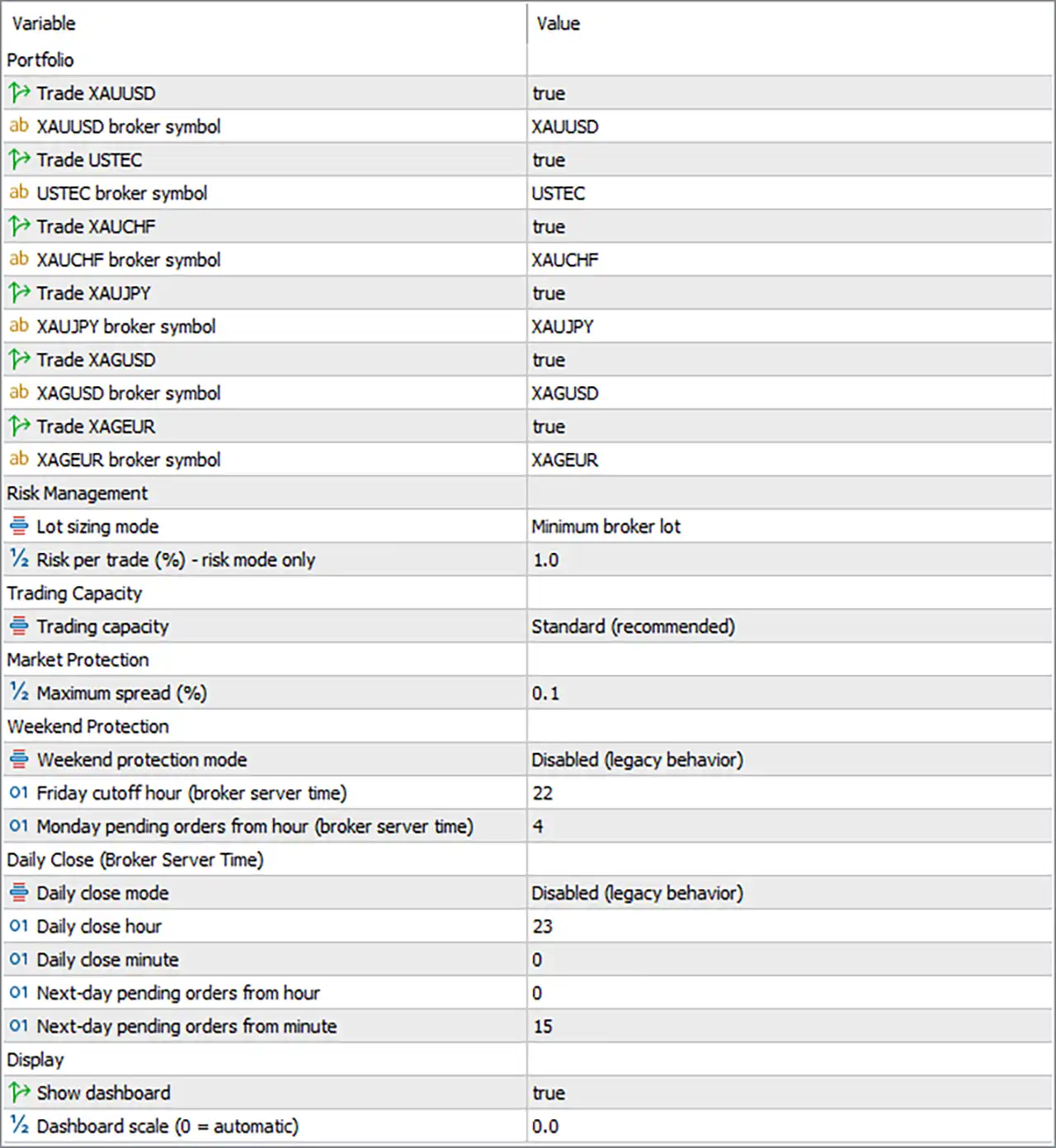
Breakouter X6 Portfolio EA MT5 Settings Panel
⚙️ Portfolio Settings
🔹 Trade XAUUSD = true — Enables trading on XAUUSD (Gold). When enabled, the EA can include Gold in its multi-market breakout portfolio, subject to broker availability and the EA’s trading conditions.
🔹 XAUUSD broker symbol = XAUUSD — Specifies XAUUSD as the broker’s symbol name for Gold. If the broker uses a suffix or prefix, such as XAUUSD.a or XAUUSDm, this value should be adjusted to match the exact symbol available in the trading terminal.
🔹 Trade USTEC = true — Enables trading on USTEC, commonly used as a symbol name for a US technology-stock index. The exact instrument and contract specifications depend on the broker.
🔹 USTEC broker symbol = USTEC — Maps the portfolio’s USTEC market to the broker symbol USTEC. If the broker uses another name, such as NAS100 or a broker-specific variation, the mapping should be updated accordingly.
🔹 Trade XAUCHF = true — Enables trading on XAUCHF, a Gold-denominated currency pair quoted against the Swiss franc where offered by the broker. This adds another market to the EA’s portfolio, subject to symbol availability and trading conditions.
🔹 XAUCHF broker symbol = XAUCHF — Specifies XAUCHF as the broker symbol for this portfolio market. The value should match the broker’s exact symbol name to ensure the EA can access the intended instrument.
🔹 Trade XAUJPY = true — Enables trading on XAUJPY, Gold priced against the Japanese yen where supported by the broker. The EA can consider this market as part of its multi-instrument breakout portfolio.
🔹 XAUJPY broker symbol = XAUJPY — Sets the broker symbol mapping for XAUJPY to XAUJPY. Adjust this value if the broker uses a different symbol name or adds a prefix or suffix.
🔹 Trade XAGUSD = true — Enables trading on XAGUSD (Silver against the US dollar). This allows the EA to include silver breakout opportunities alongside the other enabled portfolio markets.
🔹 XAGUSD broker symbol = XAGUSD — Maps the portfolio’s silver market to the broker symbol XAGUSD. The exact symbol name must be available in the broker’s Market Watch and trading environment.
🔹 Trade XAGEUR = true — Enables trading on XAGEUR (Silver against the euro) where offered by the broker. This market adds another precious-metal instrument to the enabled portfolio.
🔹 XAGEUR broker symbol = XAGEUR — Specifies XAGEUR as the broker symbol for the silver-euro market. If the broker uses another naming convention, this input should be changed to match the available instrument.
⚙️ Risk Management
🔹 Lot sizing mode = Minimum broker lot — Selects the minimum-lot position-sizing mode. The EA uses the smallest lot size permitted by the broker for each enabled market, which can simplify initial testing but does not create equal monetary risk across instruments because contract sizes, tick values, and minimum volumes may differ.
🔹 Risk per trade (%) – risk mode only = 1.0 — Sets the risk parameter to 1.0% for use when the risk-based sizing mode is selected. Because the current mode is Minimum broker lot, the 1.0 value is not the active position-sizing method in this configuration. In risk mode, actual exposure depends on the stop-loss distance and each instrument’s specifications.
⚙️ Trading Capacity
🔹 Trading capacity = Standard (recommended) — Selects Standard trading capacity, which applies additional internal safety limits to trading activity. These limits may restrict individual trades or pending orders based on available margin, account size, minimum lot requirements, or other safeguards. The developer describes Full capacity as an option for sufficiently funded accounts, but Standard is the currently selected setting. <Cite refs={[“turn309001search0”]}/>
⚙️ Market Protection
🔹 Maximum spread (%) = 0.1 — Sets the maximum spread parameter to 0.1%. The EA uses this input as a spread-related trading restriction according to its internal calculation. Since the setting is expressed as a percentage, it should not be interpreted as 0.1 points; the precise calculation and application should be verified against the EA’s implementation and the broker’s symbol specifications.
⚙️ Weekend Protection
🔹 Weekend protection mode = Disabled (legacy behavior) — Selects the disabled legacy weekend-protection mode. The newer weekend-protection behavior is therefore not selected through this setting, and the EA’s handling of Friday cutoffs and weekend positions should be verified before live use.
🔹 Friday cutoff hour (broker server time) = 22 — Sets the Friday cutoff hour to 22:00 according to broker server time. This value provides the configured Friday cutoff reference, although the selected Disabled (legacy behavior) mode may affect how the cutoff is applied.
🔹 Monday pending orders from hour (broker server time) = 4 — Sets the Monday pending-order start hour to 04:00 broker server time. This defines the configured hour from which pending orders may be allowed or resumed on Monday, subject to the selected weekend-protection mode and other EA rules.
⚙️ Daily Close Settings
🔹 Daily close mode = Disabled (legacy behavior) — Selects the disabled legacy daily-close mode. The EA is not configured to use the newer daily-close behavior through this setting, so traders should not assume positions will be automatically closed at the specified hour.
🔹 Daily close hour = 23 — Sets the daily-close hour to 23:00 broker server time. This is the configured hour for the daily-close feature if the applicable mode is enabled.
🔹 Daily close minute = 0 — Sets the daily-close minute to 0. Together with Daily close hour = 23, the configured daily-close time is 23:00 broker server time.
🔹 Next-day pending orders from hour = 0 — Sets the next-day pending-order start hour to 00:00 broker server time. This defines the hour component of the configured time from which pending orders may be permitted on the following day, subject to the EA’s daily-close and order-management logic.
🔹 Next-day pending orders from minute = 15 — Sets the next-day pending-order start minute to 15. Together with the hour value of 0, this configures the next-day pending-order time as 00:15 broker server time.
⚙️ Dashboard and Display
🔹 Show dashboard = true — Enables the EA’s on-chart dashboard. The dashboard provides a visual overview of portfolio and trading information supported by the EA, such as market status, positions, pending orders, or account information.
🔹 Dashboard scale (0 = automatic) = 0.0 — Sets the dashboard scale to 0.0, which selects automatic scaling. The EA can adjust the dashboard size according to its built-in scaling logic rather than using a manually specified scale.
🔢 Conclusion
The displayed Breakouter X6 Portfolio EA MT5 configuration enables all six markets: XAUUSD, USTEC, XAUCHF, XAUJPY, XAGUSD, and XAGEUR. Position sizing is set to Minimum broker lot, while the risk-based sizing parameter remains at 1.0% for use when that mode is selected. Trading capacity is set to Standard (recommended), and the maximum spread parameter is configured at 0.1%.
Both weekend protection and daily-close mode are set to Disabled (legacy behavior). The configured Friday cutoff is 22:00, Monday pending orders are set to begin from 04:00, and the daily-close time is 23:00. The next-day pending-order time is 00:15. The dashboard is enabled with automatic scaling.
Before live deployment, verify all six broker symbol mappings, the interpretation of the spread percentage, and the behavior of the legacy weekend and daily-close modes. Since several instruments can generate overlapping positions, available margin and combined portfolio exposure should be monitored carefully. Testing the complete configuration with the intended broker is essential; historical or demo results do not guarantee future performance.
User Reviews
Only logged in customers who have purchased this product may leave a review.
❓ What is Breakouter X6 Portfolio MT5?
A MetaTrader 5 Expert Advisor that coordinates swing based breakout trading across six gold, silver and index markets from one chart.
❓ Which markets does Breakouter X6 Portfolio MT5 support?
XAUUSD, USTEC, XAUCHF, XAUJPY, XAGUSD and XAGEUR, subject to broker availability and symbol mapping. Each can be enabled or disabled separately.
❓ Which timeframe suits Breakouter X6 Portfolio MT5?
The product recommends starting from an XAUUSD M5 chart, while the EA coordinates the enabled markets internally.
❓ Does Breakouter X6 Portfolio MT5 work on a netting account?
No. An MT5 hedging account is required, and netting accounts are not supported.
❓ How does Breakouter X6 Portfolio MT5 enter trades?
It identifies swing highs and lows and prepares pending orders around them, to take part when price breaks the structure.
❓ What sizing options does Breakouter X6 Portfolio MT5 provide?
Minimum broker lot or percentage risk per trade. The percentage applies to each order and not to total portfolio risk.
❓ How does Breakouter X6 Portfolio MT5 exit trades?
Through Stop Loss, Take Profit, breakeven and trailing functions that manage each position after its order activates.
❓ What drawdown appeared in Breakouter X6 Portfolio MT5 tests?
The minimum lot test reported 19.17% maximum relative equity drawdown, and the 1% risk variant reported 26.62%. These are simulations and not forecasts.
❓ Does Breakouter X6 Portfolio MT5 have a news filter?
No. It does not use an external economic calendar or a fixed news filter, so scheduled releases may affect execution.
❓ How much capital does Breakouter X6 Portfolio MT5 need?
The reference test used $4,000 at 1:500 leverage. That is not a universal minimum, and lower leverage may require more capital or fewer enabled markets.
❓ Are Breakouter X6 Portfolio MT5 results guaranteed?
No. Results can differ with symbol availability, costs, leverage, execution and enabled markets, and historical simulations do not predict future results.
-
 Original price was: $8,000.00.$249.00Current price is: $249.00.
-
 Original price was: $7,000.00.$249.00Current price is: $249.00.
-
 Original price was: $8,000.00.$249.00Current price is: $249.00.
-
 Original price was: $25,000.00.$249.00Current price is: $249.00.
-
 4Original price was: $499.00.$249.00Current price is: $249.00.
-
 0Original price was: $430.00.$249.00Current price is: $249.00.
-
 27Original price was: $60,000.00.$239.00Current price is: $239.00.
-
 1Original price was: $1,000.00.$599.00Current price is: $599.00.
There are no reviews yet.