


🔢 Gold Storm PRO EA MT5 – Complete Settings & Parameters Guide
Gold Storm PRO EA is a structured automated trading Expert Advisor configuration focused on systematic trade execution, percentage-based money management, predefined trading hours, trailing-stop management, impulse-based closing and end-of-week protection.
The supplied settings show a configuration using 5.0% balance-based lot calculation, M5 order periods, a 1.0% percentage Stop Loss, a 500-point fixed Take Profit, active trailing protection, and dedicated Friday deletion/closing controls. The EA also allows individual weekday trading permissions and uses Magic Number 888 with the trade comment “Gold Storm PRO.”
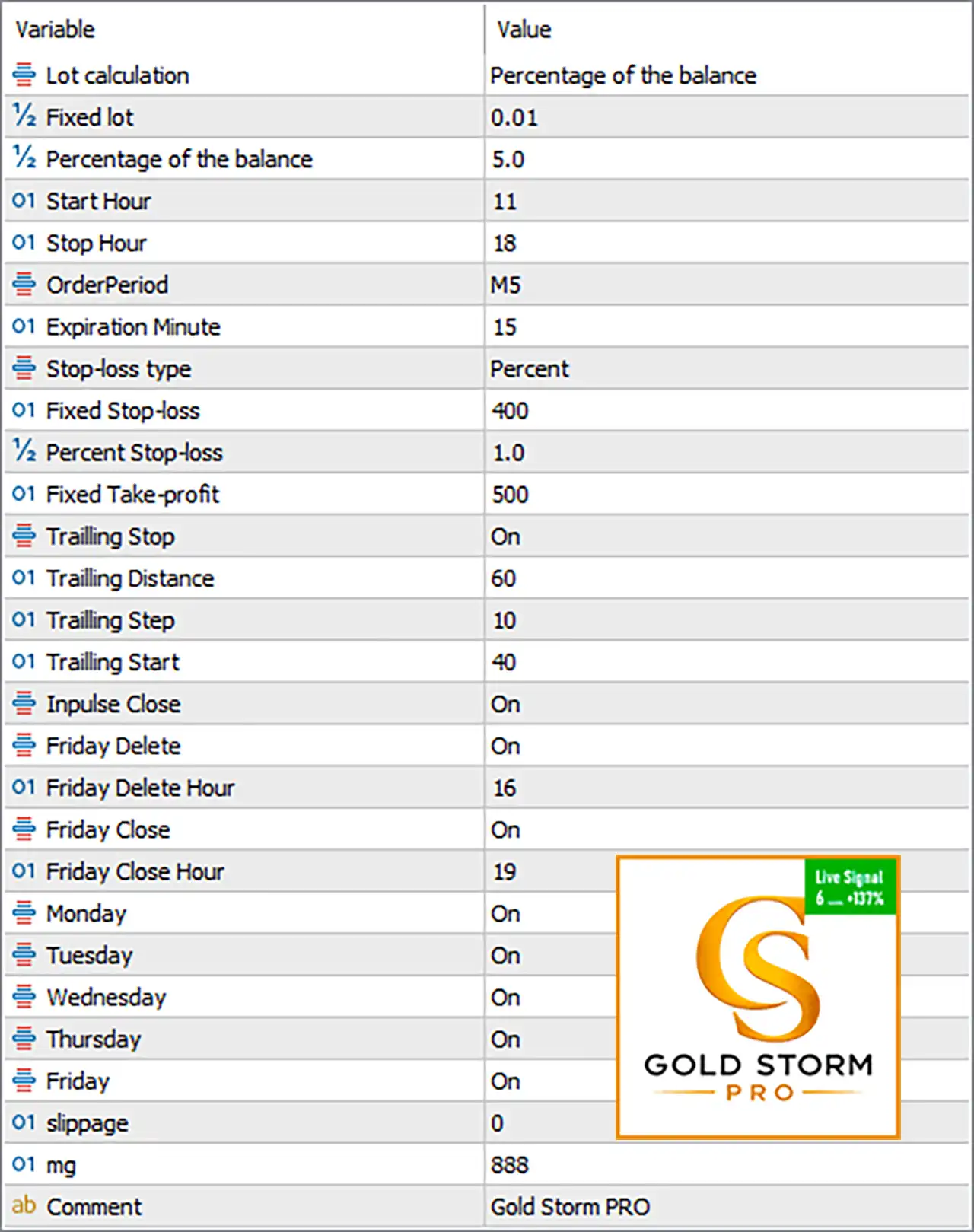
🔄 Money Management Settings
🔹 Lot calculation = Percentage of the balance — Selects percentage-of-balance money management rather than using the fixed-lot value as the primary sizing method.
🔹 Fixed lot = 0.01 — Defines a fixed position size of 0.01 lot when fixed-lot sizing is applicable.
🔹 Percentage of the balance = 5.0 — Sets the balance-based position-sizing parameter to 5.0%.
🔄 Trading Time Settings
🔹 Start Hour = 11 — Sets the configured trading start hour to 11:00.
🔹 Stop Hour = 18 — Sets the configured trading stop hour to 18:00.
🔹 OrderPeriod = M5 — Uses the M5 (5-minute) period for order/trading logic.
🔹 Expiration Minute = 15 — Sets pending/order expiration timing to 15 minutes, according to the EA's expiration parameter.
🔄 Stop-Loss & Take-Profit Settings
🔹 Stop-loss type = Percent — Selects percentage-based Stop Loss as the active Stop Loss calculation mode.
🔹 Fixed Stop-loss = 400 — Defines a fixed Stop Loss distance of 400 points when the fixed Stop Loss mode is used.
🔹 Percent Stop-loss = 1.0 — Sets the percentage Stop Loss parameter to 1.0%.
🔹 Fixed Take-profit = 500 — Defines a fixed Take Profit distance of 500 points when the fixed Take Profit value is used.
🔄 Trailing Stop Settings
🔹 Trailing Stop = On — Enables the trailing-stop mechanism.
🔹 Trailing Distance = 60 — Sets the trailing distance to 60 points.
🔹 Trailing Step = 10 — Sets the trailing adjustment step to 10 points.
🔹 Trailing Start = 40 — Activates trailing management after the trade reaches 40 points of profit.
🔄 Trade Management & Weekly Protection
🔹 Impulse Close = On — Enables the EA's impulse-close functionality, allowing trades to be closed according to its programmed impulse-management logic.
🔹 Friday Delete = On — Enables deletion of relevant pending orders on Friday.
🔹 Friday Delete Hour = 16 — Sets the Friday pending-order deletion time to 16:00.
🔹 Friday Close = On — Enables Friday position-closing protection.
🔹 Friday Close Hour = 19 — Sets the Friday position-closing time to 19:00.
🔄 Trading Days
🔹 Monday = On — Trading is enabled on Monday.
🔹 Tuesday = On — Trading is enabled on Tuesday.
🔹 Wednesday = On — Trading is enabled on Wednesday.
🔹 Thursday = On — Trading is enabled on Thursday.
🔹 Friday = On — Trading is enabled on Friday, subject to the configured Friday Delete and Friday Close rules.
🔄 Execution & Identification
🔹 Slippage = 0 — Sets the permitted/configured slippage value to 0 points.
🔹 mg = 888 — Uses 888 as the EA's Magic Number for identifying its trades.
🔹 Comment = Gold Storm PRO — Assigns Gold Storm PRO as the trade comment for identifying EA-generated orders/positions.
🔢 How the Current Configuration Works
🔹 Money management is percentage-based: The active Lot calculation = Percentage of the balance, with the parameter set to 5.0.
🔹 The EA operates on M5: The configured OrderPeriod = M5 indicates a 5-minute trading/order period.
🔹 Trading hours are restricted: The configured operating window is 11:00–18:00.
🔹 Stop Loss uses percentage mode: The active Stop-loss type = Percent, with Percent Stop-loss = 1.0, while Fixed Stop-loss = 400 remains configured as the alternative fixed-mode value.
🔹 Take Profit is configured at 500 points: The Fixed Take-profit = 500 provides the fixed TP distance used when the corresponding fixed TP logic is applicable.
🔹 Trailing protection starts early: With Trailing Start = 40, trailing management is configured to begin after 40 points, maintaining a 60-point trailing distance and moving in 10-point steps.
🔹 Friday protection is active: Pending orders are scheduled for deletion at 16:00, while Friday closing is scheduled for 19:00.
🔹 All five weekdays are enabled: Monday through Friday are all set to On.
🔢 Important Configuration Notes
🔹 The 5.0% setting deserves careful attention: Because the selected lot calculation mode is Percentage of the balance, the configured 5.0 should be reviewed carefully against the EA's actual position-sizing algorithm and account size before live trading.
🔹 Fixed lot 0.01 is not necessarily the active sizing method: The EA is currently set to Percentage of the balance, while Fixed lot = 0.01 is retained as the fixed-lot parameter.
🔹 The active Stop Loss mode is Percent: Stop-loss type = Percent, so the 1.0 percentage setting is the relevant configured mode rather than the alternative 400-point fixed Stop Loss.
🔹 Trailing values are points: 60, 10, and 40 should be interpreted according to the broker/symbol's point specification rather than automatically assuming they represent pips.
🔹 Friday Delete and Friday Close are separate functions: The EA can delete relevant pending orders at 16:00 and close positions at 19:00 under the current configuration.
🔹 Slippage is set to 0: The configured Slippage = 0 provides a strict execution setting, although actual execution conditions can still depend on the broker and market environment.
🔢 Conclusion
Gold Storm PRO EA MT5 is configured as a time-controlled automated trading system with percentage-based balance management, M5 order processing, percentage Stop Loss, Take Profit parameters, trailing-stop protection, impulse closing, and dedicated Friday risk controls.
The current setup uses 5.0% balance-based sizing, a 1.0% percentage Stop Loss, 500 fixed TP points, and an active trailing mechanism beginning at 40 points, with a 60-point distance and 10-point step.
Trading is enabled from Monday through Friday, with the primary trading window set to 11:00–18:00. Friday-specific protection is also active, with pending-order deletion at 16:00 and Friday closing at 19:00.
Before using these settings on a live account, traders should verify how the EA converts the 5.0% balance parameter into actual lot size, confirm the broker's point specification for XAUUSD, and perform comprehensive backtesting and forward testing. Automated trading involves substantial risk, and past performance does not guarantee future results.
🔢 FAQs
❓ What is the main lot calculation method in Gold Storm PRO EA MT5?
The configured Lot calculation mode is Percentage of the balance, with the percentage parameter set to 5.0.
❓ What timeframe does Gold Storm PRO EA MT5 use?
The configured OrderPeriod is M5, meaning the EA's order period is 5 minutes.
❓ What is the current Stop Loss setting?
The active Stop-loss type is Percent, with Percent Stop-loss = 1.0. The alternative Fixed Stop-loss = 400 points is also configured.
❓ When does the trailing stop start?
The trailing stop is On and starts at 40 points, using a 60-point trailing distance and 10-point trailing step.
❓ Does Gold Storm PRO EA MT5 close trades before the weekend?
Yes. Friday Close = On with Friday Close Hour = 19, while Friday Delete = On deletes relevant pending orders at 16.


