


🔢 Osloma FlipPro MT5 Settings & Parameters Guide
Osloma FlipPro MT5 is a multi-strategy Expert Advisor designed primarily for XAUUSD / GOLD, combining Star, Prime, and Gold signals with basket-based risk management, grid controls, session filters, overnight protection, and a high-impact news filter.
The configuration shown is Version 1.23, last updated 30/08/2026, with all three trading strategies enabled. The EA is configured with a 0.01 fixed lot, basket maximum loss of 500.0, up to 12 grid levels per strategy, and several market-session and news-protection mechanisms.
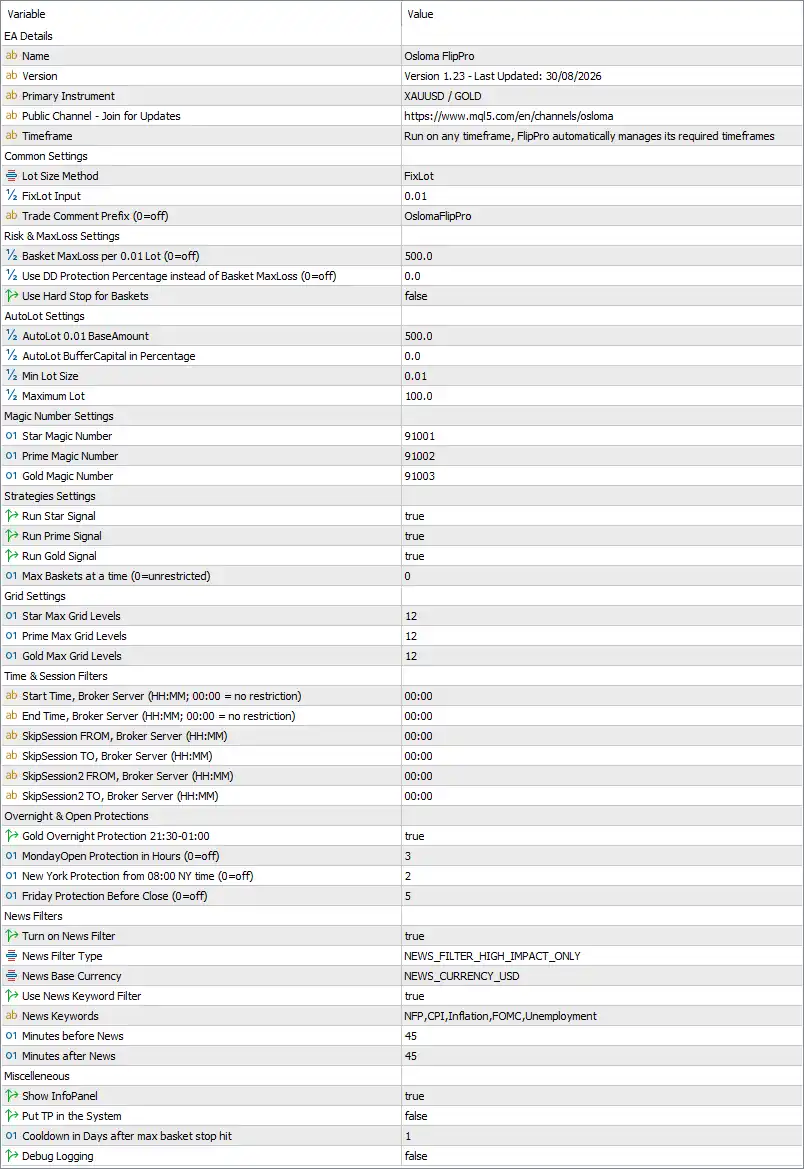
Note: The explanations below describe what each parameter appears to control based on its name and the supplied configuration panel. They do not guarantee trading performance or imply that any setting is universally optimal.
🔄 EA Details
🔹 Name = Osloma FlipPro — Defines the EA name as Osloma FlipPro.
🔹 Version = Version 1.23 - Last Updated: 30/08/2026 — Identifies the installed version as 1.23, with the displayed update date of 30/08/2026.
🔹 Primary Instrument = XAUUSD / GOLD — Indicates that the EA is primarily designed/configured for XAUUSD / GOLD.
🔹 Public Channel - Join for Updates = MQL5 channel link provided in the settings — Provides the developer's public MQL5 channel for receiving updates; the displayed address is https://www.mql5.com/en/channels/osloma. Osloma MQL5 Channel
🔹 Timeframe = Run on any timeframe, FlipPro automatically manages its required timeframes — Allows the EA to be attached to different chart timeframes while internally managing the timeframes required by its strategy.
🔄 Common Settings
🔹 Lot Size Method = FixLot — Selects fixed-lot position sizing.
🔹 FixLot Input = 0.01 — Sets the fixed trading volume to 0.01 lot.
🔹 Trade Comment Prefix (0=off) = OslomaFlipPro — Adds OslomaFlipPro as the trade-comment prefix for identifying EA orders.
🔄 Risk & MaxLoss Settings
🔹 Basket MaxLoss per 0.01 Lot (0=off) = 500.0 — Sets the maximum basket loss parameter to 500.0 for each 0.01 lot reference size; 0 would disable this feature.
🔹 Use DD Protection Percentage instead of Basket MaxLoss (0=off) = 0.0 — Sets percentage-based drawdown protection to 0.0, meaning this alternative protection is currently disabled.
🔹 Use Hard Stop for Baskets = false — Disables the hard-stop mechanism for baskets.
🔄 AutoLot Settings
🔹 AutoLot 0.01 BaseAmount = 500.0 — Defines 500.0 as the account amount associated with the AutoLot 0.01 base unit.
🔹 AutoLot BufferCapital in Percentage = 0.0 — Sets the additional AutoLot buffer capital requirement to 0.0%.
🔹 Min Lot Size = 0.01 — Sets the minimum permitted trading volume to 0.01 lot.
🔹 Maximum Lot = 100.0 — Sets the maximum permitted trading volume to 100.0 lots.
🔄 Magic Number Settings
🔹 Star Magic Number = 91001 — Unique Magic Number 91001 for identifying Star strategy orders.
🔹 Prime Magic Number = 91002 — Unique Magic Number 91002 for identifying Prime strategy orders.
🔹 Gold Magic Number = 91003 — Unique Magic Number 91003 for identifying Gold strategy orders.
🔄 Strategies Settings
🔹 Run Star Signal = true — Enables the Star trading signal.
🔹 Run Prime Signal = true — Enables the Prime trading signal.
🔹 Run Gold Signal = true — Enables the Gold trading signal.
🔹 Max Baskets at a time (0=unrestricted) = 0 — Sets the maximum simultaneous basket count to 0, which according to the parameter description means unrestricted.
🔄 Grid Settings
🔹 Star Max Grid Levels = 12 — Allows up to 12 grid levels for the Star strategy.
🔹 Prime Max Grid Levels = 12 — Allows up to 12 grid levels for the Prime strategy.
🔹 Gold Max Grid Levels = 12 — Allows up to 12 grid levels for the Gold strategy.
🔄 Time & Session Filters
🔹 Start Time, Broker Server (HH:MM; 00:00 = no restriction) = 00:00 — Sets the trading start time to 00:00 broker-server time; the parameter notes that 00:00 means no restriction.
🔹 End Time, Broker Server (HH:MM; 00:00 = no restriction) = 00:00 — Sets the end-time restriction to 00:00, which the parameter defines as no restriction.
🔹 SkipSession FROM, Broker Server (HH:MM) = 00:00 — Sets the first skipped-session starting time to 00:00.
🔹 SkipSession TO, Broker Server (HH:MM) = 00:00 — Sets the first skipped-session ending time to 00:00.
🔹 SkipSession2 FROM, Broker Server (HH:MM) = 00:00 — Sets the second skipped-session starting time to 00:00.
🔹 SkipSession2 TO, Broker Server (HH:MM) = 00:00 — Sets the second skipped-session ending time to 00:00.
🔄 Overnight & Open Protections
🔹 Gold Overnight Protection 21:30-01:00 = true — Enables the Gold overnight protection window covering 21:30–01:00.
🔹 MondayProtection in Hours (0=off) = 3 — Applies Monday protection for 3 hours; 0 would disable this protection.
🔹 New York Protection from 08:00 NY time (0=off) = 2 — Configures 2 hours of New York session protection beginning from 08:00 NY time; 0 would disable it.
🔹 Friday Protection Before Close (0=off) = 5 — Enables a 5-hour protection period before the relevant Friday market close; 0 would disable it.
🔄 News Filters
🔹 Turn on News Filter = true — Enables the EA's economic-news filtering system.
🔹 News Filter Type = NEWS_FILTER_HIGH_IMPACT_ONLY — Configures the filter to focus exclusively on high-impact news events.
🔹 News Base Currency = NEWS_CURRENCY_USD — Sets USD as the base currency for news filtering.
🔹 Use News Keyword Filter = true — Enables keyword-based filtering of economic news.
🔹 News Keywords = NFP,CPI,Inflation,FOMC,Unemployment — Filters for the specified keywords: NFP, CPI, Inflation, FOMC, and Unemployment.
🔹 Minutes before News = 45 — Blocks or restricts relevant trading 45 minutes before a filtered news event.
🔹 Minutes after News = 45 — Maintains the news protection period for 45 minutes after a filtered event.
🔄 Miscellaneous
🔹 Show InfoPanel = true — Displays the EA's information panel on the chart.
🔹 Put TP in the System = false — Disables the setting that would place the Take Profit directly into the trading system/order structure.
🔹 Cooldown in Days after max basket stop hit = 1 — Applies a 1-day cooldown after a maximum basket-stop event is triggered.
🔹 Debug Logging = false — Disables detailed debug logging.
🔢 Important Configuration Notes
🔹 Fixed lot mode is active: The current Lot Size Method = FixLot, with FixLot Input = 0.01, so the fixed-lot configuration is the primary sizing setting shown.
🔹 All three strategies are enabled: Star, Prime, and Gold are all set to true, with separate Magic Numbers 91001, 91002, and 91003.
🔹 Grid capacity is significant: Each strategy can use up to 12 grid levels, which can increase aggregate exposure as additional positions are opened.
🔹 Maximum basket count is unrestricted: Max Baskets at a time = 0, and the parameter explicitly defines 0 = unrestricted.
🔹 Basket MaxLoss is 500.0: The EA has a configured basket-loss threshold of 500.0 per 0.01 lot, while the percentage DD alternative is set to 0.0.
🔹 Hard basket stop is disabled: Use Hard Stop for Baskets = false.
🔹 News protection is active: The EA uses high-impact USD news filtering, including NFP, CPI, Inflation, FOMC, and Unemployment, with 45 minutes before and 45 minutes after protection.
🔹 Session restrictions are effectively inactive: The primary Start/End times and both SkipSession ranges are all 00:00, with the main parameter description explicitly stating 00:00 = no restriction.
🔹 Overnight protection is active: Gold Overnight Protection is enabled for 21:30–01:00.
🔢 Conclusion
Osloma FlipPro MT5 is configured as a multi-strategy XAUUSD/GOLD Expert Advisor with Star, Prime, and Gold signals all enabled. The current setup uses FixLot = 0.01, separate Magic Numbers 91001–91003, and up to 12 grid levels for each strategy.
Its risk architecture includes a 500.0 basket MaxLoss per 0.01 lot, a 100.0 maximum lot, and a 1-day cooldown after a maximum basket stop. The EA also incorporates several layers of market protection, including 21:30–01:00 Gold overnight protection, 3-hour Monday protection, 2-hour New York protection from 08:00 NY time, and 5-hour Friday pre-close protection.
The news system is particularly explicit: it is set to high-impact USD events only, with keyword filtering for NFP, CPI, Inflation, FOMC, and Unemployment, plus 45-minute protection before and after news.
Because the configuration allows 12 grid levels per strategy and an unrestricted number of baskets, users should carefully evaluate aggregate exposure, margin requirements, and worst-case basket behavior before considering live deployment. Always backtest and forward-test with broker-specific conditions before using an EA on a live account. Past results do not guarantee future performance.
🔢 FAQs
❓ What market is Osloma FlipPro MT5 primarily designed for?
The settings identify XAUUSD / GOLD as the Primary Instrument.
❓ What is the current fixed lot size?
The EA uses FixLot mode with a FixLot Input of 0.01.
❓ Which trading strategies are enabled?
All three strategies are enabled: Star Signal = true, Prime Signal = true, and Gold Signal = true.
❓ How many grid levels can each strategy use?
Each strategy has a maximum of 12 grid levels: Star 12, Prime 12, and Gold 12.
❓ Does Osloma FlipPro MT5 have news protection?
Yes. Turn on News Filter = true, using NEWS_FILTER_HIGH_IMPACT_ONLY and NEWS_CURRENCY_USD, with 45 minutes before and 45 minutes after protection and keywords NFP,CPI,Inflation,FOMC,Unemployment.


