


🔢 HighFrequencyEA MT5 Settings: Complete Inputs Guide
HighFrequencyEA MT5 is an automated trading Expert Advisor with configurable entry filters, position management, profit protection, structural trailing stops, and basket-level risk controls. Its input parameters cover VWAP and EMA confirmation, position sizing, trade limits, spread and session filters, and daily drawdown protection. Understanding these settings helps traders evaluate how the EA manages entries, open positions, and account-level risk.
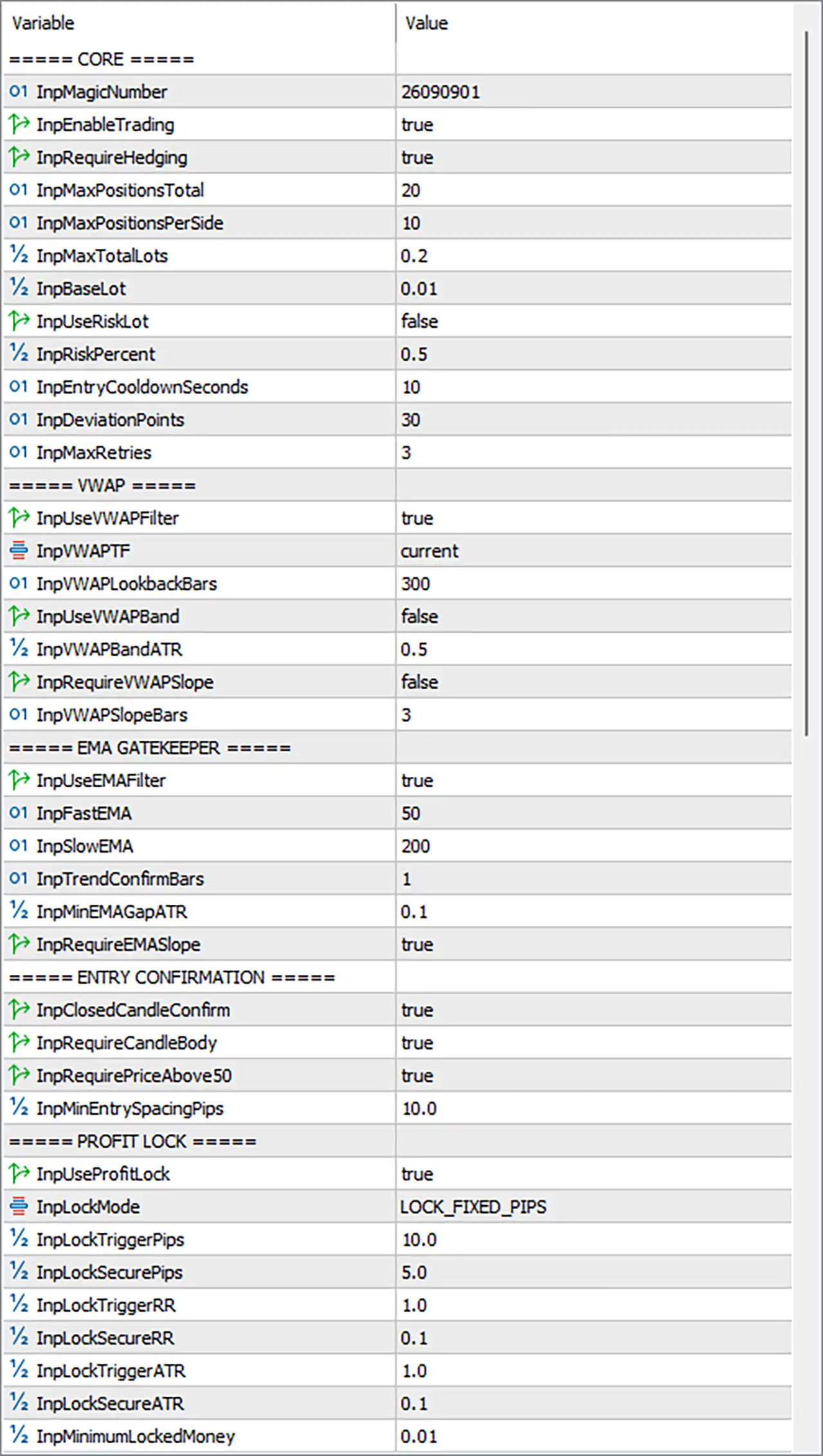
⚙️ Core Settings
🔹 InpMagicNumber = 26090901: Sets the EA's Magic Number to 26090901, helping identify and manage its trades separately from positions opened by other Expert Advisors.
🔹 InpEnableTrading = true: Enables the EA's trading functionality, allowing it to process signals and submit orders when the other entry and risk conditions are satisfied.
🔹 InpRequireHedging = true: Enables the requirement for a hedging-capable account. Confirm that the broker's account type supports simultaneous opposing positions before running the EA.
🔹 InpMaxPositionsTotal = 20: Sets the maximum total number of positions managed by the EA to 20, subject to its internal position-counting rules.
🔹 InpMaxPositionsPerSide = 10: Limits the number of positions on each trading side to 10, helping restrict the number of simultaneous Buy or Sell positions.
🔹 InpMaxTotalLots = 0.2: Sets the maximum combined trading volume to 0.2 lots for the positions covered by the EA's total-lot control.
🔹 InpBaseLot = 0.01: Sets the base trading volume to 0.01 lots for the fixed or base-lot calculation method.
🔹 InpUseRiskLot = false: Disables risk-based lot sizing, so the EA uses its alternative base-lot sizing logic rather than enabling the percentage-risk calculation.
🔹 InpRiskPercent = 0.5: Sets the risk-sizing parameter to 0.5%; this value becomes relevant when the EA's risk-based lot-sizing mode is enabled.
🔹 InpEntryCooldownSeconds = 10: Sets a cooldown of 10 seconds between eligible entry attempts, helping limit overly frequent order submissions.
🔹 InpDeviationPoints = 30: Sets the permitted execution deviation to 30 points, defining the configured tolerance between requested and executed prices where supported by the order type and broker.
🔹 InpMaxRetries = 3: Allows up to 3 retries for applicable order operations that fail, according to the EA's execution-handling logic.
⚙️ VWAP Filter Settings
🔹 InpUseVWAPFilter = true: Enables the VWAP filter, allowing the EA to use the Volume Weighted Average Price as part of its entry-screening process.
🔹 InpVWAPTF = current: Sets the VWAP calculation timeframe to current, indicating that the EA uses its current chart or operating timeframe as defined by its implementation.
🔹 InpVWAPLookbackBars = 300: Sets the VWAP lookback to 300 bars, defining the historical bar window used by the filter.
🔹 InpUseVWAPBand = false: Disables the optional VWAP-band filter, so the configured band multiplier is not intended to act as an active entry restriction while this option remains off.
🔹 InpVWAPBandATR = 0.5: Sets the VWAP band parameter to 0.5 ATR, which becomes relevant if the VWAP-band filter is enabled.
🔹 InpRequireVWAPSlope = false: Disables the requirement for a directional VWAP slope when evaluating trade entries.
🔹 InpVWAPSlopeBars = 3: Sets the VWAP slope evaluation window to 3 bars, which is relevant when the slope requirement is enabled.
⚙️ EMA Gatekeeper Settings
🔹 InpUseEMAFilter = true: Enables the EMA filter, allowing the EA to use moving-average conditions to screen potential entries.
🔹 InpFastEMA = 50: Sets the fast Exponential Moving Average period to 50, defining the shorter of the two configured EMA periods.
🔹 InpSlowEMA = 200: Sets the slow Exponential Moving Average period to 200, providing the longer-term moving-average reference for trend filtering.
🔹 InpTrendConfirmBars = 1: Sets the trend-confirmation requirement to 1 bar, determining the configured number of bars used to validate the EMA trend condition.
🔹 InpMinEMAGapATR = 0.1: Sets the minimum EMA separation to 0.1 ATR, helping filter conditions where the fast and slow moving averages are too close together.
🔹 InpRequireEMASlope = true: Requires the EMA slope condition to be satisfied as part of the trend filter, helping screen entries based on moving-average direction.
⚙️ Entry Confirmation Settings
🔹 InpClosedCandleConfirm = true: Requires entry confirmation using a closed candle rather than relying solely on a candle that is still forming.
🔹 InpRequireCandleBody = true: Requires the candle-body condition to be satisfied before an entry is accepted, according to the EA's candle-confirmation logic.
🔹 InpRequirePriceAbove50 = true: Enables a price-position filter relative to the level 50; the exact reference, such as an indicator or price threshold, should be confirmed from the EA's implementation.
🔹 InpMinEntrySpacingPips = 10.0: Sets the minimum spacing between eligible entries to 10.0 pips, helping prevent entries that are too close together under the EA's spacing rules.
⚙️ Profit Lock Settings
🔹 InpUseProfitLock = true: Enables profit-lock management, allowing the EA to secure a portion of unrealized gains according to the selected lock mode and trigger conditions.
🔹 InpLockMode = LOCK_FIXED_PIPS: Selects LOCK_FIXED_PIPS as the profit-lock mode, using fixed pip-based thresholds rather than relying exclusively on RR- or ATR-based thresholds.
🔹 InpLockTriggerPips = 10.0: Sets the fixed-pip profit-lock trigger to 10.0 pips, defining the profit threshold at which the fixed-pip lock logic may activate.
🔹 InpLockSecurePips = 5.0: Sets the secured-profit distance to 5.0 pips in the fixed-pip lock mode, subject to the EA's actual stop adjustment rules.
🔹 InpLockTriggerRR = 1.0: Sets the alternative risk-to-reward profit-lock trigger to 1.0R, meaning one unit of initial risk as defined by the EA.
🔹 InpLockSecureRR = 0.1: Sets the alternative secured-profit level to 0.1R when the RR-based lock mode is used.
🔹 InpLockTriggerATR = 1.0: Sets the alternative ATR-based profit-lock trigger to 1.0 ATR.
🔹 InpLockSecureATR = 0.1: Sets the alternative ATR-based secured-profit level to 0.1 ATR.
🔹 InpMinimumLockedMoney = 0.01: Sets the minimum locked monetary amount to 0.01 in the account's deposit currency, where the EA's profit-lock logic uses this threshold.
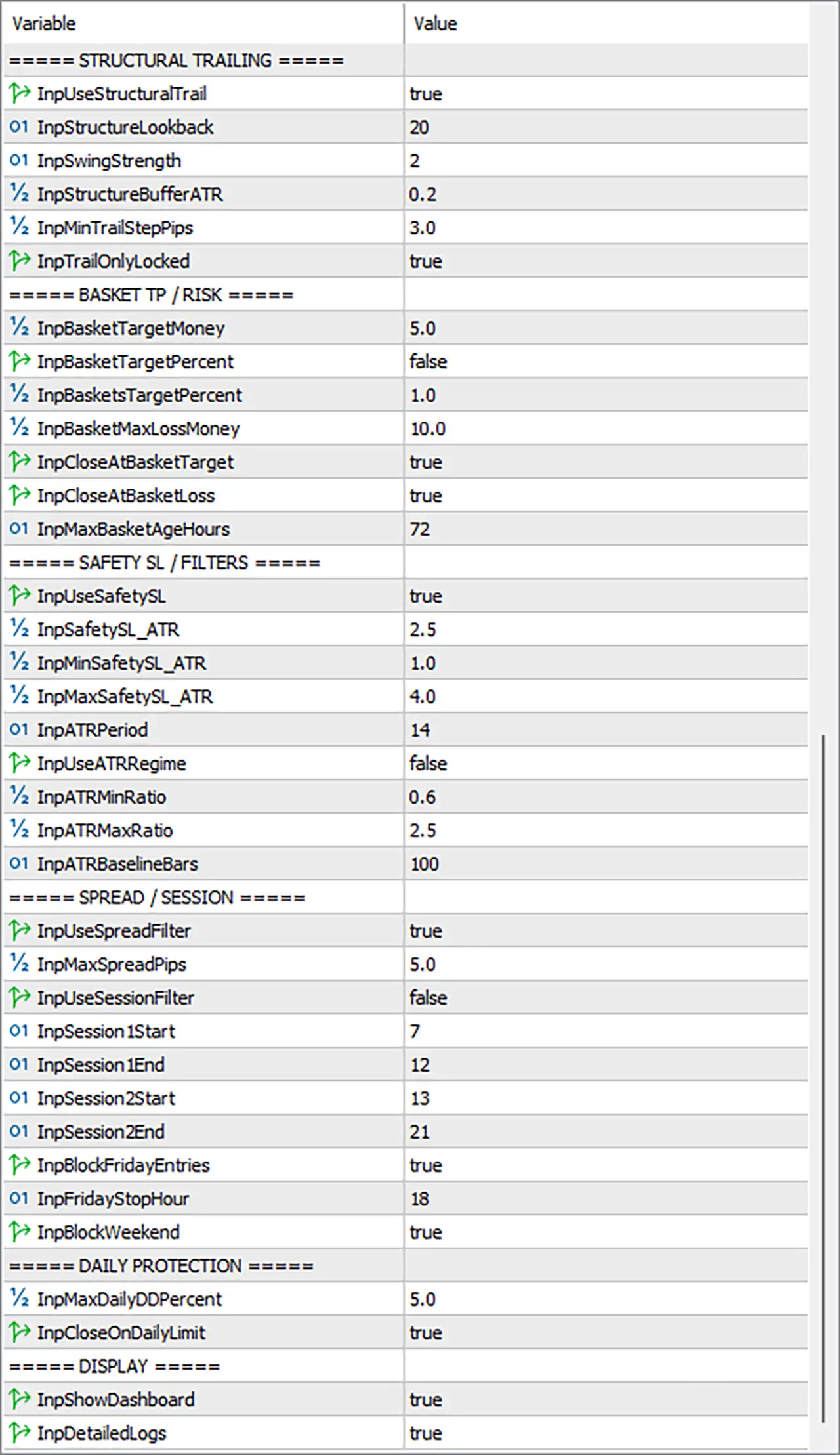
⚙️ Structural Trailing Settings
🔹 InpUseStructuralTrail = true: Enables structural trailing, allowing the EA to adjust stop-loss levels according to detected market swing structure.
🔹 InpStructureLookback = 20: Sets the structural analysis window to 20 bars, defining the historical range used to identify relevant price structure.
🔹 InpSwingStrength = 2: Sets swing strength to 2, controlling the number of bars used by the structural logic to validate swing points.
🔹 InpStructureBufferATR = 0.2: Sets the structural trailing buffer to 0.2 ATR, providing a volatility-scaled buffer around the relevant structure level.
🔹 InpMinTrailStepPips = 3.0: Sets the minimum trailing adjustment step to 3.0 pips, helping avoid excessive stop-loss updates for small price movements.
🔹 InpTrailOnlyLocked = true: Restricts structural trailing according to the EA's locked-profit condition, so trailing adjustments are intended to occur only after the required profit-lock state has been reached.
⚙️ Basket Take Profit and Risk Settings
🔹 InpBasketTargetMoney = 5.0: Sets the basket profit target to 5.0 units of the account's deposit currency for the money-based target mode.
🔹 InpBasketTargetPercent = false: Disables the percentage-based basket-target mode, making the monetary target the configured alternative when the EA uses this setting as intended.
🔹 InpBasketsTargetPercent = 1.0: Sets the percentage basket-target parameter to 1.0%, which is relevant if percentage-based basket targeting is enabled.
🔹 InpBasketMaxLossMoney = 10.0: Sets the basket maximum-loss threshold to 10.0 units of the account's deposit currency.
🔹 InpCloseAtBasketTarget = true: Enables closing the applicable basket when the configured basket profit target is reached, according to the EA's basket-management logic.
🔹 InpCloseAtBasketLoss = true: Enables closing the applicable basket when the configured basket loss threshold is reached, helping limit continued exposure at the basket level.
🔹 InpMaxBasketAgeHours = 72: Sets the maximum basket age to 72 hours, defining the configured time limit for basket management.
⚙️ Safety Stop Loss and ATR Filters
🔹 InpUseSafetySL = true: Enables the safety Stop Loss mechanism, adding a protective stop-loss calculation according to the EA's safety rules.
🔹 InpSafetySL_ATR = 2.5: Sets the main safety Stop Loss distance parameter to 2.5 ATR, allowing the stop distance to scale with market volatility.
🔹 InpMinSafetySL_ATR = 1.0: Sets the minimum safety Stop Loss distance to 1.0 ATR, establishing the lower bound for the ATR-based stop calculation.
🔹 InpMaxSafetySL_ATR = 4.0: Sets the maximum safety Stop Loss distance to 4.0 ATR, establishing the upper bound for the ATR-based stop calculation.
🔹 InpATRPeriod = 14: Sets the Average True Range indicator period to 14 bars for the volatility calculations that use this ATR setting.
🔹 InpUseATRRegime = false: Disables the ATR-regime filter, so the configured minimum and maximum ATR ratios are not used as active regime restrictions while this option is off.
🔹 InpATRMinRatio = 0.6: Sets the minimum ATR ratio to 0.6, defining the lower volatility-ratio threshold if the ATR-regime filter is enabled.
🔹 InpATRMaxRatio = 2.5: Sets the maximum ATR ratio to 2.5, defining the upper volatility-ratio threshold if the ATR-regime filter is enabled.
🔹 InpATRBaselineBars = 100: Sets the ATR baseline window to 100 bars, providing the historical reference for the ATR-regime calculation.
⚙️ Spread and Trading Session Settings
🔹 InpUseSpreadFilter = true: Enables the spread filter, allowing the EA to restrict new entries when the spread exceeds its configured limit.
🔹 InpMaxSpreadPips = 5.0: Sets the maximum permitted spread to 5.0 pips for the spread filter.
🔹 InpUseSessionFilter = false: Disables the trading-session filter, so the configured session hours do not restrict entries while this option remains off.
🔹 InpSession1Start = 7: Sets the start hour of trading session 1 to 07:00, using the EA's configured time reference.
🔹 InpSession1End = 12: Sets the end hour of trading session 1 to 12:00, using the EA's configured time reference.
🔹 InpSession2Start = 13: Sets the start hour of trading session 2 to 13:00, using the EA's configured time reference.
🔹 InpSession2End = 21: Sets the end hour of trading session 2 to 21:00, using the EA's configured time reference.
🔹 InpBlockFridayEntries = true: Enables the Friday entry restriction, preventing new entries according to the configured Friday cutoff logic.
🔹 InpFridayStopHour = 18: Sets the Friday entry-stop hour to 18:00, using the EA's configured time reference.
🔹 InpBlockWeekend = true: Enables the weekend trading restriction, preventing eligible weekend entries according to the EA's implementation.
⚙️ Daily Protection Settings
🔹 InpMaxDailyDDPercent = 5.0: Sets the maximum daily drawdown threshold to 5.0%, defining the configured daily loss limit for the EA's protection system.
🔹 InpCloseOnDailyLimit = true: Enables the option to close the applicable positions when the daily drawdown limit is reached, according to the EA's implementation.
⚙️ Display and Logging Settings
🔹 InpShowDashboard = true: Enables the on-chart dashboard, allowing supported trading, position, and risk information to be displayed while the EA runs.
🔹 InpDetailedLogs = true: Enables detailed logging, providing more information about the EA's decisions and operations for monitoring and troubleshooting.
🔢 Conclusion
HighFrequencyEA MT5 combines entry filters, position limits, profit locking, structural trailing, basket management, and daily drawdown protection. The displayed configuration uses a base lot of 0.01, allows up to 20 total positions and 10 positions per side, and caps the covered total volume at 0.2 lots. It also enables VWAP and EMA filtering, profit locking, structural trailing, basket target and loss controls, spread filtering, Friday restrictions, weekend restrictions, and daily drawdown protection.
Several optional features are currently disabled, including risk-based lot sizing, VWAP bands, VWAP slope confirmation, ATR-regime filtering, and the session filter. The daily drawdown limit is set to 5.0%, while the basket target and maximum basket loss are 5.0 and 10.0 deposit-currency units, respectively.
Before live deployment, verify the meaning of the price-above-50 condition, the EA's hedging-account requirement, the precise scope of its position and lot limits, and the time zone used for session controls. Backtesting and demo testing are recommended to assess order execution, maximum exposure, basket-loss behavior, and the interaction between profit locking and structural trailing.


