


🔢 Zone Striker GOLD EA Settings: Complete Inputs Guide
Zone Striker GOLD EA is an automated trading Expert Advisor for MetaTrader 5, designed specifically for Gold (XAUUSD). Its configurable inputs cover position sizing, dynamic recovery, basket-level profit and loss management, trailing stops, micro-scalping, trend reversal logic, and trading-session protection. The settings also include safeguards for equity drawdown, execution conditions, weekend exposure, and spread expansion around midnight rollover.
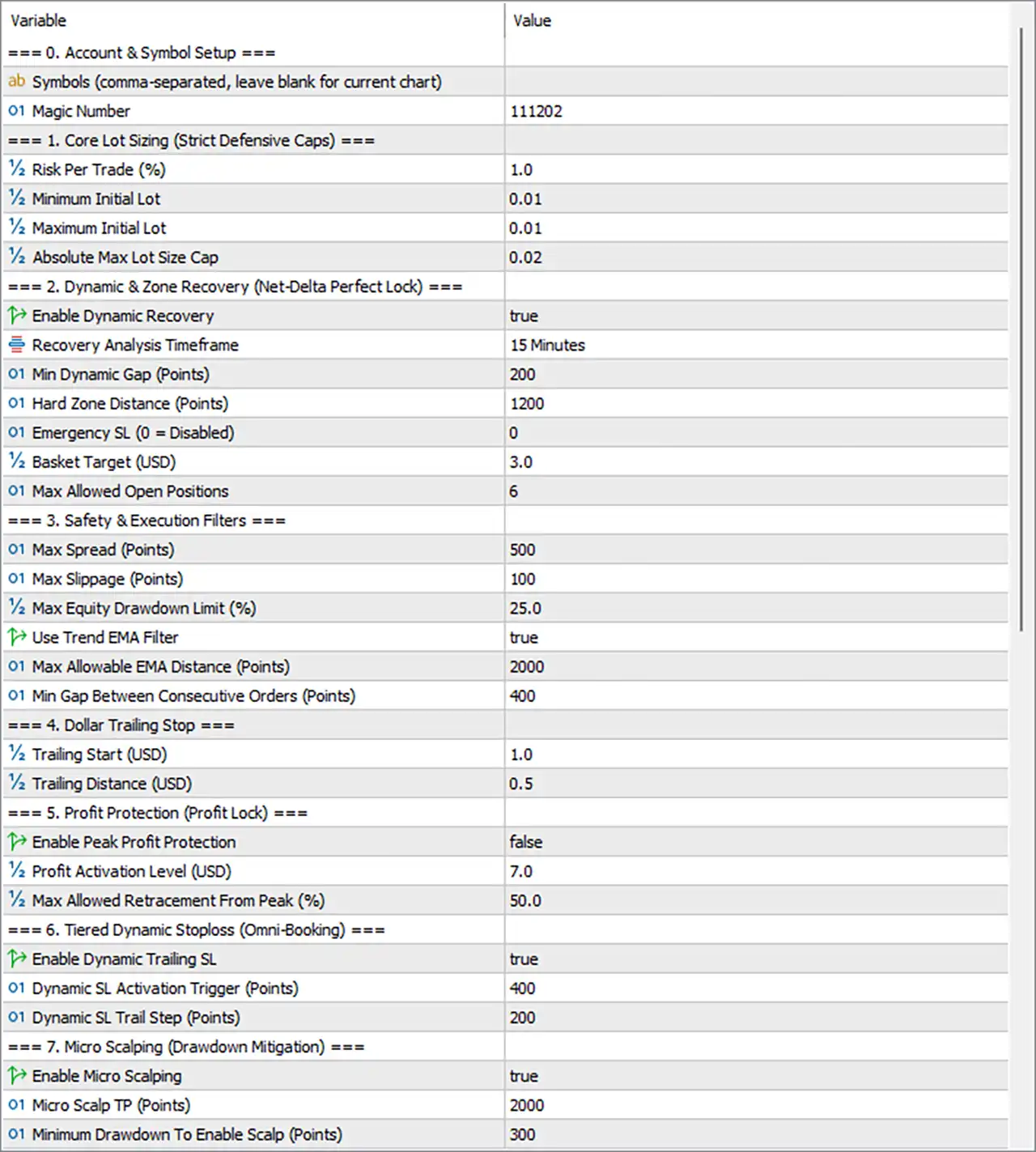
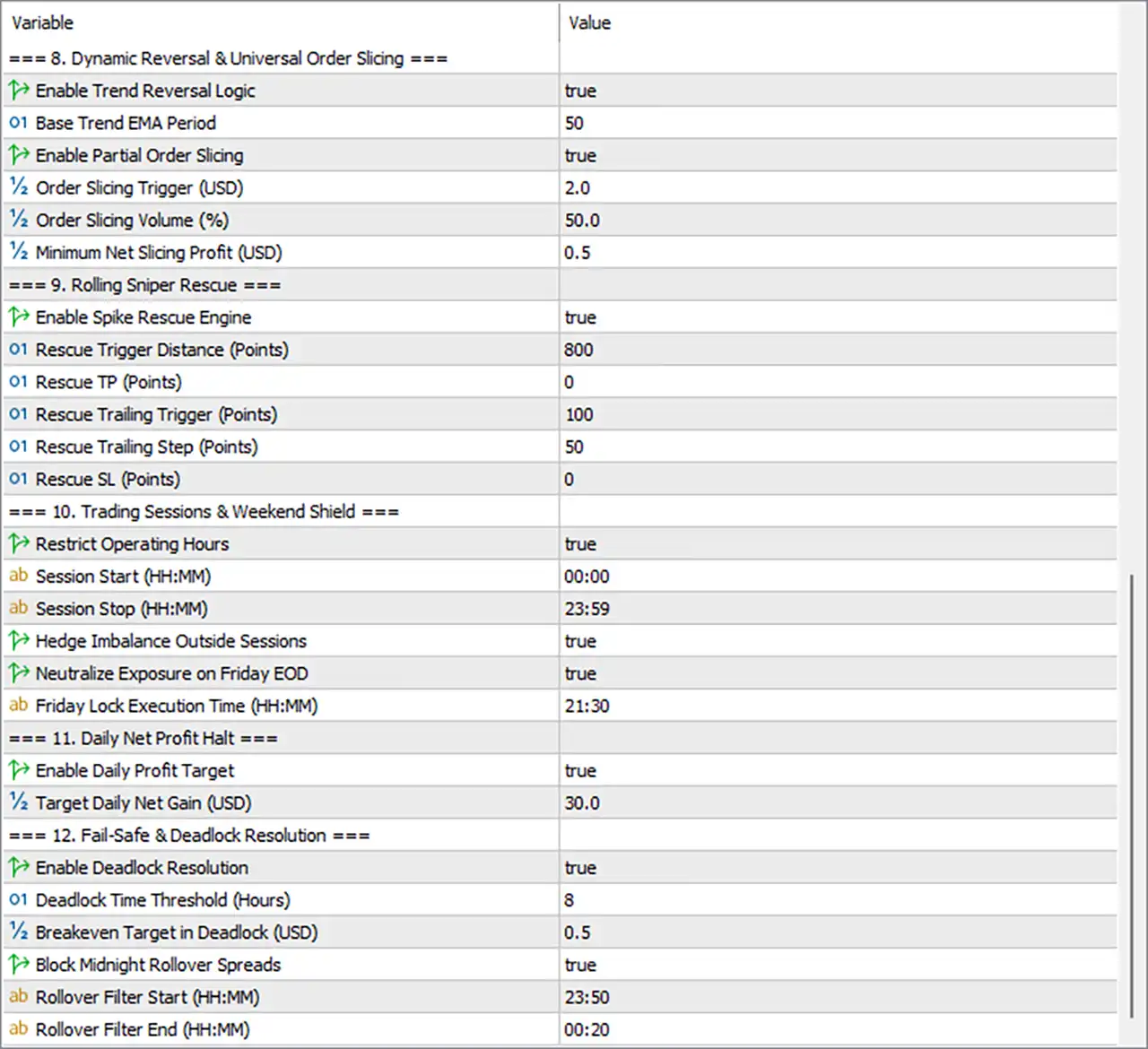
This guide explains the parameters visible in both supplied settings images, retaining the original names and numerical values.
⚙️ Account and Symbol Setup
🔹 Symbols (comma-separated, leave blank for current chart) = blank: Leaves the symbol list empty so the EA uses the symbol of the current chart, according to the parameter's description.
🔹 Magic Number = 111202: Assigns the identifier 111202 to the EA's trades, helping distinguish its positions from those managed by other Expert Advisors.
⚙️ Core Lot Sizing — Strict Defensive Caps
🔹 Risk Per Trade (%) = 1.0: Sets the risk-sizing parameter to 1.0% per trade when the EA's position-sizing logic uses this value.
🔹 Minimum Initial Lot = 0.01: Sets the minimum permitted initial order size to 0.01 lots.
🔹 Maximum Initial Lot = 0.01: Caps the initial order size at 0.01 lots, preventing the initial position from exceeding this configured limit.
🔹 Absolute Max Lot Size Cap = 0.02: Sets the absolute lot-size cap to 0.02 lots for the positions covered by this safety control.
⚙️ Dynamic and Zone Recovery — Net-Delta Perfect Lock
🔹 Enable Dynamic Recovery = true: Enables the EA's dynamic recovery functionality, which manages positions according to its recovery logic and zone-related conditions.
🔹 Recovery Analysis Timeframe = 15 Minutes: Sets the recovery analysis timeframe to 15 Minutes.
🔹 Min Dynamic Gap (Points) = 200: Sets the minimum dynamic gap between relevant recovery levels or orders to 200 points.
🔹 Hard Zone Distance (Points) = 1200: Sets the hard zone-distance parameter to 1200 points, defining the configured distance limit for the recovery zone logic.
🔹 Emergency SL (0 = Disabled) = 0: Sets the emergency Stop Loss to 0, which the parameter label explicitly identifies as disabled.
🔹 Basket Target (USD) = 3.0: Sets the basket profit target to $3.0, using the EA's basket-management calculation.
🔹 Max Allowed Open Positions = 6: Limits the number of open positions covered by this control to 6.
⚙️ Safety and Execution Filters
🔹 Max Spread (Points) = 500: Sets the maximum permitted spread to 500 points, allowing the EA to filter out entries when the spread exceeds the configured threshold.
🔹 Max Slippage (Points) = 100: Sets the maximum execution slippage parameter to 100 points for the EA's order-handling logic.
🔹 Max Equity Drawdown Limit (%) = 25.0: Sets the maximum equity drawdown threshold to 25.0%, defining the configured equity-risk limit.
🔹 Use Trend EMA Filter = true: Enables the trend EMA filter, allowing the EA to screen trading conditions using its trend-related moving-average logic.
🔹 Max Allowable EMA Distance (Points) = 2000: Sets the maximum allowable distance from the relevant EMA to 2000 points.
🔹 Min Gap Between Consecutive Orders (Points) = 400: Requires a minimum gap of 400 points between consecutive orders covered by this spacing control.
⚙️ Dollar Trailing Stop
🔹 Trailing Start (USD) = 1.0: Sets the trailing-stop activation threshold to $1.0 in profit.
🔹 Trailing Distance (USD) = 0.5: Sets the trailing distance to $0.5, defining how much profit the EA aims to retain as the trailing mechanism follows gains.
⚙️ Profit Protection — Profit Lock
🔹 Enable Peak Profit Protection = false: Disables the peak-profit protection feature, so the configured activation and retracement parameters are not active while this switch remains off.
🔹 Profit Activation Level (USD) = 7.0: Sets the profit activation threshold to $7.0, which becomes relevant when peak-profit protection is enabled.
🔹 Max Allowed Retracement From Peak (%) = 50.0: Sets the maximum permitted retracement from peak profit to 50.0%, defining the configured pullback threshold for the optional profit-protection feature.
⚙️ Tiered Dynamic Stop Loss — Omni-Booking
🔹 Enable Dynamic Trailing SL = true: Enables dynamic trailing Stop Loss management for positions covered by this feature.
🔹 Dynamic SL Activation Trigger (Points) = 400: Sets the activation threshold for dynamic Stop Loss adjustments to 400 points.
🔹 Dynamic SL Trail Step (Points) = 200: Sets the dynamic trailing adjustment step to 200 points.
⚙️ Micro Scalping — Drawdown Mitigation
🔹 Enable Micro Scalping = true: Enables the micro-scalping feature, which is described in the settings as a drawdown-mitigation mechanism.
🔹 Micro Scalp TP (Points) = 2000: Sets the Take Profit target for micro-scalping trades to 2000 points.
🔹 Minimum Drawdown To Enable Scalp (Points) = 300: Sets the minimum drawdown-related threshold to 300 points before the micro-scalping feature can activate.
⚙️ Dynamic Reversal and Universal Order Slicing
🔹 Enable Trend Reversal Logic = true: Enables the trend-reversal logic, allowing the EA to respond to qualifying changes in its trend conditions.
🔹 Base Trend EMA Period = 50: Sets the base trend EMA period to 50 bars for the trend-reversal logic.
🔹 Enable Partial Order Slicing = true: Enables partial order slicing, allowing the EA to reduce or divide an applicable position rather than necessarily handling the entire order at once.
🔹 Order Slicing Trigger (USD) = 2.0: Sets the order-slicing activation threshold to $2.0 according to the EA's slicing rules.
🔹 Order Slicing Volume (%) = 50.0: Sets the volume allocated to the partial-slicing operation to 50.0% of the applicable position volume.
🔹 Minimum Net Slicing Profit (USD) = 0.5: Requires a minimum net slicing profit of $0.5 for the relevant slicing operation, according to the EA's internal conditions.
⚙️ Rolling Sniper Rescue
🔹 Enable Spike Rescue Engine = true: Enables the spike-rescue engine, which is designed to manage qualifying adverse or rapid price movements under the EA's rescue logic.
🔹 Rescue Trigger Distance (Points) = 800: Sets the rescue activation distance to 800 points.
🔹 Rescue TP (Points) = 0: Sets the rescue Take Profit parameter to 0; the screenshot does not specify whether this means no fixed rescue TP or an alternative target calculation.
🔹 Rescue Trailing Trigger (Points) = 100: Sets the rescue trailing activation threshold to 100 points.
🔹 Rescue Trailing Step (Points) = 50: Sets the rescue trailing adjustment step to 50 points.
🔹 Rescue SL (Points) = 0: Sets the rescue Stop Loss parameter to 0; the precise behavior of this value should be verified in the EA's implementation.
⚙️ Trading Sessions and Weekend Shield
🔹 Restrict Operating Hours = true: Enables the operating-hours restriction, allowing the EA to apply the configured session start and stop times.
🔹 Session Start (HH) = 00:00: Sets the operating session's start time to 00:00 (midnight), using the EA's configured time reference.
🔹 Session Stop (HH) = 23:59: Sets the operating session's stop time to 23:59, allowing operation through nearly the entire day within the specified session.
🔹 Hedge Imbalance Outside Sessions = true: Enables the hedge-imbalance feature outside the configured trading session, according to the EA's exposure-management logic.
🔹 Neutralize Exposure on Friday EOD = true: Enables Friday end-of-day exposure neutralization, intended to reduce or offset remaining market exposure before the weekend.
🔹 Friday Lock Execution Time (HH) = 21:30: Sets the Friday lock execution time to 21:30, using the EA's configured time reference.
⚙️ Daily Net Profit Halt
🔹 Enable Daily Profit Target = true: Enables the daily net-profit target feature, allowing the EA to apply its configured daily profit limit.
🔹 Target Daily Net Gain (USD) = 30.0: Sets the daily net-profit target to $30.0. The EA's daily target logic determines how trading is halted or managed once this threshold is reached.
⚙️ Fail-Safe and Deadlock Resolution
🔹 Enable Deadlock Resolution = true: Enables the deadlock-resolution mechanism, which is intended to manage positions that remain unresolved for an extended period.
🔹 Deadlock Time Threshold (Hours) = 8: Sets the deadlock time threshold to 8 hours before the applicable resolution logic can activate.
🔹 Breakeven Target in Deadlock (USD) = 0.5: Sets the deadlock-resolution breakeven target to $0.5, defining the configured profit objective for the applicable resolution process.
🔹 Block Midnight Rollover Spreads = true: Enables the midnight rollover spread filter, intended to protect trading operations during periods when spreads may widen around the broker's daily rollover.
🔹 Rollover Filter Start (HH) = 23:50: Sets the start of the rollover filter window to 23:50.
🔹 Rollover Filter End (HH) = 00:20: Sets the end of the rollover filter window to 00:20, creating a protection window that crosses midnight.
🔢 Conclusion
Zone Striker GOLD EA combines dynamic recovery, strict lot-size limits, basket profit management, multiple trailing mechanisms, micro-scalping, order slicing, and session-based exposure controls. The displayed configuration uses a 0.01 initial lot, a 0.02 absolute lot cap, a maximum of 6 open positions, a $3.0 basket target, and a 25.0% maximum equity drawdown threshold.
Several protective features are enabled, including dynamic recovery, dynamic trailing Stop Loss, micro-scalping, trend-reversal logic, spike rescue, Friday exposure neutralization, a $30.0 daily profit target, and rollover spread protection. Peak-profit protection is disabled, and both emergency Stop Loss and rescue Stop Loss are set to 0, so their exact implications should be reviewed before live deployment.
The most important checks are the interaction between recovery and position limits, the behavior of zero-valued stop parameters, the broker's server time, and the actual effect of the equity drawdown limit. Backtesting and demo testing should be used to evaluate cumulative exposure, margin usage, basket closures, and behavior during high-volatility Gold sessions.



