




King of Gold Ucb Agent EA MT5 (Latest version) - Unlimited

Subscriptions for Special Plan
- 30 EA package is more economical!
- Special package with 99%
- Download 1 EA/Day

Subscriptions for Premium Membership
- Download Unlimited in 1 Year
- Get 100% Discount
- Get free access to all

Subscriptions for Gold Membership
- 1 Year Membership
- Get 100% Discount
- Access EA+Indicator+Course
Frequently bought together 🎁
Add these products to enhance your purchase



Quick Overview
King of Gold UCB Agent EA does not follow one fixed rule set. It is a self-learning Expert Advisor built for XAUUSD, and it treats every closed trade as a lesson.
Inside the EA, several contextual multi-armed bandits using the UCB method decide which entries, which position sizes and which execution style have worked best in each market context. As conditions change, those choices change with them.
The EA trades the symbol and timeframe of the chart it is attached to. XAUUSD is the main target, and crypto, index, stock or forex charts can also be used.
Best For:
✅ XAUUSD traders who want an EA that adapts instead of repeating one rule set.
✅ Traders interested in self-learning and adaptive automation.
✅ Users who want detailed risk controls, from daily limits to basket close.
✅ Patient users willing to let the EA build a learning history on demo first.
What is King of Gold UCB Agent EA?
King of Gold UCB Agent is a MetaTrader 5 Expert Advisor (EA) that learns while it trades. Where most robots apply the same logic through every market phase, this one keeps score of what works.
The learning method is the multi-armed bandit. The idea is simple. Each decision, such as how big a position should be, is treated as a choice between several options. After every trade, the result is recorded against the option that was chosen. UCB (Upper Confidence Bound) balances two goals: use the options that have paid off, and still test the ones with too little history to judge.
 Vendor Website: View here
Delivery time 24h-48h after payment.
Refund if not delivered.
You will receive the current version without any limitations (ID+Time).
King of Gold Ucb Agent EA MT5 Review
How Does King of Gold UCB Agent EA Work?
Setup Detection
The EA watches streaks of consecutive bullish and bearish bars. It learns by itself whether a streak tends to reverse or continue, and how long the streak has to be. This is learned separately for each trading session and market regime, so a streak in the London session can be treated differently from one in New York.
Decision Bandit (UCB)
For every signal, the decision bandit chooses SKIP, SMALL, NORMAL or STRONG position size. The choice depends on session, regime, signal score and liquidity zone. SKIP means the EA learned that a given context is not worth trading.
Execution Bandit
This bandit chooses between a market order and a limit order placed at a volume-profile liquidity zone. Entering at once and waiting for a better price both have a cost, and the EA learns which one suits each context.
Profile Bandit
It chooses a short-term, normal or long-term TP/SL profile, so the exit style adapts as well as the entry.
Additional Bandits
More bandits cover timeframe alignment (M1 to H4), candle patterns and multi-timeframe confluence.
Consistent Reward Scale
Every outcome is measured in R, where 1R is the risk of one base-sized trade. The learning therefore sees both the win rate and the size of each win or loss, and not just whether a trade closed green.
Persistent Memory
Everything learned is saved to a file and restored after a restart. A platform restart or VPS reboot does not wipe the learning history.
Historical Trading Results Performance
The backtest demonstrates strong performance, generating $160,560.08 net profit from a $700 initial deposit across 1,557 trades. With a 1.94 profit factor and 43.96% maximum equity drawdown, the EA delivers substantial returns but with elevated risk exposure.
King of Gold Ucb Agent EA MT5 Backtest Results
| Parameter | Results |
|---|---|
| Initial Deposit | $700 |
| Total Net Profit | $160,560.08 |
| Profit Factor | 1.94 |
| Total Trades | 1,557 |
| Equity Drawdown | 43.96% |
| Balance Drawdown | 40.55% |
| Sharpe Ratio | 47.81 |
Key Features of King of Gold UCB Agent EA
Self-Learning Core
Several contextual UCB bandits learn from every closed trade and keep adjusting as conditions change. The EA is not a fixed rule set with a fixed result.
Learned Position Sizing
SKIP, SMALL, NORMAL and STRONG sizes are chosen by context, and these decisions apply in fixed-lot mode as well.
Smart Execution
A market order or a limit order at a volume-profile liquidity zone, chosen by the execution bandit.
Adaptive TP/SL Profiles
Short-term, normal and long-term profiles let the exit style follow the market context.
Volume-Profile Liquidity Zones
Liquidity zones from volume profile feed both the decision and the execution choices.
Order Book (DOM) Signals
On brokers that provide market depth, the EA reads order book signals. Where depth is not available, it falls back to volume profile automatically.
Economic Calendar Awareness
Upcoming high-impact news and released-news bias are part of the market context.
Session Performance Tracking
London and New York session performance is tracked, so the EA knows where it performs best.
Telegram Alerts and On-Chart Panel
Telegram notifications for entries, closes, risk events, news and sessions, optional sound alerts, an on-chart status panel and periodic learning telemetry in the Journal.
Risk and Trade Management
A learning EA still needs firm limits. The risk toolkit is broad, and most of it is optional.
🔹 Position sizing: fixed lot or risk-% sizing.
🔹 Protective orders: Stop Loss (SL) and Take Profit (TP) on every trade.
🔹 Basket close: auto-close at a profit target, with an optional trailing close.
🔹 Daily limits: a daily profit target and a daily loss limit, with optional trailing giveback protection.
🔹 Trade protection: optional trailing stop, breakeven and adaptive stop loss, which stay active outside trading hours.
🔹 Safety modes: recovery mode, safe mode for small balances, and a cooldown after losses.
🔹 Filters: trading hours, trading days and a spread filter.
🔹 Order-flow protection: closes a profitable basket when incoming volume turns strongly against it.
A good starting point is the guide on risk management, followed by one on stop-loss placement and one on take-profit methods.
How to Get the Most from King of Gold UCB Agent EA
Learning systems reward patience, and a few habits help.
🔹 Start on demo: let the EA build its learning history before any live trading.
🔹 Use the right account: an ECN or Raw-spread account is recommended for XAUUSD.
🔹 Test on the exact broker: run the settings in the Strategy Tester with the broker’s own data.
🔹 Pick the chart deliberately: the EA trades the symbol and timeframe it is attached to, so each chart is a separate decision.
🔹 Set the daily limits first: a daily loss limit and basket targets give the learning a safe frame.
🔹 Keep it running: a VPS keeps the EA online, while the saved memory file covers restarts.
Recommended Trading Conditions
For the best performance, the developer recommends:
| Features | Type |
|---|---|
| Trading platform | MetaTrader 5 (MT5) |
| Time frames | M1–H4 |
| Currency pairs | XAUUSD (Gold) |
| Minimum / Recommended deposit | $200+ |
| Minimum / Recommended leverage | Any |
| Account type | ECN / Raw spread |
| Additional services | Unlock and Decompile |
| Recommended brokers | Exness Broker, Icmarkets Broker |
| Recommended VPS | MyfxVPS.com (Blue VPS, Golden VPS). Lowest Latency, 2 week Free Trial, 100% Free for 12-18 Months. |
Product Download Package?
The download package of the product suite includes:
 Experts: King of Gold UCB Agent.ex5
 Reviewed by David Easton
What Sets It Apart
🔹 Learning instead of fixed rules: entry, size and execution choices are updated from real trade results.
🔹 Several bandits, not one: decision, execution, profile, timeframe, candle and confluence bandits each learn a different part of the job.
🔹 Rewards measured in R: the learning sees how big each win and loss was, which a win rate alone hides.
🔹 Memory that survives a restart: learning is saved to a file and restored.
Limitations and Risk Warnings
🔹 It cannot predict the market: the EA learns from past trades, and past patterns can stop working.
🔹 Early behavior is unproven: with little learning history, decisions rest on limited data. This is why a demo period is recommended.
🔹 Complexity: many bandits and many settings mean more to understand than a simple fixed-rule EA.
🔹 High-risk markets: gold, CFDs, cryptocurrencies, indices and stocks carry a high level of risk and may not suit all investors. Losses can exceed the initial deposit.
🔹 No guarantees: past performance, including backtests, does not guarantee future results.
Who Should Use King of Gold UCB Agent EA?
🔹 XAUUSD traders: those who want an adaptive EA built for Gold.
🔹 Technology-minded traders: those curious about self-learning and bandit-based automation.
🔹 Risk-aware users: those who will set daily limits and basket targets before going live.
🔹 Patient traders: those ready to give the EA a demo period to build its learning history.
🔹 Not for traders who: expect a guaranteed result or want a simple fixed-rule robot.
Final Verdict
King of Gold UCB Agent EA is an unusual EA for XAUUSD. Instead of repeating one rule set, it keeps learning which entries, sizes and execution choices fit each market context, and it measures every result in R.
Its strengths are the adaptive design and a wide set of risk controls. The trade-off is a system that needs time to learn and more care in setup. Used on demo first, with firm daily limits, it is a serious option for traders who want automation that adapts.
King of Gold Ucb Agent EA MT5 Settings Guide
King of Gold Ucb Agent EA MT5 is an advanced adaptive Expert Advisor built around contextual decision-making, persistent learning, multi-bandit optimization, liquidity analysis, market-state evaluation, and dynamic risk management. The supplied configuration reveals an extensive architecture covering trading schedules, position sizing, trailing protection, break-even management, daily profit and loss controls, persistent learning memory, UCB decision bands, liquidity-zone execution, volume analysis, order-book signals, economic news, session quality, sentiment feedback, and adaptive performance management.
The official product description identifies King of Gold as a self-learning EA primarily built for XAUUSD while also supporting other market categories. Its architecture uses contextual multi-armed bandits to learn which entries, position sizing, and execution methods work best in different market contexts. The EA also supports persistent memory, profile selection, execution decisions, liquidity zones, order-flow protection, economic-calendar awareness, and London/New York session tracking.
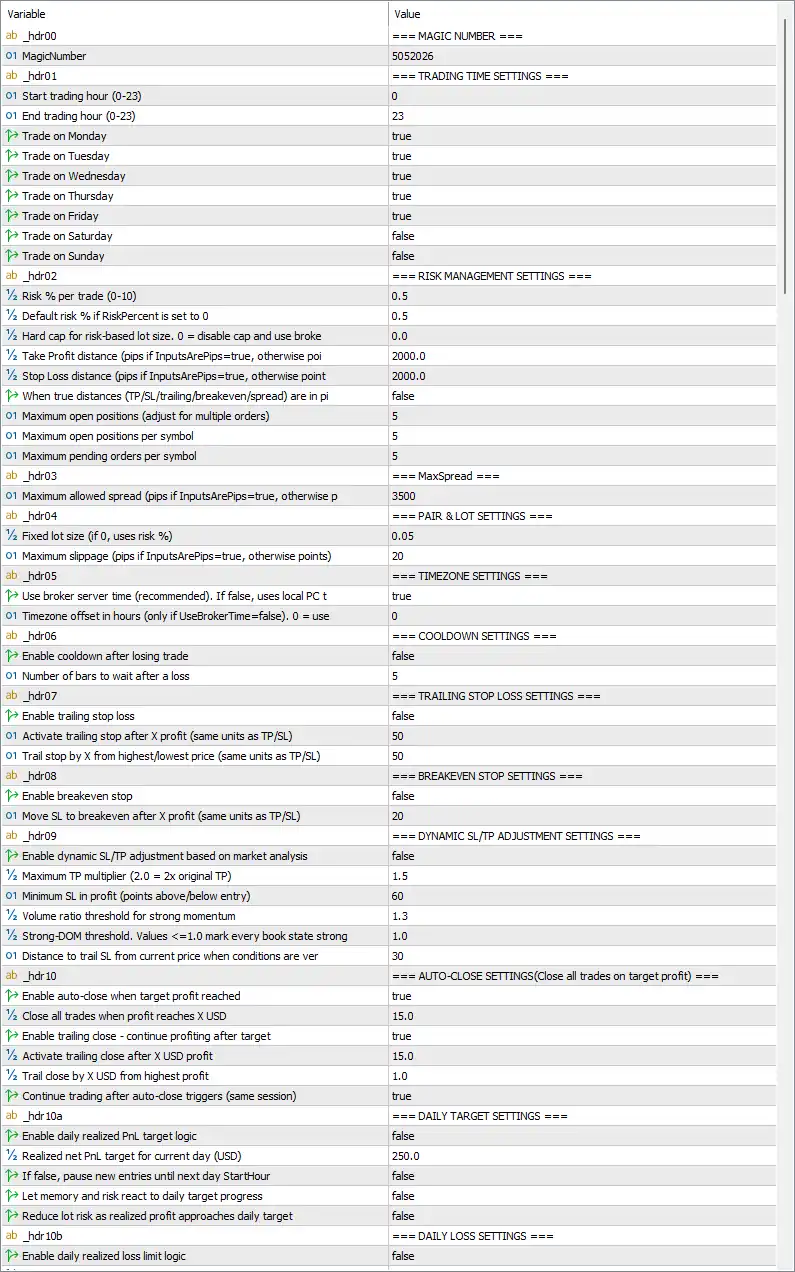
King of Gold Ucb Agent EA MT5 Settings Panel
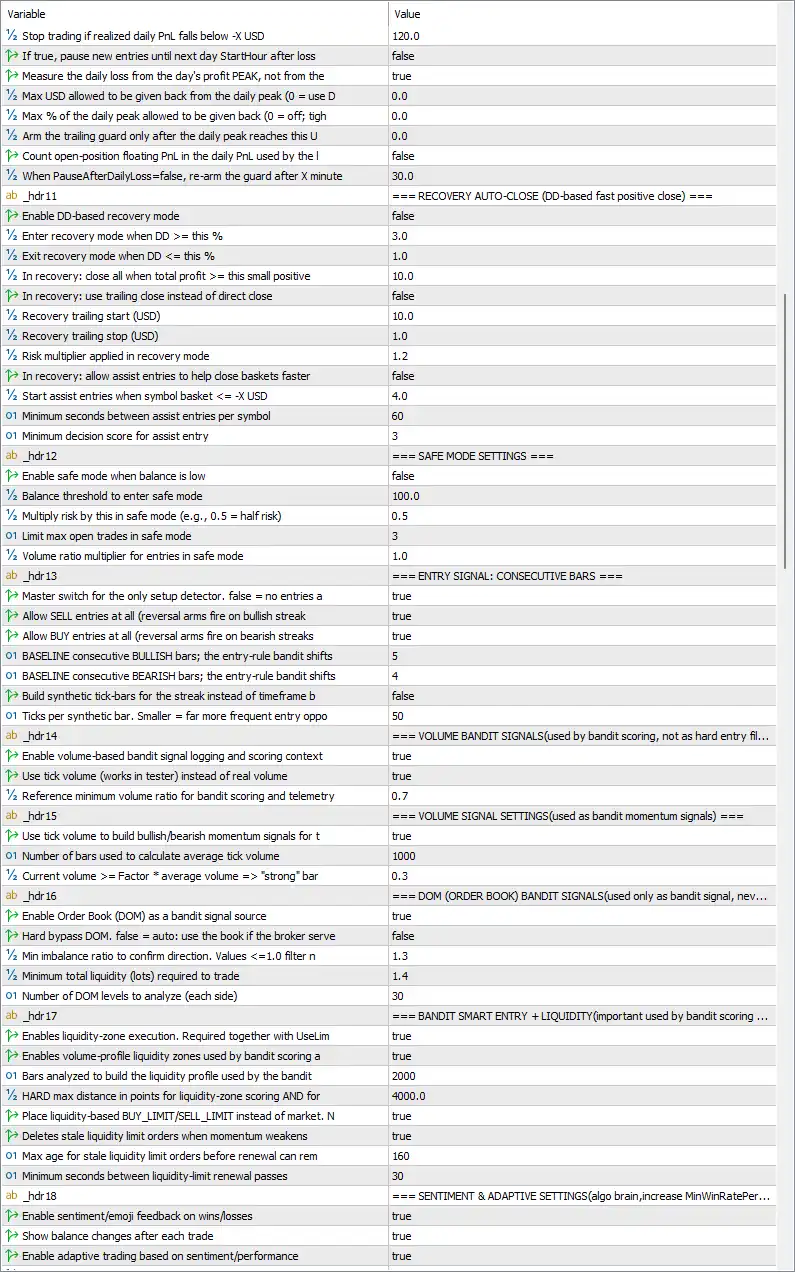
King of Gold Ucb Agent MT5 Settings Panel
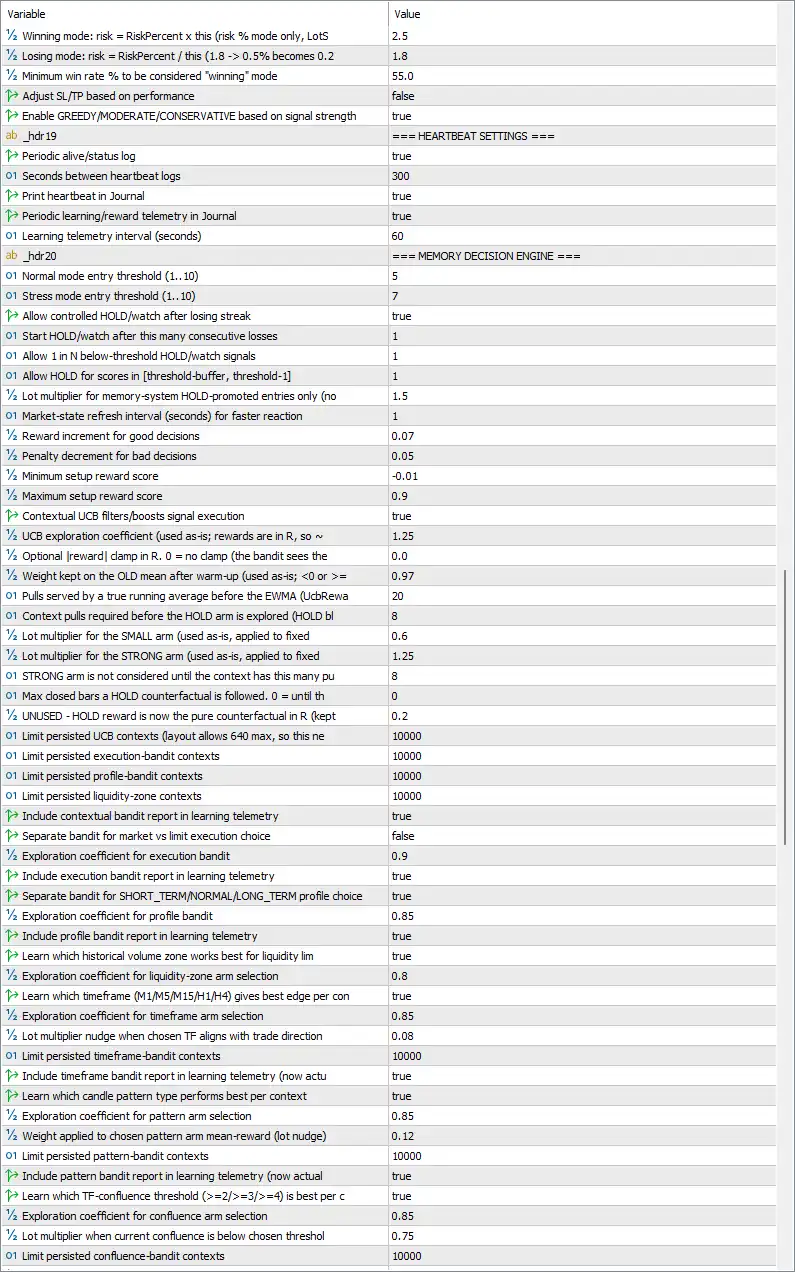
King of Gold Ucb Agent EA Settings Panel
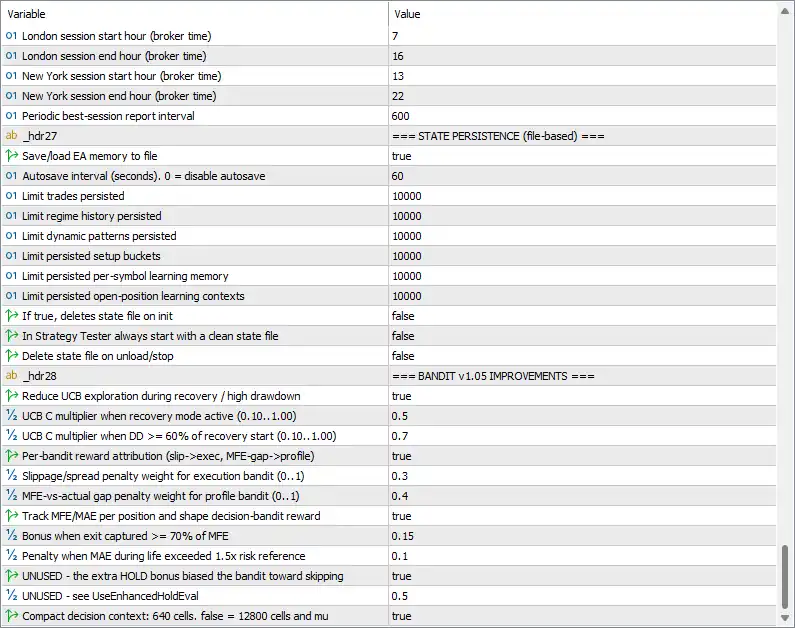
King of Gold Ucb Agent EA Setting Panel
Magic Number
🔹 Magic Number = 5052026 — Assigns 5052026 as the unique identifier for trades managed by the EA, helping separate its positions from other Expert Advisors or manual trades.
Trading Time Settings
🔹 Start trading hour (0-23) = 0 — Sets the earliest trading hour to 0, allowing the EA’s configured trading window to begin at midnight.
🔹 End trading hour (0-23) = 23 — Sets the trading window end hour to 23, covering the full configured daily schedule.
🔹 Trade on Monday = true — Allows trading on Monday.
🔹 Trade on Tuesday = true — Allows trading on Tuesday.
🔹 Trade on Wednesday = true — Allows trading on Wednesday.
🔹 Trade on Thursday = true — Allows trading on Thursday.
🔹 Trade on Friday = true — Allows trading on Friday.
🔹 Trade on Saturday = false — Disables trading on Saturday.
🔹 Trade on Sunday = false — Disables trading on Sunday.
Risk Management Settings
🔹 Risk % per trade (0-10) = 0.5 — Sets the primary percentage-based risk level to 0.5% per trade.
🔹 Default risk % if RiskPercent is set to 0 = 0.5 — Defines the fallback risk percentage as 0.5 when the main RiskPercent value is configured to zero.
🔹 Hard cap for risk-based lot size. 0 = disable cap and use broker = 0.0 — Sets the risk-based lot-size ceiling to 0.0; according to the displayed label, zero disables this additional cap and allows the broker’s limit to apply.
🔹 Take Profit distance (pips if InputsArePips=true, otherwise points) = 2000.0 — Sets the configured Take Profit distance to 2000.0, with the unit interpreted according to the InputsArePips setting.
🔹 Stop Loss distance (pips if InputsArePips=true, otherwise points) = 2000.0 — Sets the configured Stop Loss distance to 2000.0, using pips or points according to the corresponding unit mode.
🔹 When true distances (TP/SL/trailing/breakeven/spread) are in pips = false — Keeps the unit mode disabled, meaning the displayed distance values are interpreted as points rather than pips.
🔹 Maximum open positions (adjust for multiple orders) = 5 — Limits the total number of simultaneously open positions to 5 under the EA’s position-management rules.
🔹 Maximum open positions per symbol = 5 — Allows a maximum of 5 open positions for an individual symbol.
🔹 Maximum pending orders per symbol = 5 — Limits pending orders for each symbol to 5.
MaxSpread
🔹 Maximum allowed spread (pips if InputsArePips=true, otherwise points) = 3500 — Sets the maximum accepted spread threshold to 3500, with the actual unit determined by the configured pip/point mode.
Pair & Lot Settings
🔹 Fixed lot size (if 0, uses risk %) = 0.05 — Sets the fixed position size to 0.05 lots; when the fixed-lot mechanism is applicable, this value defines the trade volume.
🔹 Maximum slippage (pips if InputsArePips=true, otherwise points) = 20 — Limits permitted execution slippage to 20, interpreted as pips or points according to the configured distance mode.
Timezone Settings
🔹 Use broker server time (recommended). If false, uses local PC time = true — Uses the broker’s server time because the setting is true, keeping trading-hour calculations aligned with broker time.
🔹 Timezone offset in hours (only if UseBrokerTime=false). 0 = use = 0 — Sets the manual timezone offset to 0; this parameter becomes relevant when broker-server time is disabled.
Cooldown Settings
🔹 Enable cooldown after losing trade = false — Disables the post-loss cooldown mechanism.
🔹 Number of bars to wait after a loss = 5 — Sets the cooldown duration to 5 bars if the losing-trade cooldown feature is enabled.
Trailing Stop Loss Settings
🔹 Enable trailing stop loss = false — Disables the standard trailing Stop Loss mechanism.
🔹 Activate trailing SL after X profit (same units as TP/SL) = 50 — Sets the trailing activation threshold to 50 units of profit when the trailing feature is enabled.
🔹 Trail stop by X from highest/lowest price (same units as TP/SL) = 50 — Sets the trailing distance to 50 units from the highest or lowest favorable price.
Breakeven Stop Settings
🔹 Enable breakeven stop = false — Disables automatic break-even Stop Loss adjustment.
🔹 Move SL to breakeven after X profit (same units as TP/SL) = 20 — Configures the break-even trigger at 20 units of profit when enabled.
Dynamic SL/TP Adjustment Settings
🔹 Enable dynamic SL/TP adjustment based on market analysis = false — Disables adaptive Stop Loss and Take Profit adjustment based on market analysis.
🔹 Maximum TP multiplier (2.0 = 2x original TP) = 1.5 — Limits the dynamic Take Profit expansion factor to 1.5× the original TP when the feature is enabled.
🔹 Minimum SL in profit (points above/below entry) = 60 — Sets the minimum profitable Stop Loss displacement to 60 points when dynamic protection is active.
🔹 Volume ratio threshold for strong momentum = 1.3 — Uses 1.3 as the configured volume-ratio threshold for identifying stronger momentum conditions.
🔹 Strong-DOM threshold. Values <=1.0 mark every book state strong = 1.0 — Sets the strong order-book threshold to 1.0, with the panel explicitly noting that values at or below 1.0 mark every book state as strong.
🔹 Distance to trail SL from current price when conditions are very strong = 30 — Sets the trailing Stop Loss distance to 30 under very strong market conditions when the applicable dynamic mechanism is active.
Auto-Close Settings
🔹 Enable auto-close when target profit reached = true — Enables automatic closure when the configured profit target is reached.
🔹 Close all trades when profit reaches X USD = 15.0 — Sets the basket or account-level auto-close trigger at 15.0 USD of profit.
🔹 Enable trailing close – continue profiting after target = true — Enables trailing-close behavior after the initial profit target has been reached.
🔹 Activate trailing close after X USD profit = 15.0 — Activates the trailing-close mechanism after 15.0 USD of profit.
🔹 Trail close by X USD from highest profit = 1.0 — Sets the allowed profit retracement to 1.0 USD from the highest recorded profit.
🔹 Continue trading after auto-close triggers (same session) = true — Allows the EA to continue opening new trades after an automatic close within the same trading session.
Daily Target Settings
🔹 Enable daily realized PnL target logic = false — Disables the daily realized-profit target logic.
🔹 Realized net PnL target for current day (USD) = 250.0 — Sets the daily realized net profit target to 250.0 USD when the daily target feature is enabled.
🔹 If false, pause new entries until next day StartHour = false — Keeps the pause-until-next-day behavior disabled.
🔹 Let memory and risk react to daily target progress = false — Prevents learning memory and risk behavior from dynamically reacting to progress toward the daily target.
🔹 Reduce lot risk as realized profit approaches daily target = false — Disables progressive lot-risk reduction as realized profit approaches the daily target.
Daily Loss Settings
🔹 Enable daily realized loss limit logic = false — Disables the primary daily realized-loss limit logic.
Session Settings
🔹 London session start hour (broker time) = 7 — Sets the London session start to 07:00 broker time.
🔹 London session end hour (broker time) = 16 — Sets the London session end to 16:00 broker time.
🔹 New York session start hour (broker time) = 13 — Sets the New York session start to 13:00 broker time.
🔹 New York session end hour (broker time) = 22 — Sets the New York session end to 22:00 broker time.
🔹 Periodic best-session report interval = 600 — Sets the periodic session-performance reporting interval to 600 seconds.
State Persistence (File-Based)
🔹 Save/load EA memory to file = true — Enables saving and restoring the EA’s learning memory through a file-based persistence system.
🔹 Autosave interval (seconds). 0 = disable autosave = 60 — Configures automatic state saving every 60 seconds.
🔹 Limit trades persisted = 10000 — Limits the number of stored trade-learning records to 10000.
🔹 Limit regime history persisted = 10000 — Limits stored market-regime history to 10000 records.
🔹 Limit dynamic patterns persisted = 10000 — Allows up to 10000 persisted dynamic-pattern records.
🔹 Limit persisted setup buckets = 10000 — Limits stored setup-bucket learning records to 10000.
🔹 Limit persisted per-symbol learning memory = 10000 — Allows up to 10000 persisted per-symbol learning-memory records.
🔹 Limit persisted open-position learning contexts = 10000 — Limits stored open-position learning contexts to 10000.
🔹 If true, delete state file on init = false — Keeps the existing persistent state file instead of deleting it when the EA initializes.
🔹 In Strategy Tester always start with a clean state file = false — Does not force a clean learning-state file at the start of every Strategy Tester run.
🔹 Delete state file on unload/stop = false — Preserves the state file when the EA is unloaded or stopped.
Bandit v1.05 Improvements
🔹 Reduce UCB exploration during recovery / high drawdown = true — Reduces exploratory UCB behavior during recovery or elevated drawdown conditions.
🔹 UCB C multiplier when recovery mode active (0.10..1.00) = 0.5 — Sets the UCB exploration multiplier to 0.5 while recovery mode is active.
🔹 UCB C multiplier when DD >= 60% of recovery start (0.10..1.00) = 0.7 — Uses 0.7 as the UCB C multiplier when drawdown reaches at least 60% of the configured recovery-start level.
🔹 Per-bandit reward attribution (slip->exec, MFE-gap->profile) = true — Enables separate reward attribution for different bandit components, including execution slippage and profile-related MFE gaps.
🔹 Slippage/spread penalty weight for execution bandit (0..1) = 0.3 — Sets the execution-bandit penalty weight for slippage and spread conditions to 0.3.
🔹 MFE-vs-actual gap penalty weight for profile bandit (0..1) = 0.4 — Sets the profile-bandit penalty weight for the difference between maximum favorable excursion and realized outcome to 0.4.
🔹 Track MFE/MAE per position and shape decision-bandit reward = true — Enables tracking of Maximum Favorable Excursion and Maximum Adverse Excursion for individual positions.
🔹 Bonus when exit captured >= 70% of MFE = 0.15 — Adds a 0.15 reward bonus when the exit captures at least 70% of MFE.
🔹 Penalty when MAE during life exceeded 1.5x risk reference = 0.1 — Applies a 0.1 penalty when the position’s MAE exceeds 1.5× its risk reference.
🔹 UNUSED – the extraHOLD bonus biased the bandit toward skipping = true — Retains this legacy/unused feature flag at true, as shown in the Inputs panel.
🔹 UNUSED – see UseEnhancedHoldEval = 0.5 — Keeps the displayed unused/legacy parameter at 0.5.
🔹 Compact decision context: 640 cells, false = 12800 cells and mu… = true — Enables the compact decision-context mode, using the smaller context representation described in the parameter label.
Bandit Entry & Decision Controls
🔹 Include confluence bandit report in learning telemetry (now act… = true — Includes confluence-bandit information in the learning telemetry.
🔹 Bandit owns entries and learns the entry rule itself (false = f… = true — Allows the bandit system to control entry decisions and learn the entry rule.
🔹 Minimum composite decision score before bandit can trigger = 5 — Requires a minimum composite score of 5 before the bandit can trigger a trade.
🔹 Minimum regime quality required for bandit entries = 0.45 — Requires a minimum regime-quality score of 0.45 for bandit entries.
🔹 Move/delete pending liquidity limits when signal changes = true — Allows pending liquidity limit orders to be moved or deleted when the trading signal changes.
🔹 Minimum pending-price move before modifying a limit order = 3 — Requires a minimum price movement of 3 before modifying a pending limit order.
🔹 Tighten moved limit SL/TP when market gets this close = 0.35 — Sets the proximity threshold to 0.35 for tightening SL/TP when a moved limit order becomes sufficiently close to the market.
🔹 SL distance factor applied (to the ORIGINAL distance, never com… = 0.82 — Applies a 0.82 multiplier to the original Stop Loss distance under the relevant adaptive adjustment.
🔹 TP distance factor applied (to the ORIGINAL distance, never com… = 0.92 — Applies a 0.92 multiplier to the original Take Profit distance.
🔹 Adapt initial TP/SL by entry profile = true — Enables adaptive initial TP/SL selection according to the selected entry profile.
🔹 Score threshold for LONG_TERM profile = 6 — Requires a score of 6 for the LONG_TERM profile.
🔹 Score threshold for SHORT_TERM profile = 5 — Requires a score of 5 for the SHORT_TERM profile.
🔹 Initial TP multiplier for SHORT_TERM = 1.8 — Sets the initial Take Profit multiplier for SHORT_TERM trades to 1.8.
🔹 Initial SL multiplier for SHORT_TERM = 1.8 — Sets the initial Stop Loss multiplier for SHORT_TERM trades to 1.8.
🔹 Initial TP multiplier for LONG_TERM = 1.5 — Sets the initial Take Profit multiplier for LONG_TERM trades to 1.5.
🔹 Initial SL multiplier for LONG_TERM = 1.5 — Sets the initial Stop Loss multiplier for LONG_TERM trades to 1.5.
Asset Tracking
🔹 Track forex pairs in learning memory (the multi-symbol scanner) = true — Enables learning-memory tracking for forex pairs.
🔹 Track metals like XAU/XAG in learning memory = true — Enables learning-memory tracking for metals such as XAU/XAG.
🔹 Track indices in learning memory = true — Enables learning-memory tracking for index symbols.
🔹 Track stocks/equities in learning memory = true — Enables learning-memory tracking for stocks and equities.
🔹 Track crypto symbols in learning memory = true — Enables learning-memory tracking for cryptocurrency symbols.
Order Flow
🔹 Order-flow engine: ms-based spike entries AND the protective close = true — Enables the order-flow engine for millisecond-based spike-entry logic and protective basket-close behavior.
Alerts: Sound, News & Future Events
🔹 Enable PlaySound alerts = false — Disables sound alerts.
🔹 Minimum seconds between same sound event = 10 — Sets a 10-second minimum interval between repeated identical sound events.
🔹 Sound file for BUY execution = buy.wav — Uses buy.wav for BUY execution alerts.
🔹 Sound file for SELL execution = sell.wav — Uses sell.wav for SELL execution alerts.
🔹 Sound file for blocked order/event = blocked.wav — Uses blocked.wav for blocked-order or event alerts.
🔹 Sound file for risk/stress warnings = warning.wav — Uses warning.wav for risk and stress warnings.
🔹 Sound file for profitable close = profit.wav — Uses profit.wav for profitable-close notifications.
🔹 Sound file for losing close = loss.wav — Uses loss.wav for losing-close notifications.
🔹 Sound file for upcoming economic news = news.wav — Uses news.wav for upcoming economic-news alerts.
🔹 Sound file for future session events = event.wav — Uses event.wav for future session-event notifications.
🔹 Enable economic calendar alerts = true — Enables economic-calendar alert processing.
🔹 Calendar scan interval = 60 — Checks the economic-calendar information every 60 seconds.
🔹 Alert for events within next X minutes = 30 — Generates alerts for events occurring within the next 30 minutes.
🔹 Cooldown between news alerts = 300 — Sets a 300-second cooldown between economic-news alerts.
🔹 If false: only symbol currencies = true — Enables the displayed symbol-currency filtering behavior.
🔹 Add upcoming high-impact news context to liquidity bandit memory = true — Adds upcoming high-impact economic-news context to liquidity-bandit learning memory.
🔹 Lookahead window for liquidity-bandit news context = 60 — Uses a 60-minute forward-looking window for news context.
🔹 Interpret released high-impact news as bullish/bearish bias for… = true — Enables interpretation of released high-impact news as directional market bias.
🔹 How far back to analyze released important news = 120 — Looks back 120 minutes when evaluating recently released important news.
🔹 Alert before session start/end = true — Enables alerts before configured trading-session starts or ends.
🔹 Minutes before start/end to alert = 15 — Generates session alerts 15 minutes before the configured session boundary.
Telegram Alerts
🔹 Enable Telegram notifications via Bot API = false — Disables Telegram notifications in the supplied configuration.
🔹 Telegram bot token from BotFather = blank — No Telegram BotFather token is configured.
🔹 Telegram chat_id (user/group/channel) = blank — No Telegram user, group, or channel ID is configured.
🔹 Cooldown between same Telegram event messages = 15 — Sets the minimum interval between identical Telegram events to 15 seconds.
🔹 Send BUY/SELL execution alerts to Telegram = true — Enables Telegram BUY/SELL execution messages when Telegram integration is activated.
🔹 Send close-profit/loss alerts to Telegram = true — Enables Telegram notifications for profitable and losing closes.
🔹 Send risk/stress alerts to Telegram = true — Enables Telegram notifications for risk and stress events.
🔹 Send economic news alerts to Telegram = true — Enables Telegram economic-news notifications.
🔹 Send future session event alerts to Telegram = true — Enables Telegram notifications for future session events.
🔹 Send blocked-order alerts to Telegram = true — Enables Telegram notifications when orders are blocked.
Best Sessions Engine
🔹 Learn and report session quality (London/NY/Overlap) = true — Enables learning and reporting of session quality for London, New York, and their overlap.
🔹 Block new entries when current session is weak = false — Does not block new entries solely because the current session is classified as weak.
🔹 Feed learned session quality into the decision score = true — Incorporates learned session-quality information into the trading decision score.
🔹 Minimum trades before a session is considered reliable = 5 — Requires at least 5 trades before session statistics are considered reliable.
🔹 Session must keep at least this win rate to be optimal = 55.0 — Sets the minimum session win rate for an optimal classification at 55.0%.
Adaptive Performance Settings
🔹 Winning mode: risk = RiskPercent x this (risk % mode only, Lots… = 2.5 — Sets the winning-mode risk multiplier to 2.5× the base RiskPercent when the percentage-risk mode applies.
🔹 Losing mode: risk = RiskPercent / this (1.8 -> 0.5% becomes 0.2… = 1.8 — Sets the losing-mode divisor to 1.8, reducing percentage-based risk during losing conditions according to the displayed formula.
🔹 Minimum win rate % to be considered “winning” mode = 55.0 — Requires a minimum win rate of 55.0% before the system classifies conditions as winning mode.
🔹 Adjust SL/TP based on performance = false — Disables performance-based Stop Loss and Take Profit adjustment.
🔹 Enable AGGRESSIVE/MODERATE/CONSERVATIVE based on signal strength = true — Enables automatic risk or behavior classification into AGGRESSIVE, MODERATE, or CONSERVATIVE modes according to signal strength.
Heartbeat Settings
🔹 Periodic alive/status log = true — Enables periodic alive/status logging.
🔹 Seconds between heartbeat logs = 300 — Sets the heartbeat interval to 300 seconds.
🔹 Print heartbeat in Journal = true — Enables heartbeat messages in the MT5 Journal.
🔹 Periodic learning/reward telemetry in Journal = true — Enables periodic learning and reward telemetry in the Journal.
🔹 Learning telemetry interval (seconds) = 60 — Sets the learning telemetry interval to 60 seconds.
Memory Decision Engine
🔹 Normal mode entry threshold (1..10) = 5 — Sets the normal decision-entry threshold to 5 on the 1–10 scale.
🔹 Stress mode entry threshold (1..10) = 7 — Sets the stress-mode entry threshold to 7, requiring stronger evidence under stressed conditions.
🔹 Allow conditional HOLD/watch after losing streak = true — Enables conditional HOLD/watch behavior following a losing streak.
🔹 Start HOLD/watch after this many consecutive losses = 1 — Starts HOLD/watch behavior after 1 consecutive loss.
🔹 Allow 1 in N below-threshold HOLD/watch signals = 1 — Allows 1 in N below-threshold HOLD/watch signals with N configured as 1.
🔹 Allow HOLD for scores [threshold-1]=1 — Allows HOLD decisions for scores 1 point below the configured threshold.
🔹 Lot multiplier for memory-system HOLD-promoted entries only = 1.5 — Applies a 1.5× lot multiplier to entries promoted through the memory-system HOLD mechanism.
🔹 Market-state refresh interval (seconds) for fast reaction = 1 — Refreshes market-state information every 1 second.
🔹 Reward increment for good decisions = 0.07 — Adds 0.07 to the learning reward for a good decision.
🔹 Penalty decrement for bad decisions = 0.05 — Applies a 0.05 penalty for a bad decision.
🔹 Minimum setup reward score = -0.01 — Sets the minimum setup reward score to -0.01.
🔹 Maximum setup reward score = 0.9 — Caps the setup reward score at 0.9.
🔹 Contextual UCB filters/boosts signal execution = true — Enables contextual UCB filtering and signal-execution boosting.
🔹 UCB exploration coefficient (used as-is; rewards are in R, so… = 1.25 — Sets the UCB exploration coefficient to 1.25.
🔹 Optional |reward| clamp in R. 0 = no clamp = 0.0 — Sets the optional absolute-reward clamp to 0.0, which represents no clamp according to the label.
🔹 Weight kept on the OLD mean after warm-up (used as-is; <0 or… = 0.97 — Retains 0.97 weight on the previous mean after the warm-up phase.
🔹 Pulls served by a true running average before the EWMA (UcbRewa… = 20 — Uses 20 pulls before the running-average/EWMA transition.
🔹 Context pulls required before the HOLD arm is explored (HOLD bl… = 8 — Requires 8 context pulls before the HOLD arm can be explored.
🔹 Lot multiplier for the SMALL arm (used as-is, applied to fixed… = 0.6 — Applies a 0.6× lot multiplier to the SMALL decision arm.
🔹 Lot multiplier for the STRONG arm (used as-is, applied to fixed… = 1.25 — Applies a 1.25× lot multiplier to the STRONG decision arm.
🔹 STRONG arm is not considered until the context has this many pu… = 8 — Requires 8 context pulls before the STRONG arm becomes eligible.
🔹 Max closed bars a HOLD counterfactual is followed. 0 = until th… = 0 — Sets the HOLD counterfactual follow-up limit to 0, according to the displayed configuration.
🔹 UNUSED – HOLD reward is now the pure counterfactual in R (kept… = 0.2 — Retains the displayed unused HOLD-reward parameter at 0.2.
Persistent Bandit Context Limits
🔹 Limit persisted UCB contexts (payout allows 640 max, so this ne… = 10000 — Allows up to 10000 persisted UCB contexts.
🔹 Limit persisted execution-bandit contexts = 10000 — Allows up to 10000 persisted execution-bandit contexts.
🔹 Limit persisted profile-bandit contexts = 10000 — Allows up to 10000 persisted profile-bandit contexts.
🔹 Limit persisted liquidity-zone contexts = 10000 — Allows up to 10000 persisted liquidity-zone contexts.
Execution, Profile & Liquidity Bandits
🔹 Include contextual bandit report in learning telemetry = true — Includes contextual-bandit reports in learning telemetry.
🔹 Separate bandit for market vs limit execution choice = false — Keeps market and limit execution choices within the same bandit rather than separating them.
🔹 Exploration coefficient for execution bandit = 0.9 — Sets execution-bandit exploration to 0.9.
🔹 Include execution bandit report in learning telemetry = true — Enables execution-bandit reporting in learning telemetry.
🔹 Separate bandit for SHORT_TERM/NORMAL/LONG_TERM profile choice = true — Enables separate bandit handling for SHORT_TERM, NORMAL, and LONG_TERM profile selection.
🔹 Exploration coefficient for profile bandit = 0.85 — Sets profile-bandit exploration to 0.85.
🔹 Include profile bandit report in learning telemetry = true — Includes profile-bandit results in learning telemetry.
🔹 Learn which historical volume zone works best for liquidity = true — Enables learning of which volume/liquidity zones perform best.
🔹 Exploration coefficient for liquidity-zone arm selection = 0.8 — Sets liquidity-zone bandit exploration to 0.8.
Timeframe & Pattern Learning
🔹 Learn which timeframe (M1/M5/M15/H1/H4) gives best edge per con… = true — Enables learning of which timeframe among M1/M5/M15/H1/H4 provides the best contextual edge.
🔹 Exploration coefficient for timeframe arm selection = 0.85 — Sets timeframe-selection exploration to 0.85.
🔹 Lot multiplier nudge when chosen TF aligns with trade direction = 0.08 — Applies a 0.08 lot-size nudge when the selected timeframe aligns with trade direction.
🔹 Limit persisted timeframe-bandit contexts = 10000 — Limits persisted timeframe-bandit contexts to 10000.
🔹 Include timeframe bandit report in learning telemetry = true — Includes timeframe-bandit information in learning telemetry.
🔹 Learn which candle pattern type performs best per context = true — Enables learning of which candle-pattern type performs best in each market context.
🔹 Exploration coefficient for pattern arm selection = 0.85 — Sets pattern-selection exploration to 0.85.
🔹 Weight applied to chosen pattern arm mean-reward (lot nudge) = 0.12 — Applies a 0.12 weighting to the selected pattern arm’s mean reward for the lot-size adjustment.
🔹 Limit persisted pattern-bandit contexts = 10000 — Limits persisted pattern-bandit contexts to 10000.
🔹 Include pattern bandit report in learning telemetry = true — Includes pattern-bandit results in learning telemetry.
🔹 Learn which TF-confluence threshold (>=2/>=3/>=4) is best per c… = true — Enables learning of which multi-timeframe confluence threshold, such as >=2, >=3, or >=4, performs best for each context.
🔹 Exploration coefficient for confluence arm selection = 0.85 — Sets confluence-bandit exploration to 0.85.
🔹 Lot multiplier when current confluence is below chosen threshold = 0.75 — Applies a 0.75× lot multiplier when current confluence is below the selected threshold.
🔹 Limit persisted confluence-bandit contexts = 10000 — Limits persisted confluence-bandit contexts to 10000.
Daily Loss Protection
🔹 Stop trading if realized daily PnL falls below -X USD = 120.0 — Sets the realized daily PnL stop threshold to -120.0 USD.
🔹 If true, pause new entries until next day StartHour after loss = false — Keeps the next-day entry pause disabled after the daily loss threshold is reached.
🔹 Measure the daily loss from the day’s profit PEAK, not from the… = true — Measures the daily giveback from the day’s realized-profit peak rather than only from the day’s starting value.
🔹 Max USD allowed to be given back from the daily peak (0 = use D… = 0.0 — Sets the maximum USD giveback from the daily peak to 0.0, meaning this optional threshold is not configured with a positive value.
🔹 Max % of the daily peak allowed to be given back (0 = off; tigh… = 0.0 — Sets the percentage-based daily-peak giveback limit to 0.0, leaving that optional percentage guard inactive.
🔹 Arm the trailing guard only after the daily peak reaches this U… = 0.0 — Sets the daily-profit threshold required to arm the trailing guard to 0.0.
🔹 Count open-position floating PnL in the daily PnL used by the l… = false — Excludes floating open-position PnL from the daily PnL calculation used by this protection mechanism.
🔹 When PauseAfterDailyLoss=false, re-arm the guard after X minutes = 30.0 — Sets the re-arm delay to 30.0 minutes when the daily-loss pause feature is disabled.
Recovery Auto-Close
🔹 Enable DD-based recovery mode = false — Disables the drawdown-based recovery mode.
🔹 Enter recovery mode when DD >= this % = 3.0 — Sets the recovery-entry drawdown threshold to 3.0% if recovery mode is enabled.
🔹 Exit recovery mode when DD <= this % = 1.0 — Sets the recovery-exit drawdown threshold to 1.0%.
🔹 In recovery: close all when total profit >= this small positive = 10.0 — Sets the recovery close-all profit target to 10.0 USD.
🔹 In recovery: use trailing close instead of direct close = false — Keeps recovery-mode trailing closure disabled.
🔹 Recovery trailing start (USD) = 10.0 — Sets the recovery trailing-close activation level to 10.0 USD if enabled.
🔹 Recovery trailing stop (USD) = 1.0 — Sets the recovery trailing distance to 1.0 USD.
🔹 Risk multiplier applied in recovery mode = 1.2 — Sets the recovery-mode risk multiplier to 1.2×.
🔹 In recovery: allow assist entries to help close baskets faster = false — Disables additional assist entries during recovery.
🔹 Start assist entries when symbol basket <= -X USD = 4.0 — Sets the assist-entry activation level at a basket loss of -4.0 USD if assist entries are enabled.
🔹 Minimum seconds between assist entries per symbol = 60 — Requires at least 60 seconds between assist entries for the same symbol.
🔹 Minimum decision score for assist entry = 3 — Requires a minimum decision score of 3 before an assist entry can qualify.
Safe Mode Settings
🔹 Enable safe mode when balance is low = false — Disables the low-balance safe mode.
🔹 Balance threshold to enter safe mode = 100.0 — Sets the balance threshold for entering safe mode to 100.0.
🔹 Multiply risk by this in safe mode (e.g., 0.5 = half risk) = 0.5 — Configures safe mode to multiply risk by 0.5, equivalent to half the normal risk when active.
🔹 Limit max open trades in safe mode = 3 — Limits simultaneous open trades to 3 under safe mode.
🔹 Volume ratio multiplier for entries in safe mode = 1.0 — Keeps the safe-mode volume-ratio multiplier at 1.0.
Entry Signal: Consecutive Bars
🔹 Master switch for the only setup detector. false = no entries a… = true — Enables the consecutive-bar setup detector.
🔹 Allow SELL entries at all (reversal arms fire on bullish streak = true — Allows SELL entries, including reversal-arm behavior following bullish streak conditions.
🔹 Allow BUY entries at all (reversal arms fire on bearish streaks = true — Allows BUY entries, including reversal-arm behavior following bearish streak conditions.
🔹 BASELINE consecutive BULLISH bars; the entry-rule bandit shifts = 5 — Uses 5 consecutive bullish bars as the baseline bullish streak threshold.
🔹 BASELINE consecutive BEARISH bars; the entry-rule bandit shifts = 4 — Uses 4 consecutive bearish bars as the baseline bearish streak threshold.
🔹 Build synthetic tick-bars for the streak instead of timeframe b… = false — Disables synthetic tick-bar construction for the streak detector.
🔹 Ticks per synthetic bar. Smaller = far more frequent entry oppo… = 50 — Sets 50 ticks per synthetic bar if synthetic bars are enabled.
Volume Bandit Signals
🔹 Enable volume-based bandit signal logging and scoring context = true — Enables volume-based signal logging and scoring context for the bandit system.
🔹 Use tick volume (works in tester) instead of real volume = true — Uses tick volume rather than real exchange volume.
🔹 Reference minimum volume ratio for bandit scoring and telemetry = 0.7 — Sets the reference minimum volume ratio to 0.7.
Volume Signal Settings
🔹 Use tick volume to build bullish/bearish momentum signals for t… = true — Enables tick-volume analysis for bullish and bearish momentum signals.
🔹 Number of bars used to calculate average tick volume = 1000 — Uses 1000 bars to calculate average tick volume.
🔹 Current volume >= factor * average volume => “strong” bar = 0.3 — Sets the displayed strong-bar volume factor to 0.3.
DOM Order Book Bandit Signals
🔹 Enable Order Book (DOM) as a bandit signal source = true — Enables Order Book/DOM data as a signal source for the bandit system.
🔹 Hard bypass DOM. false = auto: use the book if the broker serve… = false — Keeps hard DOM bypass disabled, allowing the EA to automatically use DOM when supported by the broker.
🔹 Min imbalance ratio to confirm direction. Values <=1.0 filter n… = 1.3 — Requires a minimum DOM imbalance ratio of 1.3 to confirm directional conditions.
🔹 Minimum total liquidity (lots) required to trade = 1.4 — Requires at least 1.4 lots of total liquidity under the configured DOM filter.
🔹 Number of DOM levels to analyze (each side) = 30 — Analyzes up to 30 DOM levels on each side of the order book.
Bandit Smart Entry + Liquidity
🔹 Enables liquidity-zone execution. Required together with UseLim… = true — Enables liquidity-zone execution and activates the corresponding limit-order functionality.
🔹 Enables volume-profile liquidity zones used by bandit scoring a… = true — Enables volume-profile liquidity zones for bandit scoring and execution decisions.
🔹 Bars analyzed to build the liquidity profile used by the bandit = 2000 — Uses 2000 bars to construct the liquidity profile.
🔹 HARD max distance in points for liquidity-zone scoring AND for… = 4000.0 — Sets the maximum liquidity-zone distance to 4000.0 points.
🔹 Place liquidity-based BUY_LIMIT/SELL_LIMIT instead of market… = true — Enables liquidity-based BUY_LIMIT and SELL_LIMIT placement instead of relying exclusively on market execution.
🔹 Deletes stale liquidity limit orders when momentum weakens = true — Removes stale liquidity limit orders when momentum conditions weaken.
🔹 Max age for stale liquidity limit orders before renewal can rem… = 160 — Sets the maximum stale-order age to 160 units before renewal can be considered.
🔹 Minimum seconds between liquidity-limit renewal passes = 30 — Requires 30 seconds between liquidity-limit renewal passes.
Sentiment & Adaptive Settings
🔹 Enable sentiment/emoji feedback on wins/losses = true — Enables sentiment or emoji feedback based on winning and losing trade outcomes.
🔹 Show balance changes after each trade = true — Displays balance changes after each completed trade.
🔹 Enable adaptive trading based on sentiment/performance = true — Enables adaptive trading behavior based on sentiment and observed performance.
User Reviews
Only logged in customers who have purchased this product may leave a review.
❓ What is King of Gold UCB Agent EA?
A self-learning MetaTrader 5 Expert Advisor built for XAUUSD. Several contextual UCB bandits learn from every closed trade.
❓ What does UCB mean in King of Gold UCB Agent EA?
UCB stands for Upper Confidence Bound, a multi-armed bandit method. It favors choices that have worked, while still testing choices with too little history.
❓ How does King of Gold UCB Agent EA learn?
After each closed trade, the outcome is measured in R and credited to the choices that were made. Everything learned is saved to a file and restored after a restart.
❓ What does the EA decide on each signal?
A position size (SKIP, SMALL, NORMAL or STRONG), a market or limit order, and a short-term, normal or long-term TP/SL profile.
❓ Which markets does King of Gold UCB Agent EA trade?
XAUUSD is the main target. It can also be attached to crypto, index, stock or forex charts, and it trades the symbol and timeframe of that chart.
❓ What does R mean in King of Gold UCB Agent EA?
1R is the risk of one base-sized trade. Every outcome is measured in R so the learning sees both win rate and the size of wins and losses.
❓ Does King of Gold UCB Agent EA include risk management?
Yes. It has Stop Loss and Take Profit on every trade, basket close, daily profit and loss limits, trailing, breakeven, recovery and safe modes, cooldown, and trading hour and spread filters.
❓ Does King of Gold UCB Agent EA use the order book?
On brokers that provide market depth, yes. Otherwise it falls back to volume profile automatically.
-
 Original price was: $9,999.00.$249.00Current price is: $249.00.
 -
 Original price was: $30,000.00.$249.00Current price is: $249.00.
 -
 Original price was: $30,000.00.$249.00Current price is: $249.00.
 -
 Original price was: $5,000.00.$249.00Current price is: $249.00.
-
 4Original price was: $499.00.$249.00Current price is: $249.00.
 -
 0Original price was: $1,299.00.$249.00Current price is: $249.00.
 -
 0Original price was: $199.00.$179.00Current price is: $179.00.
 -
 1Original price was: $699.00.$249.00Current price is: $249.00.
There are no reviews yet.