




Fantastic 4 MT5 (Latest version) - Unlimited

Subscriptions for Special Plan
- 30 EA package is more economical!
- Special package with 99%
- Download 1 EA/Day

Subscriptions for Premium Membership
- Download Unlimited in 1 Year
- Get 100% Discount
- Get free access to all

Subscriptions for Gold Membership
- 1 Year Membership
- Get 100% Discount
- Access EA+Indicator+Course
Frequently bought together 🎁
Add these products to enhance your purchase




Quick Overview
Fantastic 4 MT5 puts eleven separate trading strategies inside one Expert Advisor, all aimed at XAUUSD. Breakouts, trend following, scalping and range expansion each have their own module.
Every strategy keeps exclusive entry rules, independent order management and its own risk control. They run side by side without interfering with one another, so a weak stretch for one style does not switch off the rest.
The aim is a more balanced equity curve. Short runs of small losses can still appear under specific market conditions, but spreading the work across low-correlation strategies is meant to ease the drawdown of long-term operation.
Best For:
✅ XAUUSD traders who want several strategies in a single EA.
✅ Traders who want no Grid, no Martingale and real Stop Loss and Take Profit.
✅ Users who like breakout and trend styles mixed with scalping.
✅ Long-term operators who size capital according to a personal risk plan.
What is Fantastic 4 MT5?
Fantastic 4 is an automated MetaTrader 5 Expert Advisor (EA) for Gold. Instead of one strategy tuned to one kind of market, it integrates 11 mutually independent quantitative trading logics.
The built-in strategies come from long-term research and iterative optimization. Each one has exclusive entry rules, independent order management and customized risk control modules, and none of them depends on another.
That independence is the whole point. Gold trends, ranges, spikes and goes quiet, and one strategy rarely suits all of it. A portfolio of strategies with low correlation gives the EA more than one way to fit the market it is in.
 Vendor Website: View here
Delivery time 24h-48h after payment.
Refund if not delivered.
You will receive the current version without any limitations (ID+Time).
Fantastic 4 MT5 Review
Key Features of Fantastic 4 MT5
11 Independent Strategies
Each strategy has exclusive entry rules, independent order management and its own risk control. They run separately without mutual interference.
Four Timeframes, Many Styles
M15, H1, H4 and D1 logic is covered, with trend following, breakout, scalping and range expansion working in one EA.
Real Stop Loss and Take Profit
The EA is designed around real Stop Loss (SL) and Take Profit (TP) logic, with no grid and no martingale.
Pending-Order Execution
Several strategies use Buy Stop and Sell Stop orders placed beyond key levels, with set expiry times.
Fully Automatic Operation
24-hour unattended running, with automatic entry, exit and position management and no manual work.
Capital Allocation Flexibility
The risk framework supports long-term operation and capital allocation according to personal risk plans, across different fund sizes.
Verified Live Signal Performance
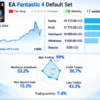
Fantastic 4 MT5 Live Signal shows strong account growth of 231% since 2026, with reported profit of $17,773.58 on a $10,000 initial deposit.
However, the 53.2% maximum drawdown indicates substantial risk exposure, so the impressive growth should be evaluated alongside capital preservation.
Fantastic 4 MT5 Live Signal
| Parameter | Result |
|---|---|
| Account Growth | +231% |
| Reported Profit | $17,773.58 |
| Initial Deposit | $10,000 |
| Equity | $18,773.58 |
| Profit Trades | 56.7% |
| Maximum Drawdown | 53.2% |
| Trading Duration | 17 weeks |
Historical Trading Results Performance
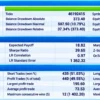
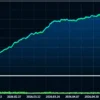
Fantastic 4 MT5 generated $16,713.64 net profit from a $1,000 initial deposit, with a 2.07 profit factor across 888 trades. However, the 40.67% relative equity drawdown indicates substantial risk exposure despite the strong reported profitability.
Fantastic 4 MT5 Backtest Results
| Parameter | Results |
|---|---|
| Initial Deposit | $1,000 |
| Total Net Profit | $16,713.64 |
| Profit Factor | 2.07 |
| Total Trades | 888 |
| Winning Trades | 49.55% |
| Equity Drawdown | 40.67% |
| Recovery Factor | 26.65 |
Core Advantages
🔹 Diversified risk control: strategies with different market logic complement each other and lower the risk of one strategy failing to fit changing markets.
🔹 Drawdown control: the multi-strategy design is meant to keep short-term floating losses from damaging the long-term equity trend.
🔹 Wide market compatibility: designed for ranging, volatile and trending conditions, covering the main movement modes of XAUUSD.
🔹 Fully automatic running: 24-hour unattended operation with no manual work.
🔹 Adaptable to capital size: a risk framework for long-term running at different fund scales.
🔹 Clean design: no grid, no martingale, real Stop Loss and Take Profit and controlled risk management.
Recommended Trading Conditions
For the best performance, the developer recommends:
| Features | Type |
|---|---|
| Trading platform | MetaTrader 5 (MT5) |
| Time frames | Any |
| Currency pairs | XAUUSD (Gold) |
| Minimum / Recommended deposit | $100+ |
| Minimum / Recommended leverage | 1:100+ |
| Account type | ECN and RAW accounts |
| Additional services | Unlock and Decompile |
| Recommended brokers | Exness Broker, Icmarkets Broker |
| Recommended VPS | MyfxVPS.com (Blue VPS, Golden VPS). Lowest Latency, 2 week Free Trial, 100% Free for 12-18 Months. |
Product Download Package?
The download package of the product suite includes:
 Experts: Fantastic 4 MT5.ex5
 Reviewed by David Easton
How to Get the Most from Fantastic 4 MT5
🔹 Choose the broker first: a regulated ECN or RAW broker with low spread and fast execution matters more than any setting.
🔹 Respect the limits: keep spread, stops level and delay within the stated values.
🔹 Scale capital sensibly: the guide is 0.01 to 0.02 lots for every $500.
🔹 Match the profile to the risk plan: strategies J and K are aimed at high-risk profiles, so low-risk users should check how those two are handled before going live.
🔹 Expect drawdown phases: trend strategies in particular can lose several trades in a row in sideways markets.
🔹 Test on demo first: run the EA on the exact broker before real capital is committed.
🔹 Study risk first: the risk management guide helps with choosing position size.
Limitations and Risk Warnings
🔹 Losing streaks happen: short-term successive small losses can appear under specific market conditions.
🔹 Some modules are aggressive: strategies J and K can open several or many positions and can show larger floating drawdown. Strategy K is for high-risk profiles only.
🔹 Gold only: the EA is built for XAUUSD, so all exposure sits in one market.
🔹 Strict broker rules: only ECN and RAW accounts are supported, and poor spread or latency affects results.
🔹 Protective stops are wide in places: several strategies use wide stops, so single-trade loss can be large relative to the target. A guide to stop-loss placement gives background.
🔹 No guarantees: nothing here promises profit. A guide to take-profit methods covers how targets and risk-to-reward interact.
Who Should Use Fantastic 4 MT5?
🔹 Gold traders who want variety: those who prefer several strategy styles over one.
🔹 Long-term operators: those who plan to let an EA run unattended and judge it over months.
🔹 Risk-plan driven traders: those who size capital by a personal risk plan.
🔹 Broker-aware users: those who can open an ECN or RAW account and check spread, stops level and latency.
🔹 Not for traders who: want a multi-pair EA, a standard retail account or a guaranteed result.
Final Verdict
Fantastic 4 MT5 takes a portfolio approach to gold. Eleven independent strategies on M15, H1, H4 and D1 give the EA several ways to work, and each one has its own entry rules, order management and risk control.
The trade-offs are clear. Losing streaks are part of the design, a few modules carry high risk, and the broker requirements are strict. For traders who want a no-grid, no-martingale gold EA with real Stop Loss and Take Profit, and who will test it carefully, it is a strong candidate.
🔢 Fantastic 4 MT5 Settings: Complete Inputs Guide
Fantastic 4 MT5 is a multi-strategy automated trading Expert Advisor designed primarily for XAUUSD (Gold). It combines breakout, trend-following, scalping, swing-trading, and ZigZag-based pending-order approaches through independently configured strategy modules. Its Inputs panel provides control over strategy activation, lot sizing, Take Profit and Stop Loss levels, pending orders, trailing stops, and margin-related safeguards.
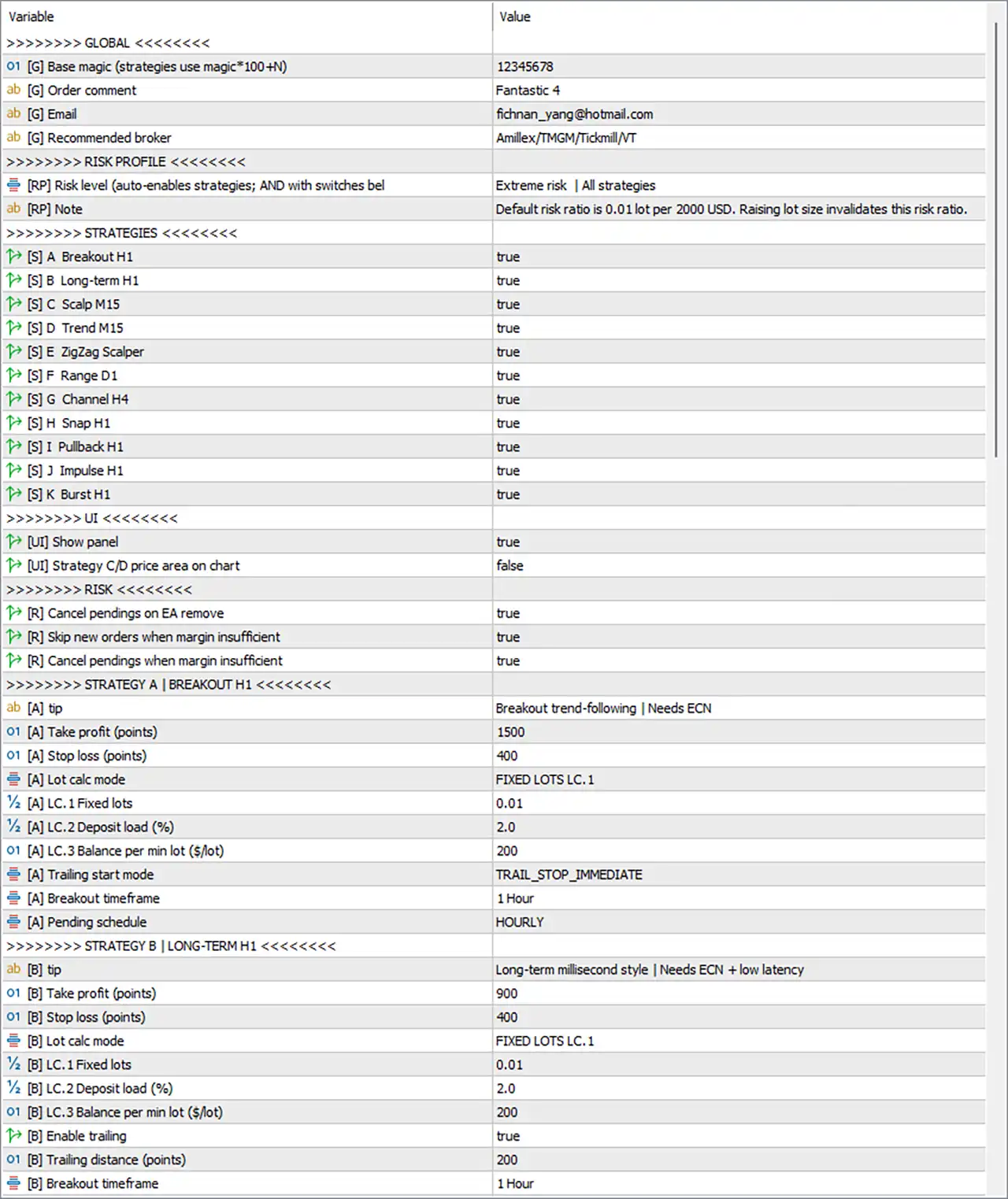
Fantastic 4 MT5 Settings Panel
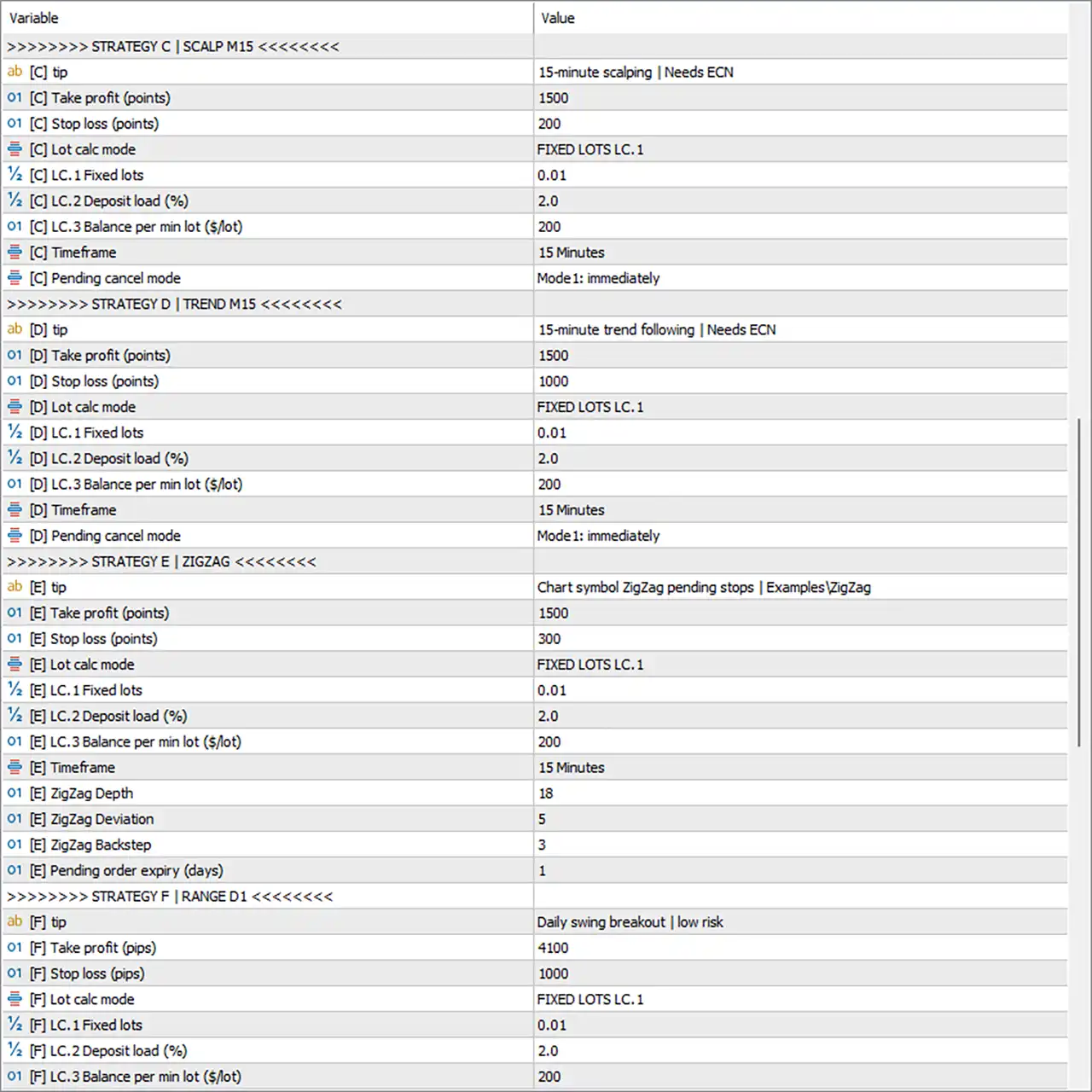
Fantastic 4 MT5 EA Settings Panel
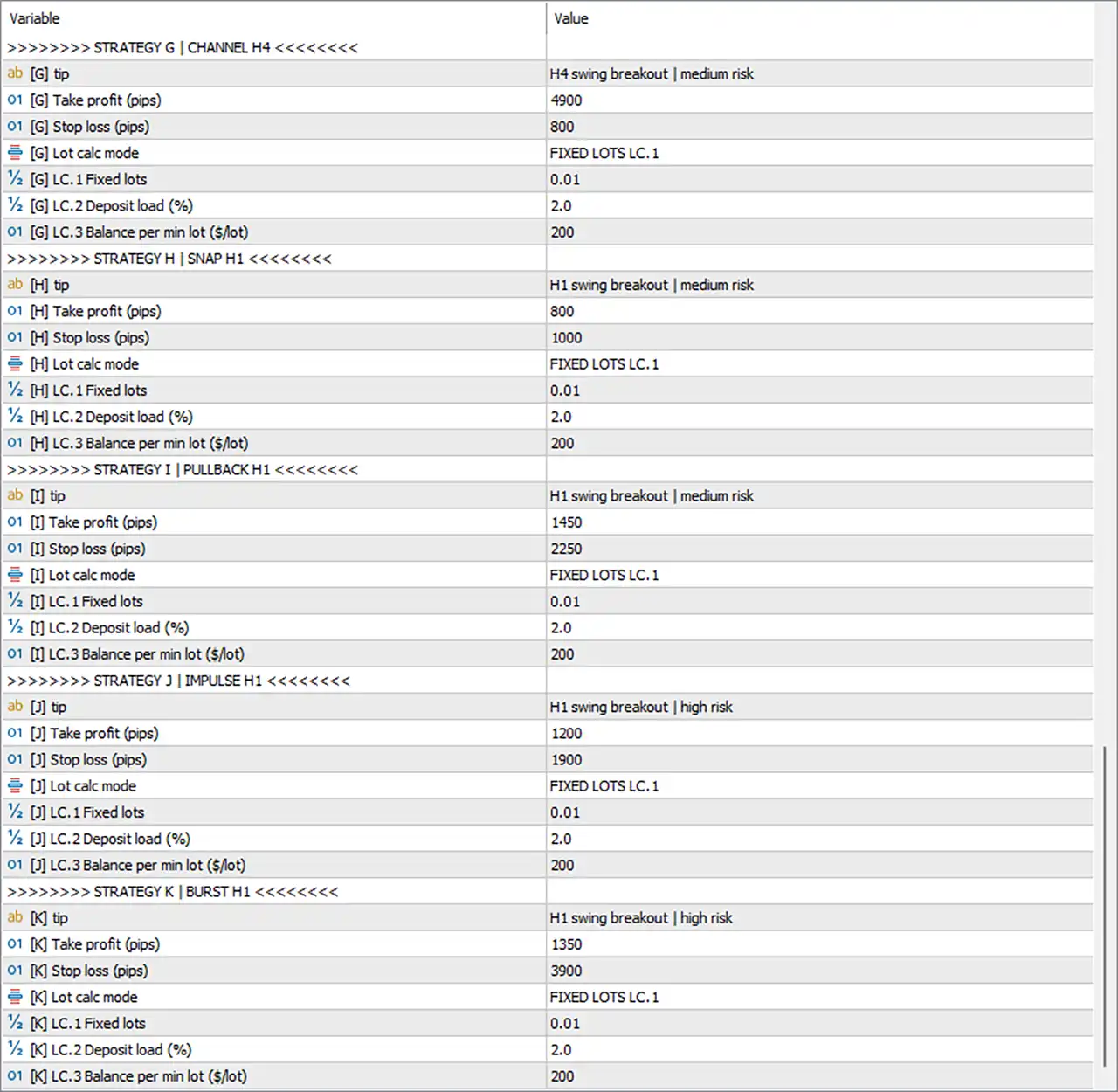
Fantastic 4 MT5 Setting Panel
⚙️ Global Settings
🔹 [G] Base magic (strategies use magic*100+N) = 12345678: Sets the base Magic Number to 12345678; individual strategies use the base value multiplied by 100 plus their strategy number to distinguish their trades.
🔹 [G] Order comment = Fantastic 4: Sets the order comment to Fantastic 4, helping identify trades opened by this EA in the trading terminal and account history.
🔹 [G] Email = configured contact email: Specifies the contact email configured in the Inputs panel; the actual address is omitted here for privacy.
🔹 [G] Recommended broker = Amilex/TMGM/Tickmill/VT: Displays the broker recommendations entered in the EA settings; broker availability and suitability should be verified independently.
⚙️ Risk Profile Settings
🔹 [RP] Risk level (auto-enables strategies; AND with switches below) = Extreme risk | All strategies: Selects the Extreme risk profile and the All strategies configuration; the final activation of each strategy also depends on its individual enable switch.
🔹 [RP] Note = Default risk ratio is 0.01 lot per 2000 USD. Raising lot size invalidates this risk ratio.: States the recommended baseline of 0.01 lot per 2000 USD; increasing lot size changes the intended risk relationship and invalidates this baseline.
⚙️ Strategy Activation Settings
🔹 [S] A Breakout H1 = true: Enables Strategy A, the H1 breakout trend-following module.
🔹 [S] B Long-term H1 = true: Enables Strategy B, the long-term H1 trading module.
🔹 [S] C Scalp M15 = true: Enables Strategy C, the 15-minute scalping module.
🔹 [S] D Trend M15 = true: Enables Strategy D, the 15-minute trend-following module.
🔹 [S] E ZigZag Scalper = true: Enables Strategy E, the ZigZag-based scalping and pending-order module.
🔹 [S] F Range D1 = true: Enables Strategy F, the daily-range breakout module.
🔹 [S] G Channel H4 = true: Enables Strategy G, the H4 channel breakout module.
🔹 [S] H Snap H1 = true: Enables Strategy H, the H1 snap-breakout module.
🔹 [S] I Pullback H1 = true: Enables Strategy I, the H1 pullback-breakout module.
🔹 [S] J Impulse H1 = true: Enables Strategy J, the H1 impulse-breakout module.
🔹 [S] K Burst H1 = true: Enables Strategy K, the H1 burst-breakout module.
⚙️ User Interface Settings
🔹 [UI] Show panel = true: Enables the EA’s on-chart information panel so supported trading information can be displayed on the chart.
🔹 [UI] Strategy C/D price area on chart = false: Disables the display of the Strategy C/D price area on the chart.
⚙️ General Risk and Order Protection
🔹 [R] Cancel pendings on EA remove = true: Enables cancellation of pending orders when the EA is removed from the chart, helping prevent its remaining pending orders from being left active.
🔹 [R] Skip new orders when margin insufficient = true: Prevents the EA from submitting new orders when the available margin is insufficient according to its margin checks.
🔹 [R] Cancel pendings when margin insufficient = true: Enables cancellation of pending orders when the EA’s margin-insufficiency condition is triggered; the precise scope depends on its internal order-management logic.
⚙️ Strategy A — Breakout H1
🔹 [A] tip = Breakout trend-following | Needs ECN: Describes Strategy A as an H1 breakout trend-following system and indicates that ECN-style execution is recommended.
🔹 [A] Take profit (points) = 1500: Sets the Take Profit distance to 1500 points for Strategy A.
🔹 [A] Stop loss (points) = 400: Sets the Stop Loss distance to 400 points for Strategy A.
🔹 [A] Lot calc mode = FIXED LOTS LC.1: Selects the FIXED LOTS LC.1 position-sizing mode for Strategy A.
🔹 [A] LC.1 Fixed lots = 0.01: Sets the fixed lot size to 0.01 for Strategy A when the LC.1 sizing mode is used.
🔹 [A] LC.2 Deposit load (%) = 2.0: Sets the deposit-load parameter to 2.0 in the alternative LC.2 sizing mode.
🔹 [A] LC.3 Balance per min lot ($/lot) = 200: Sets the balance reference to 200 per minimum lot under the alternative LC.3 sizing mode.
🔹 [A] Trailing start mode = TRAIL_STOP_IMMEDIATE: Selects TRAIL_STOP_IMMEDIATE as the trailing-start mode for Strategy A.
🔹 [A] Breakout timeframe = 1 Hour: Sets the breakout detection timeframe to 1 Hour.
🔹 [A] Pending schedule = HOURLY: Sets the pending-order scheduling mode to HOURLY.
⚙️ Strategy B — Long-Term H1
🔹 [B] tip = Long-term millisecond style | Needs ECN + low latency: Describes Strategy B as a long-term, execution-sensitive strategy and indicates that ECN execution with low latency is recommended.
🔹 [B] Take profit (points) = 900: Sets the Take Profit distance to 900 points for Strategy B.
🔹 [B] Stop loss (points) = 400: Sets the Stop Loss distance to 400 points for Strategy B.
🔹 [B] Lot calc mode = FIXED LOTS LC.1: Selects the FIXED LOTS LC.1 position-sizing mode for Strategy B.
🔹 [B] LC.1 Fixed lots = 0.01: Sets the fixed lot size to 0.01 for Strategy B under LC.1 mode.
🔹 [B] LC.2 Deposit load (%) = 2.0: Sets the deposit-load parameter to 2.0 for the alternative LC.2 sizing mode.
🔹 [B] LC.3 Balance per min lot ($/lot) = 200: Sets the balance reference to 200 per minimum lot under the alternative LC.3 sizing mode.
🔹 [B] Enable trailing = true: Enables trailing-stop management for Strategy B.
🔹 [B] Trailing distance (points) = 200: Sets the trailing-stop distance to 200 points for Strategy B.
🔹 [B] Breakout timeframe = 1 Hour: Sets the breakout detection timeframe to 1 Hour.
⚙️ Strategy C — Scalp M15
🔹 [C] tip = 15-minute scalping | Needs ECN: Identifies Strategy C as a 15-minute scalping module and indicates that ECN-style execution is recommended.
🔹 [C] Take profit (points) = 1500: Sets the Take Profit distance to 1500 points for Strategy C.
🔹 [C] Stop loss (points) = 200: Sets the Stop Loss distance to 200 points for Strategy C.
🔹 [C] Lot calc mode = FIXED LOTS LC.1: Selects the FIXED LOTS LC.1 position-sizing mode for Strategy C.
🔹 [C] LC.1 Fixed lots = 0.01: Sets the fixed lot size to 0.01 for Strategy C under LC.1 mode.
🔹 [C] LC.2 Deposit load (%) = 2.0: Sets the deposit-load parameter to 2.0 for the alternative LC.2 sizing mode.
🔹 [C] LC.3 Balance per min lot ($/lot) = 200: Sets the balance reference to 200 per minimum lot under the alternative LC.3 sizing mode.
🔹 [C] Timeframe = 15 Minutes: Sets Strategy C’s trading timeframe to 15 Minutes.
🔹 [C] Pending cancel mode = Mode1: immediately: Selects Mode1: immediately as the pending-order cancellation mode for Strategy C.
⚙️ Strategy D — Trend M15
🔹 [D] tip = 15-minute trend following | Needs ECN: Identifies Strategy D as a 15-minute trend-following module and indicates that ECN-style execution is recommended.
🔹 [D] Take profit (points) = 1500: Sets the Take Profit distance to 1500 points for Strategy D.
🔹 [D] Stop loss (points) = 1000: Sets the Stop Loss distance to 1000 points for Strategy D.
🔹 [D] Lot calc mode = FIXED LOTS LC.1: Selects the FIXED LOTS LC.1 position-sizing mode for Strategy D.
🔹 [D] LC.1 Fixed lots = 0.01: Sets the fixed lot size to 0.01 for Strategy D under LC.1 mode.
🔹 [D] LC.2 Deposit load (%) = 2.0: Sets the deposit-load parameter to 2.0 for the alternative LC.2 sizing mode.
🔹 [D] LC.3 Balance per min lot ($/lot) = 200: Sets the balance reference to 200 per minimum lot under the alternative LC.3 sizing mode.
🔹 [D] Timeframe = 15 Minutes: Sets Strategy D’s trading timeframe to 15 Minutes.
🔹 [D] Pending cancel mode = Mode1: immediately: Selects Mode1: immediately as the pending-order cancellation mode for Strategy D.
⚙️ Strategy E — ZigZag Scalper
🔹 [E] tip = Chart symbol ZigZag pending stops | ExamplesZigZag: Describes Strategy E as a ZigZag-based pending-stop strategy and references Examples\ZigZag in its parameter description.
🔹 [E] Take profit (points) = 1500: Sets the Take Profit distance to 1500 points for Strategy E.
🔹 [E] Stop loss (points) = 300: Sets the Stop Loss distance to 300 points for Strategy E.
🔹 [E] Lot calc mode = FIXED LOTS LC.1: Selects the FIXED LOTS LC.1 position-sizing mode for Strategy E.
🔹 [E] LC.1 Fixed lots = 0.01: Sets the fixed lot size to 0.01 for Strategy E under LC.1 mode.
🔹 [E] LC.2 Deposit load (%) = 2.0: Sets the deposit-load parameter to 2.0 for the alternative LC.2 sizing mode.
🔹 [E] LC.3 Balance per min lot ($/lot) = 200: Sets the balance reference to 200 per minimum lot under the alternative LC.3 sizing mode.
🔹 [E] Timeframe = 15 Minutes: Sets Strategy E’s timeframe to 15 Minutes.
🔹 [E] ZigZag Depth = 18: Sets the ZigZag indicator’s Depth parameter to 18, affecting the swing points identified by the indicator.
🔹 [E] ZigZag Deviation = 5: Sets the ZigZag Deviation parameter to 5, controlling the deviation threshold used when identifying swing points.
🔹 [E] ZigZag Backstep = 3: Sets the ZigZag Backstep parameter to 3, controlling the indicator’s swing-point filtering behavior.
🔹 [E] Pending order expiry (days) = 1: Sets pending orders to expire after 1 day, subject to the EA’s order-expiration implementation.
⚙️ Strategy F — Range D1
🔹 [F] tip = Daily swing breakout | low risk: Describes Strategy F as a daily swing-breakout module labelled low risk; the label is a profile description, not a guarantee of low losses.
🔹 [F] Take profit (pips) = 4100: Sets the Take Profit distance to 4100 pips for Strategy F.
🔹 [F] Stop loss (pips) = 1000: Sets the Stop Loss distance to 1000 pips for Strategy F.
🔹 [F] Lot calc mode = FIXED LOTS LC.1: Selects the FIXED LOTS LC.1 position-sizing mode for Strategy F.
🔹 [F] LC.1 Fixed lots = 0.01: Sets the fixed lot size to 0.01 for Strategy F under LC.1 mode.
🔹 [F] LC.2 Deposit load (%) = 2.0: Sets the deposit-load parameter to 2.0 for the alternative LC.2 sizing mode.
🔹 [F] LC.3 Balance per min lot ($/lot) = 200: Sets the balance reference to 200 per minimum lot under the alternative LC.3 sizing mode.
⚙️ Strategy G — Channel H4
🔹 [G] tip = H4 swing breakout | medium risk: Describes Strategy G as an H4 swing-breakout module labelled medium risk.
🔹 [G] Take profit (pips) = 4900: Sets the Take Profit distance to 4900 pips for Strategy G.
🔹 [G] Stop loss (pips) = 800: Sets the Stop Loss distance to 800 pips for Strategy G.
🔹 [G] Lot calc mode = FIXED LOTS LC.1: Selects the FIXED LOTS LC.1 position-sizing mode for Strategy G.
🔹 [G] LC.1 Fixed lots = 0.01: Sets the fixed lot size to 0.01 for Strategy G under LC.1 mode.
🔹 [G] LC.2 Deposit load (%) = 2.0: Sets the deposit-load parameter to 2.0 for the alternative LC.2 sizing mode.
🔹 [G] LC.3 Balance per min lot ($/lot) = 200: Sets the balance reference to 200 per minimum lot under the alternative LC.3 sizing mode.
⚙️ Strategy H — Snap H1
🔹 [H] tip = H1 swing breakout | medium risk: Describes Strategy H as an H1 swing-breakout module labelled medium risk.
🔹 [H] Take profit (pips) = 800: Sets the Take Profit distance to 800 pips for Strategy H.
🔹 [H] Stop loss (pips) = 1000: Sets the Stop Loss distance to 1000 pips for Strategy H.
🔹 [H] Lot calc mode = FIXED LOTS LC.1: Selects the FIXED LOTS LC.1 position-sizing mode for Strategy H.
🔹 [H] LC.1 Fixed lots = 0.01: Sets the fixed lot size to 0.01 for Strategy H under LC.1 mode.
🔹 [H] LC.2 Deposit load (%) = 2.0: Sets the deposit-load parameter to 2.0 for the alternative LC.2 sizing mode.
🔹 [H] LC.3 Balance per min lot ($/lot) = 200: Sets the balance reference to 200 per minimum lot under the alternative LC.3 sizing mode.
⚙️ Strategy I — Pullback H1
🔹 [I] tip = H1 swing breakout | medium risk: Describes Strategy I as an H1 swing-breakout module labelled medium risk.
🔹 [I] Take profit (pips) = 1450: Sets the Take Profit distance to 1450 pips for Strategy I.
🔹 [I] Stop loss (pips) = 2250: Sets the Stop Loss distance to 2250 pips for Strategy I.
🔹 [I] Lot calc mode = FIXED LOTS LC.1: Selects the FIXED LOTS LC.1 position-sizing mode for Strategy I.
🔹 [I] LC.1 Fixed lots = 0.01: Sets the fixed lot size to 0.01 for Strategy I under LC.1 mode.
🔹 [I] LC.2 Deposit load (%) = 2.0: Sets the deposit-load parameter to 2.0 for the alternative LC.2 sizing mode.
🔹 [I] LC.3 Balance per min lot ($/lot) = 200: Sets the balance reference to 200 per minimum lot under the alternative LC.3 sizing mode.
⚙️ Strategy J — Impulse H1
🔹 [J] tip = H1 swing breakout | high risk: Describes Strategy J as an H1 breakout module labelled high risk.
🔹 [J] Take profit (pips) = 1200: Sets the Take Profit distance to 1200 pips for Strategy J.
🔹 [J] Stop loss (pips) = 1900: Sets the Stop Loss distance to 1900 pips for Strategy J.
🔹 [J] Lot calc mode = FIXED LOTS LC.1: Selects the FIXED LOTS LC.1 position-sizing mode for Strategy J.
🔹 [J] LC.1 Fixed lots = 0.01: Sets the fixed lot size to 0.01 for Strategy J under LC.1 mode.
🔹 [J] LC.2 Deposit load (%) = 2.0: Sets the deposit-load parameter to 2.0 for the alternative LC.2 sizing mode.
🔹 [J] LC.3 Balance per min lot ($/lot) = 200: Sets the balance reference to 200 per minimum lot under the alternative LC.3 sizing mode.
⚙️ Strategy K — Burst H1
🔹 [K] tip = H1 swing breakout | high risk: Describes Strategy K as an H1 breakout module labelled high risk.
🔹 [K] Take profit (pips) = 1350: Sets the Take Profit distance to 1350 pips for Strategy K.
🔹 [K] Stop loss (pips) = 3900: Sets the Stop Loss distance to 3900 pips for Strategy K.
🔹 [K] Lot calc mode = FIXED LOTS LC.1: Selects the FIXED LOTS LC.1 position-sizing mode for Strategy K.
🔹 [K] LC.1 Fixed lots = 0.01: Sets the fixed lot size to 0.01 for Strategy K under LC.1 mode.
🔹 [K] LC.2 Deposit load (%) = 2.0: Sets the deposit-load parameter to 2.0 for the alternative LC.2 sizing mode.
🔹 [K] LC.3 Balance per min lot ($/lot) = 200: Sets the balance reference to 200 per minimum lot under the alternative LC.3 sizing mode.
🔢 Conclusion
Fantastic 4 MT5 combines 11 selectable strategy modules with a shared risk profile, global trade identifiers, and safeguards for pending orders and insufficient margin. The displayed configuration selects Extreme risk | All strategies, enables every strategy from A through K, and sets the fixed-lot sizing value to 0.01 for each visible strategy module.
The most important consideration is the combined exposure created when multiple modules trade the same instrument. The risk note specifies 0.01 lot per 2000 USD, and the individual strategies use substantially different Take Profit and Stop Loss distances. Strategy J and Strategy K are explicitly labelled high risk, while other modules are labelled low risk or medium risk; these labels do not guarantee actual risk outcomes.
Before live deployment, verify the intended risk profile, the unit conventions for points versus pips, broker execution conditions, and the aggregate exposure if several modules open trades simultaneously. Historical testing and demo trading can help evaluate the system, but they cannot guarantee future results.
User Reviews
Only logged in customers who have purchased this product may leave a review.
❓ What is Fantastic 4 MT5?
An automated MetaTrader 5 Expert Advisor for XAUUSD that combines 11 mutually independent trading strategies.
❓ How many strategies does Fantastic 4 MT5 have?
Eleven, labeled A to K. Each has its own entry rules, order management and risk control, and they run separately.
❓ Which timeframes does Fantastic 4 MT5 use?
Its strategies work on M15, H1, H4 and D1 logic, and the EA supports all timeframes.
❓ Does Fantastic 4 MT5 use grid or martingale?
No. It is designed with no grid, no martingale and real Stop Loss and Take Profit logic.
❓ What account does Fantastic 4 MT5 require?
Only ECN or RAW accounts are supported. Spread should stay below 25, stops level below 30 and delay below 100 ms.
❓ What leverage and capital does Fantastic 4 MT5 need?
Leverage from 1:100 to 1:1000. The capital guide is 0.01 to 0.02 lots for every $500.
❓ Which brokers are recommended for Fantastic 4 MT5?
Vantage, BlackBull and TMGM. Any regulated ECN or RAW broker with low spread and latency can suit it.
❓ Which pairs does Fantastic 4 MT5 trade?
XAUUSD only. It is developed exclusively for Gold.
❓ Can Fantastic 4 MT5 lose several trades in a row?
Yes. Short-term successive small losses can appear under specific conditions, and trend strategies can lose a run of trades in sideways markets.
❓ Which Fantastic 4 MT5 strategies are the most aggressive?
Strategy K is the most aggressive and is meant for high-risk profiles only. Strategy J is also higher risk.
-
 Original price was: $500.00.$249.00Current price is: $249.00.
-
 Original price was: $888.00.$249.00Current price is: $249.00.
-
 Original price was: $439.00.$249.00Current price is: $249.00.
-
 Original price was: $9,999.00.$249.00Current price is: $249.00.
-
 0Original price was: $1,299.00.$249.00Current price is: $249.00.
-
 0Original price was: $2,288.00.$249.00Current price is: $249.00.
-
 0Original price was: $290.00.$179.00Current price is: $179.00.
-
 0Original price was: $199.00.$179.00Current price is: $179.00.
There are no reviews yet.