
Omega Pattern Sniper Indicator MT5
Omega Pattern Sniper IndicatorOmega Pattern Sniper Indicator ReviewOmega Pattern Sniper Indicator MT5 ReviewOmega Pattern Sniper MT5 Review
Updated 30 Sept 2026

Omega Pattern Sniper Indicator MT5

Omega Pattern Sniper Indicator automatically detects 12 classic chart patterns and tracks formation, breakout, target, failure or expiration on MT5.

Buy now — $25Add to cart
Download link right after paymentLifetime licenceInstall guide includedFree updates to new versions
Pay with Visa · MastercardUSDT · BTC · ETHBinance Pay
Not sure it fits your broker or account?Ask a question
Optimize Settings

Recommended settings for Omega Pattern Sniper Indicator MT5

🔢 Omega Pattern Sniper – Easy-to-Read Inputs Guide
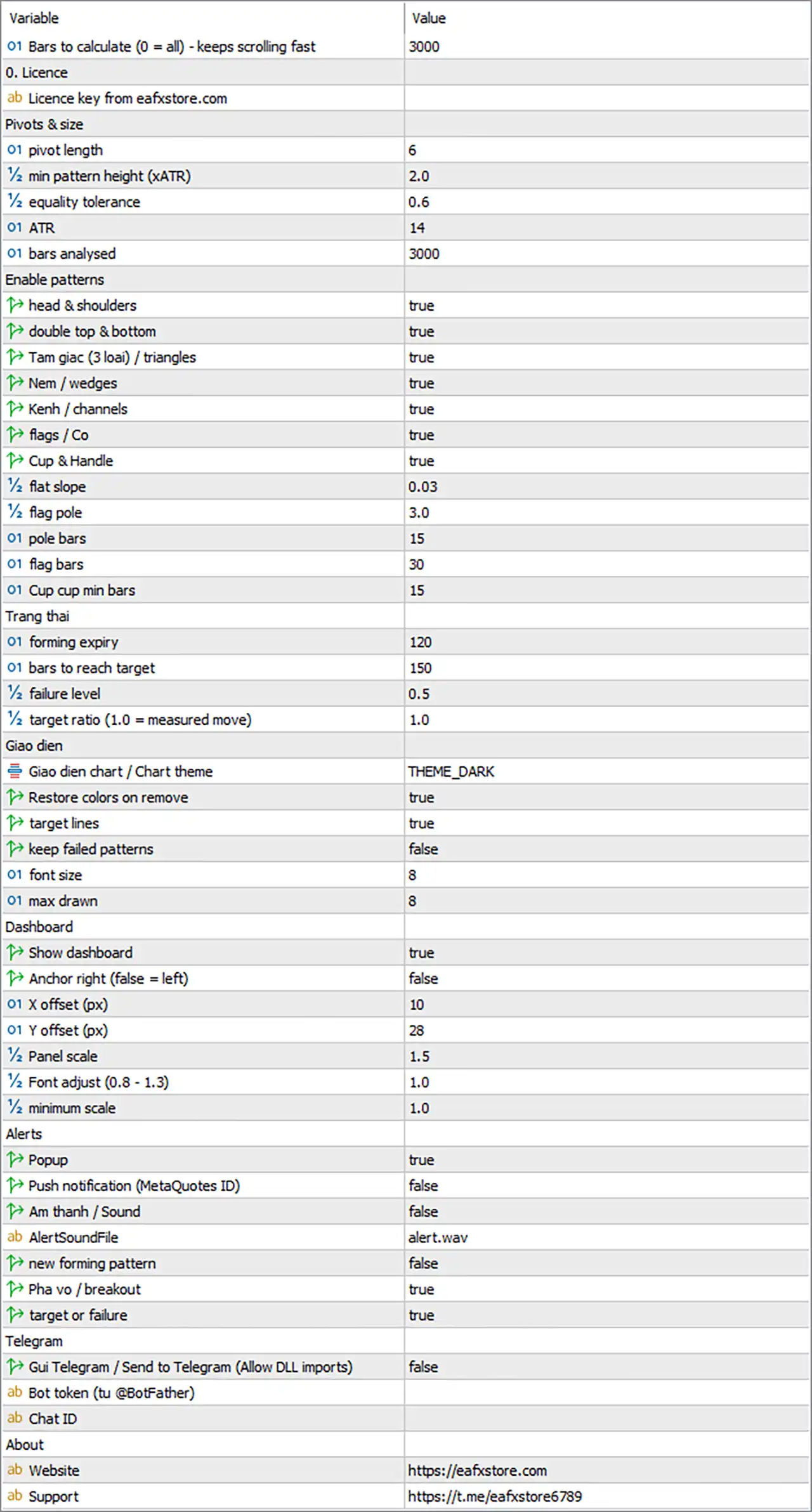
Omega Pattern Sniper Indicator MT5 Settings Panel

🔢 Installation

Attach the Indicator

🔹 Step 1 — Copy the indicator file to File → Open Data Folder → MQL5 → Indicators.

🔹 Step 2 — Restart MetaTrader 5 or right-click Indicators in Navigator and select Refresh.

🔹 Step 3 — Drag Omega Pattern Sniper from Navigator onto the chart.

🔹 Step 4 — Open the Common tab and enable Allow DLL imports. This is required for licence verification, Telegram alerts and the WEB / TELEGRAM buttons.

🔹 Step 5 — Open the Inputs tab, enter the licence key and configure the required settings.

🔹 Save / Load Settings — Use the Save / Load buttons on the Inputs tab to store configurations as .set files.


🔢 Calculation Range

🔹 Bars to calculate (0 = all) [MaxBarsCalc] — Default: 3000 — Controls how many recent bars are processed when the indicator loads. 0 calculates the entire history. Recommended: 3000; use 5000–10000 for more statistics on low timeframes.

🔹 Calculation Window — MaxBarsCalc limits how far back pivots are calculated.

🔹 Pattern History Window — MaxHistory controls how far back patterns are detected and counted.

🔹 Effective History — The actual working window is the smaller of MaxBarsCalc and MaxHistory. Keeping both values equal is recommended unless there is a specific reason to change them.


🔢 Licence

🔹 Licence key from eafxstore.com [InpLicenseKey] — Default: (empty) — The licence key received after purchase. The key is automatically trimmed and converted to uppercase. Recommended: enter the exact licence key provided.

🔹 Allow DLL imports — Must be enabled because the licence is verified online.

🔹 Internet Connection — Required for online licence verification.

🔹 Licence Verification — The key is checked together with the trading account number at startup, every 30 minutes and after switching trading accounts.

🔹 Grace Period — If the licence server cannot be reached after a recent successful verification, the indicator normally runs for up to 72 hours.

Common Licence Messages

🔹 “Please enter your licence key.” — The licence field is empty.

🔹 “Please tick Allow DLL imports…” — Enable DLL imports in the indicator's Common tab.

🔹 “Cannot reach the licence server.” — Check the internet connection or firewall and make sure a valid grace period is available.

🔹 “System clock check failed…” — Check that the computer date and time have not been set backwards.

🔹 Other server message — The message may indicate an expired key or account limitation. Contact support when necessary.


🔢 Pivots & Size

These settings control swing detection and the minimum size required for a pattern. They have a major effect on the number of patterns displayed.

🔹 pivot length [PivLen] — Default: 6 — Number of candles on each side required to confirm a swing high or low. Higher values find larger swings; lower values find smaller swings. Recommended: 4 scalping, 6 intraday, 8 swing.

🔹 Pivot Confirmation — A pivot is confirmed PivLen bars after it forms.

🔹 min pattern height (xATR) [MinHeightATR] — Default: 2.0 — Minimum pattern height measured in ATR multiples. Patterns smaller than this are ignored. It also defines the minimum depth of a Cup. Recommended: 1.5–2.5.

🔹 equality tolerance [EqualTolATR] — Default: 0.6 — Defines how close two prices must be in ATR terms to be considered equal for Double Tops, Double Bottoms and Cup rims. Recommended: 0.5–0.8; increase for volatile markets such as gold and crypto.

🔹 ATR [AtrLen] — Default: 14 — ATR period used by ATR-based settings and label spacing. Recommended: 14.

🔹 bars analysed [MaxHistory] — Default: 3000 — Number of recent closed bars used for pattern detection, tracking and statistics. Recommended: same value as MaxBarsCalc.


🔢 Enable Patterns

Pattern Switches

Each switch enables or disables one pattern family. Disabled patterns are not detected, drawn, alerted or included in statistics.

🔹 head & shoulders [UseHS] — Default: true — Detects bearish Head & Shoulders and bullish Inverse Head & Shoulders.

🔹 double top & bottom [UseDouble] — Default: true — Detects bearish Double Tops and bullish Double Bottoms.

🔹 Tam giac (3 loai) / triangles [UseTriangle] — Default: true — Detects Ascending, Descending and Symmetrical Triangles.

🔹 Nem / wedges [UseWedge] — Default: true — Detects Rising Wedges and Falling Wedges.

🔹 Kenh / channels [UseChannel] — Default: true — Detects parallel price channels, with direction determined by the breakout.

🔹 flags / Co [UseFlag] — Default: true — Detects Bull Flags and Bear Flags.

🔹 Cup & Handle [UseCup] — Default: true — Detects bullish Cup & Handle patterns.

🔹 Pattern Statistics Tip — Review the Statistics section of the dashboard after several days. Pattern families showing a low hit rate on a particular symbol can be disabled to reduce noise.


🔢 Pattern Shape Parameters

🔹 flat slope [SlopeFlatATR] — Default: 0.03 — ATR-per-bar threshold used to classify lines as flat, rising or falling. It also controls the tolerance for parallel channel lines. Recommended: 0.02–0.05.

🔹 flag pole [PoleATR] — Default: 3.0 — Minimum flag-pole size in ATR multiples. The flag consolidation must remain within 50% of the pole and retrace no more than about 62%. Recommended: 2.5–4.0.

🔹 pole bars [PoleBars] — Default: 15 — Maximum number of candles used to measure the flag pole. Recommended: 10–20.

🔹 flag bars [FlagMaxBars] — Default: 30 — Maximum age of a flag pattern. The pole top or bottom must be within this number of bars from the current candle. Recommended: 20–40.

🔹 Cup cup min bars [CupMinBars] — Default: 15 — Minimum width of the Cup between its two rims. Helps filter out sharp V-shaped formations. Recommended: 15–30 on intraday charts; larger on low timeframes.


🔢 Pattern States

These settings control the life cycle of a pattern after detection: breakout waiting time, target, failure level and target/failure time limit.

🔹 forming expiry [ExpireBars] — Default: 120 — Number of bars a pattern can wait for a breakout before it becomes Expired and is removed. Recommended: 80 scalping, 120 intraday, 150 swing.

🔹 bars to reach target [TargetBars] — Default: 150 — Number of bars allowed after breakout to reach the target or failure level. If neither is reached, the pattern becomes Timed out and is not counted as a hit or failure. Recommended: 100–200.

🔹 failure level [FailRatio] — Default: 0.5 — Controls the distance of the failure level from the breakout line based on pattern height. Recommended: 0.5; 0.3 gives less room, while 0.7 gives more room.

🔹 target ratio (1.0 = measured move) [TargetRatio] — Default: 1.0 — Sets the target distance based on pattern height. 1.0 represents the classic measured move. Recommended: 0.8 conservative, 1.0 standard, 1.272–1.618 extended.

Simple Target Example

🔹 Double Top Example — Top = 1.1050, neckline = 1.1000, pattern height = 50 pips.

🔹 Bearish Breakout — A candle closes below 1.1000.

🔹 Target — 1.1000 − 50 × 1.0 = 1.0950.

🔹 Failure Level — 1.1000 + 50 × 0.5 = 1.1025.

🔹 Dashboard Risk-to-Reward — Measured from the breakout candle close to the target and failure levels.

🔹 Important — Changing TargetRatio, FailRatio or related state settings also changes the statistics because these values define what counts as a hit or failure. Compare different settings over the same historical period.


🔢 Display

🔹 Giao dien chart / Chart theme [Theme] — Default: Dark — Controls the chart colour theme: None, Dark, Midnight or Light. The theme changes background, grid, candles, bid/ask and chart style. Recommended: Dark or Midnight for the dashboard; use None with a custom template.

🔹 Restore colors on remove [RestoreTheme] — Default: true — Restores the original chart colours when the indicator is removed. Recommended: true.

🔹 target lines [ShowTargets] — Default: true — Displays the gold TP line and grey failure line after a breakout. Recommended: true; disable for a cleaner chart.

🔹 keep failed patterns [ShowFailed] — Default: false — Keeps failed patterns on the chart in grey when enabled. Recommended: false for a clean chart; true for historical review.

🔹 font size [LabelFont] — Default: 8 — Controls the font size of pattern labels and TP price labels. Recommended: 8–10.

🔹 max drawn [MaxDraw] — Default: 8 — Maximum number of patterns displayed on the chart, starting with the most recent. Expired patterns are never drawn. Recommended: 5–10.

🔹 Important — MaxDraw only controls the number of displayed patterns. It does not change pattern detection, alerts or statistics.


🔢 Dashboard

🔹 Show dashboard [ShowDash] — Default: true — Shows or hides the dashboard. Pattern detection and alerts continue even when the dashboard is hidden. Recommended: true.

🔹 Anchor right (false = left) [DashRight] — Default: false — Places the dashboard on the right side instead of the left. Recommended: true if the left side of the chart needs to remain clear.

🔹 X offset (px) [DashX] — Default: 10 — Horizontal distance from the selected chart edge. Recommended: 10–20.

🔹 Y offset (px) [DashY] — Default: 28 — Vertical distance from the top of the chart. 28 leaves room for the one-click trading panel or licence message.

🔹 Panel scale [DashScale] — Default: 1.5 — Controls the overall dashboard size. The panel automatically reduces to fit chart height and 45% of chart width. Recommended: 1.0–1.2 on Full HD and 1.5–2.0 on 2K/4K screens.

🔹 Font adjust (0.8 - 1.3) [DashFontAdj] — Default: 1.0 — Adjusts dashboard text size without changing the panel layout. Recommended: 0.9–1.1.

🔹 minimum scale [DashMinScale] — Default: 1.0 — Minimum scale allowed when the dashboard automatically fits a small chart. The internal lower limit is 0.55. Recommended: 1.0; use 0.7 if the dashboard is cut off on small charts.

Moving the Dashboard

🔹 Drag Dashboard — Drag the dashboard by its header to move it.

🔹 Saved Position — A manually moved dashboard position is saved for that chart and overrides DashX and DashY.

🔹 Reset Position — Press F3, open Global Variables and delete variables beginning with OMPATT_DASH, then re-attach the indicator.


🔢 Alerts

Alerts are sent only for newly closed live candles.

🔹 Popup [AlertPopup] — Default: true — Displays the standard MT5 alert window with sound. Recommended: true when monitoring the chart directly.

🔹 Push notification (MetaQuotes ID) [AlertPush] — Default: false — Sends alerts to the MT5 mobile application. Setup: enter the MetaQuotes ID under Tools → Options → Notifications.

🔹 Am thanh / Sound [AlertSoundOn] — Default: false — Plays the selected sound file when an alert occurs. Useful when popups are disabled.

🔹 AlertSoundFile [AlertSoundFile] — Default: alert.wav — Specifies the sound file located in the terminal's Sounds folder. Any .wav file in that folder can be used.

🔹 new forming pattern [AlertForming] — Default: false — Alerts when a new pattern is detected before breakout. Recommended: false for most traders; enable for early preparation on higher timeframes.

🔹 Pha vo / breakout [AlertBreakout] — Default: true — Alerts when a pattern breaks out and includes price, target and failure information. Recommended: true.

🔹 target or failure [AlertResult] — Default: true — Alerts when a pattern reaches its target or failure level. Recommended: true for position management.


🔢 Telegram

🔹 Gui Telegram / Send to Telegram (Allow DLL imports) [TgEnable] — Default: false — Sends alerts to Telegram as formatted messages containing symbol, timeframe, event, prices and time. Recommended: true after Telegram is configured.

🔹 Bot token (tu @BotFather) [TgToken] — Default: (empty) — Telegram bot API token. Keep the token private.

🔹 Chat ID [TgChatID] — Default: (empty) — Identifies the Telegram chat, group or channel that receives messages.

🔹 Group Chat ID — Group IDs start with -.

🔹 Channel Chat ID — Channel IDs usually start with -100.

Telegram Setup

🔹 Step 1 — Open @BotFather in Telegram, send /newbot and follow the instructions.

🔹 Step 2 — Copy the bot token into TgToken.

🔹 Step 3 — Open the bot chat and press Start, or add the bot to a group/channel as an administrator.

🔹 Step 4 — Obtain the Chat ID using a suitable Telegram method and enter it into TgChatID.

🔹 Step 5 — Set TgEnable = true and make sure Allow DLL imports is enabled.

🔹 Step 6 — Click the gold TEST TG button in the dashboard footer.

🔹 Troubleshooting — If the test fails, check the Experts tab for the reported reason.


🔢 About

🔹 Website [AboutWeb] — Default: https://eafxstore.com — Website opened by the WEB button on the dashboard. Recommended: leave as is.

🔹 Support [AboutTelegram] — Default: https://t.me/eafxstore6789 — Telegram support page opened by the TELEGRAM button. Recommended: leave as is.


🔢 Quick Setup Presets

Parameters not listed below keep their default values.

⚙️ Scalping — M5 to M15

🔹 PivLen — 4

🔹 MinHeightATR — 1.5

🔹 EqualTolATR — 0.5

🔹 ExpireBars — 80

🔹 TargetBars — 100

🔹 TargetRatio — 0.8

🔹 FailRatio — 0.5

🔹 AlertForming — false


⚙️ Intraday — M30 to H1

🔹 PivLen — 6

🔹 MinHeightATR — 2.0

🔹 EqualTolATR — 0.6

🔹 ExpireBars — 120

🔹 TargetBars — 150

🔹 TargetRatio — 1.0

🔹 FailRatio — 0.5

🔹 AlertForming — false


⚙️ Swing — H4 to D1

🔹 PivLen — 8

🔹 MinHeightATR — 2.5

🔹 EqualTolATR — 0.7

🔹 ExpireBars — 150

🔹 TargetBars — 200

🔹 TargetRatio — 1.0

🔹 FailRatio — 0.5

🔹 AlertForming — true


⚙️ Volatile Markets — Gold / Crypto

🔹 PivLen — 6–8

🔹 MinHeightATR — 2.5

🔹 EqualTolATR — 0.8

🔹 ExpireBars — 120

🔹 TargetBars — 150

🔹 TargetRatio — 0.8

🔹 FailRatio — 0.6

🔹 AlertForming — false


🔢 Simple Pattern Detection Logic

🔹 Step 1 — Swing Detection — PivLen identifies important swing highs and lows.

🔹 Step 2 — Pattern Size Check — MinHeightATR filters out patterns that are too small relative to market volatility.

🔹 Step 3 — Pattern Matching — The enabled pattern families are checked against their specific structural conditions.

🔹 Step 4 — Equality Check — EqualTolATR controls how close important price points must be for patterns such as Double Tops, Double Bottoms and Cups.

🔹 Step 5 — Pattern Formation — A detected pattern remains active while waiting for a breakout.

🔹 Step 6 — Forming Expiry — If no breakout occurs within ExpireBars, the pattern becomes Expired.

🔹 Step 7 — Breakout — When the breakout condition occurs, the indicator calculates the target and failure level.

🔹 Step 8 — Target Calculation — The target uses the pattern height multiplied by TargetRatio.

🔹 Step 9 — Failure Calculation — The failure level is determined using FailRatio.

🔹 Step 10 — Result Tracking — The pattern is tracked for TargetBars to determine whether it reaches the target or failure level.


🔢 Recommended Starting Settings

⚙️ Balanced Intraday Setup

🔹 PivLen — 6

🔹 MinHeightATR — 2.0

🔹 EqualTolATR — 0.6

🔹 ATR — 14

🔹 MaxHistory — 3000

🔹 TargetRatio — 1.0

🔹 FailRatio — 0.5

🔹 TargetBars — 150

🔹 ExpireBars — 120

🔹 ShowTargets — true

🔹 ShowFailed — false

🔹 AlertBreakout — true

🔹 AlertResult — true

This configuration follows the standard intraday preset from the source guide.

⚙️ Cleaner Chart / Fewer Patterns

🔹 PivLen — Increase toward 8

🔹 MinHeightATR — Increase toward 2.5

🔹 MaxDraw — Reduce toward 5

🔹 Disable weak pattern families — Turn off pattern switches that produce excessive noise.

⚙️ More Active Pattern Detection

🔹 PivLen — Reduce toward 4

🔹 MinHeightATR — Reduce toward 1.5

🔹 EqualTolATR — Keep within the recommended range.

🔹 Pattern switches — Enable the required pattern families.


🔢 Troubleshooting

🔹 Nothing is drawn and a licence message appears — Check the licence key, DLL permission, internet connection and licence status.

🔹 No patterns appear — Lower PivLen or MinHeightATR, make sure the pattern switches are enabled and confirm that enough history is loaded.

🔹 Too many patterns — Increase PivLen or MinHeightATR, reduce MaxDraw and disable weaker pattern families.

🔹 Dashboard too large or cut off — Lower DashScale or DashMinScale, or drag the dashboard to a clearer area.

🔹 Chart colours changed — Check the Theme setting. Select None to keep custom colours, or remove the indicator to restore the original theme.

🔹 Telegram does not work — Check TgToken, TgChatID, DLL permission and that the bot was started. Use TEST TG and check the Experts tab.

🔹 Statistics show “-” — There are not enough resolved patterns yet. Increase MaxBarsCalc / MaxHistory or allow more historical patterns to accumulate.


🔢 Quick Summary

🔹 For Scalping — Start with PivLen 4, MinHeightATR 1.5, TargetRatio 0.8 and ExpireBars 80.

🔹 For Intraday — Start with PivLen 6, MinHeightATR 2.0, TargetRatio 1.0 and ExpireBars 120.

🔹 For Swing Trading — Start with PivLen 8, MinHeightATR 2.5, TargetRatio 1.0 and ExpireBars 150.

🔹 For Gold / Crypto — Use a higher EqualTolATR, with the source preset using 0.8.

🔹 For Cleaner Signals — Increase pivot length and minimum pattern height.

🔹 For More Patterns — Reduce pivot length and minimum pattern height.

🔹 For Breakout Monitoring — Keep AlertBreakout = true.

🔹 For Result Monitoring — Keep AlertResult = true.

🔹 For Telegram Alerts — Configure TgToken and TgChatID, enable TgEnable and allow DLL imports.
Full review

Quick Verdict

Omega Pattern Sniper Indicator is an MT5 chart pattern scanner that automatically identifies 12 patterns across seven families and tracks each setup from formation to breakout and target or failure. It combines objective pattern detection, historical statistics, breakout alerts and measurable trade levels in one dashboard.

Best For

✅ Traders who use classic chart patterns for technical analysis

✅ MT5 users looking for automated pattern recognition

✅ Traders who want measurable breakout and target statistics

✅ Users who prefer entry, target and failure levels on the chart

✅ Traders working with Forex, gold, indices, crypto or stocks

Overall Rating

9.0/10 ⭐⭐⭐⭐⭐


What is Omega Pattern Sniper Indicator?

Omega Pattern Sniper Indicator is a MetaTrader 5 technical analysis tool that automatically scans price action for 12 classic chart patterns across seven pattern families. It uses a rules based pivot engine to identify formations such as Head and Shoulders, Double Tops, Triangles, Wedges, Channels, Flags and Cup and Handle. Each detected pattern is tracked through formation, breakout, target, failure or expiration.

The indicator is designed to make chart pattern analysis more objective and measurable. It draws pattern boundaries, breakout arrows, target and failure levels while providing historical statistics for each pattern family on the selected symbol and timeframe.

⭐ Join Our Channel Telegram


How Does Omega Pattern Sniper Indicator Work?

Omega Pattern Sniper Indicator processes each closed candle through five main stages. It first identifies confirmed price pivots, normalizes pattern measurements using ATR, checks the pivot structure against enabled pattern rules, tracks the pattern through its life cycle and updates historical statistics.

Pivot Based Pattern Detection

The indicator uses a pivot engine similar to a ZigZag structure. Swing highs and lows are confirmed using the selected PivLen, while consecutive pivots of the same type are merged to create a cleaner alternating sequence. Once confirmed, a pivot does not move, helping keep pattern detection stable.

ATR Based Pattern Measurement

Pattern height, equality and slope conditions are measured using ATR rather than fixed price distances. This allows the same logic to adapt across markets with different volatility characteristics, including Forex and XAUUSD.

Automatic Chart Pattern Recognition

Every newly confirmed pivot triggers a check of the enabled pattern families. The indicator can identify Head and Shoulders, Inverse Head and Shoulders, Double Top, Double Bottom, three types of Triangle, two Wedges, Channel, Bull and Bear Flags and Cup and Handle.

Pattern Life Cycle

Each pattern is tracked from Forming to Breakout and then to Target Hit, Failed or Timed Out. A breakout occurs when a candle closes beyond the relevant neckline or boundary. Once the breakout happens, the target and failure levels become fixed.

Measured Move Targets

The target is calculated from the breakout line plus the pattern height multiplied by the selected TargetRatio. The failure level uses the pattern height multiplied by FailRatio. The exact height calculation depends on the pattern type.

Pattern Score

The Pattern Score ranges from 0 to 100 and combines the active pattern direction, its historical success rate and the balance of bullish versus bearish breakouts over the last 50 candles. Scores of 60 or higher are classified as bullish, while scores of 40 or lower are classified as bearish.


Key Features of Omega Pattern Sniper Indicator

12 Automated Chart Patterns

The indicator recognizes 12 chart patterns covering seven families, including Head and Shoulders, Double Tops and Bottoms, Triangles, Wedges, Channels, Flags and Cup and Handle.

Rules Based Pattern Engine

Pattern recognition is based on defined pivot geometry, equality tolerances, slopes, convergence and volatility normalized measurements rather than manual visual interpretation.

Breakout Detection

Confirmed breakouts are identified when a candle closes beyond the relevant pattern boundary in the expected direction. Breakout arrows are then displayed directly on the chart.

Target and Failure Levels

Every confirmed breakout receives a measured target and failure level. These levels are calculated from the breakout price and the measured height of the pattern.

Historical Pattern Statistics

The dashboard tracks pattern counts, target hit percentage, failure percentage and average candles from breakout to target for each pattern family.

Pattern Score Dashboard

A single 0 to 100 Pattern Score summarizes the current market picture using active pattern direction, historical pattern performance and recent breakout balance.

Multi Channel Alerts

Alerts can be delivered through MT5 popup notifications, mobile push, sound and Telegram. Different alert types can be enabled for new patterns, breakouts and final results.

Clean Trading Dashboard

The dashboard displays the active pattern, status, target, risk to reward ratio, Pattern Score, historical statistics, live patterns and recent events in one scalable interface.


Omega Pattern Sniper Indicator Review

Omega Pattern Sniper Indicator takes a traditional chart pattern approach and turns it into a systematic MT5 workflow. Instead of relying entirely on visual pattern recognition, the indicator uses confirmed pivots and predefined geometric rules to scan the market continuously.

One of the strongest aspects of the system is its pattern life cycle. A formation is not treated as a completed trade signal simply because its shape resembles a known pattern. It remains in the Forming state until price produces the required breakout. After the breakout, the indicator continues monitoring the trade structure until the target is reached, the failure level is crossed or the setup expires.

The historical statistics add another useful layer. Rather than showing only the number of patterns detected, the dashboard records how frequently each pattern family reached its target, how often it failed and how many candles were typically required to reach the target. These results are calculated from the selected symbol and timeframe.

The ATR normalization is also important because chart patterns appear across markets with very different volatility characteristics. By measuring height, equality and slope in relation to ATR, the recognition rules can adapt more naturally between instruments such as EURUSD and XAUUSD.

For active traders, the dashboard and alert system reduce the need to continuously search every chart manually. New formations, confirmed breakouts and completed results can be delivered through several notification channels.

Omega Pattern Sniper Indicator MT5 Review
Omega Pattern Sniper MT5 Review

Omega Pattern Sniper MT5 Review

Simple BUY and SELL Entry Strategy

For beginners, the Omega Pattern Sniper Indicator can be used with a simple chart-pattern confirmation approach. The main idea is to wait for the indicator to identify a potential bullish or bearish pattern, then confirm the expected direction with price action before entering a trade.

BUY Entry

🔹 Step 1: Wait for the Omega Pattern Sniper Indicator to identify a bullish pattern or display a clear BUY signal on the chart.

🔹 Step 2: Allow the bullish pattern to complete rather than entering while the pattern is still developing.

🔹 Step 3: Look for a bullish confirmation, such as a bullish candle closing above the pattern's confirmation level or nearby resistance.

🔹 Step 4: Enter a BUY position after the bullish confirmation candle closes.

🔹 Stop Loss: Place the Stop Loss below the recent swing low or below the invalidation level of the bullish pattern.

🔹 Take Profit: Target the next resistance level or the pattern's projected target, using a predefined risk-to-reward ratio such as 1:2.

SELL Entry

🔹 Step 1: Wait for the Omega Pattern Sniper Indicator to identify a bearish pattern or display a clear SELL signal on the chart.

🔹 Step 2: Allow the bearish pattern to complete rather than entering while the pattern is still developing.

🔹 Step 3: Look for a bearish confirmation, such as a bearish candle closing below the pattern's confirmation level or nearby support.

🔹 Step 4: Enter a SELL position after the bearish confirmation candle closes.

🔹 Stop Loss: Place the Stop Loss above the recent swing high or above the invalidation level of the bearish pattern.

🔹 Take Profit: Target the next support level or the pattern's projected target, using a predefined risk-to-reward ratio such as 1:2.

Simple Entry Rule for Beginners

The basic rule is:

BUY = Bullish Pattern + Pattern Completion + Bullish Confirmation

SELL = Bearish Pattern + Pattern Completion + Bearish Confirmation

Avoid entering simply because a pattern starts to form. Wait until the Omega Pattern Sniper Indicator identifies a completed setup and price confirms the expected direction. This helps reduce premature entries while keeping the trading process simple.

This beginner-friendly approach makes the Omega Pattern Sniper Indicator easier to understand and apply. More advanced traders can later combine pattern signals with support and resistance, market structure, trend direction, or additional confirmation tools.

Omega Pattern Sniper Indicator Review

Omega Pattern Sniper Indicator Review

Why Omega Pattern Sniper Indicator Stands Out

Automated Pattern Scanning

The indicator continuously scans enabled chart patterns on the selected market and timeframe, reducing the need for manual chart inspection.

Objective Pattern Recognition

Every pattern is evaluated using the same pivot and geometry rules, helping create consistent detection across charts instead of relying entirely on subjective visual interpretation.

Pattern Performance Evidence

Historical target hit rates, failure rates and average time to target are displayed for individual pattern families, giving traders measurable information about past behaviour on the selected market.

Breakout Based Trading Logic

The indicator separates pattern formation from the actual breakout. This creates a clearer distinction between a potential setup and a confirmed price movement through the pattern boundary.

Adaptive Volatility Rules

ATR based measurements allow pattern requirements to scale with market volatility, making the detection framework applicable to different instruments and timeframes.

Complete Pattern Tracking

Once a pattern is registered, the indicator follows it until target, failure or expiration. This provides a complete record of what happened after the formation appeared.

Flexible Alerts

Popup, push, sound and Telegram notifications help keep traders informed when new patterns, breakouts or results occur.


Risk Management Features

Defined Failure Level

Each breakout receives a failure level based on the breakout line and measured pattern height. This provides a predefined reference for determining when the breakout structure has failed.

Measured Move Target

The target uses the traditional measured move concept, calculated from the breakout line and pattern height. TargetRatio controls how much of the measured move is used.

Risk to Reward Information

The dashboard displays the active pattern's target and risk to reward ratio, allowing the trade structure to be evaluated directly from the chart.

Pattern Quality Filtering

The Pattern Score and historical pattern statistics provide additional context for evaluating the quality and behaviour of active formations.

Session Control

The indicator includes a session timer that can limit signals to a selected daily time window, including windows that cross midnight.


Omega Pattern Sniper Indicator supports any timeframe and symbols including Forex, metals, indices, crypto and stocks. The default settings are positioned toward intraday trading on M30 to H1, while alternative configurations are available for scalping and swing trading.

Trading Style Timeframe PivLen MinHeightATR Target Ratio
Scalping M5 to M15 4 1.5 0.8
Intraday M30 to H1 6 2.0 1.0
Swing Trading H4 to D1 8 2.5 1.0

Scalping Conditions

For M5 to M15 scalping, the suggested PivLen is 4 with MinHeightATR at 1.5. Breakout alerts are recommended as the main notification type for this faster trading style.

Intraday Conditions

M30 to H1 is the default configuration, using PivLen 6 and MinHeightATR 2.0. Breakout and result alerts provide information about both confirmed entries and subsequent outcomes.

Swing Trading Conditions

For H4 to D1 swing trading, PivLen can be increased to 8 and MinHeightATR to 2.5. The longer configuration gives the pattern engine more room to identify larger market structures.

Gold, Indices and Crypto

For more volatile instruments such as gold, indices and crypto, the supplied settings recommend increasing EqualTolATR to around 0.7 to 0.8 and MinHeightATR to around 2.5 for cleaner pattern detection.


Weaknesses and Risk Warnings

Pattern Confirmation Takes Time

Because pivots require PivLen candles on the right side before confirmation, pattern recognition intentionally includes a confirmation delay. This helps stabilize the detected structure but means formations are not identified instantly.

Not Every Pattern Becomes a Breakout

A detected formation can remain in the Forming state, expire without a breakout or fail after breaking out. Pattern recognition should therefore be separated from confirmed trade execution.

Market Specific Statistics Matter

Historical pattern performance is calculated from the current symbol and timeframe. A pattern family that performed well historically on one market should not automatically be assumed to behave the same way on another.

Volatile Markets Need Careful Settings

Gold, indices and crypto can generate more noise. Higher MinHeightATR and EqualTolATR settings may help produce cleaner structures, but they can also reduce the number of detected formations.

Historical Statistics Do Not Guarantee Results

The indicator's win rates, target hit percentages and backtest statistics describe past market behaviour and do not guarantee future performance. Proper testing and risk management remain necessary.


Who Should Use Omega Pattern Sniper Indicator?

Chart Pattern Traders

The indicator is suitable for traders who already use classic formations such as Head and Shoulders, Double Tops, Triangles, Wedges, Flags and Cup and Handle.

Technical Analysis Traders

Users who prefer rule based price structure analysis can use the automated pivot and pattern engine to monitor multiple formations without manually drawing every structure.

Intraday Traders

The default M30 to H1 configuration makes the indicator particularly relevant to intraday chart pattern trading, while M5 to M15 settings are available for faster setups.

Traders Who Value Statistics

The dashboard provides pattern family statistics including target hit percentage, failure percentage and average time to target. This makes the indicator useful for traders who want measurable historical context.

Multi Market Traders

Omega Pattern Sniper Indicator supports Forex, metals, indices, crypto and stocks across different timeframes, with ATR based rules helping the pattern engine adapt to different volatility environments.


Product Download Package?

The download package of the product suite includes:

✅ Indicator: OmegaPatternSniper_v1.01.ex5

✅ Omega_Pattern_Sniper_Product_Guide.pdf

✅ Omega_Pattern_Sniper_Inputs_Setup_Guide.pdf

➡️ Reviewed by David Easton


Final Verdict

Omega Pattern Sniper Indicator turns classic chart pattern analysis into a structured MT5 workflow. It automatically detects 12 patterns, confirms breakouts on closed candles, calculates measured targets and failure levels, tracks every formation through its complete life cycle and records historical pattern statistics. With ATR based normalization, Pattern Score, alerts and a detailed dashboard, it provides a practical framework for traders who want more objective and measurable chart pattern analysis. Proper testing and risk management remain essential because historical performance does not guarantee future results.

Questions about Omega Pattern Sniper Indicator MT5

❓ What does Omega Pattern Sniper Indicator do?

Omega Pattern Sniper Indicator automatically scans the market for 12 chart patterns across 7 families and tracks each pattern from formation to breakout, target hit, failure, or expiry.

❓ Which chart patterns does Omega Pattern Sniper Indicator recognize?

Omega Pattern Sniper Indicator recognizes Head & Shoulders, Inverse H&S, Double Top, Double Bottom, three Triangle types, two Wedge types, Channel, Bull/Bear Flag, and Cup & Handle.

❓ How does Omega Pattern Sniper Indicator confirm chart patterns?

Omega Pattern Sniper Indicator uses a rules-based pivot engine and ATR-based measurements to identify pattern geometry consistently across different symbols and market conditions.

❓ Does Omega Pattern Sniper Indicator repaint its breakout signals?

No. Omega Pattern Sniper Indicator processes closed candles only, and confirmed pivots and breakout arrows remain fixed after they are printed.

❓ Does Omega Pattern Sniper Indicator provide entry, target, and failure levels?

Yes. Omega Pattern Sniper Indicator draws the breakout line, measured-move target, and failure level, providing clear reference points for trade planning.

❓ What is the Pattern Score in Omega Pattern Sniper Indicator?

Omega Pattern Sniper Indicator calculates a 0–100 Pattern Score using the active pattern direction, its historical success rate, and the balance of recent bullish and bearish breakouts.

❓ Does Omega Pattern Sniper Indicator provide historical pattern statistics?

Yes. Omega Pattern Sniper Indicator shows pattern counts, target-hit percentage, failure percentage, and average candles from breakout to target for each pattern family.

❓ What alerts are available in Omega Pattern Sniper Indicator?

Omega Pattern Sniper Indicator supports alerts for forming patterns, breakouts, and results through MT5 popup, push notification, sound, and Telegram.

❓ Which markets and timeframes support Omega Pattern Sniper Indicator?

Omega Pattern Sniper Indicator works on any timeframe and symbols with OHLC data, including Forex, metals, indices, crypto, and stocks.

❓ What are the installation requirements for Omega Pattern Sniper Indicator?

Omega Pattern Sniper Indicator requires a valid licence key, an internet connection for licence verification and Telegram, and “Allow DLL imports” enabled in MetaTrader 5.

Other products traders compare

From $25
Instant download
Choose option