🔢 Omega Harmonic Edge – Easy-to-Read Inputs Guide
This guide explains the Omega Harmonic Edge Inputs in a simple and practical format. It covers installation, licence, swing detection, harmonic pattern recognition, Fibonacci ratio tolerance, PRZ settings, chart display, dashboard, alerts, Telegram notifications, recommended presets, troubleshooting, and the complete harmonic analysis logic.
🔢 Installation
🔹 Open MetaTrader 5 → File → Open Data Folder.
🔹 Go to MQL5 → Indicators and copy the Omega Harmonic Edge indicator file into this folder.
🔹 Right-click the Navigator panel in MetaTrader 5 and select Refresh.
🔹 Go to Tools → Options → Expert Advisors and enable Allow DLL imports.
🔹 Drag Omega Harmonic Edge from the Navigator onto a chart.
🔹 If the Common tab also displays Allow DLL imports, enable it.
🔹 Open the Inputs tab and enter the licence key.
🔹 Click OK and check the Indicator tab.
🔹 A successful licence verification should display a message beginning with “Licence: Licence OK”.
To change the settings later, press Ctrl+I, select Omega Harmonic Edge, and click Properties.
🔢 General
🔶 MaxBarsCalc
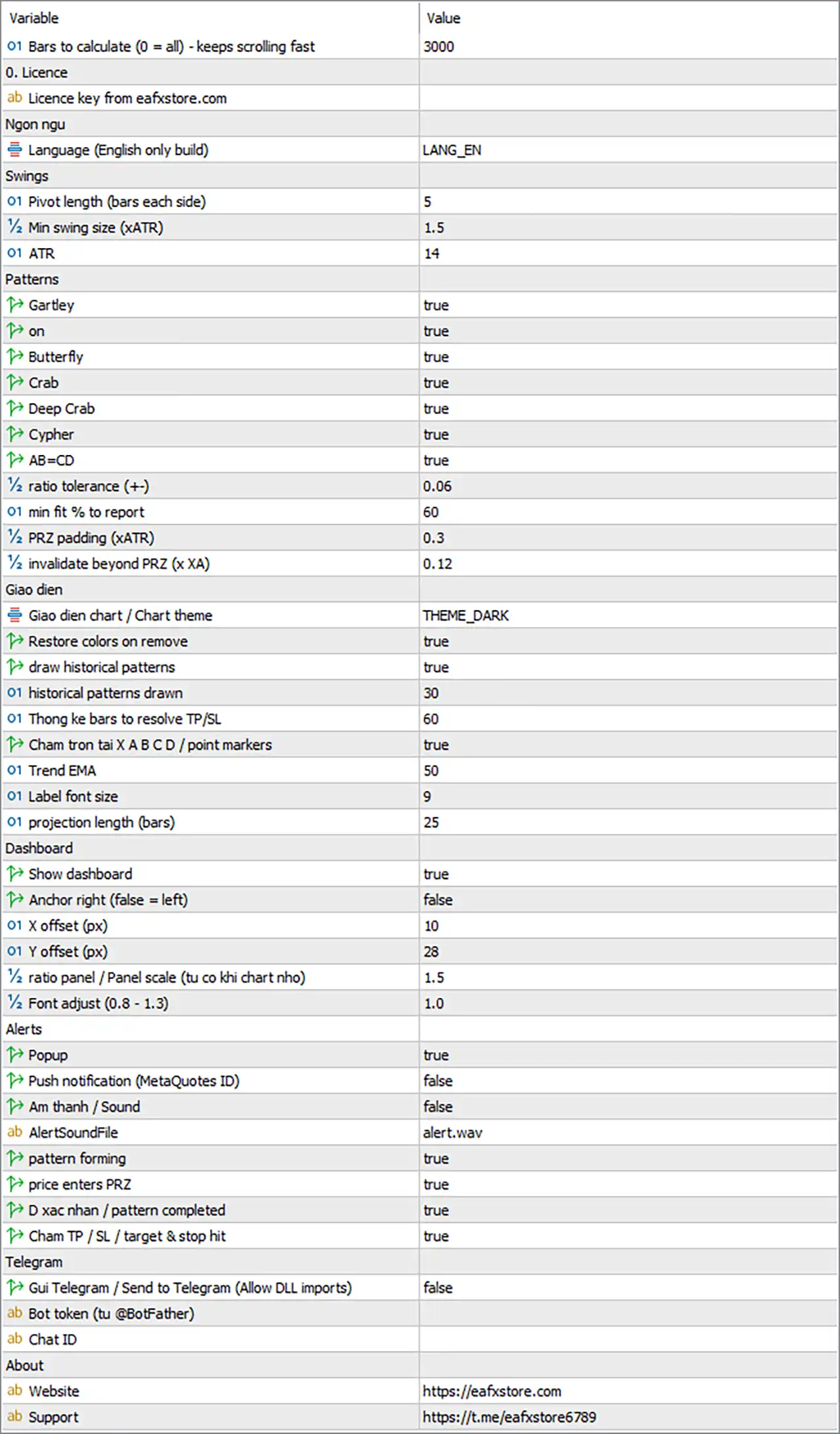
🔹 Bars to calculate (0 = all) [MaxBarsCalc] — Default: 3000 — Defines how many of the most recent bars are analyzed for swings, harmonic patterns, and historical statistics. Suggested: 2000–10000.
A larger value provides more historical patterns and a larger statistical sample, but requires more loading time and creates more chart objects. A value of 0 analyzes the entire available chart history.
Recommended: 3000–5000 for normal use; 5000–10000 when more historical patterns are needed.
🔢 Licence
🔶 InpLicenseKey
🔹 Licence key from eafxstore.com [InpLicenseKey] — Default: (empty) — Enter the personal licence key received after purchase.
The key is automatically trimmed and converted to uppercase. It is checked when the indicator starts, every 30 minutes afterward, and whenever logging into a different trading account.
Recommended: Enter the valid personal licence key.
A previously verified installation can continue running for up to 72 hours if the licence server is temporarily unreachable. Internet access and Allow DLL imports are required for verification.
🔢 Language
🔶 Lang
🔹 Language (English only build) [Lang] — Default: LANG_EN — Controls the display language of the indicator.
This build displays dashboard text, chart labels, and alerts in English. The setting is retained mainly for compatibility with older presets.
Recommended: Leave as LANG_EN.
🔢 Swings
The Swings section determines which market highs and lows are recognized as valid swing points. Since harmonic patterns are built from these swings, these settings have a major influence on pattern detection.
🔶 PivLen
🔹 Pivot length (bars each side) [PivLen] — Default: 5 — Defines how many bars must exist on each side of a bar to confirm a swing high or swing low. Suggested: 3–8.
Lower values detect more and smaller swings, producing more patterns but also more noise. Higher values detect fewer and larger swings, creating cleaner structures but confirming each swing later.
Recommended: 3–4 for M5–M15, 5 for M30–H1, and 5–7 for H4–D1.
🔶 SwingATR
🔹 Min swing size (xATR) [SwingATR] — Default: 1.5 — Defines the minimum distance between consecutive swing highs and lows as a multiple of ATR. Suggested: 1.0–3.0.
Price movements smaller than this threshold do not create a new swing and instead extend the current swing.
Recommended: Increase toward 2.0–3.0 to filter small zig-zags; lower toward 1.0–1.5 to detect smaller harmonic structures.
🔶 AtrLen
🔹 ATR [AtrLen] — Default: 14 — Defines the Average True Range calculation period used by SwingATR, PRZ padding, D confirmation tolerance, and PRZ proximity calculations.
Recommended: 14 for a balanced volatility measurement. Suggested: 10–21.
🔢 Patterns
The Patterns section controls which harmonic formations are detected and how strictly their Fibonacci ratios are evaluated.
🔶 Harmonic Pattern Switches
🔹 Gartley [UseGartley] — Default: true — Enables or disables Gartley detection. The pattern uses approximately B ≈ 0.618 XA and D = 0.786 XA.
🔹 Bat [UseBat] — Default: true — Enables or disables Bat detection. The pattern uses approximately B ≈ 0.44 XA and D = 0.886 XA.
🔹 Butterfly [UseButterfly] — Default: true — Enables or disables Butterfly detection. The pattern uses approximately B ≈ 0.786 XA and D = 1.272 XA.
🔹 Crab [UseCrab] — Default: true — Enables or disables Crab detection. The pattern uses approximately B ≈ 0.50 XA and D = 1.618 XA.
🔹 Deep Crab [UseDeepCrab] — Default: true — Enables or disables Deep Crab detection. The pattern uses approximately B ≈ 0.886 XA and D = 1.618 XA.
🔹 Cypher [UseCypher] — Default: true — Enables or disables Cypher detection. The pattern uses C = 1.13–1.414 XA and D = 0.786 XC.
🔹 AB=CD [UseABCD] — Default: true — Enables or disables AB=CD detection. The pattern uses CD = AB and BC = 0.618–0.786 AB.
Setting a pattern switch to false completely removes that pattern from detection, drawing, alerts, and historical statistics.
🔶 RatioTol
🔹 Ratio tolerance (+-) [RatioTol] — Default: 0.06 — Defines how far a measured Fibonacci ratio can deviate from the ideal pattern range while still being accepted. Suggested: 0.03–0.10.
A larger value detects more patterns but allows lower ratio precision. A smaller value produces fewer patterns with tighter Fibonacci matching.
Recommended: 0.06 for balanced detection; 0.03–0.05 for stricter pattern filtering.
🔶 MinFit
🔹 Min fit % to report [MinFit] — Default: 60 — Defines the minimum pattern fit score from 0–100 required for a pattern to be displayed, alerted, and included in statistics. Suggested: 55–80.
Recommended: 60 for balanced detection; increase toward 70–80 when only stronger-fitting patterns should be reported.
🔶 PRZExtraATR
🔹 PRZ padding (xATR) [PRZExtraATR] — Default: 0.3 — Adds extra space above and below the Potential Reversal Zone using ATR multiples. Suggested: 0.1–0.6.
A wider PRZ is reached earlier and more frequently, allowing more patterns to complete. For Butterfly, Crab, Deep Crab, and AB=CD, a wider PRZ also creates a wider stop-loss because the stop is positioned beyond the PRZ.
Recommended: 0.3 for a balanced PRZ.
🔶 InvalidXA
🔹 Invalidate beyond PRZ (x XA) [InvalidXA] — Default: 0.12 — Defines how far price must close beyond the far edge of the PRZ, measured as a fraction of the XA leg, before a forming pattern becomes invalid. Suggested: 0.05–0.25.
A smaller value cancels failed patterns faster, while a larger value allows more room for price to overshoot the PRZ.
Recommended: 0.12 for a balanced invalidation threshold.
🔢 Display
🔶 Theme
🔹 Chart theme [Theme] — Default: THEME_DARK — Changes the chart colours to match Omega Harmonic Edge.
Available options:
🔹 THEME_NONE — Keeps the existing chart colours.
🔹 THEME_DARK — Dark grey background.
🔹 THEME_MIDNIGHT — Deep navy background with brighter candles.
🔹 THEME_LIGHT — White background with grid.
All themes except THEME_NONE also switch the chart to candlesticks and hide period separators.
Recommended: THEME_DARK for the default Omega Harmonic Edge appearance.
🔶 RestoreTheme
🔹 Restore colors on remove [RestoreTheme] — Default: true — Restores the original chart colours, grid, and chart mode when the indicator is removed.
Recommended: true.
🔶 ShowHistory
🔹 Draw historical patterns [ShowHistory] — Default: true — Displays completed historical harmonic patterns using dimmed colours and shows their results such as TP1, TP2, SL, or timeout.
Turning it off creates a cleaner chart while historical statistics continue to be calculated.
Recommended: true for pattern analysis; false for a cleaner live chart.
🔶 MaxHistory
🔹 Historical patterns drawn [MaxHistory] — Default: 30 — Defines how many of the most recent historical patterns are displayed on the chart. Suggested: 10–50.
This affects chart drawing only and does not change the historical statistics.
Recommended: 30.
🔶 StatHold
🔹 Thong ke bars to resolve TP/SL (Statistics) [StatHold] — Default: 60 — Defines how many bars after D a historical pattern has to reach its stop-loss or TP1. If neither is reached within this period, the pattern becomes a timeout and is excluded from the win rate. Suggested: 40–100.
Recommended: Use shorter values on lower timeframes and longer values on higher timeframes.
🔶 ShowPoints
🔹 Cham tron tai X A B C D / Point markers [ShowPoints] — Default: true — Displays round markers at the X, A, B, C, and D points. Suggested: true / false.
The letter labels remain visible even when the point markers are disabled.
🔶 TrendLen
🔹 Trend EMA [TrendLen] — Default: 50 — Defines the period of the Trend EMA displayed on the chart and used in the Harmonic Score. Price above a rising EMA adds 8 points for bullish conditions, while price below a falling EMA subtracts 8 points for bearish conditions. Suggested: 20–200.
Recommended: 20–50 for short-term trend filtering or 100–200 for longer-term trend analysis.
🔶 LabelFont
🔹 Label font size [LabelFont] — Default: 9 — Controls the font size of pattern titles, PRZ ranges, SL labels, and TP labels. The X, A, B, C, and D letters are displayed one size larger. Suggested: 8–12.
Recommended: 9.
🔶 ProjBars
🔹 Projection length (bars) [ProjBars] — Default: 25 — Defines how many bars to the right of C the projected D point and PRZ box are displayed. The PRZ box extends another 5 bars. After completion, SL, TP1, and TP2 lines extend this many bars to the right of D. Suggested: 15–50.
Recommended: 25.
🔢 Dashboard
🔶 ShowDash
🔹 Show dashboard [ShowDash] — Default: true — Shows or hides the Omega Harmonic Edge information panel. Pattern detection, alerts, and statistics continue working even when the dashboard is hidden.
Recommended: true.
🔶 DashRight
🔹 Anchor right (false = left) [DashRight] — Default: false — Places the dashboard on the right side of the chart when enabled. When true, DashX becomes the distance from the right chart edge.
Recommended: false for the default left-side layout.
🔶 DashX
🔹 X offset (px) [DashX] — Default: 10 — Defines the horizontal distance of the dashboard from the chart edge in pixels. Suggested: 0–200.
Recommended: 10.
🔶 DashY
🔹 Y offset (px) [DashY] — Default: 28 — Defines the vertical distance of the dashboard from the top of the chart in pixels. Suggested: 0–200.
Recommended: 28.
The dashboard can also be dragged by its header. The dragged position is saved and takes priority over DashX and DashY.
To reset the position, press F3 and delete the Global Variables beginning with OMHARM_DASHX_ and OMHARM_DASHY_.
🔶 DashScale
🔹 Panel scale (auto-shrinks on small charts) [DashScale] — Default: 1.5 — Controls the overall size of the dashboard. Suggested: 1.0–2.0.
The panel automatically shrinks to fit the chart height and uses no more than 45% of the chart width, down to a minimum scale of 0.55.
Recommended: 1.5 on high-resolution displays; lower values on smaller laptop screens.
🔶 DashFontAdj
🔹 Font adjust (0.8 - 1.3) [DashFontAdj] — Default: 1.0 — Fine-tunes the dashboard text size without changing the overall panel layout. Suggested: 0.8–1.3.
Recommended: 1.0; increase if the dashboard text appears too small.
🔢 Alerts
🔶 Alert Delivery
🔹 Popup [AlertPopup] — Default: true — Displays the standard MetaTrader alert window when an alert event occurs.
Recommended: true.
🔹 Push notification (MetaQuotes ID) [AlertPush] — Default: false — Sends alerts to the MetaTrader mobile application through the configured MetaQuotes ID. Suggested: true / false.
Recommended: true when mobile notifications are required.
🔹 Am thanh / Sound [AlertSoundOn] — Default: false — Plays a sound file when an alert is triggered without opening the popup window. Suggested: true / false.
Recommended: true when sound-based monitoring is required.
🔹 AlertSoundFile [AlertSoundFile] — Default: alert.wav — Defines the .wav sound file used when AlertSoundOn is enabled. The file must exist in the terminal's Sounds folder.
Recommended: alert.wav.
🔶 Alert Events
🔹 Pattern forming [AlertForming] — Default: true — Sends an alert when a new harmonic pattern is detected at point C. The message includes the pattern, direction, fit percentage, PRZ range, and ideal D level.
Recommended: true for early pattern detection.
🔹 Price enters PRZ [AlertPRZ] — Default: true — Sends an alert when price first trades into the Potential Reversal Zone.
Recommended: true for PRZ monitoring.
🔹 Pattern completed (D confirmed) [AlertComplete] — Default: true — Sends an alert when D is confirmed inside the PRZ. The message contains D, SL, TP1, and TP2.
Recommended: true.
🔹 Target & stop hit [AlertTargets] — Default: true — Sends alerts when SL, TP1, or TP2 is reached and when a forming pattern becomes invalidated.
Recommended: true.
Alerts only trigger on live bars. Historical patterns loaded when the indicator starts are drawn and counted but do not generate alerts.
🔢 Telegram
🔶 TgEnable
🔹 Send to Telegram (Allow DLL imports) [TgEnable] — Default: false — Sends indicator alerts to a Telegram chat in addition to the normal alert channels. Requires Allow DLL imports.
Recommended: true when Telegram notifications are required.
🔶 TgToken
🔹 Bot token (from @BotFather) [TgToken] — Default: (empty) — Stores the Telegram bot token generated by @BotFather.
Recommended: Enter the valid bot token.
🔶 TgChatID
🔹 Chat ID [TgChatID] — Default: (empty) — Defines the Telegram chat, group, or channel that receives the alerts. Group and channel IDs usually begin with -100.
Recommended: Enter the correct Telegram Chat ID.
🔶 Telegram Setup
🔹 Open @BotFather in Telegram.
🔹 Send /newbot and follow the setup instructions.
🔹 Copy the generated token into TgToken.
🔹 Open a chat with the new bot and press Start.
🔹 For groups or channels, add the bot with the required permissions.
🔹 Enter the destination Chat ID into TgChatID.
🔹 Set TgEnable = true.
🔹 Make sure Allow DLL imports is enabled.
🔹 Click TEST TG on the dashboard.
🔹 Check the Indicator tab if the test message fails.
🔢 About
🔶 AboutWeb
🔹 Website [AboutWeb] — Default: https://eafxstore.com — Defines the website opened by the WEB button in the dashboard footer.
Recommended: Leave unchanged.
🔶 AboutTelegram
🔹 Support [AboutTelegram] — Default: https://t.me/eafxstore6789 — Defines the Telegram support page opened by the TELEGRAM button in the dashboard footer.
Recommended: Leave unchanged.
🔢 Recommended Presets
🔶 Scalping / Lower Timeframes
🔹 PivLen [PivLen] — Recommended: 3–4 — Detects smaller and more frequent swing structures on M5–M15.
🔹 SwingATR [SwingATR] — Recommended: 1.0–1.5 — Allows smaller price movements to qualify as swings.
🔹 AtrLen [AtrLen] — Recommended: 14 — Maintains a standard volatility calculation.
🔹 RatioTol [RatioTol] — Recommended: 0.06 — Provides balanced harmonic ratio tolerance.
🔹 MinFit [MinFit] — Recommended: 60 — Keeps a balanced pattern quality threshold.
🔹 StatHold [StatHold] — Recommended: 40–60 — Uses a shorter resolution period for lower timeframes.
🔶 Intraday / Balanced
🔹 PivLen [PivLen] — Recommended: 5 — Balanced swing detection for M30–H1.
🔹 SwingATR [SwingATR] — Recommended: 1.5–2.0 — Filters smaller market movements.
🔹 AtrLen [AtrLen] — Recommended: 14 — Standard ATR calculation.
🔹 RatioTol [RatioTol] — Recommended: 0.06 — Balanced ratio tolerance.
🔹 MinFit [MinFit] — Recommended: 60 — Balanced minimum fit requirement.
🔹 PRZExtraATR [PRZExtraATR] — Recommended: 0.3 — Balanced PRZ padding.
🔹 InvalidXA [InvalidXA] — Recommended: 0.12 — Balanced pattern invalidation threshold.
🔶 Swing / Higher Timeframes
🔹 PivLen [PivLen] — Recommended: 5–7 — Produces larger and cleaner swing structures on H4–D1.
🔹 SwingATR [SwingATR] — Recommended: 2.0–3.0 — Filters smaller market fluctuations.
🔹 AtrLen [AtrLen] — Recommended: 14–21 — Provides a smoother volatility measurement.
🔹 RatioTol [RatioTol] — Recommended: 0.03–0.06 — Keeps harmonic ratio matching relatively strict.
🔹 MinFit [MinFit] — Recommended: 60–70 — Focuses on stronger pattern fits.
🔹 StatHold [StatHold] — Recommended: 60–100 — Allows more time for higher-timeframe patterns to resolve.
🔢 High-Quality Pattern Preset
For a cleaner chart with fewer but more selective harmonic patterns:
🔹 PivLen [PivLen] — Recommended: 5–7 — Focuses on larger swing structures.
🔹 SwingATR [SwingATR] — Recommended: 2.0–3.0 — Filters small zig-zag movements.
🔹 RatioTol [RatioTol] — Recommended: 0.03–0.05 — Requires tighter Fibonacci ratio matching.
🔹 MinFit [MinFit] — Recommended: 70–80 — Raises the minimum pattern quality.
🔹 PRZExtraATR [PRZExtraATR] — Recommended: 0.2–0.3 — Maintains a relatively focused PRZ.
🔹 ShowHistory [ShowHistory] — Recommended: false — Keeps the live chart cleaner while preserving statistics.
🔢 More Pattern Opportunities Preset
For broader harmonic pattern detection:
🔹 PivLen [PivLen] — Recommended: 3–4 — Detects more swing points.
🔹 SwingATR [SwingATR] — Recommended: 1.0–1.5 — Allows smaller price movements to form swings.
🔹 RatioTol [RatioTol] — Recommended: 0.06–0.10 — Accepts wider ratio deviations.
🔹 MinFit [MinFit] — Recommended: 55–60 — Allows more patterns to qualify.
🔹 MaxBarsCalc [MaxBarsCalc] — Recommended: 5000–10000 — Provides a larger historical sample.
🔢 Troubleshooting
🔹 “Please enter your licence key.” — Enter the valid licence key in InpLicenseKey.
🔹 “Please tick Allow DLL imports…” — Go to Tools → Options → Expert Advisors, enable Allow DLL imports, and attach the indicator again.
🔹 “Cannot reach the licence server.” — Check the internet connection and firewall. A previously verified installation can continue for up to 72 hours.
🔹 “System clock check failed.” — Correct the computer date and time. Automatic time synchronization is recommended.
🔹 No patterns appear — Lower MinFit or SwingATR, reduce PivLen, increase RatioTol, or increase MaxBarsCalc. At least 4 swings are required.
🔹 Too many weak patterns — Increase MinFit or SwingATR, reduce RatioTol, or disable weaker harmonic pattern types.
🔹 Telegram test fails — Check TgToken and TgChatID, make sure the bot has been started, verify Allow DLL imports, and check the internet connection.
🔹 No push notifications — Enter the MetaQuotes ID under Tools → Options → Notifications and enable Push Notifications.
🔹 Dashboard too small or too large — Adjust DashScale and DashFontAdj.
🔹 Dashboard is off-screen or in the wrong position — Reset the dragged dashboard position by deleting the OMHARM_DASHX_ and OMHARM_DASHY_ Global Variables through F3.
🔹 Chart colours did not return after removal — Keep RestoreTheme = true, or use THEME_NONE when the original chart colours should remain unchanged.
🔢 Quick Harmonic Edge Strategy Logic
🔶 Step 1 — Detect Market Swings
The indicator first analyzes price structure using PivLen, SwingATR, and AtrLen. These settings determine which highs and lows become valid swing points.
🔶 Step 2 — Build Harmonic Structures
The detected swings are used to construct potential X-A-B-C-D structures. The enabled pattern switches determine which harmonic formations are considered.
🔶 Step 3 — Check Fibonacci Ratios
The indicator compares the measured legs and Fibonacci relationships against the selected harmonic pattern rules.
RatioTol determines how much deviation from the ideal ratios is accepted.
🔶 Step 4 — Calculate Pattern Fit
Each detected structure receives a fit score. MinFit determines the minimum score required for the pattern to be reported.
🔶 Step 5 — Calculate the PRZ
The indicator calculates the Potential Reversal Zone around the expected D point. PRZExtraATR adds additional ATR-based padding around this area.
🔶 Step 6 — Monitor Pattern Completion
When price approaches the PRZ, the indicator monitors the developing D point. InvalidXA determines when excessive movement beyond the PRZ invalidates the forming pattern.
🔶 Step 7 — Confirm D
When D is confirmed inside the PRZ, the indicator displays the completed harmonic setup together with the available SL, TP1, and TP2 levels.
🔶 Step 8 — Monitor Targets
After completion, Omega Harmonic Edge monitors the active pattern for SL, TP1, and TP2 events.
🔶 Step 9 — Historical Statistics
Completed historical patterns can be evaluated using StatHold. Patterns that reach TP1 remain classified as wins, while patterns that reach neither TP1 nor SL within the allowed period become timeouts.
🔶 Step 10 — Alerts and Telegram
The indicator can send alerts when a pattern forms, price enters the PRZ, D is confirmed, or SL/TP targets are reached. Telegram can be enabled as an additional delivery channel.
🔶 Simple Logic Flow
Swing Detection → X-A-B-C Structure → Fibonacci Ratio Check → Fit Score → PRZ → D Confirmation → SL/TP → Historical Statistics → Alerts / Telegram