


🔢 Neo Delta EA MT5 – Complete Settings & Parameters Guide
Neo Delta EA MT5 is a configurable MetaTrader 5 Expert Advisor designed around multi-module trading, dynamic Stop Loss management, trailing logic, recovery controls, news protection, trading-hour restrictions, and account-level drawdown safeguards.
The configuration shown provides detailed control over risk sizing, SL/TP, 5-minute and 20-minute trading modules, recovery behavior, news filtering, GMT synchronization, trading hours, execution limits, and the EA dashboard. Below is a complete breakdown of every visible parameter and its current value.
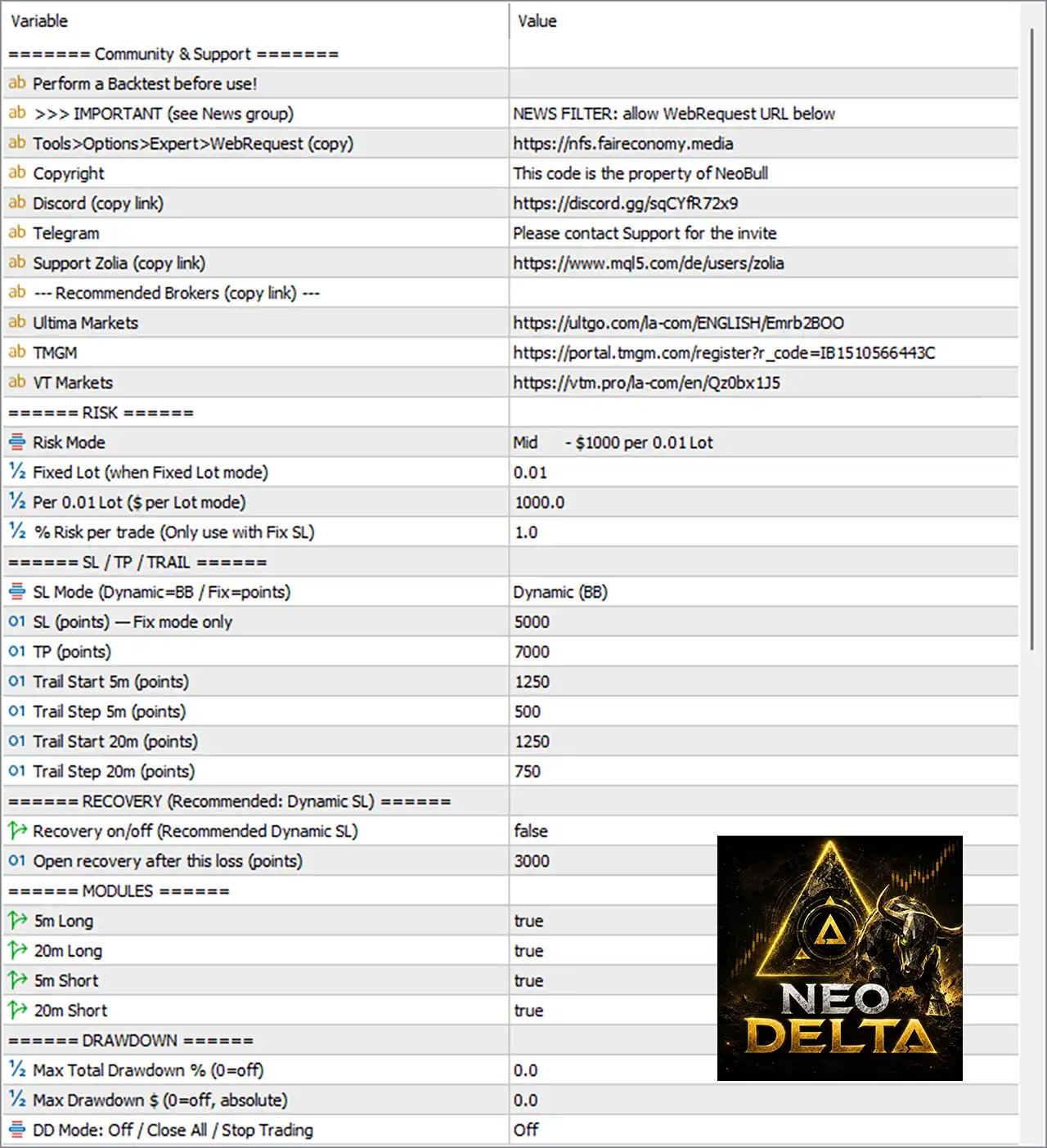
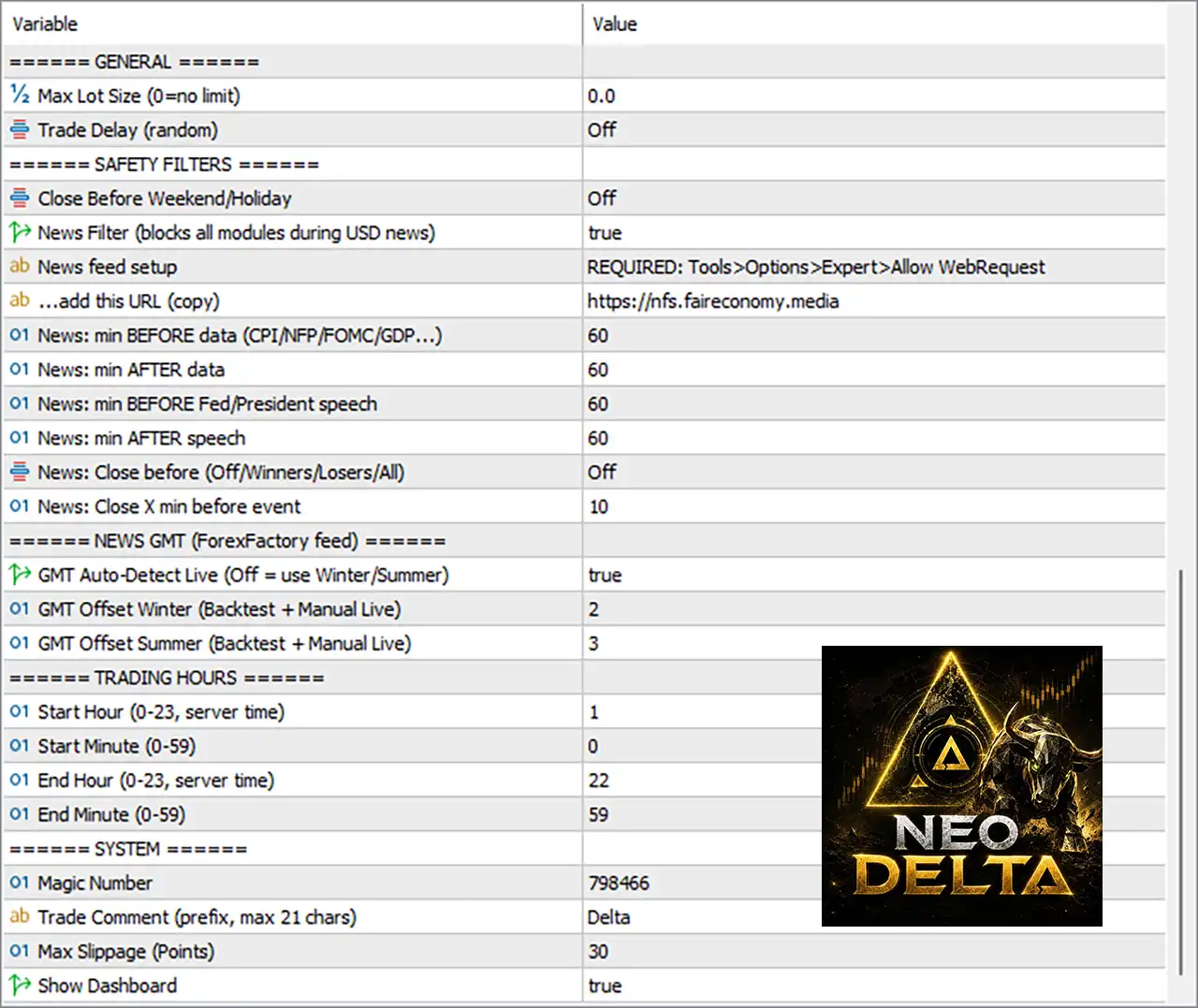
Note: The explanations describe the apparent function of each parameter based on its name and displayed setting. They do not imply guaranteed trading results.
🔄 Risk Settings
🔹 Risk Mode = Mid - $1000 per 0.01 Lot — Selects the Mid risk profile, with the displayed sizing reference of $1000 per 0.01 lot.
🔹 Fixed Lot (when Fixed Lot mode) = 0.01 — Sets the fixed trading volume to 0.01 lots when Fixed Lot mode is selected.
🔹 Per 0.01 Lot ($ per Lot mode) = 1000.0 — Uses 1000.0 as the account-value scaling amount associated with each 0.01 lot in the corresponding lot-sizing mode.
🔹 % Risk per trade (Only use with Fix SL) = 1.0 — Sets the percentage risk per trade to 1.0% when the fixed-SL risk calculation is applicable.
🔄 SL / TP / TRAIL Settings
🔹 SL Mode (Dynamic=BB / Fix=points) = Dynamic (BB) — Uses Dynamic (BB) Stop Loss calculation rather than a fixed point-based SL.
🔹 SL (points) — Fix mode only = 5000 — Sets the fixed Stop Loss to 5000 points when Fixed SL mode is selected.
🔹 TP (points) = 7000 — Sets the Take Profit distance to 7000 points.
🔹 Trail Start 5m (points) = 1250 — Activates the 5-minute trailing mechanism after 1250 points of favorable movement.
🔹 Trail Step 5m (points) = 500 — Uses a 500-point step for the 5-minute trailing mechanism.
🔹 Trail Start 20m (points) = 1250 — Activates the 20-minute trailing mechanism after 1250 points of favorable movement.
🔹 Trail Step 20m (points) = 750 — Uses a 750-point trailing step for the 20-minute module.
🔄 Recovery Settings
🔹 Recovery on/off (Recommended Dynamic SL) = false — Disables the recovery mechanism; the displayed recommended configuration references Dynamic SL.
🔹 Open recovery after this loss (points) = 3000 — Sets the loss threshold for opening a recovery trade at 3000 points when Recovery is enabled.
🔄 Trading Modules
🔹 5m Long = true — Enables the 5-minute Long trading module.
🔹 20m Long = true — Enables the 20-minute Long trading module.
🔹 5m Short = true — Enables the 5-minute Short trading module.
🔹 20m Short = true — Enables the 20-minute Short trading module.
🔄 Drawdown Protection
🔹 Max Total Drawdown % (0=off) = 0.0 — Sets the maximum total drawdown percentage to 0.0; according to the parameter description, 0 = Off, so this percentage-based protection is disabled.
🔹 Max Drawdown $ (0=off, absolute) = 0.0 — Sets the maximum absolute drawdown limit to 0.0; 0 = Off, so the dollar-based drawdown limit is disabled.
🔹 DD Mode: Off / Close All / Stop Trading = Off — Sets the drawdown response mode to Off, meaning no drawdown-triggered Close All or Stop Trading action is active.
🔄 General Settings
🔹 Max Lot Size (0=no limit) = 0.0 — Sets the maximum lot size to 0.0; because 0 = no limit, this parameter does not impose an additional maximum lot restriction.
🔹 Trade Delay (random) = Off — Disables the random trade-delay mechanism.
🔄 Safety Filters
🔹 Close Before Weekend/Holiday = Off — Disables automatic closing of trades before weekends or holidays.
🔹 News Filter (blocks all modules during USD news) = true — Enables the News Filter, which is configured to block all trading modules during relevant USD news.
🔹 News feed setup = REQUIRED: Tools>Options>Expert>Allow WebRequest — Indicates that MT5 WebRequest permission is required for the news-feed functionality.
🔹 ...add this URL (copy) = https://nfs.faireconomy.media — Specifies the news-feed URL that should be added to the MT5 allowed WebRequest list.
🔹 News: min BEFORE data (CPI/NFP/FOMC/GDP ...) = 60 — Blocks trading 60 minutes before scheduled economic data such as CPI, NFP, FOMC, and GDP.
🔹 News: min AFTER data = 60 — Keeps the news protection active for 60 minutes after the economic release.
🔹 News: min BEFORE Fed/President speech = 60 — Blocks trading 60 minutes before a Federal Reserve or President speech.
🔹 News: min AFTER speech = 60 — Keeps trading blocked for 60 minutes after the speech.
🔹 News: Close before (Off/Winners/Losers/All) = Off — Disables automatic position closing before a news event.
🔹 News: Close X min before event = 10 — If news-based position closing is enabled, the configured closing time is 10 minutes before the event.
🔄 News GMT Settings
🔹 GMT Auto-Detect Live (Off = use Winter/Summer) = true — Enables automatic live GMT-offset detection instead of relying exclusively on manually specified winter/summer offsets.
🔹 GMT Offset Winter (Backtest + Manual Live) = 2 — Sets the winter GMT offset to GMT+2.
🔹 GMT Offset Summer (Backtest + Manual Live) = 3 — Sets the summer GMT offset to GMT+3.
🔄 Trading Hours
🔹 Start Hour (0-23, server time) = 1 — Sets the trading start hour to 01:00 server time.
🔹 Start Minute (0-59) = 0 — Sets the trading start minute to 00, resulting in a start time of 01:00.
🔹 End Hour (0-23, server time) = 22 — Sets the trading end hour to 22:00 server time.
🔹 End Minute (0-59) = 59 — Sets the trading end minute to 59, resulting in an end time of 22:59.
🔹 Trading Window = 01:00–22:59 server time — Based on the four time parameters above, the configured trading window runs from 01:00 through 22:59 server time.
🔄 System Settings
🔹 Magic Number = 798466 — Assigns 798466 as the EA's Magic Number, allowing MT5 to identify trades belonging to this EA.
🔹 Trade Comment (prefix, max 21 chars) = Delta — Uses Delta as the trade-comment prefix, with the parameter specifying a maximum length of 21 characters.
🔹 Max Slippage (Points) = 30 — Sets the maximum permitted execution slippage to 30 points.
🔹 Show Dashboard = true — Enables the EA's on-chart dashboard.
🔢 Neo Delta EA MT5 Configuration Summary
🔹 Risk Mode: Mid — $1000 per 0.01 Lot
🔹 Fixed Lot: 0.01
🔹 Per 0.01 Lot: 1000.0
🔹 Risk per Trade: 1.0%
🔹 SL Mode: Dynamic (BB)
🔹 Fixed SL: 5000 points
🔹 Take Profit: 7000 points
🔹 5m Trail Start: 1250 points
🔹 5m Trail Step: 500 points
🔹 20m Trail Start: 1250 points
🔹 20m Trail Step: 750 points
🔹 Recovery: false
🔹 Recovery Trigger: 3000 points
🔹 5m Long: true
🔹 20m Long: true
🔹 5m Short: true
🔹 20m Short: true
🔹 Maximum Total Drawdown: 0.0% = Off
🔹 Maximum Absolute Drawdown: 0.0 = Off
🔹 Drawdown Mode: Off
🔹 Maximum Lot Size: 0.0 = No limit
🔹 Random Trade Delay: Off
🔹 Weekend/Holiday Close: Off
🔹 News Filter: true
🔹 News Protection Before Data: 60 minutes
🔹 News Protection After Data: 60 minutes
🔹 Fed/President Speech Protection: 60 minutes before / 60 minutes after
🔹 News Position Closing: Off
🔹 News Close Timing: 10 minutes before event
🔹 GMT Auto-Detection: true
🔹 Winter GMT Offset: 2
🔹 Summer GMT Offset: 3
🔹 Trading Hours: 01:00–22:59 server time
🔹 Magic Number: 798466
🔹 Trade Comment: Delta
🔹 Maximum Slippage: 30 points
🔹 Dashboard: true
🔢 Conclusion
The displayed Neo Delta EA MT5 configuration combines four active trading modules—5m Long, 20m Long, 5m Short, and 20m Short—with Dynamic (BB) Stop Loss, a 7000-point Take Profit, and separate trailing parameters for 5-minute and 20-minute operations.
Risk is configured around the Mid profile, with $1000 per 0.01 lot and 1.0% risk per trade when the relevant fixed-SL calculation is used. Recovery and drawdown protection are currently disabled, while the News Filter is enabled with substantial 60-minute before/after protection windows.
The configured trading session of 01:00–22:59 server time, GMT+2 winter / GMT+3 summer, and 30-point maximum slippage provides additional execution structure.
Before using Neo Delta EA MT5 on a live account, traders should backtest the exact configuration, verify broker point/contract specifications, test the news-feed connection, and evaluate drawdown under different market conditions. Automated trading involves substantial risk, and the displayed parameters should not be interpreted as a guarantee of profitability.


