


🔢 TitanForge EA MT5 Settings & Parameters Guide
TitanForge EA MT5 is a feature-rich automated trading system designed to combine structured trade management, dynamic position sizing, protective risk controls, economic-news handling, and an advanced visual analysis framework.
Its Inputs provide detailed control over execution, entry logic, position sizing, profit targets, stop management, spread protection, daily and overall loss limits, news-event protection, chart visualization, target zones, structure detection, and animated market analysis.
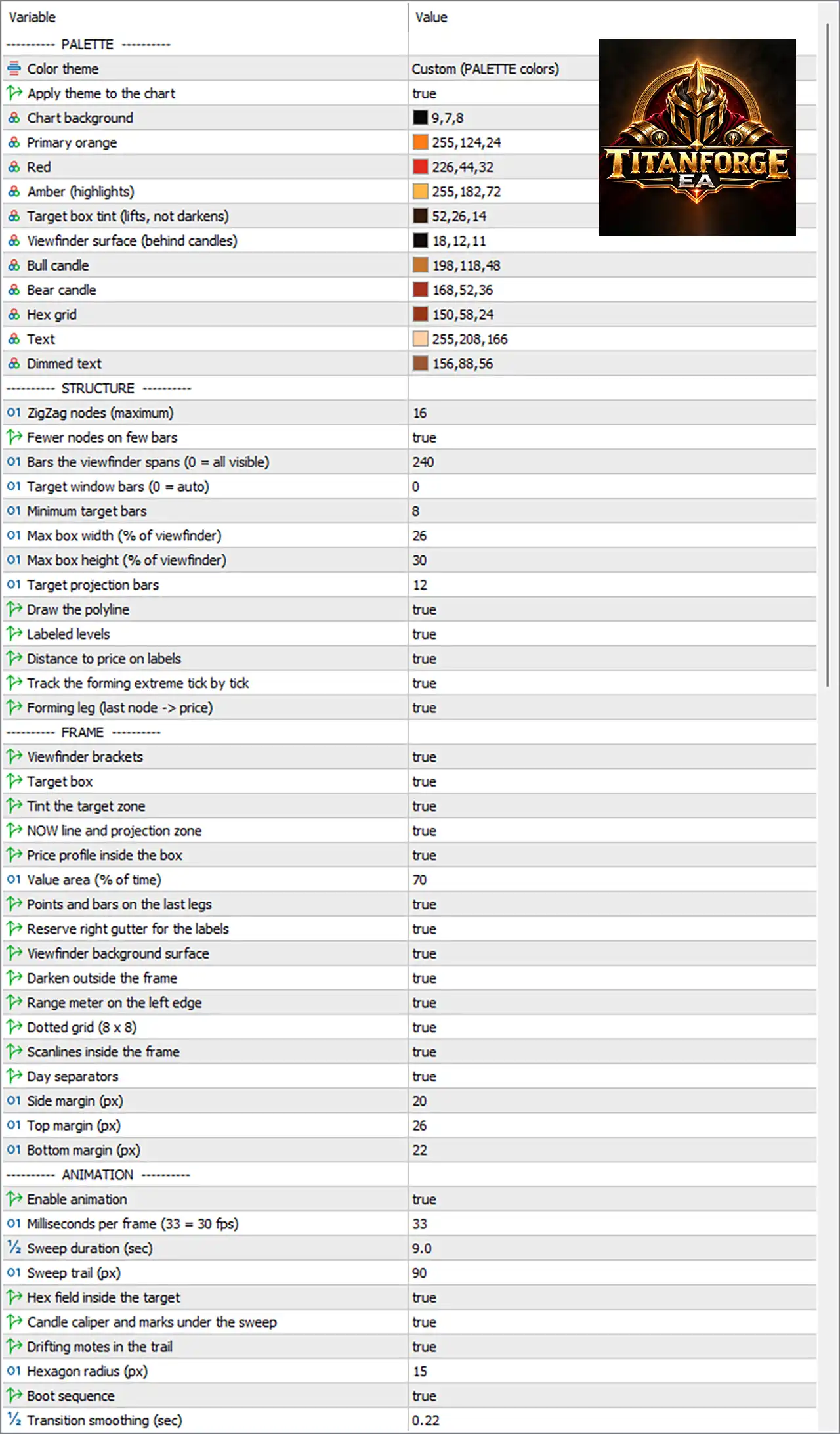
The following guide explains every visible parameter and preserves the exact numerical values shown in the provided Inputs.
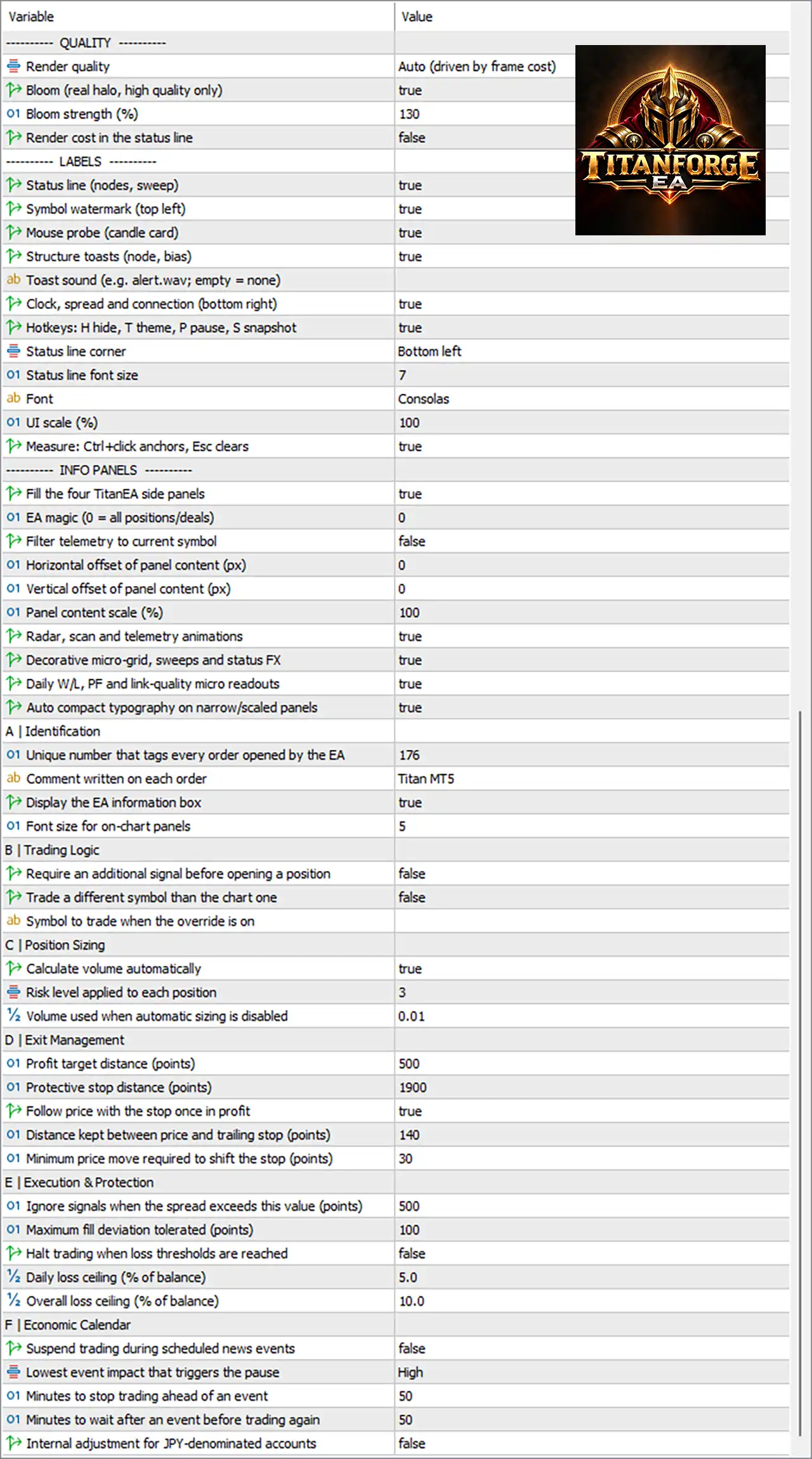
⚙️ QUALITY
🔹 Render quality = Auto (driven by frame cost) — Automatically adjusts rendering quality according to the current frame-processing cost to balance visual quality and performance.
🔹 Bloom (real halo, high quality only) = true — Enables the high-quality Bloom effect, adding a realistic halo/glow effect to supported visual elements.
🔹 Bloom strength (%) = 130 — Sets Bloom intensity to 130%, controlling the strength of the visual glow effect.
🔹 Render cost in the status line = false — Disables displaying the rendering cost information in the chart's status line.
⚙️ LABELS
🔹 Status line (nodes, sweep) = true — Displays status information related to detected nodes and sweep activity on the chart.
🔹 Symbol watermark (top left) = true — Shows the trading symbol as a watermark in the top-left area of the chart.
🔹 Mouse probe (candle card) = true — Enables the interactive candle information card when the mouse is positioned over chart candles.
🔹 Structure toasts (nodes, bias) = true — Enables notification-style messages showing detected market structure nodes and directional bias.
🔹 Toast sound (e.g. alert.wav; empty = none) = [empty/default] — Defines the sound used for toast notifications. An empty value means no custom sound is specified.
🔹 Clock, spread and connection (bottom right) = true — Displays the clock, current spread, and connection information in the bottom-right section of the chart.
🔹 Hotkeys: H hide, T theme, P pause, S snapshot = true — Enables the predefined hotkeys: H to hide, T to change theme, P to pause, and S to take a snapshot.
🔹 Status line corner = Bottom left — Places the status line in the bottom-left corner of the chart.
🔹 Status line font size = 7 — Sets the status-line font size to 7.
🔹 Font = Consolas — Uses the Consolas font for the EA's text and interface elements.
🔹 UI scale (%) = 100 — Sets the user-interface scale to 100%.
🔹 Measure: Ctrl+click anchors, Esc clears = true — Enables the measurement tool using Ctrl+Click anchors, while Esc clears the measurement.
⚙️ INFO PANELS
🔹 Fill the four TitanEA side panels = true — Enables content rendering inside all four TitanEA side panels.
🔹 EA magic (0 = all positions/deals) = 0 — Uses Magic Number 0, which means the display can include all positions/deals rather than restricting information to a specific EA magic number.
🔹 Filter telemetry to current symbol = false — Disables filtering telemetry exclusively to the current chart symbol.
🔹 Horizontal offset of panel content (px) = 0 — Applies a horizontal panel-content offset of 0 pixels.
🔹 Vertical offset of panel content (px) = 0 — Applies a vertical panel-content offset of 0 pixels.
🔹 Panel content scale (%) = 100 — Displays panel content at 100% scale.
🔹 Radar, scan and telemetry animations = true — Enables animated radar, scanning, and telemetry visualizations.
🔹 Decorative micro-grid, sweeps and status FX = true — Enables decorative micro-grid elements, sweep effects, and status visual effects.
🔹 Daily W/L, P/L and link-quality micro readouts = true — Displays compact readouts for daily win/loss, profit/loss, and connection/link quality.
🔹 Auto compact typography on narrow/scaled panels = true — Automatically adjusts typography to a more compact format when panels become narrow or are scaled.
⚙️ A | IDENTIFICATION
🔹 Unique number that tags every order opened by the EA = 176 — Uses 176 as the unique identifier for orders opened by the EA, helping distinguish its trades.
🔹 Comment written on each order = Titan MT5 — Adds “Titan MT5” as the order comment for trades opened by the EA.
🔹 Display the EA information box = true — Enables the EA information box on the trading chart.
🔹 Font size for on-chart panels = 5 — Sets the font size for the on-chart information panels to 5.
⚙️ B | TRADING LOGIC
🔹 Require an additional signal before opening a position = false — Disables the requirement for an additional confirmation signal before opening a position.
🔹 Trade a different symbol than the chart one = false — Prevents the EA from trading a symbol different from the chart symbol under the current configuration.
🔹 Symbol to trade when the override is on = [empty/default] — Specifies the alternative symbol to trade when symbol override is enabled. No alternative symbol is currently entered.
⚙️ C | POSITION SIZING
🔹 Calculate volume automatically = true — Enables automatic calculation of trading volume based on the EA's position-sizing logic.
🔹 Risk level applied to each position = 3 — Sets the position risk level to 3 for each trade.
🔹 % volume used when automatic sizing is disabled = 0.01 — Defines 0.01 as the volume used when automatic position sizing is disabled.
⚙️ D | EXIT MANAGEMENT
🔹 Profit target distance (points) = 500 — Sets the profit-target distance to 500 points from the entry price.
🔹 Protective stop distance (points) = 1900 — Sets the protective stop-loss distance to 1900 points.
🔹 Follow price with the stop once in profit = true — Enables dynamic stop movement once the position becomes profitable.
🔹 Initial step between trailing and stop (points) = 140 — Sets the initial distance between the current price and the trailing stop to 140 points.
🔹 Minimum price move required to shift the stop (points) = 30 — Requires a minimum price movement of 30 points before the EA moves the trailing stop again.
⚙️ E | EXECUTION & PROTECTION
🔹 Ignore signals when the spread exceeds this value (points) = 500 — Prevents the EA from acting on signals when the spread exceeds 500 points.
🔹 Maximum fill deviation tolerated (points) = 100 — Allows a maximum execution/fill deviation of 100 points when processing orders.
🔹 Halt trading when loss thresholds are reached = false — Disables the feature that would completely halt new trading after the configured loss thresholds are reached.
🔹 Daily loss ceiling (% of balance) = 5.0 — Sets the daily loss ceiling to 5.0% of account balance.
🔹 Overall loss ceiling (% of balance) = 10.0 — Sets the overall loss ceiling to 10.0% of account balance.
⚙️ F | ECONOMIC CALENDAR
🔹 Suspend trading during scheduled news events = false — Disables automatic trading suspension during scheduled economic-calendar events.
🔹 Lowest event impact that triggers the pause = High — Defines High as the minimum economic-news impact level capable of triggering a trading pause when news suspension is enabled.
🔹 Minutes to stop trading ahead of an event = 50 — Specifies a 50-minute pre-news pause period when the economic-calendar suspension feature is active.
🔹 Minutes to wait after an event before trading again = 50 — Specifies a 50-minute post-news waiting period before trading resumes.
🔹 Internal adjustment for JPY-denominated accounts = false — Disables the internal adjustment specifically designed for JPY-denominated trading accounts.
⚙️ PALETTE
🔹 Color theme = Custom (PALETTE colors) — Uses the custom color configuration defined by the individual Palette parameters rather than a predefined theme.
🔹 Apply theme to the chart = true — Applies the selected custom theme directly to the trading chart.
🔹 Chart background = 9,7,8 — Sets the chart background RGB color to 9,7,8, producing a very dark background.
🔹 Primary orange = 255,124,24 — Defines the primary orange interface color using RGB 255,124,24.
🔹 Red = 226,44,32 — Defines the red visual element color using RGB 226,44,32.
🔹 Amber (highlights) = 255,182,72 — Sets the highlight/amber color to RGB 255,182,72.
🔹 Target box tint (lifts, not darkens) = 52,26,14 — Defines the target-box tint using RGB 52,26,14, affecting the target visualization without darkening it.
🔹 Viewfinder surface (behind candles) = 18,12,11 — Sets the viewfinder background surface behind candles to RGB 18,12,11.
🔹 Bull candle = 198,118,48 — Sets bullish candlesticks to RGB 198,118,48.
🔹 Bear candle = 168,52,36 — Sets bearish candlesticks to RGB 168,52,36.
🔹 Hex grid = 150,58,24 — Sets the hexadecimal grid color to RGB 150,58,24.
🔹 Text = 255,208,166 — Sets the primary interface text color to RGB 255,208,166.
🔹 Dimmed text = 156,88,56 — Sets secondary or dimmed text to RGB 156,88,56.
⚙️ STRUCTURE
🔹 ZigZag nodes (maximum) = 16 — Limits the maximum number of ZigZag structure nodes displayed or processed to 16.
🔹 Fewer nodes on few bars = true — Reduces the number of displayed structure nodes when only a small number of chart bars are available.
🔹 Bars the viewfinder spans (0 = all visible) = 240 — Sets the viewfinder coverage to 240 bars. A value of 0 would represent all visible bars.
🔹 Target window bars (0 = auto) = 0 — Uses automatic target-window sizing because the value is 0.
🔹 Minimum target bars = 8 — Requires at least 8 bars for the target structure window.
🔹 Max box width (% of viewfinder) = 26 — Limits the target box width to 26% of the viewfinder.
🔹 Max box height (% of viewfinder) = 30 — Limits the target box height to 30% of the viewfinder.
🔹 Target projection bars = 12 — Projects the target structure forward by 12 bars.
🔹 Draw the polyline = true — Enables drawing of the market-structure polyline.
🔹 Labeled levels = true — Displays labels for the identified structure levels.
🔹 Distance to price on labels = true — Displays the distance between identified levels and the current price on labels.
🔹 Track the forming extreme tick by tick = true — Continuously tracks the developing extreme point tick by tick.
🔹 Forming leg (last node → price) = true — Displays the current forming structure leg between the latest node and the current price.
⚙️ FRAME
🔹 Viewfinder brackets = true — Displays bracket markers around the viewfinder area.
🔹 Target box = true — Enables visualization of the target box.
🔹 Tint the target zone = true — Applies the configured tint to the target zone.
🔹 NOW line and projection zone = true — Displays the current NOW line and the projected target zone.
🔹 Price profile inside the box = true — Displays the price-profile information inside the target box.
🔹 Value area (% of time) = 70 — Defines the Value Area as 70% of the selected time/data distribution.
🔹 Points and bars on the last legs = true — Displays points and bar information associated with the latest structure legs.
🔹 Reserve right gutter for the labels = true — Reserves space on the right side of the chart for structure labels.
🔹 Viewfinder background surface = true — Enables the background surface behind the viewfinder visualization.
🔹 Darken outside the frame = true — Darkens the chart area outside the selected analysis frame.
🔹 Range meter on the left edge = true — Displays a range meter along the left edge of the frame.
🔹 Dotted grid (8 x 8) = true — Enables the dotted 8 × 8 grid within the visualization.
🔹 Scanlines inside the frame = true — Displays scanline effects inside the analysis frame.
🔹 Day separators = true — Shows separators between trading days.
🔹 Side margin (px) = 20 — Sets the side margin to 20 pixels.
🔹 Top margin (px) = 26 — Sets the top margin to 26 pixels.
🔹 Bottom margin (px) = 22 — Sets the bottom margin to 22 pixels.
⚙️ ANIMATION
🔹 Enable animation = true — Enables the animated visual effects used by the TitanForge/Titan MT5 interface.
🔹 Milliseconds per frame (33 = 30 fps) = 33 — Sets the animation interval to 33 milliseconds per frame, corresponding approximately to 30 FPS.
🔹 Sweep duration (sec) = 9.0 — Sets the sweep animation duration to 9.0 seconds.
🔹 Sweep trail (px) = 90 — Sets the sweep visual trail length to 90 pixels.
🔹 Hex field inside the target = true — Displays the hexadecimal field/grid effect inside the target area.
🔹 Candle caliper and marks under the sweep = true — Enables candle-caliper measurements and marks underneath the sweep effect.
🔹 Drifting motes in the trail = true — Adds drifting particle/mote effects within the sweep trail.
🔹 Hexagon radius (px) = 15 — Sets the hexagon radius to 15 pixels.
🔹 Boot sequence = true — Enables the animated boot/startup sequence when the interface initializes.
🔹 Transition smoothing (sec) = 0.22 — Sets transition smoothing to 0.22 seconds, controlling how smoothly visual transitions are animated.
🔢 Current Configuration Overview
The supplied TitanForge EA MT5 configuration combines automated trade management with an extensive visual analysis interface. Automatic position sizing is enabled, with a Risk Level of 3, a 500-point profit target, and a 1900-point protective stop. Once a trade moves into profit, the EA can follow price with the stop using an initial 140-point trailing distance and a 30-point minimum movement requirement.
From a protection perspective, the configuration defines a 5.0% daily loss ceiling and a 10.0% overall loss ceiling, although the setting Halt trading when loss thresholds are reached = false means the automatic full trading halt is currently disabled. The EA also ignores signals when the spread exceeds 500 points and allows up to 100 points of fill deviation.
Economic-news suspension is currently disabled. If enabled, the configured minimum trigger is High impact, with a 50-minute pause before and 50-minute wait after an event.
The visual engine is highly customized, using a dark RGB 9,7,8 chart background, orange RGB 255,124,24 primary accents, custom bullish and bearish candle colors, structure visualization, target zones, scanlines, grids, and animated effects. The interface operates at 100% UI scale, uses Consolas, and renders animations at 33 ms per frame, approximately 30 FPS.
🔢 Conclusion
TitanForge EA MT5 provides a broad combination of automated trading controls and advanced on-chart visualization. Its Inputs cover the complete workflow from position sizing and trade execution to stop management, spread protection, loss thresholds, economic-calendar controls, market-structure visualization, and interface customization.
The current setup uses automatic volume calculation, Risk Level 3, a 500-point profit target, 1900-point protective stop, and profit-following stop management. Risk controls are configured with a 5.0% daily loss ceiling and 10.0% overall loss ceiling, while news-event suspension remains disabled.
For users focused on customization, TitanForge EA MT5 also provides extensive visual controls, including 16 maximum ZigZag nodes, 240 viewfinder bars, 26% maximum box width, 30% maximum box height, 12 target projection bars, a 70% value area, and multiple animated chart effects. Before using these settings on a live account, traders should validate the EA through backtesting and forward testing because actual behavior can vary according to symbol specifications, broker execution, spread, account conditions, and market volatility.


