




The Gold Ayon EA MT5 v1.0 with SetFiles (Unlimited)

Subscriptions for Special Plan
- 30 EA package is more economical!
- Special package with 99%
- Download 1 EA/Day

Subscriptions for Premium Membership
- Download Unlimited in 1 Year
- Get 100% Discount
- Get free access to all

Subscriptions for Gold Membership
- 1 Year Membership
- Get 100% Discount
- Access EA+Indicator+Course
Frequently bought together 🎁
Add these products to enhance your purchase




Quick Overview
The Gold Ayon MT5 is a multi-strategy Expert Advisor (EA) built exclusively for XAUUSD. It runs several independent modules in parallel, each with its own session window, timeframe and entry logic, and manages trades with distance based averaging and a weighted basket close. Drawdown control, a news filter and a live panel complete the package.
Best For:
✅ Gold traders who want a multi-strategy EA on MT5.
✅ Users who like session based trading modules.
✅ Traders who want drawdown control modes built in.
✅ Users who want an NFP and Friday night filter.
✅ Traders who like a detailed live account panel.
What is The Gold Ayon MT5?
The Gold Ayon is a multi-strategy Expert Advisor (EA) for MetaTrader 5, built exclusively for XAUUSD (Gold). It runs several independent trading modules in parallel, each with its own session window, timeframe and entry logic.
This lets the EA react to different phases of the market during the day, instead of relying on a single fixed setup.
 Vendor Website: View here
How Does The Gold Ayon MT5 Work?
Independent Modules
Every module trades only within its own predefined session and timeframe. This filters out the hours that do not suit its logic, and it lets several modules work side by side across the day.
Proprietary Decision Engine
The EA uses a proprietary decision engine that combines multiple momentum and reversal signals, calibrated for the price behavior of Gold.
Position Management
Position management includes distance based averaging and a weighted basket close. The EA reacts to how a trade develops, and does not use a single fixed take profit.
Session and Calendar Controls
Trading day and Friday night controls, an NFP Friday filter and an optional year end pause keep the EA away from selected risky periods, while the news filter blocks new entries around high impact events.
Historical Trading Results Performance
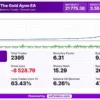
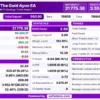
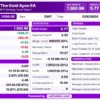
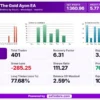
✅ The Gold Ayon EA backtest generated a net profit of $21,775.38 from an initial deposit of $500, with a profit factor of 3.55 across 2,395 trades. The trading symbol and test period are not shown.
The Gold Ayon EA MT5 Backtest Results
| Parameter | Result |
|---|---|
| Initial Deposit | $500 |
| Total Net Profit | $21,775.38 |
| Total Trades | 2,395 |
| Profit Trades | 63.80% |
| Profit Factor | 3.55 |
| Maximum Balance Drawdown | 6.26% |
| Maximum Equity Drawdown | 26.32% |
✅ The backtest balance/equity chart shows a generally rising curve from January 2024 to August 10, 2026, with stronger growth in the later stages and several temporary equity dips.
The Gold Ayon EA Backtest Results
Key Features of The Gold Ayon MT5
Independent Strategy Modules
Each module has its own session window, timeframe and entry logic, and the modules run in parallel across the trading day instead of using one fixed setup.
Proprietary Decision Engine
The engine combines several momentum and reversal signals, and it is calibrated for the price behavior of Gold and not for general use on other markets.
Averaging and Basket Close
Distance based averaging and a weighted basket close manage how positions build and exit, which can raise exposure during adverse market moves.
Three Lot Sizing Modes
Lot size can be automatic by risk level, a fixed lot, or a fixed lot scaled to the balance, to match the size of the account.
Drawdown Control
Configurable modes can close and continue, close and remove the EA, or only send an alert once the drawdown limit has been reached.
Broker Preset Profiles
Presets cover common ECN and Raw spread conditions, and a fully custom mode is there for traders who want complete control of the settings.
Spread Filter and Margin Check
Both checks run before every new entry, which keeps the EA from opening trades in costly spread conditions or without enough free margin.
Session and Calendar Controls
Trading day and Friday night controls, an NFP Friday filter and an optional year end pause keep the EA away from selected risky periods.
How to Get the Most from The Gold Ayon MT5
🔹 Use a suitable account: the author recommends an ECN or Raw spread account with low spread and suitable leverage, so the account type and leverage both matter.
🔹 Pick a broker preset: begin with the preset profile that matches the broker conditions, and use the custom mode only when every setting is fully understood.
🔹 Choose the lot sizing mode with care: automatic risk level, fixed lot or fixed lot scaled to balance should match the account size and the loss that can be accepted.
🔹 Set the drawdown mode first: decide whether the EA should close and continue, close and remove itself or only alert, before the first live trade is opened.
🔹 Review the news and calendar filters: check the news filter, the Friday night rules, the NFP Friday filter and the year end pause against the personal trading plan.
🔹 Watch the averaging exposure: distance based averaging can grow open volume during adverse moves, so the volume and floating profit and loss on the panel need monitoring.
🔹 Test on demo first: the author advises thorough demo testing, and the risk management guide helps with choosing a safe lot size and drawdown limit.
Risk Management
Averaging and Basket Close Risk
Distance based averaging can grow open volume when the market moves against a position, and a basket close ties the exit to the whole group of trades.
Large floating losses are possible. A guide to stop-loss placement explains how stops protect an account.
Drawdown Control Modes
The EA can close and continue, close and remove itself, or only alert once a drawdown limit is reached.
The chosen mode should be decided before live use. A guide to take-profit methods shows how targets relate to risk.
News and Session Filters
The news filter, the session controls and the spread and margin checks reduce exposure to difficult moments, but they cannot remove slippage, gaps or sudden moves.
The news filter relies on the native economic calendar of the platform.
What Sets It Apart
🔹 Parallel strategy modules: each module has its own session, timeframe and entry logic, so the EA can react to different phases of the Gold market.
🔹 Basket style exits: a weighted basket close replaces a single fixed take profit, which ties the exit to how the whole group of trades develops.
🔹 Flexible drawdown response: three drawdown modes let the trader decide whether the EA continues, removes itself or only alerts after a limit is hit.
🔹 Native calendar filter: the news filter uses the economic calendar built into MetaTrader 5, so no outside data feed needs to be set up.
Strengths and Limitations
Strengths
🔹 Several independent modules: parallel modules with their own sessions help cover different phases of the Gold market in one EA.
🔹 Layered protection: spread filter, margin check, drawdown control, news filter and calendar controls all sit inside the same EA.
🔹 Flexible sizing and presets: three lot sizing modes and broker preset profiles help match the setup to the account and broker.
🔹 Clear monitoring: the real-time panel shows account, session, position and news filter status in one place on the chart.
Limitations
🔹 Averaging exposure: distance based averaging can grow positions during adverse moves, and large floating losses remain possible.
🔹 Gold only: the EA is built exclusively for XAUUSD, so it offers no diversification across other markets or symbols.
🔹 Private logic: the decision engine is proprietary, so testing on demo is the only way to judge how its signals behave.
🔹 No published performance: the product information includes no backtest or live report, so no returns can be quoted here.
Who Should Use The Gold Ayon MT5?
🔹 Gold traders on MT5: those who want a multi-strategy system built only for XAUUSD and active across different sessions of the day.
🔹 Risk-aware users: traders who will set a drawdown mode and a sensible lot size, and who monitor averaging exposure on the panel.
🔹 Rule based traders: users who like session filters, a native news filter and clear calendar rules around NFP and year end.
🔹 Not for traders who: want a multi-symbol EA, cannot accept averaging risk or expect guaranteed profit from any automated system.
Recommended Trading Conditions
Recommended settings and parameters to pay attention to from developers and experts:
| Features | Type |
|---|---|
| Trading platform | MetaTrader 5 (MT5) |
| Time frames | Any |
| Currency pairs | XAUUSD (Gold) |
| Minimum / Recommended deposit | $500+ |
| Minimum / Recommended leverage | 1:100+ |
| Account type | ECN or Raw spread |
| Additional services | Unlock and Decompile |
| Recommended brokers | Exness Broker, Icmarkets Broker |
| Recommended VPS | MyfxVPS.com (Blue VPS, Golden VPS). Lowest Latency, 2 week Free Trial, 100% Free for 12-18 Months. |
Product Download Package?
The download package of the product suite includes:
Experts
 The Gold Ayon.ex5
SetFiles
XAUUSD_Very Low.set
XAUUSD_Low.set
XAUUSD_Medium.set
XAUUSD_High.set
XAUUSD_Very High.set
 Reviewed by David Easton
Final Verdict
The Gold Ayon MT5 is a Gold specific multi-strategy EA that combines independent session modules with drawdown control, a native news filter and a detailed live panel.
Its averaging and basket exit approach can raise exposure in adverse moves, and no results are published here. A thorough demo test, a careful drawdown mode and a sensible lot size are the right way to start.
🔢 The Gold Ayon EA MT5 Settings – Complete Inputs Guide
The Gold Ayon EA is an automated trading system designed specifically for Gold (XAUUSD) on MetaTrader 5. It uses a multi-strategy approach that combines momentum and reversal signals, with configurable position sizing, drawdown controls, economic-calendar filtering, and trade-management options. The EA’s settings allow traders to adjust risk exposure, define trading safeguards, and customize the on-chart monitoring panel.
This guide explains every visible input in the supplied configuration, retaining the original parameter names and numerical values. Where the exact calculation or unit depends on the EA’s internal implementation, the explanation avoids assuming undocumented behavior.
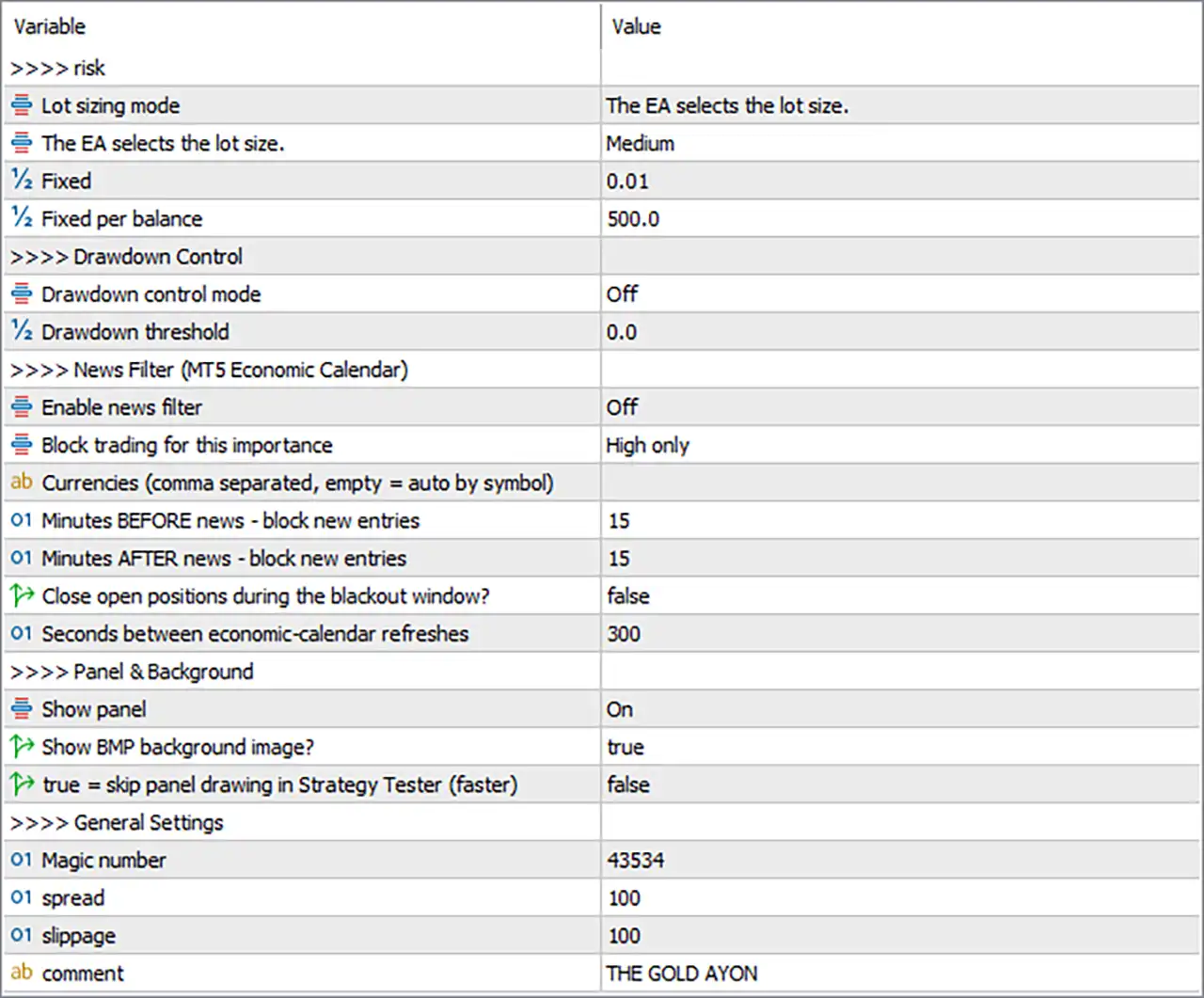
The Gold Ayon EA MT5 Settings Panel
⚙️ Risk and Lot Sizing Settings
🔹 Lot sizing mode = The EA selects the lot size. – Selects the lot-sizing method in which the EA determines the trading volume rather than relying exclusively on a manually specified fixed lot size.
🔹 The EA selects the lot size. = Medium – Sets the selected lot-sizing profile to Medium, representing the chosen risk or volume preset. The precise lot size generated by this profile depends on the EA’s internal calculation rules.
🔹 Fixed = 0.01 – Sets the fixed-lot value to 0.01 lots. This value is relevant when the fixed-lot sizing method is selected rather than the automatic lot-sizing profile.
🔹 Fixed per balance = 500.0 – Sets the balance reference for fixed-per-balance position sizing to 500.0. The EA may use this value as a balance increment when calculating trade volume; the exact scaling formula should be verified before live trading.
⚙️ Drawdown Control Settings
🔹 Drawdown control mode = Off – Disables the EA’s configurable drawdown-control mechanism. As a result, the threshold below should not be assumed to trigger the corresponding drawdown protection while this mode remains off.
🔹 Drawdown threshold = 0.0 – Sets the drawdown threshold to 0.0. This value may represent an unset or disabled threshold, depending on the EA’s internal logic. A zero threshold should not be interpreted as a guarantee of zero drawdown.
⚙️ News Filter – MT5 Economic Calendar
🔹 Enable news filter = Off – Disables the economic-calendar news filter. The remaining news settings define the intended filtering rules, but they should not be assumed to block trades while the main switch is off.
🔹 Block trading for this importance = High only – Selects high-impact economic events as the events that can trigger a trading restriction when the news filter is enabled.
🔹 Currencies (comma separated, empty = auto by symbol) = blank – Leaves the currency list empty, allowing the EA to select relevant currencies automatically based on the traded symbol, according to the parameter description.
🔹 Minutes BEFORE news – block new entries = 15 – Configures the EA to block new entries beginning 15 minutes before a qualifying news event when the news filter is active.
🔹 Minutes AFTER news – block new entries = 15 – Configures the EA to continue blocking new entries for 15 minutes after a qualifying news event when the filter is active.
🔹 Close open positions during the blackout window? = false – Disables the option to close existing positions during the news blackout window. If news filtering is enabled, the configured behavior is to restrict new entries without automatically closing existing positions through this option.
🔹 Seconds between economic-calendar refreshes = 300 – Sets the economic-calendar refresh interval to 300 seconds, equivalent to 5 minutes. This determines how frequently the EA attempts to update its calendar information.
⚙️ Panel and Background Settings
🔹 Show panel = On – Enables the EA’s on-chart information panel, allowing relevant trading information to be displayed within the MetaTrader 5 chart.
🔹 Show BMP background image? = true – Enables display of the panel’s BMP background image, if the required image asset is available and supported by the EA.
🔹 true = skip panel drawing in Strategy Tester (faster) = false – Leaves the option to skip panel drawing in the Strategy Tester disabled. The panel is therefore not instructed to be skipped through this setting, which may result in additional drawing overhead during backtesting.
⚙️ General Settings
🔹 Magic number = 43534 – Assigns the Magic Number 43534 to trades managed by the EA. This identifier helps distinguish the EA’s orders from trades opened manually or by other automated systems.
🔹 spread = 100 – Sets the spread parameter to 100. This input may be used in the EA’s spread or execution checks; the exact unit and whether it acts as a maximum threshold should be confirmed from the EA’s implementation.
🔹 slippage = 100 – Sets the slippage parameter to 100. This controls the configured tolerance for execution-price deviation or a related execution check. The effective meaning of the value depends on the EA and the broker’s quote format.
🔹 comment = THE GOLD AYON – Sets the trade comment to THE GOLD AYON, providing a recognizable label for the EA’s orders in the trading terminal and account history.
🔢 Conclusion
The current The Gold Ayon EA MT5 configuration uses the automatic lot-sizing mode with the Medium profile, while retaining Fixed = 0.01 and Fixed per balance = 500.0 as alternative sizing inputs. Drawdown control is switched off, and the economic-calendar news filter is also disabled, although it is configured to target high-impact events with 15 minutes of protection before and after each event.
The chart panel is enabled, the BMP background image option is active, and the EA uses Magic number = 43534, spread = 100, and slippage = 100. Before live deployment, the lot-sizing profile and the units used by the spread and slippage parameters should be verified. Enabling the drawdown-control and news-filter features may also be worth considering when those safeguards are required. Gold can experience rapid price movements, and neither an automatic lot-sizing profile nor a configured filter guarantees a particular trading outcome.
User Reviews
Only logged in customers who have purchased this product may leave a review.
❓ What is The Gold Ayon MT5?
A multi-strategy Expert Advisor for MetaTrader 5, built exclusively for XAUUSD (Gold), that runs several independent modules in parallel.
❓ Which symbol does The Gold Ayon MT5 trade?
XAUUSD (Gold) only, on MetaTrader 5.
❓ How do the modules in The Gold Ayon MT5 work?
Each module has its own session window, timeframe and entry logic, and it only trades inside its own predefined session and timeframe.
❓ What signals does The Gold Ayon MT5 use?
A proprietary decision engine that combines several momentum and reversal signals, calibrated for the price behavior of Gold.
❓ Does The Gold Ayon MT5 use averaging?
Yes. It uses distance based averaging and a weighted basket close, so the EA reacts to how a trade develops, and the exposure can grow in adverse moves.
❓ What lot sizing modes does The Gold Ayon MT5 offer?
Automatic by risk level, fixed lot, and fixed lot scaled to the balance.
❓ How does drawdown control work in The Gold Ayon MT5?
Configurable modes can close and continue, close and remove the EA, or only send an alert once the drawdown limit is reached.
❓ Does The Gold Ayon MT5 have a news filter?
Yes. It uses the native MetaTrader 5 economic calendar to block new entries around high impact events for the relevant currencies, with adjustable minutes before and after.
❓ What session controls does The Gold Ayon MT5 include?
Trading day and Friday night controls, an NFP Friday filter and an optional year end pause.
❓ Which account suits The Gold Ayon MT5?
An ECN or raw spread, low spread account is recommended, and broker preset profiles cover common conditions, with a custom mode also available.
❓ What does the panel of The Gold Ayon MT5 show?
Balance, equity, floating profit and loss, spread, account and server information, the current session, active strategies, open positions, total volume, win rate and news filter status.
❓ Does The Gold Ayon MT5 guarantee profits?
No. Automated trading can produce profits and losses, past results do not guarantee future results, and a thorough demo test is advised before real trading.
🔥 Get This EA for FREE with Our Membership! 🚀🚀
Unlock access to this EA, premium Indicators, and exclusive trading tools completely FREE with any of our Membership Plans! Thousands of traders already benefit from our VIP library—join them and level up your trading instantly. Choose Your Membership:
- SPECIAL – 1 Month Membership
- GOLD – 1 Year Membership
- PREMIUM – 1 Year Membership
-
 Original price was: $999.00.$599.00Current price is: $599.00.
-
 Original price was: $500.00.$249.00Current price is: $249.00.
-
 Original price was: $888.00.$249.00Current price is: $249.00.
-
 Original price was: $439.00.$249.00Current price is: $249.00.
-
 10Original price was: $499.00.$69.00Current price is: $69.00.
-
 1Original price was: $11,000.00.$89.00Current price is: $89.00.
-
 1Original price was: $599.00.$59.00Current price is: $59.00.
-
 3Original price was: $499.00.$59.00Current price is: $59.00.
There are no reviews yet.