🔢 Codex Beast Killer EA MT5 – Easy-to-Read Inputs Guide
Codex Beast Killer EA MT5 is an automated Expert Advisor configuration built around multi-layer signal filtering, EMA trend analysis, RSI confirmation, breakout detection, ATR-based risk management, break-even protection, trailing stops, trading guardrails, economic-news filtering, and a customizable on-chart dashboard.
The supplied Inputs panel provides detailed control over both the trading engine and operational safeguards, allowing the system to define entry direction, position sizing, Stop Loss and Take Profit calculations, trading frequency, execution conditions, news protection, and visual dashboard presentation.
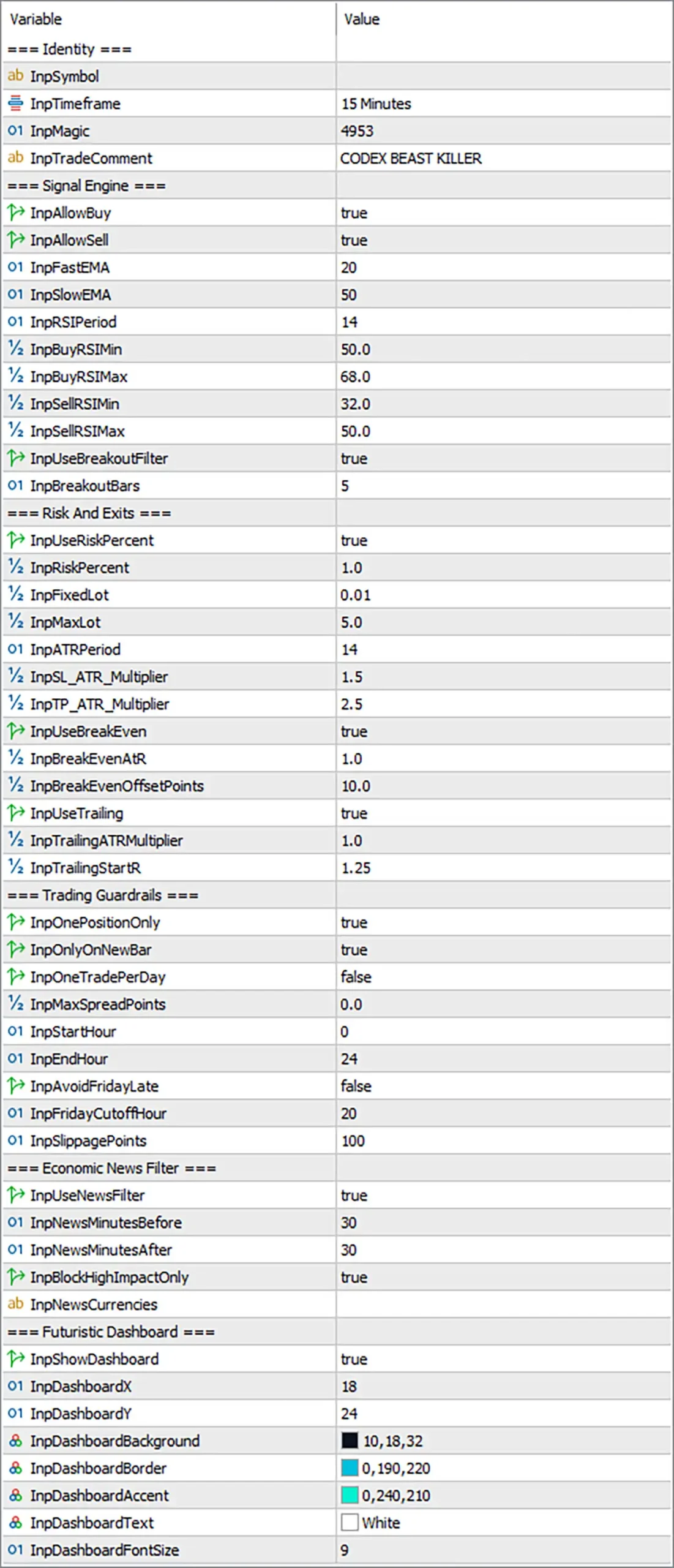
=== Identity ===
🔹 InpTimeframe = 15 Minutes — Sets the primary operating timeframe to 15 Minutes (M15) for the EA's signal calculations and trading analysis.
🔹 InpMagic = 4953 — Assigns the unique Magic Number 4953 to EA-generated trades, allowing MT5 to distinguish Codex Beast Killer positions from other EAs or manual trades.
🔹 InpTradeComment = CODEX BEAST KILLER — Sets CODEX BEAST KILLER as the trade comment attached to applicable orders or positions for identification.
=== Signal Engine ===
🔹 InpAllowSell = true — Enables SELL trading, allowing the EA to open short positions when its configured signal conditions are satisfied.
🔹 InpFastEMA = 20 — Sets the fast Exponential Moving Average period to 20, providing a shorter-term trend reference for the signal engine.
🔹 InpSlowEMA = 50 — Sets the slow EMA period to 50, providing a broader trend reference compared with the 20-period EMA.
🔹 InpRSIPeriod = 14 — Sets the RSI calculation period to 14, defining the number of price periods used to calculate the momentum indicator.
🔹 InpBuyRSIMin = 50.0 — Sets the minimum RSI level for BUY conditions to 50.0, establishing the lower RSI boundary for qualifying bullish setups.
🔹 InpBuyRSIMax = 68.0 — Sets the maximum RSI level for BUY conditions to 68.0, defining the upper RSI boundary for qualifying long setups.
🔹 InpSellRSIMin = 32.0 — Sets the minimum RSI level for SELL conditions to 32.0, defining the lower RSI boundary for qualifying bearish setups.
🔹 InpSellRSIMax = 50.0 — Sets the maximum RSI level for SELL conditions to 50.0, establishing the upper RSI boundary for qualifying short setups.
🔹 InpUseBreakoutFilter = true — Enables the breakout filter, requiring the EA's additional breakout condition to be considered as part of its signal validation.
🔹 InpBreakoutBars = 5 — Sets the breakout analysis window to 5 bars, defining the number of recent candles considered by the breakout filter.
=== Risk And Exits ===
🔹 InpRiskPercent = 1.0 — Sets the configured trading risk to 1.0% when percentage-based risk management is active.
🔹 InpFixedLot = 0.01 — Defines the fixed trading volume as 0.01 lots. This value is used when fixed-lot sizing is selected or when the EA's internal logic falls back to fixed-lot calculation.
🔹 InpMaxLot = 5.0 — Sets the maximum permitted lot size to 5.0, placing an upper ceiling on automatically calculated position volume.
🔹 InpATRPeriod = 14 — Sets the ATR calculation period to 14, determining the number of bars used to measure market volatility for the EA's ATR-based trade-management calculations.
🔹 InpSL_ATR_Multiplier = 1.5 — Sets the Stop Loss ATR multiplier to 1.5. The configured Stop Loss distance can therefore be calculated from ATR volatility using a 1.5× multiplier.
🔹 InpTP_ATR_Multiplier = 2.5 — Sets the Take Profit ATR multiplier to 2.5, allowing the profit target to be derived from current ATR volatility using a 2.5× multiplier.
🔹 InpUseBreakEven = true — Enables break-even protection, allowing the EA to adjust the Stop Loss toward the entry level after the configured break-even condition is reached.
🔹 InpBreakEvenATR = 1.0 — Sets the break-even activation reference to 1.0 ATR, meaning the break-even mechanism uses an ATR-based threshold of 1.0×.
🔹 InpBreakEvenOffsetPoints = 10.0 — Sets the break-even offset to 10.0 points, defining the additional protection distance applied relative to the entry price when break-even is activated.
🔹 InpUseTrailing = true — Enables the ATR-based trailing-stop mechanism for active positions.
🔹 InpTrailingATRMultiplier = 1.0 — Sets the trailing-stop ATR multiplier to 1.0, defining the trailing distance relative to current ATR volatility.
🔹 InpTrailingStartR = 1.25 — Sets the trailing activation threshold to 1.25R, meaning trailing management begins after the trade reaches a profit level equivalent to 1.25 times the initial risk.
=== Trading Guardrails ===
🔹 InpOnlyOnNewBar = true — Allows new trading decisions only when a new candle/bar is formed, helping prevent repeated signal evaluation within the same candle.
🔹 InpOneTradePerDay = false — Disables the one-trade-per-day restriction, allowing the EA to potentially take multiple trades during the same trading day when other conditions permit.
🔹 InpMaxSpreadPoints = 0.0 — Sets the maximum spread threshold to 0.0 points. This value commonly represents no explicit spread limitation or a disabled spread filter, although the exact behavior depends on the EA's internal implementation.
🔹 InpStartHour = 0 — Sets the beginning of the permitted trading schedule to hour 0.
🔹 InpEndHour = 24 — Sets the end of the permitted trading schedule to hour 24, effectively configuring a full-day trading window from 00:00 to the end of the trading day.
🔹 InpAvoidFridayLate = false — Disables the late-Friday trading restriction, so the EA does not apply the optional Friday cutoff protection.
🔹 InpFridayCutoffHour = 20 — Sets the Friday cutoff reference to hour 20. This becomes relevant when InpAvoidFridayLate = true.
🔹 InpSlippagePoints = 100 — Sets the maximum permitted execution deviation to 100 points when trading orders are executed.
=== Economic News Filter ===
🔹 InpNewsMinutesBefore = 30 — Sets the pre-news protection period to 30 minutes, defining how long before a qualifying event the EA can restrict new trading activity.
🔹 InpNewsMinutesAfter = 30 — Sets the post-news protection period to 30 minutes, defining how long after a qualifying event the EA can continue applying the news restriction.
🔹 InpBlockHighImpactOnly = true — Configures the news filter to block trading around high-impact economic events only.
🔹 InpNewsCurrencies = [blank] — Specifies the currencies to be monitored by the news filter. The field is blank in the supplied configuration, so no specific currency list is explicitly entered.
=== Futuristic Dashboard ===
🔹 InpDashboardX = 18 — Sets the dashboard horizontal position to 18, controlling its distance from the chart's horizontal reference edge.
🔹 InpDashboardY = 24 — Sets the dashboard vertical position to 24, controlling its distance from the chart's vertical reference edge.
🔹 InpDashboardBackground = 10,18,32 — Sets the dashboard background color using RGB values 10,18,32, producing a dark blue-toned interface background.
🔹 InpDashboardBorder = 0,190,220 — Sets the dashboard border color to RGB 0,190,220, providing a bright cyan-blue border.
🔹 InpDashboardAccent = 0,240,210 — Sets the dashboard accent color to RGB 0,240,210, creating a vivid turquoise/cyan highlight color for selected interface elements.
🔹 InpDashboardText = White — Sets the dashboard text color to White, providing strong contrast against the dark background.
🔹 InpDashboardFontSize = 9 — Sets the dashboard font size to 9, controlling the displayed text scale of the on-chart interface.
🔢 Conclusion
Codex Beast Killer EA MT5 uses a highly structured configuration that combines EMA trend analysis, RSI filtering, breakout confirmation, ATR-based risk management, break-even protection, trailing stops, execution guardrails, economic-news filtering, and a customizable dashboard.
The current signal configuration uses InpTimeframe = 15 Minutes, with Fast EMA 20, Slow EMA 50, and RSI Period 14. BUY signals operate within an RSI range of 50.0–68.0, while SELL signals use 32.0–50.0. The breakout filter is enabled with InpBreakoutBars = 5, adding another layer to the signal-validation process.
Risk management is configured around InpRiskPercent = 1.0, with a maximum lot ceiling of 5.0. ATR 14 is used for volatility-based exits, with a 1.5 ATR Stop Loss multiplier and 2.5 ATR Take Profit multiplier. Break-even protection and trailing management are both enabled, using 1.0 ATR for break-even, a 10.0-point offset, a 1.0 ATR trailing multiplier, and 1.25R as the trailing activation threshold.
The trading guardrails are relatively restrictive: InpOnePositionOnly = true and InpOnlyOnNewBar = true limit simultaneous exposure and repeated intrabar entries, while InpOneTradePerDay = false allows more than one trade per day. The spread limit is set to 0.0, while maximum slippage is 100 points.
Economic-news protection is enabled with a 30-minute window before and after events, specifically configured to block high-impact events only. The dashboard is also enabled and uses a futuristic dark RGB color scheme with 10,18,32 background, 0,190,220 border, 0,240,210 accent, and White text.
Overall, the supplied configuration presents Codex Beast Killer EA MT5 as a multi-filter, volatility-adaptive automated trading framework, with strong emphasis on controlled entries, ATR-based exits, position limits, news protection, and visual monitoring. The exact proprietary entry algorithm should not be inferred beyond the exposed EMA, RSI, breakout, and risk-management parameters.