




OSOK Gold Killer EA MT5 v3.10 with SetFiles (Unlimited)

Subscriptions for Special Plan
- 30 EA package is more economical!
- Special package with 99%
- Download 1 EA/Day

Subscriptions for Premium Membership
- Download Unlimited in 1 Year
- Get 100% Discount
- Get free access to all

Subscriptions for Gold Membership
- 1 Year Membership
- Get 100% Discount
- Access EA+Indicator+Course
Frequently bought together 🎁
Add these products to enhance your purchase




Quick Overview
OSOK Gold Killer EA is an automated Expert Advisor (EA) for Gold (XAUUSD) on MetaTrader 5. It works with recovery zones, a lot multiplier and profit targets in pips, and adds a spread guard, a daily equity target, a US news filter and an on-chart dashboard. Its recovery logic raises exposure quickly, so testing comes first.
Best For:
✅ Gold traders who want a recovery zone EA on MT5.
✅ Users who want clear inputs for lot, zones and targets.
✅ Traders who like a built in US news filter.
✅ Users who want a spread guard and a daily target.
✅ Experienced traders who can manage recovery risk.
What is OSOK Gold Killer EA MT5?
OSOK Gold Killer EA is an automated trading system designed for Gold (XAUUSD) on MetaTrader 5. Its configurable inputs cover lot sizing, recovery zone spacing, profit targets, execution slippage, spread protection, daily profit limits, economic news filtering and an on-chart dashboard.
These controls define how the EA manages entries, handles repeated trading cycles and responds to changing market conditions. Some settings depend on the internal implementation, so their exact behavior should be verified through testing before live use.
 Vendor Website: View here
How Does OSOK Gold Killer EA MT5 Work?
Recovery Zones
The EA spaces its recovery positions with a base zone gap, set in pips.
The number of recovery steps is limited according to the internal rules, so the sequence cannot grow without a boundary.
Lot Sizing and Multiplier
Each cycle starts with an initial lot, and a lot multiplier means subsequent recovery positions may use a larger volume than the previous one, if the EA applies the multiplier in sequence. This can raise exposure rapidly during a prolonged adverse move.
Profit Target and Re-entry
Each cycle aims for a profit target set in pips. After a take profit, the EA can continue looking for new trading opportunities instead of stopping, because re-entry is enabled.
The default direction fallback is buy, which does not mean that every cycle starts with a buy.
Protection Filters
A spread guard blocks entries when transaction costs become excessive, a daily equity target can restrict further trading once it is reached, and the news filter pauses trading around qualifying US events.
Verified Live Signal Performance
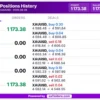
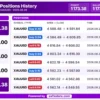
✅ OSOK Gold Killer EA generated a total profit of $1,173.38 on XAUUSD (Gold) on August 28, 2026, with eight recorded trades showing positive results.
OSOK Gold Killer EA Trading Results
| Parameter | Result |
|---|---|
| Trading Symbol | XAUUSD (Gold) |
| Trading Date | August 28, 2026 |
| Total Trades Shown | 8 |
| Total Profit | $1,173.38 |
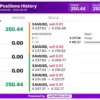
✅ OSOK Gold Killer EA recorded a total profit of $250.44 on XAUUSD (Gold) on September 28, 2026, with six profitable sell trades shown in the trading history.
OSOK Gold Killer MT5 Trading Results
| Parameter | Result |
|---|---|
| Trading Symbol | XAUUSD (Gold) |
| Trading Date | September 28, 2026 |
| Trades Shown | 6 |
| Trade Direction | Sell |
| Total Profit | $250.44 |
Historical Trading Results Performance
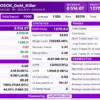
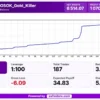
OSOK Gold Killer EA was backtested on XAUUSD (Gold) using the M1 timeframe from January 1 to March 31, 2025, delivering positive results across 187 trades.
OSOK Gold Killer EA MT5 Backtest Results
OSOK Gold Killer EA Backtest Results
| Parameter | Result |
|---|---|
| Trading Symbol | XAUUSD (Gold) |
| Timeframe | M1 |
| Test Period | Jan 1 – Mar 31, 2025 |
| Initial Deposit | $1,000 |
| Total Net Profit | $6,514.07 |
| Profit Trades | 96.79% (181/187) |
| Profit Factor | 1,070.63 |
Key Features of OSOK Gold Killer EA MT5
Recovery Zone System
The EA handles repeated trading cycles through spaced recovery zones, which gives each cycle a clear structure for adding and closing positions.
Lot Multiplier
Recovery positions may use a larger volume than the previous one, so exposure can grow very quickly during a prolonged adverse market move.
Profit Targets
Each cycle aims for a defined target distance, which describes price movement and should not be read as a guaranteed profit for any single cycle.
Recovery Step Limit
A limit on the number of recovery steps controls how many positions can build up, although it does not guarantee limited drawdown in a bad run.
Continuous Trading After Take Profit
Once a cycle closes at its target, the EA keeps looking for new opportunities and does not stop on its own after every successful cycle.
Spread Guard
New entries are blocked when transaction costs become excessive, so the EA avoids opening trades in poor conditions, depending on the broker quotes.
Daily Profit Target
A daily target can restrict further trading once it is reached, which adds a clear boundary to each trading day without promising any profit.
US News Filter
Trading pauses around important US economic events, which helps reduce exposure to sudden price moves and unstable execution near announcements.
On-Chart Dashboard
A heads-up panel shows useful EA information directly on the chart, scales automatically and can be placed where it suits the trader.
Slippage Control
The EA limits the price difference it tolerates when orders are executed, subject to the broker execution model and the internal logic.
How to Get the Most from OSOK Gold Killer EA MT5
🔹 Test on demo first: the exact behavior of some settings depends on the internal implementation, so every setting should be tested on a demo account before live use.
🔹 Choose the starting lot with care: the supplied 0.1 lot is a sizeable start for Gold, so it should match the account size and the margin that is available.
🔹 Review multiplier and step limit together: a factor of 2.0 with up to 20 steps can grow exposure very fast, so the pair should be judged as one risk setting.
🔹 Check the Gold pip convention: confirm that 25 pips equal $2.50 on the broker feed, because the zone gap, the target and the spread limit all rely on it.
🔹 Consider a tighter spread limit: 100 pips is a loose limit under the stated convention, so a lower value may suit brokers that offer tight Gold spreads.
🔹 Confirm the news data source: the filter pauses 30 minutes before and after qualifying events, and it depends on the availability of the news data it refreshes.
🔹 Plan the risk: the risk management guide helps with choosing a lot size, a step limit and daily limits that the account can survive.
OSOK Gold Killer EA MT5 Risk Management
Recovery and Lot Multiplier Risk
The combination of the initial lot, the lot multiplier and the number of recovery steps is the most important risk factor.
If positions increase geometrically, exposure can grow very quickly. A guide to stop-loss placement explains how stops protect an account.
Step Limit Is Not a Drawdown Cap
The maximum number of recovery steps limits how many positions can build up, but it is not a guarantee of limited drawdown.
Margin requirements should be checked with the intended broker before live trading. A guide to take-profit methods shows how targets relate to risk.
Daily Target Is Not a Profit Guarantee
An ambitious daily equity target does not guarantee daily profitability.
The reference equity and the behavior after reaching the target should be confirmed in testing.
Spread and News Limits
The spread guard and the news pauses reduce exposure to costly or unstable moments, but they cannot remove slippage, gaps or sudden moves.
Their effect depends on the broker quote format and on the news data being available.
What Sets It Apart
🔹 Fully visible inputs: every parameter is exposed, from lot size to dashboard layout, so a trader can see how each setting shapes behavior.
🔹 Recovery zone design: the EA handles repeated trading cycles through spaced recovery zones with a configurable multiplier and step limit.
🔹 Built in news filter: a dedicated US news filter with adjustable impact level, time windows and refresh rate sits inside the same EA.
🔹 Daily equity target: a configurable daily target can stop further trading once it is reached, which adds a clear daily boundary.
Strengths and Limitations
Strengths
🔹 Clear controls: lot size, zone gap, target, step limit and slippage are all exposed, which makes the behavior easy to inspect.
🔹 Layered filters: spread guard, daily target and the US news filter work together to restrict trading in poor conditions.
🔹 Continuous operation: re-entry after take profit lets the EA keep working through repeated cycles without manual restarts.
🔹 Monitoring panel: the on-chart dashboard scales automatically and can be placed anywhere on the chart for easier monitoring.
Limitations
🔹 Geometric exposure: with a lot multiplier and many recovery steps, exposure can grow very quickly during a prolonged adverse move.
🔹 Step limit is not a cap: a maximum number of recovery steps does not guarantee limited drawdown, and large losses remain possible.
🔹 Daily target is no promise: an ambitious daily target is not guaranteed to be reached on any given day, and it does not protect against losses.
🔹 Implementation details: some settings depend on internal logic, so their exact behavior must be verified through testing.
Who Should Use OSOK Gold Killer EA MT5?
🔹 Experienced Gold traders: those who understand recovery systems and can judge how a lot multiplier affects margin and drawdown.
🔹 Careful testers: users who will check every setting on a demo account and confirm the pip convention with their broker.
🔹 Risk-aware users: traders who will lower the starting lot and the step limit to suit the size of their own account and risk limit.
🔹 Not for traders who: want low drawdown, cannot tolerate large exposure or expect guaranteed daily profit from the target.
Recommended Trading Conditions
Recommended settings and parameters to pay attention to from developers and experts:
| Features | Type |
|---|---|
| Trading platform | MetaTrader 5 (MT5) |
| Time frames | Any |
| Currency pairs | XAUUSD (Gold) |
| Minimum / Recommended deposit | $500+ |
| Minimum / Recommended leverage | 1:30+ |
| Account type | Any |
| Additional services | Unlock and Decompile |
| Recommended brokers | Exness Broker, Icmarkets Broker |
| Recommended VPS | MyfxVPS.com (Blue VPS, Golden VPS). Lowest Latency, 2 week Free Trial, 100% Free for 12-18 Months. |
Product Download Package?
The download package of the product suite includes:
Experts
 OSOK_Gold_Killer_v2.0.ex5
OSOK_Gold_Killer_v3.10.ex5
SetFiles
XAUUSD_MinLot_0.01.set
XAUUSD_MinLot_0.01_Signal.set
 Reviewed by David Easton
Final Verdict
OSOK Gold Killer EA MT5 is a Gold EA with fully visible inputs, a recovery zone design and a useful set of filters, from the spread guard to the US news pauses and the daily target.
Its main risk is the mix of a lot multiplier and a high number of recovery steps, which can raise exposure very quickly. The sensible path is a lower starting lot, a careful review of margin and a full demo test with the intended broker before any live use.
🔢 OSOK Gold Killer EA MT5 Settings – Complete Inputs Guide
OSOK Gold Killer EA MT5 is an automated trading system designed for Gold (XAUUSD) trading on MetaTrader 5. Its configurable inputs cover lot sizing, recovery-zone spacing, profit targets, execution slippage, spread protection, daily profit limits, economic news filtering, and an on-chart dashboard. These controls help define how the EA manages trade entries, handles repeated trading cycles, and responds to changing market conditions.
This article explains every visible parameter in the supplied configuration, preserving the original names and values. Some settings depend on the EA’s internal implementation, so their exact behavior should be verified through testing before live deployment.
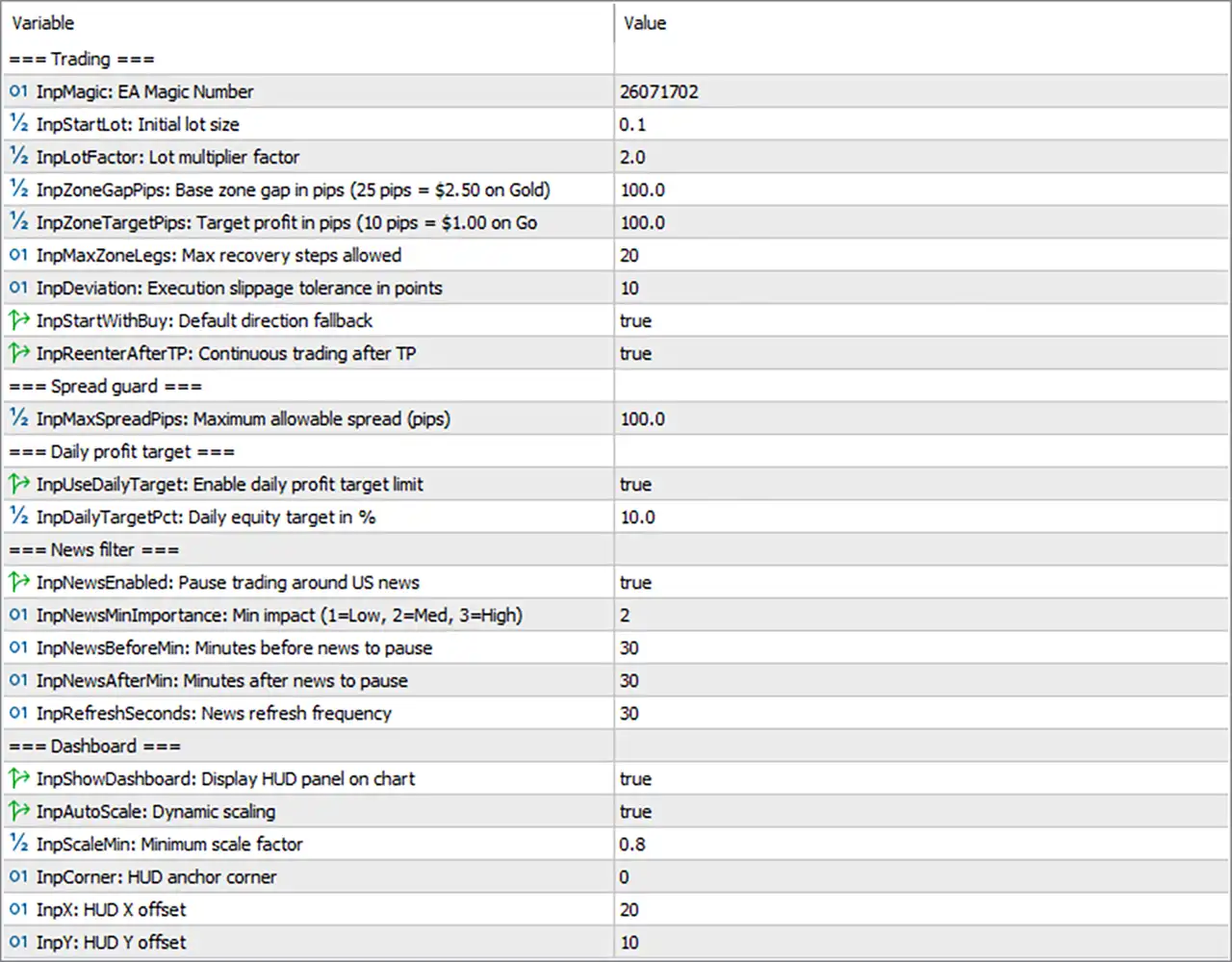
OSOK Gold Killer EA MT5 Settings Panel
⚙️ Trading Settings
🔹 InpMagic: EA Magic Number = 26071702 – Assigns the unique Magic Number 26071702 to identify and manage trades opened by this EA. A distinct identifier helps prevent order-management conflicts with other automated systems operating on the same account.
🔹 InpStartLot: Initial lot size = 0.1 – Sets the initial trading volume to 0.1 lots. This determines the starting position size and can have a substantial effect on margin usage and potential losses, particularly when trading Gold.
🔹 InpLotFactor: Lot multiplier factor = 2.0 – Sets the lot multiplier to 2.0, meaning subsequent recovery positions may use a volume twice that of the preceding position if the EA applies this multiplier sequentially. This can increase exposure rapidly during prolonged adverse market movements.
🔹 InpZoneGapPips: Base zone gap in pips (25 pips = $2.50 on Gold) = 100.0 – Sets the base recovery-zone spacing to 100.0 pips. Based on the parameter’s stated conversion of 25 pips = $2.50 on Gold, 100 pips corresponds to approximately $10.00 of Gold price movement under the same convention.
🔹 InpZoneTargetPips: Target profit in pips (10 pips = $1.00 on Gold) = 100.0 – Sets the target profit distance to 100.0 pips. Using the stated conversion of 10 pips = $1.00 on Gold, this corresponds to approximately $10.00 of price movement under the same convention; it should not be interpreted as a guaranteed $10 monetary profit.
🔹 InpMaxZoneLegs: Max recovery steps allowed = 20 – Allows up to 20 recovery steps or zone legs according to the EA’s internal rules. A higher limit can permit more positions to accumulate, potentially increasing total exposure and drawdown.
🔹 InpDeviation: Execution slippage tolerance in points = 10 – Sets the permitted execution deviation to 10 points. This controls the price difference tolerated during order execution, subject to the broker’s execution model and the EA’s implementation.
🔹 InpStartWithBuy: Default direction fallback = true – Sets the fallback direction to buy when the EA needs to use its default direction. This does not necessarily mean that every trading cycle begins with a buy if the algorithm has other valid direction signals.
🔹 InpReenterAfterTP: Continuous trading after TP = true – Enables re-entry after a take-profit event. Once the EA closes a cycle or position at its target, it can continue looking for new trading opportunities instead of stopping automatically.
⚙️ Spread Guard
🔹 InpMaxSpreadPips: Maximum allowable spread (pips) = 100.0 – Sets the maximum permitted spread to 100.0 pips. The spread guard is intended to prevent entries when transaction costs become excessive, although the effectiveness of this threshold depends on the broker’s quote format and the EA’s pip calculation.
⚙️ Daily Profit Target
🔹 InpUseDailyTarget: Enable daily profit target limit = true – Enables the daily profit-target feature. When the EA detects that its defined daily target has been reached, it can restrict further trading according to its internal daily-target logic.
🔹 InpDailyTargetPct: Daily equity target in % = 10.0 – Sets the daily equity target to 10.0%. This is an ambitious target, and reaching it is not guaranteed. The exact reference equity, calculation method, and behavior after reaching the target should be confirmed in the EA’s implementation.
⚙️ News Filter
🔹 InpNewsEnabled: Pause trading around US news = true – Enables the news filter for US economic events. When the filter detects a relevant event, the EA can pause trading according to the configured impact level and time windows.
🔹 InpNewsMinImportance: Min impact (1=Low, 2=Med, 3=High) = 2 – Sets the minimum news-impact level to 2, corresponding to medium-impact events. Based on the displayed scale, the filter can include medium- and high-impact events when the news filter is operating as intended.
🔹 InpNewsBeforeMin: Minutes before news to pause = 30 – Configures the EA to pause trading 30 minutes before a qualifying news event. This is intended to reduce exposure to sudden price movements, spread widening, and unstable execution around scheduled announcements.
🔹 InpNewsAfterMin: Minutes after news to pause = 30 – Configures the EA to continue its news-related pause for 30 minutes after a qualifying event. This provides a post-announcement buffer while market conditions may remain volatile.
🔹 InpRefreshSeconds: News refresh frequency = 30 – Sets the news-data refresh interval to 30 seconds. This determines how frequently the EA attempts to refresh or update its news information, subject to the implementation and availability of the news source.
⚙️ Dashboard Settings
🔹 InpShowDashboard: Display HUD panel on chart = true – Enables the on-chart heads-up display (HUD). This panel is intended to present relevant EA information directly on the chart for easier monitoring.
🔹 InpAutoScale: Dynamic scaling = true – Enables automatic dashboard scaling. The interface can adjust its display size according to the EA’s scaling logic rather than relying entirely on a fixed scale.
🔹 InpScaleMin: Minimum scale factor = 0.8 – Sets the minimum dashboard scale factor to 0.8, equivalent to 80% of the reference scale if the EA interprets this value as a proportional scaling factor.
🔹 InpCorner: HUD anchor corner = 0 – Sets the dashboard’s anchor-corner index to 0. In many MetaTrader interfaces, corner indices map to chart corners, but the exact mapping should be checked in the EA’s display implementation.
🔹 InpX: HUD X offset = 20 – Sets the dashboard’s horizontal offset to 20 units from its selected anchor corner. This controls the panel’s horizontal placement on the chart.
🔹 InpY: HUD Y offset = 10 – Sets the dashboard’s vertical offset to 10 units from its selected anchor corner. This controls the panel’s vertical placement on the chart.
🔢 Conclusion
The current OSOK Gold Killer EA configuration starts with 0.1 lots, uses a lot multiplier of 2.0, sets the base zone gap to 100.0 pips, and permits up to 20 recovery steps. Continuous trading after take-profit is enabled, and the spread guard is configured at 100.0 pips. The daily equity target is set to 10.0%, while the US news filter is enabled with a minimum impact level of 2 and pause periods of 30 minutes before and after qualifying events.
The most important risk consideration is the combination of InpStartLot = 0.1, InpLotFactor = 2.0, and InpMaxZoneLegs = 20. If positions increase geometrically, exposure can grow very quickly; the maximum permitted number of recovery steps is not a guarantee of limited drawdown. The daily target also does not guarantee daily profitability. Before live trading, the configuration should be tested on a demo account, and the Gold pip conversion, spread threshold, margin requirements, and recovery behavior should be verified with the intended broker.
User Reviews
Only logged in customers who have purchased this product may leave a review.
❓ What is OSOK Gold Killer EA MT5?
An automated Expert Advisor for Gold (XAUUSD) on MetaTrader 5 that uses recovery zones, a lot multiplier, profit targets, a spread guard, a daily target and a US news filter.
❓ Which symbol does OSOK Gold Killer EA MT5 trade?
XAUUSD (Gold) on MetaTrader 5. Other symbols should not be assumed without separate confirmation and testing.
❓ Does OSOK Gold Killer EA MT5 use a lot multiplier?
Yes. Recovery positions may use a larger volume than the previous one, which can increase exposure rapidly in a prolonged adverse move.
❓ Does OSOK Gold Killer EA MT5 limit recovery steps?
Yes. A maximum number of recovery steps is set according to the internal rules. A higher limit lets more positions accumulate and does not guarantee limited drawdown.
❓ How are zone gap and profit target set in OSOK Gold Killer EA MT5?
Both are set in pips. The pip to dollar convention on Gold should be confirmed with the broker, and the target is a price distance and not a guaranteed money profit.
❓ Does OSOK Gold Killer EA MT5 keep trading after take profit?
Yes. Re-entry after take profit is available, so the EA continues to look for new opportunities after a cycle closes at its target.
❓ How does the spread guard work in OSOK Gold Killer EA MT5?
It blocks new entries when the spread exceeds the maximum limit. The real effect depends on the broker quote format and the pip calculation of the EA.
❓ What is the daily target in OSOK Gold Killer EA MT5?
A daily equity target, set as a percent, that can restrict further trading once it is reached. The reference equity and the behavior afterwards should be confirmed in testing.
❓ Does OSOK Gold Killer EA MT5 have a news filter?
Yes. It can pause trading around US events of a chosen impact level, before and after the release, and it refreshes the news data at a set interval.
❓ Does OSOK Gold Killer EA MT5 have a dashboard?
Yes. An on-chart heads-up panel with automatic scaling and an adjustable corner and offset shows EA information directly on the chart.
❓ Is OSOK Gold Killer EA MT5 low risk?
No recovery system with a lot multiplier is low risk. Exposure can grow quickly, so the starting lot, multiplier and step limit should be chosen carefully and tested on demo first.
❓ Does OSOK Gold Killer EA MT5 guarantee profits?
No. Neither the profit target nor the daily target guarantees profit, and results depend on the broker, spread, margin and market conditions.
🔥 Get This EA for FREE with Our Membership! 🚀🚀
Unlock access to this EA, premium Indicators, and exclusive trading tools completely FREE with any of our Membership Plans! Thousands of traders already benefit from our VIP library—join them and level up your trading instantly. Choose Your Membership:
- SPECIAL – 1 Month Membership
- GOLD – 1 Year Membership
- PREMIUM – 1 Year Membership
-
 Original price was: $500.00.$249.00Current price is: $249.00.
-
 Original price was: $888.00.$249.00Current price is: $249.00.
-
 Original price was: $439.00.$249.00Current price is: $249.00.
-
 Original price was: $9,999.00.$249.00Current price is: $249.00.
-
 1Original price was: $11,000.00.$89.00Current price is: $89.00.
-
 1Original price was: $599.00.$59.00Current price is: $59.00.
-
 3Original price was: $999.00.$69.00Current price is: $69.00.
-
 2Original price was: $898.00.$59.00Current price is: $59.00.
There are no reviews yet.