



🔢 Gold Oni EA MT5 – Complete Settings & Parameters Guide
Gold Oni EA is an automated trading system designed for MetaTrader 5 that focuses on intelligent trend-following execution, dynamic risk management, ATR-based trade exits, spread protection, news filtering and prop firm safety controls.
The EA offers flexible money management options, trailing stop functionality, and multiple trade scaling settings, making it suitable for traders seeking a structured and risk-controlled approach to Gold trading.
🔢 Gold Oni EA MT5 Settings Explained
Below are the details of the parameters in the advisor’s trading system settings table:
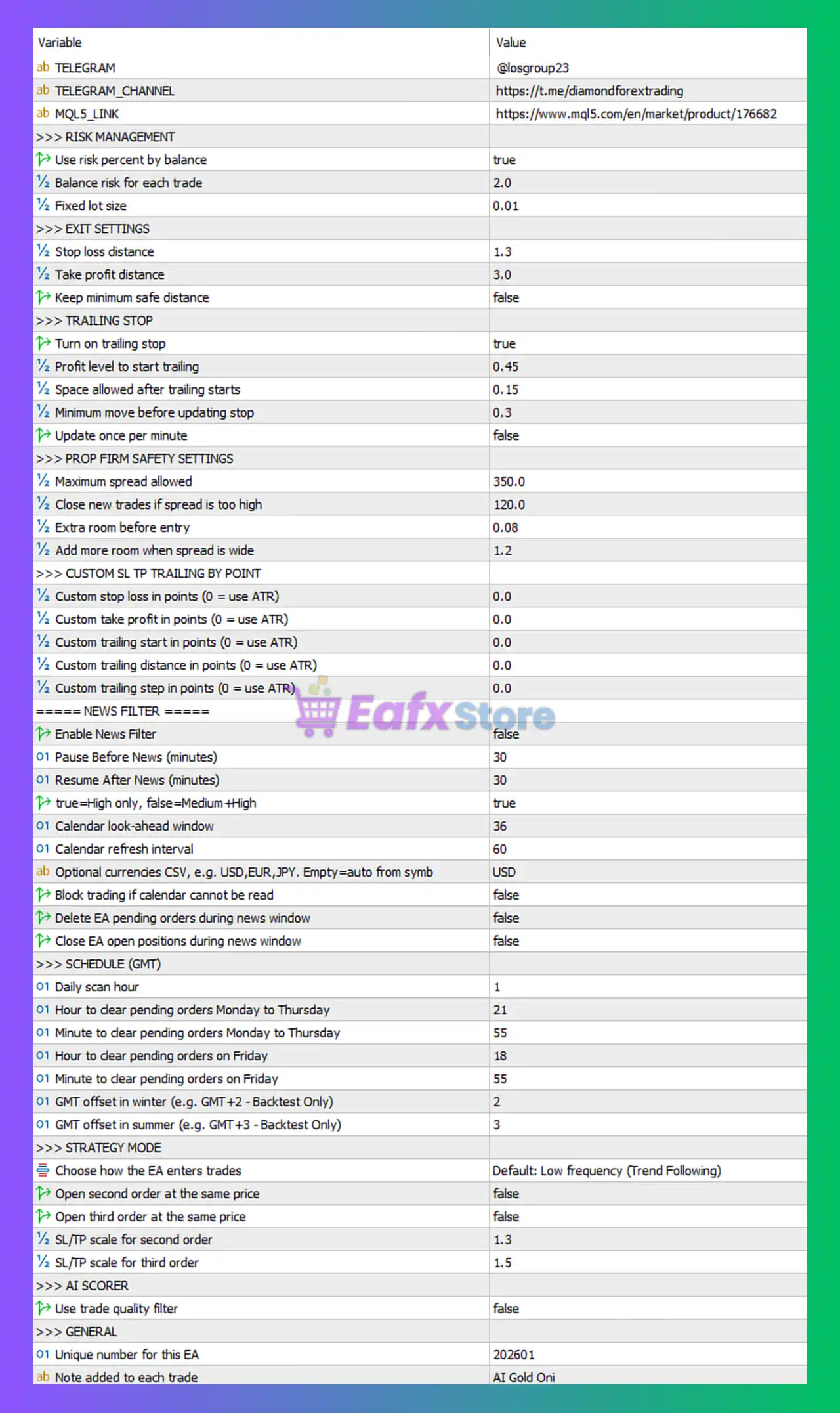
🔶 Risk Management Settings
🔹 Use risk percent by balance = true — Enables automatic lot sizing based on account balance and percentage risk.
🔹 Balance risk for each trade = 2.0 — Risks 2.0% of account balance per trade when automatic risk calculation is enabled.
🔹 Fixed lot size = 0.01 — Uses 0.01 lots when fixed-lot mode is selected.
🔶 Exit Settings
🔹 Stop loss distance = 1.3 — Sets the stop loss distance to 1.3 ATR-based units or strategy-defined measurement.
🔹 Take profit distance = 3.0 — Sets the take profit target to 3.0 ATR-based units or strategy-defined measurement.
🔹 Keep minimum safe distance = false — Minimum safety distance protection is disabled.
🔶 Trailing Stop Settings
🔹 Turn on trailing stop = true — Enables automatic trailing stop management.
🔹 Profit level to start trailing = 0.45 — Trailing stop activates once profit reaches 0.45 units.
🔹 Space allowed after trailing starts = 0.15 — Allows 0.15 units of price movement before stop adjustment.
🔹 Minimum move before updating stop = 0.3 — Price must move at least 0.3 units before the trailing stop updates.
🔹 Update once per minute = false — Trailing stop updates continuously rather than once per minute.
🔶 Prop Firm Safety Settings
🔹 Maximum spread allowed = 350.0 — The EA will only trade when spread remains below 350.0 points.
🔹 Close new trades if spread is too high = 120.0 — New trades are blocked when spread exceeds 120.0 points.
🔹 Extra room before entry = 0.08 — Adds 0.08 units of extra entry tolerance.
🔹 Add more room when spread is wide = 1.2 — Expands entry tolerance by a factor of 1.2 during wider spreads.
🔶 Custom SL, TP & Trailing by Point Settings
🔹 Custom stop loss in points (0 = use ATR) = 0.0 — Uses ATR-based stop loss because value is 0.0.
🔹 Custom take profit in points (0 = use ATR) = 0.0 — Uses ATR-based take profit because value is 0.0.
🔹 Custom trailing start in points (0 = use ATR) = 0.0 — Uses ATR-based trailing activation because value is 0.0.
🔹 Custom trailing distance in points (0 = use ATR) = 0.0 — Uses ATR-based trailing distance because value is 0.0.
🔹 Custom trailing step in points (0 = use ATR) = 0.0 — Uses ATR-based trailing step because value is 0.0.
🔶 News Filter Settings
🔹 Enable News Filter = false — Economic news filtering is currently disabled.
🔹 Pause Before News (minutes) = 30 — The EA can pause trading 30 minutes before news events when enabled.
🔹 Resume After News (minutes) = 30 — Trading resumes 30 minutes after news events when enabled.
🔹 true=High only, false=Medium+High = true — Only high-impact news events are considered.
🔹 Calendar look-ahead window = 36 — The EA scans economic events 36 hours ahead.
🔹 Calendar refresh interval = 60 — News calendar refreshes every 60 minutes.
🔹 Optional currencies CSV (e.g., USD,EUR,JPY. Empty=auto from symb) = USD — News filtering focuses on USD-related events.
🔹 Block trading if calendar cannot be read = false — Trading continues even if the economic calendar cannot be accessed.
🔹 Delete EA pending orders during news window = false — Pending orders remain active during news periods.
🔹 Close EA open positions during news window = false — Existing positions remain open during news events.
🔶 Schedule (GMT) Settings
🔹 Daily scan hour = 1 — Performs daily market scans at 01:00 GMT.
🔹 Hour to clear pending orders Monday to Thursday = 21 — Pending orders are cleared at 21:00 GMT from Monday to Thursday.
🔹 Minute to clear pending orders Monday to Thursday = 55 — Pending orders are cleared at 21:55 GMT from Monday to Thursday.
🔹 Hour to clear pending orders on Friday = 18 — Pending orders are cleared at 18:00 GMT on Friday.
🔹 Minute to clear pending orders on Friday = 55 — Pending orders are cleared at 18:55 GMT on Friday.
🔹 GMT offset in winter (e.g., GMT+2 - Backtest Only) = 2 — Uses GMT+2 offset during winter backtesting.
🔹 GMT offset in summer (e.g., GMT+3 - Backtest Only) = 3 — Uses GMT+3 offset during summer backtesting.
🔶 Strategy Mode Settings
🔹 Choose how the EA enters trades = Default: Low frequency (Trend Following) — Uses a low-frequency trend-following entry model.
🔹 Open second order at the same price = false — The EA does not open a second order at the identical entry price.
🔹 Open third order at the same price = false — The EA does not open a third order at the identical entry price.
🔹 SL/TP scale for second order = 1.3 — Stop loss and take profit values are multiplied by 1.3 for the second order.
🔹 SL/TP scale for third order = 1.5 — Stop loss and take profit values are multiplied by 1.5 for the third order.
🔶 AI Scorer Settings
🔹 Use trade quality filter = false — AI-based trade quality scoring is disabled.
🔶 General Settings
🔹 Unique number for this EA = 202601 — Unique Magic Number used to identify trades opened by Gold Oni EA MT5.
🔹 Note added to each trade = AI Gold Oni — Adds the comment "AI Gold Oni" to all orders executed by the EA.
🔢 Conclusion
Gold Oni EA MT5 combines trend-following logic, ATR-based trade management, spread protection, trailing stop automation, and optional news filtering into a comprehensive automated trading solution.
With configurable risk settings, multi-order scaling options, and prop-firm-oriented safety controls, the EA provides traders with a flexible framework for managing Gold trading strategies while maintaining disciplined risk management.
🔢 FAQs
❓ What risk level does Gold Oni EA MT5 use by default?
The EA is configured to risk 2.0% of account balance per trade when automatic risk management is enabled.
❓ Does Gold Oni EA MT5 use a trailing stop?
Yes, Turn on trailing stop = true, meaning the trailing stop feature is enabled by default.
❓ What happens when custom SL and TP values are set to 0.0?
The EA automatically switches to its built-in ATR-based stop loss and take profit calculations.
❓ Does the EA filter economic news events?
The news filter exists, but it is currently disabled because Enable News Filter = false.
❓ What trading style is selected in the default configuration?
The EA uses Default: Low frequency (Trend Following) mode, focusing on trend-based market opportunities rather than high-frequency trading.



