




Scalping Robot Pro MT5 + Sets (Latest version) | Available
Select a variant to see availability.
Quick Verdict
Gold remains one of the most actively traded and volatile instruments in the financial markets. Capturing short-term movements consistently requires speed, precision, and disciplined risk management—qualities that many traders struggle to maintain manually.
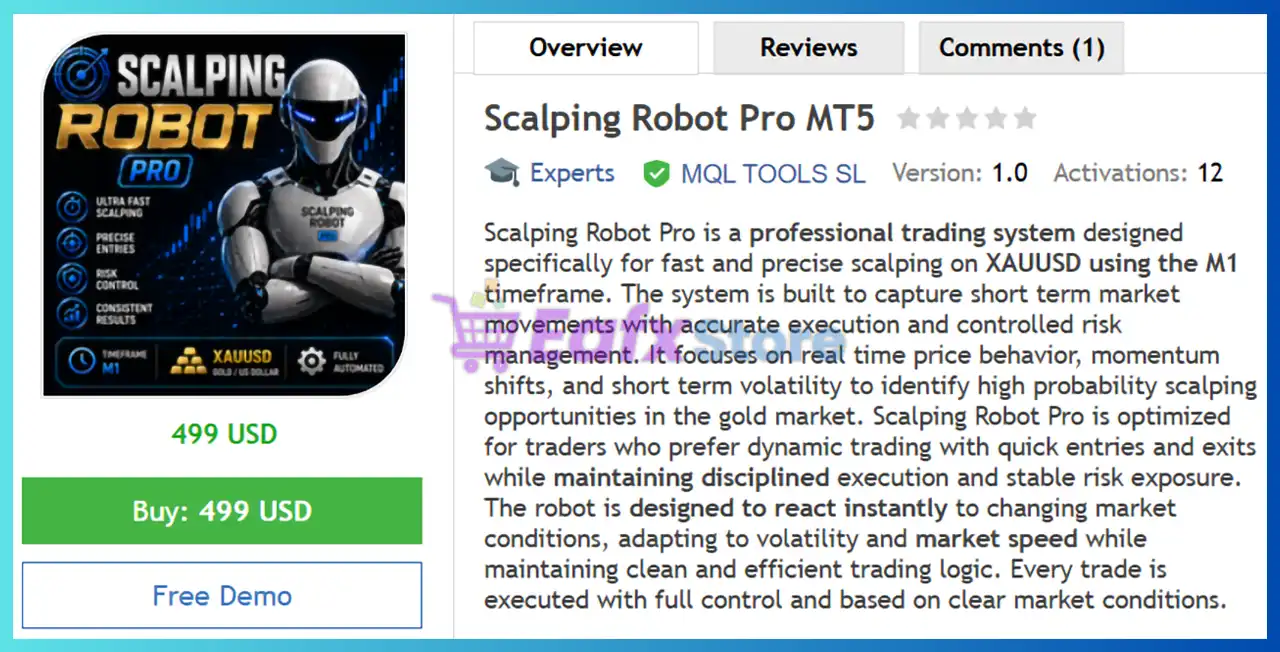
Scalping Robot Pro MT5 was developed specifically to solve this challenge. Designed exclusively for XAUUSD on the M1 timeframe, this advanced trading robot combines real-time market analysis, intelligent execution, volatility filtering, and automated trade management to identify high-probability scalping opportunities throughout the trading day.
With a strong historical backtest, impressive live signal performance, a 4.91/5 user rating, and comprehensive risk controls, Scalping Robot Pro MT5 has quickly established itself as one of the most promising Gold scalping EAs available for MetaTrader 5.
Best For
Scalping Robot Pro MT5 is ideal for:
✔ Gold (XAUUSD) traders seeking fully automated execution
✔ Scalpers looking for high-frequency opportunities
✔ Traders who prefer short holding times
✔ Users wanting a simple setup process
✔ Traders seeking strong risk controls and drawdown protection
✔ Investors looking for a professional Gold-focused EA
✔ Beginners who want optimized default settings
Overall Rating
⭐⭐⭐⭐⭐ 9.3/10
| Category | Score |
|---|---|
| Scalping Strategy | 9.5/10 |
| Risk Management | 9.2/10 |
| Ease of Use | 9.5/10 |
| Live Performance | 9.2/10 |
| Backtest Quality | 9.4/10 |
| User Satisfaction | 9.3/10 |
What is Scalping Robot Pro MT5?
Scalping Robot Pro MT5 is a fully automated Expert Advisor (EA) developed specifically for trading XAUUSD (Gold) on the M1 timeframe.
Unlike generic multi-currency robots, this EA focuses exclusively on one of the most liquid and volatile markets in the world.
The system analyzes:
✔ Real-time price action.
✔ Market momentum.
✔ Volatility shifts.
✔ Session activity.
✔ News conditions.
✔ Market liquidity.
Using advanced filtering mechanisms, the robot only enters trades when predefined market conditions align.
Core Objective
The primary goal of Scalping Robot Pro MT5 is simple:
✔ Capture small but frequent Gold price movements.
✔ Maintain fast execution.
✔ Protect capital through structured risk controls.
✔ Deliver consistent long-term growth.
 Vendor Website: View here
This is GroupBuy ==> How to Join
Scalping Robot Pro MT5 Reviews
About the Developer
Scalping Robot Pro MT5 was developed by MQL TOOLS SL, a developer known for creating automated trading solutions for MetaTrader users.
The company focuses on:
✔ Automated Forex systems.
✔ Gold trading robots.
✔ Price action tools.
✔ Algorithmic trading solutions.
✔ Risk-controlled trading automation.
Other Popular Products from MQL TOOLS SL
Several well-known products associated with the developer include:
Additionally, buyers of Scalping Robot Pro MT5 receive one of these products free as a bonus.
How Does Scalping Robot Pro MT5 Work?
Specialized Gold Scalping Logic
The EA was built specifically for Gold scalping rather than adapting a generic Forex strategy.
The system continuously scans:
✔ Momentum changes.
✔ Volatility spikes.
✔ Short-term trend shifts.
✔ Intraday liquidity conditions.
When all requirements align, trades are executed automatically.
M1 Timeframe Optimization
Operating exclusively on the M1 chart allows the robot to:
✔ React instantly to market changes.
✔ Capture short-term opportunities.
✔ Enter and exit positions quickly.
✔ Maintain precise execution timing.
Intelligent Trade Management
The robot manages trades automatically through:
✔ Stop Loss.
✔ Take Profit.
✔ Trailing Stop.
✔ Position control algorithms.
This ensures every trade follows a structured risk framework.
Session-Based Trading Filters
The system can be configured to trade only during selected market sessions, helping avoid periods of low liquidity and poor market conditions.
Verified Live Signal Performance
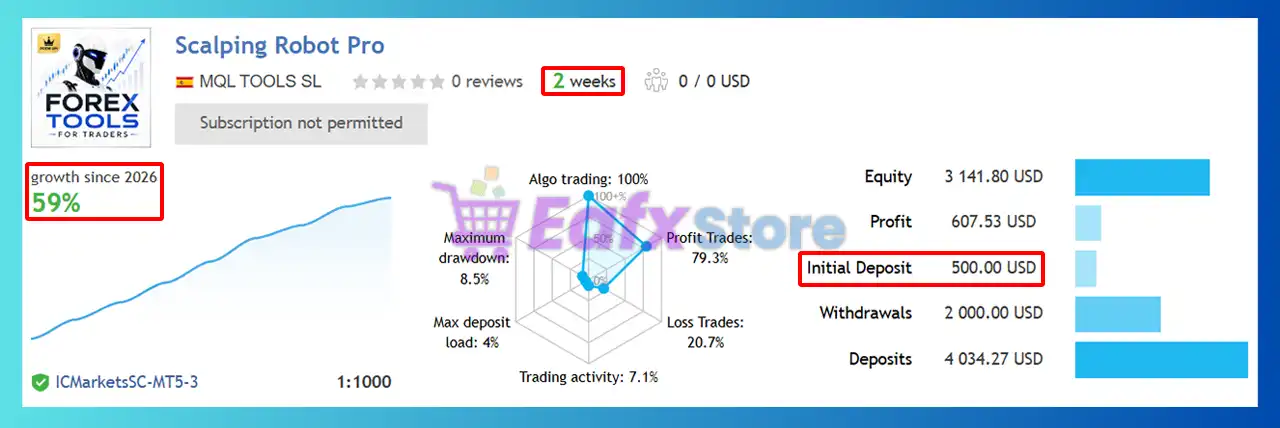
One of the strongest aspects of Scalping Robot Pro MT5 is the availability of a verified live signal.
Key Live Signal Statistics
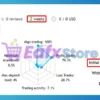
Scalping Robot Pro MT5 Live Signal
| Metric | Result |
|---|---|
| Growth | 59% |
| Maximum Drawdown | 8.5% |
| Profit Trades | 79.3% |
| Loss Trades | 20.7% |
| Max Deposit Load | 4% |
| Trading Activity | 7.1% |
| Leverage | 1:1000 |
Live Performance Analysis
✔ High Winning Percentage: A win rate close to 80% indicates that the system successfully identifies high-probability trading setups.
✔ Controlled Drawdown: The reported maximum drawdown of 8.5% is relatively conservative for a Gold scalping strategy.
✔ Low Account Exposure: A maximum deposit load of only 4% suggests the robot avoids excessive leverage and overexposure.
✔ Consistent Equity Growth: The live equity curve shows steady account appreciation rather than sharp spikes, which is generally considered a positive characteristic for long-term sustainability.
Overall, the live signal demonstrates a healthy balance between profitability and risk control.
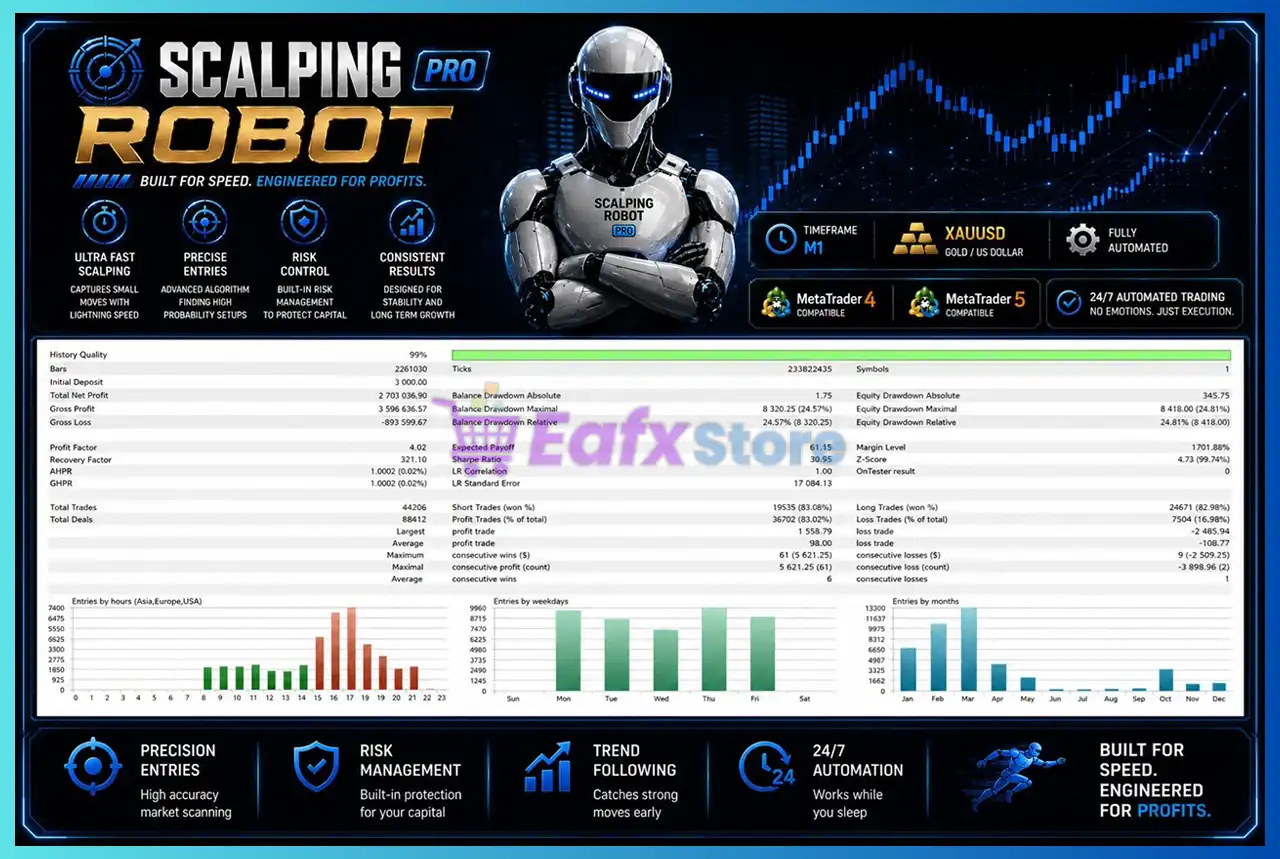
Historical Backtest Performance
Historical testing results are particularly impressive.
Backtest Highlights
Scalping Robot Pro MT5 Backtest
| Metric | Result |
|---|---|
| Initial Deposit | $3,000 |
| Total Net Profit | $2,703,036 |
| Profit Factor | 4.02 |
| Recovery Factor | 321.10 |
| Total Trades | 44,206 |
| Winning Trades | 83.02% |
| Relative Drawdown | 24.57% |
| History Quality | 99% |
Key Strengths
✔ Exceptional Profit Factor: A Profit Factor above 4.0 is rarely seen among retail EAs and suggests strong profitability relative to losses.
✔ Massive Sample Size: More than 44,000 trades were tested, providing substantial statistical significance.
✔ Consistent Growth Curve: The balance curve displays smooth and steady growth across multiple years without major interruptions.
✔ Strong Recovery Capability: The Recovery Factor above 300 demonstrates the system’s ability to recover from drawdowns effectively.
What Real Users Are Saying
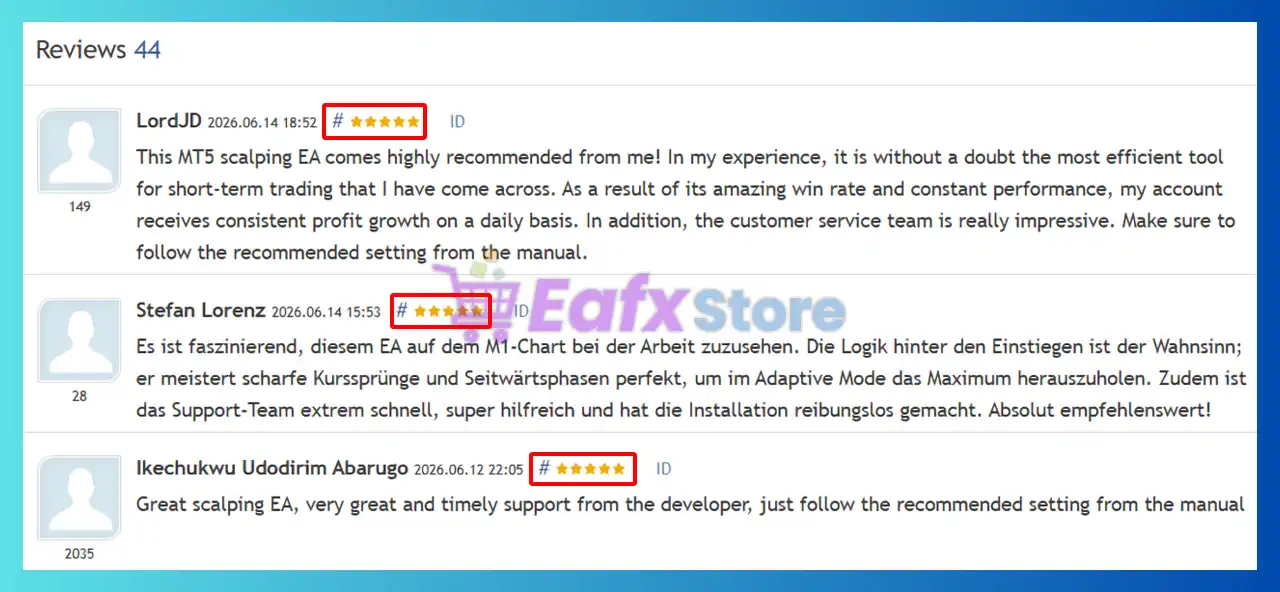
User reviews consistently highlight profitability, ease of use, and customer support.
User reviews of Scalping Robot Pro MT5
Example #1 – Daily Profit Growth
“One trader described Scalping Robot Pro MT5 as the most effective short-term trading tool they had used, reporting consistent daily profit growth and excellent customer support.”
Example #2 – Smart Market Adaptation
“Another user praised the EA’s ability to handle sharp price movements and sideways market conditions while maintaining strong overall performance.”
Example #3 – Reliable Automated Trading
“Multiple traders highlighted stable results, smooth execution, and responsive assistance from the support team.”
Common Themes from Reviews
Most positive reviews mention:
✔ Consistent profitability.
✔ Strong win rate.
✔ Easy installation.
✔ Reliable support.
✔ Good Gold market adaptation.
✔ Stable risk management.
Why Scalping Robot Pro MT5 Stands Out
Built Exclusively for Gold
Unlike multi-asset robots, Scalping Robot Pro MT5 focuses entirely on XAUUSD.
This specialization allows:
✔ Better optimization.
✔ More precise entries.
✔ Enhanced execution quality.
Fully Automated Trading
Once installed:
✔ Market analysis.
✔ Entries.
✔ Exits.
✔ Trade management.
are handled automatically.
Beginner-Friendly Setup
The developer intentionally simplified the configuration process.
Most users only need to:
✔ Attach the EA to XAUUSD M1.
✔ Set lot size.
✔ Enable AutoTrading.
Everything else is already optimized.
Risk Management Features
Risk control is one of the strongest selling points of Scalping Robot Pro MT5.
Built-In Stop Loss
Every position can be protected using predefined Stop Loss levels.
Configurable Take Profit
Users may choose:
✔ Fixed Take Profit
✔ Automated Take Profit logic
Trailing Stop Protection
The built-in Trailing Stop system helps secure profits as trades move favorably.
Daily Drawdown Protection
Users can define:
✔ Maximum Daily Drawdown
✔ Daily Profit Target
Once reached, trading can automatically stop.
News Filter
The robot avoids trading during high-impact events such as:
✔ NFP releases
✔ CPI announcements
✔ Interest rate decisions
Holiday Protection
Additional filters help reduce exposure during periods of low liquidity and unpredictable market conditions.
Recommended Trading Conditions
Recommended settings and parameters to pay attention to from developers and experts:
| Features | Type |
|---|---|
| Trading platform | MetaTrader 5 (MT5) |
| Time frames | M1 (1 minute chart) |
| Currency pairs | XAUUSD (Gold) |
| Minimum / Recommended deposit | $1,000 |
| Minimum / Recommended leverage | 1:20 up to 1:1000 |
| Account type | Hedging, Netting, Zero, Cent, Micro, Standard, Premium or ECN |
| Product type | Original version |
| Additional services | Unlock and Decompile |
| Recommended brokers | Exness Broker, Icmarkets Broker |
| Recommended VPS | MyfxVPS.com (Blue VPS, Golden VPS). Lowest Latency, 2 week Free Trial, 100% Free for 12-18 Months. |
Product Download Package?
The download package of the product suite includes:
 Setting (If Any).docx
Installation Guide.docx
 Reviewed by David Easton
Potential Risks (Weaknesses and Risk Warnings)
No trading system is risk-free.
Gold Can Be Extremely Volatile
XAUUSD frequently experiences:
✔ Sudden price spikes
✔ News-driven volatility
✔ Liquidity shifts
These conditions can affect scalping performance.
Scalping Requires Good Execution
Broker quality is critical.
Poor execution may lead to:
✔ Slippage
✔ Spread widening
✔ Reduced profitability
Historical Results Are Not Guarantees
Strong backtests and live results are encouraging, but future market behavior may differ.
M1 Strategies May Experience Short-Term Fluctuations
Because the robot trades frequently, traders should expect:
✔ Winning streaks
✔ Losing streaks
✔ Temporary drawdowns
Proper risk management remains essential.
Who Should Use Scalping Robot Pro MT5?
Gold Scalpers
Perfect for traders who want to focus exclusively on XAUUSD.
Busy Professionals
Ideal for traders seeking:
✔ Automated execution
✔ Minimal chart monitoring
✔ Hands-free trading
Beginners
The optimized default settings make it accessible even for users with limited trading experience.
Advanced Traders
Experienced traders can customize:
✔ Trading sessions
✔ Risk controls
✔ Take Profit levels
✔ News filters
✔ Drawdown limits
to suit their trading style.
Final Verdict
Scalping Robot Pro MT5 is a highly specialized Gold scalping EA designed for traders who value speed, precision, and disciplined risk management.
Its strongest advantages include:
✔ Exclusive XAUUSD optimization.
✔ High historical win rate.
✔ Strong verified live signal.
✔ Flexible risk controls.
✔ News and holiday protection.
✔ Beginner-friendly setup.
✔ Access to private support and updates.
The combination of a 59% verified live growth, 8.5% maximum drawdown, 79.3% winning trades, and a 4.91-star user rating makes Scalping Robot Pro MT5 one of the most attractive Gold scalping solutions currently available for MetaTrader 5.
🔢 Scalping Robot Pro MT5 – Complete Settings & Parameters Guide
Scalping Robot Pro MT5 is an advanced automated trading Expert Advisor (EA) for MetaTrader 5 designed for high-frequency scalping and short-term market opportunities.
The EA combines adaptive trade management, ATR-based volatility filters, candle-size validation, spread protection, news filtering, session controls, and flexible money management.
With support for Buy and Sell trading, adaptive stop management, and built-in risk controls, Scalping Robot Pro MT5 aims to optimize trade execution while maintaining strict protection against adverse market conditions.
Scalping Robot Pro MT5 Settings
🔢 Scalping Robot Pro MT5 Settings Explained
Below are the details of the parameters in the advisor’s trading system settings table:
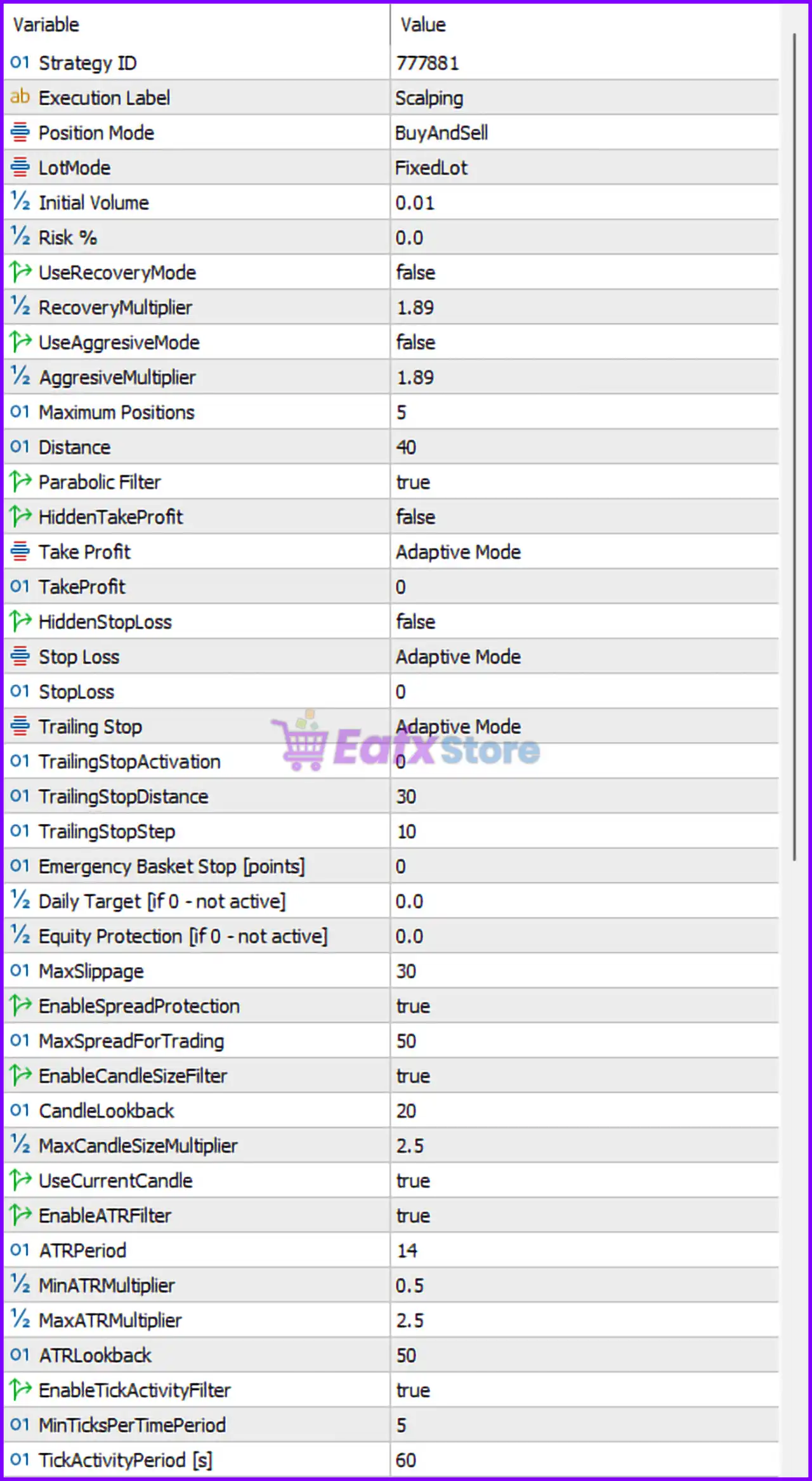
Scalping Robot Pro MT5 Settings Panel
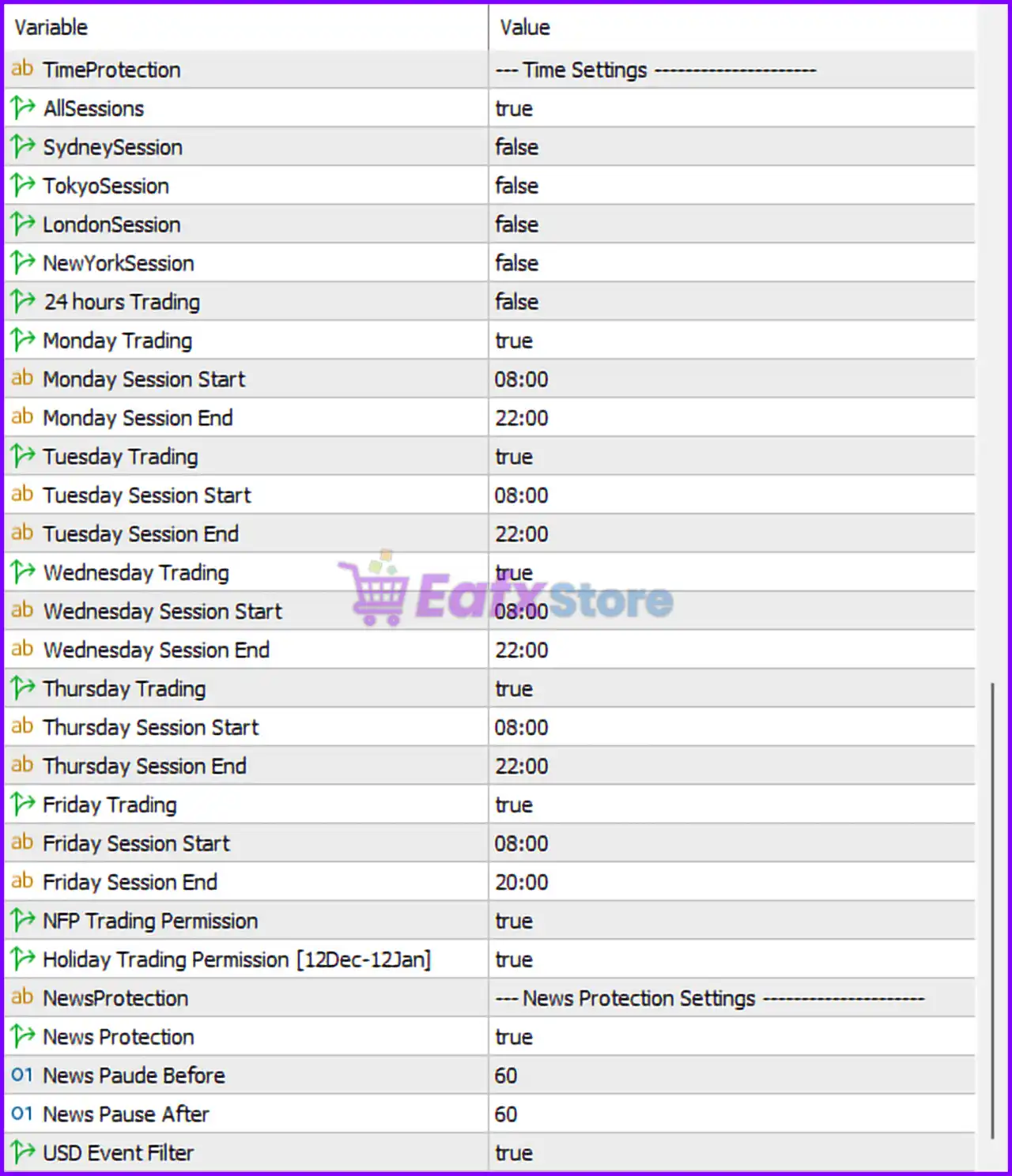
Scalping Robot Pro MT5 Setting Panel
🔶 Core Trading Settings
🔹 Strategy ID = 777881 — Unique strategy identifier used by the EA.
🔹 Execution Label = Scalping — Internal label indicating the EA operates using a scalping strategy.
🔹 Position Mode = BuyAndSell — Allows both Buy and Sell positions.
🔹 LotMode = FixedLot — Uses a fixed lot sizing method.
🔹 Initial Volume = 0.01 — Starting lot size for each trade.
🔹 Risk % = 0.0 — Risk-based lot sizing is disabled.
🔶 Recovery & Aggressive Trading Settings
🔹 UseRecoveryMode = false — Recovery trading mode is disabled.
🔹 RecoveryMultiplier = 1.89 — Multiplier that would be used for recovery positions if enabled.
🔹 UseAggresiveMode = false — Aggressive trading mode is disabled.
🔹 AggresiveMultiplier = 1.89 — Multiplier used for aggressive position sizing when enabled.
🔶 Position Management
🔹 Maximum Positions = 5 — Maximum number of simultaneously open positions.
🔹 Distance = 40 — Minimum distance between entries or grid positions.
🔹 Parabolic Filter = true — Enables Parabolic SAR filtering for trade validation.
🔶 Take Profit Settings
🔹 HiddenTakeProfit = false — Take Profit is visible to the broker.
🔹 Take Profit = Adaptive Mode — The EA automatically calculates Take Profit levels.
🔹 TakeProfit = 0 — No fixed Take Profit value because Adaptive Mode is active.
🔶 Stop Loss Settings
🔹 HiddenStopLoss = false — Stop Loss is visible to the broker.
🔹 Stop Loss = Adaptive Mode — Stop Loss values are automatically calculated.
🔹 StopLoss = 0 — No fixed Stop Loss value because Adaptive Mode is enabled.
🔶 Trailing Stop Settings
🔹 Trailing Stop = Adaptive Mode — Dynamic trailing stop management is active.
🔹 TrailingStopActivation = 0 — Trailing stop activation level is automatically determined.
🔹 TrailingStopDistance = 30 — Trailing stop remains 30 points behind price.
🔹 TrailingStopStep = 10 — Stop loss adjusts every 10 points.
🔶 Protection Settings
🔹 Emergency Basket Stop [points] = 0 — Basket-level emergency stop is disabled.
🔹 Daily Target [if 0 – not active] = 0.0 — Daily profit target protection is disabled.
🔹 Equity Protection [if 0 – not active] = 0.0 — Equity protection feature is disabled.
🔹 MaxSlippage = 30 — Maximum acceptable slippage is 30 points.
🔶 Spread Protection
🔹 EnableSpreadProtection = true — Spread protection is enabled.
🔹 MaxSpreadForTrading = 50 — Trading is blocked if spread exceeds 50 points.
🔶 Candle Size Filter
🔹 EnableCandleSizeFilter = true — Filters trades based on candle size.
🔹 CandleLookback = 20 — Uses the previous 20 candles for analysis.
🔹 MaxCandleSizeMultiplier = 2.5 — Rejects oversized candles exceeding 2.5× normal size.
🔹 UseCurrentCandle = true — Includes the current candle in calculations.
🔶 ATR Volatility Filter
🔹 EnableATRFilter = true — Activates ATR-based volatility filtering.
🔹 ATRPeriod = 14 — ATR calculation period is 14 candles.
🔹 MinATRMultiplier = 0.5 — Minimum ATR threshold multiplier.
🔹 MaxATRMultiplier = 2.5 — Maximum ATR threshold multiplier.
🔹 ATRLookback = 50 — ATR calculations reference the last 50 candles.
🔶 Tick Activity Filter
🔹 EnableTickActivityFilter = true — Uses market tick activity as a trade filter.
🔹 MinTicksPerTimePeriod = 5 — Requires at least 5 ticks during the evaluation period.
🔹 TickActivityPeriod [s] = 60 — Tick activity measured over 60 seconds.
🔢 Time Protection Settings
🔶 Trading Sessions
🔹 AllSessions = true — Allows all trading sessions by default.
🔹 SydneySession = false — Sydney session filter disabled.
🔹 TokyoSession = false — Tokyo session filter disabled.
🔹 LondonSession = false — London session filter disabled.
🔹 NewYorkSession = false — New York session filter disabled.
🔹 24 hours Trading = false — Continuous 24-hour trading is disabled.
🔶 Monday Trading
🔹 Monday Trading = true — Trading allowed on Monday.
🔹 Monday Session Start = 08:00 — Monday trading starts at 08:00.
🔹 Monday Session End = 22:00 — Monday trading ends at 22:00.
🔶 Tuesday Trading
🔹 Tuesday Trading = true — Trading allowed on Tuesday.
🔹 Tuesday Session Start = 08:00 — Tuesday trading starts at 08:00.
🔹 Tuesday Session End = 22:00 — Tuesday trading ends at 22:00.
🔶 Wednesday Trading
🔹 Wednesday Trading = true — Trading allowed on Wednesday.
🔹 Wednesday Session Start = 08:00 — Wednesday trading starts at 08:00.
🔹 Wednesday Session End = 22:00 — Wednesday trading ends at 22:00.
🔶 Thursday Trading
🔹 Thursday Trading = true — Trading allowed on Thursday.
🔹 Thursday Session Start = 08:00 — Thursday trading starts at 08:00.
🔹 Thursday Session End = 22:00 — Thursday trading ends at 22:00.
🔶 Friday Trading
🔹 Friday Trading = true — Trading allowed on Friday.
🔹 Friday Session Start = 08:00 — Friday trading starts at 08:00.
🔹 Friday Session End = 20:00 — Friday trading stops at 20:00.
🔶 Event Trading Permissions
🔹 NFP Trading Permission = true — Trading during Non-Farm Payroll events is allowed.
🔹 Holiday Trading Permission [12Dec-12Jan] = true — Trading is allowed during the holiday period from 12 Dec to 12 Jan.
🔶 News Protection Settings
🔹 News Protection = true — Economic news protection is enabled.
🔹 News Pause Before = 60 — Trading pauses 60 minutes before important news.
🔹 News Pause After = 60 — Trading resumes 60 minutes after news releases.
🔹 News Impact Filter = true — Filters trades based on news impact level.
🔢 Conclusion
Scalping Robot Pro MT5 is a feature-rich scalping Expert Advisor that combines adaptive trade management, volatility filtering, spread control, news protection, and session-based trading rules.
Its configurable money management system, ATR filters, candle analysis, and advanced protective mechanisms make it suitable for traders seeking a disciplined and highly customizable automated scalping solution for MT5.
🔢 FAQs
❓ What trading style does Scalping Robot Pro MT5 use?
It is designed primarily for scalping, focusing on short-term market movements and rapid trade execution.
❓ Can Scalping Robot Pro MT5 trade both Buy and Sell positions?
Yes, the setting Position Mode = BuyAndSell enables both long and short trading.
❓ Does the EA include spread protection?
Yes, EnableSpreadProtection = true prevents trading when the spread exceeds 50 points.
❓ How many trades can the EA open simultaneously?
The current configuration allows a maximum of 5 open positions.
❓ Does Scalping Robot Pro MT5 pause trading during economic news?
Yes, with News Protection = true, trading pauses 60 minutes before and 60 minutes after major news events.
User Reviews
Only logged in customers who have purchased this product may leave a review.
❓ What is Scalping Robot Pro MT5 designed for?
Scalping Robot Pro MT5 is built for fast XAUUSD scalping on M1, using precise entries, volatility analysis, and disciplined risk management.
❓ Does Scalping Robot Pro MT5 trade automatically?
Yes, Scalping Robot Pro MT5 operates fully automatically, analyzing market conditions and executing trades without manual intervention.
❓ Which trading instrument works best with Scalping Robot Pro MT5?
Scalping Robot Pro MT5 is optimized exclusively for XAUUSD, focusing on gold’s volatility and short-term market opportunities.
❓ What timeframe should I use for Scalping Robot Pro MT5?
Scalping Robot Pro MT5 is specifically optimized for the M1 timeframe to capture fast price movements and execute precise scalping trades.
❓ Does Scalping Robot Pro MT5 include a news filter?
Yes, Scalping Robot Pro MT5 includes an integrated news filter that helps avoid trading during high-impact economic events and volatility spikes.
❓ Can I customize trade direction in Scalping Robot Pro MT5?
Yes, Scalping Robot Pro MT5 allows traders to choose Buy Only, Sell Only, or Buy and Sell modes based on market conditions.
❓ How does risk management work in Scalping Robot Pro MT5?
Scalping Robot Pro MT5 supports Stop Loss, Take Profit, Trailing Stop, drawdown protection, and daily profit limits for controlled trading.
❓ Is Scalping Robot Pro MT5 suitable for beginners?
Yes, Scalping Robot Pro MT5 comes with optimized default settings, requiring users to adjust only lot size and basic risk preferences.
❓ Can Scalping Robot Pro MT5 work with any broker?
Yes, Scalping Robot Pro MT5 supports most MT5 brokers, but low-spread ECN accounts are recommended for optimal scalping performance.
❓ What do users receive after purchasing Scalping Robot Pro MT5?
Scalping Robot Pro MT5 buyers receive the EA, multilingual manuals, private group access, support resources, updates, and a bonus trading tool.
-
 Original price was: $2,000.00.$89.00Current price is: $89.00.
 -
 Original price was: $2,000.00.$89.00Current price is: $89.00.
 -
 Original price was: $499.00.$89.00Current price is: $89.00.
 -
 Original price was: $200.00.$69.00Current price is: $69.00.
-
 4
4 -
 5Price range: $89.00 through $599.00
 -
 1Price range: $89.00 through $599.00
 -
 0Price range: $89.00 through $599.00
There are no reviews yet.