





Shauns CoPilot EA MT4 v1.10 with SetFiles (Unlimited)

Subscriptions for Special Plan
- 30 EA package is more economical!
- Special package with 99%
- Download 1 EA/Day

Subscriptions for Premium Membership
- Download Unlimited in 1 Year
- Get 100% Discount
- Get free access to all

Subscriptions for Gold Membership
- 1 Year Membership
- Get 100% Discount
- Access EA+Indicator+Course
Frequently bought together 🎁
Add these products to enhance your purchase




Shaun’s CoPilot EA MT4: The Precision Trading Engine for Serious Traders
Shaun’s CoPilot EA is an advanced automated system built by a respected EA architect, trusted by professionals and prop firm challengers. It offers dual-layer strategy logic and multi-indicator fusion combined with bulletproof risk controls. CoPilot is a versatile, customizable engine that adapts to both scalping fast moves and anchoring long-term trends.
🔶 Vendor Website: View here
About the Author
This product is compiled by Shaun Mark Featherstone. This author has more than +1 years of experience working on MQL5 with many famous products such as Shauns CoPilot, Shauns CoPilot EA MT5, Shauns OrderMesh EA and other advisors. Among them, Shauns CoPilot is his best performing products.
Key Features of Shauns CoPilot EA for MT4
🔹 Dual-Layer Trading Engine: Combines anchor trades and scalp entries for diversified execution.
🔹 Advanced Signal Fusion: Integrates multiple indicators for precise market confirmation logic.
🔹 Professional Risk Management: Includes floating loss guards, partial closes and profit protection.
🔹 Adaptive Trade Filtering: Uses spread, volume, EMA slope and candle structure analysis.
🔹 Dynamic Lot Management: Supports fixed, Fibonacci, Martingale and balance-scaled sizing modes.
🔹 Custom Indicator Integration: Allows traders to connect personalized indicators and strategies.
What is the Shauns CoPilot EA Trading Strategy?
🔹 Multi-Indicator Confirmation: Combines RSI, MACD, Bollinger Bands, VWAP and momentum signals.
🔹 Anchor & Scalp Execution: Separates long-term structure trades from short-term opportunities.
🔹 Adaptive Market Filtering: Avoids weak setups through volatility and spread protection systems.
🔹 Dynamic Profit Management: Uses breakeven, trailing and partial close trade optimization.
🔹 Support & Resistance Logic: Filters trades around key liquidity and structural market zones.
🔹 Flexible Signal Voting: Executes trades based on majority or combined indicator agreements.
Shauns CoPilot EA MT4 Review
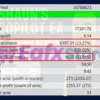
1. Shauns CoPilot EA Myfxbook Results:
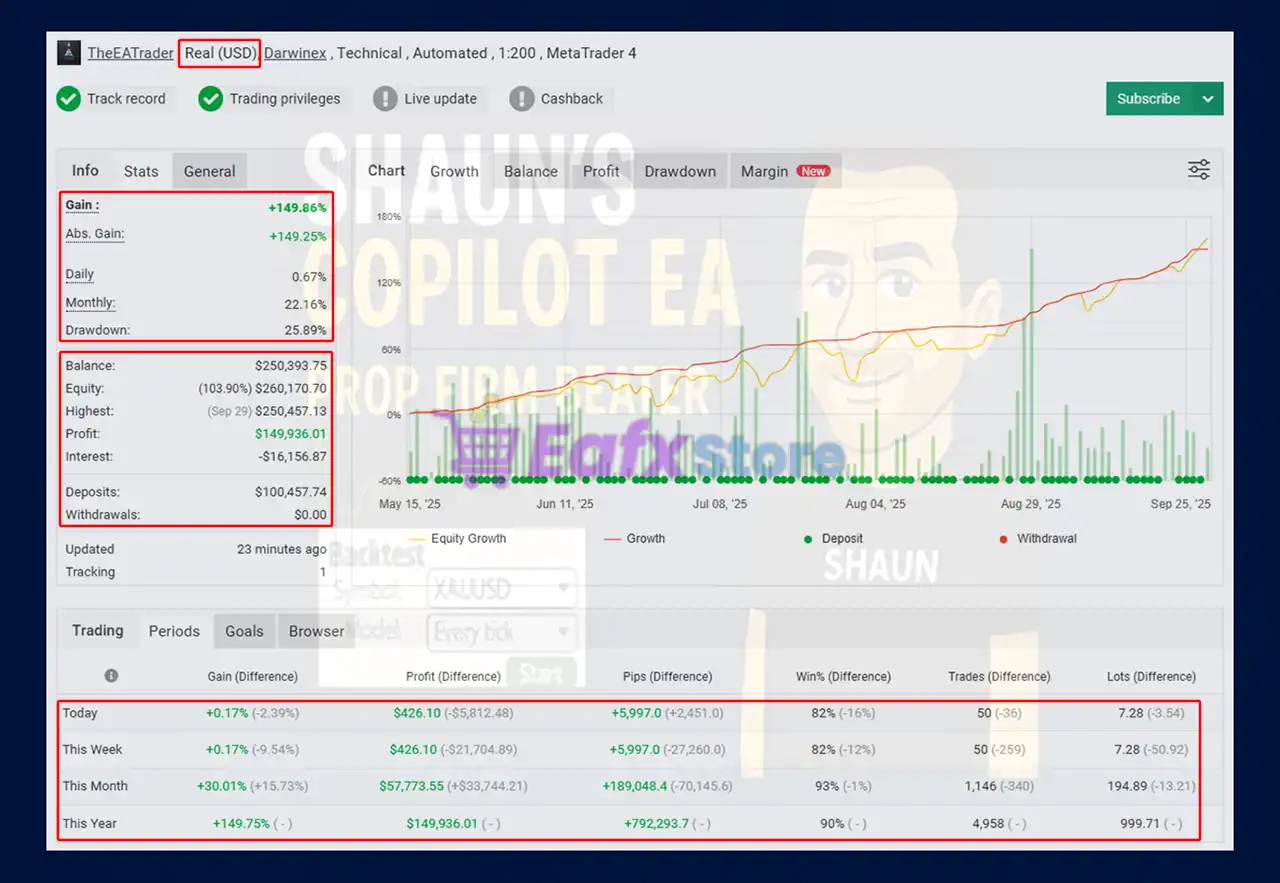
🔶 Shauns CoPilot EA Tested by Myfxbook on real USD account for 5 months, stats show strong growth, stable profits and advanced risk management.
✅ Total Gain: +149.86%
✅ Daily Growth: 0.67%
✅ Monthly Growth: 22.16%
✅ Drawdown: 25.89%
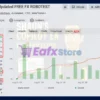
Shauns CoPilot Myfxbook
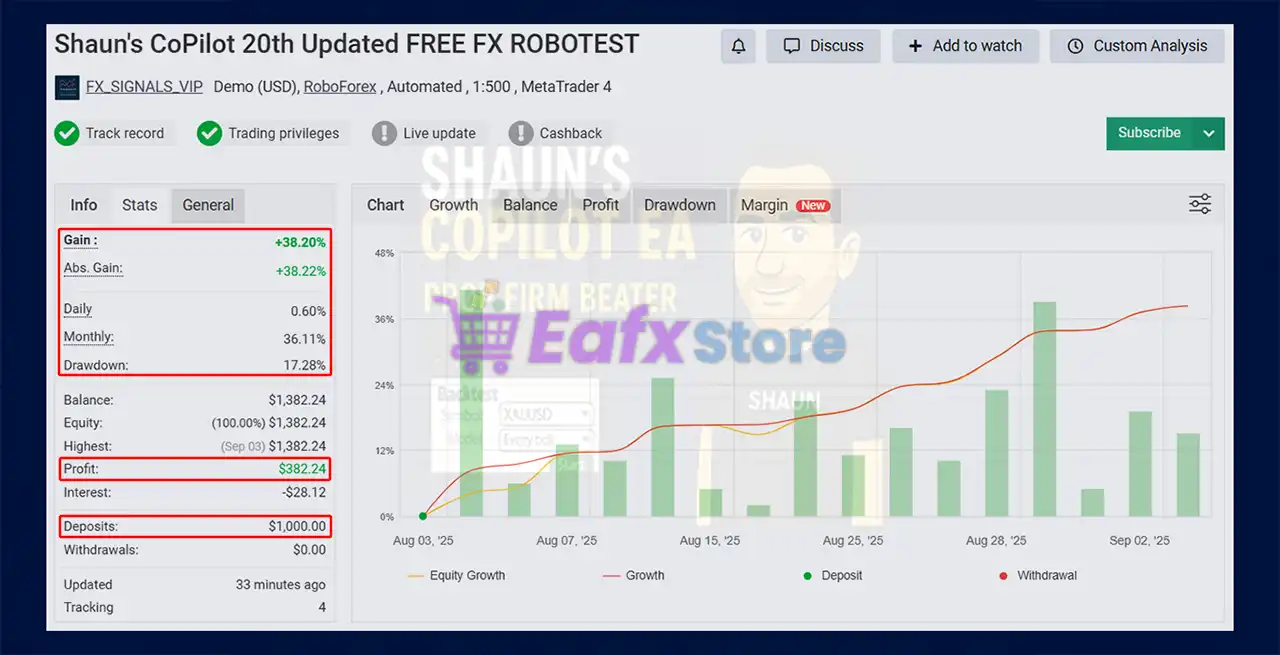
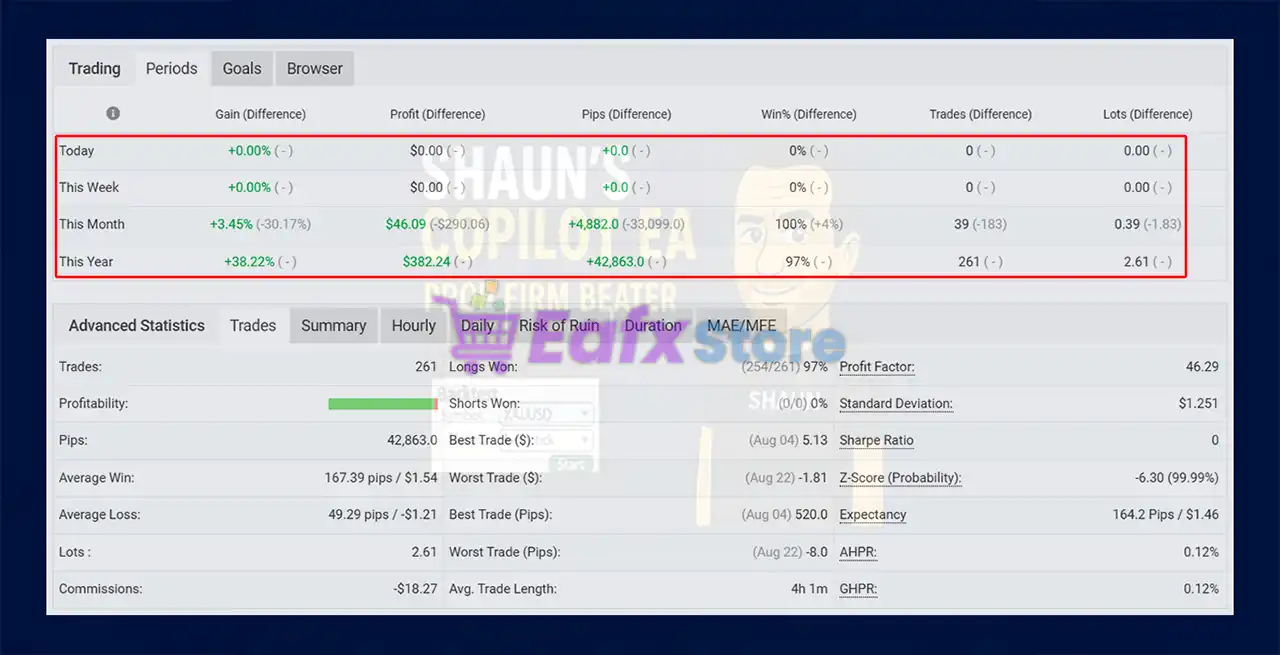
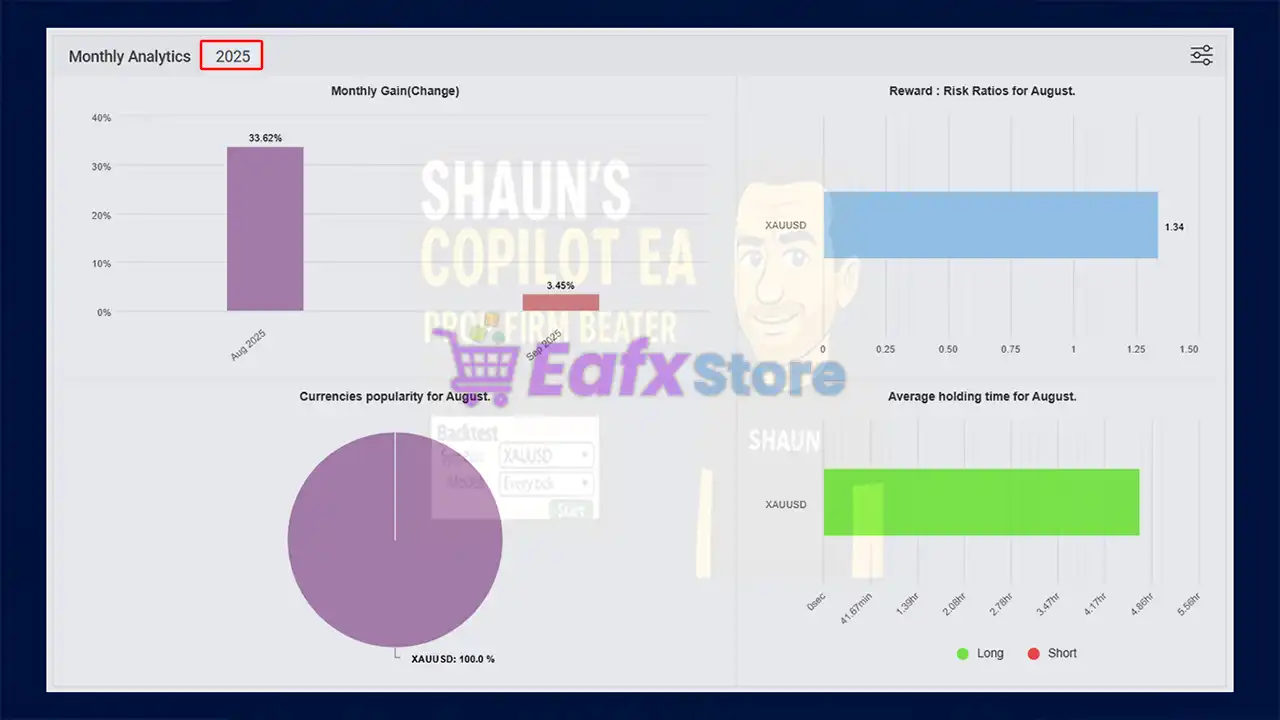
🔶 Shauns CoPilot EA trading results have been verified by Myfxbook, this Expert Advisor has proven to be consistently profitable with controlled risk for 2 months.
✅ Total Gain: +38.20%
✅ Daily Growth: ~0.60%
✅ Monthly Growth: ~36.11%
✅ Drawdown: 17.28%
Shauns CoPilot EA MT4 Myfxbook
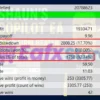
2. Shauns CoPilot EA Backtest Results:
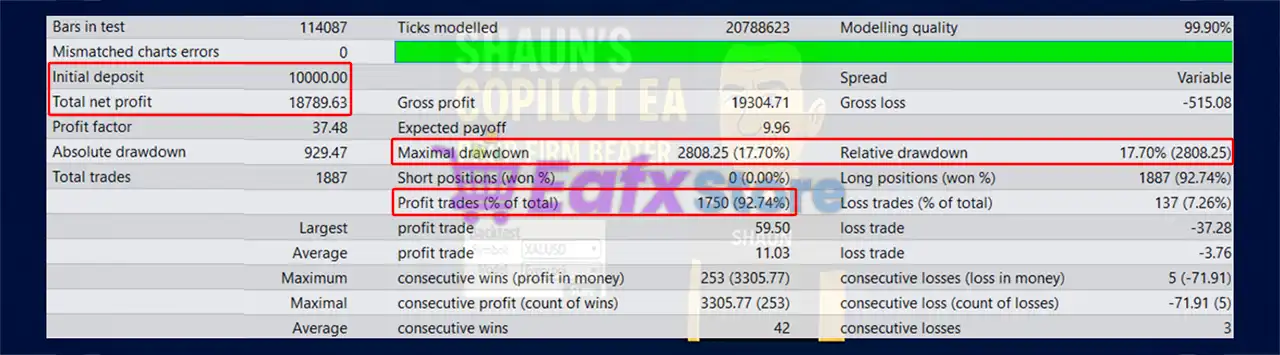
🔶 Shaun’s CoPilot EA has been backtested with a high-quality modelling accuracy of 99.90%, ensuring reliable and realistic results.
✅ Initial Deposit: $10,000
✅ Total Net Profit: $18,789.63
✅ Win Rate: 92.74%
✅ Maximal Drawdown: 17.70%
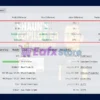
Shauns CoPilot EA Backtest Results
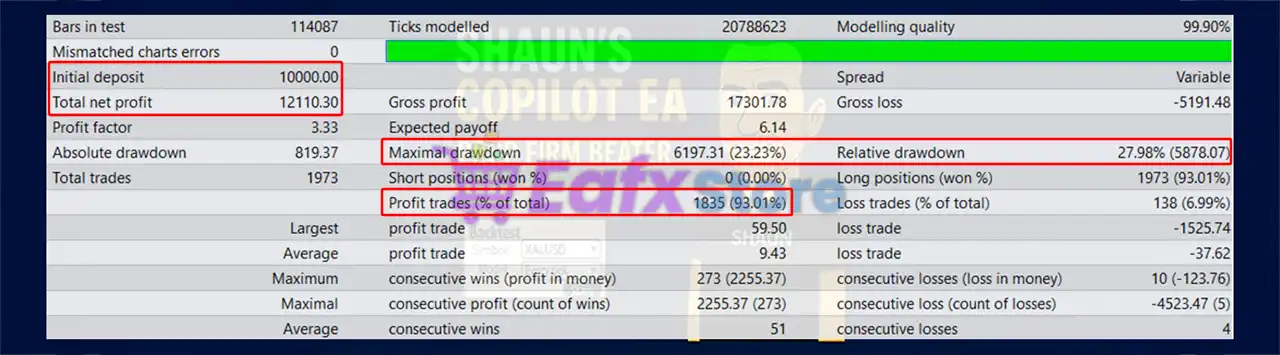
🔶 The backtest of Shaun’s CoPilot EA demonstrates its ability to generate consistent profits while maintaining strong risk control.
✅ Initial Deposit: $10,000
✅ Total Net Profit: $12,110.30
✅ Win Rate: 93.01%
✅ Maximal Drawdown: 23.23%
Shauns CoPilot EA MT4 Backtest Results
Why use Shauns CoPilot EA?
🔹 Stable Automated Performance: Built for resilient execution across changing Forex conditions.
🔹 Professional Risk Protection: Prioritizes disciplined exposure and controlled drawdown handling.
🔹 Highly Customizable Trading: Adapts easily to individual strategies and trading preferences.
🔹 Advanced Market Adaptability: Responds dynamically to volatility, trend and liquidity changes.
🔹 Institutional-Level Features: Includes real-time diagnostics, trade panels and signal overlays.
🔹 Long-Term Trading Consistency: Engineered for precision execution and sustainable growth.
Is Shauns CoPilot EA MT4 safe?
Shauns CoPilot EA shows significant potential in providing stable and reliable profits, making it a reliable tool in the forex market. The advisor is highly appreciated by the MQL5 community in many aspects and has won the trust of users.
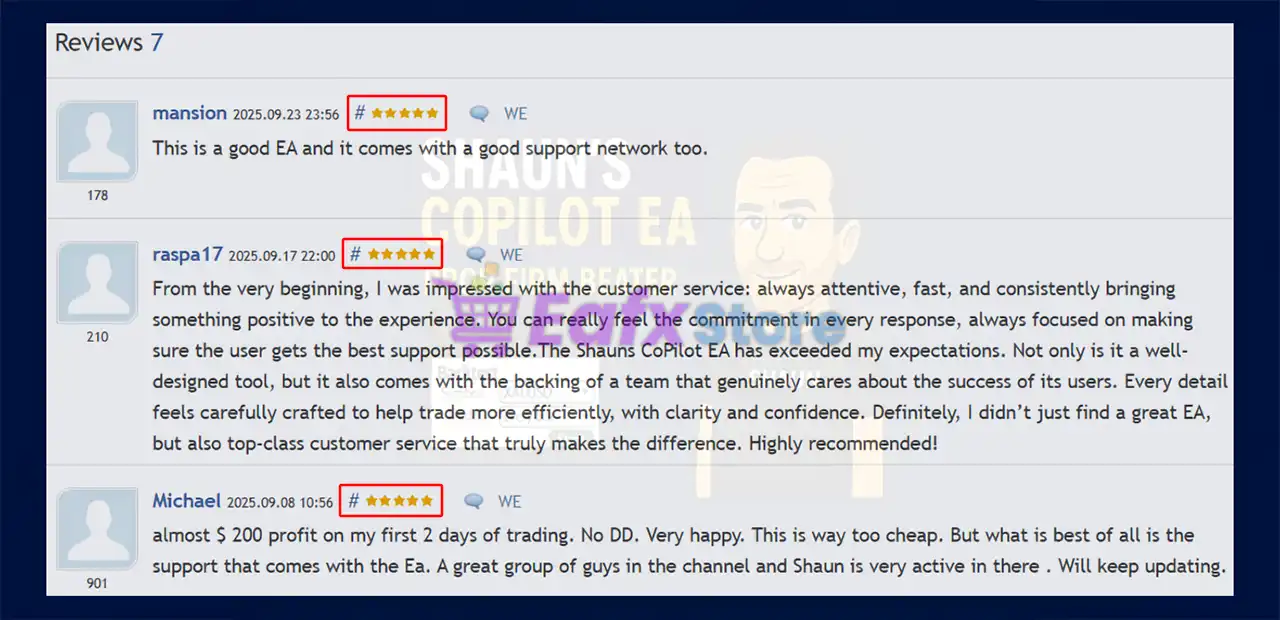
➡️ Michael (2025.09.08): “Almost $ 200 profit on my first 2 days of trading. No DD. Very happy. This is way too cheap. But what is best of all is the support that comes with the Ea.”
➡️ Luis Mariano Herranz Lopez (2025.08.26): “A great EA, with a lot of potential, I trust Shaun 100% he is a fantastic developer. Very good work.”
➡️ Raspa (2025.09.17): “Not only is it a well-designed tool, but it also comes with the backing of a team that genuinely cares about the success of its users. Every detail feels carefully crafted to help trade more efficiently, with clarity and confidence. Highly recommended!”
Shauns CoPilot EA is rated 5 stars by users
Recommended settings
Recommended settings and parameters to pay attention to from developers and experts:
| Features | Type |
|---|---|
| Trading platform | MetaTrader 4 (MT4) |
| Time frames | M1, M5 |
| Minimum / Recommended deposit | $500 |
| Minimum / Recommended leverage | 1:100 |
| Currency pairs | XAUUSD (Gold), XAGUSD, EURUSD, SP500 |
| Product type | NoDLL / Unlimited |
| Additional services | Unlock and Decompile |
| Recommended brokers | Exness Broker, Icmarkets Broker |
| Recommended VPS | MyfxVPS.com ( Blue VPS, Golden VPS). Lowest Latency, 2 week Free Trial, 100% Free for 12-18 Months. |
➡️ Reviewed by David Easton
Product Download Package?
The download package of the product suite includes:
1. Experts:
✅ Shauns CoPilot EA_fix.ex4
2. SetFiles:
✅ CoPilot-XAUUSD-1Min.set
✅ COPILOT-XAUUSD-5Min-SAFER.set
✅ 1min-XAUUSD-Sept3rd-CoPilot.set
✅ Shauns_CoPilot_XAUUSD_-_1min_-_FTMO.set
✅ Shauns-OrderMesh-XAUUSD-BUY-ONLY-5Min.set
Conclusion
In short, Shauns CoPilot EA for MT4 delivers professional-grade trading with dual-layer strategy, precision entry filters and bulletproof risk controls. Verified MyFxBook results and 99.9% backtests prove its consistent profitability, adaptability and capital safety. Built for both retail traders and prop firm challengers, Shauns CoPilot EA is more than just software—it’s your trusted trading partner for long-term success.
🔢 Shauns CoPilot EA MT4 Settings Explained
Shauns CoPilot EA is a professional multi-strategy Expert Advisor (EA) for MetaTrader 4 designed to combine anchor trading, scalp trading, indicator confirmations, partial close management, and advanced risk controls into one automated trading system.
The EA supports Bollinger Bands, Stochastic, Fair Value Gap (FVG), Support & Resistance, EMA trend filtering, higher timeframe analysis and dynamic lot sizing.
With flexible trade management and advanced filtering tools, Shauns CoPilot EA is suitable for traders seeking a highly customizable automated Forex trading solution.
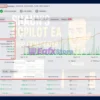
Shauns CoPilot EA MT4 Settings
🔢 Shauns CoPilot EA MT4 Full Settings Explanation
Below are the details of the parameters in the advisor’s trading system settings table:
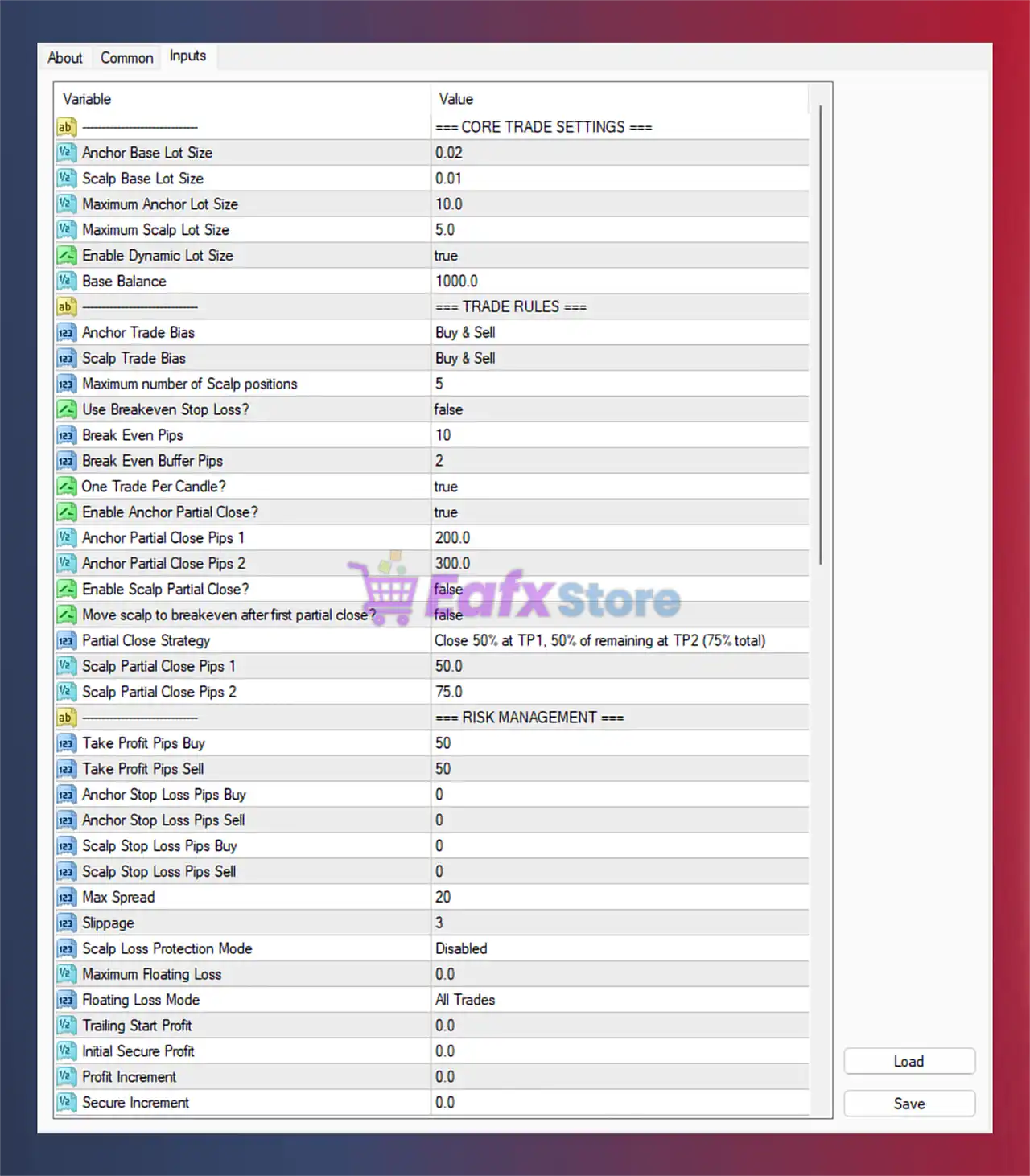
Shauns CoPilot EA MT4 Settings Panel
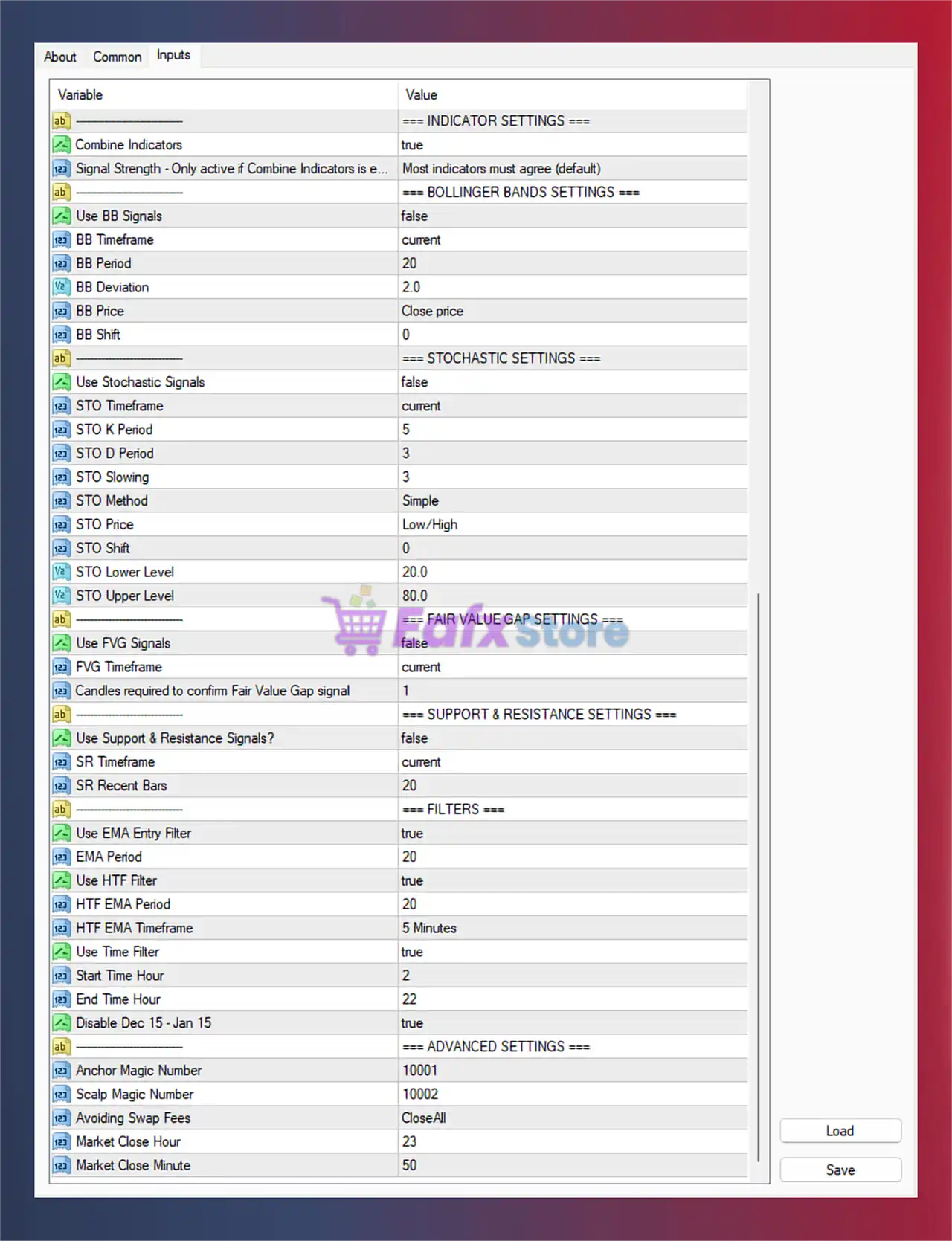
Shauns CoPilot EA Settings Panel
🔶 CORE TRADE SETTINGS
🔹 Anchor Base Lot Size = 0.02: Base lot size used for anchor trades is set to 0.02.
🔹 Scalp Base Lot Size = 0.01: Base lot size used for scalp trades is configured at 0.01.
🔹 Maximum Anchor Lot Size = 10.0: Maximum allowable lot size for anchor positions is 10.0.
🔹 Maximum Scalp Lot Size = 5.0: Maximum allowable lot size for scalp positions is 5.0.
🔹 Enable Dynamic Lot Size = true: Dynamic lot scaling based on account conditions is enabled.
🔹 Base Balance = 1000.0: Dynamic lot calculations are based on an account balance of 1000.0.
🔶 TRADE RULES
🔹 Anchor Trade Bias = Buy & Sell: Anchor trades are allowed for both buy and sell directions.
🔹 Scalp Trade Bias = Buy & Sell: Scalp trades can open both buy and sell positions.
🔹 Maximum number of Scalp positions = 5: The EA can open a maximum of 5 scalp positions simultaneously.
🔹 Use Breakeven Stop Loss? = false: Automatic breakeven stop-loss feature is disabled.
🔹 Break Even Pips = 10: Breakeven activates after 10 pips profit when enabled.
🔹 Break Even Buffer Pips = 2: Additional 2 pip buffer is added after breakeven activation.
🔹 One Trade Per Candle? = true: Only one trade can be opened per candle.
🔹 Enable Anchor Partial Close? = true: Partial close functionality for anchor trades is enabled.
🔹 Anchor Partial Close Pips 1 = 200.0: First anchor partial close level is 200.0 pips.
🔹 Anchor Partial Close Pips 2 = 300.0: Second anchor partial close level is 300.0 pips.
🔹 Enable Scalp Partial Close? = false: Partial close for scalp trades is disabled.
🔹 Move scalp to breakeven after first partial close? = false: Automatic breakeven movement after partial close is disabled.
🔹 Partial Close Strategy = Close 50% at TP1, 50% of remaining at TP2 (75% total): Defines the partial close execution logic.
🔹 Scalp Partial Close Pips 1 = 50.0: First scalp partial close level is 50.0 pips.
🔹 Scalp Partial Close Pips 2 = 75.0: Second scalp partial close level is 75.0 pips.
🔶 RISK MANAGEMENT
🔹 Take Profit Pips Buy = 50: Buy trades close automatically after 50 pips profit.
🔹 Take Profit Pips Sell = 50: Sell trades close automatically after 50 pips profit.
🔹 Anchor Stop Loss Pips Buy = 0: Buy anchor trades have no fixed stop loss.
🔹 Anchor Stop Loss Pips Sell = 0: Sell anchor trades have no fixed stop loss.
🔹 Scalp Stop Loss Pips Buy = 0: Buy scalp trades have no fixed stop loss.
🔹 Scalp Stop Loss Pips Sell = 0: Sell scalp trades have no fixed stop loss.
🔹 Max Spread = 20: Maximum allowed trading spread is 20 points.
🔹 Slippage = 3: Maximum slippage allowed during execution is 3.
🔹 Scalp Loss Protection Mode = Disabled: Additional scalp loss protection is disabled.
🔹 Maximum Floating Loss = 0.0: No floating loss limit is currently configured.
🔹 Floating Loss Mode = All Trades: Floating loss calculations apply to all open trades.
🔹 Trailing Start Profit = 0.0: Trailing secure profit starts immediately when enabled.
🔹 Initial Secure Profit = 0.0: Initial secure profit lock level is 0.0.
🔹 Profit Increment = 0.0: Profit increment step is currently disabled.
🔹 Secure Increment = 0.0: Secure increment step is disabled.
🔶 INDICATOR SETTINGS
🔹 Combine Indicators = true: Multiple indicators are combined for trade confirmation.
🔹 Signal Strength = Most indicators must agree (default): Signals are validated only when most indicators align.
🔶 BOLLINGER BANDS SETTINGS
🔹 Use BB Signals = false: Bollinger Bands entry signals are disabled.
🔹 BB Timeframe = current: Bollinger Bands use the current chart timeframe.
🔹 BB Period = 20: Bollinger Bands calculation period is 20.
🔹 BB Deviation = 2.0: Bollinger Bands deviation setting is 2.0.
🔹 BB Price = Close price: Bollinger Bands are calculated using closing prices.
🔹 BB Shift = 0: No Bollinger Bands shift is applied.
🔶 STOCHASTIC SETTINGS
🔹 Use Stochastic Signals = false: Stochastic indicator signals are disabled.
🔹 STO Timeframe = current: Stochastic uses the current timeframe.
🔹 STO K Period = 5: Stochastic %K period is 5.
🔹 STO D Period = 3: Stochastic %D period is 3.
🔹 STO Slowing = 3: Stochastic slowing value is 3.
🔹 STO Method = Simple: Stochastic uses Simple moving average smoothing.
🔹 STO Price = Low/High: Stochastic is calculated from Low/High prices.
🔹 STO Shift = 0: No Stochastic shift is applied.
🔹 STO Lower Level = 20.0: Oversold level is set to 20.0.
🔹 STO Upper Level = 80.0: Overbought level is set to 80.0.
🔶 FAIR VALUE GAP SETTINGS
🔹 Use FVG Signals = false: Fair Value Gap signal detection is disabled.
🔹 FVG Timeframe = current: FVG analysis uses the current timeframe.
🔹 Candles required to confirm Fair Value Gap signal = 1: One candle confirmation is required for FVG validation.
🔶 SUPPORT & RESISTANCE SETTINGS
🔹 Use Support & Resistance Signals? = false: Support and resistance signals are disabled.
🔹 SR Timeframe = current: Support and resistance analysis uses the current timeframe.
🔹 SR Recent Bars = 20: The EA checks the most recent 20 bars for SR calculations.
🔶 FILTERS
🔹 Use EMA Entry Filter = true: EMA trend filtering for entries is enabled.
🔹 EMA Period = 20: EMA calculation period is 20.
🔹 Use HTF Filter = true: Higher timeframe trend filtering is enabled.
🔹 HTF EMA Period = 20: Higher timeframe EMA period is 20.
🔹 HTF EMA Timeframe = 5 Minutes: HTF EMA uses the 5 Minutes timeframe.
🔹 Use Time Filter = true: Time-based trading restriction is enabled.
🔹 Start Time Hour = 2: Trading starts at hour 2.
🔹 End Time Hour = 22: Trading ends at hour 22.
🔹 Disable Dec 15 – Jan 15 = true: Trading is disabled between December 15 and January 15.
🔶 ADVANCED SETTINGS
🔹 Anchor Magic Number = 10001: Magic number assigned to anchor trades.
🔹 Scalp Magic Number = 10002: Magic number assigned to scalp trades.
🔹 Avoiding Swap Fees = CloseAll: The EA closes all trades to avoid overnight swap charges.
🔹 Market Close Hour = 23: Market closing management starts at hour 23.
🔹 Market Close Minute = 50: Market close management activates at minute 50.
🔢 Conclusion
Shauns CoPilot EA is a highly advanced automated Forex trading system that combines anchor trading, scalp execution, dynamic risk management and multi-indicator confirmations into one powerful EA.
With configurable EMA filters, Bollinger Bands, Stochastic indicators, Fair Value Gap analysis, and advanced partial close strategies, the EA provides traders with extensive control over trade execution and risk exposure. Its flexible architecture makes it suitable for both conservative and aggressive trading styles on MetaTrader 4.
🔢 FAQs
❓ What is Shauns CoPilot EA MT4?
Shauns CoPilot EA MT4 is a multi-strategy automated Forex trading robot designed for MetaTrader 4.
❓ Does Shauns CoPilot EA MT4 support dynamic lot sizing?
Yes, the EA includes dynamic lot size management based on account balance.
❓ Can I use indicator filters in Shauns CoPilot EA MT4?
Yes, the EA supports EMA, Bollinger Bands, Stochastic, Fair Value Gap, and Support & Resistance filters.
❓ Does Shauns CoPilot EA MT4 include partial close functionality?
Yes, the EA supports configurable partial close strategies for anchor and scalp trades.
❓ Is Shauns CoPilot EA MT4 suitable for scalping?
Yes, the EA includes dedicated scalp trading settings and scalp risk management features.
User Reviews
Only logged in customers who have purchased this product may leave a review.
❓ What trading platform does Shaun’s CoPilot EA support?
Shaun’s CoPilot EA is designed for MetaTrader 4 (MT4) and works seamlessly with most brokers that allow automated trading.
❓ What markets and pairs can I trade with CoPilot EA?
It supports Gold (XAUUSD), Silver (XAGUSD), major Forex pairs like EURUSD, and even indices such as SP500.
❓ What is the minimum recommended deposit to start?
The recommended starting balance is $500 with a leverage of at least 1:100 for optimal performance.
❓ How does the dual-layer strategy engine work?
The EA separates trades into two logics: Anchor trades for trend direction and Scalp trades for fast moves, providing balance between long-term and short-term strategies.
❓ Does CoPilot EA include risk management features?
Yes, it has Floating Loss Guard, Scalp Loss Protection, Partial Close Framework, and Secure Profit Trailing, ensuring strong capital protection.
❓ Can I customize the indicators used by the EA?
Absolutely. You can combine 20+ built-in indicators and even add two custom indicators for fully tailored trading strategies.
❓ What kind of results has Shaun’s CoPilot EA shown in tests?
Backtests with 99.9% modelling accuracy and live Myfxbook results show strong profitability, with gains of over +149% in 5 months and controlled drawdowns under 26%.
❓ Is this EA suitable for both beginners and professionals?
Yes. Beginners benefit from its automation and safety nets, while advanced traders can fine-tune settings for scalping or trend anchoring.
❓ Can the EA run 24/5 without interruptions?
Yes, it is optimized for continuous operation, and even includes time/holiday filters and swap avoidance logic to protect your account.
🔥 Get This EA for FREE with Our Membership! 🚀🚀
Unlock access to this EA, premium Indicators, and exclusive trading tools completely FREE with any of our Membership Plans! Thousands of traders already benefit from our VIP library—join them and level up your trading instantly. Choose Your Membership:
- SPECIAL – 1 Month Membership
- GOLD – 1 Year Membership
- PREMIUM – 1 Year Membership
-
 Original price was: $8,000.00.$249.00Current price is: $249.00.
 -
 Original price was: $7,000.00.$249.00Current price is: $249.00.
 -
 Original price was: $8,000.00.$249.00Current price is: $249.00.
 -
 Original price was: $25,000.00.$249.00Current price is: $249.00.
-
 10Original price was: $499.00.$69.00Current price is: $69.00.
 -
 1Original price was: $1,599.00.$59.00Current price is: $59.00.
 -
 0Original price was: $500.00.$69.00Current price is: $69.00.
 -
 3Original price was: $999.00.$69.00Current price is: $69.00.
There are no reviews yet.