




Smart Owl FX EA MT5 + SetFiles (Latest version) | Available
Select a variant to see availability.
What is Smart Owl FX EA?
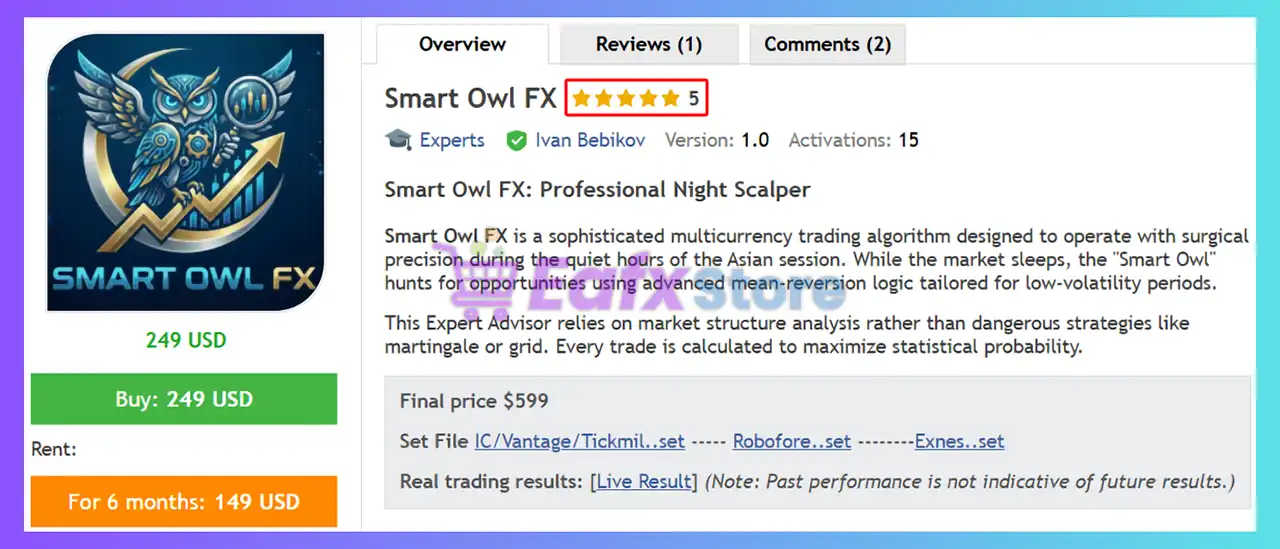
Smart Owl FX EA is a professional night scalping Expert Advisor (EA) designed for automated multicurrency trading during the Asian session. Built on advanced mean-reversion and market structure analysis, it targets low-volatility conditions with precision. Featuring fixed Stop Loss (SL), adaptive risk modes, and news protection, it delivers stable, disciplined and broker-aware automated trading.
 Vendor Website: View here
This is GroupBuy ==> How to Join
About the Author
This product is compiled by Ivan Bebikov. This Russia author has more than +10 years of experience working on MQL5 with many famous products such as Smart Owl FX MT5, King Sniper EA MT4, King Sniper EA MT5, AlgoTradingNightEA MT5, Smart Owl FX MT4 and others. Among them, Smart Owl FX is his best performing products.
Key Features of Smart Owl FX EA for MT5
🔹 Multicurrency Monitoring: Scans multiple currency pairs simultaneously for diversified trading opportunities.
🔹 Advanced News Filter: Pauses trading before major economic events to reduce volatility exposure risks.
🔹 Adaptive Risk Control: Supports flexible risk settings for different account sizes and leverage levels.
🔹 Fixed Stop Protection: Every trade includes a predefined Stop Loss (SL) for disciplined risk management.
🔹 Asian Session Optimization: Designed specifically for stable execution during low-volatility periods.
🔹 Broker-Sensitive Execution: Optimized for ECN and Raw spread environments with low night spreads.
Why Choose & Use Smart Owl FX EA?
🔹 Mean-Reversion Logic: Uses statistical price behavior during calm market conditions for precise entries.
🔹 Market Structure Analysis: Identifies trading opportunities through advanced structure-based indicators.
🔹 Low-Volatility Trading: Focuses on stable Asian session conditions for controlled market execution.
🔹 Multicurrency Trade Engine: Diversifies exposure by managing multiple forex pairs automatically.
🔹 News Event Protection: Avoids unstable conditions with integrated high-impact news filtering.
🔹 Single Chart Automation: Handles all multicurrency operations efficiently from one trading chart.
Smart Owl FX EA MT5 Review
Smart Owl FX EA Signal Results
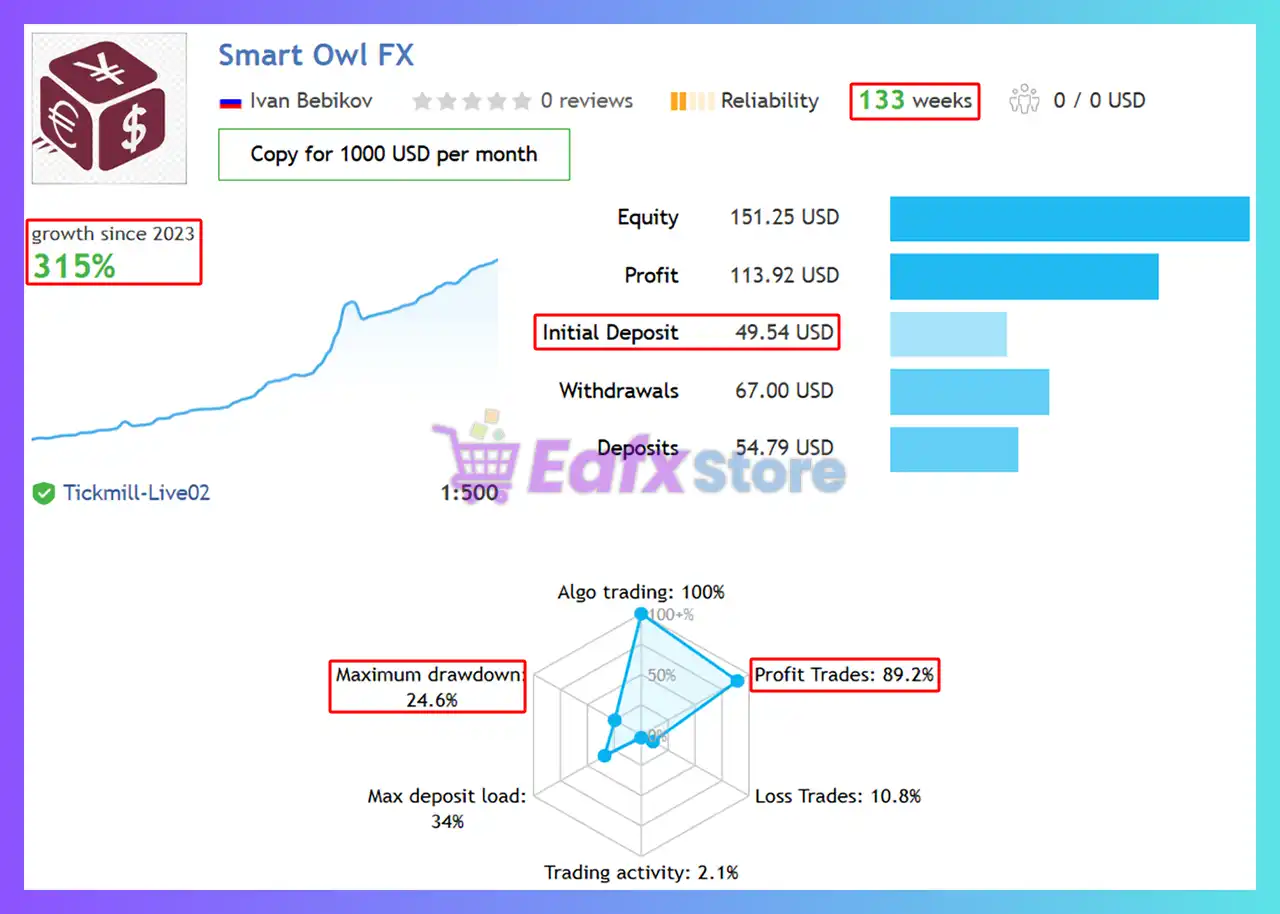
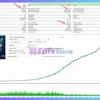
Smart Owl FX MT5 has achieved impressive profit performance when trading on a live account. The advisor shows long-term profit potential and actual profits match the reverse test profits.
🔶 Trading results with EURUSD, GBPUSD, AUDUSD, EURAUD, AUDCAD, USDCAD pairs over 133 trading weeks:
✅ Initial Deposit: $49.54
✅ Growth Rate: +315%
✅ Win Rate (% of total): 89.2%
✅ Maximum Drawdown: 24.6%
Smart Owl FX MT5 Signal Results
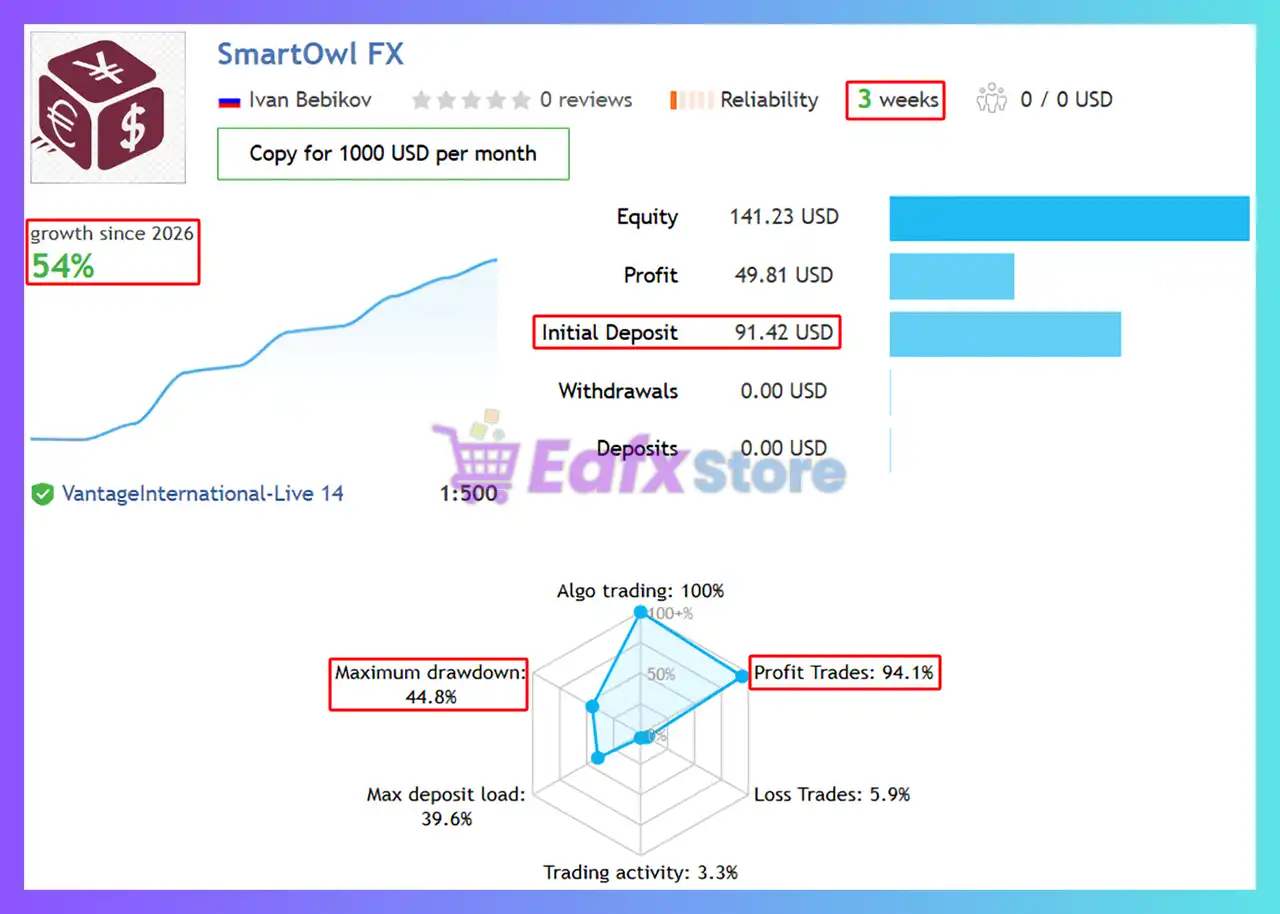
🔶 Trading results with EURCHF, USDCHF, AUDCHF, CADCHF, AUDCHF pairs over 3 trading weeks:
✅ Initial Deposit: $91.42
✅ Growth Rate: +54%
✅ Win Rate (% of total): 94.1%
✅ Maximum Drawdown: 44.8%
Smart Owl FX EA Signal Results
Smart Owl FX MT5 Backtests
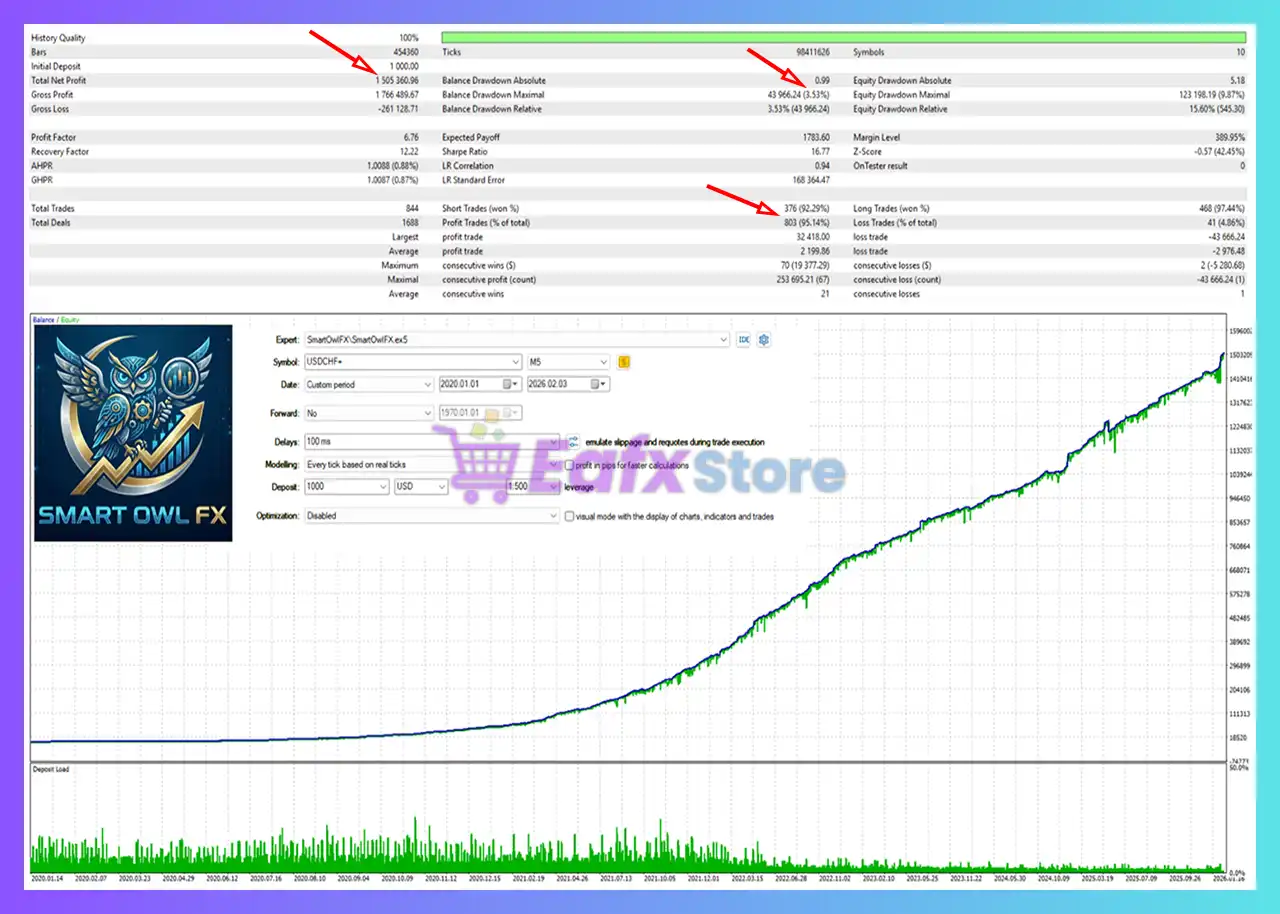
The Smart Owl FX EA has achieved impressive profit performance over 6 years of testing trading with the USDCHF pair. This EA demonstrates excellent ability to master the market and increase profits.
✅ Initial Deposit: $1,000
✅ Total Net Profit: $1.5 million
✅ Win Rate (% of total): 95.14%
✅ Maximum Drawdown: 3.53%
Smart Owl FX EA MT5 Backtest
What is the Smart Owl FX EA Trading Strategy?
🔹 Stable Overnight Trading: Built for disciplined execution during quiet and predictable market hours.
🔹 Professional Risk Management: Prioritizes controlled drawdowns and consistent portfolio protection.
🔹 No Dangerous Recovery Systems: Avoids martingale and risky grid methods for safer automation.
🔹 Flexible Account Compatibility: Suitable for both low leverage and higher-capital trading accounts.
🔹 Optimized for VPS Trading: Ensures reliable execution with stable low-latency server performance.
🔹 Efficient Automated Execution: Delivers hands-free trading with adaptable and resilient strategies.
Is Smart Owl FX MT5 Safe?
Smart Owl FX EA shows significant potential in providing stable and reliable profits, making it a reliable tool in the forex market. The advisor is highly appreciated by the MQL5 community in many aspects and has won the trust of users.
 Kay Alexander Rabe (2026.02.26): “Really impressive results so far. After three weeks, the win rate is around 95% and the drawdown has been very low at about 1.2%. Based on what I’ve seen so far, I can definitely recommend the bot right now.”
Nguyen An Nguyen (2026.02.04): “I’ve been using Smart Owl for a while now and I’m impressed with its logic. The entries are precise, and the risk management is better than most EAs I’ve tried. It’s a reliable tool for anyone looking for consistent growth.”
Recommended settings
Recommended settings and parameters to pay attention to from developers and experts:
| Features | Type |
|---|---|
| Trading platform | MetaTrader 5 (MT5) |
| Time frames | M5 (5 minute chart) |
| Currency pairs | EURUSD, GBPUSD, AUDUSD, EURAUD, AUDCAD, USDCAD, EURCHF, USDCHF, AUDCHF, CADCHF, AUDCHF |
| Minimum / Recommended deposit | $100 |
| Minimum / Recommended leverage | 1:30+ |
| Account type | ECN, Raw Spread |
| Product type | Original version |
| Additional services | Unlock and Decompile |
| Recommended brokers | Exness Broker, Icmarkets Broker |
| Recommended VPS | MyfxVPS.com (Blue VPS, Golden VPS). Lowest Latency, 2 week Free Trial, 100% Free for 12-18 Months. |
Reviewed by David Easton
Product Download Package?
The download package of the product suite includes:
1. Experts:
 Setting (If Any).docx
Installation Guide.docx
Smart Owl FX_1.4_fix.ex5
2. SetFiles:
Exness_Smart_Owl_FX.set
Robo_Smart_Owl_FX.set
IC_Vantage_Tickmill_Smart_Owl_FX.set
Smart_Owl_FX_Low_Risk.set
Conclusion
In short, Smart Owl FX is a professional night scalping EA for MT5, designed for automated multicurrency trading during the Asian session. Using mean-reversion logic, fixed Stop Loss protection, and advanced news filters, it delivers disciplined and broker-aware execution. Optimized for low-volatility conditions, Smart Owl FX offers stable, risk-controlled Forex automation for long-term growth.
Smart Owl FX EA MT5 – Complete Settings Guide & Explanation
Smart Owl FX EA is a professional multi-currency automated trading Expert Advisor (EA) designed for the MetaTrader 5 platform. The EA integrates advanced money management, auto lot sizing, news filtering, spread protection, time-based trading control and pair-specific optimization settings.
With support for multiple Forex pairs and intelligent risk allocation, Smart Owl FX EA is suitable for traders seeking stable and diversified automated Forex trading performance.
Smart Owl FX MT5 Setting
Installation Panel Parameters
Below are the details of the parameters in the advisor’s trading system settings table:
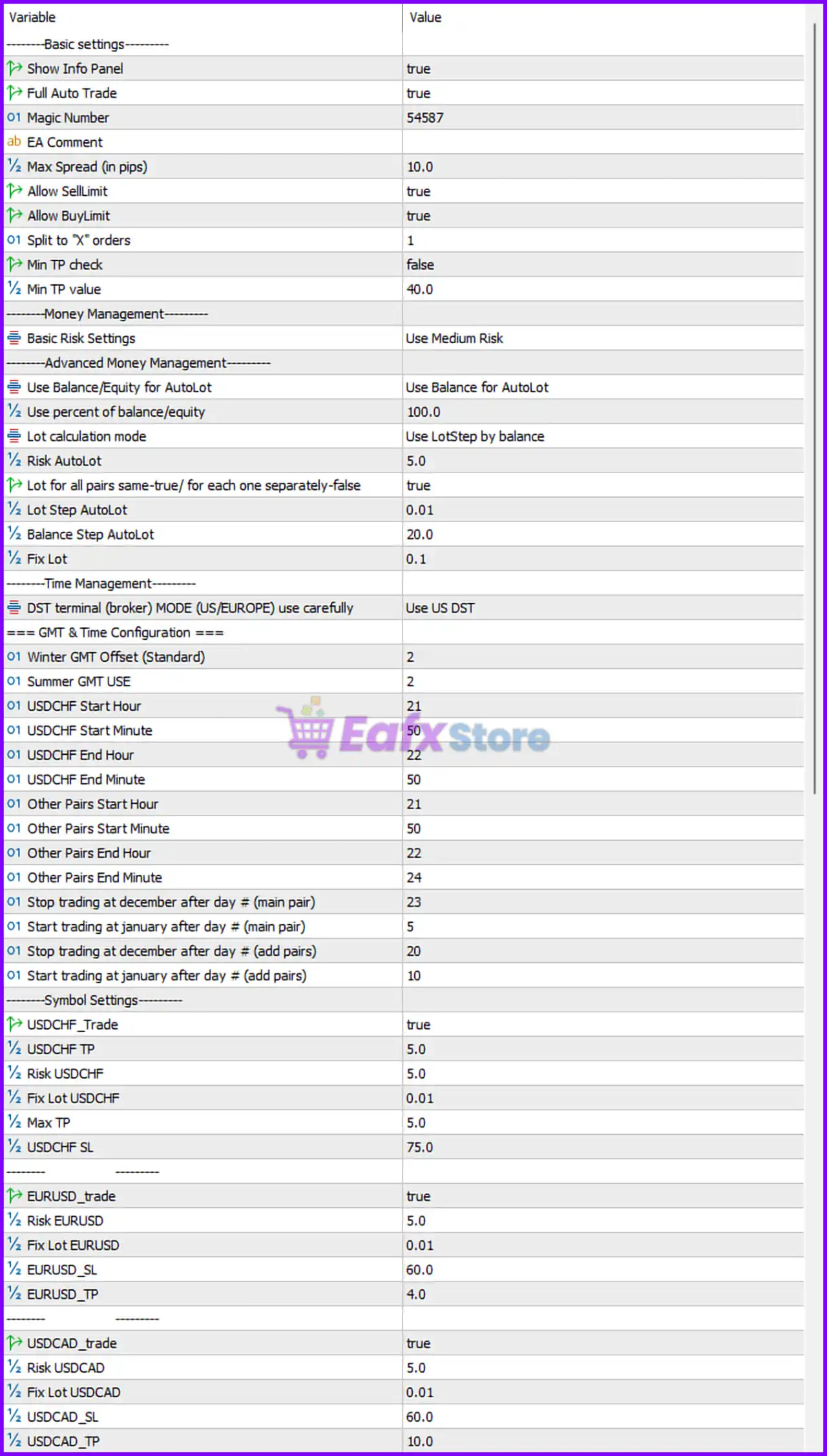
Smart Owl FX EA MT5 Setting Panel
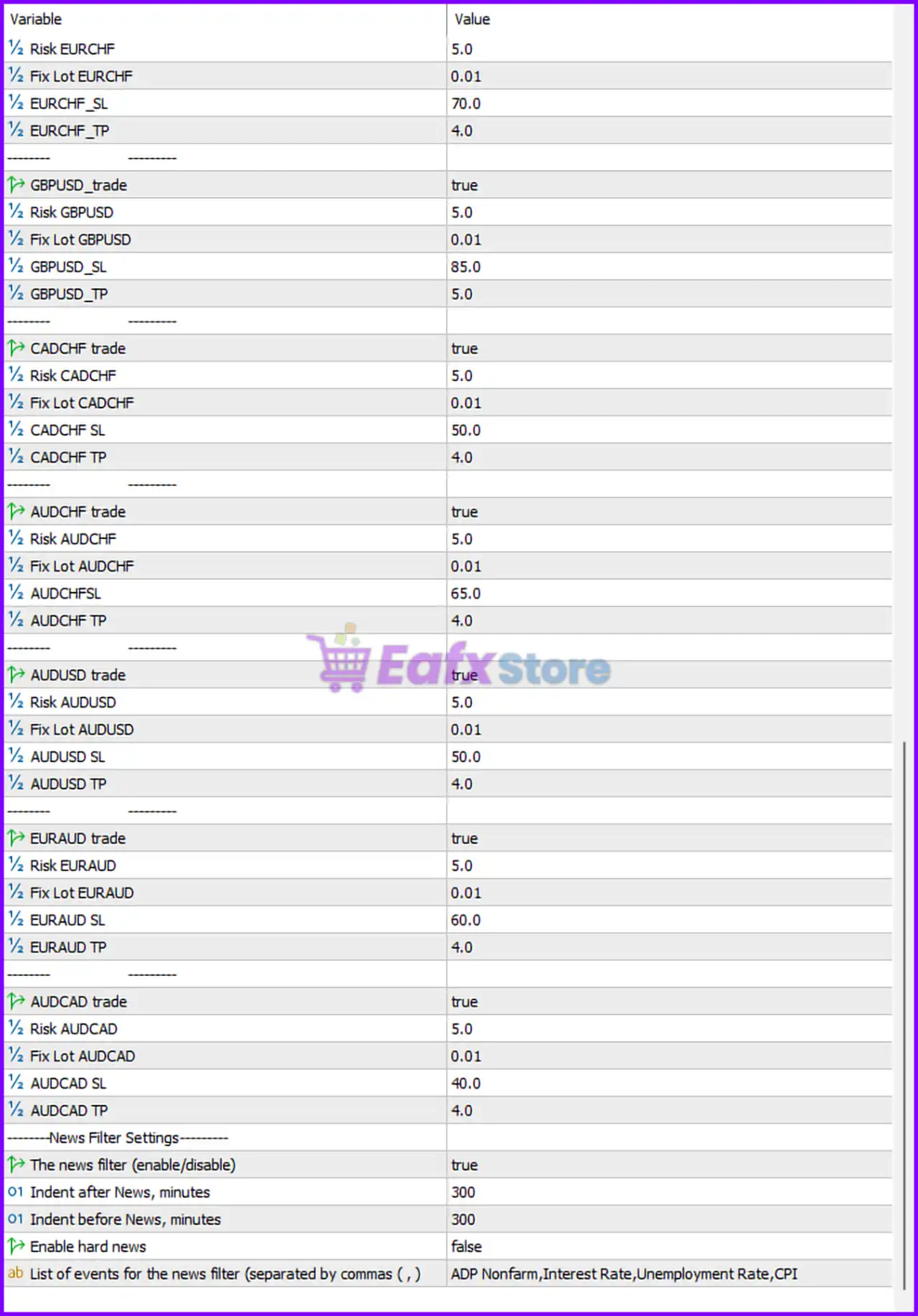
Smart Owl FX MT5 Setting Panel
Basic Settings
🔹 ———Basic settings——— — Main section header for the EA general configuration settings.
🔹 Show Info Panel = true — Displays the EA information panel directly on the chart.
🔹 Full Auto Trade = true — Enables fully automated trade execution.
🔹 Magic Number = 54587 — Unique identifier used by the EA to manage and track trades.
🔹 EA Comment = EA Comment — Adds the default comment text to all trades opened by the EA.
🔹 Max Spread (in pips) = 10.0 — Maximum spread allowed before opening new trades.
🔹 Allow SellLimit = true — Allows the EA to place Sell Limit pending orders.
🔹 Allow BuyLimit = true — Allows the EA to place Buy Limit pending orders.
🔹 Split to “X” orders = 1 — Number of split orders used for trade execution.
🔹 Min TP check = false — Disables minimum take profit verification before order placement.
🔹 Min TP value = 40.0 — Minimum take profit target value when Min TP check is enabled.
Money Management Settings
🔹 ———Money Management——— — Main section header for money management settings.
🔹 Basic Risk Settings = Use Medium Risk — Uses the Medium Risk profile for trading operations.
Advanced Money Management Settings
🔹 ———Advanced Money Management——— — Section header for advanced lot sizing controls.
🔹 Use Balance/Equity for AutoLot = Use Balance for AutoLot — Uses account balance instead of equity for automatic lot calculations.
🔹 Use percent of balance/equity = 100.0 — Uses 100.0% of account balance/equity for lot calculation references.
🔹 Lot calculation mode = Use LotStep by balance — Calculates lot size using balance-based step increments.
🔹 Risk AutoLot = 5.0 — Automatic lot sizing risk level set to 5.0%.
🔹 Lot for all pairs same=true/ for each one separately=false = true — Uses identical lot sizing for all currency pairs.
🔹 Lot Step AutoLot = 0.01 — Lot size increases in increments of 0.01.
🔹 Balance Step AutoLot = 20.0 — Increases lot size for every 20.0 balance units.
🔹 Fix Lot = 0.1 — Fixed manual lot size value set to 0.1.
Time Management Settings
🔹 ———Time Management——— — Main section header for broker time and session controls.
🔹 DST terminal (broker) MODE (US/EUROPE) use carefully = Use US DST — Uses United States daylight saving time settings.
GMT & Time Configuration Settings
🔹 === GMT & Time Configuration === — Section header for GMT offset and trading session scheduling.
🔹 Winter GMT Offset (Standard) = 2 — Broker GMT offset during winter is +2.
🔹 Summer GMT USE = 2 — Broker GMT offset during summer is +2.
🔹 USDCHF Start Hour = 21 — USDCHF trading session begins at hour 21.
🔹 USDCHF Start Minute = 50 — USDCHF trading session starts at minute 50.
🔹 USDCHF End Hour = 22 — USDCHF trading session ends at hour 22.
🔹 USDCHF End Minute = 50 — USDCHF trading session ends at minute 50.
🔹 Other Pairs Start Hour = 21 — Trading session for other pairs begins at hour 21.
🔹 Other Pairs Start Minute = 50 — Trading session for other pairs begins at minute 50.
🔹 Other Pairs End Hour = 22 — Trading session for other pairs ends at hour 22.
🔹 Other Pairs End Minute = 24 — Trading session for other pairs ends at minute 24.
🔹 Stop trading at december after day # (main pair) = 23 — Stops trading the main pair after December 23.
🔹 Start trading at january after day # (main pair) = 5 — Resumes trading the main pair after January 5.
🔹 Stop trading at december after day # (add pairs) = 20 — Stops trading additional pairs after December 20.
🔹 Start trading at january after day # (add pairs) = 10 — Resumes trading additional pairs after January 10.
Symbol Settings – USDCHF
🔹 ———Symbol Settings——— — Main section header for currency pair configuration settings.
🔹 UsdCHF_Trade = true — Enables automated trading for USDCHF.
🔹 UsdCHF TP = 5.0 — Take profit target for USDCHF trades is 5.0 pips.
🔹 Risk USDCHF = 5.0 — Risk level for USDCHF trading is 5.0%.
🔹 Fix Lot USDCHF = 0.01 — Fixed lot size for USDCHF is 0.01.
🔹 Max TP = 5.0 — Maximum take profit value allowed for USDCHF.
🔹 USDCHF SL = 75.0 — Stop loss value for USDCHF trades is 75.0 pips.
Symbol Settings – EURUSD
🔹 EURUSD_trade = true — Enables automated trading for EURUSD.
🔹 Risk EURUSD = 5.0 — Risk level for EURUSD trading is 5.0%.
🔹 Fix Lot EURUSD = 0.01 — Fixed lot size for EURUSD is 0.01.
🔹 EURUSD_SL = 60.0 — Stop loss value for EURUSD trades is 60.0 pips.
🔹 EURUSD_TP = 4.0 — Take profit target for EURUSD trades is 4.0 pips.
Symbol Settings – USDCAD
🔹 USDCAD_trade = true — Enables automated trading for USDCAD.
🔹 Risk USDCAD = 5.0 — Risk level for USDCAD trading is 5.0%.
🔹 Fix Lot USDCAD = 0.01 — Fixed lot size for USDCAD is 0.01.
🔹 USDCAD_SL = 60.0 — Stop loss value for USDCAD trades is 60.0 pips.
🔹 USDCAD_TP = 10.0 — Take profit target for USDCAD trades is 10.0 pips.
Symbol Settings – EURCHF
🔹 Risk EURCHF = 5.0 — Risk level for EURCHF trading is 5.0%.
🔹 Fix Lot EURCHF = 0.01 — Fixed lot size for EURCHF is 0.01.
🔹 EURCHF_SL = 70.0 — Stop loss value for EURCHF trades is 70.0 pips.
🔹 EURCHF_TP = 4.0 — Take profit target for EURCHF trades is 4.0 pips.
Symbol Settings – GBPUSD
🔹 GBPUSD_trade = true — Enables automated trading for GBPUSD.
🔹 Risk GBPUSD = 5.0 — Risk level for GBPUSD trading is 5.0%.
🔹 Fix Lot GBPUSD = 0.01 — Fixed lot size for GBPUSD is 0.01.
🔹 GBPUSD_SL = 85.0 — Stop loss value for GBPUSD trades is 85.0 pips.
🔹 GBPUSD_TP = 5.0 — Take profit target for GBPUSD trades is 5.0 pips.
Symbol Settings – CADCHF
🔹 CADCHF_trade = true — Enables automated trading for CADCHF.
🔹 Risk CADCHF = 5.0 — Risk level for CADCHF trading is 5.0%.
🔹 Fix Lot CADCHF = 0.01 — Fixed lot size for CADCHF is 0.01.
🔹 CADCHF_SL = 50.0 — Stop loss value for CADCHF trades is 50.0 pips.
🔹 CADCHF TP = 4.0 — Take profit target for CADCHF trades is 4.0 pips.
Symbol Settings – AUDCHF
🔹 AUDCHF trade = true — Enables automated trading for AUDCHF.
🔹 Risk AUDCHF = 5.0 — Risk level for AUDCHF trading is 5.0%.
🔹 Fix Lot AUDCHF = 0.01 — Fixed lot size for AUDCHF is 0.01.
🔹 AUDCHFSL = 65.0 — Stop loss value for AUDCHF trades is 65.0 pips.
🔹 AUDCHF TP = 4.0 — Take profit target for AUDCHF trades is 4.0 pips.
Symbol Settings – AUDUSD
🔹 AUDUSD trade = true — Enables automated trading for AUDUSD.
🔹 Risk AUDUSD = 5.0 — Risk level for AUDUSD trading is 5.0%.
🔹 Fix Lot AUDUSD = 0.01 — Fixed lot size for AUDUSD is 0.01.
🔹 AUDUSD SL = 50.0 — Stop loss value for AUDUSD trades is 50.0 pips.
🔹 AUDUSD TP = 4.0 — Take profit target for AUDUSD trades is 4.0 pips.
Symbol Settings – EURAUD
🔹 EURAUD trade = true — Enables automated trading for EURAUD.
🔹 Risk EURAUD = 5.0 — Risk level for EURAUD trading is 5.0%.
🔹 Fix Lot EURAUD = 0.01 — Fixed lot size for EURAUD is 0.01.
🔹 EURAUD SL = 60.0 — Stop loss value for EURAUD trades is 60.0 pips.
🔹 EURAUD TP = 4.0 — Take profit target for EURAUD trades is 4.0 pips.
Symbol Settings – AUDCAD
🔹 AUDCAD trade = true — Enables automated trading for AUDCAD.
🔹 Risk AUDCAD = 5.0 — Risk level for AUDCAD trading is 5.0%.
🔹 Fix Lot AUDCAD = 0.01 — Fixed lot size for AUDCAD is 0.01.
🔹 AUDCAD SL = 40.0 — Stop loss value for AUDCAD trades is 40.0 pips.
🔹 AUDCAD TP = 4.0 — Take profit target for AUDCAD trades is 4.0 pips.
News Filter Settings
🔹 ———News Filter Settings——— — Main section header for economic news filtering.
🔹 The news filter (enable/disable) = true — Enables the built-in news filter system.
🔹 Indent after News, minutes = 300 — Blocks trading for 300 minutes after major news releases.
🔹 Indent before News, minutes = 300 — Blocks trading for 300 minutes before major news releases.
🔹 Enable hard news = false — Disables filtering for hard-impact news only.
🔹 List of events for the news filter (separated by commas (, )) = ADP Nonfarm,Interest Rate,Unemployment Rate,CPI — Filters trading during ADP Nonfarm, Interest Rate, Unemployment Rate, and CPI economic events.
Conclusion
Smart Owl FX EA is a highly configurable multi-currency trading Expert Advisor that combines automatic lot sizing, advanced money management, spread protection, time-based trading filters, and economic news filtering into a professional MT5 trading solution.
With optimized settings for multiple Forex pairs and flexible risk controls, the EA is suitable for traders seeking stable and diversified automated Forex trading performance.
FAQs
❓ What is Smart Owl FX EA MT5?
Smart Owl FX EA MT5 is an automated multi-currency Forex trading Expert Advisor for MetaTrader 5 with advanced money management and news filtering systems.
❓ Does Smart Owl FX EA MT5 support automatic lot sizing?
Yes, the EA supports AutoLot calculation based on account balance, equity, and configurable risk settings.
❓ Which currency pairs are supported in the provided settings?
The settings include USDCHF, EURUSD, USDCAD, EURCHF, GBPUSD, CADCHF, AUDCHF, AUDUSD, EURAUD, and AUDCAD.
❓ Can Smart Owl FX EA MT5 filter economic news events?
Yes, the EA includes a built-in news filter for events such as ADP Nonfarm, Interest Rate, Unemployment Rate, and CPI.
❓ Does Smart Owl FX EA MT5 support pending orders?
Yes, the EA supports both Buy Limit and Sell Limit pending orders for automated trade execution.
User Reviews
Only logged in customers who have purchased this product may leave a review.
❓ What trading strategy does Smart Owl FX use?
Smart Owl FX applies a night scalping mean-reversion strategy. It analyzes market structure during low-volatility Asian hours to capture statistical pullbacks with structured entries.
❓ During which session does Smart Owl FX operate?
Smart Owl FX is optimized for the Asian session. It trades during quiet, low-liquidity hours where spreads are stable and mean-reversion patterns are more predictable.
❓ Is Smart Owl FX a multicurrency trading system?
Yes, Smart Owl FX features a multicurrency engine that monitors and trades multiple Forex pairs from a single chart, improving diversification and execution efficiency.
❓ How does Smart Owl FX manage risk?
Smart Owl FX uses fixed Stop Loss protection, adaptive risk modes, and avoids grid or martingale systems. This structured framework supports disciplined capital preservation.
❓ Does Smart Owl FX include a news filter?
Yes, Smart Owl FX integrates an advanced news filter that pauses trading before high-impact economic events, reducing exposure to sudden volatility spikes.
❓ What is the recommended deposit for Smart Owl FX?
Smart Owl FX requires a minimum deposit of $100 with recommended leverage around 1:30, making it suitable for conservative and low-risk trading profiles.
❓ Is Smart Owl FX suitable for ECN or Raw spread accounts?
Smart Owl FX is designed for ECN and Raw spread environments. It performs best with tight spreads and stable execution during night trading hours.
❓ What were the long-term backtest results of Smart Owl FX?
Smart Owl FX demonstrated strong long-term results in backtests, including high win rates and low drawdown over multiple years, highlighting consistent mean-reversion performance.
❓ Does Smart Owl FX use martingale or grid techniques?
No, Smart Owl FX avoids martingale and grid methods. It follows controlled exposure logic with predefined Stop Loss levels for each individual trade.
❓ Is Smart Owl FX suitable for long-term automated trading?
Smart Owl FX focuses on probability-based execution and disciplined risk control, making it suitable for traders seeking stable, long-term night scalping automation.
-
 Price range: $70.00 through $599.00
 -
 Price range: $65.00 through $599.00
 -
 Price range: $70.00 through $599.00
 -
 Price range: $80.00 through $599.00
-
 3
3 -
 2
2 -
 5Price range: $89.00 through $599.00
 -
 1Price range: $89.00 through $599.00
There are no reviews yet.