








ApexBot MT5 (Latest version) - Unlimited

Subscriptions for Special Plan
- 30 EA package is more economical!
- Special package with 99%
- Download 1 EA/Day

Subscriptions for Premium Membership
- Download Unlimited in 1 Year
- Get 100% Discount
- Get free access to all

Subscriptions for Gold Membership
- 1 Year Membership
- Get 100% Discount
- Access EA+Indicator+Course
Frequently bought together 🎁
Add these products to enhance your purchase

Quick Verdict
ApexBot MT5 is a professional AI-powered trading robot built for traders seeking consistent, long-term growth rather than high-risk speculation. Combining advanced pattern recognition, adaptive risk management, dynamic lot sizing, and comprehensive safety filters, it delivers a disciplined automated trading experience suitable for both beginners and experienced MetaTrader 5 users.
Best For
✅ Forex traders seeking AI-powered automation.
✅ Swing and intraday traders.
✅ Prop Firm traders.
✅ Risk-conscious investors.
✅ MT5 users wanting hands-free trading.
Overall Rating
⭐⭐⭐⭐⭐ 9.4/10
| Category | Score |
|---|---|
| Trading Strategy | 9.5/10 |
| Risk Management | 9.6/10 |
| Ease of Use | 9.3/10 |
| Customization | 9.4/10 |
| Stability | 9.4/10 |
| Overall Value | 9.4/10 |
What is ApexBot MT5?
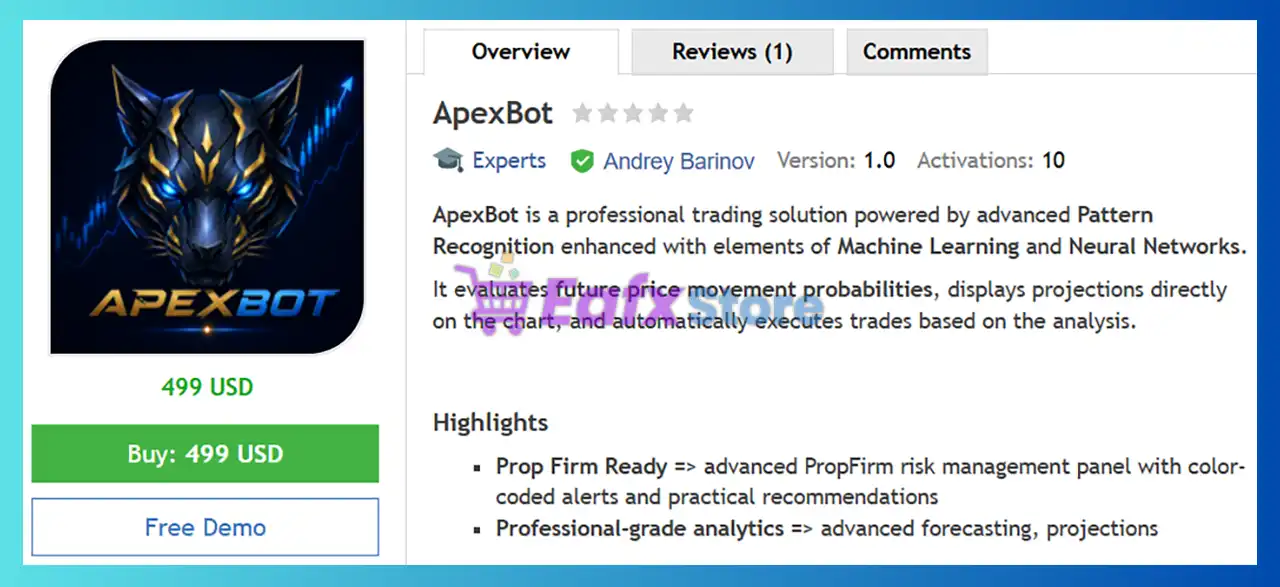
ApexBot MT5 is a fully automated MetaTrader 5 Expert Advisor (EA) that uses advanced Pattern Recognition, Machine Learning, and Neural Network technologies to evaluate market behavior and automatically execute trades.
Unlike traditional Expert Advisors that rely solely on fixed technical indicators, ApexBot continuously analyzes price action, estimates future price movement probabilities, and displays market projections directly on the trading chart.
The system follows a disciplined trading philosophy by allowing only one active position at a time, eliminating the risks associated with Grid, Martingale or multiple overlapping trades.
 Vendor Website: View here
Delivery time 24h-48h after payment.
Refund if not delivered.
You will receive the current version without any limitations (ID+Time).
ApexBot MT5 Review
How Does ApexBot MT5 Work?
AI-Based Pattern Recognition
ApexBot continuously scans live market data using advanced pattern recognition algorithms enhanced by machine learning techniques.
The system evaluates:
🔹 Price structure
🔹 Trend behavior
🔹 Market momentum
🔹 Probability of future price movement
Trades are executed only when predefined confidence levels are reached.
Intelligent Trade Execution
Once a valid setup is detected, the EA automatically:
🔹 Opens the trade
🔹 Sets Stop Loss
🔹 Sets Take Profit
🔹 Monitors market conditions
🔹 Manages the position until completion
Only one trade can remain active at any given time, helping reduce unnecessary market exposure.
Adaptive Position Management
Instead of relying on fixed trade management, ApexBot can dynamically adjust:
🔹 Position sizing
based on changing market conditions.
Continuous Monitoring
The EA constantly checks:
🔹 AutoTrading status
🔹 Terminal connection
🔹 Spread conditions
🔹 Market availability
to ensure stable and reliable execution.
Key Features of ApexBot MT5
AI-Powered Pattern Recognition
Advanced Pattern Recognition enhanced with Machine Learning and Neural Networks continuously analyzes market behavior to identify high-probability trading opportunities.
No Grid & No Martingale
ApexBot follows a disciplined trading approach by allowing only one active position at a time, eliminating the risks commonly associated with Grid and Martingale recovery systems.
Adaptive Risk Management
The EA features dynamic lot sizing, adaptive Stop Loss and Take Profit, optional partial closing, and configurable drawdown protection to balance growth and capital preservation.
Built-in Market Protection Filters
Integrated Spread Filter, optional News Filter, maximum trade holding time, and trading direction controls help avoid unfavorable market conditions.
Prop Firm Ready
Dedicated Prop Firm protection includes daily loss monitoring, drawdown management, color-coded alerts, and practical risk recommendations to help traders stay within evaluation rules.
Professional Trading Dashboard
A real-time on-chart dashboard displays EA status, market analysis, trading projections, connection status, and risk information, providing complete transparency during automated trading.
Multi-Market & Multi-Language Support
ApexBot supports Forex pairs, Metals, Indices, and Cryptocurrencies (broker dependent), works with both Hedging and Netting accounts, and offers a graphical interface available in six languages.
Historical Backtest Results Performance
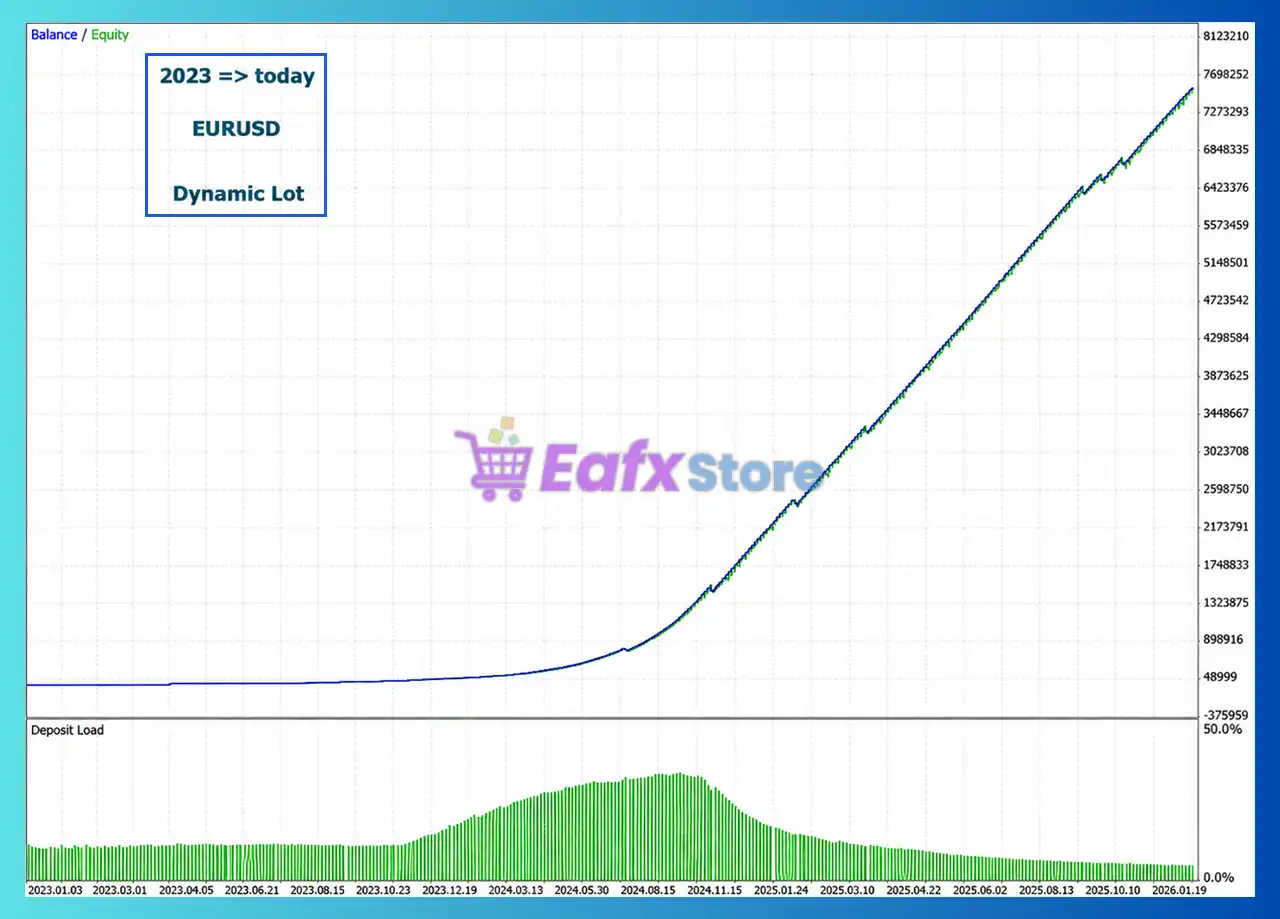
The developer provides long-term backtests demonstrating the EA’s ability to maintain a smooth equity curve under different money management methods.
Dynamic Lot Backtest
ApexBot MT5 Backtest
| Metric | Result |
|---|---|
| Testing Period | 2023 – Today |
| Instrument | EURUSD |
| Money Management | Dynamic Lot |
| Balance Growth | Strong long-term compounding |
| Equity Curve | Consistent upward trend |
| Deposit Load | Gradually reduced as equity increased |
Performance Analysis
The dynamic lot test illustrates the compounding capability of ApexBot. As account equity grows, position sizes adjust automatically, allowing the strategy to scale while maintaining controlled exposure. The steadily rising equity curve suggests disciplined execution with relatively limited interruptions.
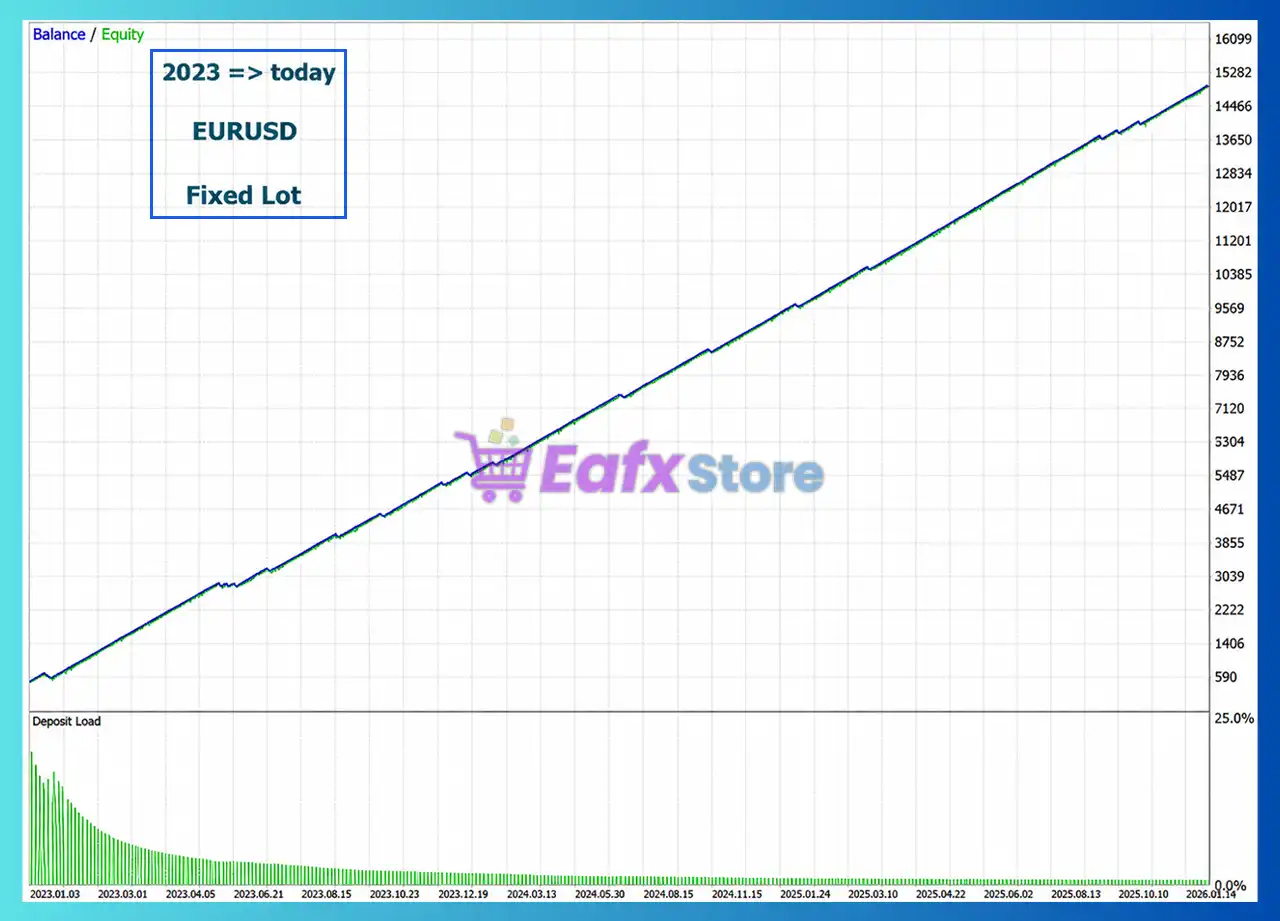
Fixed Lot Backtest
ApexBot MT5 Backtest Results
| Metric | Result |
|---|---|
| Testing Period | 2023 – Today |
| Instrument | EURUSD |
| Money Management | Fixed Lot |
| Equity Curve | Smooth and consistent |
| Risk Profile | Lower and more predictable |
| Deposit Load | Gradually decreases over time |
Performance Analysis
The fixed-lot backtest demonstrates a more conservative growth profile, making it suitable for traders who prioritize predictable risk over aggressive compounding. The gradual and stable equity progression highlights the EA’s consistency under fixed position sizing.
Note: Historical backtests demonstrate past strategy behavior under simulated market conditions. Future trading results may differ depending on broker conditions, spreads, execution quality, and market volatility.
Why ApexBot MT5 Stands Out
Several characteristics distinguish ApexBot MT5 from many conventional Expert Advisors.
AI-Driven Decision Making
Rather than relying solely on static technical indicators, ApexBot combines Pattern Recognition, Machine Learning, and Neural Networks to evaluate trading opportunities.
Clean Trading Philosophy
The EA avoids:
🔹 Grid trading
🔹 Martingale trading
🔹 Multiple simultaneous positions
This creates a cleaner and more disciplined risk profile.
Prop Firm Optimization
Integrated risk controls and account monitoring make the EA suitable for traders pursuing funded account challenges.
Adaptive Trade Management
Dynamic Stop Loss, Take Profit, and position sizing allow the system to respond intelligently to changing market conditions.
Beginner-Friendly Operation
Most settings are preconfigured, allowing users to start trading with minimal manual adjustment while still offering advanced customization for experienced traders.
Risk Management Features
Capital protection is one of ApexBot MT5’s strongest advantages.
Built-in safety features include:
🔹 Dynamic lot sizing
🔹 Fixed lot mode
🔹 Risk percentage per trade
🔹 Adaptive Stop Loss
🔹 Adaptive Take Profit
🔹 Optional Partial Close
🔹 Maximum Daily Loss protection
🔹 Maximum Drawdown protection
🔹 News Filter
🔹 Spread Filter
🔹 Maximum Trade Holding Time
🔹 One-position trading model
🔹 Unique Magic Number management
🔹 Continuous connection monitoring
These features help traders maintain disciplined risk exposure while reducing emotional decision-making.
Recommended Trading Conditions
Recommended settings and parameters to pay attention to from developers and experts:
| Features | Type |
|---|---|
| Trading platform | MetaTrader 5 (MT5) |
| Time frames | Any |
| Currency pairs | Major currency pairs (EURUSD, GBPUSD, EURJPY) |
| Minimum / Recommended deposit | $100 |
| Minimum / Recommended leverage | 1:30+ |
| Type of account | Hedging and Netting |
| Additional services | Unlock and Decompile |
| Recommended brokers | Exness Broker, Icmarkets Broker |
| Recommended VPS | MyfxVPS.com ( Blue VPS, Golden VPS). Lowest Latency, 2 week Free Trial, 100% Free for 12-18 Months. |
Product Download Package?
The download package of the product suite includes:
 Experts: ApexBot MT5.ex5
 Reviewed by David Easton
Weaknesses and Risk Warnings
Although ApexBot MT5 offers numerous advantages, traders should understand its limitations.
No Guaranteed Profits
Like every automated trading system, ApexBot cannot eliminate market risk or guarantee future returns.
Performance Depends on Market Conditions
Changing volatility and broker execution quality may influence results.
Lower Trading Frequency
The EA focuses on quality over quantity, which may not suit traders looking for high-frequency scalping.
Broker Conditions Matter
Lower spreads and stable execution generally improve trading performance.
Demo Testing Recommended
The developer recommends testing ApexBot on a demo account before moving to live trading.
Who Should Use ApexBot MT5?
ApexBot MT5 is ideal for:
Forex Traders
Those seeking disciplined automated trading on major currency pairs.
Prop Firm Traders
Users requiring advanced drawdown protection and risk management.
Beginners
Traders who prefer optimized default settings with minimal configuration.
Long-Term Investors
Individuals looking for consistent portfolio growth rather than aggressive short-term gains.
Multi-Asset Traders
Users interested in trading Forex while also having the flexibility to test Metals, Indices, or Cryptocurrencies.
It may be less suitable for traders seeking:
🔹 Grid-based strategies
🔹 Martingale systems
🔹 High-frequency scalping
🔹 Aggressive multi-position trading
Final Verdict
ApexBot MT5 is a modern AI-powered Expert Advisor that combines advanced Pattern Recognition, Machine Learning, and Neural Network technologies to deliver disciplined automated trading across Forex and other supported markets. Its emphasis on single-position execution, adaptive trade management, and comprehensive risk controls sets it apart from many conventional trading robots that rely on aggressive recovery techniques.
ApexBot MT5 Settings Explained – Complete Configuration Guide
ApexBot MT5 is an automated MetaTrader 5 Expert Advisor designed with flexible risk management, adaptive stop-loss control, dynamic lot sizing, spread filtering, and optional economic news protection. Its configurable trading engine allows traders to balance profitability and capital preservation while adapting to different market conditions.
ApexBot MT5 Settings
ApexBot MT5 Settings
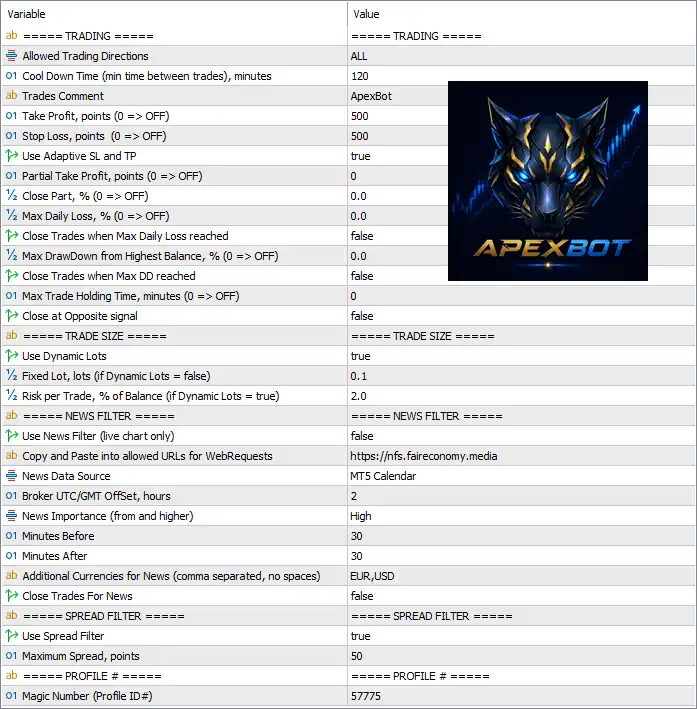
Below are the details of the parameters in the advisor’s trading system settings table:
ApexBot MT5 Settings Panel
Trading Settings
🔹 Allowed Trading Directions = ALL – Allows the EA to open both Buy and Sell positions.
🔹 Cool Down Time (min time between trades), minutes = 120 – Waits 120 minutes before opening another trade after the previous one.
🔹 Trades Comment = ApexBot – Adds the trade comment “ApexBot” to every order opened by the EA.
🔹 Take Profit, points (0 => OFF) = 500 – Sets the Take Profit target to 500 points; a value of 0 disables Take Profit.
🔹 Stop Loss, points (0 => OFF) = 500 – Sets the Stop Loss distance to 500 points; a value of 0 disables Stop Loss.
🔹 Use Adaptive SL and TP = true – Enables automatic adjustment of Stop Loss and Take Profit according to market conditions.
🔹 Partial Take Profit, points (0 => OFF) = 0 – Disables partial profit-taking because the value is set to 0.
🔹 Close Part, % (0 => OFF) = 0.0 – Disables partial position closing by percentage.
🔹 Max Daily Loss, % (0 => OFF) = 0.0 – Disables the daily loss percentage limit.
🔹 Close Trades when Max Daily Loss reached = false – The EA will not automatically close trades when the daily loss threshold is reached.
🔹 Max DrawDown from highest Balance, % (0 => OFF) = 0.0 – Disables the maximum drawdown limit measured from the highest account balance.
🔹 Close Trades when Max DD reached = false – Prevents automatic closing of trades when drawdown limits are reached because the feature is disabled.
🔹 Max Trade Holding Time, minutes (0 => OFF) = 0 – Disables the maximum trade duration limit.
🔹 Close at Opposite signal = false – Existing positions remain open even if an opposite trading signal appears.
Trade Size Settings
🔹 Use Dynamic Lots = true – Enables automatic lot size calculation based on the selected risk percentage.
🔹 Fixed Lot, lots (if Dynamic Lots = false) = 0.1 – Uses a fixed lot size of 0.1 lots only when Dynamic Lots is disabled.
🔹 Risk per Trade, % of Balance (if Dynamic Lots = true) = 2.0 – Risks 2.0% of the account balance on each new trade when Dynamic Lots is enabled.
News Filter Settings
🔹 Use News Filter (live chart only) = false – Disables the economic news filter during live trading.
🔹 Copy and Paste into allowed URLs for WebRequests = https://nfs.faireconomy.media – The required URL that must be added to MT5 WebRequest permissions for downloading economic calendar data.
🔹 News Data Source = MT5 Calendar – Uses the built-in MT5 Calendar as the source of economic news.
🔹 Broker UTC/GMT Offset, hours = 2 – Sets the broker time offset to UTC/GMT +2 hours.
🔹 News Importance (from and higher) = High – Filters only High-impact economic events.
🔹 Minutes Before = 30 – Starts blocking trading 30 minutes before a scheduled news event.
🔹 Minutes After = 30 – Continues blocking trading for 30 minutes after the news release.
🔹 Additional Currencies for News (comma separated, no spaces) = EUR,USD – Monitors EUR and USD economic news events in addition to the trading symbol.
🔹 Close Trades For News = false – Keeps existing trades open during news events instead of closing them automatically.
Spread Filter Settings
🔹 Use Spread Filter = true – Enables spread protection before opening new trades.
🔹 Maximum Spread, points = 50 – Prevents new entries whenever the current spread exceeds 50 points.
Profile Settings
🔹 Magic Number (Profile ID#) = 57775 – Assigns the unique Magic Number 57775 to identify ApexBot MT5 trades separately from other Expert Advisors.
Conclusion
ApexBot MT5 provides a balanced combination of intelligent risk management, adaptive Stop Loss and Take Profit, dynamic position sizing, spread protection, and optional news filtering. Its flexible configuration allows traders to customize risk exposure while maintaining disciplined trade execution, making it suitable for both conservative and aggressive MT5 trading strategies.
FAQs
❓ What is the purpose of the Dynamic Lots feature in ApexBot MT5?
Dynamic Lots automatically adjusts the trade volume according to the account balance and the configured Risk per Trade (%), helping maintain consistent risk management.
❓ Can ApexBot MT5 trade both Buy and Sell positions?
Yes. With Allowed Trading Directions = ALL, the EA can automatically execute both Buy and Sell trades.
❓ How does the Spread Filter improve trading performance?
The Spread Filter prevents the EA from opening new trades when the market spread exceeds the configured 50 points, reducing execution during unfavorable conditions.
❓ Does ApexBot MT5 include an economic news filter?
Yes. The EA supports a configurable News Filter using the MT5 Calendar, allowing traders to avoid trading around high-impact economic events.
❓ What is the Magic Number used for in ApexBot MT5?
The Magic Number (57775) uniquely identifies trades placed by ApexBot MT5, allowing multiple Expert Advisors to run simultaneously on the same trading account without conflicts.
User Reviews
Only logged in customers who have purchased this product may leave a review.
❓ What is ApexBot MT5 designed for?
ApexBot MT5 is an automated trading solution that combines pattern recognition, machine learning, and neural network concepts to identify high-probability trades.
❓ Does ApexBot MT5 use Grid or Martingale strategies?
No. ApexBot MT5 follows a disciplined trading approach with no Grid, no Martingale, and only one active position at any given time.
❓ How does ApexBot MT5 manage trading risk?
ApexBot MT5 includes predefined Stop Loss, Take Profit, daily loss protection, total drawdown limits, and optional partial close functionality.
❓ Is ApexBot MT5 suitable for Prop Firm trading?
Yes. ApexBot MT5 includes a dedicated Prop Firm risk management panel with color-coded alerts and practical recommendations for disciplined trading.
❓ Which markets can ApexBot MT5 trade?
ApexBot MT5 is optimized for major Forex pairs and also supports Metals, Indices, and Cryptocurrencies when available through your broker.
❓ What currency pairs are recommended for ApexBot MT5?
ApexBot MT5 performs particularly well on EURUSD, GBPUSD, and EURJPY, although traders can also test other supported market symbols.
❓ Does ApexBot MT5 include news and spread protection?
Yes. ApexBot MT5 features integrated news filters and spread filters that help prevent trades during high-impact events or unfavorable market conditions.
❓ What leverage is recommended for ApexBot MT5?
ApexBot MT5 works with leverage as low as 1:30, while 1:100 is recommended to provide greater flexibility and smoother trading performance.
❓ Can ApexBot MT5 run on a VPS?
Yes. ApexBot MT5 supports both the MQL5 VPS service and standard VPS solutions, ensuring reliable execution and continuous automated trading.
❓ How many trades does ApexBot MT5 usually open?
ApexBot MT5 typically executes between 5 and 20 trades per week for each currency pair, depending on market conditions and your selected settings.
-
 Original price was: $999.00.$89.00Current price is: $89.00.
 -
 Original price was: $3,000.00.$89.00Current price is: $89.00.
 -
 Original price was: $1,400.00.$89.00Current price is: $89.00.
 -
 Original price was: $1,300.00.$89.00Current price is: $89.00.
-
 0Original price was: $1,299.00.$249.00Current price is: $249.00.
 -
 0Original price was: $2,288.00.$249.00Current price is: $249.00.
 -
 1Original price was: $500.00.$249.00Current price is: $249.00.
 -
 3Original price was: $199.00.$159.00Current price is: $159.00.
There are no reviews yet.