








Iron Stops EA MT5 (Latest version) - Unlimited

Subscriptions for Special Plan
- 30 EA package is more economical!
- Special package with 99%
- Download 1 EA/Day

Subscriptions for Premium Membership
- Download Unlimited in 1 Year
- Get 100% Discount
- Get free access to all

Subscriptions for Gold Membership
- 1 Year Membership
- Get 100% Discount
- Access EA+Indicator+Course
Frequently bought together 🎁
Add these products to enhance your purchase




Quick Verdict
Iron Stops EA is a focused XAUUSD M30 system built around volume acceleration, automated risk calculation and drawdown controls. Its historical tests show strong profitability, high winning-trade rates and relatively contained equity drawdown, making it an interesting option for disciplined Gold traders.
Best For
✅ Gold Traders: Designed specifically for XAUUSD trading.
✅ Prop-Firm Traders: Built with account restrictions and drawdown control in mind.
✅ Risk-Conscious Traders: Supports automatic position sizing and equity protection.
✅ M30 Traders: Optimized for operation on a single XAUUSD M30 chart.
✅ Automation Seekers: Suitable for traders who prefer fully automated trade execution.
Overall Rating
⭐⭐⭐⭐⭐ 9.0/10
| Category | Rating |
|---|---|
| Strategy Concept | 8.8/10 |
| Risk Management | 9.0/10 |
| Backtest Performance | 9.3/10 |
| Drawdown Control | 9.0/10 |
| Ease of Use | 9.0/10 |
| Overall Rating | 9.0/10 |
What is Iron Stops EA MT5?
Iron Stops EA is an automated trading system developed for traders who prioritize consistency and controlled exposure when trading Gold.
The EA is configured to operate on XAUUSD using the M30 timeframe, allowing traders to run the system from a single chart.
Its strategy description highlights volume acceleration as a key signal concept. The system looks for sudden changes in market volume that may indicate the beginning of a breakout or directional movement.
Beyond its entry logic, Iron Stops includes a broad collection of account-management features. These include automatic lot calculation, spread protection, drawdown management, timed restrictions, trade limits and Prop-Firm-related controls.
 Vendor Website: View here
Delivery time 24h-48h after payment.
Refund if not delivered.
You will receive the current version without any limitations (ID+Time).
How Does Iron Stops EA MT5 Work?
Monitors XAUUSD
Iron Stops EA MT5 is designed specifically for XAUUSD, allowing its trading logic to focus on the characteristics of Gold.
Operates on M30
The recommended setup uses the M30 timeframe. According to the product description, traders only need to apply the EA to an XAUUSD M30 chart.
Detects Volume Acceleration
The strategy uses volume acceleration to identify sudden changes in market activity that may precede breakout movements.
Evaluates Trading Conditions
Before managing a trade, the EA can consider execution-related conditions such as spread and the configured trading restrictions.
Calculates Position Size
With the supplied configuration, the EA uses Risk base on balance percent for lot calculation.
This allows position size to be adjusted according to account balance and the relevant stop-loss structure.
Applies Account Protection
Iron Stops includes drawdown-related controls that can restrict new trades and close open positions when configured equity conditions are reached.
Manages Trades Automatically
Once operating, the EA handles its configured trading and risk-management tasks automatically, reducing the need for manual intervention.
Key Features of Iron Stops EA MT5
XAUUSD M30 Trading
Iron Stops is designed around XAUUSD on M30, providing a simple single-chart setup rather than requiring traders to configure numerous charts.
Automatic Risk Calculation
The EA can calculate position size according to account balance and the selected risk configuration, helping traders avoid manually calculating every trade’s lot size.
Fixed-Lot Option
Traders can also use a fixed-lot approach when preferred, providing an alternative to percentage-based risk calculation.
Drawdown Protection
The system includes controls for restricting new trades and closing open orders when the configured equity drawdown condition is reached.
Spread Protection
A spread guard is included to help control execution when trading costs become less favorable.
Hedging Support
The supplied configuration has hedging enabled, allowing opposing positions when permitted by the strategy and account environment.
Triple-Swap Avoidance
The EA includes a dedicated triple-swap avoidance option, helping traders account for potentially increased swap conditions.
Prop-Firm Controls
Iron Stops includes specific settings related to prop-firm restrictions, including daily loss management and Stop Loss (SL) – Take Profit (TP) control options.
Historical Trading Results Performance
The supplied backtests show two separate XAUUSD M30 test periods. Both produced positive net profit and relatively strong Profit Factor values.
19-Month Backtest Results
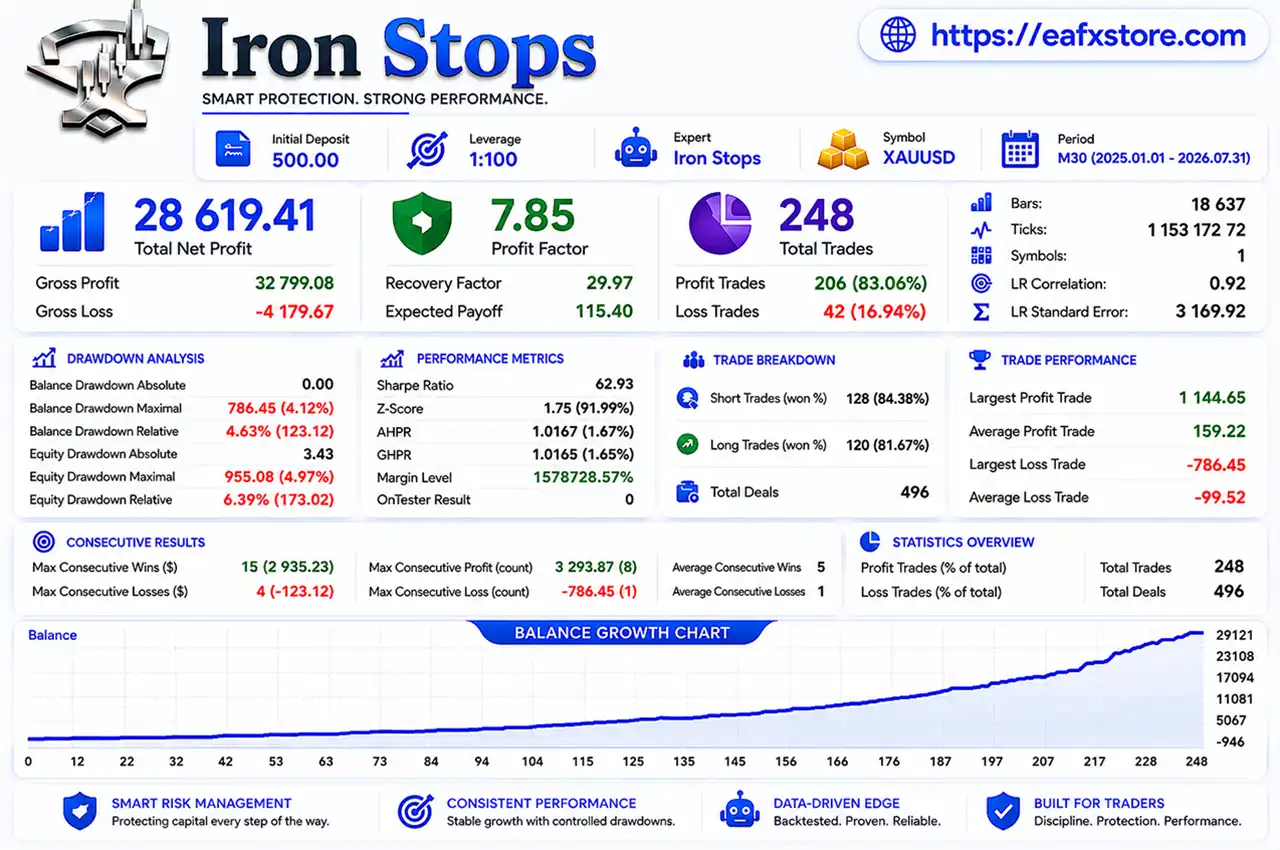
Iron Stops EA MT5 Backtest Results
| Metric | Result |
|---|---|
| Initial Deposit | $500 |
| Period | M30 (2025.01.01 – 2026.07.31) |
| Total Net Profit | $28,619.41 |
| Profit Factor | 7.85 |
| Total Trades | 248 |
| Profit Trades | 83.06% |
| Equity Drawdown Maximal | 4.97% |
| Balance Drawdown Maximal | 4.12% |
This longer test generated $28,619.41 in total net profit from an initial deposit of $500.00.
The reported 7.85 Profit Factor indicates that the gross profit was substantially larger than the gross loss during the tested period.
Equity drawdown maximal was 4.97%, while the balance drawdown maximal was 4.12%.
The balance curve shows a generally consistent upward progression, with relatively gradual growth through much of the test followed by stronger acceleration toward the end.
7-Month Backtest Results
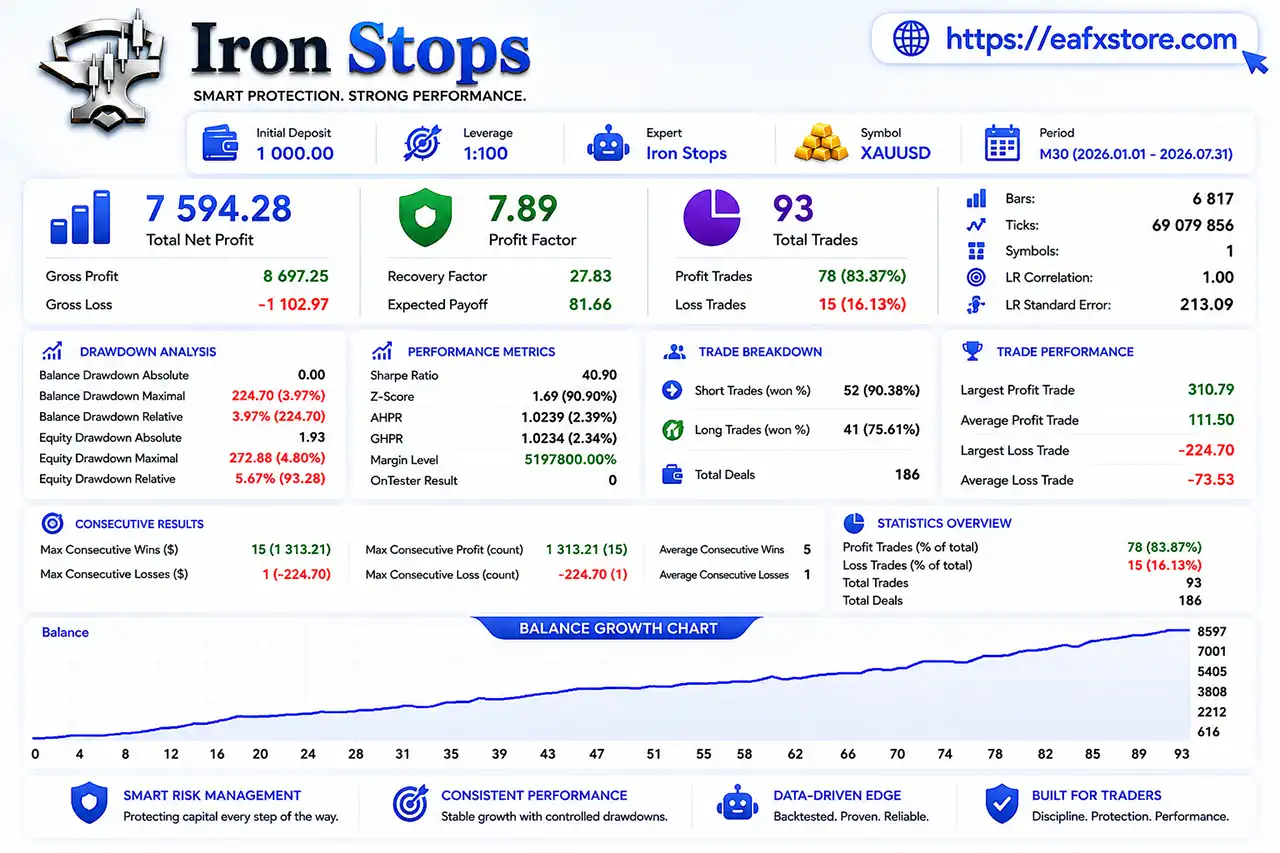
Iron Stops EA Backtest Results
| Metric | Result |
|---|---|
| Initial Deposit | $1,000 |
| Period | M30 (2026.01.01 – 2026.07.31) |
| Total Net Profit | $7,594.28 |
| Profit Factor | 7.89 |
| Total Trades | 93 |
| Profit Trades | 83.87% |
| Equity Drawdown Maximal | 4.80% |
| Balance Drawdown Maximal | 3.97% |
The 2026 test produced $7,594.28 in net profit from a $1,000.00 initial deposit.
The test recorded a 7.89 Profit Factor, while maximum equity drawdown was 4.80%.
The system completed 93 trades, with 78 profitable trades, representing an 83.87% profit-trade ratio.
The balance curve also shows a steady upward progression with several periods of gradual growth and relatively limited visible pullbacks.
Backtest Interpretation
The two tests are particularly notable for the combination of high Profit Factor, strong profitable-trade ratios and comparatively low reported equity drawdown.
However, these are historical MetaTrader 5 test results. They should be evaluated as evidence of past strategy behavior rather than as a prediction of future returns.
User Reviews
The supplied user reviews are generally positive, with several buyers commenting on the backtests, early live results and demo performance.
⭐⭐⭐⭐⭐ ROUTE (August 19, 2026)
“The backtest results were so good that I was honestly skeptical. However, all three of my most recent actual trades have been profitable, matching the backtest results.”
⭐⭐⭐⭐⭐ Umer06514 (August 20, 2026)
“I backtested this EA over 20 years, and the results are insane. I also purchased it, and within just one week, it has already hit TP.”
⭐⭐⭐⭐⭐ Liu000202 (August 19, 2026)
“Both backtests and early live results are solid. Hope it holds up.”
⭐⭐⭐⭐⭐ Ernst Moser (August 21, 2026)
“I bought the EA yesterday. So far, it’s working perfectly in demo mode. I highly recommend this EA.”
⭐⭐⭐⭐⭐ Kaustubh Shridhar Patil (August 19, 2026)
“In the last 3 days, it has taken 2 trades, and both trades hit TP successfully. So far, I’m highly impressed.”
These comments represent individual user experiences and should not be interpreted as independent verification of future profitability.
User reviews of Iron Stops EA
Why Iron Stops EA MT5 Stands Out
Designed Around Consistency
The product positioning focuses heavily on consistency rather than simply maximizing the number of trades.
Strong Historical Statistics
The supplied tests show Profit Factor values above 7.8 in both periods, combined with profitable-trade ratios above 83%.
Relatively Controlled Drawdown
The historical reports show maximum equity drawdown below 5% in both supplied tests.
Simple Trading Setup
The recommended configuration is straightforward: XAUUSD + M30, making the EA relatively easy to deploy.
Automatic Money Management
The system can calculate position size based on account balance and configured risk parameters.
Prop-Firm Orientation
The inclusion of daily-loss and drawdown-related controls makes the EA potentially relevant to traders operating under account restrictions.
Risk Management Features
Automatic Position Sizing
Iron Stops can determine lot size automatically using the account-balance-based risk method, helping traders maintain a more structured approach to position sizing.
Drawdown-Based Trade Restriction
The EA can stop opening new trades once the configured drawdown threshold is reached.
This provides an additional layer of account protection during unfavorable periods.
Equity Protection
The system can also close open orders when the configured equity drawdown condition is triggered, helping prevent continued exposure after a significant deterioration in account equity.
Spread Guard
The spread protection mechanism is designed to help avoid unfavorable execution conditions when trading costs become wider than the configured tolerance.
Daily Loss Control
A daily loss restriction is available for account-level risk management, which can be particularly relevant when trading under external account rules.
Trade Limits
The EA includes a maximum-trade setting, allowing traders to establish an upper boundary for the number of EA-managed positions.
Recommended Trading Conditions
For optimal performance, the developer recommends:
| Features | Type |
|---|---|
| Trading platform | MetaTrader 5 (MT5) |
| Time frames | M30 (30 minute chart) |
| Currency pairs | XAUUSD (Gold) |
| Minimum / Recommended deposit | $100+ |
| Minimum / Recommended leverage | Any |
| Account type | Any |
| Additional services | Unlock and Decompile |
| Recommended brokers | Exness Broker, Icmarkets Broker |
| Recommended VPS | MyfxVPS.com (Blue VPS, Golden VPS). Lowest Latency, 2 week Free Trial, 100% Free for 12-18 Months. |
Product Download Package?
The download package of the product suite includes:
✅ Experts: Iron Stops EA.ex5
 Reviewed by David Easton
Weaknesses and Risk Warnings
Historical Results Are Not Guarantees
The impressive backtest statistics should not be treated as a promise of future profitability.
Gold Can Be Highly Volatile
XAUUSD can experience rapid price movements, particularly around major economic events and changes in market liquidity.
The Current News Filters Are Disabled
The supplied settings show High, Medium and Low impact news filters all set to false.
Traders should understand this before deploying the configuration during major economic announcements.
The Drawdown Threshold Requires Careful Configuration
The supplied setting for stopping new trades is 65.0% drawdown, which is a very high threshold from a conventional risk-management perspective.
Traders should carefully review and adjust this parameter according to their own risk tolerance and account rules.
Broker Conditions Can Change Results
Spread, slippage, execution speed, commission, liquidity and contract specifications can cause live performance to differ substantially from historical testing.
Hedging May Increase Exposure
Because hedging is enabled in the supplied configuration, traders should understand how opposing positions affect margin, exposure and trading costs on their specific account.
Early Live Evidence Is Limited
The user reviews shown in the supplied material mention early live or demo experiences, but they do not establish a long-term live track record.
Who Should Use Iron Stops EA MT5?
Suitable For
🔹 XAUUSD traders looking for a dedicated Gold EA.
🔹 M30 traders who prefer a medium-term automated trading approach.
🔹 Prop-firm traders who need configurable account-level restrictions.
🔹 Risk-focused traders who want automatic position sizing and drawdown controls.
🔹 Traders seeking simple deployment through a single XAUUSD chart.
🔹 Experienced EA users who understand how to evaluate backtests and broker execution.
Less Suitable For
Iron Stops may be less appropriate for traders who want a high-frequency scalping system, a multi-market portfolio or a robot that requires little attention to risk parameters.
It is also unsuitable for traders who expect backtest performance to be reproduced exactly in live trading.
Final Verdict
Iron Stops EA is a focused XAUUSD M30 Expert Advisor (EA) built around volume acceleration, automated risk calculation and extensive account-protection controls.
The system also offers useful practical controls including automatic risk calculation, fixed-lot support, spread protection, hedging, drawdown management, daily loss restrictions and trade limits.
🔢 Iron Stops EA MT5 – Complete Settings Guide
Iron Stops EA MT5 is an automated trading Expert Advisor designed with configurable controls for symbol management, risk-based position sizing, news filtering, spread protection, hedging, timed closure, drawdown management, prop-firm restrictions and trade limits.
Its settings provide traders with detailed control over how the EA enters, manages, and closes positions, while also offering several account-protection mechanisms.
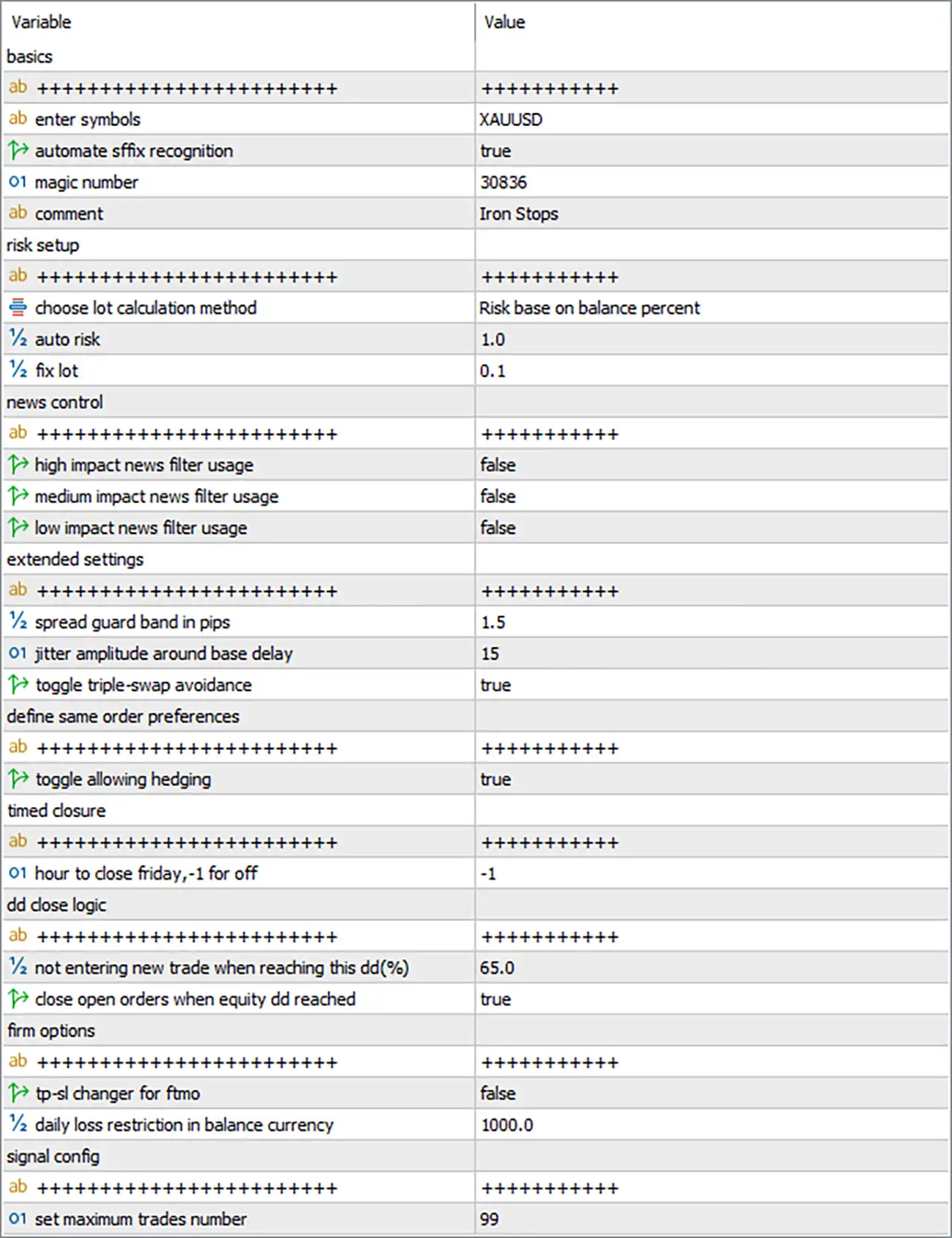
Iron Stops EA MT5 Settings Panel
🔄 Basics Settings
🔹 Enter symbols = XAUUSD — Specifies XAUUSD as the trading symbol for Iron Stops EA MT5.
🔹 Automate suffix recognition = true — Enables automatic recognition of broker-specific symbol suffixes, helping the EA identify variations of the configured XAUUSD symbol.
🔹 Magic number = 30836 — Assigns the unique Magic Number 30836 to trades managed by the EA.
🔹 Comment = Iron Stops — Sets Iron Stops as the trade comment, making EA-generated orders easier to identify.
🔄 Risk Setup
🔹 Choose lot calculation method = Risk base on balance percent — Selects Risk base on balance percent as the active position-sizing method.
🔹 Auto risk = 1.0 — Sets the automatic risk parameter to 1.0, used by the EA when calculating position size according to the selected balance-percentage method.
🔹 Fix lot = 0.1 — Sets the fixed lot size to 0.1 lots, which can be used when a fixed-lot calculation method is selected.
🔄 News Control
🔹 High impact news filter usage = false — Disables the high-impact news filter in the current configuration.
🔹 Medium impact news filter usage = false — Disables the medium-impact news filter.
🔹 Low impact news filter usage = false — Disables the low-impact news filter.
🔄 Extended Settings
🔹 Spread guard band in pips = 1.5 — Sets the spread protection guard band to 1.5 pips, helping control trading when spread conditions become unfavorable.
🔹 Jitter amplitude around base delay = 15 — Sets the jitter amplitude around the base execution delay to 15, adding controlled variation to the configured delay behavior.
🔹 Toggle triple-swap avoidance = true — Enables triple-swap avoidance, allowing the EA to account for the increased swap conditions associated with the relevant trading day.
🔄 Same Order Preferences
🔹 Toggle allowing hedging = true — Enables hedging, allowing the EA to maintain opposing positions when its trading logic permits them.
🔄 Timed Closure
🔹 Hour to close Friday, -1 for off = -1 — Sets the Friday closing hour to -1, which means the Friday timed-closure function is off according to the parameter description.
🔄 Drawdown Close Logic
🔹 Not entering new trade when reaching this dd(%) = 65.0 — Sets the drawdown threshold to 65.0%, at which point the EA is configured to stop entering new trades.
🔹 Close open orders when equity dd reached = true — Enables automatic closure of open orders when the configured equity drawdown condition is reached.
🔄 Firm Options
🔹 TP-SL changer for fmo = false — Disables the TP-SL changer for FMO function in the current configuration.
🔹 Daily loss restriction in balance currency = 1000.0 — Sets the daily loss restriction to 1000.0 in the account’s balance currency.
🔄 Signal Configuration
🔹 Set maximum trades number = 99 — Sets the maximum number of trades to 99, defining the configured upper limit for EA-managed trades.
🔢 Conclusion
Iron Stops EA MT5 provides a broad range of configuration options designed to control risk, execution, trade filtering, drawdown protection, hedging, and account-level restrictions.
The current setup is configured for XAUUSD, with automatic suffix recognition enabled and Magic Number 30836. Position sizing uses Risk base on balance percent, with Auto risk = 1.0, while the alternative fixed-lot parameter is 0.1 lots.
All three news filters—High, Medium, and Low impact—are currently disabled. The EA uses a 1.5-pip spread guard, 15 jitter amplitude, and has triple-swap avoidance enabled. Hedging is also enabled.
For drawdown protection, the EA is configured not to enter new trades when drawdown reaches 65.0%, while automatic closure of open orders when the equity drawdown condition is reached is enabled. The Friday timed closure is disabled because Hour to close Friday, -1 for off = -1.
The FMO TP-SL changer is disabled, the daily loss restriction is set to 1000.0 in the account’s balance currency, and the maximum trade count is configured at 99.
Because some settings—particularly the 65.0% drawdown threshold, 1.0 auto-risk value, 0.1 fixed lot, and 99 maximum trades—can materially affect trading exposure, users should validate the EA on a demo account and confirm the parameter behavior with their broker and account specifications before live deployment.
🔢 FAQs
❓ What symbol is Iron Stops EA MT5 configured to trade?
The Enter symbols parameter is set to XAUUSD, with Automate suffix recognition = true to support broker-specific symbol suffixes.
❓ What is the Magic Number of Iron Stops EA MT5?
The EA uses Magic Number 30836, while the trade comment is Iron Stops.
❓ What risk management method is currently selected?
The active method is Risk base on balance percent, with Auto risk = 1.0. The alternative fixed lot parameter is 0.1.
❓ Does Iron Stops EA MT5 use a news filter?
The High, Medium, and Low impact news filters are all currently disabled, with their respective values set to false.
❓ What happens when the configured drawdown threshold is reached?
At 65.0% drawdown, the EA is configured to stop entering new trades. Because Close open orders when equity dd reached = true, it is also configured to close open orders when the relevant equity drawdown condition is reached.
User Reviews
Only logged in customers who have purchased this product may leave a review.
❓ What market and timeframe does Iron Stops EA MT5 use?
Iron Stops EA MT5 is configured for XAUUSD on the M30 timeframe, operating from a single chart while managing its trading functions automatically.
❓ How does Iron Stops EA MT5 calculate lot size?
Iron Stops EA MT5 currently uses balance-based risk calculation with Auto Risk set to 1.0, while a fixed lot option of 0.1 is also available.
❓ Does Iron Stops EA MT5 support automatic risk management?
Yes. Iron Stops EA MT5 can calculate position size from account balance and risk settings, helping traders maintain consistent exposure across different accounts.
❓ Does Iron Stops EA MT5 have drawdown protection?
Yes. Iron Stops EA MT5 stops opening new trades when drawdown reaches 65.0% and can automatically close open positions when the equity drawdown condition is triggered.
❓ Does Iron Stops EA MT5 support hedging?
Yes. Iron Stops EA MT5 has hedging enabled in the current configuration, allowing opposing positions when permitted by the EA's trading logic and account conditions.
❓ Does Iron Stops EA MT5 use a news filter?
The High, Medium, and Low impact news filters in Iron Stops EA MT5 are currently disabled, allowing trading without these specific news-based restrictions.
❓ Can Iron Stops EA MT5 manage multiple symbols from one chart?
Yes. Iron Stops EA MT5 is designed for single-chart operation and can manage configured symbols internally, helping keep the trading platform organized.
❓ Does Iron Stops EA MT5 automatically close trades?
Yes. Iron Stops EA MT5 includes drawdown-based closure and timed management features, while positions are generally designed to close within approximately 36 hours.
❓ What account conditions are recommended for Iron Stops EA MT5?
Iron Stops EA MT5 is intended for controlled risk management and can suit prop challenges or managed accounts, but users should verify broker and account conditions first.
-
 Original price was: $2,000.00.$249.00Current price is: $249.00.
 -
 Original price was: $1,450.00.$249.00Current price is: $249.00.
 -
 Original price was: $2,000.00.$249.00Current price is: $249.00.
 -
 Original price was: $3,175.00.$249.00Current price is: $249.00.
-
 0Original price was: $290.00.$179.00Current price is: $179.00.
 -
 3Original price was: $199.00.$159.00Current price is: $159.00.
 -
 0Original price was: $778.00.$249.00Current price is: $249.00.
 -
 0Original price was: $500.00.$199.00Current price is: $199.00.
There are no reviews yet.