




Adaptive Xauusd Hedgefund Expert MT4 (Latest version)

Subscriptions for Special Plan
- 30 EA package is more economical!
- Special package with 99%
- Download 1 EA/Day

Subscriptions for Premium Membership
- Download Unlimited in 1 Year
- Get 100% Discount
- Get free access to all

Subscriptions for Gold Membership
- 1 Year Membership
- Get 100% Discount
- Access EA+Indicator+Course
Frequently bought together 🎁
Add these products to enhance your purchase




Quick Overview
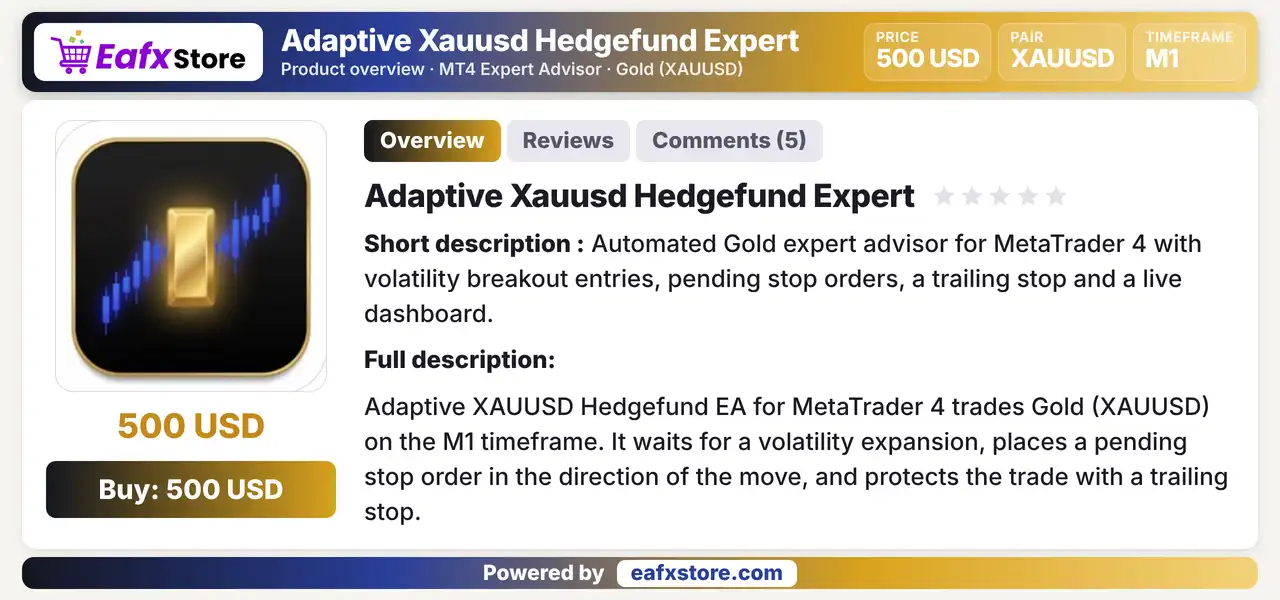
Adaptive Xauusd Hedgefund Expert is an automated EA for MetaTrader 4 that trades gold on the M1 chart. It waits for a volatility expansion, places a pending stop order in the direction of the move and protects the trade with a trailing stop.
Best For:
✅ Gold traders who like volatility breakouts.
✅ Users who prefer the M1 chart.
✅ Traders who want a stop on every trade.
✅ Users who want risk based lot sizing.
✅ Traders who like a live chart dashboard.
What is Adaptive Xauusd Hedgefund Expert?
Adaptive Xauusd Hedgefund Expert is an Expert Advisor (EA) for MetaTrader 4 that trades gold on the M1 timeframe.
It waits for a volatility expansion, places a pending stop order in the direction of the move and protects the trade with a trailing stop.
⭐ Vendor Website: View here
⭐ Delivery time 24h-48h after payment.
⭐ Refund if not delivered.
⭐ You will receive the current version without any limitations (ID+Time).
Adaptive Xauusd Hedgefund Expert MT4 Review
How Does Adaptive Xauusd Hedgefund Expert MT4 Work?
Volatility Filter
A filter requires the current bar range to exceed a set size before a setup is considered.
Channel Setup
A moving average channel of highs and lows prepares a buy stop below it or a sell stop above it.
Pending Stop Order
The order is placed with a stop loss and follows the market closer until it is triggered.
Trailing Stop
After the fill the stop loss trails price and only moves in favor of the trade.
Trading Strategy
Wait for Volatility Expansion
A filter requires the range of the current bar to exceed a set size before the EA considers any new setup on gold.
Define the Setup with a Channel
A moving average channel of highs and lows decides the setup, with price below it preparing a buy stop and above it a sell stop.
Place a Pending Stop Order
A stop order is placed in the direction of the move with a stop loss, and it follows the market closer until it is triggered.
Check Costs and Limits
The spread, an optional time window and the count of open orders are checked before an order is placed.
Trail the Stop After the Fill
Once the order fills, the stop loss trails price and only moves in favor of the trade, never against it.
Historical Trading Results Performance
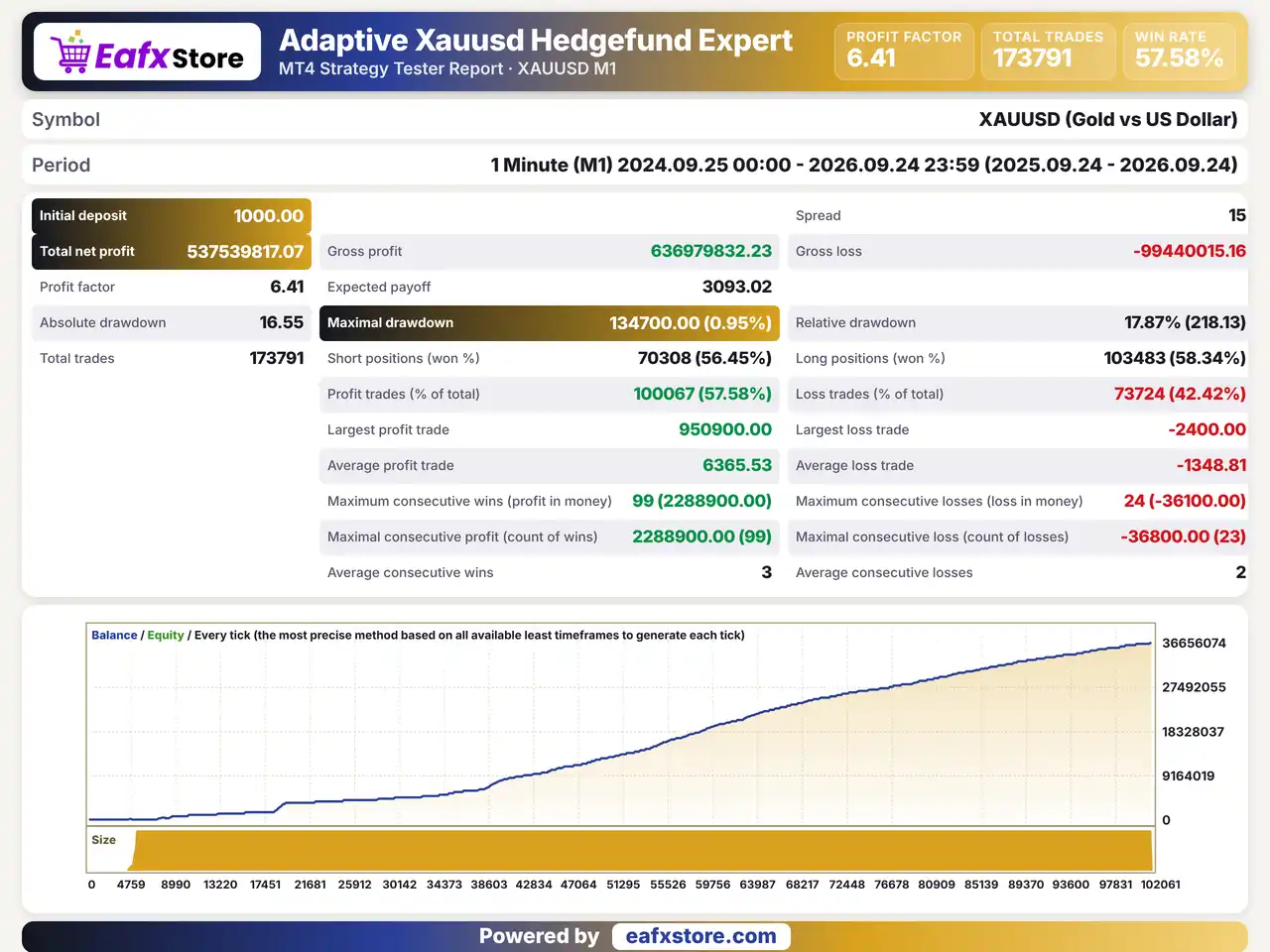
Adaptive Xauusd Hedgefund Expert was backtested on Gold using the M1 timeframe from September 24, 2024, to September 24, 2026, covering approximately two years. The test recorded a profit factor of 6.41 across 173,791 trades.
Adaptive Xauusd Hedgefund Expert MT4 Backtest Results
| Parameter | Results |
|---|---|
| Trading Symbol | XAUUSD |
| Timeframe | M1 |
| Testing Period | Sep 24, 2024 – Sep 24, 2026 |
| Initial Deposit | $1,000 |
| Total Net Profit | $537,539,817.07 |
| Profit Factor | 6.41 |
| Total Trades | 173,791 |
Key Features of Adaptive Xauusd Hedgefund Expert MT4
Volatility Breakout Entries
The EA reacts to a volatility expansion and enters with a pending stop order in the direction of the move, not at a random time.
Moving Average Channel Setup
A channel built from moving averages of highs and lows marks the setup, which gives the entry rule a clear chart reference.
Trailing Stop That Moves One Way
After a fill the stop trails price at a set distance and moves only in favor of the trade, which helps to lock in open gains.
One Order at a Time
Only one order or position is active at a time, with a stop loss on every trade, which keeps the exposure of the EA simple.
Risk Based or Fixed Lots
Lot size can follow a risk percentage of the account or stay fixed, and a margin safety check limits the use of free margin.
Spread Protection with Commission
The EA estimates the spread together with commission and blocks entries when the total cost is above the allowed limit.
Risk Management
Breakouts Can Reverse Fast
Gold can spike through the entry and fall back, so a stop order may trigger just before the move fails.
A Stop Loss Can Still Slip
Gaps and fast moves can pass the stop-loss level, so the real loss can be larger than planned.
Trailing May End a Trade Early
A tight trailing stop can close a position before it reaches a take-profit level, which gives up part of the move.
Costs Can Erase Small Gains
On M1 the spread, commission and slippage take a big share of each trade, so a poor account can turn gains into losses.
What Sets It Apart
Breakout on M1
The EA focuses on short term volatility expansions on a very fast chart, which is a demanding style for any robot.
Orders That Follow the Market
The pending stop order moves closer to price until it triggers, instead of staying at one fixed level.
One Trade at a Time
A single open order keeps the account free from stacked positions and makes the risk easy to follow.
Cost Aware Entries
The spread check includes an estimate of commission, which is more complete than a spread limit alone.
Who Should Use Adaptive Xauusd Hedgefund Expert?
Gold Breakout Traders
People who like volatility expansions and pending stop orders on the fast M1 chart of XAUUSD.
Cost Conscious Traders
Users with low spread or ECN accounts who know that costs matter a lot on short term trades.
Careful Testers
Traders who will check the filter, the stop and the trailing settings on a demo account before real use.
Not for Traders Who
Want a slow strategy, a published track record or any guaranteed profit from an automated system.
Recommended Trading Conditions
Recommended settings and parameters to pay attention to from developers and experts:
| Features | Type |
|---|---|
| Trading platform | MetaTrader 4 (MT4) |
| Time frames | M1 |
| Currency pairs | Gold (XAUUSD) |
| Minimum / Recommended deposit | $500+ |
| Minimum / Recommended leverage | Any |
| Account type | ECN |
| Additional services | Unlock and Decompile |
| Recommended brokers | Exness Broker, Icmarkets Broker |
| Recommended VPS | MyfxVPS.com (Blue VPS, Golden VPS). Lowest Latency, 2 week Free Trial, 100% Free for 12-18 Months. |
Product Download Package?
The download package of the product suite includes:
✅ Experts: Adaptive Xauusd Hedgefund Expert.ex4
Final Verdict
Adaptive Xauusd Hedgefund Expert is a gold robot for the M1 chart that waits for a volatility expansion, places a pending stop order from a moving average channel setup and protects each trade with a stop loss and a trailing stop that moves one way. It adds risk based lots, cost checks and a dashboard. It suits traders with low cost accounts who know that spread and commission matter a lot on M1. M1 trading is sensitive to costs and no results are published, so a demo test should come before any live trading.
🔢 Adaptive Xauusd Hedgefund Expert MT4 Settings Guide: Complete Inputs Explained
Adaptive Xauusd Hedgefund Expert MT4 is an automated trading robot designed for the MetaTrader 4 (MT4) platform, with a primary focus on the XAUUSD (Gold) market. Its configurable inputs cover core strategy parameters, money management, moving average-based entry settings, spread control, trading hours, and chart display options.
The EA also includes settings for lot sizing, risk allocation, stop-loss configuration, trade identification, and visual signals, allowing traders to customize its behavior according to their trading preferences and account conditions.
Understanding each parameter is essential before running the EA on a live account. Below is a complete explanation of all settings and their exact default values shown in the provided Inputs panel.
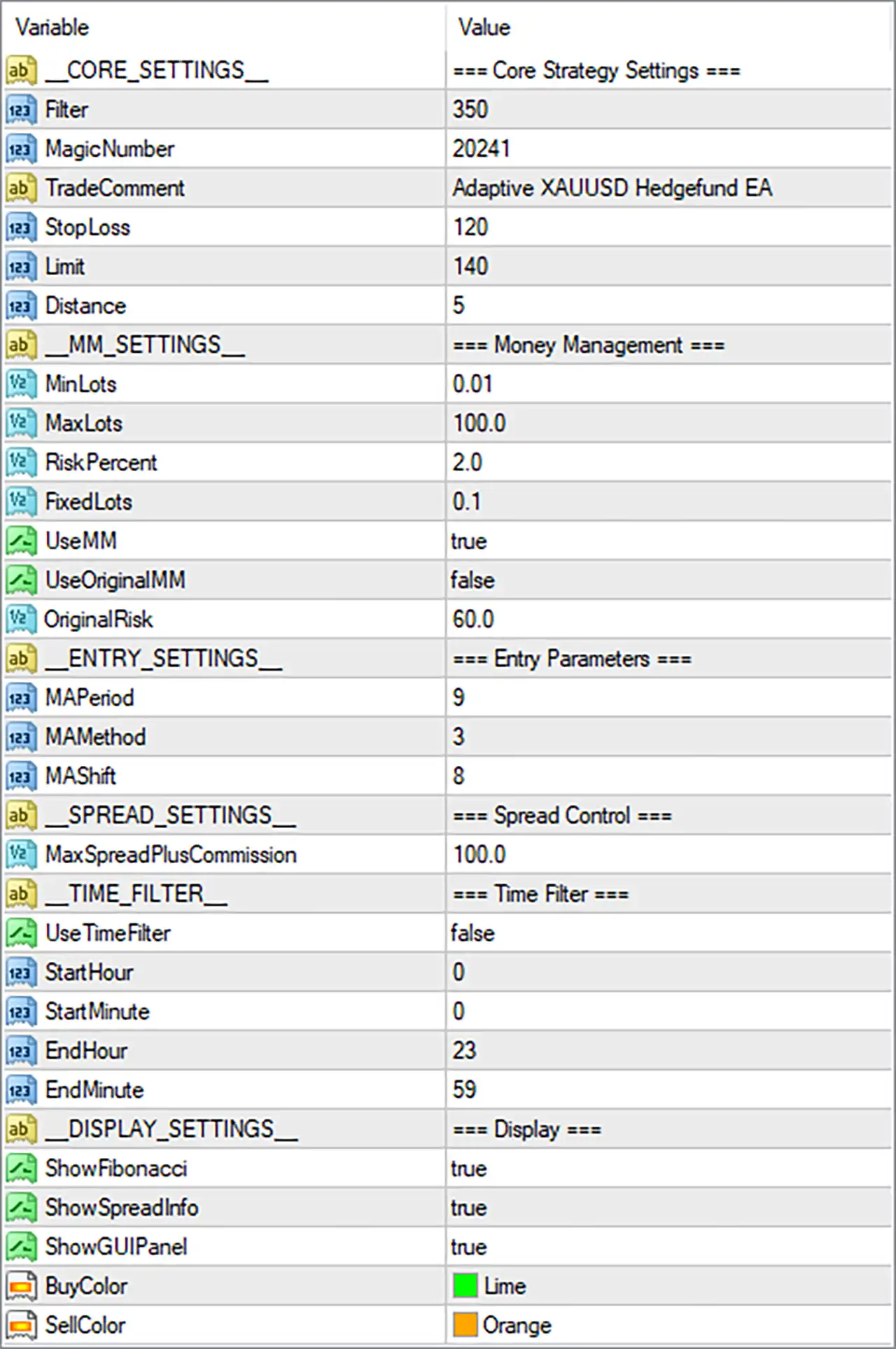
Adaptive Xauusd Hedgefund Expert MT4 Settings Panel
⚙️ Core Strategy Settings
🔹 MagicNumber = 20241: Assigns a unique identifier to trades opened by Adaptive Xauusd Hedgefund Expert MT4. This helps the EA distinguish its own positions from trades opened manually or by other Expert Advisors operating on the same account.
🔹 TradeComment = Adaptive XAUUSD Hedgefund EA: Sets the comment attached to trades opened by the robot. This label can help traders identify the EA’s positions in the MT4 trade history and account management interface.
🔹 StopLoss = 120: Defines the configured stop-loss parameter for the trading strategy. The unit is not specified in the Inputs panel and may depend on the EA’s implementation, symbol digits, and broker settings, so confirm whether the value represents points or another distance unit.
🔹 Limit = 140: Sets an internal trading limit that may relate to price distance, order placement, or another strategy condition. The precise meaning cannot be confirmed from the parameter name alone and should be checked against the EA’s documentation or source code.
🔹 Distance = 5: Specifies a distance-related parameter that may influence trade placement or the spacing between relevant price levels. Its exact function and unit depend on the EA’s implementation.
⚙️ Money Management Settings
🔹 MaxLots = 100.0: Sets the maximum lot size permitted by the EA’s lot-sizing logic. The value is 100.0 lots, but the broker may impose a lower maximum volume per order or position.
🔹 RiskPercent = 2.0: Specifies a risk-related percentage of 2.0 for the EA’s money management system. If the EA uses this input to calculate risk per trade, the intended setting may represent 2% risk; however, the actual calculation and whether it applies per trade or another measure must be verified.
🔹 FixedLots = 0.1: Sets the fixed trading volume to 0.1 lots when the EA operates in fixed-lot mode. Whether this value is used depends on how the robot’s money management options interact with the other inputs.
🔹 UseMM = true: Enables the EA’s money management functionality. When active, the robot may calculate trade volume according to its programmed money management rules rather than relying exclusively on a manually specified fixed lot size.
🔹 UseOriginalMM = false: Disables the alternative or original money management mode identified by this parameter. The exact distinction between this mode and the standard money management system depends on the EA’s programming.
🔹 OriginalRisk = 60.0: Sets the risk value used by the original money management mode to 60.0. The parameter’s unit and calculation method are not specified in the panel, and its practical effect should be verified before enabling the associated mode.
⚙️ Entry Parameters
🔹 MAMethod = 3: Specifies the moving average calculation method using the numerical code 3. In standard MetaTrader moving average enumeration, value 3 corresponds to the Linear Weighted Moving Average (LWMA), although the EA’s own implementation should be checked to confirm that it uses the standard mapping.
🔹 MAShift = 8: Sets the moving average shift to 8. In standard MT4 moving average functions, this shifts the indicator horizontally relative to the chart by the specified number of bars; it does not necessarily mean the EA waits eight candles before entering a trade.
⚙️ Spread Control
⚙️ Time Filter Settings
🔹 StartHour = 0: Defines the trading window’s starting hour as 00:00 when the time filter is enabled. The relevant time zone, such as broker server time, must be confirmed from the EA’s documentation.
🔹 StartMinute = 0: Sets the starting minute to 00. Combined with StartHour = 0, this defines a scheduled start time of 00:00 under the EA’s configured time reference.
🔹 EndHour = 23: Defines the ending hour as 23 when the time filter is enabled. Together with EndMinute = 59, this corresponds to 23:59 in the applicable time zone.
🔹 EndMinute = 59: Sets the ending minute to 59. Combined with EndHour = 23, it specifies the final minute of the configured trading window, covering almost the entire calendar day when the time filter is activated.
⚙️ Display Settings
🔹 ShowSpreadInfo = true: Enables the display of spread information on the chart or EA interface. This can help traders monitor transaction costs, particularly when trading XAUUSD during periods of changing liquidity or elevated volatility.
🔹 ShowGUIPanel = true: Enables the EA’s graphical user interface (GUI) panel. When supported, this panel may present trading information or controls directly on the MT4 chart, making it easier to monitor the robot while it operates.
🔹 BuyColor = Lime: Sets the display color for buy-related visual elements to Lime, a bright green shade. This helps distinguish buy signals or buy positions from other chart information.
🔹 SellColor = Orange: Sets the display color for sell-related visual elements to Orange. The contrasting color helps traders visually distinguish sell signals or sell positions from buy-related elements.
🔢 Conclusion
The Adaptive Xauusd Hedgefund Expert MT4 settings provide controls for strategy filtering, order identification, stop-loss configuration, lot sizing, moving average entry parameters, transaction cost limits, trading schedules, and chart visualization. The displayed defaults include a 9-period moving average, a method code of 3, a moving average shift of 8, a risk-related setting of 2.0, and a fixed lot size of 0.1.
One important detail is that UseMM = true and UseOriginalMM = false indicate that the standard money management option is enabled while the alternative original mode is disabled. Meanwhile, UseTimeFilter = false means the configured trading hours do not restrict trading through this time filter.
Before deploying the EA on a live XAUUSD account, verify the units of StopLoss = 120, Limit = 140, Distance = 5, and MaxSpreadPlusCommission = 100.0. Also confirm the lot-sizing logic, actual risk calculation, and broker execution requirements. Backtesting and forward testing on a demo account can help assess how the settings behave under different Gold market conditions. No parameter configuration can guarantee profits or eliminate trading risk.
User Reviews
Only logged in customers who have purchased this product may leave a review.
❓ What is Adaptive XAUUSD Hedgefund EA MT4?
An automated Expert Advisor for MetaTrader 4 that trades gold on the M1 chart with volatility breakout entries and pending stop orders.
❓ How does Adaptive XAUUSD Hedgefund EA MT4 enter trades?
It waits for a volatility expansion, then places a pending stop order in the direction of the move based on a moving average channel.
❓ Which timeframe does Adaptive XAUUSD Hedgefund EA MT4 use?
M1
❓ Does Adaptive XAUUSD Hedgefund EA MT4 use a stop loss?
Yes. Every trade has a stop loss, and the stop trails price after the order fills.
❓ Is Adaptive XAUUSD Hedgefund EA MT4 a grid or martingale EA?
The product states that it uses no martingale, no grid and no hedging. A demo test helps confirm this before real money is used.
❓ How many trades can Adaptive XAUUSD Hedgefund EA MT4 hold?
One order or position at a time.
❓ How is lot size set in Adaptive XAUUSD Hedgefund EA MT4?
By a risk percentage of the account or by a fixed lot, with a margin safety check on free margin.
-
 Original price was: $4,999.00.$249.00Current price is: $249.00.
 -
 Original price was: $4,500.00.$249.00Current price is: $249.00.
 -
 Original price was: $4,999.00.$249.00Current price is: $249.00.
 -
 Original price was: $28,000.00.$249.00Current price is: $249.00.
-
 4Original price was: $499.00.$249.00Current price is: $249.00.
 -
 0Original price was: $2,288.00.$249.00Current price is: $249.00.
 -
 3Original price was: $199.00.$159.00Current price is: $159.00.
 -
 0Original price was: $430.00.$249.00Current price is: $249.00.
There are no reviews yet.