






Secha4 EA MT4 (Latest version) - Unlimited

Subscriptions for Special Plan
- 30 EA package is more economical!
- Special package with 99%
- Download 1 EA/Day

Subscriptions for Premium Membership
- Download Unlimited in 1 Year
- Get 100% Discount
- Get free access to all

Subscriptions for Gold Membership
- 1 Year Membership
- Get 100% Discount
- Access EA+Indicator+Course
Frequently bought together 🎁
Add these products to enhance your purchase




Quick Overview
Secha4 EA is an automated Expert Advisor (EA) for MetaTrader 4 that trades EURUSD on the H1 and H4 charts. Its settings include money management, a martingale multiplier with a maximum lot limit, a fixed stop loss and take profit, and a trailing stop that can protect profit.
Best For:
✅ EURUSD traders who use H1 or H4.
✅ Users who accept martingale recovery.
✅ Traders who want a fixed stop and target.
✅ Users with an ECN low spread broker.
What Is Secha4 EA MT4?
Secha4 EA is an automated trading Expert Advisor (EA) designed for the MetaTrader 4 platform, specifically developed to trade the EURUSD currency pair on the H1 and H4 timeframes. It combines risk-based lot sizing with a martingale recovery strategy to manage trading positions according to configurable risk parameters.
The EA includes essential trade management features such as maximum lot size limits, Stop Loss, Take Profit, and Trailing Stop functionality. Additionally, it provides adjustable execution controls, allowing traders to customize order management and trading behavior to suit their preferred trading conditions.
 Vendor Website: View here
Delivery time 24h-48h after payment.
Refund if not delivered.
You will receive the current version without any limitations (ID+Time).
Secha4 EA MT4 Review
Secha4 EA MT4 Trading Strategy
Trade EURUSD on Slow Charts
The EA works on the H1 and H4 charts and is built for EURUSD, a pair known for tight spreads and deep liquidity.
Size Lots by Risk
A risk input and an initial lot control the starting position size, so the first trade follows the chosen account settings.
Recover Losses with a Multiplier
After a losing trade the EA can raise the next lot by a martingale multiplier, which is a high risk recovery method.
Cap the Volume
A maximum lot setting limits how large the position can grow, which stops the multiplier from raising the size without end.
Exit with Stops and a Trailing Stop
A fixed stop loss and take profit are set, and a trailing stop can move the stop behind price once a trade is in profit.
Key Features of Secha4 EA MT4
EURUSD Focus
The EA is made for one liquid pair, which keeps the setup simple and makes broker spread and commission easy to compare in tests.
Martingale Recovery
A martingale multiplier raises the lot after a loss, which can recover earlier losses quickly but grows the exposure after a losing run.
Maximum Lot Limit
A maximum lot input caps the size of any position, which gives a hard limit to the volume growth caused by the multiplier.
Fixed Stop Loss and Take Profit
Both levels are set as inputs, so each trade has a planned loss limit and a planned target from the moment it opens.
Trailing Stop
A start level and a distance control the trailing stop, which helps lock in profit once a trade moves in the expected direction.
Historical Trading Results Performance
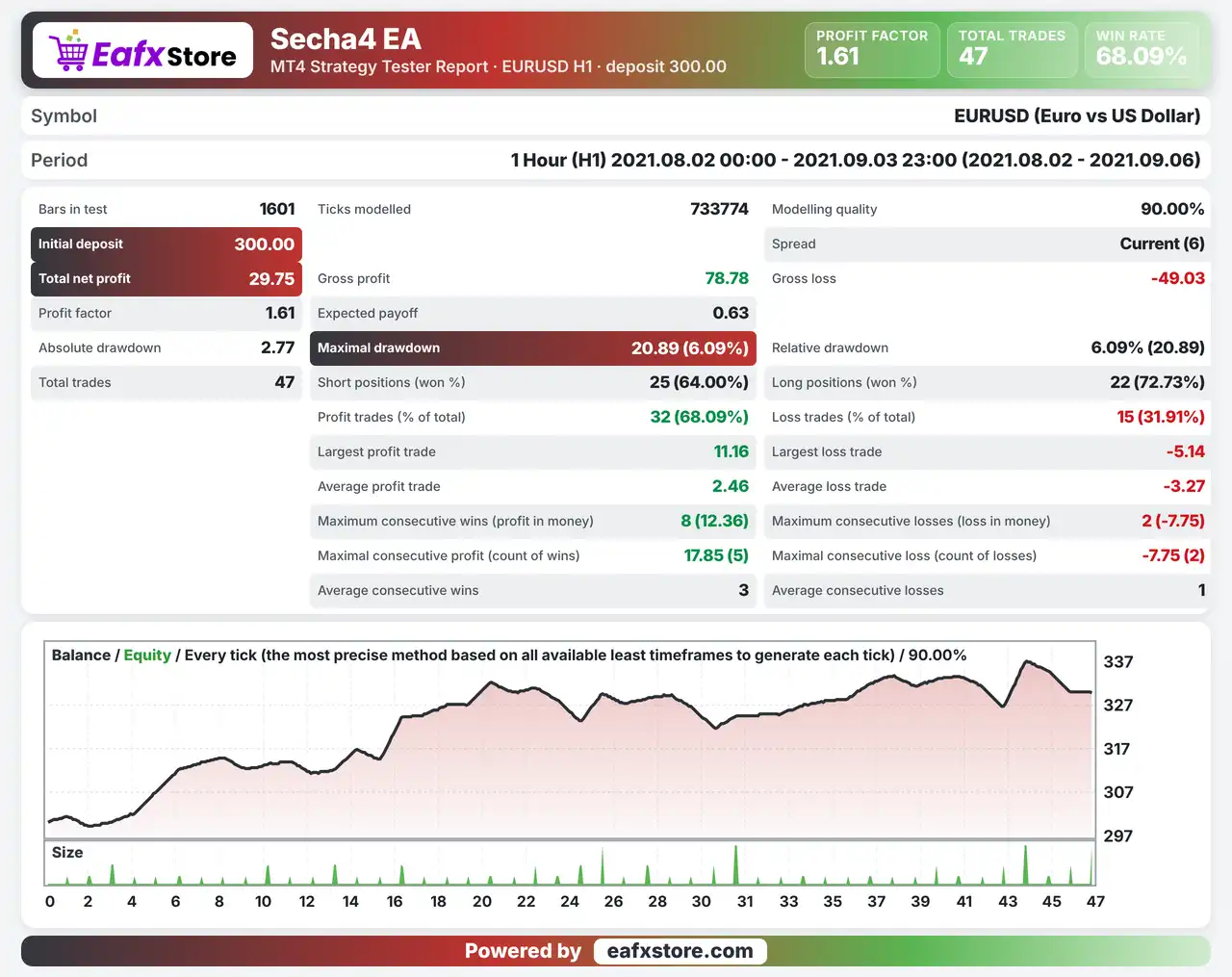
Secha4 EA was backtested on EURUSD using the H1 timeframe from August 2 to September 3, 2021, covering approximately one month of historical data and generating 47 trades with a total net profit of $29.75.
Secha4 EA MT4 Backtest Results
| Parameter | Results |
|---|---|
| Initial Deposit | $300 |
| Total Net Profit | $29.75 |
| Profit Factor | 1.61 |
| Total Trades | 47 |
| Modeling Quality | 90% |
| Winning Trades | 68.09% |
| Maximum Drawdown | 6.09% |
Risk Management
The Multiplier Compounds Losses
Each loss raises the next lot, so several losses in a row can create a drawdown far larger than the first trade.
The Lot Cap Is Not a Safety Net
A maximum lot limits size but a position at the cap can still lose a lot if price moves against it.
Use the Stop Loss Properly
A fixed stop-loss limits each trade, but gaps and fast moves can pass it and cause a larger loss.
The Target May Be Missed
Trades aim for a set take-profit, and the trailing stop can close a trade early on a strong move.
What Sets It Apart
Martingale with a Cap
The multiplier is paired with a maximum lot, which is safer than an unlimited martingale but still risky.
Slow Timeframe Martingale
Most martingale robots work on fast charts, while this one is meant for H1 and H4 with fewer entries.
Fixed Stop on Every Trade
A stop loss input is available, which many recovery systems leave out of their default settings.
Execution Tuning
Attempts, pause and slippage inputs give some control over order handling when the market moves fast.
Recommended Trading Conditions
Recommended settings and parameters to pay attention to from developers and experts:
| Features | Type |
|---|---|
| Trading platform | MetaTrader 4 (MT4) |
| Time frames | H1, H4 |
| Currency pairs | EURUSD |
| Minimum / Recommended deposit | $100+ |
| Minimum / Recommended leverage | Any |
| Account type | ECN broker |
| Additional services | Unlock and Decompile |
| Recommended brokers | Exness Broker, Icmarkets Broker |
| Recommended VPS | MyfxVPS.com (Blue VPS, Golden VPS). Lowest Latency, 2 week Free Trial, 100% Free for 12-18 Months. |
Product Download Package?
The download package of the product suite includes:
 Experts: Secha4 EA.ex4
 Reviewed by David Easton
Final Verdict
Secha4 EA is a EURUSD robot for the H1 and H4 charts that pairs a martingale multiplier with a maximum lot cap, a fixed stop loss, a take profit and a trailing stop. The settings list is short and clear, but the entry strategy is not explained and no results are published, so its quality cannot be judged from the source. Because martingale sizing can deepen a losing run, a small starting lot, a good ECN broker and a long demo test are the sensible start before any real money is placed at risk.
🔢 Secha4 EA MT4 Settings Guide: Complete Inputs and Parameters Explained
Secha4 EA is an automated trading Expert Advisor designed for the MetaTrader 4 platform. Its configuration panel provides adjustable money management, lot sizing, martingale recovery, take-profit and stop-loss levels, trailing-stop management, and trade execution controls.
The EA also includes customizable settings for maximum trading attempts, trading pauses, order identification, information display, and interface language. These options allow traders to adjust the EA’s trading behavior and risk management according to their account size and trading preferences.
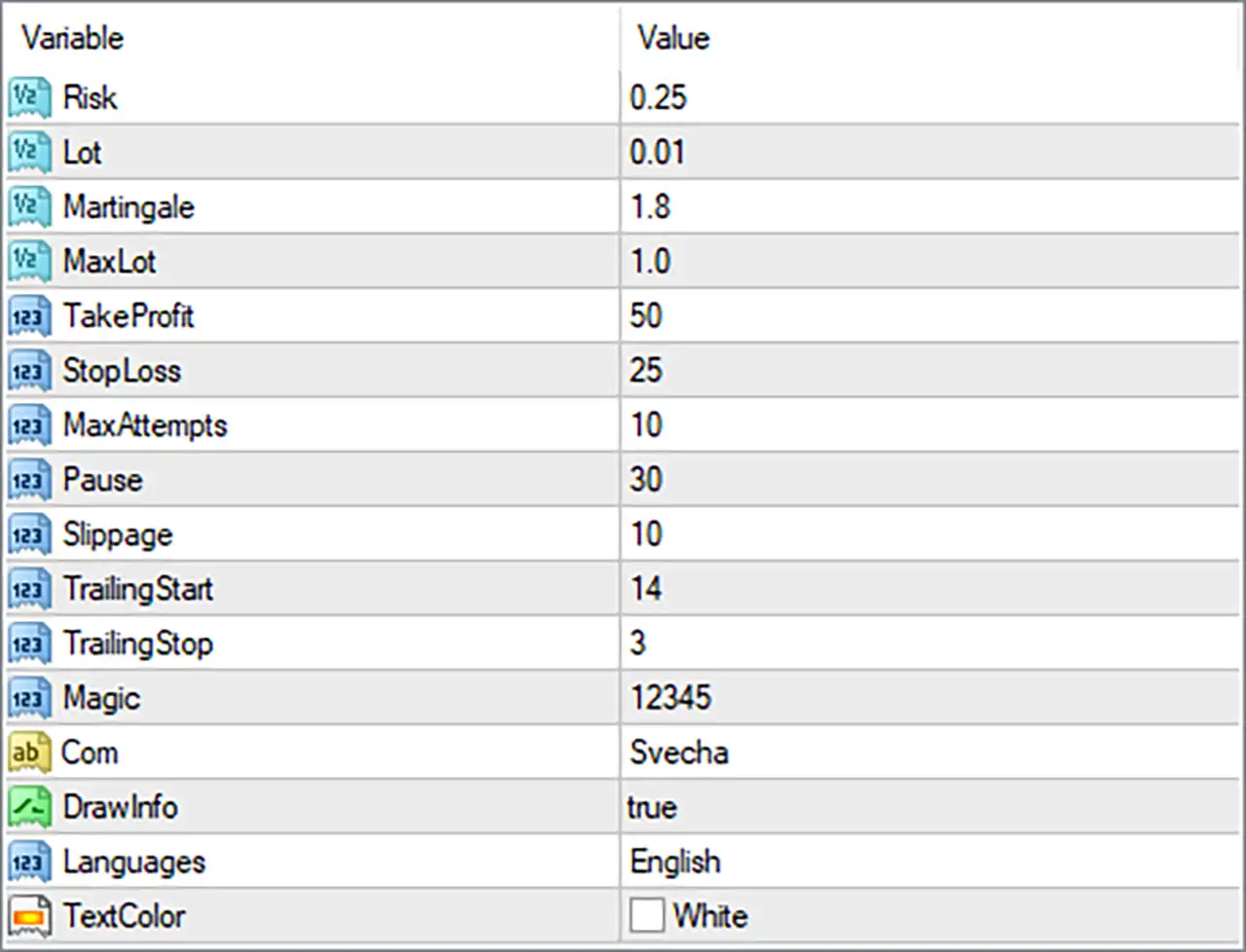
This guide explains all 15 parameters displayed in the Secha4 EA input panel, preserving their original names and exact default values.
Secha4 EA MT4 Settings Panel
⚙️ Risk Management and Lot Size Settings
🔹 Risk = 0.25: Sets the configured risk parameter to 0.25. This value may be used by the EA’s internal money management system to calculate position exposure. Verify whether it represents a percentage, risk factor, or another calculation input.
🔹 Lot = 0.01: Sets the initial trading volume to 0.01 lots. This determines the configured starting position size when Secha4 EA MT4 opens a new trade.
🔹 Martingale = 1.8: Sets the martingale multiplier to 1.8. If the EA uses a martingale recovery strategy, subsequent trading volumes may increase by a factor of 1.8 following losing trades, depending on its internal calculation rules.
🔹 MaxLot = 1.0: Sets the maximum permitted lot size to 1.0 lots. This parameter establishes a volume limit for the EA’s position-sizing or martingale mechanism, subject to its internal order-management rules.
⚙️ Take Profit and Stop Loss Settings
🔹 TakeProfit = 50: Sets the configured take-profit target to 50. This determines the intended profit-taking distance or target for trades managed by the EA. Verify whether the value represents pips, points, or another unit.
🔹 StopLoss = 25: Sets the configured stop-loss value to 25. This defines the intended loss-limiting distance or threshold for a trade, helping control potential losses when the EA applies this parameter.
⚙️ Trading Frequency and Execution Settings
🔹 MaxAttempts = 10: Sets the maximum number of trading attempts to 10. This may limit how many times the EA attempts to execute an order or perform a trading operation under its programmed conditions.
🔹 Pause = 30: Sets the pause parameter to 30. This may define the waiting interval between trading attempts or consecutive operations, depending on the EA’s internal timing logic. Verify whether the unit is seconds, minutes, or another time measurement.
🔹 Slippage = 10: Sets the permitted slippage parameter to 10. This defines the configured tolerance between the requested order price and the actual execution price, subject to broker conditions and the EA’s execution logic.
⚙️ Trailing Stop Settings
🔹 TrailingStart = 14: Sets the trailing-stop activation threshold to 14. This determines the configured profit or price-movement level at which the EA may begin adjusting the stop-loss to protect accumulated profits.
🔹 TrailingStop = 3: Sets the trailing-stop distance to 3. Once trailing management becomes active, this parameter may determine how far the stop-loss follows the current market price to help protect open-position profits.
⚙️ Trade Identification and Information Display
🔹 Magic = 12345: Assigns the magic number 12345 to trades managed by Secha4 EA MT4. This unique identifier helps distinguish the EA’s orders from manual trades and positions opened by other Expert Advisors.
🔹 Com = Svecha: Sets the trade comment to Svecha. This descriptive label may appear in the order comment field, helping traders identify positions associated with the EA in the MetaTrader 4 terminal.
🔹 DrawInfo = true: Enables the information-display feature, allowing Secha4 EA MT4 to show supported trading information or status details directly on the chart.
⚙️ Interface and Language Settings
🔹 Languages = English: Selects English as the interface language for the EA, allowing supported information, labels, and display messages to appear in English.
🔹 TextColor = White: Sets the information-panel text color to White, customizing the visual appearance of the EA’s chart interface and displayed information.
⚙️ Important Configuration Considerations
🔹 Review the Risk and Martingale Settings: Risk = 0.25 and Martingale = 1.8 should be evaluated carefully. If the EA increases position sizes after losses, cumulative exposure can grow rapidly even when the initial lot size is only 0.01.
🔹 Understand the Maximum Lot Restriction: MaxLot = 1.0 establishes the configured upper lot-size limit. Verify whether this restriction applies to individual positions or the overall position-sizing calculation.
🔹 Check Take-Profit and Stop-Loss Units: TakeProfit = 50 and StopLoss = 25 should be checked against the EA’s unit conventions. Do not assume these values represent pips without confirming the implementation.
🔹 Evaluate Trading Frequency: MaxAttempts = 10 and Pause = 30 influence the EA’s trading-attempt and waiting behavior. Confirm how the EA counts attempts and the time unit used by the pause setting.
🔹 Configure Trailing Stop Correctly: TrailingStart = 14 and TrailingStop = 3 define the configured activation threshold and trailing distance. Verify their units and test how the EA adjusts stop-loss levels when a trade moves into profit.
🔹 Check Broker Execution Conditions: Slippage = 10 should be evaluated against your broker’s execution quality, market volatility, and the instrument being traded to reduce the likelihood of unexpected execution behavior.
🔹 Test Before Live Trading: Backtest and demo-test Secha4 EA MT4 to evaluate its martingale behavior, maximum lot restriction, trade frequency, and exit management under different market conditions.
🔢 Conclusion
Secha4 EA MT4 provides a configurable trading environment with money management, martingale recovery, trade execution controls, take-profit and stop-loss settings, and trailing-stop functionality.
The displayed configuration uses an initial lot size of 0.01, a martingale multiplier of 1.8, and a maximum lot size of 1.0. Its take-profit and stop-loss settings are 50 and 25, respectively, while trailing-stop management is configured with TrailingStart = 14 and TrailingStop = 3.
The EA also includes MaxAttempts = 10, Pause = 30, and Slippage = 10 to control trading operations and order execution. Before deploying Secha4 EA MT4 on a live account, traders should carefully evaluate the martingale multiplier, verify all parameter units, and establish appropriate risk limits.
Proper backtesting and demo trading are recommended to understand the EA’s behavior and assess its suitability for different account sizes and market conditions. No configuration guarantees profitability or eliminates trading risk.
User Reviews
Only logged in customers who have purchased this product may leave a review.
❓ What is Secha4 EA MT4?
An automated Expert Advisor for MetaTrader 4 that trades EURUSD and uses martingale recovery with stop loss, take profit and trailing stop.
❓ Which pair does Secha4 EA MT4 trade?
EURUSD
❓ Which timeframes does Secha4 EA MT4 use?
H1 and H4
❓ Is Secha4 EA MT4 a martingale EA?
Yes. The settings include a martingale multiplier that raises the lot after a loss.
❓ Does Secha4 EA MT4 limit the lot size?
Yes. A maximum lot input caps the size of the positions.
❓ Does Secha4 EA MT4 use a stop loss?
Yes. It has a fixed stop loss and take profit, plus a trailing stop.
❓ How does Secha4 EA MT4 choose entries?
The product information does not describe the entry strategy.
❓ Which broker suits Secha4 EA MT4?
A good ECN broker with low commission and low spread.
❓ Does Secha4 EA MT4 need a hosted server?
The product highly recommends one so the EA can run without interruption.
❓ Does Secha4 EA MT4 show information on the chart?
Yes. An information display can show status details on the chart.
❓ Should Secha4 EA MT4 be tested on demo first?
Yes. A demo trial helps confirm the martingale behavior, the lot cap and the exit settings before real money is used.
-
 Original price was: $1,100.00.$249.00Current price is: $249.00.
 -
 Original price was: $1,299.00.$249.00Current price is: $249.00.
 -
 Original price was: $7,000.00.$249.00Current price is: $249.00.
 -
 Original price was: $2,100.00.$249.00Current price is: $249.00.
-
 4Original price was: $499.00.$249.00Current price is: $249.00.
 -
 0Original price was: $2,288.00.$249.00Current price is: $249.00.
 -
 3Original price was: $199.00.$159.00Current price is: $159.00.
 -
 1Original price was: $699.00.$249.00Current price is: $249.00.
There are no reviews yet.