Introduction to BitcoinWhale EA MT4
BitcoinWhale EA is an automated trading Expert Advisor (EA) for the MetaTrader 4 platform, featuring configurable moving average indicators, advanced signal parameters, automated profit management, trailing stop functionality, and flexible money management options.
The EA provides multiple technical indicator settings, including Fast and Slow Moving Averages, different MA calculation methods, and selectable price sources. These parameters allow traders to customize the indicator configuration used by the EA’s trading logic.
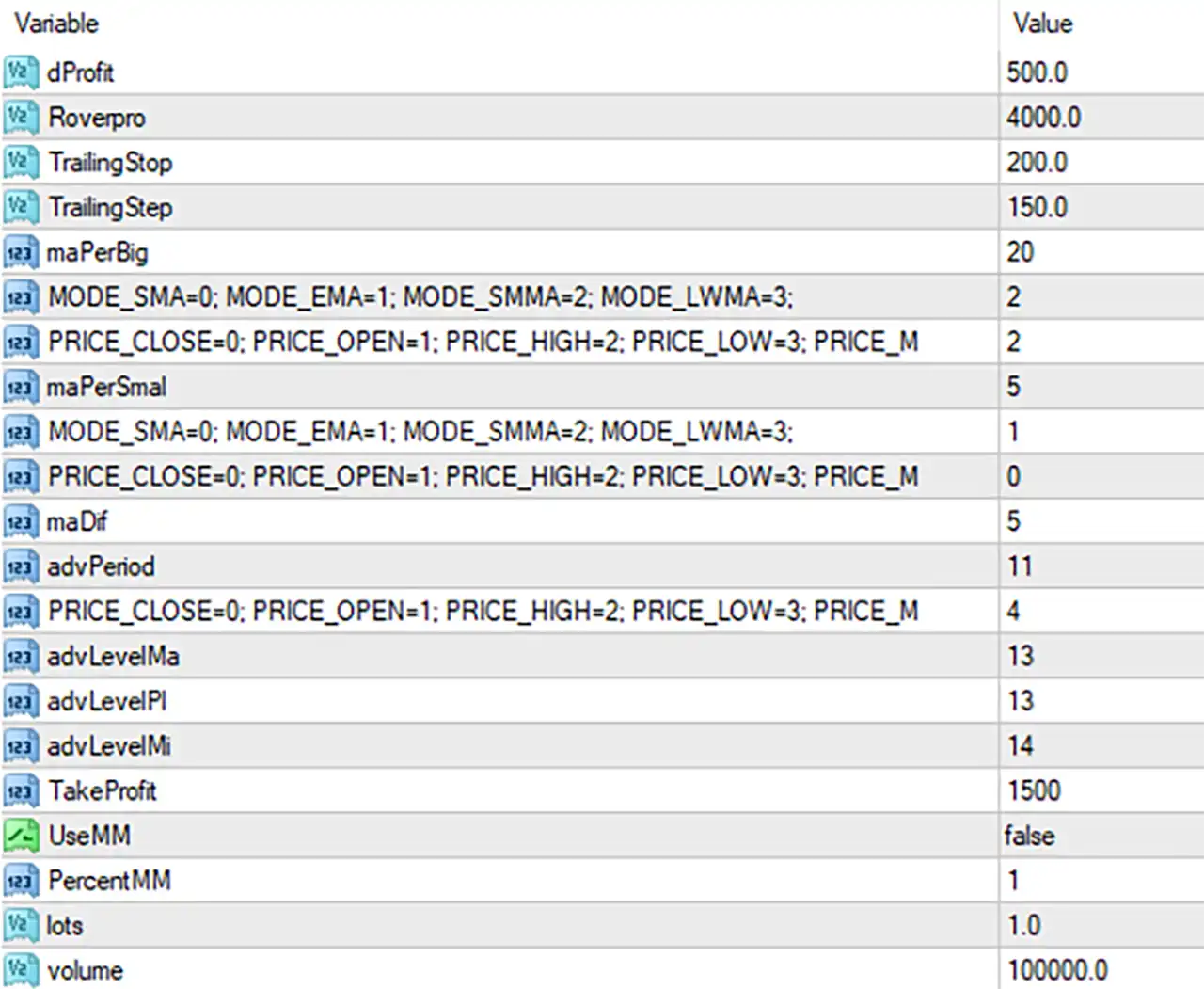
BitcoinWhale EA also incorporates trailing stop management, Take Profit settings, and optional percentage-based money management. The following guide explains all 20 input parameters displayed in the settings panel.
Profit and Trade Management Settings
This section contains the parameters responsible for profit management and trailing stop functionality.
🔹 dProfit = 500.0 – Sets the dProfit parameter to 500.0. This value configures an internal profit-related setting used by the EA’s trading management logic. Its precise calculation and unit depend on the EA’s internal programming.
🔹 Rovepro = 4000.0 – Sets the Rovepro parameter to 4000.0. This is an EA-specific configuration value that may be associated with its internal trading or profit management mechanism. The exact function should be verified against the developer’s documentation.
🔹 TrailingStop = 200.0 – Sets the trailing stop distance to 200.0 points. This parameter defines the configured distance used by the EA when adjusting the stop-loss level as a position moves into profit.
🔹 TrailingStep = 150.0 – Sets the trailing stop adjustment step to 150.0 points. This determines the configured interval for updating the trailing stop as the market moves favorably, helping manage the distance between successive stop-loss adjustments.
Moving Average – Main Indicator Settings
This section configures the primary moving average indicator, including its calculation period, averaging method, and applied price.
🔹 maPerBig = 20 – Sets the main or longer Moving Average period to 20. This parameter determines the number of price periods used in the moving average calculation, providing a broader reference for the EA’s market analysis.
🔹 MODE_SMA = 0; MODE_EMA = 1; MODE_SMMA = 2; MODE_LWMA = 3 = 2 – Selects the Smoothed Moving Average (SMMA) calculation method with value 2. The available options are Simple Moving Average (SMA = 0), Exponential Moving Average (EMA = 1), Smoothed Moving Average (SMMA = 2), and Linear Weighted Moving Average (LWMA = 3).
🔹 PRICE_CLOSE = 0; PRICE_OPEN = 1; PRICE_HIGH = 2; PRICE_LOW = 3; PRICE_M… = 2 – Selects PRICE_HIGH with value 2. This means the moving average calculation uses the High price of each candle rather than the Open, Close, or Low price.
Moving Average – Secondary Indicator Settings
This section configures the shorter moving average used alongside the primary indicator to support the EA’s signal calculations.
🔹 maPerSmal = 5 – Sets the shorter Moving Average period to 5. This parameter controls the number of price periods used in the secondary moving average calculation, allowing the EA to analyze shorter-term price movements.
🔹 MODE_SMA = 0; MODE_EMA = 1; MODE_SMMA = 2; MODE_LWMA = 3 = 1 – Selects the Exponential Moving Average (EMA) calculation method with value 1. EMA gives greater weighting to recent price data, making the indicator more responsive to recent market movements than SMA.
🔹 PRICE_CLOSE = 0; PRICE_OPEN = 1; PRICE_HIGH = 2; PRICE_LOW = 3; PRICE_M… = 0 – Selects PRICE_CLOSE with value 0. The secondary moving average uses candle closing prices as its input data, providing a reference based on completed price movements.
Advanced Indicator and Signal Settings
This section contains additional indicator parameters that configure the EA’s advanced signal-generation calculations.
🔹 maD# = 5 – Sets the maD# parameter to 5. This is an additional moving average-related input used by the EA’s internal indicator configuration. Its exact calculation role cannot be established from the displayed parameter name alone.
🔹 advPeriod = 11 – Sets the advanced indicator period to 11. This parameter defines the calculation period used by the EA’s advanced indicator or signal component.
🔹 PRICE_CLOSE = 0; PRICE_OPEN = 1; PRICE_HIGH = 2; PRICE_LOW = 3; PRICE_M… = 4 – Selects the applied price option with value 4, corresponding to PRICE_MEDIAN in the standard MetaTrader 4 applied-price enumeration. Median Price is calculated using the average of the candle’s High and Low prices.
🔹 advLevelMa = 13 – Sets the advanced moving average level parameter to 13. This value configures an additional MA-related threshold or level used by the EA’s advanced signal calculation.
🔹 advLevelPl = 13 – Sets the advanced positive level parameter to 13. This value configures the positive-side threshold used by the EA’s advanced indicator or signal logic.
🔹 advLevelMi = 14 – Sets the advanced negative level parameter to 14. This value configures the negative-side threshold used by the EA’s advanced indicator or signal logic.
Take Profit and Money Management
This section controls the main profit target and position-sizing configuration.
🔹 TakeProfit = 1500 – Sets the Take Profit target to 1500 points. This parameter defines the configured price distance at which the EA aims to close a profitable position automatically.
🔹 UseMM = false – Disables the built-in Money Management function. With this option set to false, the EA uses its alternative lot-sizing configuration rather than activating percentage-based money management.
🔹 Percent MM = 1 – Sets the percentage money management parameter to 1. This represents a configured value of 1 for the percentage-based position-sizing system. It becomes relevant when UseMM is enabled, subject to the EA’s internal calculation.
🔹 lots = 1.0 – Sets the configured trading lot size to 1.0 lot. Since UseMM is currently false, this parameter is relevant to the EA’s alternative or fixed-lot trading configuration.
🔹 volume = 100000.0 – Sets the volume parameter to 100000.0. This value may represent the contract or reference volume used by the EA’s internal lot-sizing calculations. Its precise role depends on the instrument and the EA’s implementation.