




AI Golden Life MT5 (Latest version) - Unlimited

Subscriptions for Special Plan
- 30 EA package is more economical!
- Special package with 99%
- Download 1 EA/Day

Subscriptions for Premium Membership
- Download Unlimited in 1 Year
- Get 100% Discount
- Get free access to all

Subscriptions for Gold Membership
- 1 Year Membership
- Get 100% Discount
- Access EA+Indicator+Course
Frequently bought together 🎁
Add these products to enhance your purchase



Quick Overview
AI Golden Life MT5 is an automated trading system built exclusively for XAUUSD on the H1 timeframe. It confirms entries with several independent indicators and manages trades automatically. Three protection layers, an AI geopolitical filter, a high impact news block and a volatility filter, reduce exposure when markets turn unstable.
Best for:
✅ Gold traders who want an H1 swing style EA on MT5.
✅ Users who prefer selective multi-indicator entries.
✅ Traders who want geopolitical and news protection.
✅ Users who need session, holiday and daily schedules.
✅ Traders who want trailing stop and spread protection.
What is AI Golden Life MT5?
AI Golden Life MT5 is an Expert Advisor (EA) developed exclusively for XAUUSD (Gold) on the H1 timeframe. It combines technical analysis, market filtering, automated trade management and a geopolitical risk protection layer.
Instead of chasing rapid price moves like a scalping system, it reads broader market structure and aims for a more selective and structured approach to Gold trading.
 Vendor Website: View here
Delivery time 24h-48h after payment.
Refund if not delivered.
You will receive the current version without any limitations (ID+Time).
How Does AI Golden Life MT5 Work?
Multi-Indicator Entry Logic
Several independent algorithms and technical indicators evaluate price action, momentum, direction and volatility.
A position is opened only when the EA finds a favorable market environment.
Automated Trade Management
Stop Loss (SL) and Take Profit (TP) and Trailing stop can be set manually or handled by automated management.
Optional daily profit and maximum drawdown limits add account level control.
Three Layers of Protection
The AI geopolitical filter, the high impact news block and the volatility filter work independently.
Each one can pause new entries when it detects a risk that the other two may not cover.
Schedule and Panel
Trading hours can be set for every day of the week, with session filters and holiday control.
A real-time panel shows activity, positions, account statistics and protection status.
AI Golden Life MT5 Trading Strategy
🔹 Trade only XAUUSD on H1: the EA focuses on broader market structure, price action, momentum and volatility instead of rapid short term scalping on small timeframes.
🔹 Confirm with many indicators: several independent algorithms and technical indicators must agree on direction before a position is opened, which makes entries more selective.
🔹 Avoid unstable conditions: the logic looks for favorable market environments and skips unnecessary exposure when conditions look unstable or unpredictable.
🔹 Manage the open trade: take profit, stop loss and trailing stop can be set by hand or left to automated management that follows the position as the market moves.
🔹 Layer the protection: the AI geopolitical filter, the high impact news block and the volatility filter each pause new entries when their own risk conditions appear.
Historical Trading Results Performance
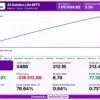
AI Golden Life MT5 records a net profit of $1,170,804.93 from 5,486 trades, with 99% history quality. The trading symbol and monitoring period are not specified in the report.
AI Golden Life MT5 Backtest Results
| Parameter | Result |
|---|---|
| Initial Deposit | $1,000 |
| Total Net Profit | $1,170,804.93 |
| Total Trades | 5,486 |
| Profit Factor | 3.26 |
| Winning Trades | 77.38% |
| Maximum Equity Drawdown | 0.73% |
| Recovery Factor | 312.16 |
Key Features of AI Golden Life MT5
AI Geopolitical Filter
The filter watches selected high priority sources such as X and Truth Social, rates the severity of market moving events and can pause new trading for a protection period.
Protection Status on the Panel
The panel shows the current risk level, the detected event, its source, the reason for the pause, the trading status and the remaining protection time.
High Impact News Protection
New orders are blocked around major scheduled economic announcements, both before and after the release, to reduce exposure to sharp news driven moves in Gold.
Advanced Volatility Filter
The filter studies abnormal price acceleration and sudden spikes in Gold, and it restricts new entries until market conditions return to an acceptable level.
Multi-Indicator Strategy
Independent analytical algorithms read price action, momentum, direction and volatility together, so entries need broader confirmation than a single signal can give.
Automatic Symbol Detection
The EA detects broker specific suffixes and works with Gold symbol variations such as XAUUSD, XAUUSDm and GOLD, so no manual symbol setup is needed.
Schedule, Session and Holiday Control
Trading hours can be set for each day of the week, session filters limit activity to chosen market periods, and optional holiday settings avoid thin liquidity.
Flexible Trade Direction
The trader can choose buy only, sell only or both directions, depending on the market view and the personal trading plan for the account.
Profit, Stop and Trailing Management
Take profit, stop loss and trailing stop can be configured manually or handled by automated management, which protects gains as price moves in the trade direction.
Daily Limits and Spread Protection
Optional daily profit and maximum drawdown limits control activity, while the spread check blocks entries when trading costs rise or liquidity weakens.
Integrated Trading Panel
The panel shows trading activity, open positions, account statistics and system status in real time, and it is not displayed during non visual backtesting.
How to Get the Most from AI Golden Life MT5
🔹 Stay on XAUUSD and H1: the EA is optimized only for Gold on the H1 timeframe, so other symbols and timeframes fall outside what it was designed to do.
🔹 Begin with the default settings: the author supplies optimized defaults, so the first test needs only the lot size and the preferred risk profile to be chosen.
🔹 Run the tester the right way: use XAUUSD, H1 and the Every Tick Normal model on a custom date range, and keep every other parameter unchanged for the first run.
🔹 Read tester results with care: historical tests cannot fully show slippage, requotes or sudden political news, and the AI filter needs its external service to act.
🔹 Set the schedule and filters on purpose: review the trading days and hours, the session filters and the holiday control against the broker server time and the personal plan.
🔹 Choose a suitable account: hedging and netting accounts are both listed as supported, and the author states that the EA can also be used with prop trading firms.
🔹 Plan the risk first: the risk management guide helps with choosing a lot size, a daily limit and a drawdown limit that suit the account.
AI Golden Life MT5 Risk Management
Protection Layers Reduce Risk, Not Remove It
The geopolitical, news and volatility filters pause new entries in risky moments, but slippage, gaps and sudden spikes in Gold can still occur.
A guide to stop-loss placement explains how stops protect an account.
AI Filter Depends on an External Service
The geopolitical filter needs access to its external monitoring service, so its live behavior may differ from Strategy Tester results.
A guide to take-profit methods shows how targets relate to risk.
Daily Limits and Demo Testing
Optional daily profit and maximum drawdown limits help set account boundaries.
A demo trial on the intended broker helps confirm the schedule, filters and lot size before real money is used.
What Sets It Apart
🔹 AI geopolitical filter: it covers sudden political statements, tariffs and sanctions that an ordinary economic calendar cannot predict ahead of time.
🔹 Visible reasons for a pause: the panel shows the event, its source and the remaining protection time, so the trader knows why trading stopped.
🔹 Three separate protection layers: geopolitical, scheduled news and volatility checks work independently, and each can pause new entries by itself.
🔹 Selective H1 approach: the EA reads broader market structure on H1 and avoids the rapid short term style that many Gold scalping systems follow.
Strengths and Limitations
Strengths
🔹 Layered protection: geopolitical, news and volatility filters plus a spread check cover several kinds of risk in one EA.
🔹 Clear status on the chart: the panel explains why protection was activated, the event severity and how long the pause will last.
🔹 Easy broker setup: automatic symbol detection removes manual symbol work and supports the usual Gold naming formats of different brokers.
🔹 Flexible control: schedule, session, holiday, direction, take profit, stop loss and trailing stop options fit different trading plans.
Limitations
🔹 Filter needs a live service: the AI geopolitical filter depends on an external monitoring service, and the Strategy Tester may not reproduce its protection.
🔹 Filters cannot remove risk: slippage, gaps and sudden spikes in Gold can still happen, and large losses remain possible on any trade.
🔹 Gold on H1 only: the EA offers no diversification across other symbols or timeframes, and signals may be less frequent than a scalping system.
🔹 Results not listed here: the product information gives no performance figures, so no returns or drawdown numbers can be quoted on this page.
Who Should Use AI Golden Life MT5?
🔹 Gold traders on MT5: those who want a selective H1 system with several indicators confirming each entry before a trade is opened.
🔹 News-aware traders: users who want protection from scheduled releases and from sudden political events that move Gold within seconds.
🔹 Rule based users: traders who like setting trading days, hours, sessions and daily limits, and who check the panel for protection status.
🔹 Not for traders who: want a multi-symbol EA, a scalping style on small timeframes or any guarantee of profit from an automated system.
Recommended Trading Conditions
Recommended settings and parameters to pay attention to from developers and experts:
| Features | Type |
|---|---|
| Trading platform | MetaTrader 5 (MT5) |
| Time frames | H1 |
| Currency pairs | XAUUSD (Gold) |
| Minimum / Recommended deposit | $1,000+ |
| Minimum / Recommended leverage | 1:10+ |
| Account type | Hedging, Netting, Cent, Zero, Standard, Premium, RAW, ECN |
| Additional services | Unlock and Decompile |
| Recommended brokers | Exness Broker, Icmarkets Broker |
| Recommended VPS | MyfxVPS.com (Blue VPS, Golden VPS). Lowest Latency, 2 week Free Trial, 100% Free for 12-18 Months. |
Product Download Package?
The download package of the product suite includes:
 Experts: AI Golden Life MT5.ex5
 Reviewed by David Easton
Final Verdict
AI Golden Life MT5 is an H1 Gold EA that pairs multi-indicator entries with three protection layers, including an AI geopolitical filter that explains its pauses on the panel.
No results are published here, and the AI filter depends on an external service that testers may not reproduce. Default settings, a careful tester run and a demo trial are the right way to start.
🔢 AI Golden Life MT5 Settings Guide: Complete Inputs Explained
AI Golden Life MT5 is an automated Gold trading system designed specifically for XAUUSD on the H1 timeframe. It combines AI-assisted market filtering, volatility monitoring, economic news protection, configurable trade management, and capital protection settings.
The EA also provides controls for trading direction, position sizing, maximum spread, slippage, trading sessions, and holiday restrictions. Its news protection is configured to block new trades 90 minutes before and 90 minutes after relevant economic announcements, while the AI and volatility filters add further layers of market-condition screening.
The following guide explains every visible input and its configured value to help traders understand the setup before backtesting or using the EA on a demo account.
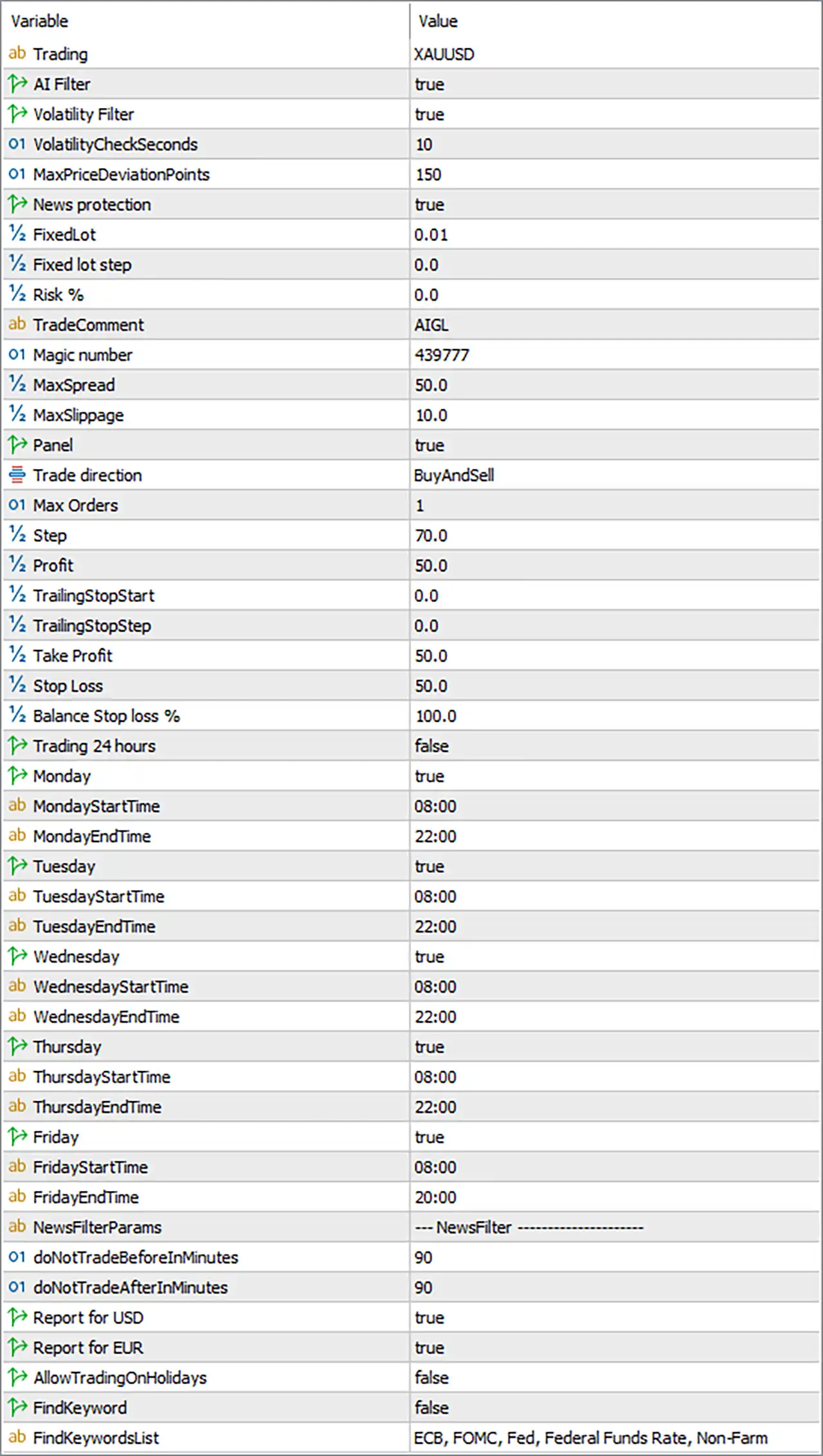
AI Golden Life MT5 Settings Panel
⚙️ General Trading and AI Settings
🔹 Trading = XAUUSD — Specifies XAUUSD (Gold) as the trading symbol. The EA is configured to focus on Gold, and the broker’s symbol naming and trading specifications should be checked before deployment.
🔹 AI Filter = true — Enables the AI filter, allowing the EA to apply its configured AI-based filtering before making trading decisions. The exact signals and filtering criteria depend on the EA’s internal implementation and any required external services.
🔹 Volatility Filter = true — Enables volatility protection. This feature is intended to identify potentially unstable market conditions, such as sudden price acceleration or abnormal volatility, and restrict new entries when the filter determines conditions are unsuitable.
🔹 VolatilityCheckSeconds = 10 — Sets the volatility-check interval to 10 seconds. The EA is configured to evaluate its volatility conditions at this interval, subject to its internal processing logic.
🔹 MaxPriceDeviationPoints = 150 — Sets the maximum price-deviation threshold to 150 points. This parameter defines a price tolerance used by the EA’s execution or price-validation logic; its precise relationship to order execution depends on the implementation.
🔹 News protection = true — Enables news protection to help reduce exposure to major economic announcements. The separate news settings below specify a 90-minute restriction before and after relevant events.
⚙️ Capital Management and Trade Identification
🔹 FixedLot = 0.01 — Sets the fixed position size to 0.01 lots. This provides a defined trading volume when fixed-lot sizing is used, although the actual margin requirement and minimum volume depend on the broker and account type.
🔹 Fixed lot step = 0.0 — Sets the fixed-lot increment parameter to 0.0. This may determine how position volume changes between trades when the corresponding feature is supported; with the current value, no positive increment is configured.
🔹 Risk % = 0.0 — Sets the percentage-risk parameter to 0.0. This does not specify a positive percentage risk allocation, so the fixed lot setting of 0.01 is the visible volume setting to review. The exact interaction between fixed-lot and percentage-risk modes should be verified in the EA’s implementation.
🔹 TradeComment = AIGL — Sets the order comment to “AIGL.” Where supported by the broker, this label helps identify trades generated by AI Golden Life in the MT5 trade history.
🔹 Magic number = 439777 — Assigns the EA’s trade identifier as 439777. This number helps distinguish the EA’s orders from those opened by other trading robots or manually, depending on the program’s order-management logic.
⚙️ Spread, Slippage, and Display
🔹 MaxSpread = 50.0 — Sets the maximum permitted spread threshold to 50.0. The EA can use this setting to avoid opening trades when the spread exceeds the configured limit; the precise unit should be verified against the EA’s symbol and point conventions.
🔹 MaxSlippage = 10.0 — Sets the maximum slippage parameter to 10.0. This configures the permitted execution-price deviation under the EA’s order-placement logic, subject to broker execution and the parameter’s internal unit definition.
🔹 Panel = true — Enables the on-chart information panel. This allows the EA’s configured trading information and status display to appear on the chart during supported operating modes.
⚙️ Trade Direction and Position Management
🔹 Trade direction = BuyAndSell — Allows both buy and sell trading directions. The EA can consider long and short opportunities according to its strategy and other active filters.
🔹 Max Orders = 1 — Sets the maximum order count to 1 under this parameter. This is a restrictive order limit, but whether the EA counts open positions, pending orders, or both depends on its internal logic.
🔹 Step = 70.0 — Sets the step parameter to 70.0. This may define a distance used in the EA’s trade-management or order-placement logic; the precise unit and function should be confirmed before changing it.
🔹 Profit = 50.0 — Sets the profit parameter to 50.0. This value may be used as a profit threshold or target by the EA’s internal management logic; the input name alone does not establish whether the unit is points, pips, or account currency.
🔹 TrailingStopStart = 0.0 — Sets the trailing-stop activation parameter to 0.0. No positive activation threshold is configured in this field, so the intended trailing behavior should be verified rather than assuming that trailing protection activates at a specific profit level.
🔹 TrailingStopStep = 0.0 — Sets the trailing-stop step parameter to 0.0. This does not configure a positive trailing increment, and the EA’s behavior at this value depends on its internal implementation.
🔹 Take Profit = 50.0 — Sets the take-profit parameter to 50.0. This value configures the EA’s profit-taking target, but the precise unit and order of application should be checked in the EA’s instructions.
🔹 Stop Loss = 50.0 — Sets the stop-loss parameter to 50.0. This configures the EA’s protective exit distance or threshold according to its internal rules. The exact unit should be confirmed before estimating the monetary risk of a trade.
🔹 Balance Stop loss % = 100.0 — Sets the balance-based stop-loss percentage parameter to 100.0. This is a critical value to verify because the input label alone does not establish whether it represents a drawdown limit, a balance threshold, or another protection rule. Its interpretation should be confirmed before live trading.
⚙️ Trading Hours and Weekly Schedule
🔹 Trading 24 hours = false — Disables continuous 24-hour trading. The EA instead uses the individual weekday switches and configured start and end times to determine its scheduled trading availability.
🔹 Monday = true — Enables trading on Monday, subject to the configured session and the EA’s other entry conditions.
🔹 MondayStartTime = 08:00 — Sets Monday’s trading start time to 08:00 according to the time reference used by the EA, which should be verified against broker server time.
🔹 MondayEndTime = 22:00 — Sets Monday’s trading end time to 22:00 according to the EA’s configured time reference.
🔹 Tuesday = true — Enables trading on Tuesday, subject to the scheduled time window and the other active trading filters.
🔹 TuesdayStartTime = 08:00 — Sets Tuesday’s trading start time to 08:00 according to the EA’s configured time reference.
🔹 TuesdayEndTime = 22:00 — Sets Tuesday’s trading end time to 22:00 according to the EA’s configured time reference.
🔹 Wednesday = true — Enables trading on Wednesday, provided the configured session and trading conditions permit new entries.
🔹 WednesdayStartTime = 08:00 — Sets Wednesday’s trading start time to 08:00 according to the EA’s configured time reference.
🔹 WednesdayEndTime = 22:00 — Sets Wednesday’s trading end time to 22:00 according to the EA’s configured time reference.
🔹 Thursday = true — Enables trading on Thursday, subject to the active session and other EA restrictions.
🔹 ThursdayStartTime = 08:00 — Sets Thursday’s trading start time to 08:00 according to the EA’s configured time reference.
🔹 ThursdayEndTime = 22:00 — Sets Thursday’s trading end time to 22:00 according to the EA’s configured time reference.
🔹 Friday = true — Enables trading on Friday. The configured Friday session ends earlier than the sessions from Monday through Thursday.
🔹 FridayStartTime = 08:00 — Sets Friday’s trading start time to 08:00 according to the EA’s configured time reference.
🔹 FridayEndTime = 20:00 — Sets Friday’s trading end time to 20:00, allowing the configured Friday session to close two hours earlier than the Monday-to-Thursday sessions.
⚙️ Economic News Filter
🔹 NewsFilterParams = — NewsFilter ——————– — Marks the beginning of the news-filter configuration section. This is a section heading rather than a numerical trading parameter.
🔹 doNotTradeBeforeInMinutes = 90 — Configures a 90-minute period before a qualifying economic announcement during which the EA should avoid initiating trades when news protection is active.
🔹 doNotTradeAfterInMinutes = 90 — Configures a 90-minute period after a qualifying economic announcement during which the EA should avoid initiating trades when news protection is active.
🔹 Report for USD = true — Enables news reporting or filtering for US dollar-related economic events. This is relevant to Gold trading because major US economic announcements can influence XAUUSD volatility and price movements.
🔹 Report for EUR = true — Enables news reporting or filtering for euro-related economic events. The EA can include qualifying EUR announcements in its news-related checks, according to its calendar integration.
🔹 AllowTradingOnHolidays = false — Disables permission to trade on holidays. The setting is intended to prevent holiday trading when the EA’s holiday-calendar logic recognizes a relevant holiday.
🔹 FindKeyword = false — Disables keyword-based news filtering. Although a keyword list is configured below, this switch indicates that keyword matching is not enabled through this option.
🔹 FindKeywordsList = ECB, FOMC, Fed, Federal Funds Rate, Non-Farm — Defines the keywords used by the optional keyword filter: ECB, FOMC, Fed, Federal Funds Rate, and Non-Farm. These terms relate to central-bank announcements, interest-rate decisions, and major US employment data. Because FindKeyword is set to false, the list is configured but keyword filtering is currently disabled through that switch.
🔢 Conclusion
The supplied AI Golden Life MT5 configuration is set up for XAUUSD, with the AI Filter, Volatility Filter, and News protection all enabled. It uses a fixed lot of 0.01, allows both buy and sell directions, limits the configured order count to 1, and sets the Take Profit and Stop Loss parameters to 50.0 each. Trading is scheduled from 08:00 to 22:00 Monday through Thursday and from 08:00 to 20:00 on Friday, while continuous 24-hour trading is disabled.
The news filter is configured with 90 minutes before and 90 minutes after relevant announcements, and both USD and EUR event reporting are enabled. However, keyword filtering is disabled, and several trade-management parameters have values whose exact units or behavior cannot be determined from their names alone. Before live deployment, verify the meaning of Balance Stop loss % = 100.0, the Step and Profit parameters, the trailing-stop settings, and the EA’s execution units. Backtesting and demo forward testing are essential because no combination of filters or settings can guarantee profits or eliminate trading risk.
User Reviews
Only logged in customers who have purchased this product may leave a review.
❓ What is AI Golden Life MT5?
An automated trading system for MetaTrader 5, built exclusively for XAUUSD on the H1 timeframe, with multi-indicator entries and three protection layers.
❓ Which symbol and timeframe does AI Golden Life MT5 use?
XAUUSD on the H1 timeframe only.
❓ How does AI Golden Life MT5 choose its entries?
It combines several independent indicators and algorithms that read price action, momentum, direction and volatility, and it opens trades when conditions are favorable.
❓ What is the AI Geopolitical Filter in AI Golden Life MT5?
A protection layer that monitors selected high priority sources, such as X and Truth Social, rates the severity of market moving events and can pause new trading for a protection period.
❓ What does the panel of AI Golden Life MT5 show?
Trading activity, open positions, account statistics and system status, plus the geopolitical risk level, detected event, source, reason, trading status and remaining protection time.
❓ Does AI Golden Life MT5 have a news filter?
Yes. High impact news protection blocks new orders around major scheduled economic announcements, both before and after the release.
❓ What does the volatility filter in AI Golden Life MT5 do?
It analyzes abnormal price acceleration and sudden spikes in Gold, and it restricts new entries until conditions return to an acceptable level.
❓ Does AI Golden Life MT5 detect the Gold symbol automatically?
Yes. It detects broker suffixes and works with variations such as XAUUSD, XAUUSDm and GOLD without manual symbol setup.
❓ Can AI Golden Life MT5 trade only buy or only sell?
Yes. The trader can choose buy only, sell only, or both directions.
❓ Can AI Golden Life MT5 be used with prop trading firms?
The author states that it can be used with any prop trading firm, and the rules of the specific firm should be checked before use.
❓ How should AI Golden Life MT5 be tested?
Use XAUUSD, H1 and the Every Tick Normal model, keep the default settings, and choose only the lot size and risk profile for the first test.
❓ Does the Strategy Tester show the full behavior of AI Golden Life MT5?
Not fully. Tests cannot reproduce real execution, slippage or sudden political news, and the AI filter needs its external service to work.
❓ Does AI Golden Life MT5 guarantee profits?
No. Automated trading can produce profits and losses, and past results do not guarantee future results.
-
 Original price was: $8,000.00.$249.00Current price is: $249.00.
-
 Original price was: $7,000.00.$249.00Current price is: $249.00.
-
 Original price was: $8,000.00.$249.00Current price is: $249.00.
-
 Original price was: $25,000.00.$249.00Current price is: $249.00.
-
 4Original price was: $499.00.$249.00Current price is: $249.00.
-
 0Original price was: $199.00.$179.00Current price is: $179.00.
-
 0Original price was: $430.00.$249.00Current price is: $249.00.
-
 1Original price was: $1,299.00.$249.00Current price is: $249.00.
There are no reviews yet.