



Gold Spectrum EA MT5 (Latest version) - Unlimited

Subscriptions for Special Plan
- 30 EA package is more economical!
- Special package with 99%
- Download 1 EA/Day

Subscriptions for Premium Membership
- Download Unlimited in 1 Year
- Get 100% Discount
- Get free access to all

Subscriptions for Gold Membership
- 1 Year Membership
- Get 100% Discount
- Access EA+Indicator+Course
Frequently bought together 🎁
Add these products to enhance your purchase



Quick Overview
Gold Spectrum EA is an automated Expert Advisor (EA) made only for XAUUSD. It runs several independent breakout strategies across different timeframes as one internal portfolio, with fixed Stop Losses, adaptive drawdown based risk sizing and optional NFP protection. A glass style dashboard shows status and protections on the chart.
Best For:
✅ Gold traders who like multi-strategy breakout systems.
✅ Users who want drawdown based risk sizing.
✅ Traders who watch combined exposure across strategies.
✅ Experienced MT5 users who manage risk carefully.
✅ Users who want NFP and daily loss controls built in.
What is Gold Spectrum EA?
Gold Spectrum EA is an automated Expert Advisor (EA) for MetaTrader 5, designed exclusively for XAUUSD. It combines multiple independent breakout strategies across different timeframes into one internal portfolio, and each module is meant to target a different type of Gold market behavior.
Its published design includes adaptive drawdown based risk sizing, fixed Stop Losses, configurable risk modes and optional Non-Farm Payroll protection.
 Vendor Website: View here
Delivery time 24h-48h after payment.
Refund if not delivered.
You will receive the current version without any limitations (ID+Time).
Gold Spectrum EA MT5 Review
How Does Gold Spectrum EA Work?
Independent Breakout Modules
The EA runs multiple breakout strategies in parallel, and each module uses its own logic and risk profile.
This can diversify entry behavior within one product, although the strategies still trade the same underlying market and can be exposed to correlated losses.
Adaptive Drawdown Based Sizing
The Auto DD mode lets a trader set a target maximum drawdown, after which risk per trade is scaled within the stated range.
This differs from choosing one fixed risk percentage, but the target remains a configuration goal and not a guaranteed drawdown ceiling.
News and Account Protection
The EA includes optional NFP filtering, daily loss protection, FIFO mode and configurable maximum drawdown controls.
The news filter is described as off by default, so the protection has to be switched on and checked.
Chart Based Monitoring
A glass style dashboard displays status, profit and loss and active protections.
This makes the operating state easier to inspect, while actual performance still needs to be judged from account history and risk statistics.
Historical Trading Results Performance
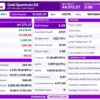
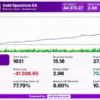
✅ The backtest generated a net profit of $44,373.27 from a $10,000 initial deposit across 1,631 trades. The trading symbol and test period are not specified in the report.
Gold Spectrum EA MT5 Backtest Results
| Parameter | Result |
|---|---|
| Initial Deposit | $10,000 |
| Total Net Profit | $44,373.27 |
| Total Trades | 1,631 |
| Profitable Trades | 75.48% |
| Profit Factor | 2.08 |
| Maximum Balance Drawdown | 8.60% |
| Maximum Equity Drawdown | 10.90% |
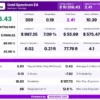
✅ The trading report shows a total profit of $10,358.43 across 550 trades, with an 84.91% win rate. The trading symbol is not specified, and the available monthly data covers 2025–2026.
Gold Spectrum MT5 Backtest Results
| Parameter | Result |
|---|---|
| Total Profit | $10,358.43 |
| Total Trades | 550 |
| Winning Percentage | 84.91% |
| Profit Factor | 2.41 |
| Maximum Drawdown | 7.09% |
| Sharpe Ratio | 0.19 |
| Return / Drawdown Ratio | 10.39 |
Gold Spectrum EA Trading Strategy
🔹 Run several breakout modules: multiple independent breakout strategies run in parallel across different timeframes, each with its own logic and risk profile.
🔹 Diversify the timing: the modules target different types of Gold movement, which gives more varied trade timing than a single entry system would.
🔹 Protect every trade: each trade carries a fixed Stop Loss, and the EA does not use grid, martingale or averaging, according to the product description.
🔹 Scale risk with a target: Auto DD takes a chosen maximum drawdown target and scales risk per trade within a stated range, with fixed risk profiles also available.
🔹 Apply the safeguards: optional NFP filtering, a daily loss guard, FIFO mode and a configurable maximum drawdown limit new activity when conditions turn adverse.
Key Features of Gold Spectrum EA
Multiple Independent Strategies
Several breakout modules run in parallel, each with its own logic and risk profile, so combined exposure should be watched when modules signal near the same event.
Auto DD Risk Scaling
A drawdown target can be chosen, and the EA adjusts risk per trade within a stated range, but this is a sizing input and not a hard guarantee.
Fixed Stop Loss on Every Trade
Each trade has a fixed Stop Loss that defines planned risk, although gaps, slippage and simultaneous signals can still produce larger losses.
Configurable Risk Modes
Besides Auto DD, Low, Medium, High and Custom profiles are available, which gives flexibility for different risk preferences and account sizes.
NFP Protection
An optional Non-Farm Payroll filter is described as off by default, so it must be switched on and checked, including time zone and handling of open orders.
Account Protection Controls
A daily loss guard, FIFO mode and a configurable maximum drawdown support strict account rules, although they do not guarantee a fixed maximum loss.
Glass Style Dashboard
A dashboard on the chart shows status, profit and loss and active protections, which makes the operating state easier to inspect at a glance.
How to Get the Most from Gold Spectrum EA
🔹 Review every protection: some protections are optional and the NFP filter is off by default, so the active settings should be checked before live use.
🔹 Choose the risk mode with care: pick Auto DD or one of the Low, Medium, High or Custom profiles that fits the account size and the loss limit accepted.
🔹 Treat the drawdown target as a goal: Auto DD is a sizing input, so it should be validated in testing and not trusted as a hard ceiling on losses.
🔹 Watch combined exposure: several modules can signal around the same event, so total open risk across modules matters more than any single trade.
🔹 Use suitable account conditions: ECN or raw spread accounts with low spread are preferred, and the same conditions should be used in testing.
🔹 Respect the capital guidance: the stated minimum is €1,000 and €3,000 or more is recommended, depending on the risk profile that is chosen.
🔹 Test before going live: run a demo with the broker to be used, and the risk management guide helps with choosing a suitable risk level.
Gold Spectrum EA Risk Management
Fixed Stop Loss per Trade
The product description states that each trade has a fixed Stop Loss and that the EA does not use grid, martingale or averaging.
A fixed stop defines planned risk, but gaps, slippage and simultaneous signals can still cause losses that differ from the planned amount.
A guide to stop-loss placement explains how stops protect an account.
Adaptive Risk Is Not a Drawdown Guarantee
Auto DD scales risk according to the chosen target within a stated per-trade range.
Real drawdown can exceed expectations during correlated losses or unusual market conditions, so the setting should be validated and not treated as a hard ceiling.
A guide to take-profit methods shows how targets relate to risk.
Optional News Filter
The NFP filter is optional and off by default.
Traders who want news protection should verify the enabled state, the time zone, the event handling and the behavior of open and pending orders before relying on it.
What Sets It Apart
🔹 Portfolio style structure: independent breakout modules give a portfolio like design focused on one instrument, which can diversify entry timing.
🔹 Drawdown based sizing: Auto DD links position risk to a selected drawdown target instead of one fixed percentage for every setup.
🔹 Published backtest summary: the product page shares a seven-year XAUUSD test with several metrics, which gives more context than a feature list.
🔹 Prop style controls: a daily loss guard, FIFO mode and maximum drawdown settings suit accounts that follow strict trading rules.
Strengths and Limitations
Strengths
🔹 Several breakout modules: multiple strategies on different timeframes aim to cover different types of Gold movement in one EA.
🔹 Fixed Stop Loss: every trade has a defined stop, and the EA is described as using no grid, martingale or averaging at all.
🔹 Configurable risk: Auto DD and the Low, Medium, High and Custom profiles let traders match the risk level to the size of the account.
🔹 Useful controls: optional daily loss, NFP and drawdown protections can be set to follow the rules of the account.
Limitations
🔹 Correlated losses: all modules trade the same Gold market, so several can lose together during sustained adverse conditions.
🔹 Drawdown target is not a ceiling: Auto DD cannot prevent every drawdown overshoot, especially in unusual market periods.
🔹 Missing fields: the published summary omits net profit, leverage and balance drawdown, which limits a complete comparison.
🔹 Settings dependence: results may not repeat on other brokers or settings, and the NFP filter must be enabled by the trader.
Who Should Use Gold Spectrum EA?
🔹 Experienced Gold traders: those who want a multi-strategy breakout system and understand drawdown based risk configuration.
🔹 Careful risk managers: users who will check the optional protections and test with the account type and costs expected live.
🔹 Prop style traders: users who need daily loss controls, FIFO mode and drawdown settings, after checking the rules of the firm.
🔹 Not for traders who: want a simple single-strategy robot, expect the drawdown target to be absolute or need every figure first.
Recommended Trading Conditions
Recommended settings and parameters to pay attention to from developers and experts:
| Features | Type |
|---|---|
| Trading platform | MetaTrader 5 (MT5) |
| Time frames | Any |
| Currency pairs | XAUUSD (Gold) |
| Minimum / Recommended deposit | €1,000+ |
| Minimum / Recommended leverage | 1:100+ |
| Account type | ECN, RAW, Low spread |
| Additional services | Unlock and Decompile |
| Recommended brokers | Exness Broker, Icmarkets Broker |
| Recommended VPS | MyfxVPS.com (Blue VPS, Golden VPS). Lowest Latency, 2 week Free Trial, 100% Free for 12-18 Months. |
Product Download Package?
The download package of the product suite includes:
 Experts: Gold Spectrum EA.ex5
 Reviewed by David Easton
Final Verdict
Gold Spectrum EA combines a multi-timeframe breakout portfolio with fixed Stop Losses and an adaptive drawdown based sizing mode. Its published backtest summary offers more quantitative context than a feature-only description.
Several important fields remain unstated, and the results are not a promise of future performance. The EA deserves a controlled evaluation that focuses on combined exposure, active news settings and whether the risk profile fits the intended account.
🔢 Gold Spectrum EA MT5 Settings Guide: Complete Inputs and Risk Management Explained
Gold Spectrum EA is an automated trading system designed for Gold (XAUUSD), with configurable risk management, spread control, news filters, and tools intended to support prop firm account rules. Its settings include automatic drawdown-based risk scaling, fixed-lot trading, optional economic-news protection, and daily loss controls. The configuration below explains every visible input and its current value to help traders understand how the EA is set up before testing it on a demo account.
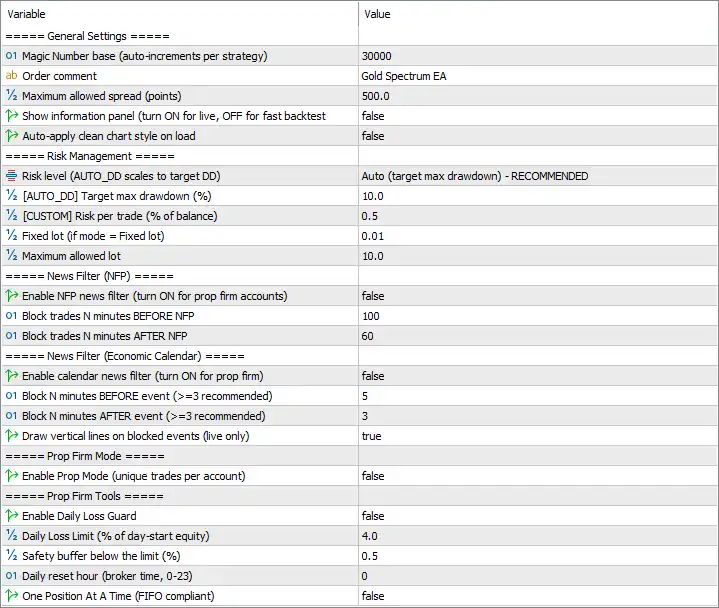
Gold Spectrum EA MT5 Settings Panel
⚙️ General Settings
🔹 Magic Number base (auto-increments per strategy) = 30000 — Sets the base identifier used to distinguish the EA’s trades from those opened by other EAs or manually. The number automatically increments for each strategy, helping separate trade management between strategies.
🔹 Order comment = Gold Spectrum EA — Adds the comment “Gold Spectrum EA” to orders where supported by the broker. This makes the EA’s trades easier to recognize in the MT5 trade history and account records.
🔹 Maximum allowed spread (points) = 500.0 — Sets the maximum spread threshold permitted for trading. The EA can use this limit to avoid entering trades when the difference between the Bid and Ask prices exceeds 500.0 points.
🔹 Show information panel (turn ON for live, OFF for fast backtest) = false — Disables the on-chart information panel. Keeping this option false may reduce unnecessary chart display processing during testing, while enabling it can provide visual status information during live operation.
🔹 Auto-apply clean chart style on load = false — Prevents the EA from automatically applying its clean chart appearance when loaded. Existing chart colors and visual settings can therefore remain unchanged.
⚙️ Risk Management Settings
🔹 Risk level (AUTO_DD scales to target DD) = Auto (target max drawdown) – RECOMMENDED — Selects automatic risk adjustment based on the configured maximum drawdown target. Instead of relying solely on a fixed risk setting, this mode is intended to scale trading risk in relation to the selected drawdown objective.
🔹 [AUTO_DD] Target max drawdown (%) = 10.0 — Sets the target maximum drawdown to 10.0%. This is the drawdown objective used by the AUTO_DD risk mode; it should not be interpreted as a guarantee that actual drawdown will never exceed 10.0%.
🔹 [CUSTOM] Risk per trade (% of balance) = 0.5 — Defines a custom risk setting of 0.5% of account balance per trade when the corresponding custom risk mode is selected. This value may not be the active risk input while automatic drawdown mode is selected.
🔹 Fixed lot (if mode = Fixed lot) = 0.01 — Sets the trading volume to 0.01 lots when Fixed Lot mode is selected. This allows the EA to use a fixed position size rather than relying on percentage-based or drawdown-based position sizing.
🔹 Maximum allowed lot = 10.0 — Sets the maximum permitted lot size to 10.0 lots. Where the EA’s risk calculation would produce a larger volume, this setting is intended to cap the lot size at the configured maximum.
⚙️ News Filter — NFP
🔹 Enable NFP news filter (turn ON for prop firm accounts) = false — Disables the dedicated Non-Farm Payrolls (NFP) news filter. With this option set to false, the EA’s NFP-specific trade-blocking rules are not enabled by this setting.
🔹 Block trades N minutes BEFORE NFP = 100 — Sets a 100-minute period before an NFP release during which new trades can be blocked when the NFP filter is enabled. The value remains configured even though the filter is currently disabled.
🔹 Block trades N minutes AFTER NFP = 60 — Sets a 60-minute period after an NFP release during which new trades can be blocked when the NFP filter is enabled. This setting is also inactive while the main NFP filter remains false.
⚙️ News Filter — Economic Calendar
🔹 Enable calendar news filter (turn ON for prop firm) = false — Disables the economic-calendar news filter. The EA will not apply this particular calendar-based blocking mechanism unless the option is enabled and the required calendar data is available.
🔹 Block N minutes BEFORE event (>=3 recommended) = 5 — Configures a 5-minute trade-blocking window before a calendar event when the filter is active. The displayed recommendation suggests using at least 3 minutes, and the current value meets that recommendation.
🔹 Block N minutes AFTER event (>=3 recommended) = 3 — Configures a 3-minute trade-blocking window after a calendar event when the filter is active. This meets the minimum recommendation shown in the parameter description.
🔹 Draw vertical lines on blocked events (live only) = true — Enables vertical chart lines to mark blocked economic-calendar events during live operation, where supported by the EA. This visual feature helps identify the timing of events that trigger trading restrictions.
⚙️ Prop Firm Mode
🔹 Enable Prop Mode (unique trades per account) = false — Disables Prop Mode. The feature is described as enforcing unique trades per account, but its exact behavior depends on the EA’s internal implementation. Enable it only after confirming how it interacts with the intended broker and account rules.
⚙️ Prop Firm Tools
🔹 Enable Daily Loss Guard = false — Disables the EA’s daily loss protection mechanism. When enabled, this feature is intended to monitor daily losses against the configured limit; with the current false value, the guard is not active through this option.
🔹 Daily Loss Limit (% of day-start equity) = 4.0 — Sets the daily loss threshold to 4.0% of equity measured at the start of the trading day. This value is relevant when Daily Loss Guard is enabled and should be checked against the limits imposed by any prop firm account.
🔹 Safety buffer below the limit (%) = 0.5 — Sets a 0.5% safety buffer below the daily loss limit. When the guard is active, this buffer is intended to allow the EA to stop trading before the configured loss boundary is reached, helping reduce the risk of crossing the limit during rapid market movements.
🔹 Daily reset hour (broker time, 0-23) = 0 — Sets the daily loss tracking reset hour to 0, meaning midnight according to broker time. The broker’s server timezone determines when this reset occurs, which may differ from local time.
🔹 One Position At A Time (FIFO compliant) = false — Disables the one-position-at-a-time restriction. If enabled, this option is intended to limit the EA to one position at a time to support a more restrictive trade-management approach and potential FIFO-related requirements. Compatibility should be confirmed with the account’s actual rules.
🔢 Conclusion
Gold Spectrum EA MT5 provides several configurable controls for position sizing, spread limits, news filtering, and daily loss management. The displayed setup uses AUTO_DD with a 10.0% target maximum drawdown, a 0.01 fixed lot if Fixed Lot mode is selected, and a 10.0-lot maximum cap. However, both news filters, Prop Mode, and Daily Loss Guard are currently disabled. Traders considering prop firm accounts should review these switches carefully, verify the applicable account rules, and test the selected configuration on a demo account before live deployment. Risk controls can help structure trading behavior, but they cannot eliminate losses or guarantee that drawdown limits will never be exceeded.
User Reviews
Only logged in customers who have purchased this product may leave a review.
❓ What market does Gold Spectrum EA trade?
XAUUSD on MetaTrader 5 only. Any chart timeframe can be used because the system uses internal timeframes, but the symbol and broker settings should still be checked.
❓ How does Gold Spectrum EA generate trades?
It combines several independent breakout strategies across different timeframes. Each module has its own logic and risk profile, but all of them trade the same Gold market.
❓ What is Auto DD in Gold Spectrum EA?
Auto DD lets the trader select a target maximum drawdown and scales risk per trade to match it. It is a sizing mechanism and not a guarantee that drawdown will never exceed the chosen level.
❓ Does Gold Spectrum EA use grid or martingale?
According to the product description, no. It does not use grid, martingale or averaging, and each trade has a fixed Stop Loss, although losses remain possible.
❓ What backtest figures are published for Gold Spectrum EA?
A 2019 to 2026 XAUUSD test with a €10,000 deposit reports a Profit Factor of 2.08, a Sharpe Ratio of 2.96, a win rate of 75.48% and a maximum drawdown of 8.60%. These are historical figures only.
❓ Does Gold Spectrum EA provide live trading results?
A comparable live record was not established from the product summary. Any linked live account should be checked for drawdown, exposure, deposits, withdrawals and settings.
❓ Can Gold Spectrum EA filter NFP news?
Yes. An optional NFP filter is included and is described as off by default, so its state, event timing and order handling should be confirmed before relying on it.
❓ What capital is recommended for Gold Spectrum EA?
The stated minimum is €1,000, with €3,000 or more recommended and low spread ECN or raw conditions. The right balance still depends on the risk profile and leverage.
❓ Does Gold Spectrum EA include daily loss protection?
Yes. A daily loss guard and configurable maximum drawdown controls are listed. They can support account rules but do not remove execution risk.
-
 Original price was: $8,000.00.$249.00Current price is: $249.00.
-
 Original price was: $7,000.00.$249.00Current price is: $249.00.
-
 Original price was: $8,000.00.$249.00Current price is: $249.00.
-
 Original price was: $25,000.00.$249.00Current price is: $249.00.
-
 4Original price was: $499.00.$249.00Current price is: $249.00.
-
 0Original price was: $778.00.$249.00Current price is: $249.00.
-
 1Original price was: $1,299.00.$249.00Current price is: $249.00.
-
 27Original price was: $60,000.00.$239.00Current price is: $239.00.
There are no reviews yet.