


🔢 Gold N Shape M5 EA MT5 Settings – Complete Inputs Guide
Gold N Shape M5 EA is an automated trading system designed specifically for Gold (XAUUSD) on the MetaTrader 5 platform using the M5 (5-minute) timeframe. It identifies short-term pullback-and-continuation candle patterns and places pending Buy Stop or Sell Stop orders using a configurable entry offset. The EA also provides optional ADX filtering, counter-trend restrictions, pending-order expiry, dynamic trailing stops, and the ability to manage manual positions on the same symbol.
The following guide explains all visible inputs, preserving their original names and numerical values. It also clarifies which features are enabled in the current configuration and how the settings influence entry execution, trading hours, and risk management.
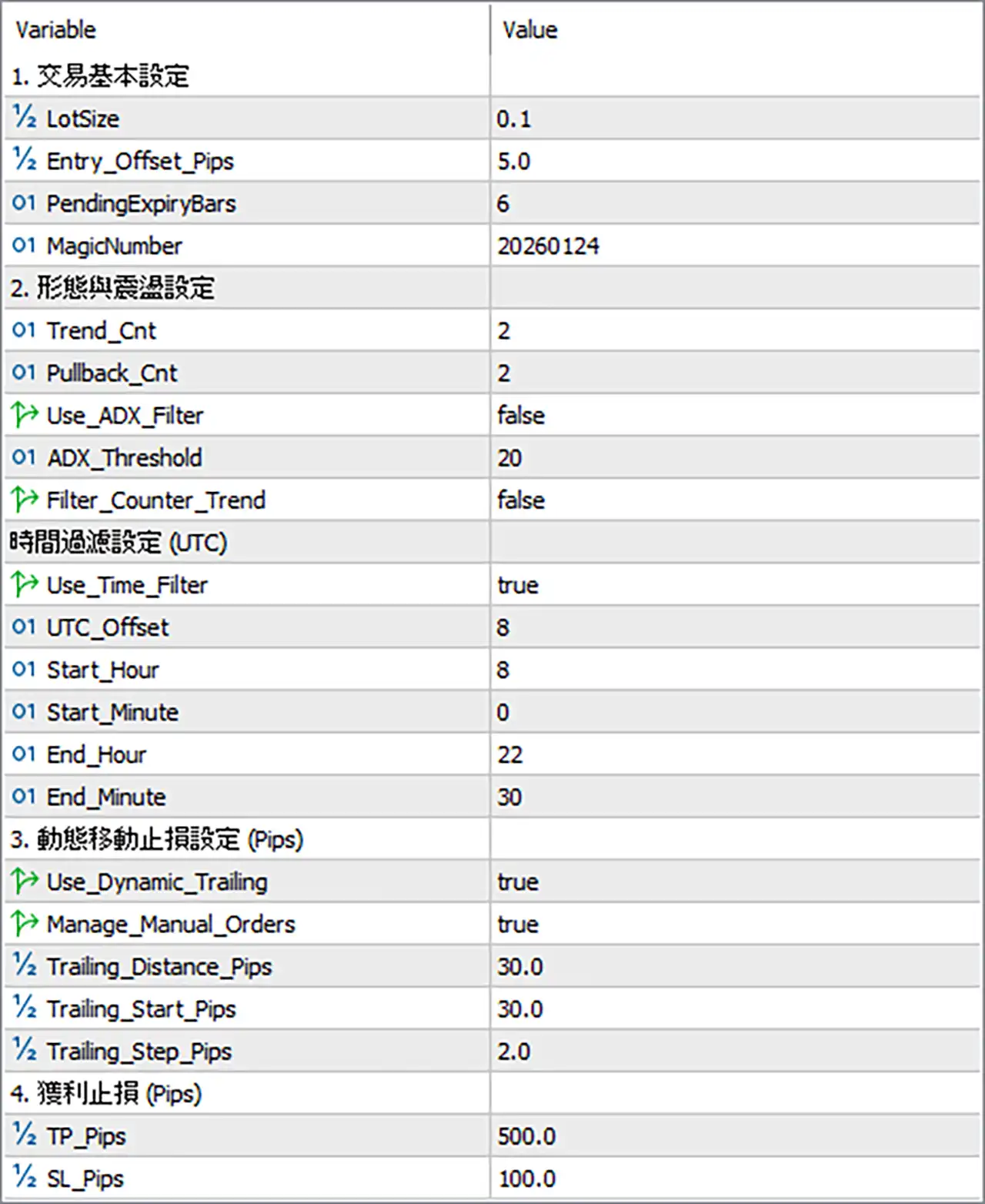
⚙️ Basic Trading Settings
🔹 LotSize = 0.1 – Sets the trading volume to 0.1 lots for each applicable trade. This determines the initial position size and should be assessed against account equity, margin requirements, and Gold's price volatility.
🔹 Entry_Offset_Pips = 5.0 – Sets the entry offset to 5.0 pips. This determines the configured distance between the identified setup level and the pending order entry price, subject to the EA's entry logic and broker specifications.
🔹 PendingExpiryBars = 6 – Sets the pending-order expiry period to 6 bars. If a pending order remains unfilled for the configured number of bars, the EA can remove it according to its order-expiration rules.
🔹 MagicNumber = 20260124 – Assigns the Magic Number 20260124 to the EA's trades, allowing it to identify and manage its own orders separately from trades opened manually or by other Expert Advisors.
⚙️ Pattern Recognition and Trend Filters
🔹 Trend_Cnt = 2 – Sets the trend-count parameter to 2, controlling a component of the EA's trend-structure evaluation. The precise counting method depends on the internal pattern-recognition logic.
🔹 Pullback_Cnt = 2 – Sets the pullback-count parameter to 2, defining the configured count used in the pullback portion of the entry pattern.
🔹 Use_ADX_Filter = false – Disables the ADX trend-strength filter. With this setting off, the EA does not require confirmation from this optional filter before evaluating otherwise valid entries.
🔹 ADX_Threshold = 20 – Sets the ADX threshold to 20. If the ADX filter is enabled, this value can be used to distinguish stronger directional conditions from weaker market conditions.
🔹 Filter_Counter_Trend = false – Disables the optional counter-trend filter. The EA is therefore not configured to block counter-trend entries through this particular restriction.
⚙️ Trading Time Filter (UTC)
🔹 Use_Time_Filter = true – Enables the trading-session filter, restricting eligible trading activity to the configured time window.
🔹 UTC_Offset = 8 – Sets the UTC offset to +8 hours. This parameter determines how the EA interprets the configured trading schedule relative to UTC, according to its time-conversion logic.
🔹 Start_Hour = 8 – Sets the trading-session start hour to 08:00 in the configured time reference.
🔹 Start_Minute = 0 – Sets the trading-session start minute to 00, making the configured start time 08:00.
🔹 End_Hour = 22 – Sets the trading-session end hour to 22.
🔹 End_Minute = 30 – Sets the trading-session end minute to 30, making the configured session end time 22:30.
Configured trading window: 08:00–22:30 using the EA's configured UTC-offset convention. Since UTC_Offset = 8, this represents a UTC+8 reference if the EA applies the offset directly. The actual relationship to broker server time should be verified before live use.
⚙️ Dynamic Trailing Stop Settings
🔹 Use_Dynamic_Trailing = true – Enables dynamic trailing-stop management, allowing the EA to adjust protective stop levels as the market moves favorably according to its trailing rules.
🔹 Manage_Manual_Orders = true – Enables management of manual orders under the EA's supported conditions. The product description indicates that manual positions can be managed on the same symbol; the precise order-selection rules should be confirmed before enabling this on an account with other trades. <Cite refs={["turn983754search0"]}/>
🔹 Trailing_Distance_Pips = 30.0 – Sets the trailing distance to 30.0 pips, defining the configured gap between the market price and the trailing stop when trailing management is active.
🔹 Trailing_Start_Pips = 30.0 – Sets the trailing activation threshold to 30.0 pips. Trailing management is configured to start after the required favorable movement has been reached, according to the EA's implementation.
🔹 Trailing_Step_Pips = 2.0 – Sets the trailing adjustment step to 2.0 pips, defining the minimum configured increment used when updating the trailing stop.
⚙️ Take-Profit and Stop-Loss Settings
🔹 TP_Pips = 500.0 – Sets the take-profit distance to 500.0 pips. The EA uses this configured target for applicable trades, subject to broker restrictions and the EA's order-management rules.
🔹 SL_Pips = 100.0 – Sets the stop-loss distance to 100.0 pips, defining the configured protective exit distance for applicable positions.
🔢 Conclusion
The current Gold N Shape M5 EA MT5 configuration uses 0.1 lots, an entry offset of 5.0 pips, and pending-order expiry after 6 bars. The pattern parameters are set to Trend_Cnt = 2 and Pullback_Cnt = 2. The ADX filter and counter-trend filter are disabled, while the trading time filter is enabled for 08:00–22:30 using the configured UTC+8 reference.
Dynamic trailing is enabled with a 30.0-pip activation threshold, a 30.0-pip trailing distance, and a 2.0-pip adjustment step. The configured take-profit is 500.0 pips, while the stop-loss is 100.0 pips.
The main risk consideration is the combination of LotSize = 0.1 and the relatively wide configured take-profit and stop-loss distances. The monetary risk depends on the broker's pip definition for Gold, contract size, execution conditions, and actual order volume. The ADX filter is currently disabled, so the threshold of 20 does not act as an active filter under this configuration. Before live trading, test the EA on a demo account, confirm the Gold pip conversion and time-zone behavior, and verify how manual-order management interacts with other open positions.


