



Nebula Quantum Trader EA MT5 (Latest version) - Unlimited

Subscriptions for Special Plan
- 30 EA package is more economical!
- Special package with 99%
- Download 1 EA/Day

Subscriptions for Premium Membership
- Download Unlimited in 1 Year
- Get 100% Discount
- Get free access to all

Subscriptions for Gold Membership
- 1 Year Membership
- Get 100% Discount
- Access EA+Indicator+Course
Frequently bought together 🎁
Add these products to enhance your purchase

Quick Overview
Nebula Quantum Trader MT5 is an automated Expert Advisor (EA) made only for XAUUSD on the M5 chart. It combines eight analytical engines, including adaptive learning, Smart Money Concepts, order flow estimates and volatility analysis, and enters when a majority of active engines agree. An adaptive grid, Stop Loss and trailing manage risk.
Best For:
✅ Technical XAUUSD traders who work on the M5 chart.
✅ Users who like multi-engine, confluence based EAs.
✅ Traders who like SMC and order flow analysis.
✅ Users able to monitor pending orders and exposure.
✅ Experienced MT5 users who test settings step by step.
What Is Nebula Quantum Trader?
Nebula Quantum Trader is an automated Expert Advisor (EA) for MetaTrader 5, designed exclusively for XAUUSD on M5. Its published architecture combines eight analytical engines: adaptive learning, multi-timeframe Markov confluence, ICT Silver Bullet timing, Smart Money Concepts, Fibonacci levels, order flow estimates, volume analysis and volatility expansion.
A weighted voting model is meant to require alignment among active modules before entries are taken.
 Vendor Website: View here
Delivery time 24h-48h after payment.
Refund if not delivered.
You will receive the current version without any limitations (ID+Time).
Nebula Quantum Trader EA Review
How Does Nebula Quantum Trader Work?
Eight-Engine Signal Framework
The system combines several analytical methods instead of relying on one indicator.
A weighted voting approach is meant to require sufficient agreement among active engines, although the actual selectivity depends on the configuration and market data.
Multi-Timeframe Market Context
The Markov component monitors M1, M5 and M15 states, while the SMC engine identifies structural events on H1.
The design seeks alignment across short-term and broader context before a trade is executed.
Institutional Timing and Price Zones
The EA includes ICT Silver Bullet windows, Fair Value Gaps, Order Blocks, Liquidity Sweeps and Fibonacci retracement proximity.
These concepts help structure the analysis, but they do not guarantee that a price level will hold.
Order Flow and Volatility Confirmation
The listed engines estimate delta and cumulative volume delta, detect volume spikes and identify range expansion against historical volatility.
These measurements are meant to filter entries that lack confirmation, but their quality depends on the data available from the broker.
Nebula Quantum Trader Trading Strategy
🔹 Run eight engines: adaptive learning, Markov confluence, ICT Silver Bullet timing, SMC, Fibonacci, order flow, volume and volatility each form part of the analysis.
🔹 Vote on the signal: a weighted voting model aims to require agreement among a majority of the active engines before any entry is taken.
🔹 Check several timeframes: the Markov component monitors M1, M5 and M15 states, while the SMC engine reads structural events on H1.
🔹 Read price zones: structure shifts, supply and demand zones, Fair Value Gaps, Order Blocks, Liquidity Sweeps and Fibonacci retracements frame each setup.
🔹 Manage the exposure: an adaptive grid with order limits, an initial Stop Loss and a dynamic trailing stop manage positions after the entry.
Historical Trading Results Performance
The backtest report shows a net profit of $53,929.13 from 2,790 trades, with a 100% history quality rating. The trading symbol and test period are not specified in the report.
Nebula Quantum Trader EA Backtest Results
| Parameter | Results |
|---|---|
| Initial Deposit | $500 |
| Total Net Profit | $53,929.13 |
| Total Trades | 2,790 |
| Profit Factor | 25.09 |
| Winning Trades | 88.96% |
| Maximum Equity Drawdown | 0.39% |
| Recovery Factor | 480.22 |
Key Features of Nebula Quantum Trader EA
Eight Analytical Engines
Adaptive learning, Markov confluence, ICT timing, Smart Money Concepts, Fibonacci levels, order flow estimates, volume analysis and volatility expansion work together.
Weighted Voting Model
Signals are weighted and compared, which is meant to require alignment among active modules, although the actual selectivity depends on the configuration.
Adaptive Learning Component
A Q-learning agent uses market state inputs and chooses Buy, Sell or Wait, and because it adds complexity it should be tested with forward observation.
Session Aware ICT Windows
Silver Bullet trading windows follow server time, so the session settings should be checked against the broker clock and daylight saving changes.
Adaptive Grid Engine
Step size, maximum range and the maximum number of simultaneous pending orders are configurable, and the grid can raise cumulative exposure.
Risk and Execution Filters
A spread filter, margin check, fixed lot or percent risk sizing and configurable trading hours help control operational risk when set to match the broker.
Stop Loss and Trailing
Each position has an initial Stop Loss and a dynamic trailing stop that starts after a required profit threshold has been reached.
On-Chart Dashboard
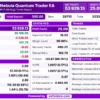
The dashboard displays account values, module states, Markov confluence, Q-learning actions, ICT windows and market structure zones for monitoring.
How to Get the Most from Nebula Quantum Trader EA
🔹 Attach to XAUUSD on M5: the EA is described for the M5 chart of Gold only, and the broker symbol naming and contract settings should be checked first.
🔹 Study the module settings: eight engines and a voting threshold decide how often trades appear, so each setting should be understood before it is changed.
🔹 Review the grid limits: step size, maximum range and the maximum number of pending orders set the total exposure and must be checked before live use.
🔹 Match the session to the broker clock: ICT windows follow server time, so the broker clock and daylight saving changes should be compared with the settings.
🔹 Set spread and margin checks: configure the spread filter and margin verification to the real XAUUSD conditions of the broker that will be used.
🔹 Choose lot or risk sizing carefully: fixed lot or percent of balance should be selected conservatively and checked against stop distance and margin.
🔹 Test on demo first: observe the aggregate exposure across engines on a demo account, and the risk management guide helps with choosing a safe level.
Risk Management
Adaptive Grid and Order Limits
The risk system includes an adaptive grid engine with a configurable step size, maximum range and maximum number of simultaneous pending orders.
This feature can raise cumulative exposure, so the number and spacing of orders must be reviewed before live use. A guide to stop-loss placement explains how stops protect an account.
Stop Loss and Trailing Controls
The EA provides an initial Stop Loss per position and a dynamic trailing stop that starts after a required profit threshold.
These controls define planned exits but cannot guarantee execution at the intended level during gaps or rapid price changes. A guide to take-profit methods shows how targets relate to risk.
Spread, Margin and Session Filters
The system includes a spread filter, margin verification, fixed lot or percent risk sizing and configurable trading hours.
These checks can reduce selected operational risks, but they need to be configured to match the real conditions of the broker.
What Sets It Apart
🔹 Broad analytical coverage: structure, volume, volatility and adaptive methods come together in one M5 Gold system built around confluence.
🔹 Weighted voting: entries are meant to need agreement among a majority of active engines, which can cut ambiguous setups.
🔹 Visible module status: the on-chart panel exposes engine states and market context, which helps with troubleshooting and monitoring.
🔹 Session aware timing: ICT Silver Bullet windows link trading to specific periods of the day, based on server time.
Strengths and Limitations
Strengths
🔹 Multi-engine design: eight engines and multi-timeframe confluence give a broad technical framework for XAUUSD on M5.
🔹 Execution safeguards: spread filter, margin check, trading hours, Stop Loss and trailing stop add several layers of control.
🔹 Flexible sizing: fixed lot or percent of balance sizing can be matched to the account and the risk the trader accepts.
🔹 Visible internals: the on-chart dashboard makes internal states easier to see than they are in a completely opaque EA.
Limitations
🔹 Complex configuration: many modules and thresholds demand time to understand, and mistakes can change trade frequency sharply.
🔹 Adaptive grid exposure: the grid can raise cumulative exposure, so order spacing and limits must be reviewed before live use.
🔹 No published performance: public details lack a complete backtest report, so the feature list alone is no proof of profitability.
🔹 Data quality dependence: order flow estimates and volume signals depend on the data supplied by the broker, which varies.
Who Should Use Nebula Quantum Trader EA?
🔹 Experienced MT5 traders: those who focus on XAUUSD, understand multi-module systems and will test changes one at a time.
🔹 Exposure monitors: users who are comfortable watching pending order limits and total exposure across the active engines.
🔹 Technical traders: users who like SMC, order flow and multi-timeframe ideas and want all of them combined in one EA.
🔹 Not for traders who: want a simple single-strategy robot, fixed entry rules or a full public backtest before any demo test.
Recommended Trading Conditions
Recommended settings and parameters to pay attention to from developers and experts:
| Features | Type |
|---|---|
| Trading platform | MetaTrader 5 (MT5) |
| Time frames | M1, M5, M15, M30, H1 |
| Currency pairs | XAUUSD (Gold) |
| Minimum / Recommended deposit | $100+ |
| Minimum / Recommended leverage | Any |
| Account type | Any |
| Additional services | Unlock and Decompile |
| Recommended brokers | Exness Broker, Icmarkets Broker |
| Recommended VPS | MyfxVPS.com (Blue VPS, Golden VPS). Lowest Latency, 2 week Free Trial, 100% Free for 12-18 Months. |
Product Download Package?
The download package of the product suite includes:
 Experts: Nebula Quantum Trader.ex5
 Reviewed by David Easton
Final Verdict
Nebula Quantum Trader EA stands out for its eight-engine analytical framework and its emphasis on confluence across several timeframes and technical methods.
That breadth creates a real configuration and validation burden, especially with an adaptive grid component in the risk system. The sensible approach is to test the chosen settings on demo, inspect total order exposure and judge risk before any live use.
🔢 Nebula Quantum Trader EA MT5 Settings Guide: Complete Inputs Explained
Nebula Quantum Trader EA is an automated trading system designed for Gold (XAUUSD), combining multiple analytical methods to identify potential trading opportunities. Its configurable engines include grid management, range expansion, multi-timeframe Markov confluence, Q-learning, ICT Silver Bullet, Smart Money Concepts (SMC), Fibonacci retracements, order flow analysis, and volume analysis.
The settings also control trading hours, position sizing, execution slippage, spread limits, trailing stops, and the on-chart information panel. These inputs allow traders to customize the EA’s behavior and evaluate its configuration before live deployment.
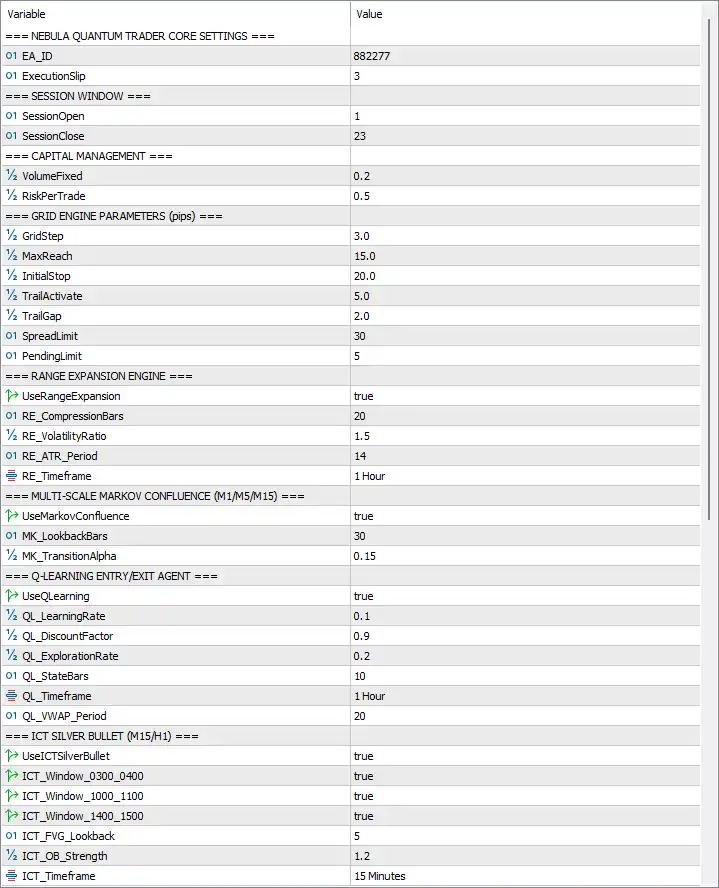
Nebula Quantum Trader EA MT5 Settings Panel
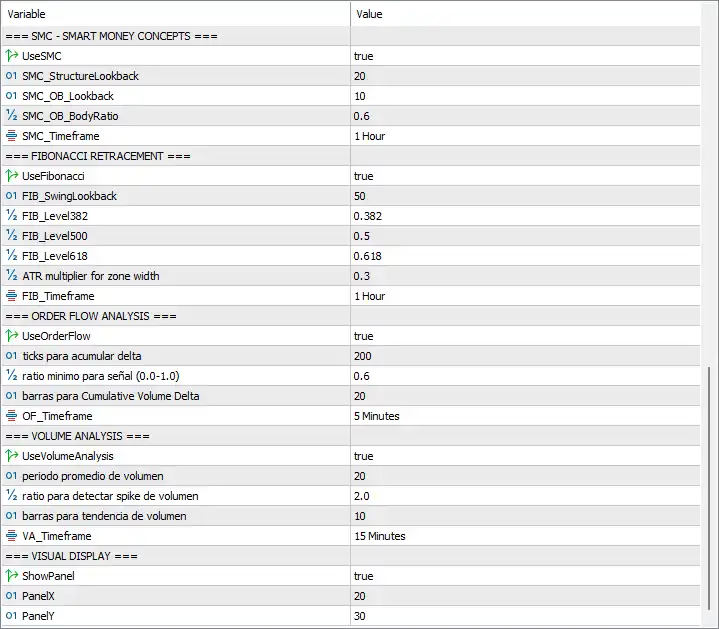
Nebula Quantum Trader EA Settings Panel
⚙️ Nebula Quantum Trader Core Settings
🔹 EA_ID = 882277 — Sets the EA’s identifier value, which may be used internally to distinguish the EA instance or its operations. Its exact implementation depends on the program’s internal logic.
🔹 ExecutionSlip = 3 — Sets the permitted execution slippage to 3 units, typically points in MetaTrader trading settings. This parameter relates to the acceptable difference between the requested and executed price, subject to the EA’s implementation and broker execution conditions.
⚙️ Session Window
🔹 SessionOpen = 1 — Sets the trading session opening hour to 1, typically interpreted as 01:00 according to the EA’s configured time reference. Trading eligibility may be restricted to the specified session.
🔹 SessionClose = 23 — Sets the trading session closing hour to 23, typically interpreted as 23:00. Together with SessionOpen = 1, this defines a broad trading window, subject to the EA’s handling of session boundaries and server time.
⚙️ Capital Management
🔹 VolumeFixed = 0.2 — Sets the fixed trading volume to 0.2 lots when fixed-volume sizing is used. This is the configured lot size, not a guarantee that every order will be accepted or filled at that volume.
🔹 RiskPerTrade = 0.5 — Sets the risk-per-trade parameter to 0.5. If the EA interprets this as a percentage, it represents 0.5% risk per trade; traders should verify the implementation before assuming the exact risk calculation.
⚙️ Grid Engine Parameters (Pips)
🔹 GridStep = 3.0 — Sets the grid spacing to 3.0 pips. This parameter defines the intended distance between grid levels or entries, depending on the EA’s grid logic and the broker’s symbol specifications.
🔹 MaxReach = 15.0 — Sets the maximum grid reach to 15.0 pips. It defines the configured range limit for grid activity, although the exact relationship between this value and the number of grid levels depends on the EA’s implementation.
🔹 InitialStop = 20.0 — Sets the initial stop-loss distance to 20.0 pips according to the parameter’s stated unit convention. It defines the initial protective distance applied by the EA, subject to its trade-management logic.
🔹 TrailActivate = 5.0 — Sets the trailing-stop activation threshold to 5.0 pips. The trailing mechanism is intended to activate after the required favorable movement or profit threshold is reached.
🔹 TrailGap = 2.0 — Sets the trailing gap to 2.0 pips. Once trailing is active, this parameter defines the intended distance between the current market price and the managed stop level.
🔹 SpreadLimit = 30 — Sets the maximum permitted spread threshold to 30 points. This filter is intended to restrict trading when transaction costs become too high, helping avoid entries during unfavorable spread conditions.
🔹 PendingLimit = 5 — Sets the pending-order limit to 5. This caps the number of pending orders allowed by the corresponding grid or order-management logic, subject to how the EA counts active orders.
⚙️ Range Expansion Engine
🔹 UseRangeExpansion = true — Enables the Range Expansion Engine. This module evaluates volatility expansion to help identify periods when price movement increases relative to a reference range or historical volatility.
🔹 RE_CompressionBars = 20 — Sets the compression-analysis lookback to 20 bars. The engine can use this number of bars to assess preceding price compression before evaluating a potential range expansion.
🔹 RE_VolatilityRatio = 1.5 — Sets the volatility ratio threshold to 1.5. This configures the relative volatility requirement used by the range expansion logic; the precise calculation depends on the EA’s internal formula.
🔹 RE_ATR_Period = 14 — Sets the Average True Range (ATR) calculation period to 14. ATR is commonly used to measure market volatility, and this setting determines the lookback period for the engine’s ATR-based analysis.
🔹 RE_Timeframe = 1 Hour — Sets the Range Expansion Engine’s analysis timeframe to H1 (one hour). The module evaluates range and volatility conditions using hourly chart data.
⚙️ Multi-Scale Markov Confluence (M1/M5/M15)
🔹 UseMarkovConfluence = true — Enables the Markov confluence module. This engine is intended to evaluate market-state transitions and contribute a directional or regime-based confirmation to the overall trading logic.
🔹 MK_LookbackBars = 30 — Sets the Markov analysis lookback to 30 bars. This determines the amount of recent chart history used by the module when evaluating market-state behavior.
🔹 MK_TransitionAlpha = 0.15 — Sets the transition adaptation factor to 0.15. This value is associated with the weighting or adaptation of Markov transition estimates; its exact mathematical role depends on the EA’s implementation.
⚙️ Q-Learning Entry/Exit Agent
🔹 UseQLearning = true — Enables the Q-learning module. This reinforcement-learning component is intended to evaluate possible trading actions based on learned state-action values and the EA’s programmed learning process.
🔹 QL_LearningRate = 0.1 — Sets the learning rate to 0.1. This controls how strongly new learning updates influence existing Q-values, with larger values generally allowing faster updates but potentially producing less stable learning.
🔹 QL_DiscountFactor = 0.9 — Sets the discount factor to 0.9. In reinforcement learning, this parameter controls the relative importance of future rewards compared with immediate rewards.
🔹 QL_ExplorationRate = 0.2 — Sets the exploration rate to 0.2. This configures the balance between exploring alternative actions and choosing actions favored by the learned model, according to the EA’s exploration policy.
🔹 QL_StateBars = 10 — Sets the state-analysis lookback to 10 bars. The module uses this configured history to help construct or evaluate the market state presented to its learning logic.
🔹 QL_Timeframe = 1 Hour — Sets the Q-learning agent’s analysis timeframe to H1 (one hour). The agent uses hourly market data for the state information associated with this module.
🔹 QL_VWAP_Period = 20 — Sets the Volume Weighted Average Price (VWAP) period to 20. VWAP measures price in relation to volume, and this period configures the amount of data used in the EA’s VWAP-based analysis.
⚙️ ICT Silver Bullet (M15/H1)
🔹 UseICTSilverBullet = true — Enables the ICT Silver Bullet module. This component is intended to identify institutional-style trading setups using time windows and price structures such as Fair Value Gaps (FVGs) and order blocks.
🔹 ICT_Window_0300_0400 = true — Enables the configured 03:00–04:00 trading window. The EA can use this setting to allow the ICT module to evaluate setups during this period, based on the time reference used by the program.
🔹 ICT_Window_1000_1100 = true — Enables the configured 10:00–11:00 trading window. This allows the ICT module to evaluate qualifying setups during the specified hour when its other conditions are satisfied.
🔹 ICT_Window_1400_1500 = true — Enables the configured 14:00–15:00 trading window. This adds the third configured time window for the ICT Silver Bullet module.
🔹 ICT_FVG_Lookback = 5 — Sets the Fair Value Gap (FVG) lookback to 5 bars. This defines the recent candle history considered when detecting or evaluating potential price gaps under the EA’s FVG rules.
🔹 ICT_OB_Strength = 1.2 — Sets the order-block strength factor to 1.2. This configures the threshold or weighting used by the module to evaluate order-block significance; the precise interpretation depends on the EA’s calculation.
🔹 ICT_Timeframe = 15 Minutes — Sets the ICT module’s analysis timeframe to M15 (15 minutes). The module uses this timeframe when evaluating the relevant ICT-style price structures and conditions.
⚙️ Smart Money Concepts (SMC)
🔹 UseSMC = true — Enables Smart Money Concepts analysis. The module is intended to evaluate market structure and institutional-style price zones as additional context for potential trade entries.
🔹 SMC_StructureLookback = 20 — Sets the market-structure lookback to 20 bars. This determines how much recent price history the module examines when identifying structural highs, lows, or related market-structure conditions.
🔹 SMC_OB_Lookback = 10 — Sets the order-block lookback to 10 bars. The module uses this configured history when searching for potential bullish or bearish order-block zones.
🔹 SMC_OB_BodyRatio = 0.6 — Sets the order-block body ratio threshold to 0.6. This configures a candle-body-related criterion for order-block evaluation, although the exact formula should be confirmed from the EA’s implementation.
🔹 SMC_Timeframe = 1 Hour — Sets the SMC analysis timeframe to H1 (one hour). Market structure and order-block conditions are evaluated using hourly chart data for this module.
⚙️ Fibonacci Retracement
🔹 UseFibonacci = true — Enables Fibonacci retracement analysis. This module is intended to calculate swing levels and identify potential price reaction zones around the configured retracement ratios.
🔹 FIB_SwingLookback = 50 — Sets the swing-analysis lookback to 50 bars. The EA uses this amount of historical data to identify the price swings from which Fibonacci levels may be calculated.
🔹 FIB_Level382 = 0.382 — Sets the Fibonacci retracement level to 0.382, equivalent to 38.2%. The EA can use this level when evaluating potential retracement zones within a measured price swing.
🔹 FIB_Level500 = 0.5 — Sets the Fibonacci retracement level to 0.5, equivalent to 50.0%. This midpoint retracement is one of the configured levels used to assess possible price reaction areas.
🔹 FIB_Level618 = 0.618 — Sets the Fibonacci retracement level to 0.618, equivalent to 61.8%. This level is used as another potential retracement zone within the selected swing range.
🔹 ATR multiplier for zone width = 0.3 — Sets the ATR-based zone-width multiplier to 0.3. This parameter is intended to adjust the width of Fibonacci-related price zones according to volatility, with the precise calculation determined by the EA.
🔹 FIB_Timeframe = 1 Hour — Sets the Fibonacci module’s analysis timeframe to H1 (one hour). Swing calculations and retracement-zone analysis are based on hourly chart data.
⚙️ Order Flow Analysis
🔹 UseOrderFlow = true — Enables order flow analysis. This module is intended to estimate buying and selling pressure using the volume and price information available to the EA.
🔹 ticks para acumular delta = 200 — Sets the number of ticks accumulated for delta analysis to 200. The parameter name means “ticks to accumulate delta”; it configures the tick sample used by the order flow calculation.
🔹 ratio minimo para señal (0.0-1.0) = 0.6 — Sets the minimum signal ratio to 0.6 on the specified 0.0–1.0 scale. This configures the minimum ratio required for a qualifying order flow signal according to the EA’s internal criteria.
🔹 barras para Cumulative Volume Delta = 20 — Sets the Cumulative Volume Delta (CVD) lookback to 20 bars. CVD estimates the accumulated difference between buying and selling volume over the configured history, subject to the data and calculation method used by the EA.
🔹 OF_Timeframe = 5 Minutes — Sets the order flow analysis timeframe to M5 (five minutes). The module uses five-minute chart data for its order flow and cumulative delta calculations.
⚙️ Volume Analysis
🔹 UseVolumeAnalysis = true — Enables the volume analysis module. This component evaluates volume behavior to identify conditions such as unusually high activity or changes in participation that may support or filter potential entries.
🔹 periodo promedio de volumen = 20 — Sets the average-volume calculation period to 20 bars. The parameter name means “average volume period”; it defines the history used to establish the reference volume level.
🔹 ratio para detectar spike de volumen = 2.0 — Sets the volume-spike detection ratio to 2.0. This configures a threshold of 2.0 relative to the module’s reference volume, commonly indicating that volume must reach approximately twice the average to qualify as a spike if the EA uses a direct ratio calculation.
🔹 barras para tendencia de volumen = 10 — Sets the volume-trend lookback to 10 bars. This determines the recent chart history used to assess whether volume is increasing, decreasing, or following another trend criterion defined by the EA.
🔹 VA_Timeframe = 15 Minutes — Sets the volume analysis timeframe to M15 (15 minutes). The module evaluates volume conditions using fifteen-minute chart data.
⚙️ Visual Display
🔹 ShowPanel = true — Enables the EA’s on-chart information panel. This allows the configured dashboard to be displayed while the EA is running, subject to its visual implementation.
🔹 PanelX = 20 — Sets the panel’s horizontal position value to 20. This determines its horizontal placement on the chart according to the EA’s coordinate system.
🔹 PanelY = 30 — Sets the panel’s vertical position value to 30. This determines its vertical placement on the chart according to the EA’s coordinate system.
🔢 Conclusion
Nebula Quantum Trader EA MT5 combines several analytical modules with grid-based trade management and configurable execution controls. In the supplied settings, the Range Expansion Engine, Markov Confluence, Q-learning, ICT Silver Bullet, SMC, Fibonacci, order flow, and volume analysis modules are all enabled. The EA is configured with a fixed volume of 0.2 lots, a 0.5 risk-per-trade parameter, a 3.0-pip grid step, a 20.0-pip initial stop, and trailing parameters of 5.0 pips for activation and 2.0 pips for the gap. The session window is set from hour 1 to hour 23, and the panel is enabled at coordinates X = 20 and Y = 30.
Because several modules are active simultaneously, performance and trade frequency will depend on how the EA combines their signals and manages grid orders. Parameter units, broker server time, symbol-specific pip definitions, and the internal risk calculation should be verified before live trading. Backtesting and forward testing on a demo account are important, particularly when trading Gold, where volatility, spreads, and execution conditions can change rapidly.
User Reviews
Only logged in customers who have purchased this product may leave a review.
❓ What market does Nebula Quantum Trader trade?
XAUUSD on MetaTrader 5, described for the M5 timeframe. Other symbols should not be assumed without confirmation and separate testing.
❓ How many analytical engines does Nebula Quantum Trader use?
Eight: multi-timeframe Markov states, adaptive learning, ICT timing, SMC, Fibonacci, order flow estimates, volume analysis and volatility expansion.
❓ How does Nebula Quantum Trader decide when to enter?
A weighted voting model is meant to require agreement among a majority of active engines. Trade count and selectivity depend on the modules, thresholds and market conditions.
❓ Does Nebula Quantum Trader use Smart Money Concepts?
Yes. The SMC engine identifies Break of Structure, Change of Character and demand and supply zones. These are interpretations of price structure and not guarantees.
❓ What does the Q-learning agent do in Nebula Quantum Trader?
It evaluates market state inputs and chooses Buy, Sell or Wait. Because adaptive behavior adds complexity, it should be tested through forward observation.
❓ Does Nebula Quantum Trader use an adaptive grid?
Yes. The grid has configurable spacing, range limits and a maximum number of pending orders, and it can raise cumulative exposure, so limits should be reviewed carefully.
❓ Does Nebula Quantum Trader have Stop Loss and trailing stop?
Yes. It has an initial Stop Loss per position and a dynamic trailing stop that activates after a minimum profit threshold. Real protection depends on settings and execution quality.
❓ Can Nebula Quantum Trader filter high spreads?
Yes. It includes an automatic spread filter and checks available margin before sending orders. The limits should reflect the XAUUSD spread and execution of the broker.
❓ Which timeframes does Nebula Quantum Trader analyze?
The chart is M5, while the Markov component watches M1, M5 and M15 states and the SMC engine reads structure on H1.
❓ Are complete backtest results available for Nebula Quantum Trader?
A complete standardized backtest table is not published in the product details. Reproducible tests and forward results with realistic costs should be reviewed before relying on the EA.
❓ Who should consider Nebula Quantum Trader?
Technically experienced traders who can assess multi-engine logic, set order limits and monitor total exposure. Demo testing is essential before risking real capital.
-
 Original price was: $8,000.00.$249.00Current price is: $249.00.
-
 Original price was: $7,000.00.$249.00Current price is: $249.00.
-
 Original price was: $8,000.00.$249.00Current price is: $249.00.
-
 Original price was: $25,000.00.$249.00Current price is: $249.00.
-
 0Original price was: $290.00.$179.00Current price is: $179.00.
-
 1Original price was: $500.00.$249.00Current price is: $249.00.
-
 0Original price was: $430.00.$249.00Current price is: $249.00.
-
 6Original price was: $2,580.00.$249.00Current price is: $249.00.
There are no reviews yet.